1. ആമുഖം
This manual provides detailed instructions for the setup, operation, maintenance, and troubleshooting of your Transformers TF-Crystal 85 Keys Mechanical Keyboard. Please read this manual thoroughly before using the product to ensure proper functionality and longevity.
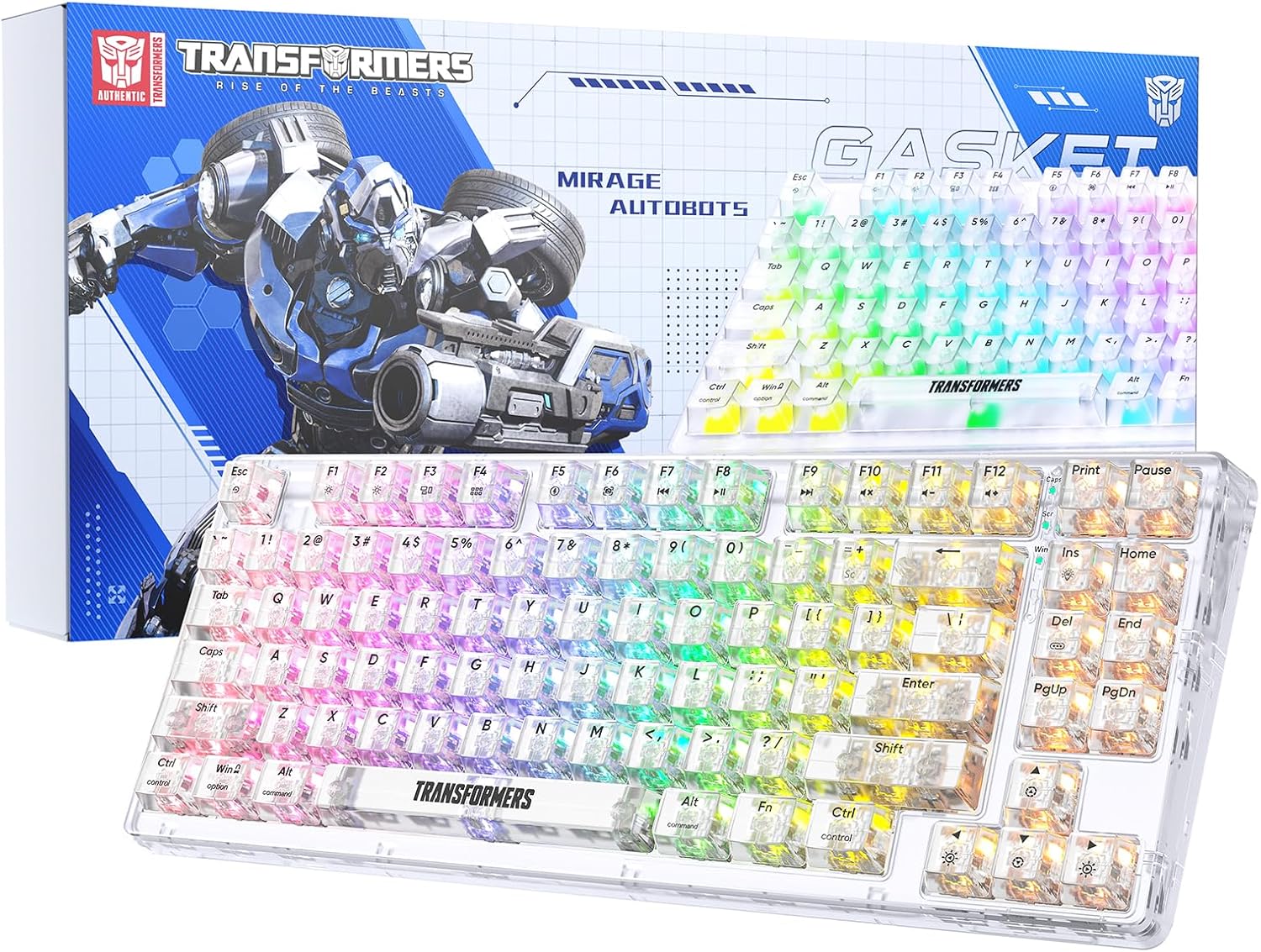
Image 1.1: Transformers TF-Crystal 85 Keys Mechanical Keyboard with its packaging, showcasing the transparent design and RGB lighting.
2. ഉൽപ്പന്നം കഴിഞ്ഞുview
2.1 പ്രധാന സവിശേഷതകൾ
- 85-കീ ലേഔട്ട്: Compact 75% design retaining essential functions, arrow, and navigation keys.
- ട്രൈ-മോഡ് കണക്റ്റിവിറ്റി: ബ്ലൂടൂത്ത് 5.0, 2.4GHz വയർലെസ്, യുഎസ്ബി-സി വയർഡ് കണക്ഷനുകൾ പിന്തുണയ്ക്കുന്നു.
- ഹോട്ട്-സ്വാപ്പ് ചെയ്യാവുന്ന PCB: Compatible with most 3-pin and 5-pin mechanical switches, allowing for easy customization and replacement.
- Linear Switches: Pre-lubricated switches with a 50 million keystroke lifespan for durability and smooth operation.
- ഗാസ്കറ്റ് ഘടന: Incorporates high-quality gasket materials and a silicone pad to absorb vibrations and reduce typing noise.
- ഇഷ്ടാനുസൃതമാക്കാവുന്ന RGB ബാക്ക്ലൈറ്റ്: Features 20 built-in backlight modes, 16.8 million color options, and dynamic music rhythm effects.
- Programmable Driver: Enables macro customization, key function remapping, and advanced lighting control.
- നീണ്ട ബാറ്ററി ലൈഫ്: Equipped with a 4000mAh battery, providing up to 240 hours of continuous use in 2.4GHz mode without backlighting.
- വിശാലമായ അനുയോജ്യത: Supports Mac, Windows, iOS, Android, PC, Laptop, Smartphone, Tablet, Switch, Xbox, and PlayStation.
- സുതാര്യമായ ഡിസൈൻ: Features transparent keycaps and base for enhanced aesthetic appeal.
3. സജ്ജീകരണം
3.1 കീബോർഡ് ചാർജ് ചെയ്യുന്നു
Before initial use, fully charge the keyboard. Connect the provided USB-C cable to the keyboard's USB-C port and the other end to a powered USB port (e.g., computer, wall adapter). The charging indicator will show the charging status.
3.2 2.4GHz വയർലെസ് മോഡ് വഴി ബന്ധിപ്പിക്കുന്നു
- സാധാരണയായി കീബോർഡിലെ ഒരു കമ്പാർട്ടുമെന്റിൽ സൂക്ഷിച്ചിരിക്കുന്ന 2.4GHz USB റിസീവർ കണ്ടെത്തുക.
- നിങ്ങളുടെ കമ്പ്യൂട്ടറിൽ ലഭ്യമായ USB പോർട്ടിലേക്ക് USB റിസീവർ പ്ലഗ് ചെയ്യുക.
- Toggle the mode switch on the keyboard to the 2.4G സ്ഥാനം.
- The keyboard will automatically connect to your device.
3.3 Connecting via Bluetooth 5.0 Mode
- Toggle the mode switch on the keyboard to the BT സ്ഥാനം.
- അമർത്തിപ്പിടിക്കുക Fn + 1 (അല്ലെങ്കിൽ Fn + 2, Fn + 3) ജോടിയാക്കൽ മോഡ് സൂചിപ്പിക്കുന്ന ഇൻഡിക്കേറ്റർ ലൈറ്റ് വേഗത്തിൽ മിന്നുന്നതുവരെ 3-5 സെക്കൻഡ് നേരത്തേക്ക്.
- നിങ്ങളുടെ ഉപകരണത്തിൽ (കമ്പ്യൂട്ടർ, ടാബ്ലെറ്റ്, സ്മാർട്ട്ഫോൺ), ബ്ലൂടൂത്ത് പ്രവർത്തനക്ഷമമാക്കി പുതിയ ഉപകരണങ്ങൾക്കായി തിരയുക.
- Select "TF-Crystal 85" from the list of available devices to pair.
- Once paired, the indicator light will stop flashing and remain solid. You can pair up to three Bluetooth devices using Fn + 1, Fn + 2, ഒപ്പം Fn + 3.
3.4 Connecting via USB-C Wired Mode
- നൽകിയിരിക്കുന്ന USB-C കേബിൾ കീബോർഡിന്റെ USB-C പോർട്ടുമായി ബന്ധിപ്പിക്കുക.
- USB-C കേബിളിന്റെ മറ്റേ അറ്റം നിങ്ങളുടെ കമ്പ്യൂട്ടറിൽ ലഭ്യമായ ഒരു USB പോർട്ടിലേക്ക് ബന്ധിപ്പിക്കുക.
- The keyboard will automatically switch to wired mode and function without battery power.

Image 3.1: Diagram illustrating the three connection modes: Bluetooth 5.0, 2.4GHz wireless, and USB-C wired, compatible with various devices.
4. പ്രവർത്തന നിർദ്ദേശങ്ങൾ
4.1 മോഡുകൾക്കിടയിൽ മാറൽ
Use the physical switch located on the keyboard to select between BT (ബ്ലൂടൂത്ത്), 2.4G (2.4GHz wireless), and USB-C (wired) modes.
4.2 RGB ബാക്ക്ലൈറ്റ് നിയന്ത്രണം
The keyboard features customizable RGB backlighting. Use the following key combinations to adjust:
- Fn + Ins: Cycle through 20 different backlight effects.
- Fn + Del: Switch backlight colors within certain modes.
- എഫ്എൻ + ↑ / ↓: Adjust backlight brightness (5 levels).
- എഫ്എൻ + ← / →: Adjust backlight effect speed (5 levels).
- Fn + Esc (hold for 3s): Reset backlight settings to default.

Image 4.1: Visual guide for controlling RGB backlight effects, brightness, and speed using Fn key combinations.
4.3 Programmable Driver Usage
The keyboard includes a programmable driver for advanced customization. This driver allows you to:
- മാക്രോ എഡിറ്റിംഗ്: Record and edit complex key sequences.
- കീ പുനർനിർവചനം: Customize the function of individual keys.
- RGB Effect Customization: Fine-tune lighting modes, colors, and speeds, including music rhythm lighting effects.
Refer to the software's dedicated user interface for detailed instructions on using these features.

Image 4.2: Screenshot of the programmable driver interface, showing options for macro editing, RGB effects, and key redefinition.
4.4 ഹോട്ട്-സ്വാപ്പിംഗ് സ്വിച്ചുകൾ
The TF-Crystal 85 keyboard features a hot-swappable PCB, allowing you to change mechanical switches without soldering. This supports most 3-pin and 5-pin mechanical switches.
- കീബോർഡ് ഓഫ് ചെയ്യുക അല്ലെങ്കിൽ നിങ്ങളുടെ ഉപകരണത്തിൽ നിന്ന് അത് വിച്ഛേദിക്കുക.
- ആവശ്യമുള്ള കീക്യാപ്പ് ശ്രദ്ധാപൂർവ്വം നീക്കം ചെയ്യാൻ നൽകിയിരിക്കുന്ന കീക്യാപ്പ് പുള്ളർ ഉപയോഗിക്കുക.
- Use the provided switch puller to gently grip the switch from its top and bottom clips, then pull it straight up to remove it.
- പുതിയ സ്വിച്ചിന്റെ പിന്നുകൾ പിസിബിയിലെ ദ്വാരങ്ങളുമായി വിന്യസിക്കുക. പിന്നുകൾ നേരെയാണെന്ന് ഉറപ്പാക്കുക.
- സുരക്ഷിതമായി ക്ലിക്ക് ആകുന്നതുവരെ പുതിയ സ്വിച്ച് പതുക്കെ അമർത്തുക. നിർബന്ധിച്ച് അമർത്തരുത്.
- കീക്യാപ്പ് മാറ്റിസ്ഥാപിക്കുക.

Image 4.3: Illustration of the hot-swappable feature, showing how to remove and insert 3-pin/5-pin switches and the linear switch specifications.
5. പരിപാലനം
5.1 കീബോർഡ് വൃത്തിയാക്കൽ
- കീബോർഡ് വൃത്തിയാക്കുന്നതിന് മുമ്പ് എല്ലാ വൈദ്യുതി സ്രോതസ്സുകളിൽ നിന്നും വിച്ഛേദിക്കുക.
- മൃദുവായ, ലിൻ്റ് രഹിത തുണി ഉപയോഗിക്കുകampകീക്യാപ്പുകളും ഷാസികളും തുടയ്ക്കാൻ വെള്ളമോ നേരിയ ക്ലീനിംഗ് ലായനിയോ ഉപയോഗിച്ച് നനയ്ക്കുക.
- കീകൾക്കിടയിൽ പൊടിയും അവശിഷ്ടങ്ങളും ഉണ്ടെങ്കിൽ, കംപ്രസ് ചെയ്ത വായു അല്ലെങ്കിൽ ഒരു ചെറിയ ബ്രഷ് ഉപയോഗിക്കുക.
- Avoid using harsh chemicals or abrasive materials that could damage the keyboard's surface.
5.2 ബാറ്ററി കെയർ
- ബാറ്ററി ഇടയ്ക്കിടെ പൂർണ്ണമായും ഡിസ്ചാർജ് ചെയ്യുന്നത് ഒഴിവാക്കുക.
- ദീർഘനേരം ഉപയോഗിക്കാത്തപ്പോൾ കീബോർഡ് തണുത്തതും വരണ്ടതുമായ സ്ഥലത്ത് സൂക്ഷിക്കുക.
- If the keyboard will not be used for a long time, charge it to about 50% before storage.
6. പ്രശ്നപരിഹാരം
| പ്രശ്നം | സാധ്യമായ കാരണം | പരിഹാരം |
|---|---|---|
| വയർലെസ്സ് മോഡിൽ കീബോർഡ് പ്രതികരിക്കുന്നില്ല. | Low battery, incorrect mode selected, receiver not connected, Bluetooth not paired. | Charge the keyboard. Ensure the mode switch is set correctly (2.4G or BT). Re-insert the 2.4G receiver. Re-pair Bluetooth. |
| കീകൾ രജിസ്റ്റർ ചെയ്യുന്നില്ല അല്ലെങ്കിൽ ഇരട്ട-ടൈപ്പ് ചെയ്യുന്നില്ല. | തകരാറുള്ള സ്വിച്ച്, കീക്യാപ്പിനടിയിൽ അവശിഷ്ടങ്ങൾ, സോഫ്റ്റ്വെയർ പ്രശ്നം. | Clean under the keycap. Try hot-swapping the switch with a known working one. Restart your computer. |
| RGB backlight not working or incorrect. | Backlight turned off, incorrect settings, software conflict. | ഉപയോഗിച്ച് തെളിച്ചം ക്രമീകരിക്കുക Fn + ↑. Cycle modes with Fn + Ins. Reset backlight with Fn + Esc (hold 3s). Check programmable driver settings. |
| കീബോർഡ് ചാർജ് ചെയ്യുന്നില്ല. | Faulty USB-C cable, power source issue, keyboard port damage. | Try a different USB-C cable. Use a different USB port or power adapter. Ensure the cable is fully inserted. |
7 സ്പെസിഫിക്കേഷനുകൾ
| ഫീച്ചർ | വിശദാംശങ്ങൾ |
|---|---|
| മോഡൽ നമ്പർ | TF-Crystal 85 |
| കീ ലേഔട്ട് | 85 കീകൾ (75% ഒതുക്കമുള്ളത്) |
| കണക്റ്റിവിറ്റി | ബ്ലൂടൂത്ത് 5.0, 2.4GHz വയർലെസ്, USB-C വയേർഡ് |
| സ്വിച്ച് തരം | Pre-lubricated Linear Mechanical Switches |
| ആയുസ്സ് മാറ്റുക | 50 ദശലക്ഷം കീസ്ട്രോക്കുകൾ |
| ഹോട്ട്-സ്വാപ്പബിൾ | അതെ (3-പിൻ/5-പിൻ അനുയോജ്യം) |
| ബാക്ക്ലൈറ്റ് | RGB (20 modes, 16.8 million colors) |
| ബാറ്ററി ശേഷി | 4000mAh |
| Battery Life (2.4G, no light) | 240 മണിക്കൂർ വരെ |
| Battery Life (Backlit ON) | ഏകദേശം 22 മണിക്കൂർ |
| അളവുകൾ (L x W x H) | 34.7 സെ.മീ x 14 സെ.മീ x 4.5 സെ.മീ |
| അനുയോജ്യത | Mac, Windows, iOS, Android, PC, Laptop, Smartphone, Tablet, Switch, Xbox, PlayStation |

Image 7.1: Visual representation of the keyboard's battery life: 240 hours with backlight off, 22 hours with backlight on, powered by a 4000mAh battery.
8. വാറൻ്റിയും പിന്തുണയും
Transformers is committed to providing exceptional customer service. If you encounter any problems with your TF-Crystal 85 Keys Mechanical Keyboard, our after-sales support team is available to assist you. This includes technical support, exchanges, or installation guidance.
Please contact our customer service for assistance. We guarantee a hassle-free service experience.


