ആമുഖം
This manual provides essential information for the proper installation, operation, and maintenance of your KENWOOD DMX50S digital multimedia receiver. Please read this manual thoroughly before using the product to ensure correct usage and to prevent damage. Keep this manual accessible for future reference.

Figure 1: Kenwood DMX50S receiver displaying Apple CarPlay interface with time and date.

ചിത്രം 2: കോണാകൃതിയിലുള്ളത് view of the Kenwood DMX50S receiver showing the main menu with icons for Radio, Mirroring, AV-IN, TEL, and Bluetooth Audio.
പ്രധാന സവിശേഷതകൾ
- 6.8" Capacitive Touchscreen: Provides a responsive and intuitive user interface.
- Wired Apple CarPlay: Seamless integration for navigation, music, and communication.
- വയർഡ് ആൻഡ്രോയിഡ് ഓട്ടോ: Access to Google Maps, media, and voice commands.
- ബ്ലൂടൂത്ത് കണക്റ്റിവിറ്റി: For hands-free calling and audio streaming.
- USB മിററിംഗ്: Display smartphone content directly on the receiver screen.
- ഓഡിയോ ഇഷ്ടാനുസൃതമാക്കൽ: 13-band graphic equalizer and digital time alignment for optimal sound.
- Short Chassis Design: Facilitates versatile installation in various vehicle types.
- iDatalink Maestro Ready: Allows integration with vehicle's factory features.
സജ്ജീകരണവും ഇൻസ്റ്റാളേഷനും
Proper installation is crucial for the performance and safety of your multimedia receiver. It is highly recommended that installation be performed by a qualified professional.
വയറിംഗ് കണക്ഷനുകൾ
Ensure all wiring connections are secure and correctly matched to your vehicle's electrical system. Refer to the detailed wiring diagram provided with your product packaging for specific connections.
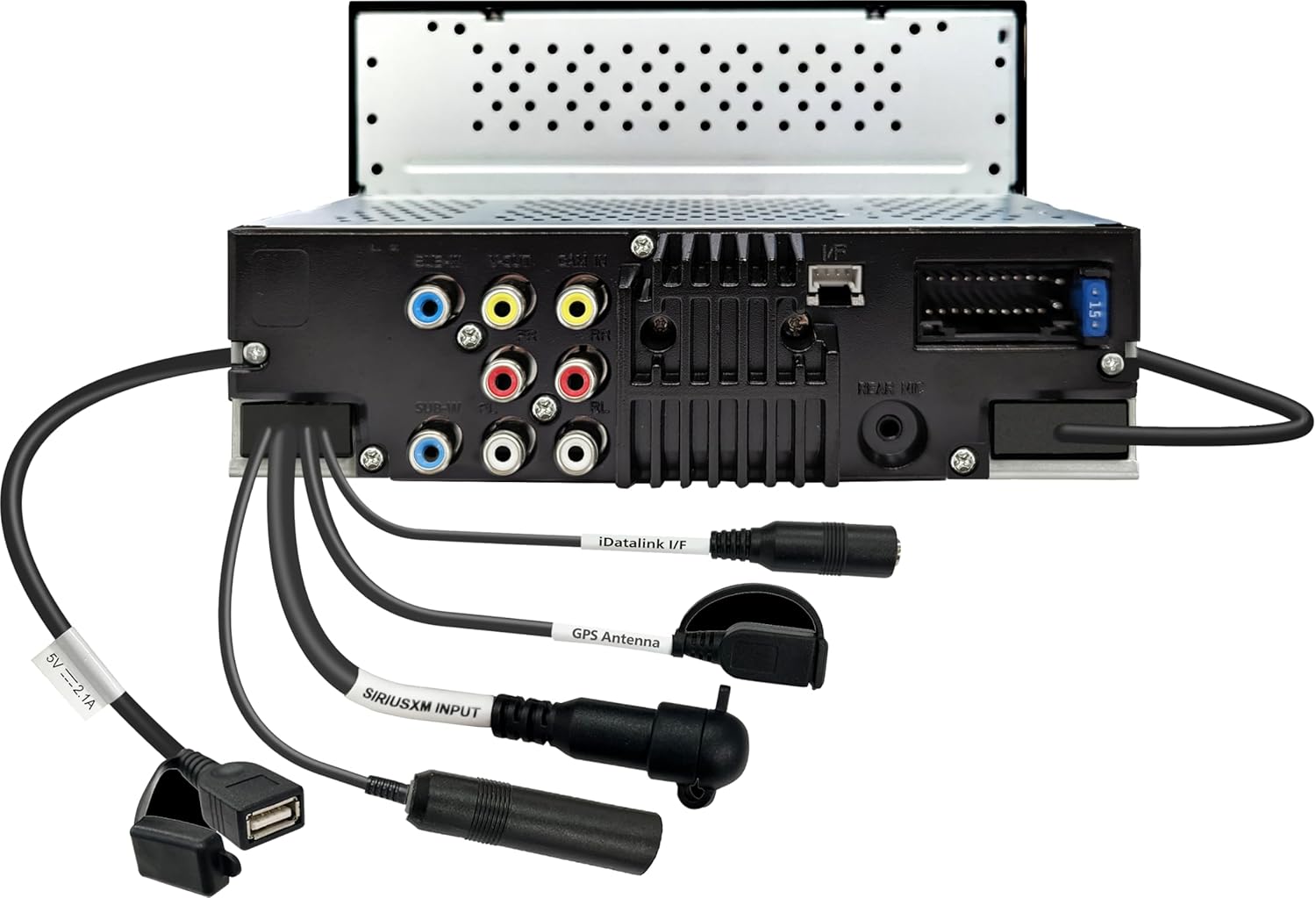
ചിത്രം 3: പിൻഭാഗം view of the Kenwood DMX50S receiver, illustrating various input and output connections.
Short Chassis Design
The compact short chassis design of the DMX50S allows for greater flexibility during installation, making it suitable for a wider range of vehicle dashboards.

ചിത്രം 4: വശം view of the Kenwood DMX50S receiver, highlighting its short chassis design.
പ്രവർത്തന നിർദ്ദേശങ്ങൾ
ടച്ച്സ്ക്രീൻ ഇന്റർഫേസ്
The 6.8-inch capacitive touchscreen provides a clear and responsive interface for controlling all functions. Tap icons to select features, swipe to navigate menus, and use the physical buttons on the left bezel for common controls like Home, Menu, Voice, and Volume.
വയർഡ് ആപ്പിൾ കാർപ്ലേ
Connect your iPhone via a USB cable to enable Apple CarPlay. This feature allows you to access compatible iPhone apps, including navigation, music, messages, and calls, directly from the receiver's display. Use Siri voice control for hands-free operation.

Figure 5: Apple CarPlay interface displaying various app icons.

Figure 6: Apple CarPlay search function overlay on a map.
വയർഡ് ആൻഡ്രോയിഡ് ഓട്ടോ
Connect your Android smartphone via a USB cable to activate Android Auto. This provides access to Google Maps, Google Assistant, music apps, and messaging services, optimized for in-car use.

Figure 7: Android Auto interface displaying navigation and app icons.
Bluetooth Audio Streaming and Hands-Free Calling
Pair your Bluetooth-enabled device with the DMX50S to stream audio wirelessly or make and receive calls hands-free. Access your phone's contact list and call history directly from the receiver.

Figure 8: Bluetooth audio streaming from a smartphone to the receiver.
യുഎസ്ബി മിററിംഗ്
Connect your smartphone via USB to mirror its display onto the DMX50S screen. This allows you to view and control compatible apps and content from your phone directly on the receiver.
ഓഡിയോ കസ്റ്റമൈസേഷൻ
Utilize the built-in 13-band graphic equalizer to fine-tune your audio output. Digital Time Alignment (DTA) allows you to adjust the sound stage for an optimized listening experience within your vehicle.

Figure 9: Representation of the 13-band graphic equalizer for audio tuning.
പാർക്കിംഗ് മാർഗ്ഗനിർദ്ദേശങ്ങൾ
When a compatible rear-view camera is connected, the DMX50S can display adjustable parking guidelines on the screen to assist with safe parking maneuvers.

Figure 10: Rear camera view with adjustable parking guidelines.
മെയിൻ്റനൻസ്
To ensure the longevity and optimal performance of your DMX50S receiver, follow these maintenance guidelines:
- സ്ക്രീൻ ക്ലീനിംഗ്: Use a soft, dry cloth to gently wipe the touchscreen. For stubborn smudges, lightly dampതുണിയിൽ വെള്ളം അല്ലെങ്കിൽ സ്ക്രീൻ-സേഫ് ക്ലീനർ ഉപയോഗിക്കുക. ഉരച്ചിലുകൾ ഉള്ള വസ്തുക്കളോ കഠിനമായ രാസവസ്തുക്കളോ ഒഴിവാക്കുക.
- പൊതുവായ ശുചീകരണം: യൂണിറ്റ് പൊടിയിൽ നിന്നും അവശിഷ്ടങ്ങളിൽ നിന്നും മുക്തമായി സൂക്ഷിക്കുക. വെന്റുകളും ബട്ടൺ ഏരിയകളും വൃത്തിയാക്കാൻ മൃദുവായ ബ്രഷ് അല്ലെങ്കിൽ കംപ്രസ് ചെയ്ത വായു ഉപയോഗിക്കുക.
- താപനില: യൂണിറ്റ് തീവ്രമായ താപനിലയിലോ, ദീർഘനേരം നേരിട്ടുള്ള സൂര്യപ്രകാശത്തിലോ, ഉയർന്ന ആർദ്രതയിലോ ഏൽക്കുന്നത് ഒഴിവാക്കുക.
ട്രബിൾഷൂട്ടിംഗ്
If you encounter issues with your DMX50S receiver, consider the following basic troubleshooting steps:
- ശക്തിയില്ല: എല്ലാ പവർ കണക്ഷനുകളും വാഹനത്തിന്റെ ഫ്യൂസ് ബോക്സും പരിശോധിക്കുക. ഇഗ്നിഷൻ ഓണാണെന്ന് ഉറപ്പാക്കുക.
- ശബ്ദമില്ല: Verify speaker connections, volume levels, and audio source selection. Check if the mute function is active.
- ടച്ച്സ്ക്രീൻ പ്രതികരിക്കുന്നില്ല: Try resetting the unit (refer to your product's specific reset procedure, usually a small reset button).
- കാർപ്ലേ/ആൻഡ്രോയിഡ് ഓട്ടോ കണക്റ്റ് ചെയ്യുന്നില്ല: Ensure your smartphone is compatible and connected via a certified USB cable. Check phone settings for CarPlay/Android Auto permissions.
- ബ്ലൂടൂത്ത് പ്രശ്നങ്ങൾ: Delete the device pairing from both the receiver and your phone, then attempt to re-pair. Ensure Bluetooth is enabled on both devices.
For persistent issues, consult the comprehensive troubleshooting section in the full product manual or contact Kenwood customer support.
സ്പെസിഫിക്കേഷനുകൾ
| ഫീച്ചർ | സ്പെസിഫിക്കേഷൻ |
|---|---|
| മോഡൽ നമ്പർ | DMX50S |
| പ്രദർശിപ്പിക്കുക | 6.8" Capacitive Touchscreen |
| ഉൽപ്പന്ന അളവുകൾ | 10 x 10 x 10 ഇഞ്ച് |
| ഇനത്തിൻ്റെ ഭാരം | 5 പൗണ്ട് |
| കണക്റ്റിവിറ്റി ടെക്നോളജി | USB, HDMI, RCA, Component Video |
| കൺട്രോളർ തരം | ഐഒഎസ് |
| പ്രത്യേക ഫീച്ചർ | ബിൽറ്റ്-ഇൻ ബ്ലൂടൂത്ത് |
| അനുയോജ്യമായ ഉപകരണങ്ങൾ | സ്മാർട്ട്ഫോൺ, ടാബ്ലെറ്റ് |
| ആകെ HDMI പോർട്ടുകൾ | 1 |
| കണക്റ്റർ തരം | യുഎസ്ബി, 3.5 എംഎം ജാക്ക് |
| ഓഡിയോ put ട്ട്പുട്ട് മോഡ് | സ്റ്റീരിയോ, സറൗണ്ട് |
| സറൗണ്ട് സൗണ്ട് ചാനൽ കോൺഫിഗറേഷൻ | 5.1 |
| വീഡിയോ എൻകോഡിംഗ് | H.264, H.265/HEVC, MPEG-4 |
| ഓഡിയോ ഫോർമാറ്റുകൾ പിന്തുണയ്ക്കുന്നു | FLAC, AAC, WAV, MP3, WMA |
| വീഡിയോ ഫോർമാറ്റുകൾ പിന്തുണയ്ക്കുന്നു | H.264, MKV, WMV, MPEG-4, MPEG 1/2 |

Figure 11: Supported Audio and Video Formats.
ബോക്സിൽ എന്താണുള്ളത്
The KENWOOD DMX50S package typically includes:
- KENWOOD DMX50S ഡിജിറ്റൽ മൾട്ടിമീഡിയ റിസീവർ
- വയറിംഗ് ഹാർനെസ്
- ഇൻസ്റ്റലേഷൻ ഹാർഡ്വെയർ
- ഉപയോക്തൃ മാനുവൽ (ഈ പ്രമാണം)
Please check the packaging contents against the packing list provided with your unit to ensure all components are present.
വാറൻ്റിയും പിന്തുണയും
For information regarding warranty coverage, technical support, or service, please refer to the warranty card included with your product or visit the official Kenwood webവാറന്റി ക്ലെയിമുകൾക്കുള്ള വാങ്ങലിന്റെ തെളിവായി നിങ്ങളുടെ വാങ്ങൽ രസീത് സൂക്ഷിക്കുക.


