1. ആമുഖം
The Hakimonoe AX913B is a versatile 2-in-1 USB adapter designed to upgrade your PC or laptop with the latest Wi-Fi 6 (802.11ax) and Bluetooth 5.4 technologies. This compact device provides high-speed wireless connectivity for both internet access and seamless pairing with a wide range of Bluetooth devices, all through a single USB port. It features a built-in driver for easy plug-and-play installation on compatible Windows operating systems.
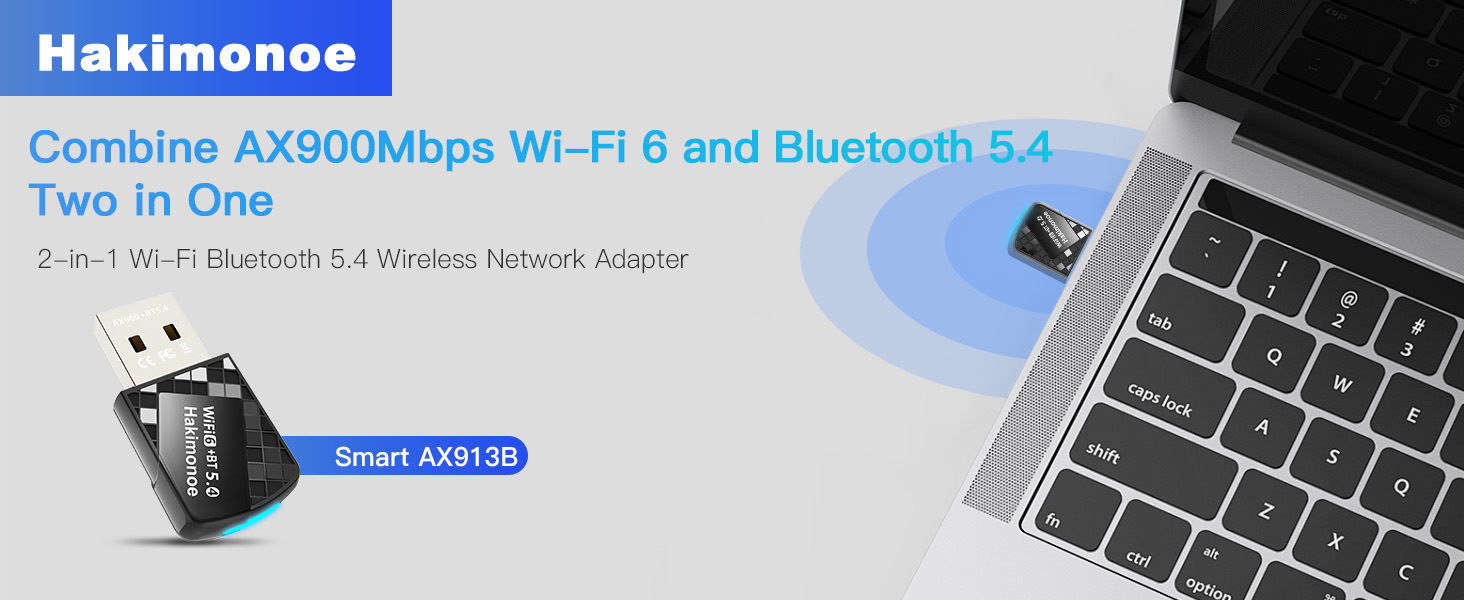
Image: The Hakimonoe AX913B 2-in-1 USB adapter, showcasing its compact design and dual functionality for Wi-Fi 6 and Bluetooth 5.4 connectivity.
2. ബോക്സിൽ എന്താണുള്ളത്?
- 1 x AX913B AX900Mbps WiFi Bluetooth 5.4 USB Adapter
- 1 x ഉപയോക്തൃ മാനുവൽ
3. സജ്ജീകരണ ഗൈഡ്
The AX913B adapter features a built-in driver for convenient installation. Follow these steps to set up your adapter:
- Disable Existing Adapters: Before inserting the AX913B, it is highly recommended to disable any built-in or third-party Wi-Fi and Bluetooth devices on your PC to prevent conflicts. Refer to the 'Troubleshooting' section for instructions on disabling built-in Bluetooth devices.
- അഡാപ്റ്റർ ചേർക്കുക: Plug the AX913B USB adapter into an available USB port on your desktop PC or laptop. For optimal recognition, it is recommended to use the back USB ports on desktop computers.
- ഓട്ടോമാറ്റിക് ഡ്രൈവർ ഇൻസ്റ്റാളേഷൻ: Upon insertion, the built-in driver software will automatically pop up. Click on the prompt to initiate the installation process.
- കമ്പ്യൂട്ടർ പുനരാരംഭിക്കുക: Once the driver installation is complete, restart your computer to ensure all changes take effect and the adapter is properly recognized.

Image: Visual guide for the easy setup process on Windows 11/10, demonstrating the plug-and-play driver installation.
അനുയോജ്യത കുറിപ്പുകൾ:
- Wi-Fi function supports Windows 11, Windows 10, and Windows 7.
- Bluetooth function supports Windows 11 and Windows 10 only.
- Not compatible with Mac OS, Linux, TV systems, or car systems.
4. പ്രവർത്തന നിർദ്ദേശങ്ങൾ
4.1. Wi-Fi കണക്റ്റിവിറ്റി
After successful driver installation and computer restart, your PC will be able to detect and connect to Wi-Fi 6 networks. The adapter supports dual-band frequencies (2.4GHz and 5GHz) for optimal performance.
- വൈഫൈയിലേക്ക് കണക്റ്റുചെയ്യുന്നു: Navigate to your computer's network settings, select the desired Wi-Fi network, and enter the password if prompted.
- ഹൈ-സ്പീഡ് പ്രകടനം: The 5GHz band offers speeds up to 600Mbps, ideal for streaming, gaming, and large downloads. The 2.4GHz band provides speeds up to 286Mbps, suitable for general browsing and longer range.
- വിപുലമായ സവിശേഷതകൾ: Supports 802.11ax protocol, MU-MIMO, and OFDMA technologies for reduced latency, improved network efficiency, and stable connections in congested environments.

Image: A comparison illustrating the higher data transfer rates of the AX900Mbps Wi-Fi 6 dongle compared to older Wi-Fi 5 adapters.
4.2. ബ്ലൂടൂത്ത് കണക്റ്റിവിറ്റി
The AX913B adapter enables your PC to connect with various Bluetooth 5.4 compatible devices, offering enhanced stability, lower latency, and wider coverage.
- ജോടിയാക്കൽ ഉപകരണങ്ങൾ: Ensure Bluetooth is enabled on your PC (after disabling any built-in Bluetooth). Go to your PC's Bluetooth settings, turn on Bluetooth, and search for devices. Select the device you wish to pair and follow the on-screen prompts.
- പിന്തുണയ്ക്കുന്ന ഉപകരണങ്ങൾ: Connect Bluetooth headphones, headsets, mice, keyboards, printers, tablets, smartphones, and game controllers.
- ഓഡിയോ നിലവാരം: Enjoy superior stereo music streaming and clear calls with Bluetooth headphones or speakers.
- ഡാറ്റ കൈമാറ്റം: കൈമാറ്റം files to and from mobile phones and tablets.
- ഒന്നിലധികം ഉപകരണ പിന്തുണ: Up to 7 Bluetooth devices can be connected simultaneously.

Image: An illustration of how the adapter facilitates connection between your computer and various Bluetooth peripherals.
5. പരിപാലനം
To ensure the longevity and optimal performance of your Hakimonoe AX913B adapter, consider the following:
- ശ്രദ്ധയോടെ കൈകാര്യം ചെയ്യുക: The adapter is compact; avoid excessive force when inserting or removing it from USB ports.
- വൃത്തിയായി സൂക്ഷിക്കു: Periodically clean the USB connector with a dry, soft cloth to prevent dust buildup.
- തീവ്രമായ അവസ്ഥകൾ ഒഴിവാക്കുക: അഡാപ്റ്ററിനെ തീവ്രമായ താപനിലയിലോ, ഈർപ്പത്തിലോ, നേരിട്ടുള്ള സൂര്യപ്രകാശത്തിലോ തുറന്നുകാട്ടരുത്.
- സുരക്ഷിത സ്ഥാനം: When not in use, store the adapter in a safe place to prevent loss or damage.
6. പ്രശ്നപരിഹാരം
If your AX913B Wi-Fi 6 USB Adapter is not recognized or not working properly, please follow these troubleshooting steps:
- Try a Different USB Port: Change the adapter to another USB port on your PC. It is often best to use a USB port directly on the motherboard (e.g., on the back of a desktop computer).
- Disable Built-in Network Devices: Press 'Win+X' on your keyboard, then select 'Device Manager'. Locate and disable your PC's built-in Wi-Fi network devices and Bluetooth devices to avoid conflicts.
- Reinstall Driver: Check if the driver is correctly installed. If not, uninstall the current driver (if any), unplug the adapter, then plug it back into your PC's USB port and allow the built-in driver to reinstall automatically.
- നിങ്ങളുടെ പിസി പുനരാരംഭിക്കുക: Turn off your PC completely, then restart it. This can often resolve minor software glitches.
- പിന്തുണയുമായി ബന്ധപ്പെടുക: If the issue persists after trying the above steps, please refer to the user manual for more detailed troubleshooting or contact customer support.
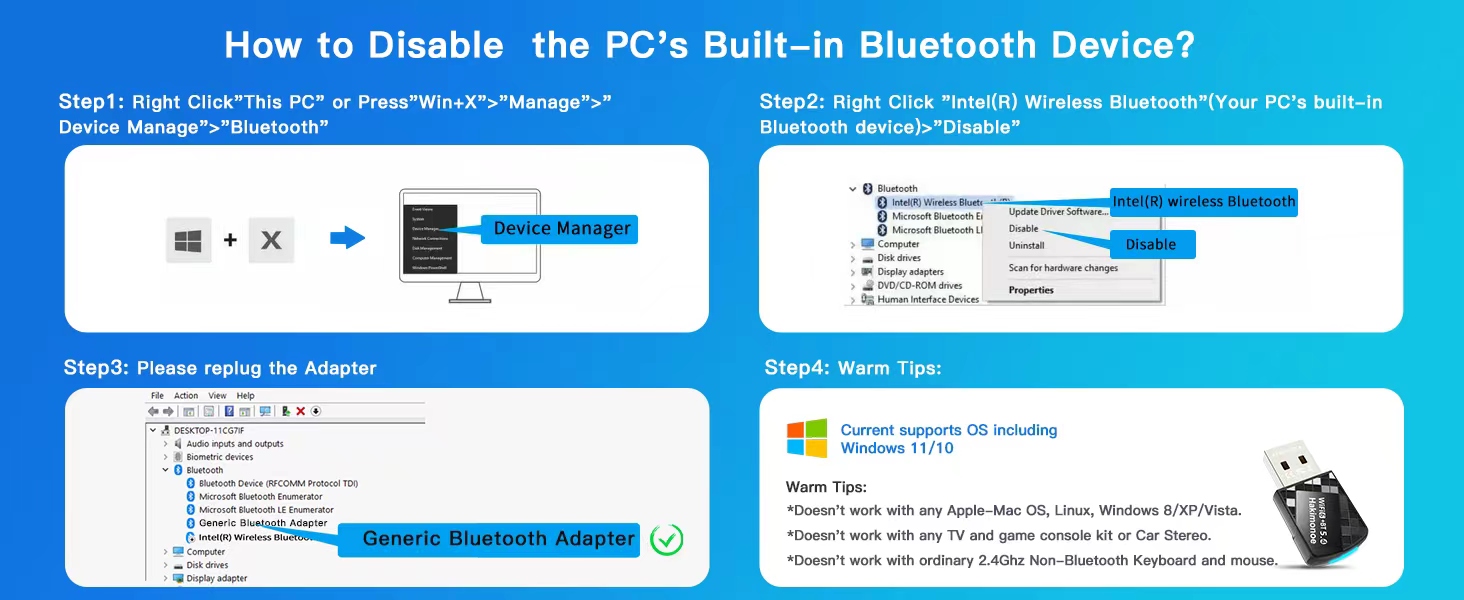
Image: A visual guide outlining common troubleshooting steps for connectivity issues with the AX913B adapter.
How to Disable PC's Built-in Bluetooth Device:
- Right-click 'This PC' or press 'Win+X' and select 'Manage' > 'Device Manager'.
- In Device Manager, expand 'Bluetooth'. Right-click on your PC's built-in Bluetooth device (e.g., 'Intel(R) Wireless Bluetooth') and select 'Disable device'.
- Re-plug the AX913B adapter. It should now be recognized as a 'Generic Bluetooth Adapter'.
7 സ്പെസിഫിക്കേഷനുകൾ
| ഫീച്ചർ | വിവരണം |
|---|---|
| മോഡൽ നമ്പർ | AX913B |
| അളവുകൾ | 1.25 x 0.66 x 0.27 ഇഞ്ച് (32mm x 15mm x 7mm) |
| ഭാരം | 0.176 ഔൺസ് (5 ഗ്രാം) |
| വൈഫൈ സ്റ്റാൻഡേർഡ് | IEEE 802.11ax (Wi-Fi 6), backward compatible with a/b/g/n |
| വൈഫൈ ഡാറ്റ നിരക്ക് | 900Mbps വരെ (5GHz-ൽ 600Mbps, 2.4GHz-ൽ 286Mbps) |
| ബ്ലൂടൂത്ത് സ്റ്റാൻഡേർഡ് | Bluetooth 5.4, backward compatible with 5.3/5.1/5.0/4.2/4.0/3.0/2.1/2.0/1.1 |
| ഹാർഡ്വെയർ ഇന്റർഫേസ് | USB 2.0 |
| സുരക്ഷ | WPA3 എൻക്രിപ്ഷൻ |
| Supported OS (Wi-Fi) | വിൻഡോസ് 11, വിൻഡോസ് 10, വിൻഡോസ് 7 |
| പിന്തുണയ്ക്കുന്ന OS (ബ്ലൂടൂത്ത്) | വിൻഡോസ് 11, വിൻഡോസ് 10 |
| നിർമ്മാതാവ് | SHEN ZHEN XIN HUA TIAN TECHNOLOGY CO., LTD |

ചിത്രം: വിശദമായ ഒരു ചിത്രം view of the advanced Bluetooth 5.4 chip, emphasizing its performance benefits.
8. വാറൻ്റിയും പിന്തുണയും
For any product inquiries, technical support, or warranty information, please refer to the official Hakimonoe website or contact their customer service directly. You may also find additional resources and FAQs on the product's Amazon listing page.
Additional support documents, such as a detailed User Guide (PDF) and Troubleshooting Guide (PDF), are available for download:


