1. ആമുഖം
This user manual provides detailed instructions for the LINOVISION 24 Ports L2 Managed PoE Switch, Model POE-SW324GM-4BT. It covers product features, package contents, setup procedures, operating guidelines, maintenance tips, troubleshooting, and technical specifications. Please read this manual thoroughly before operating the device to ensure proper installation and functionality.

ചിത്രം 1.1: മുൻഭാഗം view of the LINOVISION 24 Ports L2 Managed PoE Switch.
2. പാക്കേജ് ഉള്ളടക്കം
Verify that all items listed below are included in your package. If any item is missing or damaged, please contact LINOVISION support.
- PoE Switch (POE-SW324GM-4BT)
- പവർ അഡാപ്റ്റർ
- ഉപയോക്തൃ മാനുവൽ
- റാക്ക് മൗണ്ട് ആക്സസറി

Image 2.1: Contents of the LINOVISION PoE Switch package, including the switch, power adapter, user manual, and rack mount accessories.
3. ഉൽപ്പന്നം കഴിഞ്ഞുview
3.1 ഫ്രണ്ട് പാനൽ
The front panel of the LINOVISION POE-SW324GM-4BT features various ports and LED indicators for monitoring network activity and power status.

ചിത്രം 3.1: വിശദമായത് view of the switch's front panel, highlighting the console port, 4x 90W Gigabit PoE ports (P1-P4), 20x 30W Gigabit PoE ports (P5-P24), and 4x Gigabit Combo ports (Uplink 1-4).
3.2 പിൻ പാനൽ
The rear panel includes the power input, power switch, and a ground terminal for safety.

Image 3.2: Combined view of the front and rear panels. The rear panel shows the power switch, ground terminal, and AC power input.
4. സവിശേഷതകൾ
- 4 BT 90W PoE++ Ports: Ports 1-4 support up to 90W output, providing sufficient power for IEEE 802.3af/at/bt compliant PoE devices such as IP cameras, PTZ cameras, access points, VoIP phones, and PoE monitors.
- Built-in 370W PoE Power Budget: The switch features a maximum total PoE budget of 370W, with 4 BT 90W ports and 20 AT 30W ports, capable of supporting multiple high-power PoE devices.
- Full Gigabit Connectivity: Provides 4x 10/100/1000Mbps PoE++ ports, 20x 10/100/1000Mbps PoE+ ports, and 4x Combo Ports. Each Combo Port includes one RJ45 port and one SFP port, allowing selection of either based on network requirements, but not both simultaneously.
- L2 Managed Capabilities: Supports Layer 2 management functions including VLAN, QoS, ACL, and PoE control (On/Off). Management can be performed via WEB interface, Command Line Interface (CLI), or SNMP.
- Advanced Safety for PoE and Non-PoE Devices: Utilizes a standard 4-step PoE power-up process (PD Detection -> PoE Power Classification negotiation -> Start up -> Power ON). This ensures appropriate power delivery to 802.3af/at/bt devices, preventing overloading, and avoids supplying power to non-PoE devices to prevent damage.
- Solid and Durable Design: Features a full metal enclosure with dimensions of 17.32'' x 11.42'' x 1.75'' (440mm x 290mm x 44.5mm), and a built-in 370W power supply. It offers a wide operating temperature range (-10°C to 45°C), 64Gbps switching capacity, IP40 protection, and 6KV surge protection.
- Important PoE++ Compatibility Note: The term "PoE++" does not have a single unified standard and may not fully correspond to the IEEE 802.3bt protocol. Users should confirm if their "PoE++" Powered Device (PD) is also an IEEE 802.3bt device for guaranteed compatibility and proper operation.
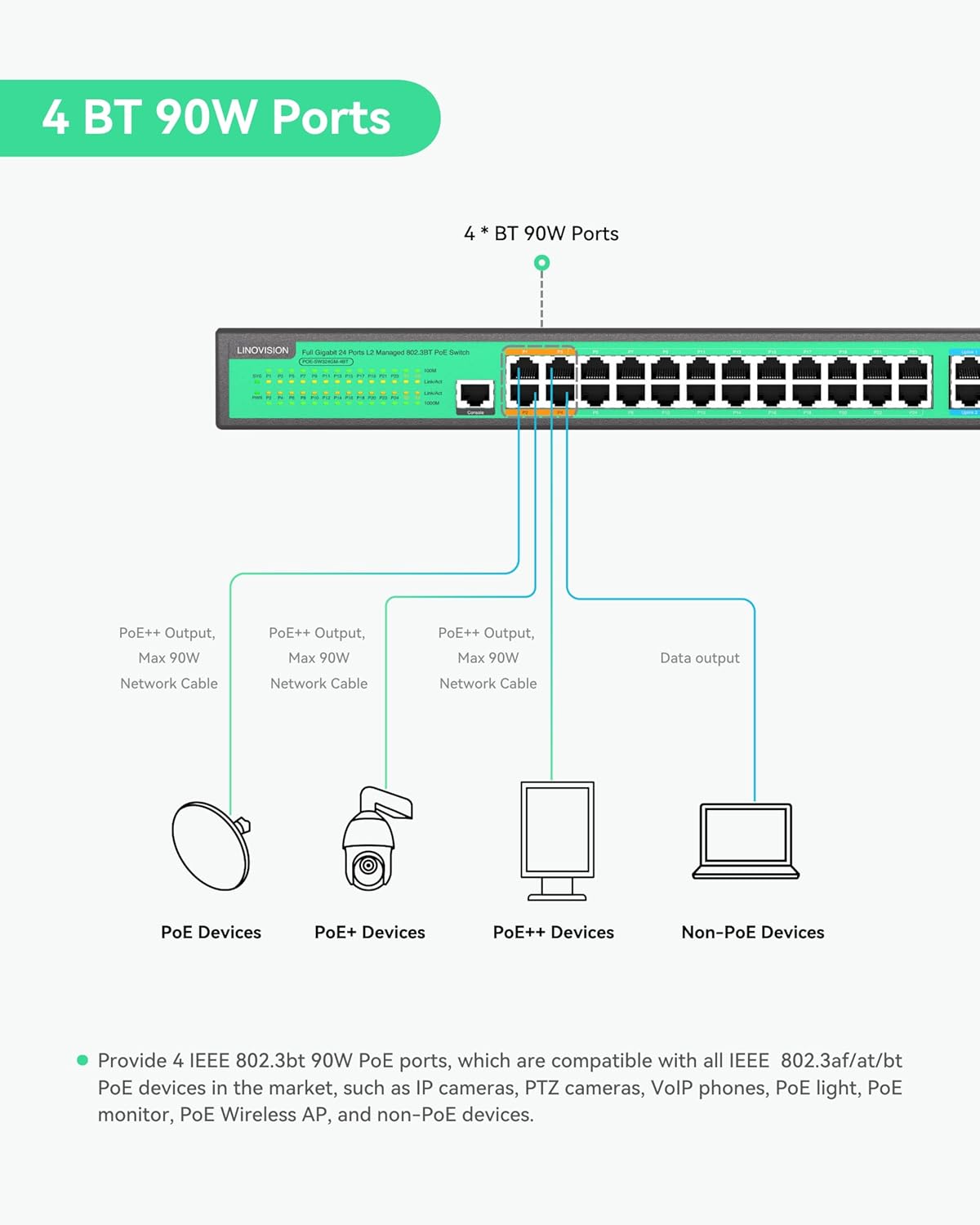
Image 4.1: Illustration of the 4 BT 90W PoE ports and their compatibility with different PoE device types.

Image 4.2: Visual representation of the switch's PoE power distribution and total budget.
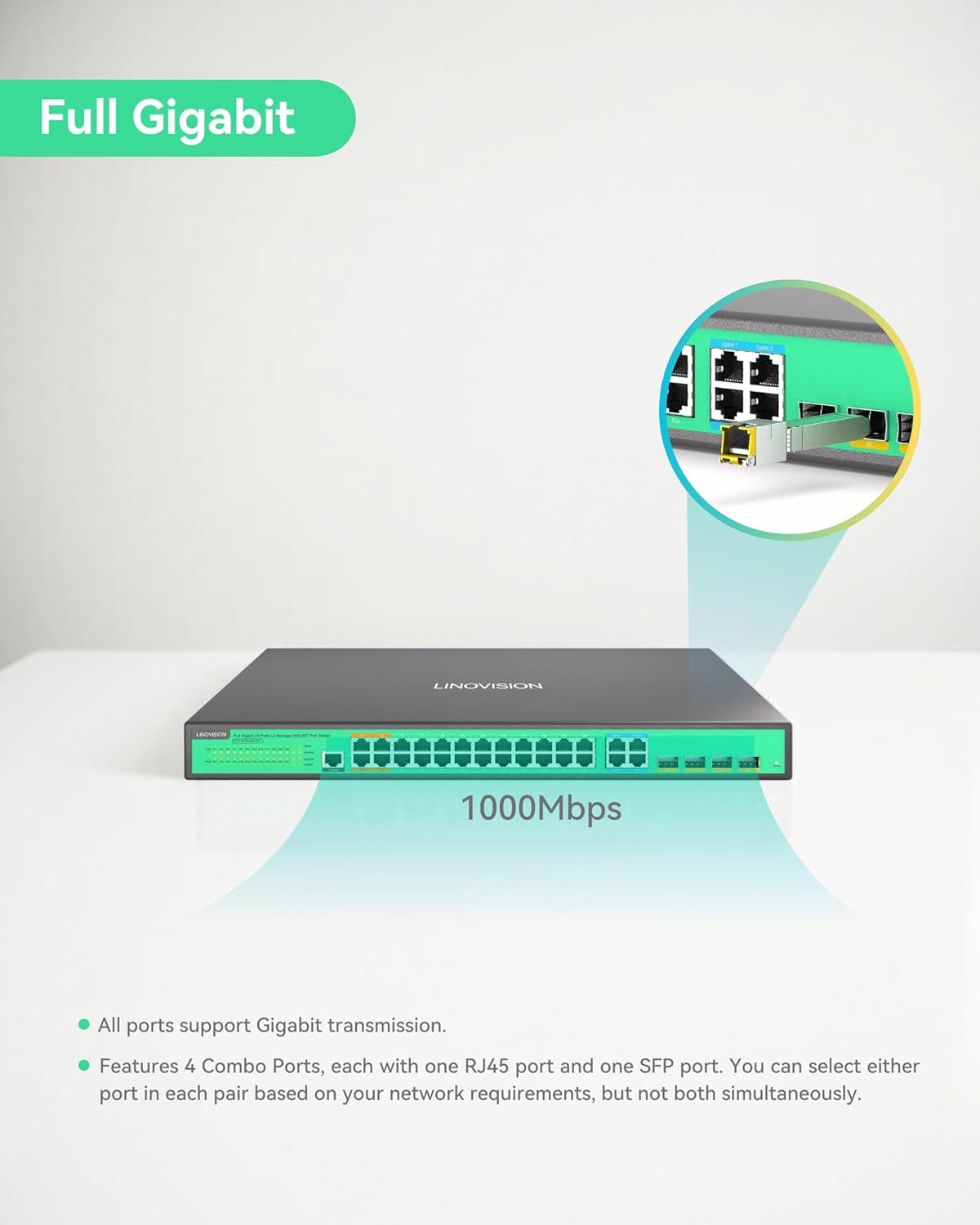
Image 4.3: Illustration of the switch's full Gigabit speed and the flexibility of its combo ports.

ചിത്രം 4.4: ഉദാample of the L2 Management interface, demonstrating various configurable network settings.
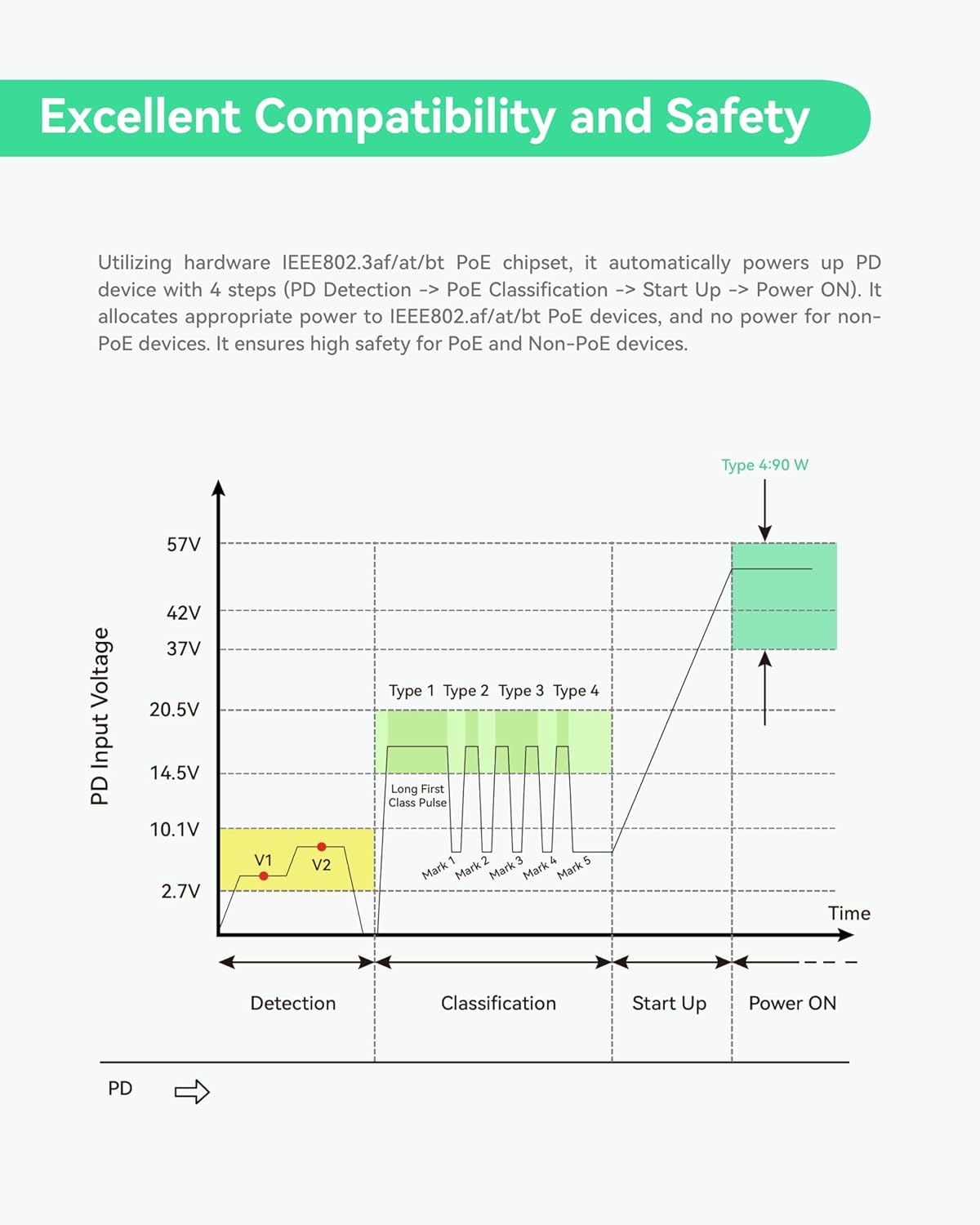
Image 4.5: Graph detailing the safe power negotiation process for PoE devices.

ചിത്രം 4.6: കഴിഞ്ഞുview of the switch's robust physical design and protective features.
5. സജ്ജീകരണം
This section guides you through the initial setup of your LINOVISION PoE Switch.
5.1 അൺബോക്സിംഗും പ്രാരംഭ പരിശോധനയും
Carefully unbox the switch and its accessories. Inspect all components for any signs of damage during transit. Refer to the 'Package Contents' section to ensure all items are present.
Video 5.1: This video demonstrates the unboxing process of the LINOVISION 24 Port L2 Managed BT 90W PoE Switch, showing how to safely remove the product and its accessories from the packaging.
5.2 ഫിസിക്കൽ ഇൻസ്റ്റലേഷൻ
- മൗണ്ടിംഗ്: Use the provided rack mount accessories to install the switch into a standard 19-inch server rack, if applicable. Ensure adequate ventilation around the device.
- ഗ്രൗണ്ടിംഗ്: Connect the ground terminal on the rear panel to a proper earth ground using a grounding wire for electrical safety.
- പവർ കണക്ഷൻ: Connect the power adapter to the AC input on the rear panel and then to a suitable power outlet. Ensure the power switch is in the OFF position before connecting.
5.3 നെറ്റ്വർക്ക് കണക്ഷനുകൾ
- Connecting PoE Devices: Connect your IEEE 802.3af/at/bt compliant PoE devices (e.g., IP cameras, access points) to the PoE ports (P1-P24) on the front panel using standard Ethernet cables.
- Connecting Non-PoE Devices: Non-PoE network devices can also be connected to the PoE ports; the switch will automatically detect and not supply power to them.
- അപ്ലിങ്ക് കണക്ഷനുകൾ: Use the Gigabit Combo Ports (Uplink 1-4) to connect the switch to your core network, router, or other switches. You can use either the RJ45 or SFP port for each combo pair.
- കൺസോൾ കണക്ഷൻ: For initial configuration or advanced management via CLI, connect a console cable to the Console Port on the front panel and to a computer.
6. പ്രവർത്തന നിർദ്ദേശങ്ങൾ
Once the switch is physically installed and connected, you can begin operation and configuration.
6.1 പവർ ചെയ്യുന്നു
Flip the power switch on the rear panel to the ON position. The Power Indicator LED on the front panel should illuminate, indicating the device is receiving power. The System Indicator LED will also light up, and PoE/Link indicators will show port status.
6.2 L2 Management Access
The LINOVISION PoE Switch supports various Layer 2 management methods:
- Webഅടിസ്ഥാന മാനേജ്മെൻ്റ്: സ്വിച്ചുകൾ ആക്സസ് ചെയ്യുക web ഇന്റർഫേസ് അതിന്റെ IP വിലാസം a-യിൽ നൽകി web browser. The default IP address and login credentials can be found in the full user manual or quick start guide.
- കമാൻഡ് ലൈൻ ഇന്റർഫേസ് (CLI): Connect via the Console Port using a terminal emulator (e.g., PuTTY) for command-line configuration.
- എസ്എൻഎംപി: The switch can be managed remotely using Simple Network Management Protocol (SNMP) for network monitoring and configuration.
6.3 Key Management Functions
Through the management interface, you can configure:
- VLAN (വെർച്വൽ ലോക്കൽ ഏരിയ നെറ്റ്വർക്ക്): മെച്ചപ്പെട്ട സുരക്ഷയ്ക്കും പ്രകടനത്തിനുമായി നിങ്ങളുടെ നെറ്റ്വർക്കിനെ വിഭാഗീകരിക്കുക.
- QoS (സേവന നിലവാരം): നിർണായക ആപ്ലിക്കേഷനുകൾക്കായി നെറ്റ്വർക്ക് ട്രാഫിക്കിന് മുൻഗണന നൽകുക.
- ACL (ആക്സസ് കൺട്രോൾ ലിസ്റ്റ്): Filter network traffic based on defined rules.
- PoE Control: Enable/disable PoE on specific ports, monitor power consumption, and schedule PoE operation.
7. പരിപാലനം
Regular maintenance ensures the longevity and optimal performance of your LINOVISION PoE Switch.
- വൃത്തിയാക്കൽ: സ്വിച്ച് വൃത്തിയായും പൊടി വിമുക്തമായും സൂക്ഷിക്കുക. വൃത്തിയാക്കാൻ മൃദുവായതും ഉണങ്ങിയതുമായ തുണി ഉപയോഗിക്കുക. ലിക്വിഡ് അല്ലെങ്കിൽ എയറോസോൾ ക്ലീനറുകൾ ഉപയോഗിക്കരുത്.
- വെൻ്റിലേഷൻ: വെന്റിലേഷൻ ദ്വാരങ്ങൾ അടഞ്ഞിട്ടില്ലെന്ന് ഉറപ്പാക്കുക. അമിതമായി ചൂടാകുന്നത് തടയാൻ ശരിയായ വായുസഞ്ചാരം നിർണായകമാണ്.
- ഫേംവെയർ അപ്ഡേറ്റുകൾ: Periodically check the LINOVISION website for firmware updates. Keeping the firmware up-to-date can improve performance, add new features, and address security vulnerabilities.
- പരിസ്ഥിതി വ്യവസ്ഥകൾ: Operate the switch within the recommended temperature and humidity ranges specified in the 'Specifications' section.
8. പ്രശ്നപരിഹാരം
If you encounter issues with your LINOVISION PoE Switch, refer to the following common troubleshooting steps:
- ശക്തിയില്ല:
- Check if the power cable is securely connected to the switch and the power outlet.
- Ensure the power switch on the rear panel is in the ON position.
- പവർ ഔട്ട്ലെറ്റ് പ്രവർത്തനക്ഷമമാണോയെന്ന് പരിശോധിക്കുക.
- നെറ്റ്വർക്ക് കണക്റ്റിവിറ്റി ഇല്ല:
- സുരക്ഷിതമായ കണക്ഷനുകൾക്കും കേടുപാടുകൾക്കും വേണ്ടി ഇതർനെറ്റ് കേബിളുകൾ പരിശോധിക്കുക.
- Verify the Link/Act LED indicators for the connected ports are active.
- Ensure IP address settings are correct if configured manually.
- PoE ഉപകരണത്തിന് പവർ ലഭിക്കുന്നില്ല:
- Confirm the connected device is IEEE 802.3af/at/bt compliant.
- Check the PoE/Link indicator for the specific port.
- Ensure the total PoE budget (370W) is not exceeded by all connected devices.
- Verify PoE is enabled for the port in the L2 management interface.
- ആക്സസ് ചെയ്യുന്നു Web Interface Issues:
- Ensure your computer is on the same network segment as the switch.
- Try pinging the switch's IP address to confirm network reachability.
- നിങ്ങളുടെ ബ്രൗസറിന്റെ കാഷെ മായ്ക്കുക അല്ലെങ്കിൽ മറ്റൊരു ബ്രൗസർ പരീക്ഷിക്കുക.
If these steps do not resolve the issue, please consult the full user manual or contact LINOVISION technical support.
9 സ്പെസിഫിക്കേഷനുകൾ
Detailed technical specifications for the LINOVISION 24 Ports L2 Managed PoE Switch (POE-SW324GM-4BT).
| ആട്രിബ്യൂട്ട് | മൂല്യം |
|---|---|
| ഉൽപ്പന്ന അളവുകൾ | 17.32 x 11.42 x 1.75 ഇഞ്ച് (440mm x 290mm x 44.5mm) |
| ഇനത്തിൻ്റെ ഭാരം | 9.28 പൗണ്ട് (4.21 കി.ഗ്രാം) |
| ഇനം മോഡൽ നമ്പർ | POE-SW324GM-4BT |
| നിർമ്മാതാവ് | ലിനോവിഷൻ |
| PoE പോർട്ടുകൾ | 4x BT 90W PoE++ ports, 20x AT 30W PoE+ ports |
| അപ്ലിങ്ക് പോർട്ടുകൾ | 4x Gigabit Combo Ports (RJ45/SFP) |
| മൊത്തം PoE ബജറ്റ് | 370W |
| സ്വിച്ചിംഗ് കപ്പാസിറ്റി | 64Gbps |
| മാനേജ്മെൻ്റ് | L2 Managed (WEB, CLI, SNMP), supports VLAN, QoS, ACL, PoE Control |
| എൻക്ലോഷർ | Full Metal, IP40 |
| സർജ് സംരക്ഷണം | 6കെ.വി |
10. വാറൻ്റിയും പിന്തുണയും
LINOVISION products are designed for reliability and performance. For warranty information, technical support, or service inquiries, please refer to the official LINOVISION website or contact their customer service directly. Details regarding warranty periods and support channels are typically provided with your purchase documentation or on the manufacturer's webസൈറ്റ്.
Manufacturer: LINOVISION
കൂടുതൽ സഹായത്തിന്, സന്ദർശിക്കുക: LINOVISION Official Store on Amazon


