1. ഉൽപ്പന്നം കഴിഞ്ഞുview
The SpeedBox 3.3 B.Tuning is an advanced tuning chip designed for e-bikes equipped with Yamaha Motors PW-X3, PW-S2, and also compatible with Yamaha YDX-Moro 05 and Yamaha Moro 07 models. This device allows users to set their own speed limit for electric assistance, enhancing the riding experience.
It features Bluetooth connectivity, enabling control and data analysis via the SpeedBox App.

Image: The SpeedBox 3.3 B.Tuning module, its wiring harness, and a portion of the installation instructions.
2 അനുയോജ്യത
The SpeedBox 3.3 B.Tuning is specifically designed for e-bikes with the following Yamaha motors:
- Yamaha Motors PW-X3
- Yamaha Motors PW-S2
- Yamaha YDX-Moro 05
- Yamaha Moro 07
പ്രധാന കുറിപ്പ്:
ഈ ഉപകരണം പൊരുത്തപ്പെടുന്നില്ല with e-bikes and motors such as Yamaha UrbanRush, CrossCore, CrossConnect, Wabash, or YDX-Torc.

Image: Visual representation of the SpeedBox 3.3 B.Tuning connected to a Yamaha e-bike motor, alongside illustrations of compatible Yamaha PW-X3, PW-S2, YDX-Moro, and YDX-Moro Pro motors.
3. ഇൻസ്റ്റലേഷൻ
Proper installation is crucial for the correct functioning of your SpeedBox. Detailed installation instructions are provided in the product package and on the official SpeedBox YouTube channel.
Before installing the SpeedBox into a brand new e-bike, it is recommended to ride at least 10 km on the e-bike without the tuning chip installed.
- Step 1: Prepare the E-bike. Remove the battery and disassemble necessary parts of the e-bike to gain access to the motor connectors.
- Step 2: Disconnect Motor Connectors. Carefully disconnect the motor connectors as illustrated in the provided instructions within the package.
- Step 3: Connect SpeedBox. Plug the SpeedBox module into the disconnected connectors. Ensure all connections are secure. Refer to the manual for specific wiring diagrams. Reassemble the e-bike to its original condition and reinstall the battery.
- Step 4: Activate Device. Activate the SpeedBox device on your e-bike's display. If using the B.Tuning version, activate it also within the SpeedBox App.
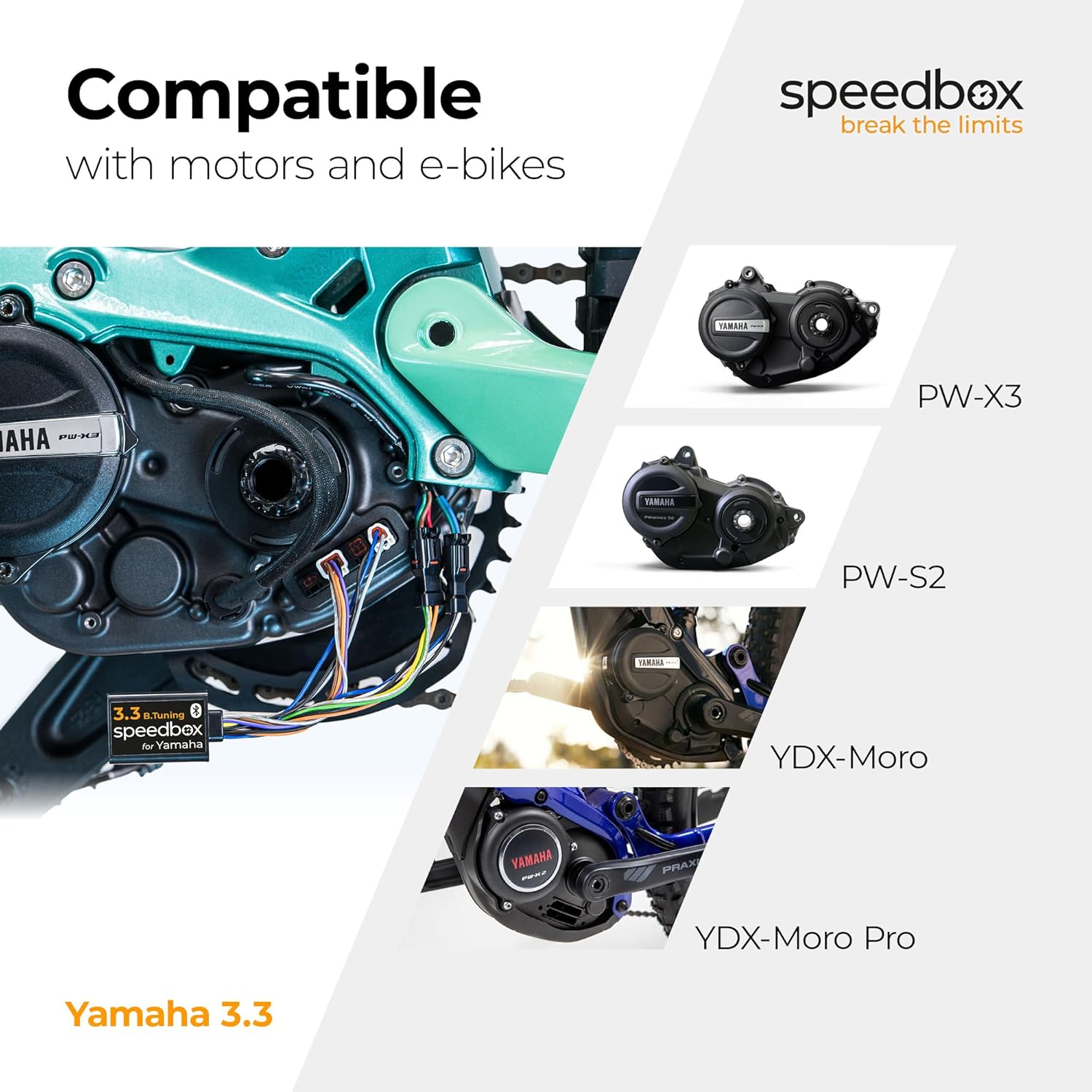
Image: Step-by-step visual guide for installing the SpeedBox 3.3 B.Tuning, showing battery removal, connector disconnection, SpeedBox connection, and activation.
For a visual guide, please refer to the official SpeedBox YouTube channel: @SpeedBoxTuning
4. പ്രവർത്തന നിർദ്ദേശങ്ങൾ
4.1. Activation and Deactivation
The SpeedBox can be activated or deactivated using the mobile SpeedBox App or directly via the e-bike's display.
- സജീവമാക്കൽ: To activate the tuning, press the Light button on your e-bike display. The display will show a value of 99 km/h (62 mph), indicating that the speed limit is removed, allowing for unlimited speed. Alternatively, you can activate by switching modes three levels down and then three levels up.
- നിർജ്ജീവമാക്കൽ: To deactivate the tuning, use the same method (Light button or mode switching). Your display will then show 25 km/h (16 mph), restoring the default speed limit. You can also use the combination of - + - + buttons to activate/deactivate the SpeedBox.

Image: E-bike display examples showing the activated state (99 km/h) and deactivated state (25 km/h) of the SpeedBox.
4.2. Setting Maximum Speed Limit
You can adjust the maximum speed limit for electric assistance through the SpeedBox App or by manipulating the e-bike's display modes.
- ആപ്പ് വഴി: Use the SpeedBox App to set your desired maximum speed limit.
- Via Display: Change modes by switching three levels down and then three levels up. The actual speed limit will then be displayed.
- The maximum speed of electric assistance can be switched by pressing the LIGHT button briefly or by turning the rear wheel 360°.
- 5 സെക്കൻഡ് നിഷ്ക്രിയത്വത്തിന് ശേഷം അവസാനം പ്രദർശിപ്പിച്ച പരിധി സംരക്ഷിക്കപ്പെടും.
5. SpeedBox App
The SpeedBox App provides comprehensive control and data analysis for your e-bike when paired with the SpeedBox 3.3 B.Tuning module.
- ട്യൂണിംഗ് നിയന്ത്രണം: Easily activate or deactivate the tuning function.
- മോട്ടോർ ലോക്ക്: Secure your e-bike by locking the motor via the app.
- Invisible Tuning Mode: Conceal the tuning status from the e-bike's display.
- Bike and Trip Data Analysis: View detailed statistics about your rides, including speed, distance, and other metrics.
- Saving Trips: Record and save your trip data for future review.

Image: Screenshots of the SpeedBox App displaying various features such as tuning control, trip data, and diagnostics.
The SpeedBox App is available for download on both Google Play Store and Apple App Store.
6. പരിപാലനവും പരിചരണവും
The SpeedBox module is designed for durability and requires minimal maintenance. Keep the module and its connections clean and dry. Avoid exposing it to extreme temperatures or harsh chemicals.
Regularly check the physical connections to ensure they remain secure, especially after riding in challenging conditions.
7. Troubleshooting and Important Warnings
7.1. ഫേംവെയർ അപ്ഡേറ്റുകൾ
മുന്നറിയിപ്പ്:
Do not update the firmware of your e-bike while the SpeedBox is installed or if you plan to use the SpeedBox. Updating the e-bike's firmware may lead to detection of the tuning device and potential malfunction. The warranty of SpeedBox products does not cover malfunctions caused by updating the motor's firmware.
7.2. നിയമപരമായ നിരാകരണം
Important Legal Notice:
E-bikes equipped with SpeedBox products are not allowed to be used on public roads, cycling paths, and public places. Such use may be in conflict with applicable laws and regulations. The manufacturer and seller are not responsible for any damages or legal consequences resulting from the improper use of the SpeedBox product.
8 സ്പെസിഫിക്കേഷനുകൾ
| ഫീച്ചർ | വിശദാംശങ്ങൾ |
|---|---|
| ബ്രാൻഡ് | SPEEDBOX |
| മോഡലിൻ്റെ പേര് | Speedbox Tuning |
| ഭാഗം നമ്പർ | SB33BT_Y |
| ഉൽപ്പന്ന അളവുകൾ (LxWxH) | 1.38" x 0.98" x 0.31" (3.5സെ.മീ x 2.5സെ.മീ x 0.8സെ.മീ) |
| ഇനത്തിൻ്റെ ഭാരം | 0.09 കിലോഗ്രാം |
| നിറം | കറുപ്പ് |
| മെറ്റീരിയൽ | പോളിപ്രൊഫൈലിൻ |
| കണക്റ്റിവിറ്റി ടെക്നോളജി | ബ്ലൂടൂത്ത് |
| ഹ്യൂമൻ ഇന്റർഫേസ് ഇൻപുട്ട് | Buttons (via e-bike display) |
| ഉൾപ്പെടുത്തിയ ഘടകങ്ങൾ | Ebike tuning chip |
9. വാറൻ്റിയും പിന്തുണയും
9.1. വാറൻ്റി വിവരങ്ങൾ
The SpeedBox 3.3 B.Tuning comes with a 9 വർഷത്തെ നിർമ്മാതാവിൻ്റെ വാറൻ്റിവാറന്റി ക്ലെയിമുകൾക്കായി നിങ്ങളുടെ വാങ്ങിയതിന്റെ തെളിവ് സൂക്ഷിക്കുക.
Note: The warranty does not cover malfunctions caused by updating the e-bike's motor firmware.
9.2. ഉപഭോക്തൃ പിന്തുണ
For further assistance, technical support, or warranty inquiries, please visit the official SpeedBox webസൈറ്റ്:
You can also find detailed installation videos and tips on their YouTube channel: @SpeedBoxTuning


