1. ആമുഖം
This manual provides comprehensive instructions for the installation, operation, and maintenance of your Eonon Android 14 Car Stereo, model VWX7. This advanced head unit is designed to integrate seamlessly with your vehicle, offering enhanced connectivity, entertainment, and navigation features.

Image 1.1: Eonon Android 14 Car Stereo (VWX7) with accessories.
2. Compatibility and Installation
2.1 Applicable Car Models
The VWX7 car stereo is compatible with a wide range of Volkswagen, SEAT, and SKODA models. Please refer to the compatibility chart below to confirm if your vehicle is supported.
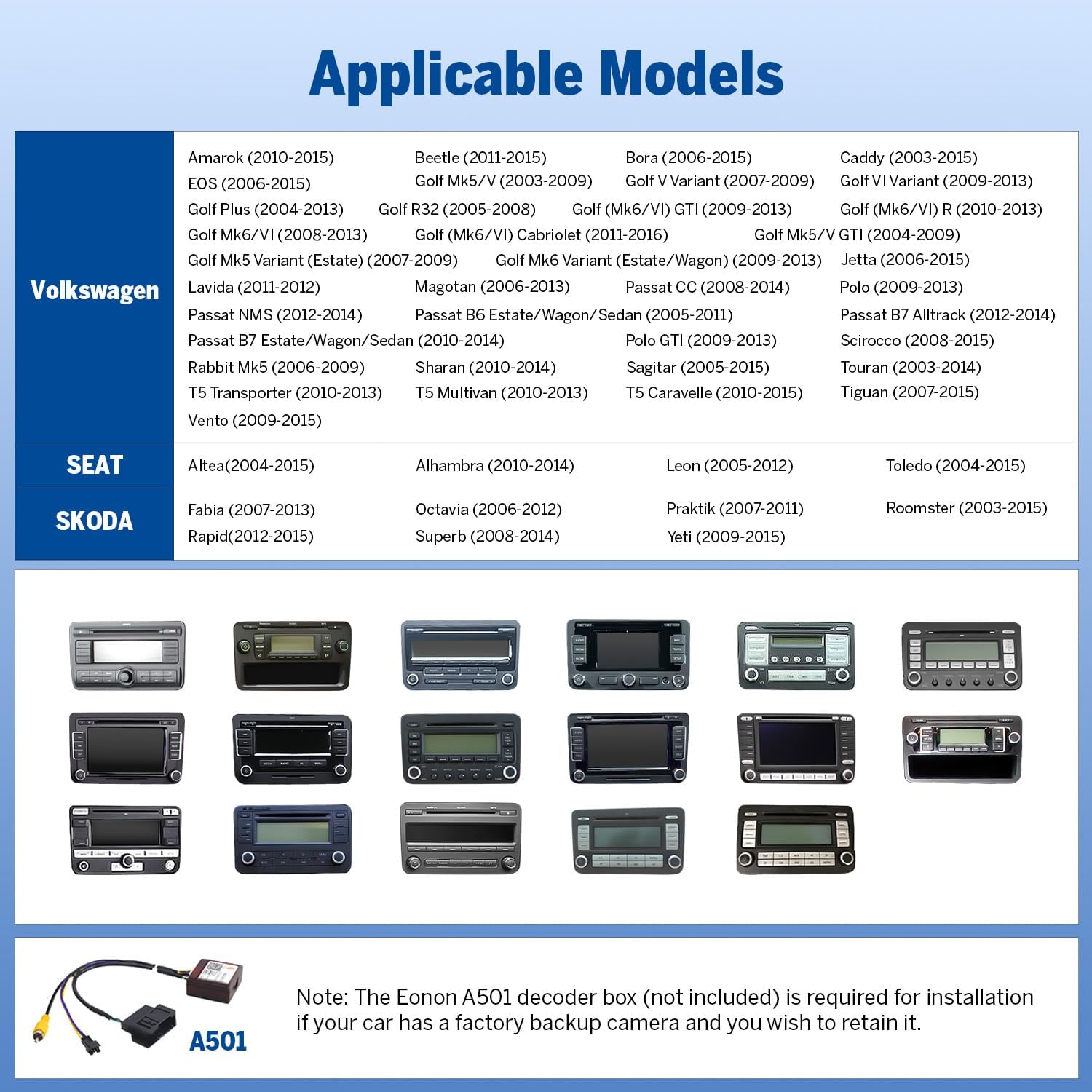
Image 2.1: Compatibility chart for Volkswagen, SEAT, and SKODA vehicles.
2.2 ഇൻസ്റ്റലേഷൻ ആവശ്യകതകൾ
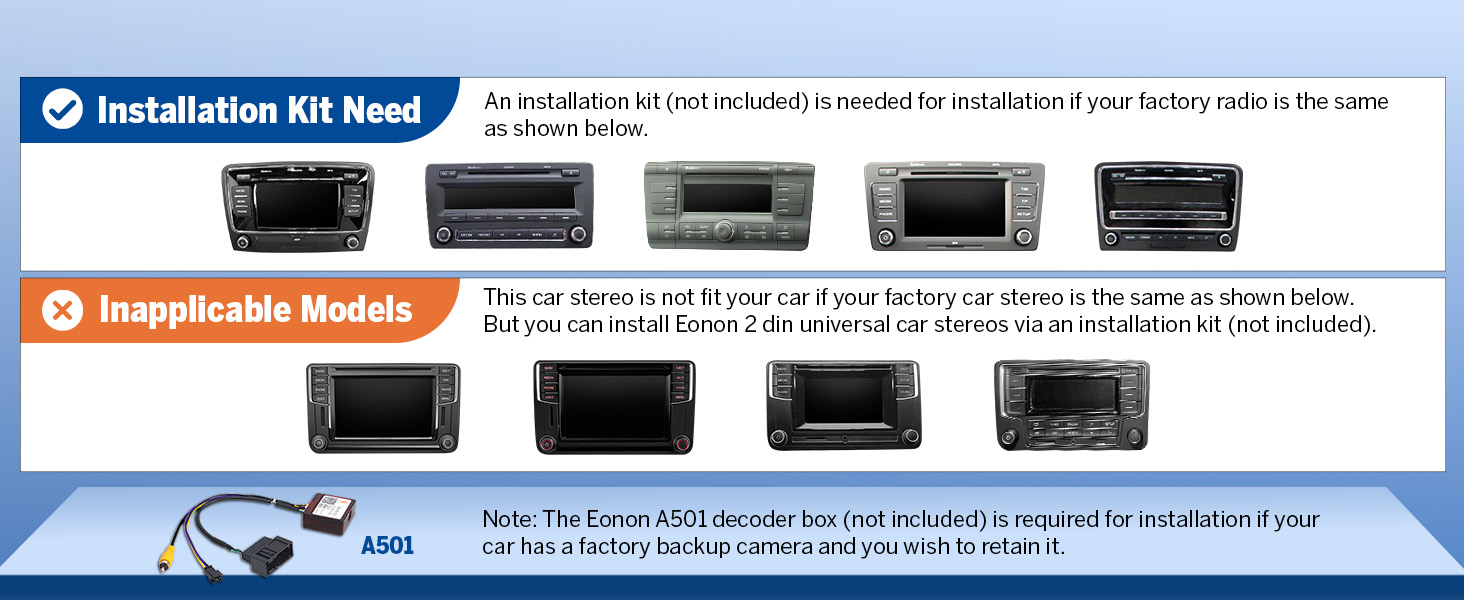
An installation kit (not included) may be required if your factory radio matches the examples shown below. This ensures proper fitment and integration.

Image 2.2: Factory radio types indicating installation kit necessity or incompatibility.
കുറിപ്പ്: If your car has a factory backup camera and you wish to retain its functionality, the Eonon A501 decoder box (not included) is required for installation.
2.3 Plug & Play Features
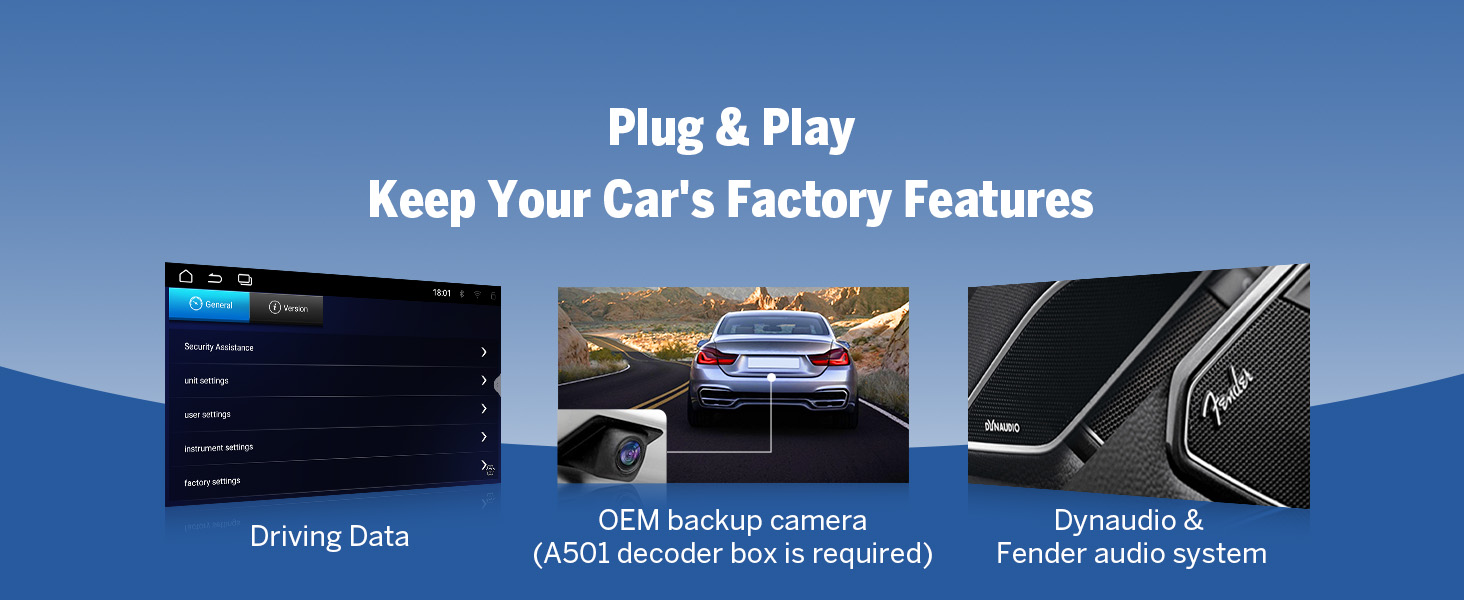
The VWX7 unit is designed for plug-and-play installation, supporting most original vehicle functions through the included CANBUS system. These features include:
- സ്റ്റിയറിംഗ് വീൽ നിയന്ത്രണങ്ങൾ (SWC)
- Dynaudio & Fender audio system integration
- Air conditioning information display
- Radar sensors and vehicle information display
- Door reminder
- Parking sensor and reversing guidelines (with compatible camera)

Image 2.3: Supported factory features and integrations.
3. പ്രധാന സവിശേഷതകൾ കഴിഞ്ഞുview
3.1 ആൻഡ്രോയിഡ് 14 സിസ്റ്റം
The VWX7 operates on the latest Android 14 system (API level 34) with 3GB RAM and 32GB ROM. It is equipped with a cutting-edge Rockchip processor, ensuring superior performance and energy efficiency for a smooth user experience.

Image 3.1: Android 14 system interface and performance metrics.
3.2 വയർലെസ്/വയർഡ് കാർപ്ലേ & ആൻഡ്രോയിഡ് ഓട്ടോ
Enjoy seamless integration with your smartphone using wireless or wired Apple CarPlay and Android Auto. This allows for hands-free control of navigation, music, calls, and messages via voice commands (Siri or Google Assistant).

Image 3.2: Wireless CarPlay and Android Auto interfaces.
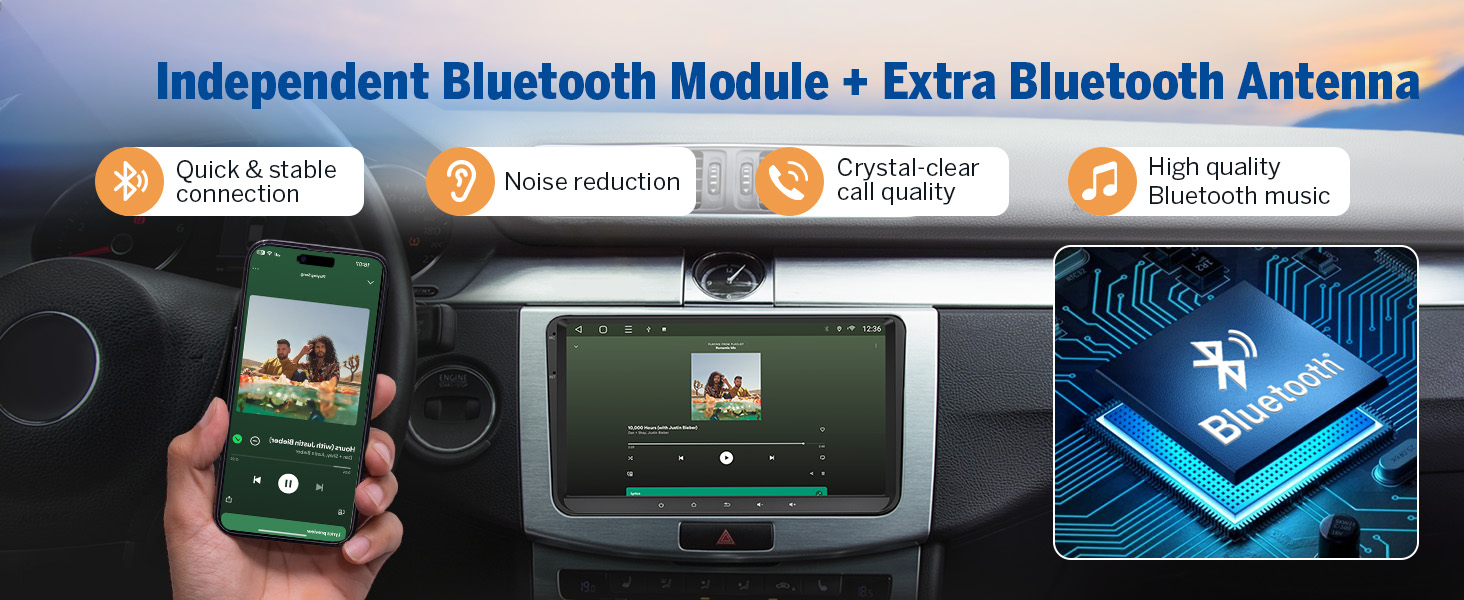
3.3 Built-in DSP and Bluetooth 5.4
The integrated Digital Signal Processing (DSP) chip, along with a 4x45W output and 36-band equalizer, provides a richer and more immersive audio experience. The independent Bluetooth 5.4 module ensures quick, stable connections, noise reduction, and crystal-clear call quality.

Image 3.3: Built-in DSP and Bluetooth module details.
3.4 9-inch IPS Display
The unit features a 9-inch IPS display with a 1280x720 resolution and a 178° viewing angle, providing vibrant colors and sharp details for navigation and entertainment.
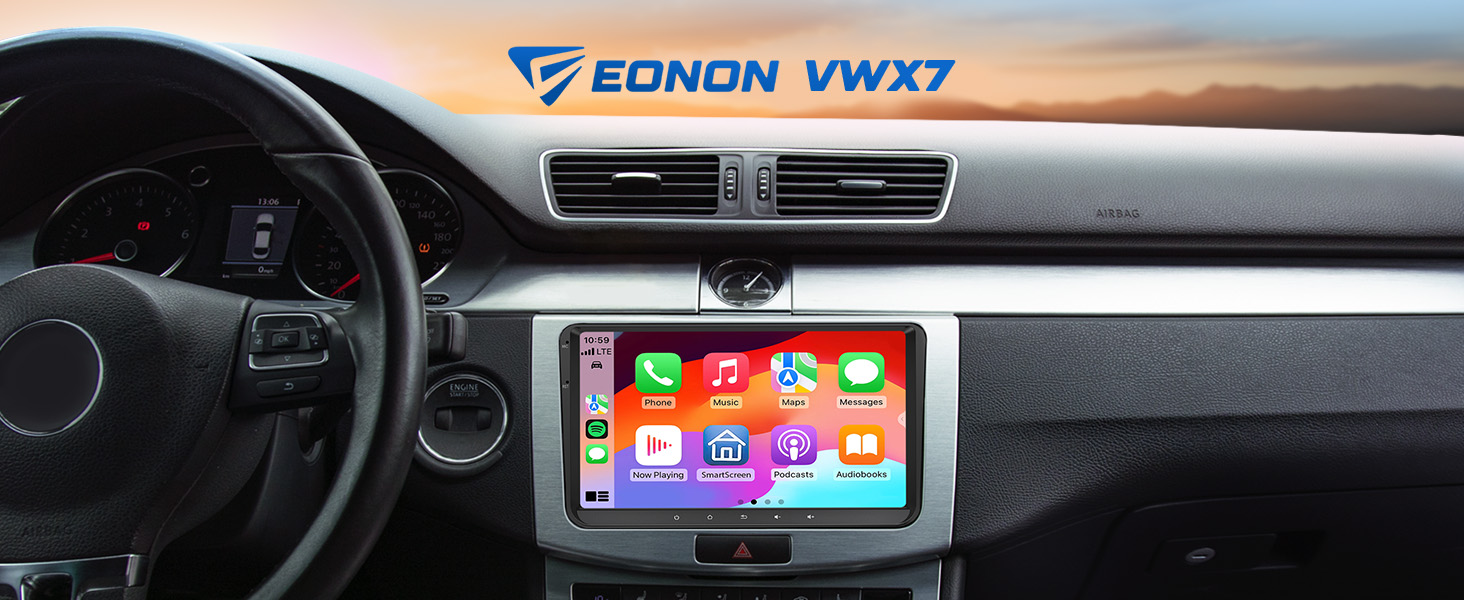
Image 3.4: 9-inch IPS Display features.
3.5 ആന്തരിക ഘടകങ്ങൾ
The Eonon X7 series is built with high-quality components, including a 4-layer automotive PCB, ST 4x45W amplifier, ultra-low latency Wi-Fi 6 & Bluetooth 5.4 module, Silicon Labs Si4755 Tuner, and top-grade Silicongo eMMC memory.

Image 3.5: Internal components of the Eonon X7 Series.
4. സജ്ജീകരണവും പ്രവർത്തനവും
4.1 വയർലെസ് കാർപ്ലേ കണക്ഷൻ
- കാർ സ്റ്റീരിയോയിലെ Zlink5 ആപ്പിൽ ക്ലിക്ക് ചെയ്യുക.
- നിങ്ങളുടെ iPhone-ൽ Wi-Fi, Bluetooth എന്നിവ ഓണാക്കുക.
- Find 'EONON' in your phone's Bluetooth device list and enter 0000 to pair. Once connected, tap 'Use CarPlay'.
- കണക്ഷൻ പൂർത്തിയാക്കാൻ കുറച്ച് നിമിഷങ്ങൾ കാത്തിരിക്കുക.
ചിത്രം 4.1: വയർലെസ്സ് ആപ്പിൾ കാർപ്ലേ കണക്ഷൻ ഘട്ടങ്ങൾ.
4.2 വയർലെസ് ആൻഡ്രോയിഡ് ഓട്ടോ കണക്ഷൻ
- കാർ സ്റ്റീരിയോയിലെ Zlink5 ആപ്പിൽ ക്ലിക്ക് ചെയ്യുക.
- നിങ്ങളുടെ ആൻഡ്രോയിഡ് ഫോണിൽ വൈഫൈയും ബ്ലൂടൂത്തും ഓണാക്കുക.
- Find 'EONON' in your phone's Bluetooth device list, enter 0000 to pair, and click 'OK'.
- കണക്ഷൻ പൂർത്തിയാക്കാൻ കുറച്ച് നിമിഷങ്ങൾ കാത്തിരിക്കുക.
ചിത്രം 4.2: വയർലെസ് ആൻഡ്രോയിഡ് ഓട്ടോ കണക്ഷൻ ഘട്ടങ്ങൾ.
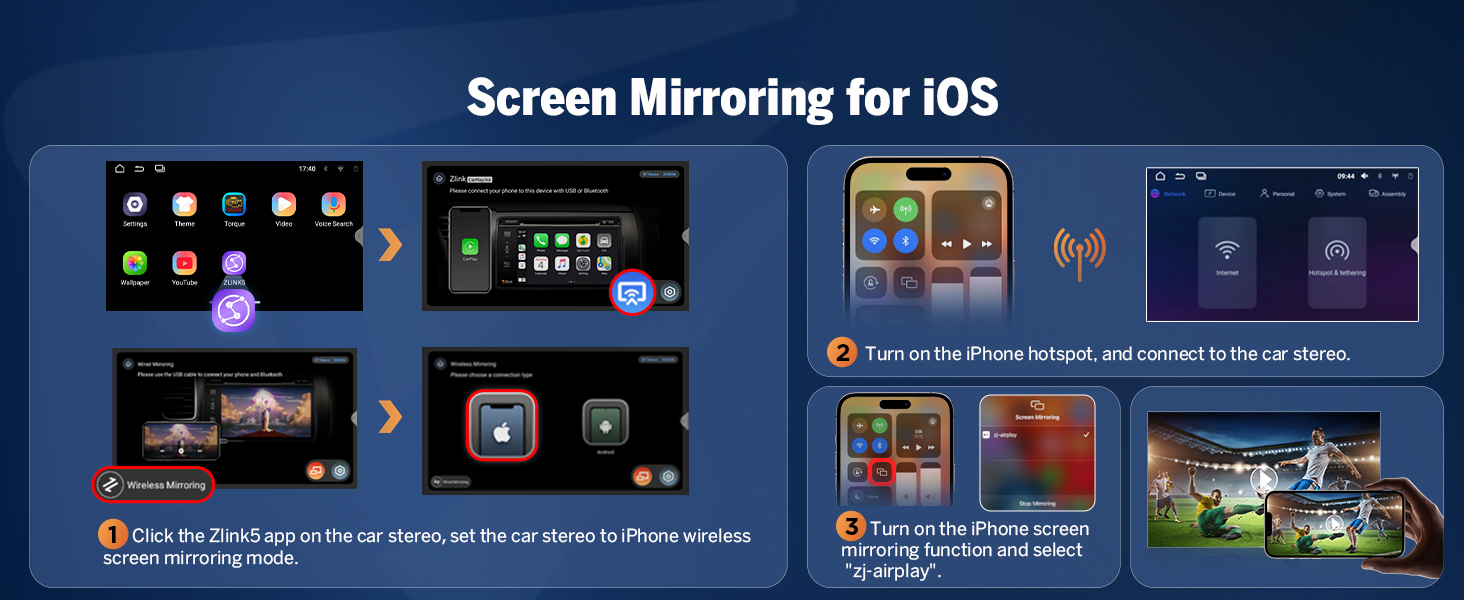
4.3 സ്ക്രീൻ മിററിംഗ്
The unit supports screen mirroring for both iOS and Android devices, allowing you to display your phone's screen directly on the car stereo.
iOS-ന്:
- കാർ സ്റ്റീരിയോയിലെ Zlink5 ആപ്പിൽ ക്ലിക്ക് ചെയ്യുക, തുടർന്ന് കാർ സ്റ്റീരിയോ ഐഫോൺ വയർലെസ് സ്ക്രീൻ മിററിംഗ് മോഡിലേക്ക് സജ്ജമാക്കുക.
- ഐഫോൺ ഹോട്ട്സ്പോട്ട് ഓണാക്കി കാർ സ്റ്റീരിയോയുമായി ബന്ധിപ്പിക്കുക.
- ഐഫോൺ സ്ക്രീൻ മിററിംഗ് ഫംഗ്ഷൻ ഓണാക്കി "zj-airplay" തിരഞ്ഞെടുക്കുക.
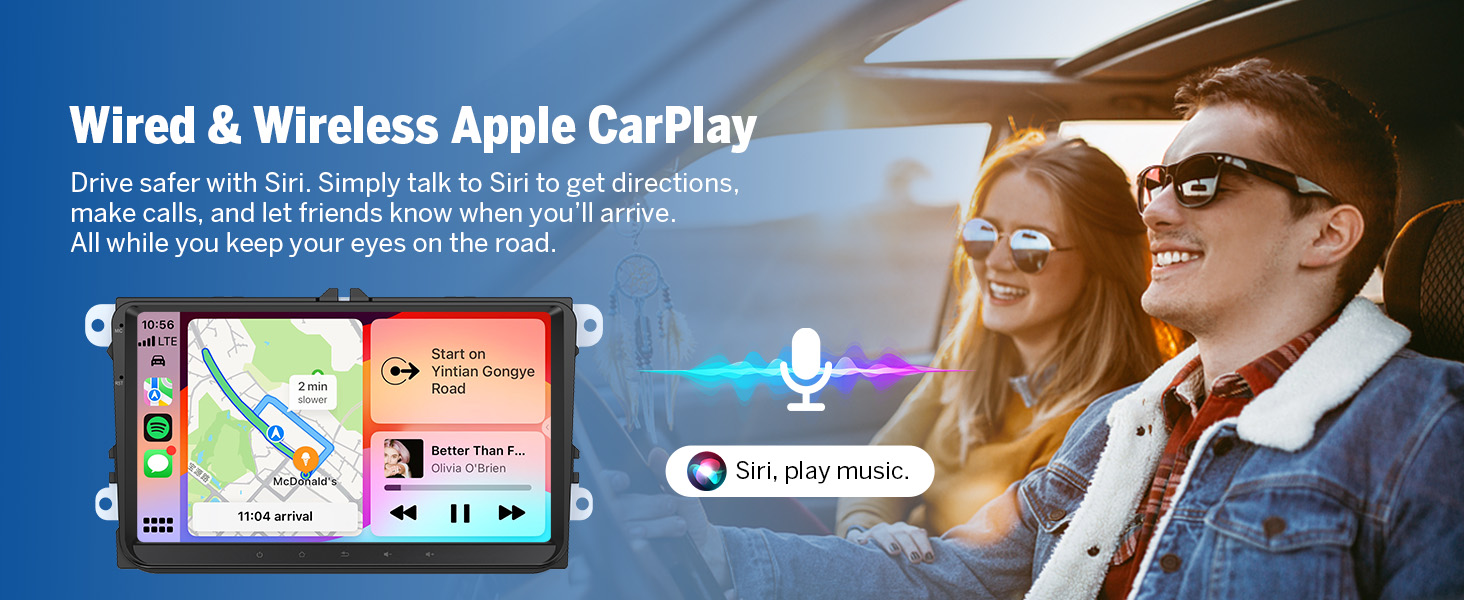
Image 4.3: Screen Mirroring for iOS devices.
Android-നായി:
- കാർ സ്റ്റീരിയോയിലെ Zlink5 ആപ്പിൽ ക്ലിക്ക് ചെയ്യുക, തുടർന്ന് കാർ സ്റ്റീരിയോ ആൻഡ്രോയിഡ് വയർലെസ് സ്ക്രീൻ മിററിംഗ് മോഡിലേക്ക് സജ്ജമാക്കുക.
- Turn on your phone's Bluetooth. Find 'EONON' in your phone's Bluetooth device list, enter 0000 to pair.
- ഫോണിന്റെ ഹോട്ട്സ്പോട്ട് ഓണാക്കി കാർ സ്റ്റീരിയോയുമായി ബന്ധിപ്പിക്കുക.
- നിങ്ങളുടെ ഫോണിൽ Zplus ആപ്പ് ഇൻസ്റ്റാൾ ചെയ്യുക. ആപ്പ് ഓണാക്കി "വയർലെസ് കണക്ഷൻ" തിരഞ്ഞെടുക്കുക.
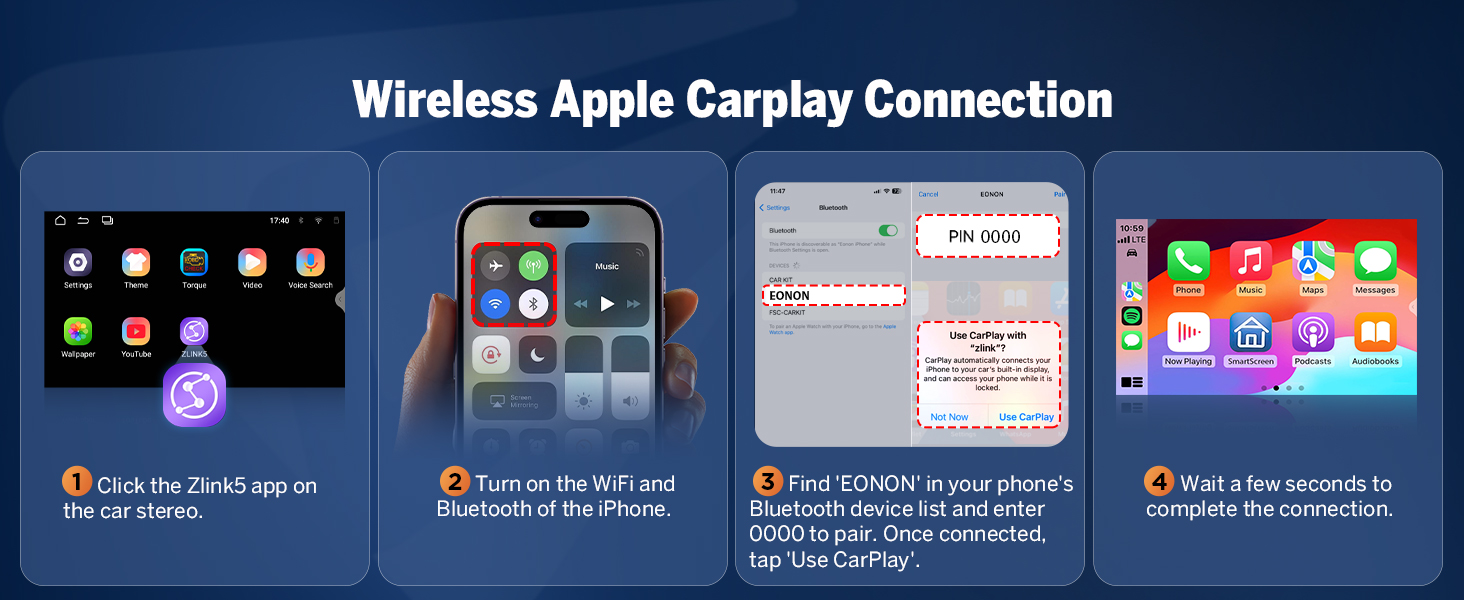
Image 4.4: Screen Mirroring for Android devices.
4.4 ഇഷ്ടാനുസൃതമാക്കൽ ഓപ്ഷനുകൾ
Personalize your car stereo's interface with various customization options:
- ബൂട്ട് ലോഗോ: ഒരു ഇഷ്ടാനുസൃത ബൂട്ട് ലോഗോ സജ്ജമാക്കുക.
- ബട്ടൺ നിറം: Change the color of the physical buttons.
- വാൾപേപ്പർ: Choose from pre-installed wallpapers or upload your own.
- UI തീമുകൾ: Select from 3 different user interface themes to match your preference.
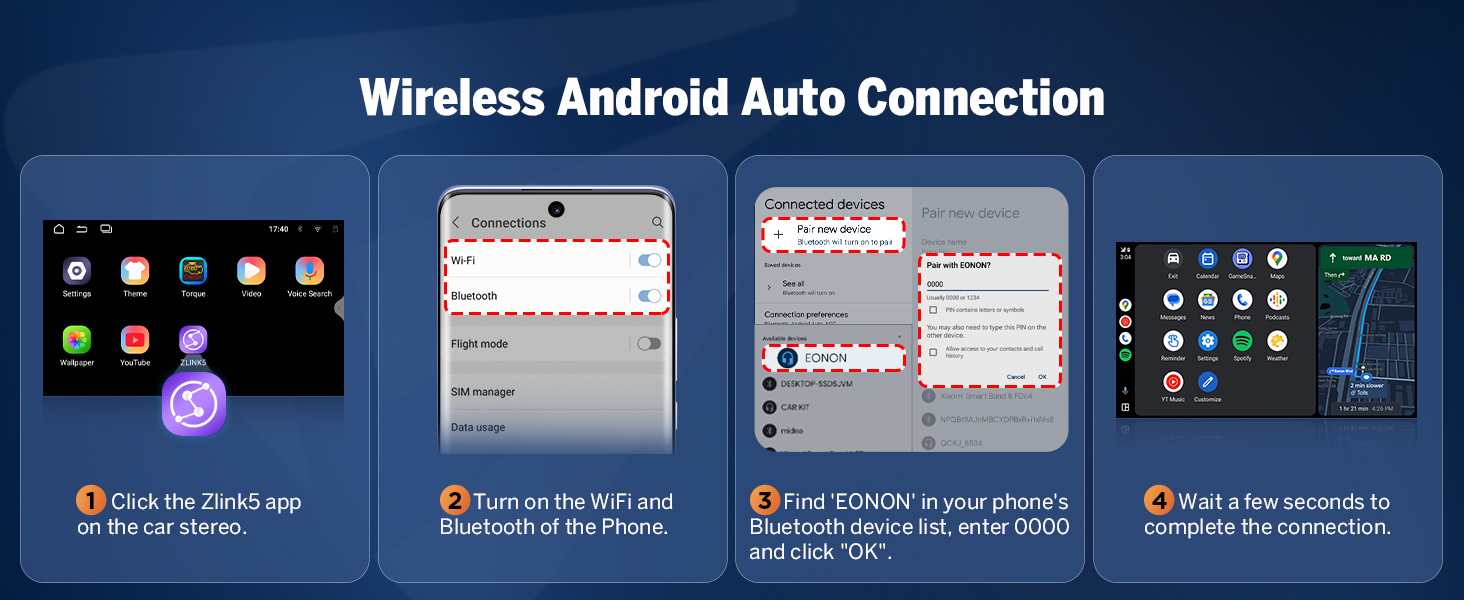
Image 4.5: Interface customization options.
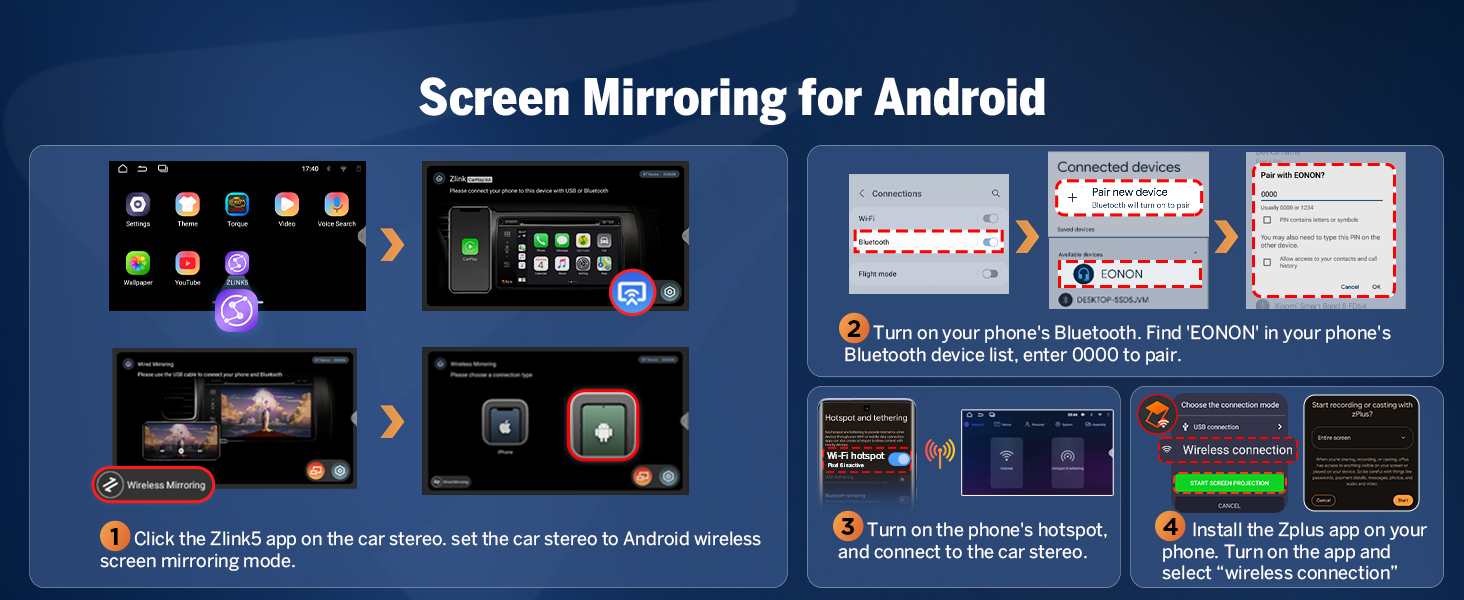
Image 4.6: Available UI Themes.
4.5 അധിക സവിശേഷതകൾ
The VWX7 unit includes several other useful features:
- 1-second fast boot time.
- Support for online and offline maps.
- Three USB ports for external devices.
- RCA output for external ampലൈഫയറുകൾ അല്ലെങ്കിൽ സബ് വൂഫറുകൾ.
- Dual-band Wi-Fi (2.4G/5G).
- AM/FM radio tuner with 18 preset channels.
ചിത്രം 4.7: കഴിഞ്ഞുview of additional features.
5. പരിപാലനം
5.1 Over-the-Air (OTA) Firmware Updates
The Eonon VWX7 supports Over-the-Air (OTA) updates, allowing you to keep your car stereo's software up-to-date. These updates can fix software issues and enhance security. Simply check for updates within the system settings and follow the on-screen prompts. Note that these updates are for the software and do not upgrade the core Android system version.

Image 5.1: Over-the-Air Firmware Update process.
6. പ്രശ്നപരിഹാരം
This section addresses common issues you might encounter with your Eonon Android 14 Car Stereo.
6.1 Wireless Connectivity Issues (CarPlay/Android Auto/Wi-Fi)
If you experience intermittent disconnections or difficulty connecting wirelessly:
- Ensure both Wi-Fi and Bluetooth are enabled on your phone and the car stereo.
- നിങ്ങളുടെ ഫോണിന്റെ ബ്ലൂടൂത്ത് ക്രമീകരണങ്ങളിൽ ഉപകരണം മറന്നു പോയി വീണ്ടും പെയർ ചെയ്യാൻ ശ്രമിക്കുക.
- നിങ്ങളുടെ ഫോണും കാർ സ്റ്റീരിയോയും റീസ്റ്റാർട്ട് ചെയ്യുക.
- Ensure the Zlink5 app is running on the car stereo.
- Check for any obstructions or interference near the unit.
6.2 OEM Functionality (Backup Camera, Steering Wheel Controls, etc.)
If original car functions are not working as expected after installation:
- Verify that the CANBUS decoder is correctly connected.
- For OEM backup cameras, ensure the A501 decoder box (if required for your model) is properly installed and connected.
- Double-check all wiring connections according to the wiring diagram.
- Consult the installation kit instructions if one was used, as specific wiring might be required.
6.3 ജിപിഎസ് സിഗ്നൽ പ്രശ്നങ്ങൾ
If the GPS unit is not receiving a signal or navigation is inaccurate:
- Ensure the GPS antenna is securely connected to the unit.
- Place the GPS antenna in a location with a clear view of the sky, away from metal obstructions (e.g., on the dashboard near the windshield).
- Test with a different navigation app to rule out app-specific issues.
6.4 ഓഡിയോ ഗുണനിലവാര പ്രശ്നങ്ങൾ
If audio quality is poor or distorted:
- സ്പീക്കർ കണക്ഷനുകൾ പരിശോധിക്കുക.
- Adjust the DSP settings and equalizer bands to optimize sound for your vehicle's acoustics.
- Ensure the volume levels are appropriately set on both the unit and any connected devices.
7 സ്പെസിഫിക്കേഷനുകൾ
| ഫീച്ചർ | സ്പെസിഫിക്കേഷൻ |
|---|---|
| ഉൽപ്പന്ന അളവുകൾ | 8.67 x 5.12 x 1.34 ഇഞ്ച് |
| ഇനത്തിൻ്റെ ഭാരം | 2.64 പൗണ്ട് (1.2 കിലോഗ്രാം) |
| മോഡൽ നമ്പർ | VWX7 |
| ഓപ്പറേറ്റിംഗ് സിസ്റ്റം | ആൻഡ്രോയിഡ് 14 |
| റാം + റോം | 3 ജിബി റാം + 32 ജിബി റോം |
| പ്രോസസ്സർ | റോക്ക്ചിപ്പ് |
| ഡിസ്പ്ലേ വലിപ്പം | 9 ഇഞ്ച് (23 സെ.മീ) |
| ഡിസ്പ്ലേ റെസല്യൂഷൻ | 1280x720 IPS |
| Viewing ആംഗിൾ | 178° |
| CarPlay / Android Auto | Wireless/Wired Support |
| ബ്ലൂടൂത്ത് പതിപ്പ് | 5.4 |
| വൈഫൈ | ഡ്യുവൽ-ബാൻഡ് (2.4G/5G) |
| ഓഡിയോ ഔട്ട്പുട്ട് പവർ | 4x45W |
| ഇക്വലൈസർ | 36-band (DSP) |
| USB പോർട്ടുകൾ | 3 |
| ട്യൂണർ ടെക്നോളജി | എഫ്എം, എഎം |
| പവർ ഉറവിടം | കാർ ബാറ്ററി |
8. Package Contents and Wiring
8.1 ബോക്സിൽ എന്താണുള്ളത്
Your Eonon Android 14 Car Stereo package includes the following components:
- ഓഡിയോ വീഡിയോ അഡാപ്റ്റർ കേബിൾ x1
- ഓഡിയോ അഡാപ്റ്റർ കേബിൾ x1
- കാർപ്ലേ & ആൻഡ്രോയിഡ് ഓട്ടോ യുഎസ്ബി അഡാപ്റ്റർ കേബിൾ x1
- യുഎസ്ബി അഡാപ്റ്റർ കേബിൾ x1
- ബാക്കപ്പ് ക്യാമറ വീഡിയോ ഇൻപുട്ട് കേബിൾ x1
- റേഡിയോ ആന്റിന അഡാപ്റ്റർ കേബിൾ x1
- പവർ കേബിൾ x1
- ജിപിഎസ് ആന്റിന x1
- ബാഹ്യ മൈക്രോഫോൺ x1
- CAN ബസ് x1
- സ്പെയർ ഫ്യൂസ് x1
- പശ പാഡ് x1
- ഉപയോക്തൃ മാനുവൽ x1
ചിത്രം 8.1: ഉൽപ്പന്ന പാക്കേജിന്റെ ഉള്ളടക്കം.
8.2 വയറിംഗ് ഡയഗ്രം
Refer to the following diagram for proper connection of all cables and accessories to the main unit.
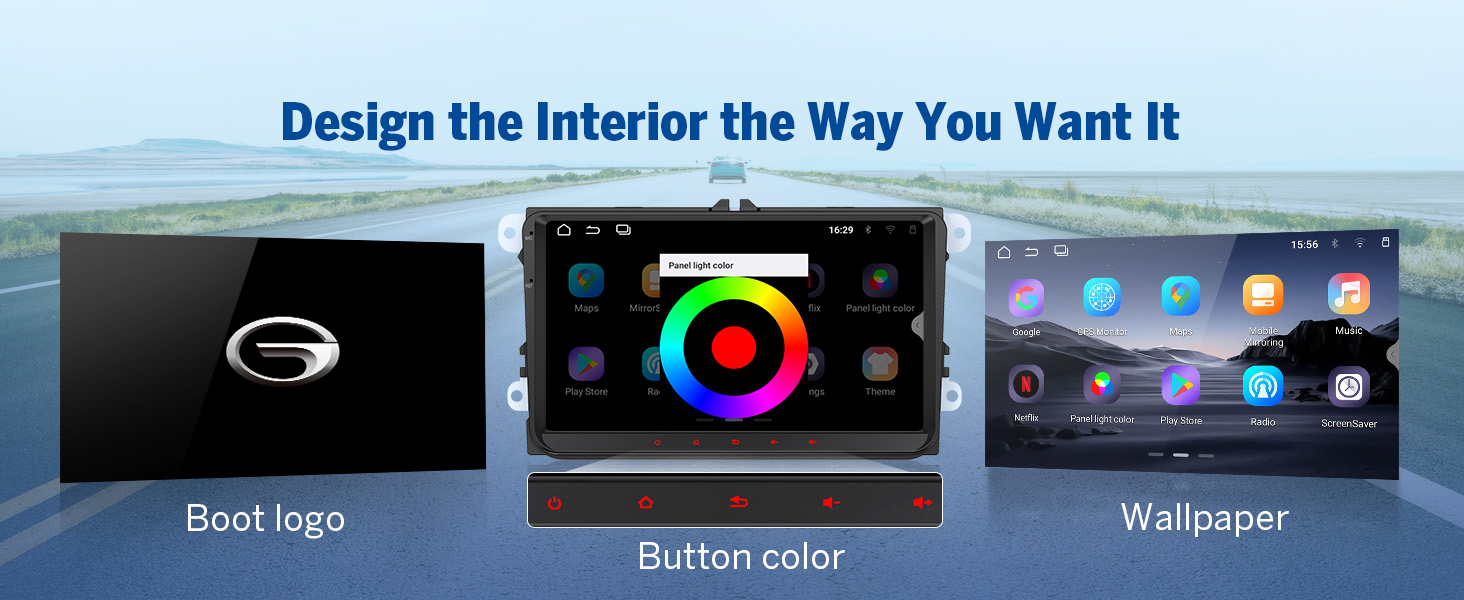
Image 8.2: Comprehensive wiring diagram.
9. പിന്തുണയും വാറണ്ടിയും
സാങ്കേതിക സഹായത്തിനോ, ഈ മാനുവലിനപ്പുറമുള്ള പ്രശ്നപരിഹാരത്തിനോ, വാറന്റി അന്വേഷണങ്ങൾക്കോ, ദയവായി അവരുടെ ഔദ്യോഗിക വിലാസത്തിലൂടെ ഇയോണൺ ഉപഭോക്തൃ പിന്തുണയുമായി ബന്ധപ്പെടുക. website or the retailer where you purchased the product. Specific warranty terms and conditions may vary by region and retailer.


