1. ആമുഖം
The ESSAGER Bluetooth 5.3 Audio Receiver Transmitter is a versatile 2-in-1 device designed to enhance your audio experience. It functions as both a Bluetooth transmitter (TX mode) and a Bluetooth receiver (RX mode), allowing you to wirelessly connect various audio devices.
In TX മോഡ്, you can transmit audio from non-Bluetooth sources like TVs, computers, or in-flight entertainment systems to Bluetooth headphones, earbuds, or speakers via a 3.5mm AUX connection.
In RX മോഡ്, it enables your smartphone or other Bluetooth-enabled devices to stream audio to wired speakers or headphones, transforming them into wireless audio systems.
This device features CVC8.0 noise reduction and Digital Signal Processor (DSP) technology for clear call quality, a built-in microphone for hands-free communication, and supports navigation app voice notifications. Its flexible 3.5mm AUX plug is designed for convenience in tight spaces.

Image 1.1: The ESSAGER Bluetooth Receiver Transmitter, highlighting its dual functionality and compact design.
2 സുരക്ഷാ വിവരങ്ങൾ
Please read and adhere to the following safety guidelines to ensure proper use and prevent damage to the device or injury.
- ബാറ്ററി കൈകാര്യം ചെയ്യൽ: Keep the device away from extreme temperatures and humidity. Do not expose the device to liquids.
- സാധ്യതയുള്ള ഇടപെടൽ: This device may interfere with other wireless devices. Avoid using it near pacemakers or other medical devices.
- വേർപെടുത്തുക: ഉപകരണം വേർപെടുത്താനോ നന്നാക്കാനോ പരിഷ്ക്കരിക്കാനോ ശ്രമിക്കരുത്. ഇത് വാറന്റി അസാധുവാക്കുകയും സുരക്ഷാ അപകടങ്ങൾ ഉണ്ടാക്കുകയും ചെയ്തേക്കാം.
- നീക്കം ചെയ്യൽ: Dispose of the device and its battery according to local regulations. Do not dispose of it in household waste.
3. പാക്കേജ് ഉള്ളടക്കം
നിങ്ങളുടെ പാക്കേജിൽ എല്ലാ ഇനങ്ങളും ഉണ്ടെന്ന് ഉറപ്പാക്കുക:
- ESSAGER Bluetooth 5.3 Audio Receiver Transmitter
- Integrated Flexible 3.5mm AUX Plug
- ടൈപ്പ്-സി ചാർജിംഗ് കേബിൾ
- Airplane Audio Adapter
- ഉപയോക്തൃ മാനുവൽ
4. ഉൽപ്പന്നം കഴിഞ്ഞുview
Familiarize yourself with the device's components:

ചിത്രം 4.1: മുൻഭാഗം view of the ESSAGER Bluetooth Receiver Transmitter and the included airplane adapter.
- Flexible 3.5mm AUX Plug: Connects to audio input/output ports. Crafted from high-rebound TPU material for durability and flexibility in tight spaces.
- MFB Button (Multi-Function Button): Power On/Off, Play/Pause, Answer/End/Reject/Redial Calls.
- RX/TX സ്വിച്ച്: Toggles between Receiver (RX) and Transmitter (TX) modes.
- LED സൂചകം: ഉപകരണ നില പ്രദർശിപ്പിക്കുന്നു (ജോടിയാക്കൽ, കണക്റ്റുചെയ്തു, ചാർജ് ചെയ്യുന്നു).
- ബിൽറ്റ്-ഇൻ മൈക്രോഫോൺ: ഹാൻഡ്സ് ഫ്രീ കോളിംഗിനായി.
- ടൈപ്പ്-സി ചാർജിംഗ് പോർട്ട്: ഉപകരണം ചാർജ് ചെയ്യുന്നതിനായി.

Image 4.2: The flexible 3.5mm AUX plug, designed for easy connection in various orientations.
5. സജ്ജീകരണവും ജോടിയാക്കലും
5.1 ഉപകരണം ചാർജ് ചെയ്യുന്നു
Before first use, fully charge the device. Connect the included Type-C charging cable to the device's charging port and a USB power source (e.g., wall adapter, computer USB port). The LED indicator will show charging status and turn off when fully charged. A full charge takes approximately 1.5 hours.
5.2 പവർ ഓൺ/ഓഫ്
- പവർ ഓൺ: Press and hold the MFB button for approximately 3 seconds until the LED indicator lights up.
- പവർ ഓഫ്: Press and hold the MFB button for approximately 3 seconds until the LED indicator turns off.
5.3 Mode Selection (RX/TX)
Use the RX/TX switch on the side of the device to select the desired mode:
- RX (റിസീവർ) മോഡ്: For receiving audio from a Bluetooth source (e.g., smartphone) and outputting to a wired audio device (e.g., car stereo, wired headphones).
- TX (ട്രാൻസ്മിറ്റർ) മോഡ്: For transmitting audio from a non-Bluetooth source (e.g., TV, computer, airplane entertainment) to a Bluetooth audio device (e.g., Bluetooth headphones, speaker).

Image 5.1: Visual representation of TX and RX modes and their respective applications.
5.4 Pairing in RX (Receiver) Mode
- Switch the device to RX മോഡ്.
- Plug the flexible 3.5mm AUX plug into the audio input port of your wired speaker, car stereo, or wired headphones.
- Power on the ESSAGER device. It will automatically enter pairing mode, indicated by the LED flashing blue and red.
- On your smartphone or other Bluetooth-enabled device, go to Bluetooth settings and search for "ESSAGER" (or similar device name).
- Select "ESSAGER" to connect. Once paired, the LED indicator will turn solid blue.
5.5 Pairing in TX (Transmitter) Mode
- Switch the device to TX മോഡ്.
- Plug the flexible 3.5mm AUX plug into the audio output port of your non-Bluetooth source (e.g., TV, computer, MP3 player, airplane entertainment system). If using for airplane entertainment, use the included airplane audio adapter.
- Power on the ESSAGER device. It will automatically enter pairing mode, indicated by the LED flashing blue and red.
- Put your Bluetooth headphones or speaker into pairing mode (refer to their respective user manuals).
- The ESSAGER device will automatically search for and connect to nearby Bluetooth audio devices in pairing mode. Once paired, the LED indicator will turn solid blue.
6. പ്രവർത്തന നിർദ്ദേശങ്ങൾ
6.1 മ്യൂസിക് പ്ലേബാക്ക്
- പ്ലേ/താൽക്കാലികമായി നിർത്തുക: MFB ബട്ടൺ ചെറുതായി അമർത്തുക.
6.2 Hands-Free Calling (RX Mode Only)
When in RX mode and connected to a smartphone, the built-in microphone allows for hands-free calls.
- മറുപടി കോൾ: Short press the MFB button when an incoming call rings.
- കോൾ അവസാനിപ്പിക്കുക: Short press the MFB button during a call.
- കോൾ നിരസിക്കുക: Press and hold the MFB button for approximately 2 seconds when an incoming call rings.
- അവസാന നമ്പർ വീണ്ടും ഡയൽ ചെയ്യുക: Double-press the MFB button when not on a call.

Image 6.1: The device used for hands-free calling in a car, emphasizing safety.
6.3 Voice Notifications
In RX mode, the device supports broadcasting voice notifications from navigation applications on your connected smartphone, allowing you to hear directions clearly while driving.
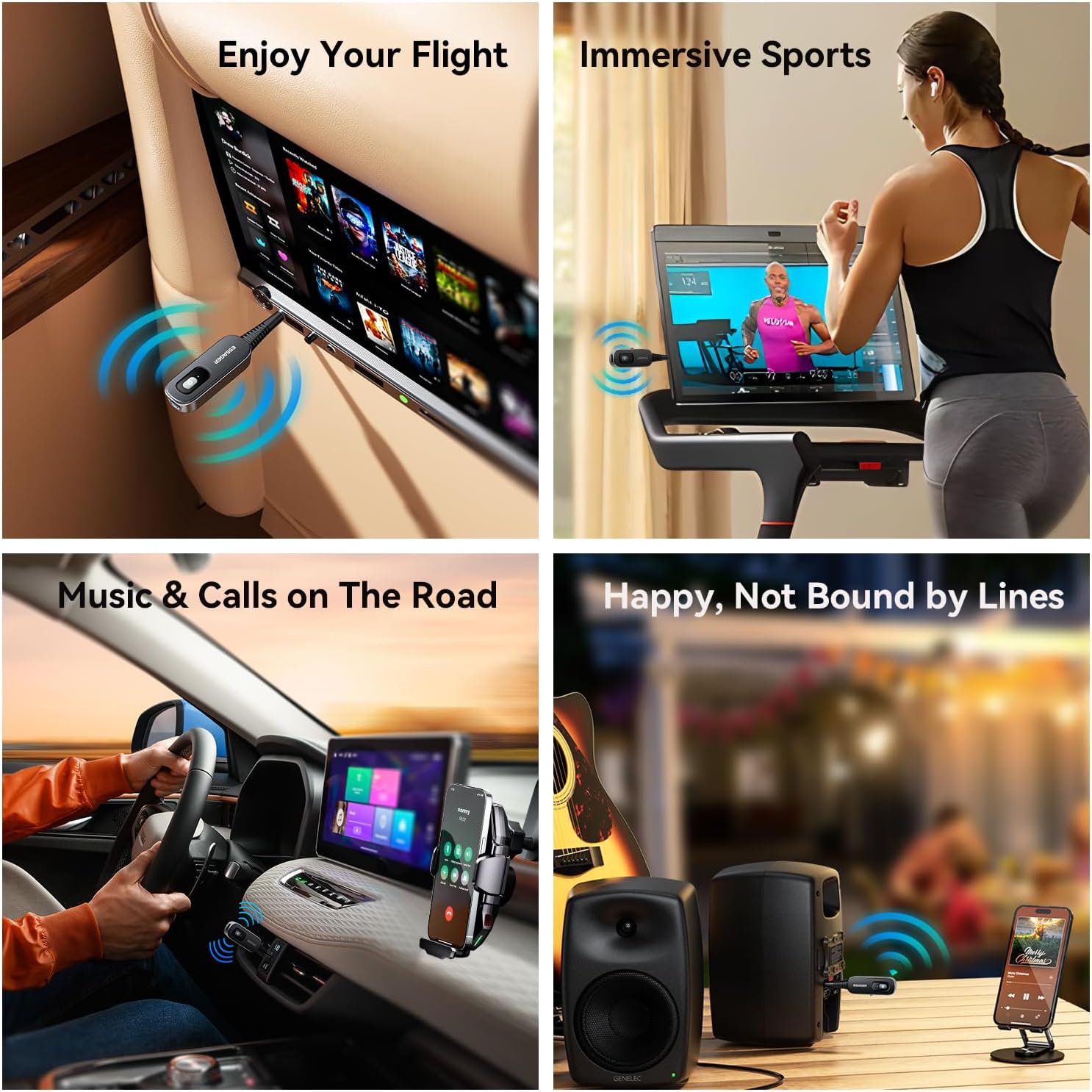
Image 6.2: Various applications of the ESSAGER Bluetooth device, including airplane use, exercise, car audio, and home stereo.
7. പരിപാലനം
- വൃത്തിയാക്കൽ: ഉപകരണം വൃത്തിയാക്കാൻ മൃദുവായതും ഉണങ്ങിയതുമായ തുണി ഉപയോഗിക്കുക. ലിക്വിഡ് ക്ലീനറുകളോ എയറോസോളുകളോ ഉപയോഗിക്കരുത്.
- സംഭരണം: നേരിട്ടുള്ള സൂര്യപ്രകാശത്തിൽ നിന്നും കടുത്ത താപനിലയിൽ നിന്നും മാറി തണുത്തതും വരണ്ടതുമായ സ്ഥലത്ത് ഉപകരണം സൂക്ഷിക്കുക.
- ആഘാതം ഒഴിവാക്കുക: ഉപകരണത്തെ ശക്തമായ ആഘാതങ്ങൾക്ക് വിധേയമാക്കുകയോ ഉപേക്ഷിക്കുകയോ ചെയ്യരുത്.
8. പ്രശ്നപരിഹാരം
| പ്രശ്നം | സാധ്യമായ കാരണം | പരിഹാരം |
|---|---|---|
| ഉപകരണം പവർ ഓണാക്കുന്നില്ല. | കുറഞ്ഞ ബാറ്ററി. | നൽകിയിരിക്കുന്ന ടൈപ്പ്-സി കേബിൾ ഉപയോഗിച്ച് ഉപകരണം പൂർണ്ണമായും ചാർജ് ചെയ്യുക. |
| Cannot pair with another device. | Incorrect mode selected (RX/TX). ഉപകരണം ജോടിയാക്കൽ മോഡിൽ ഇല്ല. Too far from the other device. Previous pairing interference. | Ensure the correct RX or TX mode is selected. Power cycle the device to re-enter pairing mode (LED flashing blue/red). Bring devices closer (within 10 meters/33 feet). Clear Bluetooth history on the source/receiving device and try again. |
| Poor audio quality or intermittent connection. | പരിധിക്ക് പുറത്ത്. മറ്റ് വയർലെസ് ഉപകരണങ്ങളിൽ നിന്നുള്ള ഇടപെടൽ. കുറഞ്ഞ ബാറ്ററി. | Ensure devices are within 10 meters (33 feet) and without major obstructions. Move away from other Wi-Fi routers, microwaves, or strong electromagnetic fields. ഉപകരണം ചാർജ് ചെയ്യുക. |
| ഹാൻഡ്സ് ഫ്രീ കോളിംഗ് പ്രവർത്തിക്കുന്നില്ല. | Not in RX mode. Microphone blocked. Not connected to a phone. | Ensure the device is in RX mode. Check that the microphone is not covered. Verify successful Bluetooth connection to your smartphone. |
9 സ്പെസിഫിക്കേഷനുകൾ
| ബ്രാൻഡ് | എസ്സാഗർ |
| മോഡൽ | B0DT6F83Z |
| ബ്ലൂടൂത്ത് പതിപ്പ് | 5.3 |
| ഓപ്പറേറ്റിംഗ് മോഡുകൾ | Receiver (RX), Transmitter (TX) |
| ഓഡിയോ പോർട്ട് | 3.5mm AUX |
| ചാർജിംഗ് പോർട്ട് | ടൈപ്പ്-സി |
| ബാറ്ററി ലൈഫ് | 6-7 hours (music/calls) |
| ചാർജിംഗ് സമയം | ഏകദേശം 1.5 മണിക്കൂർ |
| ട്രാൻസ്മിഷൻ ദൂരം | 10 മീറ്റർ വരെ (33 അടി) |
| ശബ്ദം കുറയ്ക്കൽ | CVC8.0, DSP |
| അളവുകൾ | 96.69 മിമി x 19.95 മിമി (ഏകദേശം 3.81 x 0.79 ഇഞ്ച്) |
| ഇനത്തിൻ്റെ ഭാരം | 1.76 ഔൺസ് (ഏകദേശം 0.05 കിലോഗ്രാം) |
| പവർ ഉറവിടം | ബാറ്ററി പവർ |
| പ്രത്യേക സവിശേഷതകൾ | Low Latency, Noise Cancellation, Flexible 3.5mm AUX |

Image 9.1: Dimensions of the ESSAGER Bluetooth Receiver Transmitter.
10. വാറൻ്റിയും പിന്തുണയും
ESSAGER products are designed for reliability and performance. For warranty information, technical support, or customer service inquiries, please refer to the contact information provided on the product packaging or the official ESSAGER webസൈറ്റ്. വാറന്റി ക്ലെയിമുകൾക്കായി നിങ്ങളുടെ വാങ്ങലിന്റെ തെളിവ് സൂക്ഷിക്കുക.


