1. ആമുഖം
Thank you for choosing the Baseus 45W USB C Charger Block. This device is designed to provide efficient and fast charging for a wide range of compatible electronic devices. Please read this manual carefully to ensure proper usage and to maximize the product's lifespan.

Image 1.1: Two Baseus 45W USB C Charger Blocks and two USB-C to USB-C cables included in the package.
2. ഉൽപ്പന്ന സവിശേഷതകൾ
- 45W ഫാസ്റ്റ് ചാർജിംഗ്: Equipped with PPS/PD 3.0 technology, this charger delivers rapid power, capable of charging compatible devices like the iPhone 16 series and Galaxy S24 quickly. For Super Fast Charge 2.0, a 5A charging cable is required.
- ഒതുക്കമുള്ള & പോർട്ടബിൾ ഡിസൈൻ: The charger block is significantly smaller than standard chargers, making it ideal for travel and saving space on power strips.
- Quad Thermal Management: Advanced cooling features including graphene application, scientific thermal layout, polymer silicon-based design, and 720K/h charging status monitoring ensure optimal heat dissipation and device protection.
- Powered by GaN6 Technology: Utilizes GaN6 chip technology for a 92% energy conversion rate, resulting in higher efficiency, lower operating temperatures, and a smaller physical size.
- വിശാലമായ അനുയോജ്യത: Supports multiple fast charging protocols including PD3.0, PPS, QC3.0, FCP, SCP, and AFC, ensuring compatibility with a broad range of devices.

Image 2.1: Illustration of the 45W Super Fast Charging capability, showing a Samsung S24 Ultra reaching 61% charge in 30 minutes.

Image 2.2: Visual comparison demonstrating the compact size of the Baseus 45W charger, which is 46.66% smaller than typical chargers.

ചിത്രം 2.3: വിശദമായത് view of the Quad Thermal Management system, including graphene cooling and scientific thermal layout.

Image 2.4: Illustration of the GaN6 technology, showing a 92% energy conversion rate for enhanced efficiency.
3. സജ്ജീകരണം
- അൺപാക്ക്: Carefully remove the charger block and USB-C cable(s) from the packaging.
- പരിശോധിക്കുക: Check the charger and cable for any visible damage. Do not use if damaged.
- പവറിലേക്ക് ബന്ധിപ്പിക്കുക: Plug the Baseus 45W USB C Charger Block into a standard wall outlet. Ensure the outlet is easily accessible.
4. പ്രവർത്തന നിർദ്ദേശങ്ങൾ
- കേബിൾ ബന്ധിപ്പിക്കുക: Insert one end of the USB-C cable into the USB-C port on the charger block.
- ഉപകരണം ബന്ധിപ്പിക്കുക: Insert the other end of the USB-C cable into the charging port of your compatible electronic device.
- ചാർജിംഗ് ആരംഭിക്കുക: The device should automatically begin charging. Monitor your device's screen for charging indicators.
- വിച്ഛേദിക്കുക: Once charging is complete, safely disconnect the cable from your device, then from the charger block, and finally unplug the charger from the wall outlet.

ചിത്രം 4.1: ഉദാample of the charger in use for office charging, powering a smartphone and a laptop.

ചിത്രം 4.2: ഉദാample of the charger in use for home charging, providing power for leisure activities.
5 അനുയോജ്യത
The Baseus 45W USB C Charger Block is compatible with a wide range of devices supporting USB-C charging and various fast charging protocols. Compatible devices include, but are not limited to:
- സ്മാർട്ട്ഫോണുകൾ: iPhone 12-16 Series (including Pro, Pro Max models), Galaxy S20-S24 Series, OnePlus 8 Pro, Google Pixel 6-8, Sony Xperia 5, Android phones.
- ഗുളികകൾ: iPad (various models).
- ലാപ്ടോപ്പുകൾ: MacBook Pro 2023, Lenovo ThinkPad T14, Dell XPS 13.
- Wearables & Accessories: Apple Watch, AirPods 2-3.

Image 5.1: Visual representation of the universal compatibility of the Baseus USB-C charger with various devices.
6 സുരക്ഷാ വിവരങ്ങൾ
Your safety is a priority. The Baseus 45W USB C Charger Block incorporates multiple protection features to ensure safe and reliable charging:
- ഷോർട്ട് സർക്യൂട്ട് സംരക്ഷണം
- മിന്നൽ സർജ് സംരക്ഷണം
- ഇലക്ട്രോസ്റ്റാറ്റിക് സംരക്ഷണം
- ഓവർ-കറൻ്റ് പ്രൊട്ടക്ഷൻ
- ഓവർലോഡ് സംരക്ഷണം
- ഓവർ-വോളിയംtagഇ സംരക്ഷണം
- Low Leakage Current Protection
- Flame-Retardant Shell
- വാല്യംtage Stabilization Protection
- Low EMI Protection
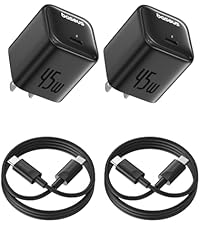
Image 6.1: Visual summary of the 10-point safety protection features integrated into the charger.
7 സ്പെസിഫിക്കേഷനുകൾ
| ഫീച്ചർ | സ്പെസിഫിക്കേഷൻ |
|---|---|
| മോഡൽ നമ്പർ | CCGAN45SECS |
| ബ്രാൻഡ് | ബേസിയസ് |
| വാട്ട്tage | 45 വാട്ട്സ് |
| മൊത്തം USB പോർട്ടുകൾ | 1 (യുഎസ്ബി ടൈപ്പ് സി) |
| ഇൻപുട്ട് വോളിയംtage | 240 വോൾട്ട് |
| Ampഉന്മേഷം | 2.24 Amps |
| പ്രത്യേക സവിശേഷതകൾ | Fast Charging, GaN6 Technology, Quad Thermal Management |
| കണക്റ്റിവിറ്റി ടെക്നോളജി | USB |
| ഇനത്തിൻ്റെ ഭാരം | 8.8 ഔൺസ് |
| പാക്കേജ് അളവുകൾ | 7.05 x 4.37 x 1.54 ഇഞ്ച് |
| ഉൾപ്പെടുത്തിയ ഘടകങ്ങൾ | യുഎസ്ബി-സി കേബിൾ |
8. പ്രശ്നപരിഹാരം
- ഉപകരണം ചാർജ് ചെയ്യുന്നില്ല:
- ചാർജർ ഒരു വർക്കിംഗ് വാൾ ഔട്ട്ലെറ്റിൽ സുരക്ഷിതമായി പ്ലഗ് ചെയ്തിട്ടുണ്ടെന്ന് ഉറപ്പാക്കുക.
- Verify the USB-C cable is firmly connected to both the charger and your device.
- Try using a different USB-C cable to rule out cable issues.
- Test the charger with a different compatible device to confirm charger functionality.
- വേഗത കുറഞ്ഞ ചാർജിംഗ്:
- Ensure your device supports 45W fast charging and the PPS/PD 3.0 protocol.
- For Super Fast Charge 2.0, use a 5A rated USB-C to USB-C cable.
- ചാർജ് ചെയ്യുമ്പോൾ വൈദ്യുതി ഉപഭോഗം കുറയ്ക്കുന്നതിന് നിങ്ങളുടെ ഉപകരണത്തിലെ അനാവശ്യ ആപ്ലിക്കേഷനുകൾ അടയ്ക്കുക.
- Avoid using your device intensively while charging for optimal speed.
- ചാർജർ ചൂടായി തോന്നുന്നു:
- പ്രവർത്തിക്കുമ്പോൾ, പ്രത്യേകിച്ച് ഫാസ്റ്റ് ചാർജിംഗ് സമയത്ത് ചാർജർ ചൂടാകുന്നത് സ്വാഭാവികമാണ്.
- If the charger becomes excessively hot to touch, disconnect it immediately and contact customer support.
9. പരിപാലനം
- വൃത്തിയാക്കൽ: വൃത്തിയാക്കുന്നതിന് മുമ്പ് പവർ ഔട്ട്ലെറ്റിൽ നിന്ന് ചാർജർ വിച്ഛേദിക്കുക. ഉപരിതലം തുടയ്ക്കാൻ മൃദുവായതും ഉണങ്ങിയതുമായ തുണി ഉപയോഗിക്കുക. ലിക്വിഡ് ക്ലീനറുകളോ എയറോസോളുകളോ ഉപയോഗിക്കരുത്.
- സംഭരണം: നേരിട്ടുള്ള സൂര്യപ്രകാശത്തിൽ നിന്നും തീവ്രമായ താപനിലയിൽ നിന്നും മാറി തണുത്തതും വരണ്ടതുമായ സ്ഥലത്ത് ചാർജർ സൂക്ഷിക്കുക.
- കൈകാര്യം ചെയ്യൽ: ചാർജർ താഴെയിടുകയോ ശക്തമായ ആഘാതങ്ങൾക്ക് വിധേയമാക്കുകയോ ചെയ്യുന്നത് ഒഴിവാക്കുക. ചാർജർ വേർപെടുത്താനോ പരിഷ്ക്കരിക്കാനോ ശ്രമിക്കരുത്.
10. വാറൻ്റിയും പിന്തുണയും
Baseus products are manufactured with high-quality standards. For warranty information, technical support, or any product-related inquiries, please refer to the warranty card included with your purchase or visit the official Baseus website. You may also contact Baseus customer service directly for assistance.