1. ഉൽപ്പന്നം കഴിഞ്ഞുview
The Motorola Moto G15 (XT2521-2) is a versatile 4G LTE smartphone designed for reliable communication and multimedia. This international model is GSM unlocked, compatible with carriers such as T-Mobile, Metro PCS, Mint, and Tello. It features a large display, capable camera system, and long-lasting battery life.
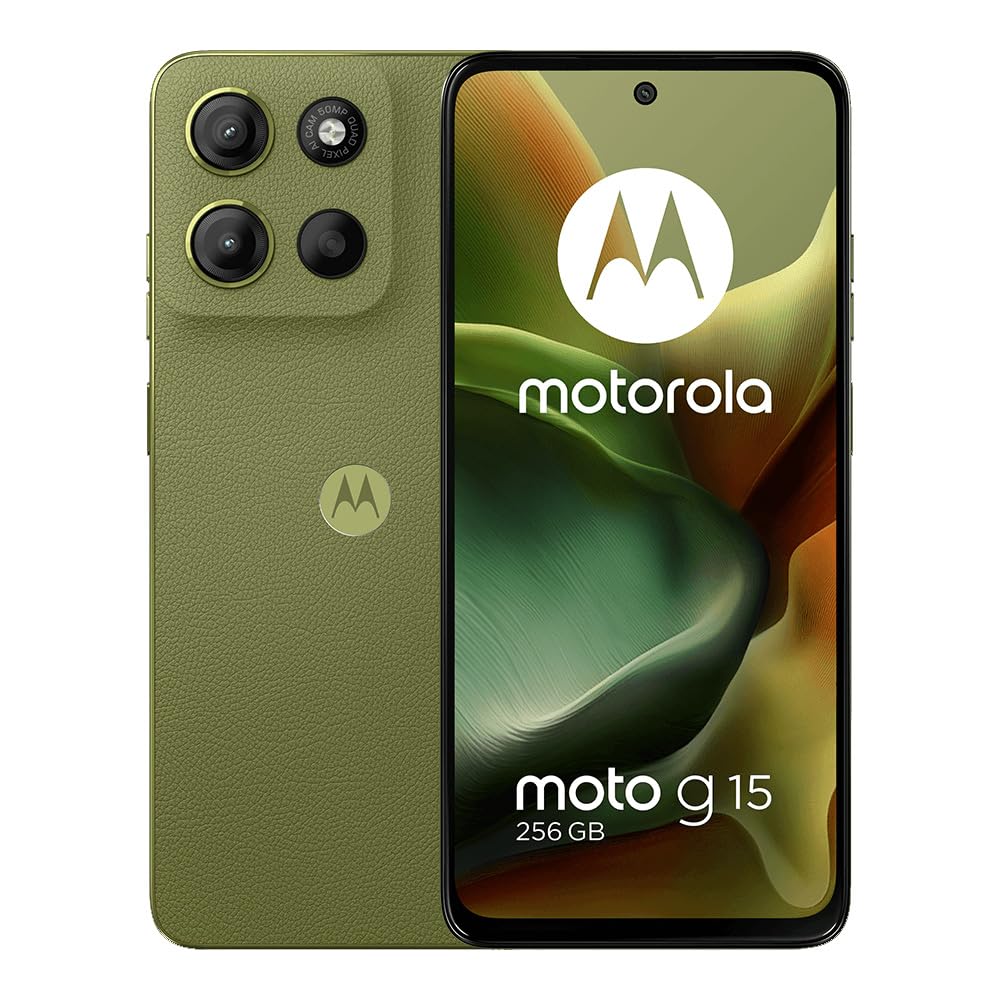
ചിത്രം 1: മുൻഭാഗം view of the Motorola Moto G15 smartphone.
2. ബോക്സിൽ എന്താണുള്ളത്?
Your Motorola Moto G15 package includes the following items:
- Motorola Moto G15 Smartphone (Green)
- പവർ അഡാപ്റ്റർ
- USB കേബിൾ
- സിം ട്രേ എജക്ടർ
3. സജ്ജീകരണം
3.1. സിം കാർഡ് ഇൻസ്റ്റാളേഷൻ
- നിങ്ങളുടെ ഉപകരണത്തിന്റെ വശത്ത് സിം ട്രേ കണ്ടെത്തുക.
- ട്രേയുടെ അടുത്തുള്ള ചെറിയ ദ്വാരത്തിലേക്ക് സിം ട്രേ എജക്റ്റർ ടൂൾ തിരുകുക, ട്രേ പുറത്തേക്ക് വരുന്നത് വരെ ദൃഢമായി അമർത്തുക.
- സ്വർണ്ണ കോൺടാക്റ്റുകൾ താഴേക്ക് അഭിമുഖമായി വരുന്ന തരത്തിൽ നിങ്ങളുടെ നാനോ-സിം കാർഡ്(കൾ) അല്ലെങ്കിൽ മൈക്രോ എസ്ഡി കാർഡ് (ബാധകമെങ്കിൽ) ട്രേയിൽ വയ്ക്കുക. അവ ശരിയായി സ്ഥാപിച്ചിട്ടുണ്ടെന്ന് ഉറപ്പാക്കുക.
- സിം ട്രേ ശ്രദ്ധാപൂർവ്വം ഉപകരണത്തിലേക്ക് വീണ്ടും ചേർക്കുക.
3.2. പ്രാരംഭ പവർ ഓൺ
- മോട്ടറോള ലോഗോ ദൃശ്യമാകുന്നതുവരെ പവർ ബട്ടൺ (വശത്ത് സ്ഥിതിചെയ്യുന്നു) അമർത്തിപ്പിടിക്കുക.
- നിങ്ങളുടെ ഭാഷ തിരഞ്ഞെടുക്കുന്നതിനും, ഒരു വൈഫൈ നെറ്റ്വർക്കിലേക്ക് കണക്റ്റുചെയ്യുന്നതിനും, നിബന്ധനകളും വ്യവസ്ഥകളും അംഗീകരിക്കുന്നതിനും ഓൺ-സ്ക്രീൻ നിർദ്ദേശങ്ങൾ പാലിക്കുക.
3.3. ഗൂഗിൾ അക്കൗണ്ട് സജ്ജീകരണം
- Sign in with your existing Google account or create a new one. This is essential for accessing Google services like the Play Store, Gmail, and Google Drive.
- Review and adjust Google services settings, including location services and data usage preferences.
3.4. Security Setup
- Set up a screen lock method: PIN, pattern, or password.
- Configure fingerprint unlock for quick and secure access.
3.5. Additional Apps & Navigation
- Review and select any additional Google apps you wish to install.
- Choose your preferred navigation style: traditional buttons or gesture navigation.
4. സവിശേഷതകൾ
4.1. ഡിസ്പ്ലേ
The Moto G15 features a large 6.72-inch IPS LCD display with a resolution of 1080 x 2400 pixels, providing clear and vibrant visuals for all your content.
4.2. ക്യാമറ
Capture high-quality photos with the 50 MP wide main camera (f/1.8) and expand your perspective with the 5 MP ultrawide camera (f/2.4).

ചിത്രം 2: പിന്നിലേക്ക് view of the Motorola Moto G15, highlighting the camera module.
4.3. പ്രകടനവും സംഭരണവും
Powered by the Mediatek Helio G81 Extreme (12 nm) Octa-core processor and 4 GB of RAM, the device offers smooth performance for daily tasks. It comes with 256 GB of internal storage, expandable via microSD card.
4.4. ബാറ്ററി
Equipped with a robust 5200 mAh non-removable battery, the Moto G15 provides extended usage times, ensuring you stay connected throughout the day.
4.5. കണക്റ്റിവിറ്റി
The device supports 4G LTE, Bluetooth 5.0, Wi-Fi, GPS, and includes a 3.5 mm audio jack and FM radio for versatile connectivity options.

ചിത്രം 3: വശം view of the Motorola Moto G15, showing buttons and ports.
5. നിങ്ങളുടെ ഉപകരണം പ്രവർത്തിപ്പിക്കുന്നു
5.1. അടിസ്ഥാന നാവിഗേഷൻ
- ഹോം സ്ക്രീൻ: വ്യത്യസ്ത ഹോം സ്ക്രീൻ പാനലുകൾ ആക്സസ് ചെയ്യാൻ ഇടത്തോട്ടോ വലത്തോട്ടോ സ്വൈപ്പ് ചെയ്യുക.
- ആപ്പ് ഡ്രോയർ: സ്ക്രീനിന്റെ അടിയിൽ നിന്ന് മുകളിലേക്ക് സ്വൈപ്പുചെയ്യുക view ഇൻസ്റ്റാൾ ചെയ്ത എല്ലാ ആപ്ലിക്കേഷനുകളും.
- അറിയിപ്പുകളും ദ്രുത ക്രമീകരണങ്ങളും: സ്ക്രീനിന്റെ മുകളിൽ നിന്ന് താഴേക്ക് സ്വൈപ്പ് ചെയ്ത് അറിയിപ്പുകളും ക്വിക്ക് സെറ്റിംഗ്സ് ടോഗിളുകളും ആക്സസ് ചെയ്യുക.
- സമീപകാല ആപ്പുകൾ: Use the recent apps button (or gesture) to switch between recently used applications.
5.2. Making Calls & Sending Messages
- Open the Phone app to dial numbers or select contacts.
- Use the Messages app to send and receive SMS/MMS messages.
5.3. ക്യാമറ ഉപയോഗം
- ക്യാമറ ആപ്പ് തുറക്കുക.
- ഒരു ഫോട്ടോ എടുക്കാൻ ഷട്ടർ ബട്ടൺ ടാപ്പ് ചെയ്യുക.
- Switch between photo and video modes, and explore options like ultrawide, portrait, and more.
6. പരിപാലനം
6.1. ജനറൽ കെയർ
- Keep your device clean using a soft, lint-free cloth.
- ഉയർന്ന താപനിലയിലോ നേരിട്ടുള്ള സൂര്യപ്രകാശത്തിലോ ഫോൺ ദീർഘനേരം തുറന്നുവെക്കുന്നത് ഒഴിവാക്കുക.
- Protect your screen with a screen protector and use a protective case to prevent damage from drops.
6.2. സോഫ്റ്റ്വെയർ അപ്ഡേറ്റുകൾ
നിങ്ങളുടെ ഉപകരണത്തിൽ ഏറ്റവും പുതിയ ഫീച്ചറുകൾ, സുരക്ഷാ പാച്ചുകൾ, പ്രകടന മെച്ചപ്പെടുത്തലുകൾ എന്നിവ ഉണ്ടെന്ന് ഉറപ്പാക്കാൻ സോഫ്റ്റ്വെയർ അപ്ഡേറ്റുകൾ പതിവായി പരിശോധിച്ച് ഇൻസ്റ്റാൾ ചെയ്യുക. ഇതിലേക്ക് പോകുക ക്രമീകരണങ്ങൾ> സിസ്റ്റം> സിസ്റ്റം അപ്ഡേറ്റുകൾ ലഭ്യമായ അപ്ഡേറ്റുകൾ പരിശോധിക്കാൻ.
7. പ്രശ്നപരിഹാരം
7.1. ഉപകരണം ഓണാക്കുന്നില്ല
- Ensure the battery is charged. Connect the phone to the charger for at least 15 minutes before attempting to power it on.
- Perform a forced restart by holding down the Power button for 10-15 seconds.
7.2. Apps Freezing or Crashing
- ആപ്പ് അടച്ച് വീണ്ടും തുറക്കുക.
- ആപ്പിന്റെ കാഷെയും ഡാറ്റയും മായ്ക്കുക (ക്രമീകരണങ്ങൾ > ആപ്പുകൾ > [ആപ്പ് നാമം] > സംഭരണം > കാഷെ മായ്ക്കുക/ഡാറ്റ മായ്ക്കുക).
- Ensure the app is updated to its latest version from the Play Store.
7.3. മോശം നെറ്റ്വർക്ക് സ്വീകരണം
- നിങ്ങളുടെ സിം കാർഡ് ശരിയായി ചേർത്തിട്ടുണ്ടോ എന്ന് പരിശോധിക്കുക.
- നിങ്ങളുടെ ഫോൺ പുനരാരംഭിക്കുക.
- Verify that your device is compatible with your carrier's network (GSM Unlocked, compatible with T-Mobile, Metro PCS, Mint & Tello).
8 സ്പെസിഫിക്കേഷനുകൾ
| ഫീച്ചർ | വിശദാംശങ്ങൾ |
|---|---|
| മോഡലിൻ്റെ പേര് | Moto G15 |
| മോഡൽ നമ്പർ | XT2521-2 |
| ഓപ്പറേറ്റിംഗ് സിസ്റ്റം | ആൻഡ്രോയിഡ് 15 |
| പ്രദർശിപ്പിക്കുക | 6.72-ഇഞ്ച് ഐപിഎസ് എൽസിഡി, 1080 x 2400 പിക്സലുകൾ |
| പ്രോസസ്സർ | മീഡിയടെക് ഹീലിയോ G81 എക്സ്ട്രീം (12 nm), ഒക്ടാ-കോർ (2x2.0 GHz കോർടെക്സ്-A75 & 6x1.7 GHz കോർടെക്സ്-A55) |
| റാം | 4 ജിബി |
| ആന്തരിക സംഭരണം | 256 ജിബി |
| വികസിപ്പിക്കാവുന്ന സംഭരണം | അതെ (മൈക്രോ എസ്ഡി) |
| പിൻ ക്യാമറ | 50 MP (wide), f/1.8; 5 MP (ultrawide), f/2.4 |
| മുൻ ക്യാമറ | Not specified in provided data, typically 8MP or 16MP for this class. |
| ബാറ്ററി | 5200 mAh (Non-removable) |
| കണക്റ്റിവിറ്റി | 4G LTE, Wi-Fi, Bluetooth 5.0, GPS, FM Radio, USB-C, 3.5 mm Audio Jack |
| സിം തരം | ഡ്യുവൽ സിം (നാനോ-സിം) |
| അളവുകൾ | 6.97 x 3.74 x 2.05 ഇഞ്ച് |
| ഭാരം | 12.6 ഔൺസ് |
9. വാറൻ്റിയും പിന്തുണയും
For warranty information and customer support, please refer to the documentation included in your product packaging or visit the official Motorola webസൈറ്റ്. പ്രദേശത്തെയും റീട്ടെയിലറെയും ആശ്രയിച്ച് നിർദ്ദിഷ്ട വാറന്റി നിബന്ധനകളും വ്യവസ്ഥകളും വ്യത്യാസപ്പെടാം.


