ഉൽപ്പന്നം കഴിഞ്ഞുview
The Edifier ES20 is a compact and powerful portable Bluetooth speaker designed for both indoor and outdoor use. It features IP67 waterproof and dustproof capabilities, ensuring durability in various environments. With Bluetooth V5.4 connectivity, it offers stable wireless audio and supports stereo pairing for an enhanced sound experience. The speaker also includes a built-in microphone for hands-free calls and customizable ambient lighting.
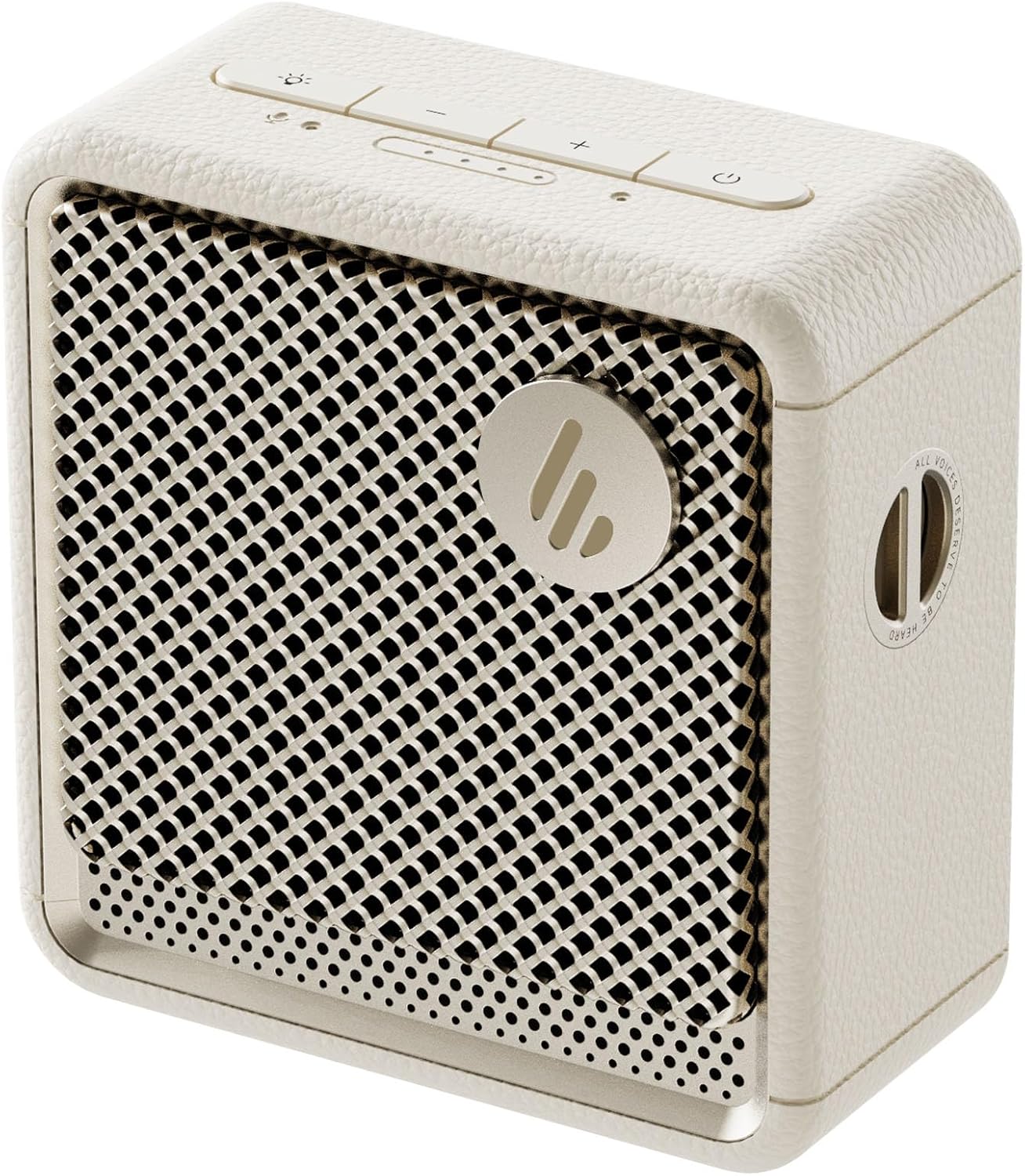
ചിത്രം: മുൻഭാഗം view of the Edifier ES20 Portable Bluetooth Speaker in Ivory, showcasing അതിന്റെ ഒതുക്കമുള്ള രൂപകൽപ്പനയും സ്പീക്കർ ഗ്രില്ലും.

Image: The Edifier ES20 speaker placed on a desk, demonstrating its suitability for home or office environments.
പ്രധാന സവിശേഷതകളിൽ ഇവ ഉൾപ്പെടുന്നു:
- പ്രീമിയം സൗണ്ട് ക്വാളിറ്റി: 6W (RMS) output with a 1.7'' full-range driver and 2'' passive bass radiators for rich, punchy sound.
- Bluetooth V5.4 & Stereo Pairing: Seamless wireless connectivity and the ability to pair two speakers for stereo sound.
- IP67 വാട്ടർപ്രൂഫ് & ഡസ്റ്റ് പ്രൂഫ്: Designed to withstand splashes, rain, and dust, making it ideal for outdoor use.
- Long Lasting Playtime: ഒറ്റ ചാർജിൽ 15 മണിക്കൂർ വരെ പ്ലേടൈം.
- ആംബിയൻ്റ് ലൈറ്റിംഗ്: Features a customizable ambient light system for enhanced atmosphere.
- ബിൽറ്റ്-ഇൻ മൈക്രോഫോൺ: High-sensitivity microphone for clear hands-free communication.
- നിയന്ത്രിക്കാൻ എളുപ്പമാണ്: Intuitive top-mounted buttons and control via the EDIFIER ConneX app.
സജ്ജീകരണ ഗൈഡ്
ബോക്സിൽ എന്താണുള്ളത്
ആരംഭിക്കുന്നതിന് മുമ്പ്, പാക്കേജിംഗിൽ എല്ലാ ഘടകങ്ങളും ഉണ്ടെന്ന് ഉറപ്പാക്കുക:
- Edifier ES20 Portable Bluetooth Speaker
- സ്ട്രാപ്പ്
- ദ്രുത ആരംഭ ഗൈഡ്
- USB-C മുതൽ USB-C കേബിൾ വരെ
- പ്രധാനപ്പെട്ട സുരക്ഷാ നിർദ്ദേശങ്ങൾ

Image: A visual representation of the Edifier ES20 speaker and its included accessories, such as the strap, charging cable, and documentation.
സ്പീക്കറെ കുറ്റപ്പെടുത്തുന്നു
The ES20 speaker comes with a built-in rechargeable battery. Before first use, it is recommended to fully charge the speaker.
- Connect the provided USB-C to USB-C cable to the charging port on the speaker.
- കേബിളിന്റെ മറ്റേ അറ്റം അനുയോജ്യമായ ഒരു USB പവർ അഡാപ്റ്ററുമായി (ഉൾപ്പെടുത്തിയിട്ടില്ല) അല്ലെങ്കിൽ കമ്പ്യൂട്ടറിന്റെ USB പോർട്ടുമായി ബന്ധിപ്പിക്കുക.
- The battery indicator lights on the top panel will illuminate to show charging progress. All lights will be solid when fully charged.
പ്രാരംഭ ബ്ലൂടൂത്ത് ജോടിയാക്കൽ
Follow these steps to connect your ES20 speaker to a Bluetooth device for the first time:
- Ensure the speaker is charged and powered on. The Bluetooth indicator light will flash, indicating it's in pairing mode.
- നിങ്ങളുടെ ഉപകരണത്തിൽ (സ്മാർട്ട്ഫോൺ, ടാബ്ലെറ്റ്, ലാപ്ടോപ്പ്), ബ്ലൂടൂത്ത് പ്രവർത്തനക്ഷമമാക്കി ലഭ്യമായ ഉപകരണങ്ങൾക്കായി തിരയുക.
- Select "EDIFIER ES20" from the list of found devices.
- Once connected, the Bluetooth indicator light on the speaker will remain solid.
For advanced features and easier control, download the EDIFIER ConneX app from your device's app store.

Image: Screenshots illustrating the EDIFIER ConneX mobile application, which provides additional control and customization options for the speaker.
പ്രവർത്തന നിർദ്ദേശങ്ങൾ
ബട്ടൺ പ്രവർത്തനങ്ങൾ
The ES20 speaker features intuitive top-mounted buttons for easy control:

Image: A detailed diagram outlining the functions of each button on the top panel of the ES20 speaker, including power, volume, playback, and lighting controls.
| ബട്ടൺ/ഇൻഡിക്കേറ്റർ | ഫംഗ്ഷൻ |
|---|---|
| പവർ ബട്ടൺ | Press and hold for 1.5s to power on/off. Short press to play/pause. |
| വോളിയം കൂട്ടുക (+) | വോളിയം കൂട്ടാൻ ചെറുതായി അമർത്തുക. |
| വോളിയം താഴേക്ക് (-) | ശബ്ദം കുറയ്ക്കാൻ ഹ്രസ്വമായി അമർത്തുക. |
| മോഡ്/ലൈറ്റ് ബട്ടൺ | Short press to cycle through sound effects. Press and hold for 1.5s to cycle through ambient light modes. |
| ബ്ലൂടൂത്ത് ബട്ടൺ | Short press to disconnect current Bluetooth device. Press and hold for 1.5s to enter Bluetooth pairing mode. Double press to enable/disable stereo pairing. |
| ബാറ്ററി പവർ സൂചകം | നിലവിലെ ബാറ്ററി നില സൂചിപ്പിക്കുന്നു. |
| മോഡ് സൂചകം | Blue for Bluetooth mode, White for Bluetooth stereo pairing mode. |
ബ്ലൂടൂത്ത് സ്റ്റീരിയോ ജോടിയാക്കൽ
You can pair two ES20 speakers together for a true wireless stereo experience. This requires two ES20 units.
- Ensure both ES20 speakers are powered on and not connected to any other Bluetooth devices.
- On one speaker (this will be the primary speaker), double-press the Bluetooth button. The Bluetooth indicator will flash rapidly.
- The primary speaker will automatically search for and connect to the second ES20 speaker.
- Once connected, the Bluetooth indicator on both speakers will remain solid, and you will hear an audible confirmation.
- Now, connect your device to the primary ES20 speaker via Bluetooth as you normally would.

Image: Two ES20 speakers, one black and one ivory, positioned to illustrate Bluetooth stereo pairing, with a smartphone displaying music playback.
Bluetooth Multi-Point Connectivity
The ES20 supports connecting to two Bluetooth devices simultaneously, allowing for seamless switching between audio sources.
- Connect the first device to the ES20 speaker via Bluetooth.
- Once connected, put the speaker back into pairing mode (press and hold the Bluetooth button for 1.5s).
- Connect the second device to the ES20 speaker.
- The speaker will now be connected to both devices. To switch audio playback, simply pause playback on the active device and start playback on the other.

Image: A visual representation of the ES20 speaker connected to multiple smartphones, highlighting its Bluetooth multi-point connectivity feature.
ആംബിയൻ്റ് ലൈറ്റ് സിസ്റ്റം
The ES20 features an ambient light system with multiple modes to enhance your listening experience or provide utility.
- ശ്വസനം: Light gently fades in and out.
- മഴവില്ല്: Cycles through a spectrum of colors.
- സ്റ്റാറ്റിക്: A single, constant color.
- Glittering and Colorful: Dynamic, multi-color effects.
- എമർജൻസി ലൈറ്റ്: Flashing red light for signaling.
To change the ambient light mode, press and hold the Mode/Light button for 1.5 seconds.

Image: The ES20 speaker showcasing its ambient light system, with icons representing different light effects like breathing, rainbow, static, glittering, and emergency light.
ഒന്നിലധികം ശബ്ദ ഇഫക്റ്റുകൾ
Optimize your audio experience by selecting from four preset sound modes:
- സംഗീതം: ബാലൻസ്ഡ് സൗണ്ട് പ്രോfile for general music listening.
- ഗെയിം: Enhanced audio cues for gaming.
- സിനിമ: Optimized for dialogue and cinematic soundscapes.
- Do ട്ട്ഡോർ: Boosted volume and bass for open-air environments.
To cycle through sound effects, short press the Mode/Light button.

Image: The ES20 speaker set in a natural environment, surrounded by icons representing its various sound effect modes: Music, Game, Movie, and Outdoor.
Built-in MEMS Microphone
The ES20 includes a high-sensitivity MEMS microphone with intelligent noise cancellation, allowing for clear hands-free calls when connected to your smartphone.

Image: The ES20 speaker positioned next to a smartphone showing an active call screen, illustrating the use of its built-in MEMS microphone for hands-free communication.
മെയിൻ്റനൻസ്
വൃത്തിയാക്കൽ
- Use a soft, dry cloth to clean the surface of the speaker.
- അബ്രാസീവ് ക്ലീനറുകൾ, മെഴുക് അല്ലെങ്കിൽ ലായകങ്ങൾ എന്നിവ ഉപയോഗിക്കരുത്, കാരണം അവ ഫിനിഷിന് കേടുവരുത്തും.
- For the speaker grille, use a soft brush to gently remove dust or debris.
വാട്ടർപ്രൂഫ്, ഡസ്റ്റ് പ്രൂഫ് കെയർ (IP67)
While the ES20 is IP67 rated for water and dust resistance, proper care is essential to maintain its integrity:
- സ്പീക്കർ വെള്ളത്തിലോ പൊടിയിലോ ഏൽപ്പിക്കുന്നതിന് മുമ്പ് ചാർജിംഗ് പോർട്ട് കവർ സുരക്ഷിതമായി അടച്ചിട്ടുണ്ടെന്ന് ഉറപ്പാക്കുക.
- Do not intentionally submerge the speaker beyond 1 meter (3 feet) or for longer than 30 minutes.
- After exposure to water, especially saltwater or chlorinated water, rinse the speaker with fresh water and allow it to air dry completely before charging or using.
- സ്പീക്കറിനെ തീവ്രമായ താപനിലയിലോ നേരിട്ടുള്ള സൂര്യപ്രകാശത്തിലോ ദീർഘനേരം തുറന്നുകാട്ടുന്നത് ഒഴിവാക്കുക.

Image: The black version of the ES20 speaker partially submerged in water, illustrating its IP67 waterproof and dustproof protection rating.
ബാറ്ററി കെയർ
- ബാറ്ററി ലൈഫ് വർദ്ധിപ്പിക്കാൻ, സ്പീക്കർ ഇടയ്ക്കിടെ പൂർണ്ണമായും ഡിസ്ചാർജ് ചെയ്യുന്നത് ഒഴിവാക്കുക.
- Charge the speaker regularly, even if not in use, to prevent deep discharge.
- ദീർഘനേരം ഉപയോഗിക്കാത്തപ്പോൾ സ്പീക്കർ തണുത്തതും വരണ്ടതുമായ സ്ഥലത്ത് സൂക്ഷിക്കുക.

Image: A circular graphic depicting the 15-hour playtime of the ES20 speaker, with the speaker itself at the center.
ട്രബിൾഷൂട്ടിംഗ്
| പ്രശ്നം | സാധ്യമായ കാരണം | പരിഹാരം |
|---|---|---|
| സ്പീക്കർ പവർ ഓൺ ചെയ്യുന്നില്ല. | ബാറ്ററി ചാർജ് കുറവാണ്; പവർ ബട്ടൺ ശരിയായി അമർത്തിയിട്ടില്ല. | Charge the speaker fully. Press and hold the power button for 1.5 seconds. |
| ബ്ലൂടൂത്ത് ഉപകരണവുമായി ജോടിയാക്കാൻ കഴിയില്ല. | Speaker not in pairing mode; Device Bluetooth off; Speaker too far from device; Interference. | Ensure speaker is in pairing mode (flashing Bluetooth light). Turn device Bluetooth off/on. Move speaker closer to device. Avoid strong Wi-Fi signals or other Bluetooth devices. |
| ശബ്ദമില്ല അല്ലെങ്കിൽ കുറഞ്ഞ ശബ്ദമില്ല. | Volume too low on speaker or device; Paused playback; Incorrect audio output selected on device. | Increase volume on both speaker and device. Ensure music is playing. Check device's audio output settings. |
| ശബ്ദ വികൃതത. | ശബ്ദം വളരെ കൂടുതലാണ്; ദുർബലമായ ബ്ലൂടൂത്ത് സിഗ്നൽ. | Lower the volume. Move speaker closer to the Bluetooth device. |
| സ്റ്റീരിയോ ജോടിയാക്കൽ പരാജയപ്പെടുന്നു. | Only one speaker in pairing mode; Speakers too far apart. | Ensure both speakers are powered on and not connected to other devices before initiating stereo pairing. Keep speakers within close proximity during pairing. |
If the issue persists, try resetting the speaker by holding the power button for 10 seconds, or consult the EDIFIER ConneX app for further assistance.
സ്പെസിഫിക്കേഷനുകൾ
Detailed technical specifications for the Edifier ES20 Portable Bluetooth Speaker:

Image: A comprehensive table listing the technical specifications of the ES20 speaker, including output power, frequency response, dimensions, and weight.
| ഫീച്ചർ | വിശദാംശങ്ങൾ |
|---|---|
| മോഡലിൻ്റെ പേര് | ES20 |
| സ്പീക്കർ തരം | പോർട്ടബിൾ സ്പീക്കർ |
| മൊത്തം ഔട്ട്പുട്ട് പവർ | 6W (RMS) |
| ഡ്രൈവർ യൂണിറ്റുകൾ | Full-range: φ43mm, Passive bass radiator: φ55mm |
| ഫ്രീക്വൻസി പ്രതികരണം | 93Hz - 19KHz |
| സിഗ്നൽ-ടു-നോയിസ് അനുപാതം | ≥85dB (എ) |
| ബ്ലൂടൂത്ത് പതിപ്പ് | V5.4 |
| കോഡെക്കുകൾ | എസ്.ബി.സി |
| കണക്റ്റിവിറ്റി പ്രോട്ടോക്കോൾ | Bluetooth, EDIFIER ConneX App |
| ബാറ്ററി ലൈഫ് | 15 മണിക്കൂർ |
| IP റേറ്റിംഗ് | IP67 (വാട്ടർപ്രൂഫ് & ഡസ്റ്റ് പ്രൂഫ്) |
| ഉൽപ്പന്ന അളവുകൾ (W × H × D) | 90.4mm × 93.7mm × 49.7mm (3.55"D x 3.68"W x 1.95"H) |
| മൊത്തം ഭാരം | 326 ഗ്രാം (1.01 പൗണ്ട്) |
| നിയന്ത്രണ രീതി | സ്പർശിക്കുക |

Image: The ES20 speaker with its dimensions (width, height, depth) clearly marked, providing a visual reference for its compact size.
വാറൻ്റിയും പിന്തുണയും
The Edifier ES20 Portable Bluetooth Speaker comes with a limited warranty. Please refer to the "Warranty Card" included in your product packaging for detailed terms and conditions.
For technical support, troubleshooting assistance beyond this manual, or warranty claims, please visit the official Edifier website or contact their customer service. The EDIFIER ConneX app may also provide direct support options or frequently asked questions.
കൂടുതൽ വിവരങ്ങളും പിന്തുണാ ഉറവിടങ്ങളും നിങ്ങൾക്ക് ഇവിടെ കണ്ടെത്താനാകും Edifier Store on Amazon.


