ആമുഖം
This manual provides essential information for the installation, operation, maintenance, and troubleshooting of your Sapphire Nitro+ AMD Radeon RX 9070 XT Gaming OC Graphics Card. Please read this manual thoroughly before installing and using your new graphics card to ensure optimal performance and longevity.

Image: The Sapphire Nitro+ AMD Radeon RX 9070 XT Graphics Card shown alongside its retail packaging.
പാക്കേജ് ഉള്ളടക്കം
നിങ്ങളുടെ ഉൽപ്പന്ന പാക്കേജിൽ എല്ലാ ഇനങ്ങളും ഉണ്ടെന്ന് ഉറപ്പാക്കുക:
- Sapphire Nitro+ AMD Radeon RX 9070 XT Graphics Card
- ഉപയോക്തൃ മാനുവൽ (ഈ പ്രമാണം)
- ഗ്രാഫിക്സ് കാർഡ് പിന്തുണ ബ്രാക്കറ്റ്
- Power Cable Adapter (if applicable)
- ARGB സമന്വയ കേബിൾ
Video: An unboxing video demonstrating the contents of the Sapphire Nitro+ AMD Radeon RX 9070 XT Graphics Card package, including the card and accessories.
സജ്ജീകരണവും ഇൻസ്റ്റാളേഷനും
Follow these steps to properly install your graphics card:
- തയ്യാറാക്കൽ: നിങ്ങളുടെ കമ്പ്യൂട്ടർ ഓഫ് ചെയ്ത് എല്ലാ കേബിളുകളും വിച്ഛേദിക്കുക. നിങ്ങളുടെ കമ്പ്യൂട്ടർ കേസ് തുറക്കുക.
- Remove Old Graphics Card (if applicable): If you are replacing an existing graphics card, carefully remove it by unscrewing its retention bracket and releasinപിസിഐഇ സ്ലോട്ട് ലാച്ച് g ചെയ്യുക.
- Insert New Graphics Card: Align the Sapphire Nitro+ RX 9070 XT with an available PCI Express x16 slot on your motherboard. Press down firmly until the card is securely seated and the PCIe slot latch engages. This card typically occupies three expansion slots.
- കാർഡ് സുരക്ഷിതമാക്കുക: Use screws to secure the graphics card's retention bracket to your computer case.
- പവർ കേബിളുകൾ ബന്ധിപ്പിക്കുക: Connect the necessary PCIe power cables from your power supply to the graphics card. Ensure all connections are firm. This model features a hidden power cable design for a cleaner aesthetic.
- Install Support Bracket: Due to the size and weight of the card, it is recommended to install the included anti-sag support bracket to prevent GPU sag over time.
- കേസ് അടച്ച് വീണ്ടും ബന്ധിപ്പിക്കുക: നിങ്ങളുടെ കമ്പ്യൂട്ടർ കേസ് അടയ്ക്കുക, എല്ലാ കേബിളുകളും വീണ്ടും ബന്ധിപ്പിക്കുക, നിങ്ങളുടെ സിസ്റ്റം പവർ ഓൺ ചെയ്യുക.
- ഡ്രൈവർ ഇൻസ്റ്റാളേഷൻ: Once your operating system loads, install the latest AMD Radeon drivers from the official AMD or Sapphire webസൈറ്റ്.

Image: The rear I/O panel of the graphics card, featuring multiple DisplayPort and HDMI outputs for connecting to monitors.

ചിത്രം: ഒരു ഡയഗ്രം ഷോasing the STEALTH Hidden Power Cable design, which routes power connectors for a cleaner build appearance.
നിങ്ങളുടെ ഗ്രാഫിക്സ് കാർഡ് പ്രവർത്തിപ്പിക്കുന്നു
After successful installation and driver setup, your Sapphire Nitro+ RX 9070 XT is ready for use. Connect your display(s) to the available ports (2 x HDMI, 2 x DisplayPort). For optimal performance, ensure your display cables are securely connected and your monitor is set to the correct input source.
Regularly check for driver updates through the AMD Radeon Software application to benefit from performance improvements and bug fixes. You can also utilize Sapphire's Trixx software for advanced monitoring, fan control, and RGB lighting customization.

Image: The graphics card displaying its integrated ARGB lighting, which can be customized for various visual effects.
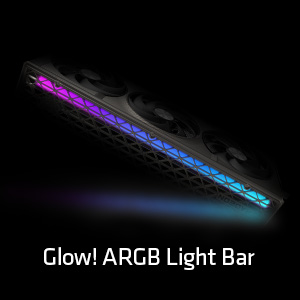
ചിത്രം: വിശദമായ ഒരു ചിത്രം view of the Glow! ARGB Light Bar, highlighting its customizable illumination capabilities.
മെയിൻ്റനൻസ്
To maintain optimal performance and extend the lifespan of your graphics card, periodic cleaning is recommended.
- പൊടി നീക്കം: Use compressed air to gently clear dust from the fans and heatsink fins. Ensure the fans do not spin rapidly during cleaning to prevent damage.
- ഫാൻ പരിശോധന: Periodically check the fans for any obstructions or unusual noises. The Quick Connect Fan feature allows for easy removal and cleaning of individual fans.
- പൊതുവായ ശുചീകരണം: കാർഡിന്റെ പുറംഭാഗം മൃദുവായതും ഉണങ്ങിയതുമായ ആന്റി-സ്റ്റാറ്റിക് തുണി ഉപയോഗിച്ച് തുടയ്ക്കുക. ലിക്വിഡ് ക്ലീനറുകൾ കാർഡിൽ നേരിട്ട് ഉപയോഗിക്കുന്നത് ഒഴിവാക്കുക.

Image: A diagram demonstrating the Quick Connect Fan system, which allows for easy removal and replacement of the cooling fans.
ട്രബിൾഷൂട്ടിംഗ്
നിങ്ങളുടെ ഗ്രാഫിക്സ് കാർഡിൽ പ്രശ്നങ്ങൾ നേരിടുകയാണെങ്കിൽ, ഇനിപ്പറയുന്ന പൊതുവായ പരിഹാരങ്ങൾ പരിഗണിക്കുക:
- ഡിസ്പ്ലേ ഔട്ട്പുട്ട് ഇല്ല:
- മോണിറ്റർ കേബിൾ ഗ്രാഫിക്സ് കാർഡിലേക്കും മോണിറ്ററിലേക്കും സുരക്ഷിതമായി ബന്ധിപ്പിച്ചിട്ടുണ്ടെന്ന് ഉറപ്പാക്കുക.
- Verify that the graphics card is fully seated in the PCIe slot and the power cables are properly connected.
- നിങ്ങളുടെ മോണിറ്റർ ശരിയായ ഇൻപുട്ട് ഉറവിടത്തിലേക്ക് സജ്ജീകരിച്ചിട്ടുണ്ടോയെന്ന് പരിശോധിക്കുക.
- സിസ്റ്റം അസ്ഥിരത അല്ലെങ്കിൽ ക്രാഷുകൾ:
- നിങ്ങളുടെ ഗ്രാഫിക്സ് ഡ്രൈവറുകൾ ഏറ്റവും പുതിയ പതിപ്പിലേക്ക് അപ്ഡേറ്റ് ചെയ്യുക.
- നിങ്ങളുടെ പവർ സപ്ലൈ യൂണിറ്റ് (പിഎസ്യു) ഏറ്റവും കുറഞ്ഞ വാട്ട് പാലിക്കുന്നുണ്ടെന്ന് ഉറപ്പാക്കുക.tagഗ്രാഫിക്സ് കാർഡിനും നിങ്ങളുടെ സിസ്റ്റത്തിനുമുള്ള e ആവശ്യകതകൾ.
- Monitor GPU temperatures using software like AMD Radeon Software or Sapphire Trixx. Overheating can cause instability.
- മോശം പ്രകടനം:
- Confirm that your display is connected to the graphics card, not the motherboard's integrated graphics.
- Check in-game settings to ensure they are appropriate for your system's capabilities.
- Ensure background applications are not consuming excessive system resources.
- ഫാൻ ശബ്ദം:
- Clean the fans and heatsink to remove dust buildup.
- Adjust fan curves using AMD Radeon Software or Sapphire Trixx to find a balance between cooling and noise.
If issues persist, consult the Sapphire support webസൈറ്റ് അല്ലെങ്കിൽ അവരുടെ ഉപഭോക്തൃ സേവനവുമായി ബന്ധപ്പെടുക.
സ്പെസിഫിക്കേഷനുകൾ
| ഫീച്ചർ | വിശദാംശങ്ങൾ |
|---|---|
| മോഡൽ നമ്പർ | 11348-01-20G |
| ഗ്രാഫിക്സ് കോപ്രൊസസർ | AMD Radeon RX 9070 XT |
| മെമ്മറി വലിപ്പം | 16 GB GDDR6 |
| മെമ്മറി ഇൻ്റർഫേസ് | 256-ബിറ്റ് |
| മെമ്മറി സ്പീഡ് | 20 GHz |
| GPU ക്ലോക്ക് സ്പീഡ് | 3060 MHz |
| പരമാവധി സ്ക്രീൻ റെസല്യൂഷൻ | 3840x2160 |
| ഔട്ട്പുട്ട് പോർട്ടുകൾ | 2 x HDMI, 2 x ഡിസ്പ്ലേ പോർട്ട് |
| ഇനത്തിൻ്റെ ഭാരം | 5.72 പൗണ്ട് |
| ഉൽപ്പന്ന അളവുകൾ (LxWxH) | 13.02 x 5.06 x 0.04 ഇഞ്ച് |
വാറൻ്റിയും പിന്തുണയും
Your Sapphire Nitro+ AMD Radeon RX 9070 XT Graphics Card is covered by a manufacturer's warranty. Please refer to the warranty card included in your product packaging or visit the official Sapphire webവിശദമായ വാറന്റി നിബന്ധനകൾക്കും വ്യവസ്ഥകൾക്കും സൈറ്റ്.
സാങ്കേതിക സഹായം, ഡ്രൈവർ ഡൗൺലോഡുകൾ, പതിവുചോദ്യങ്ങൾ, കൂടുതൽ പിന്തുണയ്ക്ക്, ദയവായി സന്ദർശിക്കുക Sapphire Technology webസൈറ്റ്. You may also find helpful resources and community support through the official AMD Radeon channels.


