1. ആമുഖം
Welcome to the Roborock Saros 10 Robot Vacuum instruction manual. This document provides essential information for the safe and efficient operation, maintenance, and troubleshooting of your new robot vacuum. The Roborock Saros 10 is engineered for high-performance cleaning, featuring powerful suction, a slim design for reaching under furniture, an AdaptiLift chassis for threshold crossing, and an advanced mopping system for thorough floor care.
2 സുരക്ഷാ വിവരങ്ങൾ
Before using your Roborock Saros 10, please read all safety instructions carefully. Keep this manual for future reference. Always ensure the robot is placed on a stable surface and away from water or heat sources. Do not allow children or pets to operate the device without supervision. Use only the original charging dock and power adapter provided by Roborock. Avoid using the robot in areas with loose cables or small objects that could get tangled in the brushes.
3. ഉൽപ്പന്നം കഴിഞ്ഞുview
The Roborock Saros 10 Robot Vacuum is designed to provide comprehensive and efficient cleaning for various floor types. Key features include:
- Industry-Leading 22,000 Pa HyperForce Suction: Captures fine dust, large debris, and pet hair effectively.
- 7.98cm Ultra-Thin Design: Allows the robot to clean under low-profile furniture such as beds and cabinets.
- Industry-First AdaptiLift Chassis: Automatically raises the omni-wheel to cross thresholds up to 4cm and adjusts the vacuum body by 15mm for improved cleaning on carpets.
- FlexiArm Design Riser Side Brush: Features an extendable telescopic design and spiral arc shape to reach corners and edges, maintaining a 0% hair tangle rate.
- Dual Anti-Tangle System: DuoDivide twin rollers and spiral blades guide hair directly into the dustbin, preventing clogging (SGS and TUV certified for 100% hair removal).
- VibraRise 4.0 Mopping System: Combines two sonic vibrating zones operating at 4,000 movements per minute with 8N of downward pressure for effective stain removal. The mop automatically lifts in vacuum-only modes to protect carpeted areas.
- Deep Clean, With Maximum Hygiene: Upgraded hot water mopping cleans the mop pads at up to 80°C with three adjustable temperature settings, reducing over 99.99% of bacteria.
- Pet-Friendly Features: Designed to handle pet hair and dander efficiently.
Product Features in Detail

ചിത്രം 3.1: The Roborock Saros 10 Robot Vacuum, showcasing അതിന്റെ മിനുസമാർന്ന രൂപകൽപ്പനയും ഒതുക്കമുള്ള ഫോം ഫാക്ടറും.
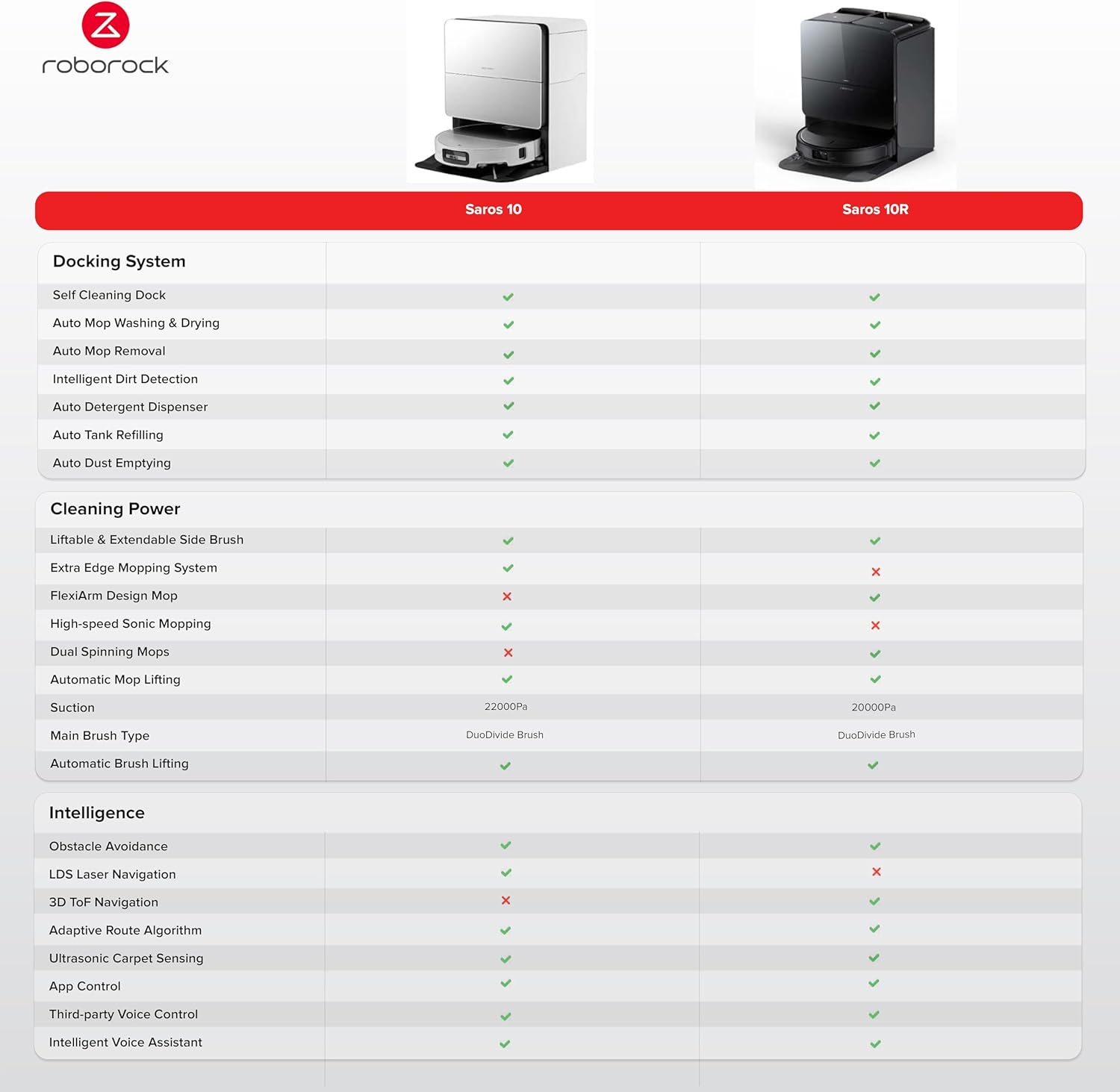
ചിത്രം 3.2: The Roborock Saros 10 positioned with its charging dock, ready for automated cleaning and maintenance.

ചിത്രം 3.3: ക്ലോസ് അപ്പ് view highlighting the 7.98cm ultra-thin design of the Roborock Saros 10, enabling it to clean under low furniture.

ചിത്രം 3.4: Illustration of the AdaptiLift Chassis in action, demonstrating its ability to raise the robot for crossing thresholds and adjusting for carpets.

ചിത്രം 3.5: View of the advanced LiDAR navigation system, which ensures precise mapping and efficient cleaning paths.
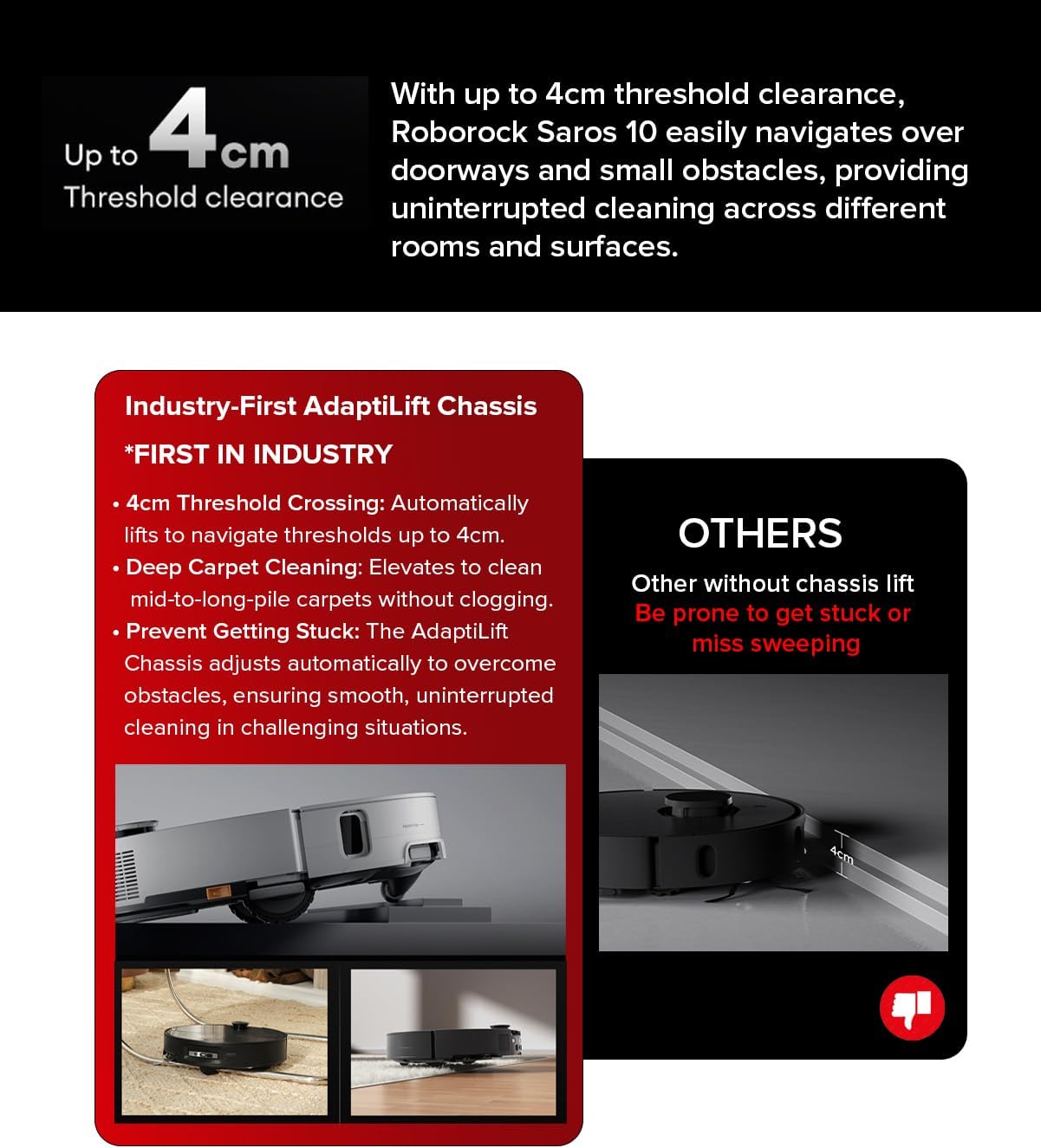
ചിത്രം 3.6: The robot seamlessly navigating over a threshold, showcasing its 4cm threshold clearance capability.
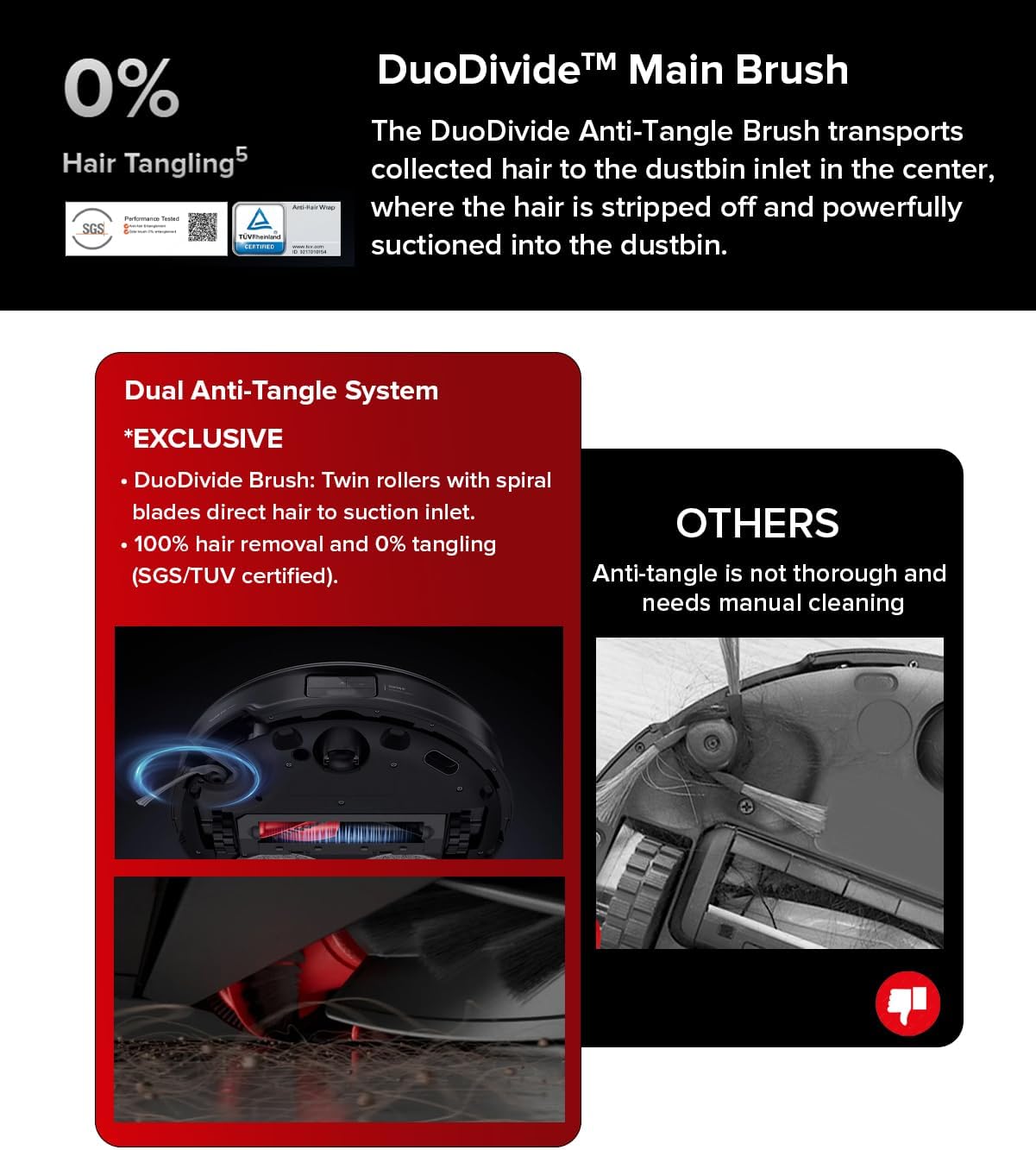
ചിത്രം 3.7: വിശദമായി view of the Dual Anti-Tangle System, featuring DuoDivide twin rollers designed to prevent hair tangling.
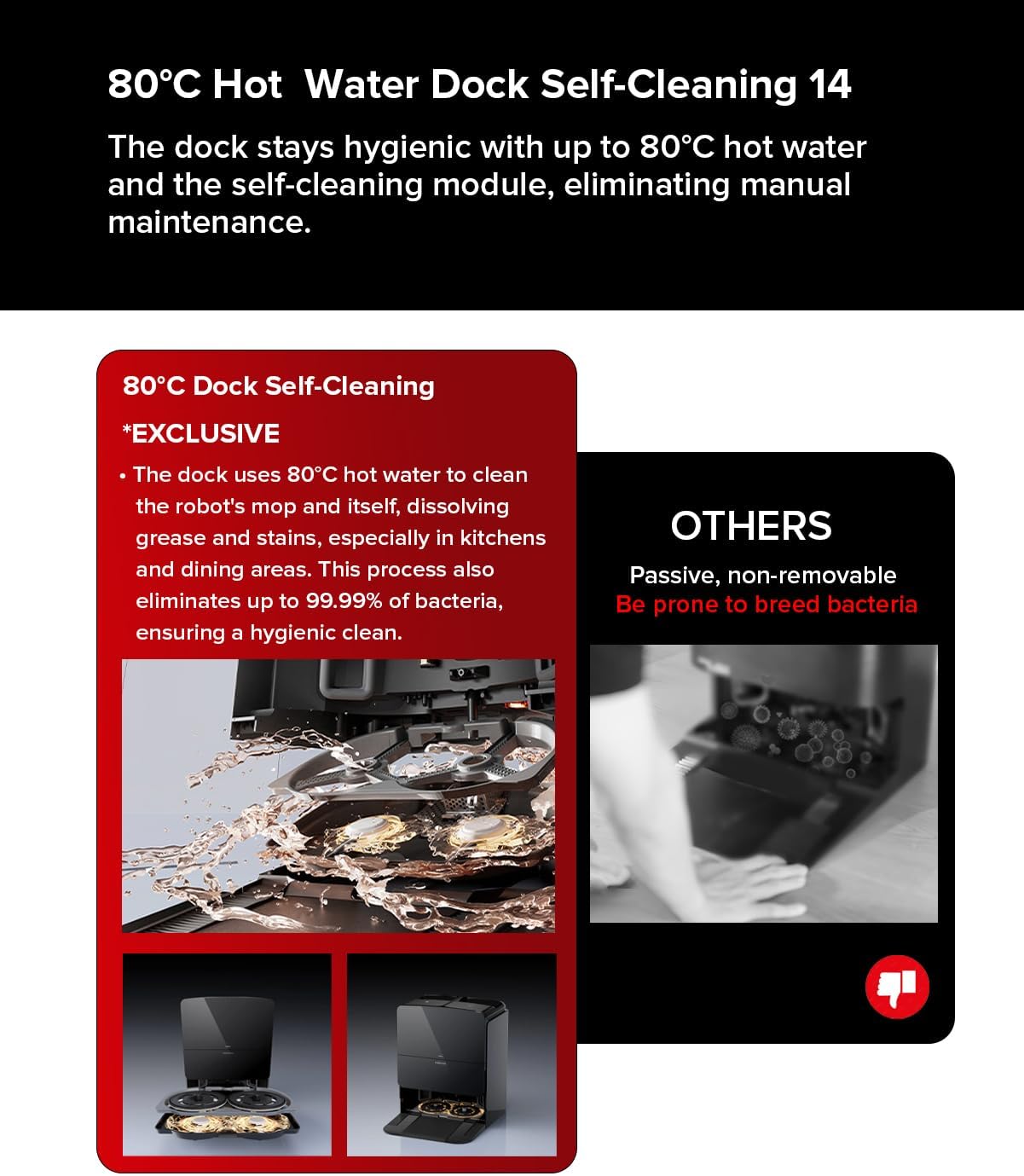
ചിത്രം 3.8: The 80°C hot water mopping system in operation, illustrating its ability to clean mop pads and ensure hygienic cleaning.
4. സജ്ജീകരണം
- അൺപാക്ക് ചെയ്യുന്നു: Carefully remove all components from the packaging. Ensure all protective films and packing materials are removed from the robot and charging dock.
- ചാർജിംഗ് ഡോക്ക് പ്ലേസ്മെന്റ്: Place the charging dock against a wall on a hard, level surface. Ensure there is at least 0.5 meters (1.6 feet) of clear space on both sides and 1.5 meters (4.9 feet) in front of the dock. Connect the power cable to the dock and plug it into a power outlet.
- പ്രാരംഭ ചാർജ്: Place the robot onto the charging dock. The robot will automatically power on and begin charging. For first-time use, fully charge the robot before operation.
- ആപ്പ് കണക്ഷൻ: Download the Roborock app from your device's app store. Follow the in-app instructions to connect your Roborock Saros 10 to your home Wi-Fi network and complete the initial setup. This will allow you to control the robot, set cleaning schedules, and access advanced features.
5. ഓപ്പറേഷൻ
The Roborock Saros 10 offers various cleaning modes and smart features for customized cleaning.
5.1 ഒരു ക്ലീൻ ആരംഭിക്കൽ
- റോബോട്ട് വഴി: Press the Power button on the robot to start a general cleaning cycle.
- ആപ്പ് വഴി: Open the Roborock app, select your device, and choose a cleaning mode (e.g., Auto, Zone, Spot) or start a full clean.
5.2 ക്ലീനിംഗ് മോഡുകൾ
- വാക്വം മാത്രം: The robot will only vacuum. The mop will automatically lift when on carpets.
- മോപ്പ് മാത്രം: The robot will only mop. Ensure the water tank is filled and mop pads are attached.
- വാക്വം & മോപ്പ്: The robot will perform both vacuuming and mopping simultaneously.
- കസ്റ്റം ക്ലീനിംഗ്: Use the app to define specific areas for cleaning, set no-go zones, or adjust suction power and water flow levels.
5.3 ഷെഡ്യൂളിംഗ്
Set up cleaning schedules through the Roborock app to automate your cleaning routine. You can specify cleaning times, days, and modes for different areas of your home.
6. പരിപാലനം
Regular maintenance ensures optimal performance and extends the lifespan of your Roborock Saros 10.
6.1 ഡസ്റ്റ്ബിനും ഫിൽട്ടറും
- ശൂന്യമാക്കുന്നു: The All-in-one Station automatically empties the dustbin. Check the dust bag in the station periodically and replace it when full.
- ക്ലീനിംഗ് ഫിൽട്ടർ: Remove the filter from the dustbin and tap it to remove debris. Rinse with water if necessary and allow it to air dry completely before reinserting.
6.2 മെയിൻ ബ്രഷും സൈഡ് ബ്രഷും
- പ്രധാന ബ്രഷ്: Remove the main brush cover and the brush itself. Use the cleaning tool to remove any tangled hair or debris. The Dual Anti-Tangle System significantly reduces tangles, but occasional checks are recommended.
- സൈഡ് ബ്രഷ്: Check the side brush for tangled hair or damage. Clean or replace as needed.
6.3 Mop Pads and Water Tanks
- മോപ്പ് പാഡുകൾ: The VibraRise 4.0 Mopping System includes hot water self-cleaning for the mop pads at the dock. Ensure the dock's water tanks are filled for this feature.
- വാട്ടർ ടാങ്കുകൾ: The All-in-one Station collects dirty water and refills clean water automatically. Regularly clean the dirty water tank and refill the clean water tank.
6.4 സെൻസറുകളും ചാർജിംഗ് കോൺടാക്റ്റുകളും
- Wipe all sensors (cliff sensors, wall sensors, LiDAR sensor) and charging contacts on both the robot and the dock with a soft, dry cloth to ensure proper function.
7. പ്രശ്നപരിഹാരം
If you encounter issues with your Roborock Saros 10, refer to the following common problems and solutions:
- റോബോട്ട് ചാർജ് ചെയ്യുന്നില്ല: Ensure the charging contacts on both the robot and the dock are clean and free of debris. Verify the power cable is securely connected to the dock and the outlet.
- റോബോട്ട് ആരംഭിക്കുന്നില്ല: Check if the robot is fully charged. If not, place it on the charging dock. Ensure no error indicators are present.
- മോശം ക്ലീനിംഗ് പ്രകടനം: Clean the main brush, side brush, and filter. Empty the dustbin. Check if the suction power setting is appropriate for the floor type.
- നാവിഗേഷൻ പ്രശ്നങ്ങൾ: Clean all sensors. Ensure there are no obstacles blocking the robot's path or the LiDAR sensor. Restart the robot and allow it to remap if necessary.
- മോപ്പിംഗ് ഫലപ്രദമല്ല: Ensure the clean water tank is filled and the mop pads are clean and properly attached. Check the water flow settings in the app.
For persistent issues, consult the Roborock app for specific error messages or contact Roborock customer support.
8 സ്പെസിഫിക്കേഷനുകൾ
| ഫീച്ചർ | സ്പെസിഫിക്കേഷൻ |
|---|---|
| ബ്രാൻഡ് | റോബോറോക്ക് |
| മോഡൽ | സരോസ് 10 |
| അളവുകൾ | 40.9 x 44 x 47 cm (Product); 44L x 47W x 40.9H cm (Product) |
| ഇനത്തിൻ്റെ ഭാരം | 20.38 കി.ഗ്രാം |
| ശബ്ദ നില | 52 ഡെസിബെൽ |
| വാല്യംtage | 200 വോൾട്ട് |
| പവർ സോഴ്സ് തരം | ബാറ്ററി പവർ |
| ബാറ്ററി ശരാശരി ആയുസ്സ് | 220 മിനിറ്റ് |
| ബാറ്ററി സെൽ കോമ്പോസിഷൻ | ലിഥിയം അയോൺ |
| ഫിൽട്ടർ തരം | ഹെപ്പ |
| പ്രത്യേക സവിശേഷതകൾ | വെറ്റ്/ഡ്രൈ |
| ഉപരിതല ശുപാർശ | Carpet, marble, laminate, wood, tile, etc. |
| കൺട്രോളർ തരം | ആപ്പ് നിയന്ത്രണം, ശബ്ദ നിയന്ത്രണം |
| ഉൾപ്പെടുത്തിയ ഘടകങ്ങൾ | Mop Pad, Water Tank |
9. വാറൻ്റിയും പിന്തുണയും
Your Roborock Saros 10 Robot Vacuum comes with a manufacturer's warranty. Please refer to the warranty card included in your product packaging for specific terms and conditions. For technical support, service, or to purchase replacement parts, please visit the official Roborock webസൈറ്റിൽ ബന്ധപ്പെടുകയോ അവരുടെ ഉപഭോക്തൃ സേവനവുമായി നേരിട്ട് ബന്ധപ്പെടുകയോ ചെയ്യുക. വാറന്റി ക്ലെയിമുകൾക്കുള്ള വാങ്ങലിന്റെ തെളിവായി നിങ്ങളുടെ വാങ്ങൽ രസീത് സൂക്ഷിക്കുക.