Memorex MX-PS802 Rechargeable Party Speaker User Manual
മോഡൽ: MX-PS802
1. ആമുഖം
വാങ്ങിയതിന് നന്ദി.asing the Memorex MX-PS802 Rechargeable Party Speaker. This manual provides essential information for the safe and efficient operation of your device. Please read it thoroughly before use and retain it for future reference.
2 സുരക്ഷാ വിവരങ്ങൾ
- സ്പീക്കറിനെ വെള്ളം, ഈർപ്പം അല്ലെങ്കിൽ തീവ്രമായ താപനില എന്നിവയിൽ തുറന്നുകാട്ടരുത്.
- സ്പീക്കർ താപ സ്രോതസ്സുകൾക്ക് സമീപമോ നേരിട്ടുള്ള സൂര്യപ്രകാശത്തിലോ വയ്ക്കുന്നത് ഒഴിവാക്കുക.
- സ്പീക്കർ ഡിസ്അസംബ്ലിംഗ് ചെയ്യാനോ പരിഷ്ക്കരിക്കാനോ ശ്രമിക്കരുത്. എല്ലാ സേവനങ്ങളും യോഗ്യതയുള്ള ഉദ്യോഗസ്ഥർക്ക് റഫർ ചെയ്യുക.
- നൽകിയിരിക്കുന്ന ചാർജിംഗ് കേബിളും അഡാപ്റ്ററും മാത്രം ഉപയോഗിക്കുക.
- കുട്ടികളിൽ നിന്നും വളർത്തുമൃഗങ്ങളിൽ നിന്നും സ്പീക്കർ അകറ്റി നിർത്തുക.
- ഉപയോഗിക്കുമ്പോൾ സ്പീക്കറിന് ചുറ്റും ശരിയായ വായുസഞ്ചാരം ഉറപ്പാക്കുക.
3. പാക്കേജ് ഉള്ളടക്കം
നിങ്ങളുടെ പാക്കേജിൽ എല്ലാ ഇനങ്ങളും ഉണ്ടെന്ന് ഉറപ്പാക്കുക:
- Memorex MX-PS802 Party Speaker
- ചാർജിംഗ് കേബിൾ
- ഉപയോക്തൃ മാനുവൽ (ഈ പ്രമാണം)
4. ഉൽപ്പന്നം കഴിഞ്ഞുview
The Memorex MX-PS802 is an 8-inch rechargeable party speaker featuring Bluetooth 5.3, LED flame lighting, TWS pairing, and multiple input options.
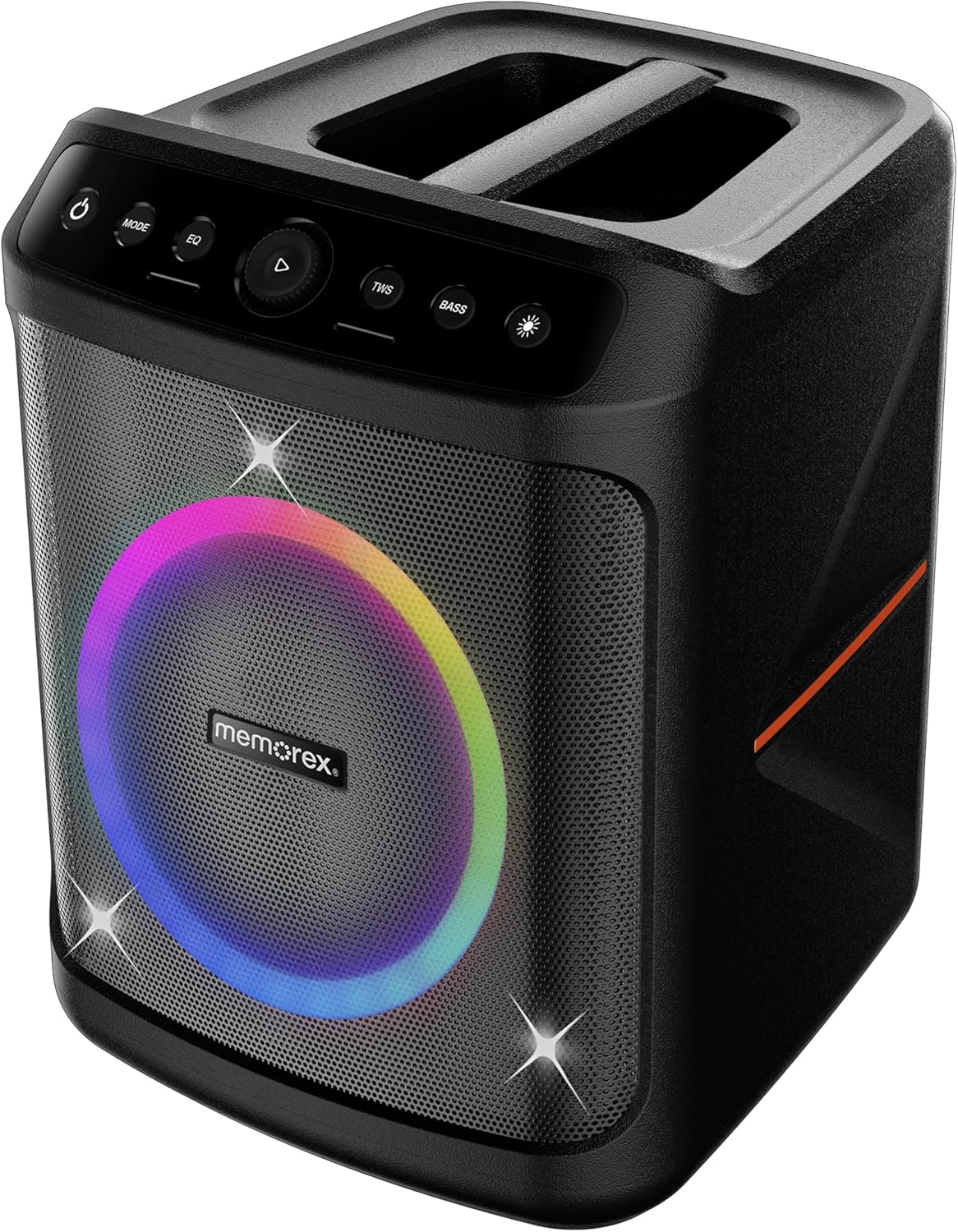
ഫ്രണ്ട് view of the Memorex MX-PS802 speaker, showcasing the illuminated woofer and the top-mounted control panel.
നിയന്ത്രണ പാനൽ പ്രവർത്തനങ്ങൾ
- പവർ ബട്ടൺ (⏻): സ്പീക്കർ ഓൺ/ഓഫ് ചെയ്യാൻ അമർത്തിപ്പിടിക്കുക.
- മോഡ് ബട്ടൺ: Short press to switch between input modes (Bluetooth, USB, SD).
- ഇക്യു ബട്ടൺ: Short press to cycle through equalizer presets.
- Play/Pause/Volume Knob (▶): Press to play or pause audio. Rotate to adjust volume.
- TWS ബട്ടൺ: ട്രൂ വയർലെസ് സ്റ്റീരിയോ ജോടിയാക്കൽ ആരംഭിക്കാൻ അമർത്തുക.
- BASS ബട്ടൺ: Press to activate or deactivate bass boost.
- Light Mode Button (☀): Press to cycle through LED lighting modes or turn lights ON/OFF.
5. സജ്ജീകരണം
5.1 സ്പീക്കർ ചാർജ് ചെയ്യുന്നു
- Connect the charging cable to the speaker's charging port.
- Plug the other end of the cable into a suitable power outlet.
- The charging indicator will illuminate. Allow the speaker to fully charge before first use (approximately 3-4 hours).
- The indicator will change or turn off once charging is complete.
5.2 പവർ ഓൺ/ഓഫ്
- To power ON, press and hold the പവർ ബട്ടൺ (⏻) for 2-3 seconds.
- To power OFF, press and hold the പവർ ബട്ടൺ (⏻) again for 2-3 seconds.
6. പ്രവർത്തന നിർദ്ദേശങ്ങൾ
6.1 ബ്ലൂടൂത്ത് ജോടിയാക്കൽ
- സ്പീക്കർ ഓണാക്കുക. മിന്നുന്ന LED സൂചിപ്പിക്കുന്ന ബ്ലൂടൂത്ത് ജോടിയാക്കൽ മോഡിലേക്ക് അത് യാന്ത്രികമായി പ്രവേശിക്കും.
- നിങ്ങളുടെ മൊബൈൽ ഉപകരണത്തിൽ, ബ്ലൂടൂത്ത് പ്രവർത്തനക്ഷമമാക്കി ലഭ്യമായ ഉപകരണങ്ങൾക്കായി തിരയുക.
- "തിരഞ്ഞെടുക്കുക"Memorex MX-PS802"ലിസ്റ്റിൽ നിന്ന്.
- Once paired, the speaker will emit a confirmation sound, and the LED will stop flashing.
6.2 യുഎസ്ബി/എസ്ഡി കാർഡ് പ്ലേബാക്ക്
- Insert a USB flash drive or SD card (with MP3 files) അനുബന്ധ പോർട്ടിലേക്ക്.
- The speaker will automatically switch to USB/SD mode and begin playback. If not, press the മോഡ് ശരിയായ ഇൻപുട്ട് തിരഞ്ഞെടുക്കാൻ ബട്ടൺ അമർത്തുക.
- Use the Play/Pause/Volume knob to control playback and volume.
6.3 ട്രൂ വയർലെസ് സ്റ്റീരിയോ (TWS) ജോടിയാക്കൽ
To pair two MX-PS802 speakers for stereo sound:
- Ensure both MX-PS802 speakers are powered on and in Bluetooth mode, but not connected to any device.
- ഒരു സ്പീക്കറിൽ (ഇതായിരിക്കും പ്രാഥമിക സ്പീക്കർ), അമർത്തുക ടി.ഡബ്ല്യു.എസ് button. It will emit a pairing tone.
- രണ്ട് സ്പീക്കറുകളും പരസ്പരം യാന്ത്രികമായി ബന്ധിപ്പിക്കും. ജോടിയാക്കിക്കഴിഞ്ഞാൽ ഒരു സ്ഥിരീകരണ ടോൺ മുഴങ്ങും.
- ഇപ്പോൾ, വിഭാഗം 6.1-ൽ വിവരിച്ചിരിക്കുന്നതുപോലെ ബ്ലൂടൂത്ത് വഴി നിങ്ങളുടെ മൊബൈൽ ഉപകരണം പ്രാഥമിക സ്പീക്കറുമായി ബന്ധിപ്പിക്കുക.
6.4 മൈക്രോഫോണും ഗിറ്റാർ ഇൻപുട്ടും
- Connect a microphone or guitar to the respective input jacks on the speaker.
- Adjust the volume of the connected instrument/microphone using its own controls or the speaker's main volume knob.
6.5 LED Flame Lighting
- അമർത്തുക ലൈറ്റ് മോഡ് ബട്ടൺ (☀) to cycle through various LED lighting effects.
- Continue pressing to turn the lights off.
6.6 EQ and Bass Boost
- അമർത്തുക EQ button to select different equalizer presets for optimized sound.
- അമർത്തുക ബാസ്സ് button to toggle the bass boost feature ON or OFF.
7. പരിപാലനം
- വൃത്തിയാക്കൽ: സ്പീക്കറിന്റെ പുറംഭാഗം വൃത്തിയാക്കാൻ മൃദുവായതും ഉണങ്ങിയതുമായ തുണി ഉപയോഗിക്കുക. അബ്രസീവ് ക്ലീനറുകളോ ലായകങ്ങളോ ഉപയോഗിക്കരുത്.
- സംഭരണം: Store the speaker in a cool, dry place away from direct sunlight when not in use for extended periods.
- ബാറ്ററി കെയർ: ബാറ്ററി ലൈഫ് വർദ്ധിപ്പിക്കുന്നതിന്, ദീർഘനേരം സൂക്ഷിക്കുന്നതിന് മുമ്പ് സ്പീക്കർ പൂർണ്ണമായും ചാർജ് ചെയ്യുക, ഓരോ 3-6 മാസത്തിലും റീചാർജ് ചെയ്യുക.
8. പ്രശ്നപരിഹാരം
- ശക്തിയില്ല: സ്പീക്കർ ചാർജ് ചെയ്തിട്ടുണ്ടെന്ന് ഉറപ്പാക്കുക. ഒരു പവർ സ്രോതസ്സിലേക്ക് കണക്റ്റ് ചെയ്ത് വീണ്ടും ശ്രമിക്കുക.
- ശബ്ദമില്ല: സ്പീക്കറിലും കണക്റ്റുചെയ്തിരിക്കുന്ന ഉപകരണത്തിലും വോളിയം ലെവൽ പരിശോധിക്കുക. ശരിയായ ഇൻപുട്ട് മോഡ് തിരഞ്ഞെടുത്തിട്ടുണ്ടെന്ന് ഉറപ്പാക്കുക.
- ബ്ലൂടൂത്ത് കണക്റ്റുചെയ്യുന്നില്ല: Ensure the speaker is in pairing mode. Turn off and on Bluetooth on your device. Forget the speaker from your device's Bluetooth list and try pairing again. Ensure no other devices are connected to the speaker.
- TWS ജോടിയാക്കൽ പരാജയം: Ensure both speakers are MX-PS802 models and are not connected to any other Bluetooth device before initiating TWS pairing.
- വികലമായ ശബ്ദം: Reduce the volume on both the speaker and your device. Check for interference from other electronic devices.
9 സ്പെസിഫിക്കേഷനുകൾ
| ഫീച്ചർ | സ്പെസിഫിക്കേഷൻ |
|---|---|
| മോഡലിൻ്റെ പേര് | MX-PS802 |
| സ്പീക്കർ തരം | Mono (can be paired for Stereo via TWS) |
| സ്പീക്കർ വലിപ്പം | 8 ഇഞ്ച് |
| സ്പീക്കർ പരമാവധി ഔട്ട്പുട്ട് പവർ | 800 Watts PMPO (80W RMS) |
| വയർലെസ് കമ്മ്യൂണിക്കേഷൻ ടെക്നോളജി | ബ്ലൂടൂത്ത് 5.3 |
| പവർ ഉറവിടം | Battery Powered (Rechargeable Li-ion) |
| ഉൽപ്പന്ന അളവുകൾ | 11.33 x 10.78 x 16.57 ഇഞ്ച് |
| ഇനത്തിൻ്റെ ഭാരം | 12.12 പൗണ്ട് |
| ഉൾപ്പെടുത്തിയ ഘടകങ്ങൾ | പാർട്ടി സ്പീക്കർ |
10. വാറൻ്റിയും പിന്തുണയും
The Memorex MX-PS802 Party Speaker comes with a പരിമിത വാറൻ്റി. Please refer to the warranty card included in your package for specific terms and conditions. For technical support or service inquiries, please contact Memorex customer service through their official webസൈറ്റ് അല്ലെങ്കിൽ നിങ്ങളുടെ വാങ്ങൽ ഡോക്യുമെന്റേഷനോടൊപ്പം നൽകിയിരിക്കുന്ന ബന്ധപ്പെടാനുള്ള വിവരങ്ങൾ.


