ആമുഖം
Thank you for choosing Raycon Bone Conduction Headphones. This manual provides essential information for the proper use, setup, and maintenance of your device. Please read it thoroughly before use.
These headphones utilize bone conduction technology, allowing you to hear audio while keeping your ears open to your surroundings. They are designed for active lifestyles, featuring a lightweight, water-resistant build and a secure fit.
പാക്കേജ് ഉള്ളടക്കം
- Raycon Bone Conduction Headphones
- മാഗ്നെറ്റിക് ചാർജിംഗ് കേബിൾ
- ഉപയോക്തൃ മാനുവൽ (ഈ പ്രമാണം)
ഉൽപ്പന്നം കഴിഞ്ഞുview
Familiarize yourself with the components of your Raycon Bone Conduction Headphones.

ചിത്രം 1: മുൻഭാഗം view of the Raycon Bone Conduction Headphones. The image shows the purple headphones with the Raycon logo visible on the left side, highlighting the open-ear design and the flexible band connecting the two ear pieces.

ചിത്രം 2: വശം view of the Raycon Bone Conduction Headphones. This image displays the control buttons located on the right ear piece, along with the charging port area. The overall lightweight and ergonomic design is visible.
പ്രധാന സവിശേഷതകൾ:
- തുറന്ന ചെവി ഡിസൈൻ: Allows situational awareness.
- അസ്ഥി ചാലക സാങ്കേതികവിദ്യ: Delivers audio through cheekbones.
- IP68 ജല പ്രതിരോധം: Protection against sweat, rain, and spills.
- ഭാരം കുറഞ്ഞ ബിൽഡ്: Comfortable for extended wear.
- Adjustable Conduction Buds: For personalized sound and awareness balance.
- ബ്ലൂടൂത്ത് 5.3: Stable wireless connectivity.
- 13-മണിക്കൂർ കളിസമയം: Extended battery life.
സജ്ജമാക്കുക
1. ഹെഡ്ഫോണുകൾ ചാർജ് ചെയ്യുന്നു
ആദ്യ ഉപയോഗത്തിന് മുമ്പ്, നിങ്ങളുടെ ഹെഡ്ഫോണുകൾ പൂർണ്ണമായും ചാർജ് ചെയ്യുക.
- നിങ്ങളുടെ ഹെഡ്ഫോണുകളിലെ ചാർജിംഗ് പോർട്ടിലേക്ക് മാഗ്നറ്റിക് ചാർജിംഗ് കേബിൾ ബന്ധിപ്പിക്കുക.
- കേബിളിന്റെ മറ്റേ അറ്റം ഒരു USB പവർ അഡാപ്റ്ററുമായി (ഉൾപ്പെടുത്തിയിട്ടില്ല) അല്ലെങ്കിൽ ഒരു കമ്പ്യൂട്ടറിന്റെ USB പോർട്ടുമായി ബന്ധിപ്പിക്കുക.
- LED ഇൻഡിക്കേറ്റർ ചാർജിംഗ് സ്റ്റാറ്റസ് കാണിക്കും (ഉദാ: ചാർജ് ചെയ്യുന്നതിന് ചുവപ്പ്, പൂർണ്ണമായി ചാർജ് ചെയ്തതിന് നീല).
- സാധാരണയായി ഒരു പൂർണ്ണ ചാർജ് ഏകദേശം 1.5-2 മണിക്കൂർ എടുക്കും.
2. പവർ ഓൺ/ഓഫ്
- പവർ ഓണാക്കാൻ: Press and hold the Power button for 3 seconds until the LED indicator flashes blue and you hear a power-on prompt.
- പവർ ഓഫ് ചെയ്യാൻ: Press and hold the Power button for 5 seconds until the LED indicator flashes red and you hear a power-off prompt.
3. ബ്ലൂടൂത്ത് ജോടിയാക്കൽ
നിങ്ങളുടെ ബ്ലൂടൂത്ത് പ്രാപ്തമാക്കിയ ഉപകരണവുമായി (സ്മാർട്ട്ഫോൺ, ടാബ്ലെറ്റ്, ലാപ്ടോപ്പ്) ഹെഡ്ഫോണുകൾ ജോടിയാക്കുക.
- ഹെഡ്ഫോണുകൾ ഓഫാണെന്ന് ഉറപ്പാക്കുക.
- ജോടിയാക്കൽ മോഡ് സൂചിപ്പിക്കുന്ന LED ഇൻഡിക്കേറ്റർ ചുവപ്പും നീലയും മാറിമാറി മിന്നുന്നതുവരെ പവർ ബട്ടൺ 5-7 സെക്കൻഡ് അമർത്തിപ്പിടിക്കുക.
- നിങ്ങളുടെ ഉപകരണത്തിൽ, ബ്ലൂടൂത്ത് ക്രമീകരണങ്ങളിലേക്ക് പോയി ബ്ലൂടൂത്ത് പ്രവർത്തനക്ഷമമാക്കുക.
- ഇതിനായി തിരയുക available devices and select "Raycon Bone Conduction" (or similar name).
- Once connected, the LED indicator will flash blue slowly, and you will hear a connection confirmation.
- The headphones will automatically reconnect to the last paired device when powered on, if within range.
പ്രവർത്തന നിർദ്ദേശങ്ങൾ
ഹെഡ്ഫോണുകൾ ധരിക്കുന്നു
Place the headphones with the transducers resting on your cheekbones, just in front of your ears. The band should wrap around the back of your head.
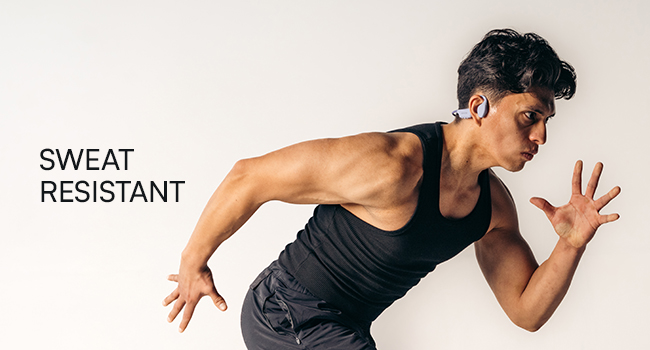
Figure 3: Illustration demonstrating the correct placement of the bone conduction headphones on the head, with the transducers positioned on the cheekbones near the ears. This image emphasizes the open-ear design.
The adjustable conduction buds allow you to slide them closer to your ear for louder sound or pull them back for increased environmental awareness. Experiment to find your preferred balance.
ബട്ടൺ പ്രവർത്തനങ്ങൾ
| ബട്ടൺ/ആക്ഷൻ | ഫംഗ്ഷൻ |
|---|---|
| Power Button (Press & Hold 3s) | പവർ ഓൺ |
| Power Button (Press & Hold 5s) | Power Off / Enter Pairing Mode |
| മൾട്ടി-ഫംഗ്ഷൻ ബട്ടൺ (സിംഗിൾ പ്രസ്സ്) | സംഗീതം പ്ലേ ചെയ്യുക/താൽക്കാലികമായി നിർത്തുക, കോൾ സ്വീകരിക്കുക/അവസാനിപ്പിക്കുക |
| മൾട്ടി-ഫംഗ്ഷൻ ബട്ടൺ (ഇരട്ട പ്രസ്സ്) | അടുത്ത ട്രാക്ക് |
| മൾട്ടി-ഫംഗ്ഷൻ ബട്ടൺ (ട്രിപ്പിൾ പ്രസ്സ്) | മുമ്പത്തെ ട്രാക്ക് |
| Volume Up (+) Button (Single Press) | വോളിയം കൂട്ടുക |
| Volume Down (-) Button (Single Press) | വോളിയം കുറയ്ക്കുക |
| Volume Up (+) Button (Press & Hold) | വോയ്സ് അസിസ്റ്റൻ്റ് സജീവമാക്കുക |
കോളുകൾ ചെയ്യലും സ്വീകരിക്കലും
- മറുപടി കോൾ: മൾട്ടി-ഫംഗ്ഷൻ ബട്ടൺ ഒരിക്കൽ അമർത്തുക.
- കോൾ അവസാനിപ്പിക്കുക: ഒരു കോൾ സമയത്ത് മൾട്ടി-ഫംഗ്ഷൻ ബട്ടൺ ഒരിക്കൽ അമർത്തുക.
- കോൾ നിരസിക്കുക: മൾട്ടി-ഫംഗ്ഷൻ ബട്ടൺ 2 സെക്കൻഡ് അമർത്തിപ്പിടിക്കുക.
- വോയ്സ് അസിസ്റ്റന്റ്: Press and hold the Volume Up (+) button to activate your device's voice assistant (Siri, Google Assistant, etc.).
പരിപാലനവും പരിചരണവും
- വൃത്തിയാക്കൽ: ഒരു സോഫ്റ്റ്, ഡി ഉപയോഗിച്ച് ഹെഡ്ഫോണുകൾ തുടയ്ക്കുകamp തുണി. കഠിനമായ രാസവസ്തുക്കളോ ഉരച്ചിലുകളുള്ള ക്ലീനറുകളോ ഉപയോഗിക്കരുത്.
- ജല പ്രതിരോധം (IP68): These headphones are IP68 rated, meaning they are protected against dust and can withstand immersion in water up to 1.5 meters for up to 30 minutes. However, they are not designed for swimming or prolonged underwater use. Ensure the charging port is dry before charging.
- സംഭരണം: നേരിട്ടുള്ള സൂര്യപ്രകാശത്തിൽ നിന്നും കടുത്ത താപനിലയിൽ നിന്നും മാറി തണുത്തതും വരണ്ടതുമായ സ്ഥലത്ത് ഹെഡ്ഫോണുകൾ സൂക്ഷിക്കുക.
- ബാറ്ററി കെയർ: ബാറ്ററി ലൈഫ് വർദ്ധിപ്പിക്കാൻ, ഹെഡ്ഫോണുകൾ ഇടയ്ക്കിടെ പൂർണ്ണമായും ചാർജ് ചെയ്യുന്നത് ഒഴിവാക്കുക. ദീർഘനേരം ഉപയോഗിച്ചിട്ടില്ലെങ്കിൽ പോലും അവ പതിവായി ചാർജ് ചെയ്യുക.
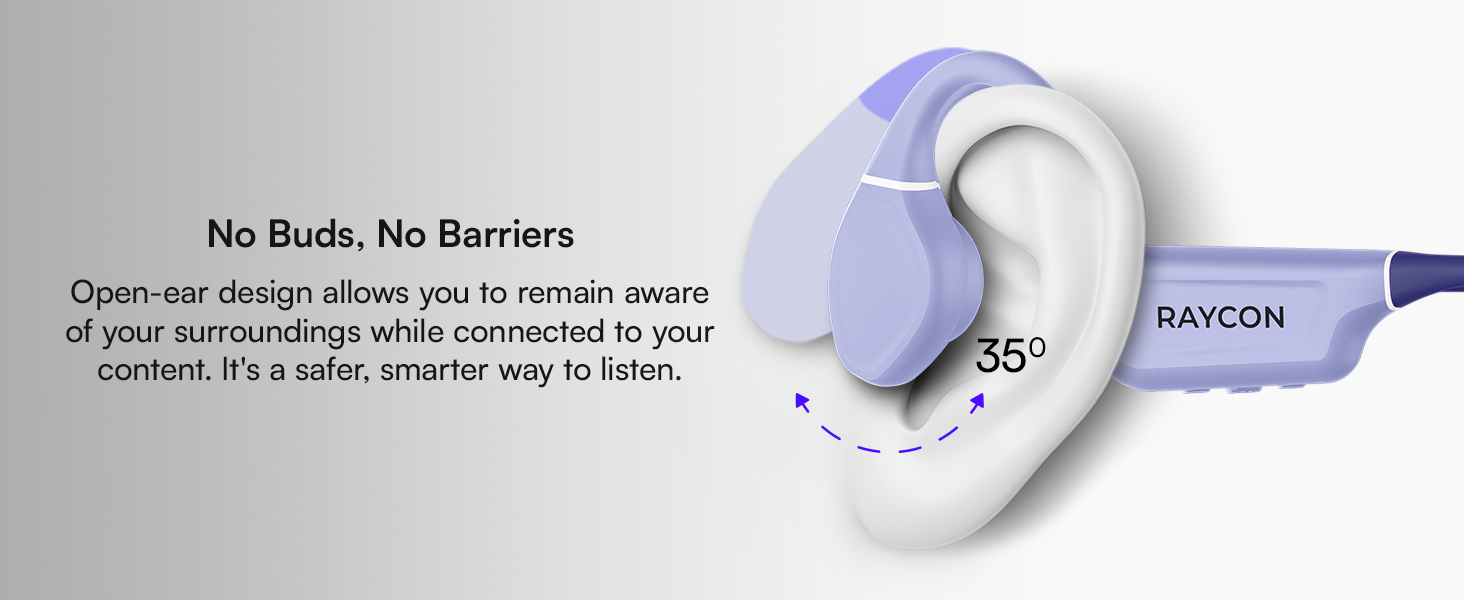
Figure 4: Image illustrating the water-resistant feature of the Raycon Bone Conduction Headphones, with water droplets splashing around them. This visually confirms their suitability for use in various weather conditions or during workouts.
ട്രബിൾഷൂട്ടിംഗ്
| പ്രശ്നം | സാധ്യമായ പരിഹാരം |
|---|---|
| ഹെഡ്ഫോണുകൾ പവർ ഓൺ ചെയ്യുന്നില്ല. | Ensure the headphones are charged. Connect to the charging cable and check the LED indicator. |
| ഉപകരണവുമായി ജോടിയാക്കാൻ കഴിയില്ല. |
|
| ശബ്ദമില്ല അല്ലെങ്കിൽ കുറഞ്ഞ ശബ്ദമില്ല. |
|
| മോശം കോൾ നിലവാരം. |
|
സ്പെസിഫിക്കേഷനുകൾ
| ഫീച്ചർ | വിശദാംശങ്ങൾ |
|---|---|
| മോഡലിൻ്റെ പേര് | ബോൺ കണ്ടക്ഷൻ ഹെഡ്ഫോണുകൾ |
| മോഡൽ നമ്പർ | RBB842-24E |
| കണക്റ്റിവിറ്റി ടെക്നോളജി | വയർലെസ്സ് (ബ്ലൂടൂത്ത് 5.3) |
| ബ്ലൂടൂത്ത് ശ്രേണി | 33 അടി വരെ (10 മീറ്റർ) |
| ഓഡിയോ ഡ്രൈവർ തരം | ബോൺ കണ്ടക്ഷൻ ഡ്രൈവർ |
| ഓഡിയോ ഡ്രൈവർ വലിപ്പം | 16 മില്ലിമീറ്റർ |
| ഫ്രീക്വൻസി റേഞ്ച് | 20 ഹെർട്സ് - 20 കിലോ ഹെർട്സ് |
| സംവേദനക്ഷമത | 91 ഡി.ബി |
| പ്രതിരോധം | 8 ഓം |
| ബാറ്ററി ലൈഫ് | 13 മണിക്കൂർ വരെ |
| ജല പ്രതിരോധ നില | IP68 |
| മെറ്റീരിയൽ | അക്രിലോണിട്രൈൽ ബ്യൂട്ടാഡിയൻ സ്റ്റൈറീൻ (എബിഎസ്), സിലിക്കൺ |
| ഇനത്തിൻ്റെ ഭാരം | 5.6 ഔൺസ് |
| ഉൾപ്പെടുത്തിയ ഘടകങ്ങൾ | മാഗ്നെറ്റിക് ചാർജിംഗ് കേബിൾ |
| യു.പി.സി | 811162032804 |
വാറൻ്റിയും പിന്തുണയും
For warranty information and customer support, please refer to the official Raycon webസൈറ്റിൽ ബന്ധപ്പെടുകയോ അവരുടെ ഉപഭോക്തൃ സേവനവുമായി നേരിട്ട് ബന്ധപ്പെടുകയോ ചെയ്യുക. വാറന്റി ക്ലെയിമുകൾക്കായി നിങ്ങളുടെ വാങ്ങിയതിന്റെ തെളിവ് സൂക്ഷിക്കുക.
ഓൺലൈൻ പിന്തുണ: സന്ദർശിക്കുക Raycon Global Support പതിവുചോദ്യങ്ങൾ, ട്രബിൾഷൂട്ടിംഗ് ഗൈഡുകൾ, കോൺടാക്റ്റ് ഓപ്ഷനുകൾ എന്നിവയ്ക്കായി.
സുരക്ഷാ വിവരങ്ങൾ
- ഉൽപ്പന്നം ഡിസ്അസംബ്ലിംഗ് ചെയ്യരുത്, നന്നാക്കരുത് അല്ലെങ്കിൽ പരിഷ്ക്കരിക്കുക.
- Do not expose the product to fire or extreme heat.
- കേൾവിക്ക് കേടുപാടുകൾ സംഭവിക്കുന്നത് തടയാൻ ദീർഘനേരം ഉയർന്ന ശബ്ദത്തിൽ കേൾക്കുന്നത് ഒഴിവാക്കുക.
- Use caution when using headphones in situations requiring awareness of your surroundings.
- കുട്ടികൾക്ക് ലഭ്യമാകാതെ സൂക്ഷിക്കുക.


