ആമുഖം
Welcome to the user manual for your AYANEO Pocket S Android Handheld Gaming Device. This manual provides essential information for setting up, operating, maintaining, and troubleshooting your device to ensure optimal performance and longevity. Please read this manual thoroughly before using your device.
സുരക്ഷാ വിവരങ്ങൾ
To prevent damage to your device or injury to yourself or others, please observe the following precautions:
- ഉപകരണത്തെ തീവ്രമായ താപനിലയിലോ, നേരിട്ടുള്ള സൂര്യപ്രകാശത്തിലോ, ഉയർന്ന ആർദ്രതയിലോ തുറന്നുകാട്ടരുത്.
- ഉപകരണം താഴെയിടുകയോ ഗുരുതരമായ ആഘാതങ്ങൾക്ക് വിധേയമാക്കുകയോ ചെയ്യുന്നത് ഒഴിവാക്കുക.
- അംഗീകൃത ചാർജറുകളും അനുബന്ധ ഉപകരണങ്ങളും മാത്രം ഉപയോഗിക്കുക.
- ഉപകരണം സ്വയം വേർപെടുത്താനോ നന്നാക്കാനോ ശ്രമിക്കരുത്. യോഗ്യതയുള്ള സേവന ഉദ്യോഗസ്ഥരെ ബന്ധപ്പെടുക.
- ഉപകരണം വെള്ളത്തിൽ നിന്നും മറ്റ് ദ്രാവകങ്ങളിൽ നിന്നും അകറ്റി നിർത്തുക.
ഉപകരണ ഘടകങ്ങൾ
Familiarize yourself with the various parts of your AYANEO Pocket S.
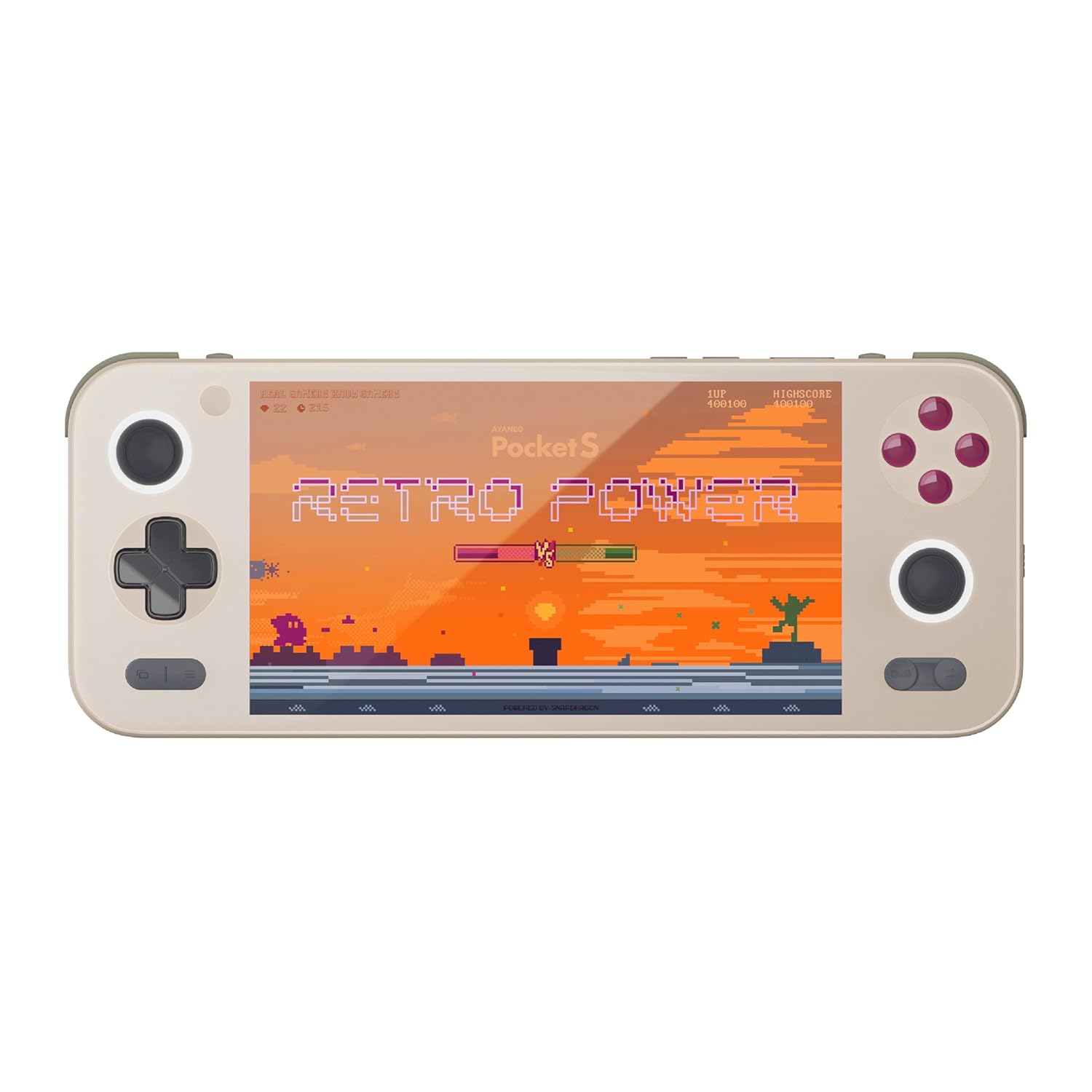
ചിത്രം 1: മുൻഭാഗം view of the AYANEO Pocket S, showing the screen, joysticks, D-pad, and action buttons.

Figure 2: Close-up of the Master Controller, highlighting the RGB Hall joysticks, Hall triggers, and crystal-textured keys.

Figure 3: Illustration of the internal VC thermal plate and active cooling system, along with the "Fishbone" biomimetic heat dissipation design on the side.

Figure 4: The AYANEO Pocket S displaying the AYASpace and AYAHOME Launcher interface, showing various game icons.
പ്രധാന സവിശേഷതകൾ:
- ഡിസ്പ്ലേ: 6-inch 2K Borderless IPS Screen (490 PPI, 120% sRGB, 85% DCI-P3)
- പ്രോസസ്സർ: Snapdragon G3x Gen 2 Gaming Platform
- മെമ്മറിയും സംഭരണവും: Up to 16GB RAM, up to 1TB Storage (This model: 12GB RAM, 128GB Storage)
- തണുപ്പിക്കൽ: Large VC Heat Sink, Active Cooling System, "Fishbone" Cooling Vents
- നിയന്ത്രണങ്ങൾ: Master Controller with RGB Hall Joysticks, Linear Hall Triggers, X-axis Vibration
- ഓപ്പറേറ്റിംഗ് സിസ്റ്റം: ആൻഡ്രോയിഡ് 13
സജ്ജീകരണ ഗൈഡ്
1. പ്രാരംഭ ചാർജിംഗ്
Before first use, fully charge your AYANEO Pocket S. Connect the provided USB-C cable to the device's charging port and the other end to a compatible power adapter. The charging indicator will illuminate.
2. പവർ ഓൺ/ഓഫ്
- പവർ ഓണാക്കാൻ: Press and hold the Power button located on the top edge of the device until the AYANEO logo appears on the screen.
- പവർ ഓഫ് ചെയ്യാൻ: പവർ ഓപ്ഷൻ മെനു ദൃശ്യമാകുന്നതുവരെ പവർ ബട്ടൺ അമർത്തിപ്പിടിക്കുക. "പവർ ഓഫ്" തിരഞ്ഞെടുത്ത് സ്ഥിരീകരിക്കുക.
- പുനരാരംഭിക്കാൻ: പവർ ഓപ്ഷനുകൾ മെനുവിൽ നിന്ന്, "പുനരാരംഭിക്കുക" തിരഞ്ഞെടുക്കുക.
3. പ്രാരംഭ സിസ്റ്റം കോൺഫിഗറേഷൻ
Upon first power-on, you will be guided through the initial Android setup process. This includes:
- നിങ്ങളുടെ ഭാഷ തിരഞ്ഞെടുക്കുന്നു.
- ഒരു Wi-Fi നെറ്റ്വർക്കിലേക്ക് കണക്റ്റുചെയ്യുന്നു.
- Signing in with your Google account (optional, but recommended for app downloads).
- Setting up screen lock and other security features.
4. സോഫ്റ്റ്വെയർ അപ്ഡേറ്റുകൾ
It is recommended to check for and install any available system updates after initial setup to ensure you have the latest features and security patches. Navigate to ക്രമീകരണങ്ങൾ > സിസ്റ്റം > സിസ്റ്റം അപ്ഡേറ്റ്.
നിങ്ങളുടെ ഉപകരണം പ്രവർത്തിപ്പിക്കുന്നു
നാവിഗേഷനും നിയന്ത്രണങ്ങളും
The AYANEO Pocket S features both touchscreen input and physical controller input for navigation and gameplay.
- ടച്ച് സ്ക്രീൻ: Use familiar Android gestures such as tap, swipe, pinch-to-zoom.
- ജോയ്സ്റ്റിക്കുകൾ: Analog input for movement and camera control in games.
- ഡി-പാഡ്: Digital input for menu navigation and directional controls.
- ആക്ഷൻ ബട്ടണുകൾ (A/B/X/Y): Primary input for in-game actions.
- Shoulder/Trigger Buttons (L1/L2/R1/R2): Additional input for various game functions.
- ഫംഗ്ഷൻ ബട്ടണുകൾ: Dedicated buttons for system functions, such as Home, Back, and Menu.
പ്രകടന മോഡുകൾ
The device offers multiple performance modes to optimize for either maximum performance or extended battery life.
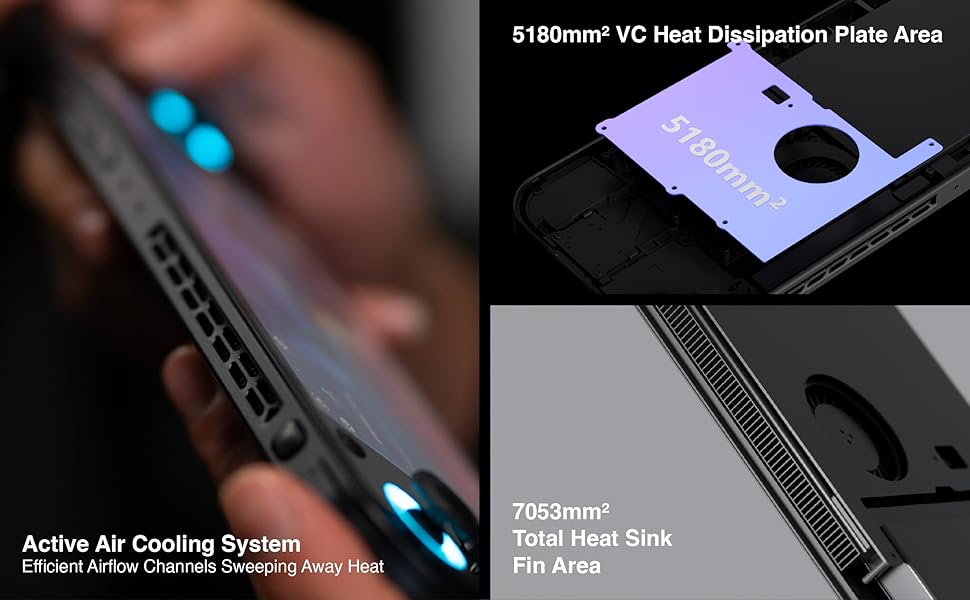
Figure 5: Diagram illustrating the three performance modes: Performance Turbo Mode, Balanced Mode, and Power-Saving Long Battery Life Mode.
- Performance Turbo Mode: Maximizes CPU, GPU, and fan speed for demanding games.
- സമതുലിതമായ മോഡ്: Provides a good balance between performance and battery life for most games.
- Power-Saving Long Battery Life Mode: Optimizes for extended usage, suitable for less demanding applications or when battery conservation is critical.
You can switch between these modes via the AYASpace application or quick settings menu.
AYASpace and AYAHOME Launcher
The AYASpace application and AYAHOME Launcher provide a customized Android experience for gaming handhelds.
- Game Management: നിങ്ങളുടെ ഗെയിമുകൾ സംഘടിപ്പിക്കുകയും സമാരംഭിക്കുകയും ചെയ്യുക.
- കീ മാപ്പിംഗ്: Customize button assignments for mobile games that do not natively support physical controllers.
- സിസ്റ്റം ക്രമീകരണങ്ങൾ: Access performance mode settings, controller calibration, and other device-specific configurations.
മെയിൻ്റനൻസ്
ഉപകരണം വൃത്തിയാക്കുന്നു
- Use a soft, lint-free cloth to wipe the screen and body of the device.
- കഠിനമായ പാടുകൾക്ക്, ചെറുതായി dampen വെള്ളമുള്ള തുണി അല്ലെങ്കിൽ ഒരു സ്ക്രീൻ ക്ലീനർ.
- കഠിനമായ രാസവസ്തുക്കളോ, അബ്രസീവ് ക്ലീനറുകളോ, എയറോസോൾ സ്പ്രേകളോ ഉപയോഗിക്കരുത്.
- Ensure all ports are free of dust and debris. Use a soft brush or compressed air if necessary, holding the can upright.
ബാറ്ററി കെയർ
- ബാറ്ററി ഇടയ്ക്കിടെ പൂർണ്ണമായും ഡിസ്ചാർജ് ചെയ്യുന്നത് ഒഴിവാക്കുക.
- ഉപകരണം ദീർഘനേരം ചാർജ് ചെയ്യാതെ വയ്ക്കരുത്.
- Store the device in a cool, dry place if not used for a long time, with the battery charged to around 50%.
സോഫ്റ്റ്വെയർ പരിപാലനം
- Regularly check for and install system updates.
- Keep your applications updated through the Google Play Store or AYASpace.
- Periodically clear cache and unnecessary fileസിസ്റ്റം പ്രകടനം നിലനിർത്താൻ.
ട്രബിൾഷൂട്ടിംഗ്
| പ്രശ്നം | സാധ്യമായ കാരണം | പരിഹാരം |
|---|---|---|
| ഉപകരണം പവർ ഓണാക്കുന്നില്ല. | ബാറ്ററി ചാർജ് കുറവാണ്; സിസ്റ്റം ക്രാഷ്. | കുറഞ്ഞത് 30 മിനിറ്റെങ്കിലും ഉപകരണം ചാർജ് ചെയ്യുക. പവർ ബട്ടൺ 10-15 സെക്കൻഡ് അമർത്തിപ്പിടിച്ചുകൊണ്ട് നിർബന്ധിതമായി റീബൂട്ട് ചെയ്യുക. |
| സ്ക്രീൻ പ്രതികരിക്കുന്നില്ല. | Software glitch; Screen damage. | ഉപകരണം പുനരാരംഭിക്കുക. പ്രശ്നം നിലനിൽക്കുകയാണെങ്കിൽ, ഉപഭോക്തൃ പിന്തുണയുമായി ബന്ധപ്പെടുക. |
| Games are lagging or performing poorly. | Incorrect performance mode; Background apps; Overheating. | Switch to Performance Turbo Mode. Close unnecessary background applications. Ensure cooling vents are not blocked. |
| വൈഫൈ കണക്ഷൻ പ്രശ്നങ്ങൾ. | Incorrect password; Router issue; Device Wi-Fi module error. | Verify Wi-Fi password. Restart your router. Toggle Wi-Fi off and on on the device. |
If you encounter issues not listed here or if the suggested solutions do not resolve the problem, please contact AYANEO customer support.
സ്പെസിഫിക്കേഷനുകൾ
| ഫീച്ചർ | വിശദാംശങ്ങൾ |
|---|---|
| മോഡൽ | പോക്കറ്റ് എസ് |
| പ്രോസസ്സർ | Snapdragon G3x Gen 2 Gaming Platform |
| പ്രദർശിപ്പിക്കുക | 6-inch 2K Borderless IPS Display (2560*1440 resolution, 490 PPI, 120% sRGB, 85% DCI-P3) |
| റാം | 12GB (as per current model) |
| സംഭരണം | 128GB (as per current model) |
| ഓപ്പറേറ്റിംഗ് സിസ്റ്റം | ആൻഡ്രോയിഡ് 13 |
| തണുപ്പിക്കൽ സംവിധാനം | Large VC Heat Sink, Active Cooling System, "Fishbone" Vents |
| ബാറ്ററി | 1 ലിഥിയം അയോൺ ബാറ്ററി (ഉൾപ്പെടുത്തിയിരിക്കുന്നു) |
| അളവുകൾ | ഏകദേശം 8.42 x 3.35 x 0.55 ഇഞ്ച് |
| ഭാരം | ഏകദേശം 1.59 പൗണ്ട് (0.72 കി.ഗ്രാം) |
വാറൻ്റി വിവരങ്ങൾ
AYANEO products typically come with a limited manufacturer's warranty. Please refer to the warranty card included in your product packaging or visit the official AYANEO webവിശദമായ വാറന്റി നിബന്ധനകൾക്കും വ്യവസ്ഥകൾക്കും സൈറ്റ് സന്ദർശിക്കുക. വാറന്റി ക്ലെയിമുകൾക്കായി നിങ്ങളുടെ വാങ്ങലിന്റെ തെളിവ് സൂക്ഷിക്കുക.
Note: Protection plans may be available for purchase separately. These plans are offered by third parties and are not part of the standard manufacturer's warranty.
ഉപഭോക്തൃ പിന്തുണ
For technical assistance, troubleshooting, or warranty inquiries, please contact AYANEO customer support through their official channels:
- ഉദ്യോഗസ്ഥൻ Webസൈറ്റ്: www.ayaneo.com (Check for support section or contact page)
- ഇമെയിൽ പിന്തുണ: ഉദ്യോഗസ്ഥനെ റഫർ ചെയ്യുക webഏറ്റവും പുതിയ പിന്തുണ ഇമെയിൽ വിലാസത്തിനായുള്ള സൈറ്റ്.
- Online Community/Forums: AYANEO may host online communities where users can find answers and share experiences.
When contacting support, please have your device model (Pocket S) and serial number ready.


