1. ആമുഖം
This manual provides essential instructions for the safe and efficient operation of your MARSTEK Portable Power Station M2200. Please read this manual thoroughly before using the device and retain it for future reference.
The MARSTEK M2200 is a high-capacity portable power station designed to provide reliable power for various applications, including outdoor camping, road trips, off-grid living, and emergency power outages. It features a durable LiFePO4 battery, multiple output ports, and fast charging capabilities.
2. സുരക്ഷാ നിർദ്ദേശങ്ങൾ
ഉപകരണത്തിന് പരിക്കേൽക്കുകയോ കേടുപാടുകൾ സംഭവിക്കുകയോ ചെയ്യാതിരിക്കാൻ ഇനിപ്പറയുന്ന സുരക്ഷാ മുൻകരുതലുകൾ പാലിക്കുക:
- യൂണിറ്റ് വേർപെടുത്തുകയോ നന്നാക്കുകയോ പരിഷ്കരിക്കുകയോ ചെയ്യരുത്. തെറ്റായി വീണ്ടും കൂട്ടിച്ചേർക്കുന്നത് തീപിടുത്തത്തിനോ വൈദ്യുതാഘാതത്തിനോ കാരണമായേക്കാം.
- യൂണിറ്റ് തീയുടെ അടുത്ത് വയ്ക്കരുത് അല്ലെങ്കിൽ നേരിട്ട് സൂര്യപ്രകാശം ഏൽക്കുകയോ ഉയർന്ന താപനില ഏൽക്കുകയോ ചെയ്യരുത്.
- Do not use or store the unit in a bathroom or in an area exposed to water or moisture.
- യൂണിറ്റ് താഴെയിടുകയോ അടിക്കുകയോ ശക്തമായ ആഘാതങ്ങൾക്ക് വിധേയമാക്കുകയോ ചെയ്യരുത്.
- കുട്ടികൾക്കും വളർത്തുമൃഗങ്ങൾക്കും ലഭ്യമാകാതെ യൂണിറ്റ് സൂക്ഷിക്കുക.
- അമിതമായി ചൂടാകുന്നത് തടയാൻ ഉപയോഗിക്കുമ്പോഴും ചാർജ് ചെയ്യുമ്പോഴും ശരിയായ വായുസഞ്ചാരം ഉറപ്പാക്കുക.
- Use only approved accessories and charging cables.
- തീപിടുത്തമുണ്ടായാൽ, ഉണങ്ങിയ പൊടി അഗ്നിശമന ഉപകരണം ഉപയോഗിക്കുക. വെള്ളം വൈദ്യുതാഘാതത്തിന് കാരണമായേക്കാം.
3. പാക്കേജ് ഉള്ളടക്കം
നിങ്ങളുടെ പാക്കേജിൽ എല്ലാ ഇനങ്ങളും ഉണ്ടെന്ന് ഉറപ്പാക്കുക:
- MARSTEK M2200 പോർട്ടബിൾ പവർ സ്റ്റേഷൻ
- എസി ചാർജിംഗ് കേബിൾ
- കാർ ചാർജിംഗ് കേബിൾ
- ഉപയോക്തൃ മാനുവൽ (ഈ പ്രമാണം)
- Professional Service Card
4. ഉൽപ്പന്നം കഴിഞ്ഞുview
The MARSTEK M2200 features a robust design with multiple input and output ports, along with a clear digital display for monitoring status.

ചിത്രം 1: മുൻഭാഗം view of the MARSTEK M2200 Portable Power Station, showing the digital display, AC outlets, and USB ports.
ഡിജിറ്റൽ ഡിസ്പ്ലേ
The integrated digital display provides real-time information on battery level, input/output wattage, and operational status.
പോർട്ടുകളും ഇൻ്റർഫേസുകളും
- എസി ഔട്ട്ലെറ്റുകൾ: Four 2000W AC outlets (power lifting up to 2400W).
- USB പോർട്ടുകൾ: Includes 100W Type-C and standard USB-A ports.
- ഇൻപുട്ട് പോർട്ടുകൾ: AC charging input, Solar/Car charging input.
- വിപുലീകരണ തുറമുഖങ്ങൾ: Two ports for connecting additional battery packs (P2200) to expand capacity.
5. സജ്ജീകരണവും ചാർജിംഗും
പ്രാരംഭ ചാർജ്
Before first use, fully charge the MARSTEK M2200 using the provided AC charging cable.
AC Fast Charging
Connect the AC charging cable to the power station's AC input port and then to a standard wall outlet. The unit supports fast charging, reaching 80% capacity in approximately 60 minutes and a full charge in 70 minutes.

Figure 2: Illustration of the MARSTEK M2200 undergoing fast AC charging, highlighting the rapid charge time.
സോളാർ ചാർജിംഗ്
Connect compatible solar panels (up to 1000W) to the solar input port. The M2200 can be fully charged via solar power in approximately 2.3 hours under optimal conditions.

Figure 3: Two MARSTEK M2200 units being charged by solar panels, demonstrating efficient solar charging capabilities.
കാർ ചാർജിംഗ്
Use the provided car charging cable to charge the power station from your vehicle's 12V auxiliary power outlet.
6. പ്രവർത്തന നിർദ്ദേശങ്ങൾ
പവർ ചെയ്യുന്നത് ഓൺ/ഓഫ്
Press and hold the main power button for a few seconds to turn the unit on or off. The digital display will illuminate upon activation.
എസി ഔട്ട്ലെറ്റുകൾ ഉപയോഗിക്കുന്നു
Press the AC power button to activate the AC outlets. Plug your devices into the available AC ports. The M2200 can power appliances up to 2000W continuously, with a power lifting capability of up to 2400W for short durations.
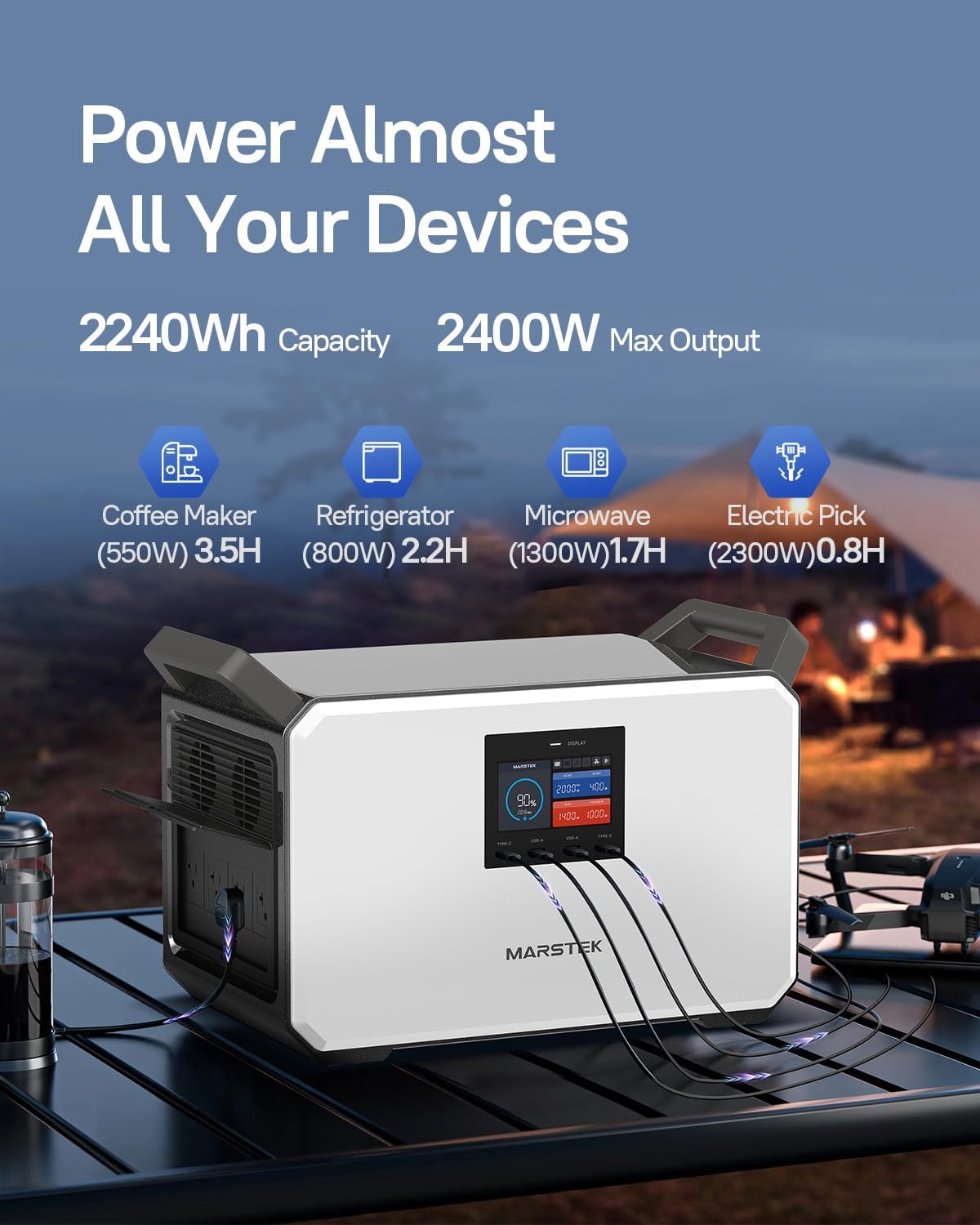
Figure 4: The MARSTEK M2200 providing power to various electronic devices simultaneously, showcasing അതിന്റെ വൈവിധ്യം.
Using DC and USB Outlets
Press the DC power button to activate the DC and USB ports. Connect your USB-C, USB-A, or 12V DC devices. The 100W Type-C port supports fast charging for compatible devices.
Emergency Power Supply (EPS) Function
When connected to an AC power source, the M2200 can function as an Emergency Power Supply. In the event of a power outage, it automatically switches to battery power within 0.02 seconds, providing continuous power to connected devices.
MARSTEK App Control
Download the MARSTEK app to monitor and control your M2200 remotely. The app allows you to check charging status, manage output ports, and view power consumption via Bluetooth or Wi-Fi.

Figure 5: A smartphone screen showing the MARSTEK application, illustrating remote monitoring and control features for the M2200.
വികസിപ്പിക്കാവുന്ന ശേഷി
The M2200's capacity can be expanded by connecting up to two MARSTEK P2200 expansion battery packs. This allows for a total capacity of up to 6720Wh (M2200 + 2x P2200).
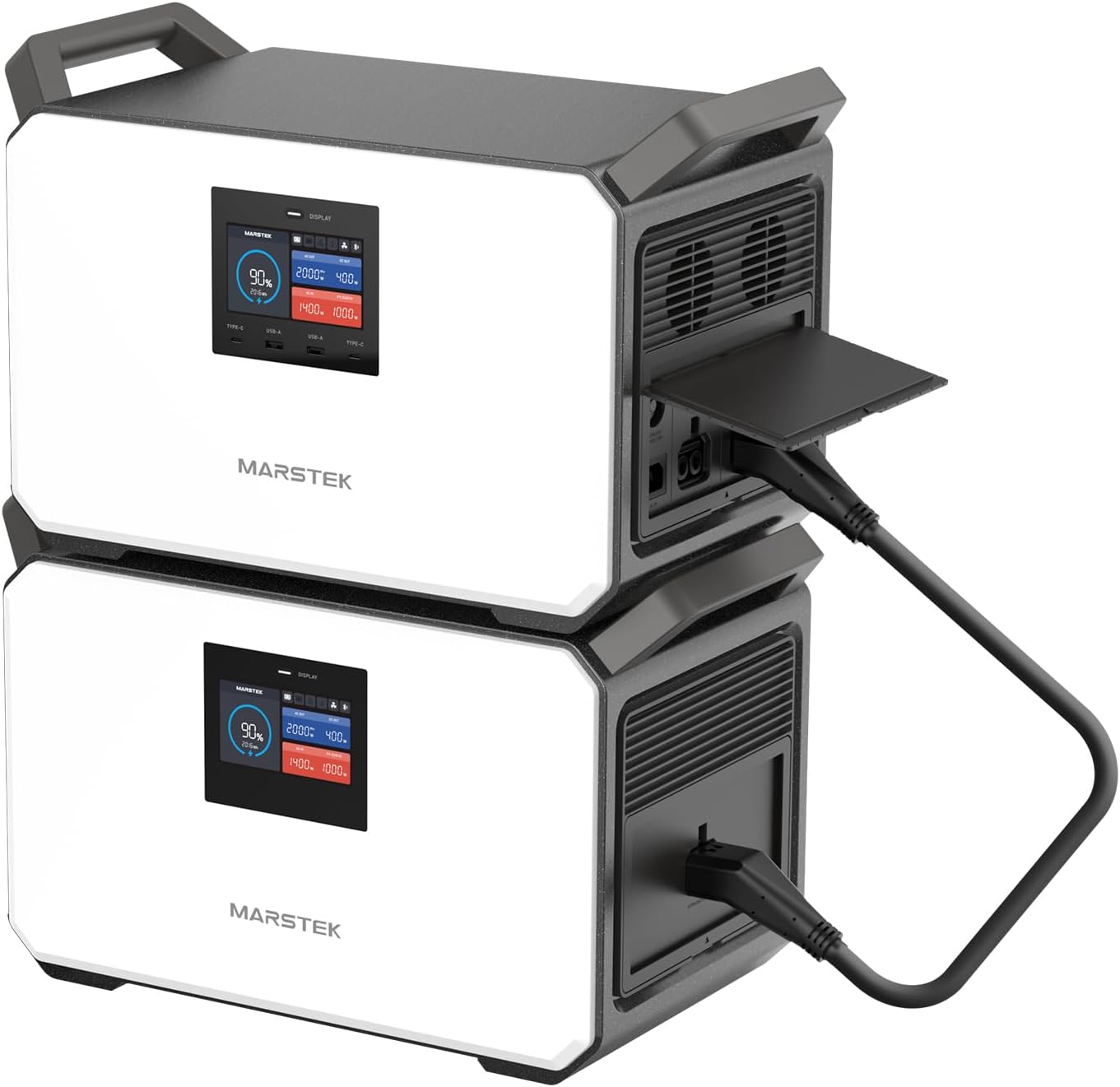
Figure 6: Two MARSTEK M2200 units stacked, demonstrating the expandable design and connection for increased power capacity.

Figure 7: A visual representation of the flat stack design for the M2200, illustrating how multiple units can be combined to expand total energy capacity.
7. ബാറ്ററി വിവരങ്ങൾ
The MARSTEK M2200 utilizes a LiFePO4 (Lithium Iron Phosphate) battery, known for its longevity and safety. This self-developing battery cell offers over 6000 charge cycles, ensuring a lifespan of up to 10 years with daily use, and a maximum lifespan of 25 years.
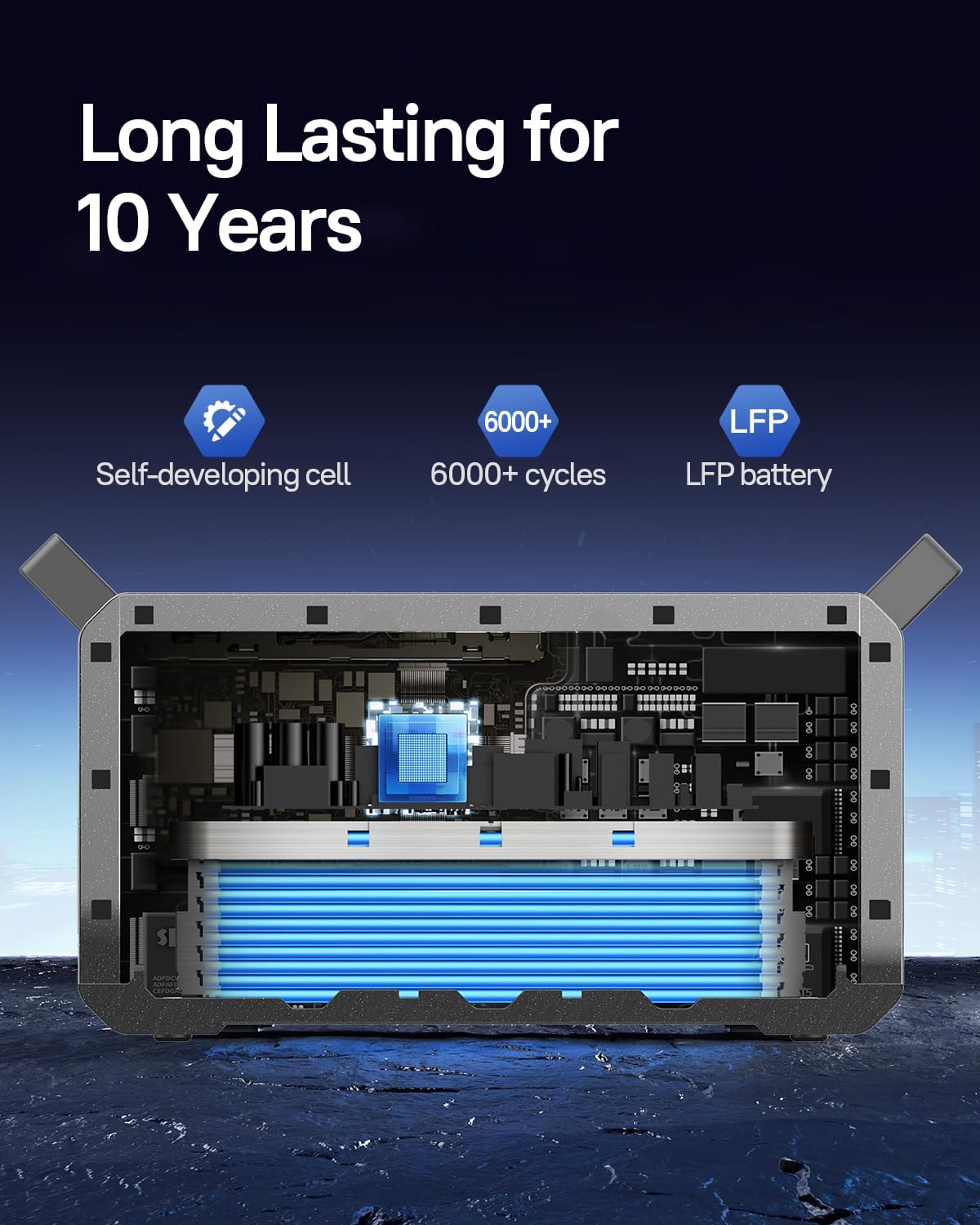
Figure 8: An internal diagram of the MARSTEK M2200 battery, emphasizing its LiFePO4 composition and extended cycle life.
8. പരിപാലനവും സംഭരണവും
പൊതു പരിപാലനം
- ഉണങ്ങിയതും മൃദുവായതുമായ തുണി ഉപയോഗിച്ച് യൂണിറ്റ് വൃത്തിയാക്കുക. അബ്രാസീവ് ക്ലീനറുകളോ ലായകങ്ങളോ ഉപയോഗിക്കരുത്.
- വെന്റിലേഷൻ ഓപ്പണിംഗുകൾ പൊടിയും അവശിഷ്ടങ്ങളും ഇല്ലാതെ വൃത്തിയായി സൂക്ഷിക്കുക.
- തീവ്രമായ താപനിലയിലോ ഈർപ്പത്തിലോ യൂണിറ്റിനെ തുറന്നുകാട്ടുന്നത് ഒഴിവാക്കുക.
സംഭരണം
- ദീർഘകാല സംഭരണത്തിനായി, ബാറ്ററിയുടെ ആരോഗ്യം നിലനിർത്താൻ ഓരോ 3-6 മാസത്തിലും യൂണിറ്റ് ഏകദേശം 50-80% വരെ ചാർജ് ചെയ്യുക.
- Store the unit in a cool, dry place away from direct sunlight and corrosive materials.
- സൂക്ഷിക്കുന്നതിനുമുമ്പ് യൂണിറ്റ് ഓഫാക്കിയിട്ടുണ്ടെന്ന് ഉറപ്പാക്കുക.
9. പ്രശ്നപരിഹാരം
If you encounter issues with your MARSTEK M2200, refer to the following common solutions:
- യൂണിറ്റ് ഓണാക്കുന്നില്ല: Ensure the battery is charged. If not, connect to an AC power source.
- പോർട്ടുകളിൽ നിന്ന് ഔട്ട്പുട്ട് ഇല്ല: Verify that the respective AC or DC power buttons are activated. Check if the device being powered is within the unit's wattagഇ പരിധികൾ.
- സ്ലോ ചാർജിംഗ്: Ensure the charging cable is securely connected. For solar charging, confirm panels are correctly positioned and receiving adequate sunlight.
- ഓവർലോഡ് മുന്നറിയിപ്പ്: If an overload warning appears on the display, disconnect some devices to reduce the load. The unit will automatically reset after a short period.
- ആപ്പ് കണക്റ്റിവിറ്റി പ്രശ്നങ്ങൾ: Ensure Bluetooth or Wi-Fi is enabled on your device and the power station. Try restarting both the app and the power station.
For persistent issues, contact MARSTEK customer support.
10 സാങ്കേതിക സവിശേഷതകൾ
| ഫീച്ചർ | സ്പെസിഫിക്കേഷൻ |
|---|---|
| ബ്രാൻഡ് | മാർസ്റ്റേക്ക് |
| മോഡലിൻ്റെ പേര് | M2200 |
| ബാറ്ററി തരം | ലൈഫെപിഒ4 |
| ശേഷി | 2240Wh |
| എസി ഔട്ട്പുട്ട് വാട്ട്tage | 2000W (Continuous), 2400W (Power Lifting) |
| വാല്യംtage | 120 വോൾട്ട് |
| AC Fast Charging Time | 80% in 60 mins, 100% in 70 mins |
| സോളാർ ചാർജിംഗ് ഇൻപുട്ട് | Up to 1000W (Full charge in approx. 2.3 hours) |
| USB-C ഔട്ട്പുട്ട് | 100W |
| ബാറ്ററി സൈക്കിളുകൾ | 6000+ സൈക്കിളുകൾ |
| ഇനത്തിൻ്റെ ഭാരം | 57 പൗണ്ട് |
| ഉൽപ്പന്ന അളവുകൾ | 16.1"L x 11.75"W x 12.09"H |
| മെറ്റീരിയൽ | എബിഎസ് + പിസി + മെറ്റൽ |
| പ്രത്യേക സവിശേഷതകൾ | Digital Display, Portable, USB Port, Expandable Capacity, EPS |
11. വാറൻ്റിയും പിന്തുണയും
വാറൻ്റി വിവരങ്ങൾ
The MARSTEK M2200 Portable Power Station comes with a 2-year manufacturer's warranty. Please refer to the professional service card included in your package for detailed warranty terms and conditions.
ഉപഭോക്തൃ പിന്തുണ
For technical assistance, warranty claims, or any questions regarding your MARSTEK M2200, please contact MARSTEK customer support through the contact information provided on your service card or the official MARSTEK webസൈറ്റ്.


