ആമുഖം
The GALAX REV-05 Computer Case is designed for enthusiasts seeking a sleek, professional, and high-performance chassis for their custom PC builds. This tower case features a modern mesh front panel for optimal airflow and comes equipped with four high-quality fixed RGB cooling fans to ensure continuous cooling for your components. Its spacious interior accommodates long graphics cards and various cooling solutions, while offering excellent cable management options for a clean and organized setup. The transparent side panel allows you to proudly display your internal components. This manual provides detailed instructions for setting up, installing components, operating, and maintaining your GALAX REV-05 case.
സുരക്ഷാ വിവരങ്ങൾ
Please read and understand all safety precautions before installing or operating your computer case.
- ഏതെങ്കിലും ഇൻസ്റ്റാളേഷനോ അറ്റകുറ്റപ്പണികളോ നടത്തുന്നതിന് മുമ്പ് എല്ലായ്പ്പോഴും മതിൽ ഔട്ട്ലെറ്റിൽ നിന്ന് വൈദ്യുതി വിതരണം വിച്ഛേദിക്കുക.
- Handle components with care to avoid damage from static electricity. Consider using an anti-static wrist strap.
- അമിതമായി ചൂടാകുന്നത് തടയാൻ കേസിനു ചുറ്റും ശരിയായ വായുസഞ്ചാരം ഉറപ്പാക്കുക.
- Keep the case away from liquids, excessive heat, and direct sunlight.
- കേസിലോ അതിന്റെ ഘടകങ്ങളിലോ മാറ്റം വരുത്താൻ ശ്രമിക്കരുത്, കാരണം ഇത് നിങ്ങളുടെ വാറന്റി അസാധുവാക്കുകയും സുരക്ഷാ അപകടമുണ്ടാക്കുകയും ചെയ്തേക്കാം.
- Keep small parts and screws out of reach of children.
പാക്കേജ് ഉള്ളടക്കം
നിങ്ങളുടെ പാക്കേജിൽ എല്ലാ ഇനങ്ങളും ഉണ്ടെന്ന് ഉറപ്പാക്കുക:
- GALAX REV-05 Computer Case (with 4 pre-installed fixed RGB fans)
- ആക്സസറി ബോക്സ് (സ്ക്രൂകൾ, കേബിൾ ടൈകൾ, മറ്റ് ചെറിയ ഭാഗങ്ങൾ എന്നിവ അടങ്ങിയിരിക്കുന്നു)
- ഉപയോക്തൃ മാനുവൽ (ഈ പ്രമാണം)
ഉൽപ്പന്നം കഴിഞ്ഞുview
Familiarize yourself with the key features and components of your GALAX REV-05 case.
ബാഹ്യ Views
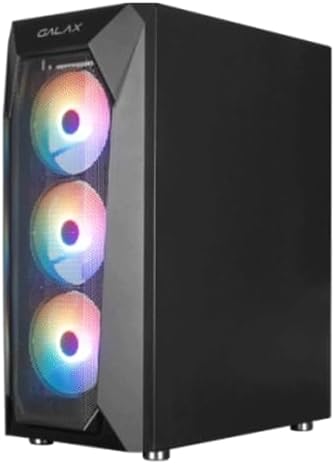
കോണാകൃതിയിലുള്ളത് view of the GALAX REV-05 case, showcasing the front mesh panel and the vibrant fixed RGB lighting of the pre-installed fans.

ഫ്രണ്ട് view of the GALAX REV-05 case, highlighting the three illuminated RGB fans behind the mesh panel, designed for optimal airflow.

കോണാകൃതിയിലുള്ളത് view of the GALAX REV-05 case with the RGB fans unlit, providing a clear look at the mesh front panel and the overall chassis design.

മുകളിൽ view of the GALAX REV-05 case, showing the top ventilation and the front I/O panel with various ports for connectivity.
ആന്തരികം Views
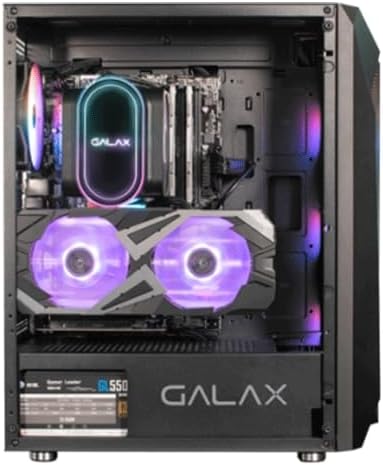
ആന്തരികം view of the GALAX REV-05 case with example components installed, demonstrating the spacious layout and potential for custom builds.

പിൻഭാഗത്തെ ആന്തരികം view of the GALAX REV-05 case, showing the motherboard tray cutout and cable routing options for organized builds.
സജ്ജീകരണവും ഇൻസ്റ്റാളേഷനും
Follow these steps to install your PC components into the GALAX REV-05 case.
1. കേസ് തയ്യാറാക്കൽ
- കേസ് ഒരു പരന്നതും സ്ഥിരതയുള്ളതുമായ പ്രതലത്തിൽ വയ്ക്കുക.
- Remove the side panels by unscrewing the thumbscrews at the rear of the case and sliding the panels off.
2. മദർബോർഡ് ഇൻസ്റ്റാളേഷൻ
- കേസിന്റെ പിൻഭാഗത്തുള്ള മദർബോർഡ് കട്ടൗട്ടിൽ I/O ഷീൽഡ് ഇൻസ്റ്റാൾ ചെയ്യുക.
- Align the motherboard with the standoffs inside the case. Ensure the standoffs match your motherboard's form factor (ATX, Micro-ATX, Mini-ITX).
- ആക്സസറി ബോക്സിൽ നിന്നുള്ള ഉചിതമായ സ്ക്രൂകൾ ഉപയോഗിച്ച് മദർബോർഡ് സുരക്ഷിതമാക്കുക.
3. പവർ സപ്ലൈ ഇൻസ്റ്റലേഷൻ
- Locate the power supply mounting area at the bottom rear of the case.
- Slide the power supply into position.
- കേസിന്റെ പിൻഭാഗത്ത് നിന്ന് സ്ക്രൂകൾ ഉപയോഗിച്ച് പവർ സപ്ലൈ സുരക്ഷിതമാക്കുക.
4. ഗ്രാഫിക്സ് കാർഡ് (GPU) ഇൻസ്റ്റലേഷൻ
- കേസിന്റെ പിൻഭാഗത്തുള്ള ആവശ്യമായ PCIe സ്ലോട്ട് കവറുകൾ നീക്കം ചെയ്യുക.
- Insert the graphics card into the appropriate PCIe slot on the motherboard, ensuring it clicks into place.
- Secure the graphics card with screws. The case supports graphics cards up to 160mm in height.
5. സ്റ്റോറേജ് ഡ്രൈവ് ഇൻസ്റ്റലേഷൻ (HDD/SSD)
- Identify the 2.5" SSD and 3.5" HDD mounting locations.
- Mount your storage drives using the provided screws.
6. കേബിൾ മാനേജ്മെന്റ്
- Route all power and data cables through the designated cutouts and channels behind the motherboard tray.
- Use the included cable ties to bundle and secure cables for a clean look and improved airflow.
പ്രവർത്തന നിർദ്ദേശങ്ങൾ
എല്ലാ ഘടകങ്ങളും ഇൻസ്റ്റാൾ ചെയ്ത് ബന്ധിപ്പിച്ചുകഴിഞ്ഞാൽ, നിങ്ങളുടെ സിസ്റ്റം ഓൺ ചെയ്യാൻ കഴിയും.
- Ensure all cables are securely connected to their respective components and the power supply.
- Connect the power cable from your power supply to a wall outlet.
- Press the power button on the top I/O panel of the case to start your computer.
- The pre-installed RGB fans will illuminate automatically upon power-on, providing fixed RGB lighting.
മെയിൻ്റനൻസ്
Regular maintenance helps ensure optimal performance and longevity of your computer case and components.
വൃത്തിയാക്കൽ
- പുറം: ഒരു മൃദുവായ, ഡി ഉപയോഗിച്ച് ബാഹ്യ പ്രതലങ്ങൾ തുടയ്ക്കുകamp തുണി. ഉരച്ചിലുകൾ ഉള്ള ക്ലീനറുകൾ ഒഴിവാക്കുക.
- ഇൻ്റീരിയർ: Periodically use compressed air to remove dust buildup from inside the case, especially from fans and mesh panels. Ensure the system is powered off and unplugged before cleaning.
ഫാൻ പരിപാലനം
- Check the pre-installed fans regularly for dust accumulation. Clean them gently with compressed air or a soft brush.
- Ensure fan blades are not obstructed and spin freely.
ട്രബിൾഷൂട്ടിംഗ്
If you encounter issues with your GALAX REV-05 case, refer to the following common problems and solutions.
| പ്രശ്നം | സാധ്യമായ കാരണം | പരിഹാരം |
|---|---|---|
| സിസ്റ്റം പവർ ഓണാക്കുന്നില്ല. | അയഞ്ഞ വൈദ്യുതി കണക്ഷനുകൾ, തകരാറുള്ള വൈദ്യുതി വിതരണം, തെറ്റായ ഫ്രണ്ട് പാനൽ ഹെഡർ കണക്ഷൻ. | Check all power cables (24-pin, 8-pin CPU, GPU power). Ensure power supply switch is ON. Verify front panel power button header is correctly connected to motherboard. |
| Fans are not spinning or RGB lights are off. | Fan power cable disconnected, faulty fan. | Ensure fan power cables are securely connected to the motherboard or fan controller. If a fan is faulty, it may need replacement. |
| മോശം വായുസഞ്ചാരം അല്ലെങ്കിൽ ഉയർന്ന താപനില. | Dust buildup, obstructed fans, poor cable management. | Clean dust filters and fans. Ensure no cables are obstructing airflow. Optimize cable routing. |
സ്പെസിഫിക്കേഷനുകൾ
Technical specifications for the GALAX REV-05 Computer Case.
| ഫീച്ചർ | വിശദാംശങ്ങൾ |
|---|---|
| മോഡലിൻ്റെ പേര് | GALAX REV-05 |
| കേസ് തരം | ടവർ |
| മെറ്റീരിയൽ | ലോഹം |
| നിറം | കറുപ്പ് |
| ഉൽപ്പന്ന അളവുകൾ (D x W x H) | 60 സെ.മീ x 72.9 സെ.മീ x 67.9 സെ.മീ |
| ഇനത്തിൻ്റെ ഭാരം | 8 grams (Note: This weight seems unusually low for a PC case and may be a data entry error in the source. Please refer to product packaging for accurate weight.) |
| തണുപ്പിക്കൽ രീതി | വായു |
| മുൻകൂട്ടി ഇൻസ്റ്റാൾ ചെയ്ത ഫാനുകൾ | 4 x Fixed RGB Fans |
| ഇളം നിറം | RGB |
| Max GPU Length Support | Supports graphics cards up to 160mm in height (Note: Original description states 160mm, which is usually GPU height, not length. Assuming this refers to height clearance for GPU.) |
| Max PSU Length Support | Supports power supplies up to 330mm in length. |
| ശുപാർശ ചെയ്യുന്ന ഉപയോഗങ്ങൾ | Gaming, Custom PC Builds |
| മാതൃരാജ്യം | ചൈന |
വാറൻ്റിയും പിന്തുണയും
For warranty information and technical support, please refer to the official GALAX webനിങ്ങളുടെ പ്രാദേശിക റീട്ടെയിലറെ ബന്ധപ്പെടുക അല്ലെങ്കിൽ സൈറ്റിൽ ബന്ധപ്പെടുക. വാറന്റി ക്ലെയിമുകൾക്കായി നിങ്ങളുടെ വാങ്ങിയതിന്റെ തെളിവ് സൂക്ഷിക്കുക.
ഓൺലൈൻ ഉറവിടങ്ങൾ: While specific links are not provided in this manual, searching for "GALAX official website" or "GALAX support" will direct you to relevant resources.


