1. ആമുഖം
The AULA F75 is a high-performance 75% wireless mechanical keyboard designed for both gaming and office use. It features versatile tri-mode connectivity (Bluetooth 5.0, 2.4GHz wireless, and USB wired), hot-swappable switches, and vibrant RGB backlighting. Its advanced structural design ensures a comfortable and responsive typing experience.

Figure 1.1: AULA F75 75% Wireless Mechanical Keyboard in Cool Black. This image shows the full keyboard with its compact layout and RGB backlighting.
2. ബോക്സിൽ എന്താണുള്ളത്?
Upon unboxing your AULA F75 keyboard, please ensure all the following components are present:
- AULA F75 വയർലെസ് മെക്കാനിക്കൽ കീബോർഡ്
- കീക്യാപ് പുള്ളർ
- USB കേബിൾ (ടൈപ്പ്-സി)
- ഉപയോക്തൃ മാനുവൽ (ഈ പ്രമാണം)
3. സജ്ജീകരണ ഗൈഡ്
3.1 പ്രാരംഭ ചാർജിംഗ്
Before first use, it is recommended to fully charge the keyboard. Connect the provided USB Type-C cable to the keyboard's Type-C port and the other end to a USB power source (e.g., computer USB port, wall adapter). The keyboard is equipped with a 4000mAh battery for long-lasting use.
3.2 കണക്റ്റിവിറ്റി ഓപ്ഷനുകൾ
The AULA F75 supports three connection modes: 2.4GHz wireless, Bluetooth 5.0, and USB wired. You can connect up to five devices simultaneously and switch between them easily.

Figure 3.1: AULA F75 Keyboard showcasing its compact 75% layout (80 keys) and the three connectivity options: Bluetooth, 2.4GHz, and Type-C wired connection.
- USB വയർഡ് കണക്ഷൻ:
Connect the USB Type-C cable from the keyboard to your computer's USB port. The keyboard will be automatically recognized and ready for use. This mode also charges the keyboard.
- 2.4GHz വയർലെസ് കണക്ഷൻ:
Locate the 2.4GHz USB receiver (usually stored in a slot on the keyboard). Plug the receiver into an available USB port on your computer. The keyboard should automatically connect. If not, ensure the keyboard's mode switch is set to 2.4GHz.
- ബ്ലൂടൂത്ത് 5.0 കണക്ഷൻ:
Switch the keyboard's mode to Bluetooth. On your device (PC, laptop, tablet, mobile phone), enable Bluetooth and search for new devices. Select "AULA F75" from the list of available devices to pair. The keyboard can store multiple Bluetooth profiles, allowing quick switching between paired devices.
4. പ്രവർത്തന നിർദ്ദേശങ്ങൾ
4.1 Multi-function Control Knob
The AULA F75 features a versatile control knob located on the top right. This knob operates differently based on the selected mode:
- ഗെയിമിംഗ് മോഡ്: Rotate the knob to adjust the brightness of the RGB backlighting. Click the knob to cycle through different lighting effects.
- ഓഫീസ് മോഡ്: Rotate the knob to adjust the system volume. Click the knob to play or pause media.
To switch between Gaming Mode and Office Mode, long press the knob for approximately 5 seconds.

ചിത്രം 4.1: ക്ലോസപ്പ് view of the AULA F75's multifunctional knob, PBT anti-sweat keycaps, scientific ladder-type keycap arrangement, and dual kickstands on the bottom for ergonomic adjustment.
4.2 RGB ബാക്ക്ലൈറ്റിംഗ്
The F75 keyboard offers 16.8 million RGB lighting colors and 16 built-in lighting effects. Additionally, it supports 10 cool music rhythm lighting effects when used with the official driver.
- Adjust brightness and speed using the multi-function knob (in Gaming Mode) or via FN key combinations.
- Select single color effects as desired.
- The backlight can be turned off if not needed.

Figure 4.2: Screenshot illustrating the 16 stylish RGB lighting modes and 10 unique music rhythm RGB effects available through the AULA F75 driver. The interface shows options for brightness, speed, color selection, and custom color settings.
4.3 ഹോട്ട്-സ്വാപ്പബിൾ സ്വിച്ചുകൾ
The AULA F75 features a hot-swappable base, allowing you to easily replace 3-pin or 5-pin mechanical switches without soldering. This enables customization of your typing feel and sound. The keyboard comes equipped with pre-lubricated stabilizers and LEOBOG Greywood V3 switches for a smooth and creamy typing experience.

Figure 4.3: Image demonstrating the hot-swappable feature of the AULA F75 keyboard, showing individual switches and the included keycap puller. Key specifications like 45g action force, 3.6mm key stroke travel, 4000mAh battery capacity, and 70 million+ keystroke service life are highlighted.
4.4 Programmable Keys and Driver Software
The AULA F75 supports full-key macro programming. You can customize single keys or key combinations to enhance gaming performance or work efficiency. The official driver software is required for advanced customization.
ഡ്രൈവർ ഡൗൺലോഡ്: സന്ദർശിക്കുക bit.ly/m/AULA to download the latest driver for your F75 keyboard.
The keyboard also features N-key rollover and a WIN key lock function to prevent accidental presses during intense gaming sessions.
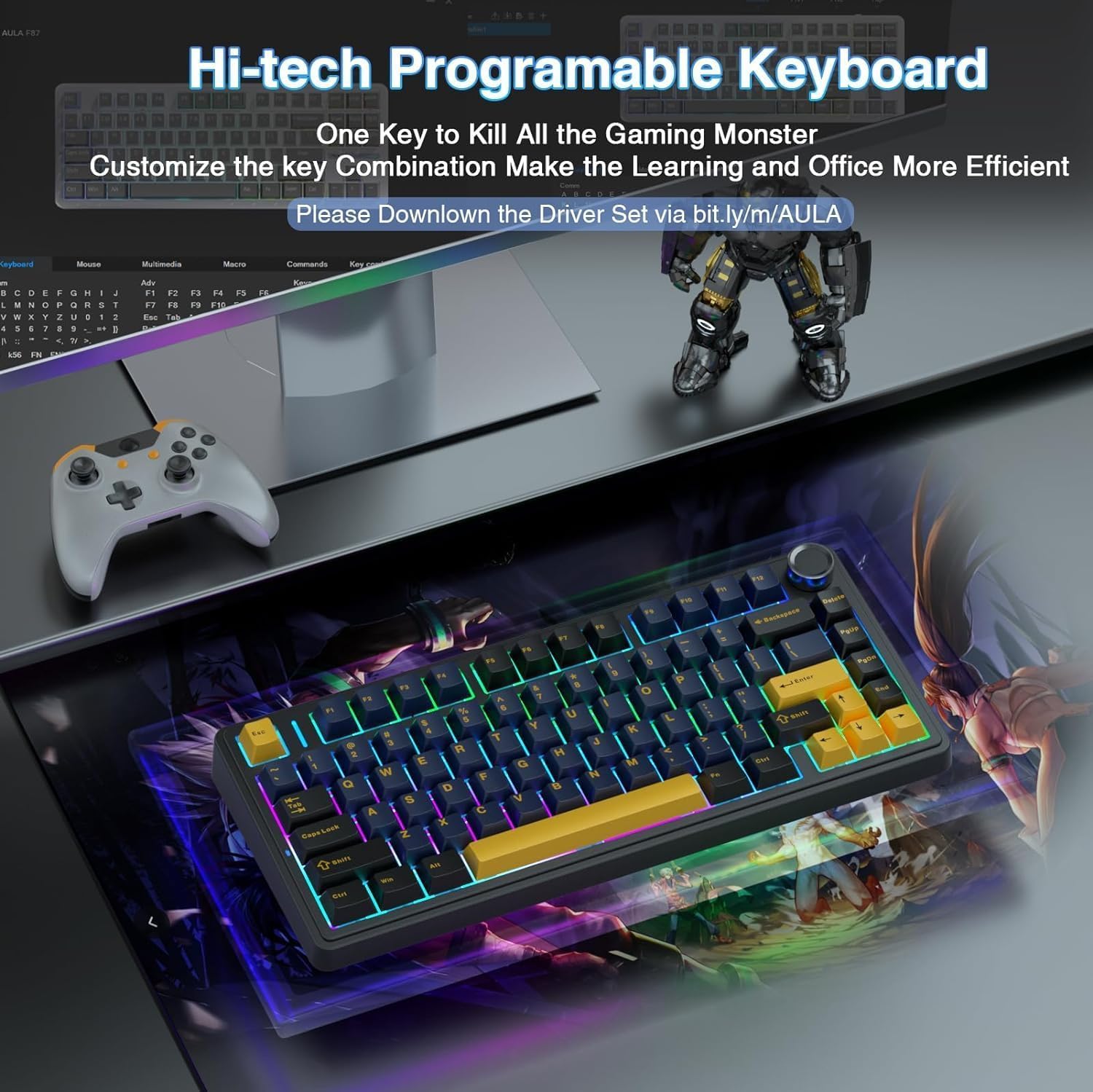
Figure 4.4: Visual representation of the AULA F75 as a hi-tech programmable keyboard, showing a user interface for customizing key combinations and macros. The driver download link is prominently displayed.
5. പരിപാലനം
To ensure the longevity and optimal performance of your AULA F75 keyboard, follow these maintenance guidelines:
- വൃത്തിയാക്കൽ: Regularly clean the keyboard with a soft, dry cloth. For deeper cleaning, use a can of compressed air to remove dust and debris from between the keycaps. You can use the included keycap puller to remove keycaps for thorough cleaning of the switches and plate.
- സ്വിച്ച് കെയർ: If you replace switches, handle them carefully to avoid bending the pins. Ensure switches are seated correctly when inserting them into the hot-swappable sockets.
- സംഭരണം: ദീർഘനേരം ഉപയോഗിക്കാത്തപ്പോൾ, കീബോർഡ് നേരിട്ട് സൂര്യപ്രകാശം ഏൽക്കാത്തതും ഉയർന്ന താപനില ഏൽക്കാത്തതുമായ തണുത്തതും വരണ്ടതുമായ സ്ഥലത്ത് സൂക്ഷിക്കുക.
- ബാറ്ററി: Avoid completely draining the battery frequently. Charge the keyboard regularly to maintain battery health.
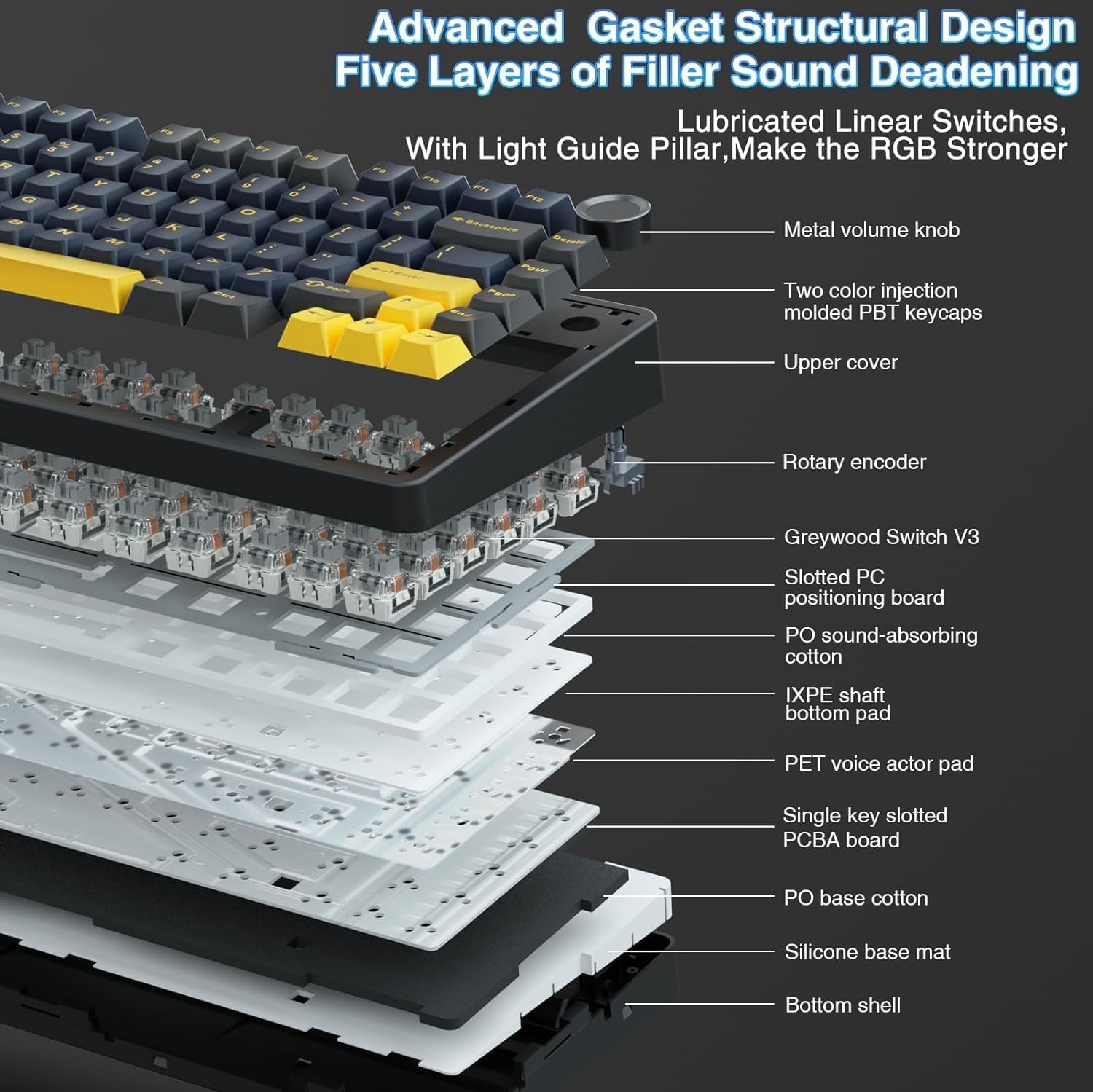
ചിത്രം 5.1: പൊട്ടിത്തെറിച്ചു view illustrating the advanced gasket structural design and five layers of filler sound deadening within the AULA F75 keyboard, including components like the metal volume knob, two-color injection molded PBT keycaps, Greywood Switch V3, and various sound-absorbing pads.
6. പ്രശ്നപരിഹാരം
| പ്രശ്നം | സാധ്യമായ കാരണം | പരിഹാരം |
|---|---|---|
| വയർലെസ്സ് മോഡിൽ കീബോർഡ് പ്രതികരിക്കുന്നില്ല. | Low battery, incorrect mode selected, receiver not plugged in (2.4GHz), not paired (Bluetooth), interference. | Charge the keyboard. Ensure the mode switch is set correctly (2.4GHz or BT). Re-insert the 2.4GHz receiver. Re-pair the Bluetooth connection. Move closer to the receiver/device. |
| RGB backlighting not working or dim. | Backlight turned off, brightness set too low, low battery. | Adjust brightness using the knob or FN key combinations. Ensure the keyboard is charged. |
| കീകൾ രജിസ്റ്റർ ചെയ്യുന്നില്ല അല്ലെങ്കിൽ ഇരട്ട-ടൈപ്പ് ചെയ്യുന്നില്ല. | Loose switch, debris under keycap, software issue. | Remove keycap and re-seat the switch firmly. Clean under the keycap. Restart your computer. Update keyboard driver. |
| Multi-function knob not working as expected. | Incorrect mode (Gaming/Office), driver issue. | Long press the knob for 5 seconds to switch modes. Ensure the driver is installed and updated. |
7 സ്പെസിഫിക്കേഷനുകൾ
| ഫീച്ചർ | വിശദാംശങ്ങൾ |
|---|---|
| മോഡലിൻ്റെ പേര് | F75-Ice Black (F75-cr) |
| കണക്റ്റിവിറ്റി ടെക്നോളജി | 2.4GHz Wireless, BT5.0, USB-C |
| കീബോർഡ് വിവരണം | മെക്കാനിക്കൽ |
| പ്രത്യേക സവിശേഷതകൾ | Backlit, Hot-Swappable, Programmable Keys, Rechargeable, Volume Roller |
| നിറം | തണുത്ത കറുപ്പ് |
| മെറ്റീരിയൽ | പ്ലാസ്റ്റിക് |
| ഉൽപ്പന്ന അളവുകൾ | 12.7 x 5.64 x 1.7 ഇഞ്ച് |
| ഇനത്തിൻ്റെ ഭാരം | 2.2 പൗണ്ട് |
| ബാറ്ററി | 1 Lithium Polymer battery required (4000mAh capacity) |
| കീ സ്വിച്ചുകൾ | LEOBOG Greywood V3 (Pre-lubricated) |
| ബാക്ക്ലൈറ്റിംഗ് | 16.8 Million RGB colors, 16 effects, 10 music rhythms |
8. വാറൻ്റിയും പിന്തുണയും
This AULA F75 keyboard is a renewed product. For specific warranty information and support, please refer to the documentation provided at the time of purchase or contact the seller directly. For general product inquiries or technical assistance, you may visit the official AULA webസൈറ്റ് ചെയ്യുക അല്ലെങ്കിൽ അവരുടെ ഉപഭോക്തൃ പിന്തുണ ചാനലുകളുമായി ബന്ധപ്പെടുക.
ഏതെങ്കിലും വാറന്റി ക്ലെയിമുകൾക്കായി നിങ്ങളുടെ വാങ്ങിയതിന്റെ തെളിവ് സൂക്ഷിക്കുക.


