1. ആമുഖം
The Havit Gamenote F2005 is a 120mm RGB CPU Cooler designed to provide efficient cooling for your computer's processor. It features copper pipe technology for enhanced heat dissipation and integrated RGB lighting for visual customization. This cooler is compatible with various Intel and AMD sockets, ensuring stable performance even during demanding tasks.
This manual provides essential information for the proper installation, operation, maintenance, and troubleshooting of your Havit Gamenote F2005 CPU Cooler. Please read it carefully before proceeding with installation.

ചിത്രം 1.1: ആംഗിൾഡ് view of the Havit Gamenote F2005 CPU Cooler, showcasing the RGB fan and heatsink design.
2. സജ്ജീകരണവും ഇൻസ്റ്റാളേഷനും
Before beginning installation, ensure your computer is powered off and disconnected from the main power supply. Refer to your motherboard's manual for specific CPU cooler mounting instructions if needed.
2.1 പാക്കേജ് ഉള്ളടക്കം
പാക്കേജിൽ എല്ലാ ഘടകങ്ങളും ഉണ്ടെന്ന് ഉറപ്പാക്കുക:
- Havit Gamenote F2005 CPU Cooler (Heatsink and Fan assembly)
- Mounting brackets for Intel sockets (LGA 1700, 1200, 115x)
- Mounting brackets for AMD sockets (AM4, AM5)
- തെർമൽ പേസ്റ്റ്
- Screws and backplate (if applicable for your socket type)
2.2 ഇൻസ്റ്റലേഷൻ ഘട്ടങ്ങൾ
- സിപിയു തയ്യാറാക്കുക: Clean the surface of your CPU and the cooler's base plate thoroughly with isopropyl alcohol to remove any old thermal paste or residue.
- തെർമൽ പേസ്റ്റ് പ്രയോഗിക്കുക: Apply a small, pea-sized amount of thermal paste to the center of your CPU's integrated heat spreader (IHS). Do not spread it manually; the pressure from the cooler will distribute it evenly.
- മൗണ്ടിംഗ് ബ്രാക്കറ്റുകൾ അറ്റാച്ചുചെയ്യുക: Secure the appropriate mounting brackets for your CPU socket (Intel LGA or AMD AM) to the cooler's base. Ensure they are firmly attached.
- കൂളർ സ്ഥാപിക്കുക: Carefully align the cooler with the mounting holes on your motherboard. For Intel sockets, you may need to install a backplate behind the motherboard first.
- കൂളർ സുരക്ഷിതമാക്കുക: Gently press the cooler down onto the CPU and secure it using the provided screws. Tighten screws in a diagonal pattern (e.g., top-left, bottom-right, top-right, bottom-left) to ensure even pressure. Do not overtighten.
- ഫാൻ പവർ ബന്ധിപ്പിക്കുക: Locate the CPU_FAN header on your motherboard and connect the cooler's 4-pin fan connector. Ensure it is securely plugged in.
- Connect RGB (Optional): If your motherboard supports RGB control, connect the cooler's RGB cable to the appropriate RGB header on your motherboard. Refer to your motherboard manual for header location.
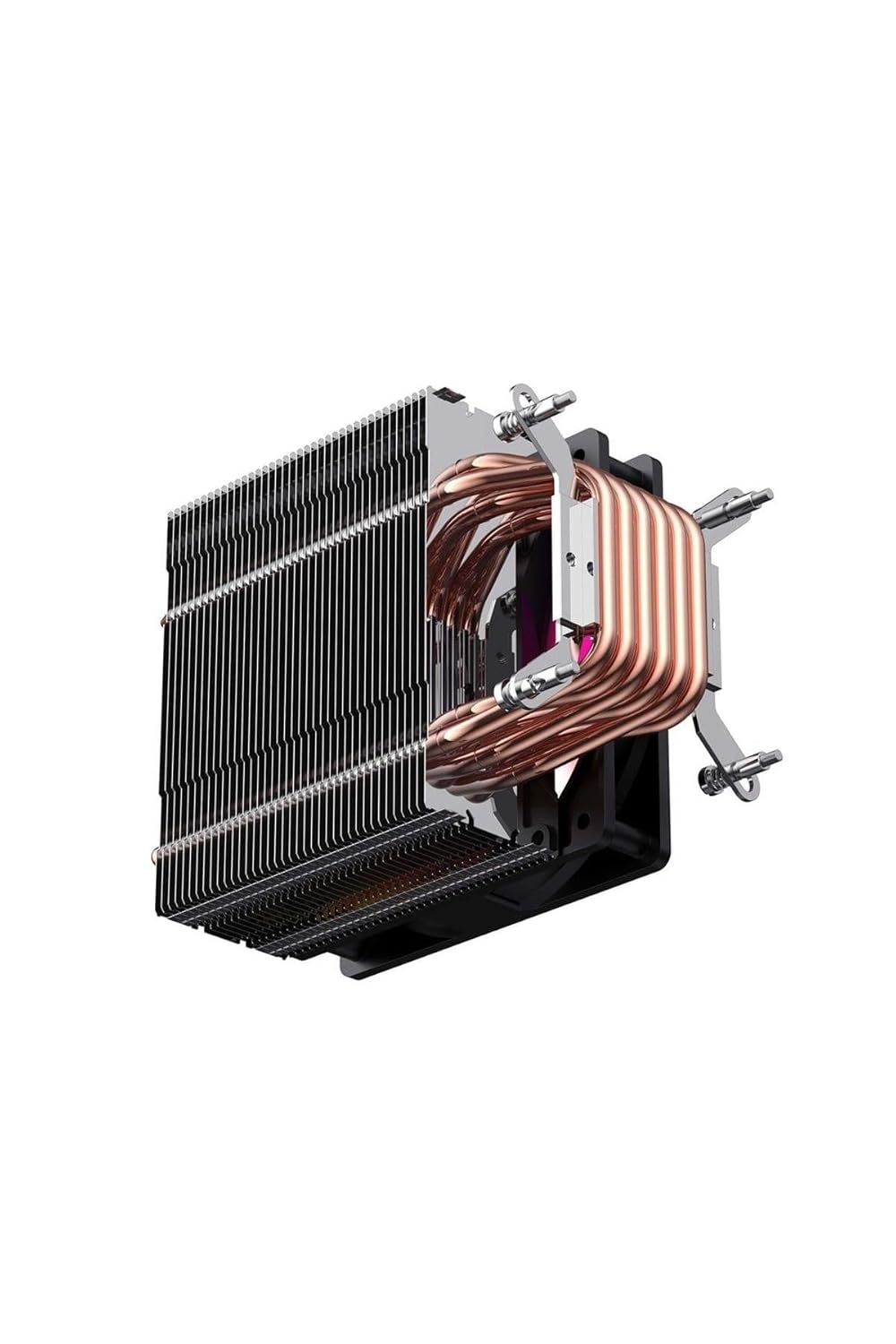
ചിത്രം 2.1: വശം view of the Havit Gamenote F2005 CPU Cooler, highlighting the copper heat pipes and aluminum fins for efficient heat transfer.

ചിത്രം 2.2: താഴെ view of the Havit Gamenote F2005 CPU Cooler, showing the direct contact copper heat pipes and the mounting bracket attachment points.
3. പ്രവർത്തന നിർദ്ദേശങ്ങൾ
Once installed, the Havit Gamenote F2005 CPU Cooler operates automatically to maintain optimal CPU temperatures.
3.1 ഫാൻ പ്രവർത്തനം
The 120mm fan's speed is controlled by your motherboard's BIOS/UEFI settings, typically adjusting automatically based on the CPU temperature. This ensures efficient cooling when needed and quiet operation during lighter loads. The Havit Gamenote F2005 is designed for quiet performance.
3.2 RGB ലൈറ്റിംഗ്
The integrated RGB lighting will illuminate upon system power-on. If connected to a compatible motherboard RGB header, you can control the lighting effects and colors using your motherboard's dedicated RGB software (e.g., ASUS Aura Sync, MSI Mystic Light, Gigabyte RGB Fusion, ASRock Polychrome Sync).

ചിത്രം 3.1: മുകളിൽ നിന്ന് താഴേക്ക് view of the Havit Gamenote F2005 CPU Cooler, showcasing the vibrant RGB lighting of the fan.
4. പരിപാലനം
നിങ്ങളുടെ സിപിയു കൂളറിന്റെ ദീർഘായുസ്സും ഒപ്റ്റിമൽ പ്രകടനവും ഉറപ്പാക്കാൻ പതിവ് അറ്റകുറ്റപ്പണി സഹായിക്കുന്നു.
- പൊടി നീക്കം: Periodically (e.g., every 3-6 months), power off your computer and use compressed air to gently blow dust out of the heatsink fins and fan blades. Hold the fan blades to prevent them from spinning rapidly during cleaning, which can damage the bearings.
- കണക്ഷനുകൾ പരിശോധിക്കുക: Ensure all power and RGB cables remain securely connected to the motherboard.
- Thermal Paste (Advanced): After several years, or if you notice a significant increase in CPU temperatures, consider reapplying thermal paste. This involves carefully removing the cooler, cleaning both surfaces, and applying new thermal paste. This is an advanced procedure and should only be performed if you are comfortable with it.
5. പ്രശ്നപരിഹാരം
If you encounter issues with your Havit Gamenote F2005 CPU Cooler, refer to the following common problems and solutions:
- ഉയർന്ന സിപിയു താപനിലകൾ:
- കൂളർ സുരക്ഷിതമായി ഘടിപ്പിച്ചിട്ടുണ്ടെന്നും സിപിയുവുമായി ശരിയായ സമ്പർക്കം പുലർത്തുന്നുണ്ടെന്നും ഉറപ്പാക്കുക.
- തെർമൽ പേസ്റ്റ് ശരിയായി പ്രയോഗിച്ചിട്ടുണ്ടെന്നും ഉണങ്ങിയിട്ടില്ലെന്നും ഉറപ്പാക്കുക.
- Check if the fan is spinning.
- ഹീറ്റ്സിങ്ക് ഫിനുകളിൽ അടിഞ്ഞുകൂടിയ പൊടി വൃത്തിയാക്കുക.
- നിങ്ങളുടെ പിസി കെയ്സിനുള്ളിൽ മതിയായ വായുസഞ്ചാരം ഉറപ്പാക്കുക.
- ഫാൻ കറങ്ങുന്നില്ല:
- 4-പിൻ ഫാൻ കണക്റ്റർ മദർബോർഡിലെ CPU_FAN ഹെഡറിൽ സുരക്ഷിതമായി പ്ലഗ് ചെയ്തിട്ടുണ്ടോയെന്ന് പരിശോധിക്കുക.
- Verify BIOS/UEFI settings to ensure the CPU fan control is enabled and not set to a very low RPM profile.
- RGB ലൈറ്റിംഗ് പ്രവർത്തിക്കുന്നില്ല:
- Ensure the RGB cable (if present) is correctly connected to a compatible RGB header on your motherboard.
- Check your motherboard's RGB software for lighting control settings.
- Verify that the RGB header on your motherboard is enabled in BIOS/UEFI.
- Unusual Noise from Fan:
- ഫാൻ ബ്ലേഡുകളിൽ തട്ടുന്ന ഏതെങ്കിലും കേബിളുകളോ തടസ്സങ്ങളോ പരിശോധിക്കുക.
- ഫാൻ സുരക്ഷിതമായി ഘടിപ്പിച്ചിട്ടുണ്ടെന്നും വൈബ്രേറ്റ് ചെയ്യുന്നില്ലെന്നും ഉറപ്പാക്കുക.
- Dust buildup can sometimes cause imbalance; clean the fan.
6 സ്പെസിഫിക്കേഷനുകൾ
| ഫീച്ചർ | വിശദാംശങ്ങൾ |
|---|---|
| മോഡൽ നമ്പർ | F2005 |
| ബ്രാൻഡ് | ഹവിറ്റ് |
| ഉൽപ്പന്ന അളവുകൾ | 12 x 12 x 2.5 സെ.മീ |
| ഭാരം | 360 ഗ്രാം |
| ഫാൻ വലിപ്പം | 120 മി.മീ |
| സിപിയു സോക്കറ്റ് അനുയോജ്യത | Intel: LGA 1700, LGA 1200, LGA 115x (1150, 1151, 1155, 1156) എഎംഡി: AM4, AM5 |
| റേറ്റുചെയ്ത വോളിയംtage | 12 വോൾട്ട് (ഡിസി) |
| വാട്ടിൽ പവർ | 200 വാട്ട് |
| പവർ കണക്റ്റർ | 4-പിൻ |
| കൂളിംഗ് ടെക്നോളജി | കോപ്പർ ഹീറ്റ് പൈപ്പുകൾ, അലുമിനിയം ഫിനുകൾ |
| ലൈറ്റിംഗ് | RGB |
7. വാറൻ്റിയും പിന്തുണയും
For detailed warranty information regarding your Havit Gamenote F2005 CPU Cooler, please refer to the official Havit webനിങ്ങളുടെ വാങ്ങൽ കേന്ദ്രവുമായി ബന്ധപ്പെടുക അല്ലെങ്കിൽ സൈറ്റിൽ ബന്ധപ്പെടുക. വാറന്റി നിബന്ധനകളും വ്യവസ്ഥകളും പ്രദേശത്തിനും റീട്ടെയിലറിനും അനുസരിച്ച് വ്യത്യാസപ്പെടാം.
For technical support or further assistance, please visit the official Havit support page or contact their customer service department.


