1. ആമുഖം
The Antec FLUX SE is a Mid Tower PC case meticulously engineered for performance, aesthetics, and quietness. Crafted from steel, plastic, and wood, its panel offers a premium texture, seamlessly blending into any home design. Its multi-directional vent design ensures optimal airflow, with sound dampening foam on both sides ensuring sound insulation. FLUX SE supports up to 9 fans, maximizing heat dissipation while maintaining an optimal environment for your components.
2 പ്രധാന സവിശേഷതകൾ
- Crafted with a combination of metal, glass and wood to create a high-quality texture with different materials. Sound-dampening foam on both side panels ensures a quieter computing experience.
- Multi-directional vent design creates a dedicated Antec Flux airflow channel.
- Supports up to 9 fans simultaneously, with pre-installed 3 x P12 PWM at the front & 1 x P12R PWM reverse fan at the power supply chamber & 1 x P14 PWM in the rear.
- Supports simultaneous installation of Front 360mm radiator + Top 360mm radiator or Front 420mm radiator + Top 280mm radiator.
- Widely supports various back-connect motherboards available on the market.
3. Product Components & Overview

ഫ്രണ്ട് view of the Antec Flux SE PC Case, highlighting the walnut wood panel and mesh design.

Diagram illustrating the FLUX airflow design within the PC case, showing fan placement and air movement.

Image showing the five high-performance PWM fans that come pre-installed with the case.

Illustration of the tool-free panel design, allowing easy removal of top, left, right, and front panels.

View of the bottom full-size pull-out dust filter for easy cleaning and strong dust prevention.
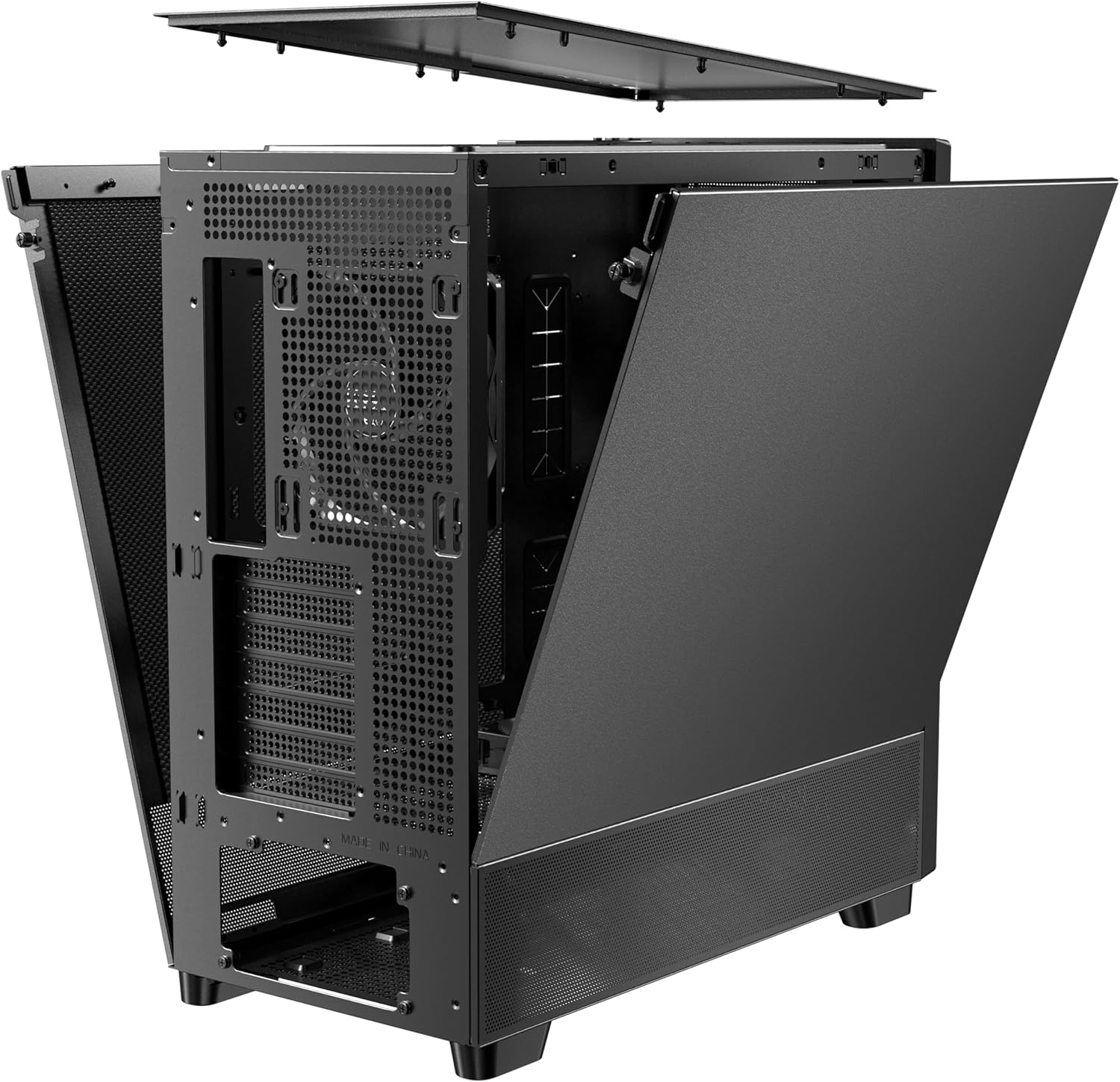
Diagram showing the extensive interior layout, indicating support for various motherboard sizes, CPU coolers, and GPU lengths, along with drive bays and power supply location.

ഒരു പൊട്ടിത്തെറിച്ചു view of the Antec Flux SE PC case, showing all its detachable components including panels, fans, and internal structure.
4. സജ്ജീകരണവും ഇൻസ്റ്റാളേഷനും
4.1. പവർ സപ്ലൈ ഇൻസ്റ്റലേഷൻ
Official video guide demonstrating the power supply installation process within the Antec Flux SE case, including various mounting orientations and cable routing recommendations.
4.2. Motherboard & GPU Installation

The case supports various back-connect motherboards, allowing cables to be plugged in from behind for a cleaner look and smoother airflow.

The chassis supports vertical GPU mounting with an optional vertical bracket, allowing removal of fully-open PCI slot covers.
4.3. Fan & Radiator Support
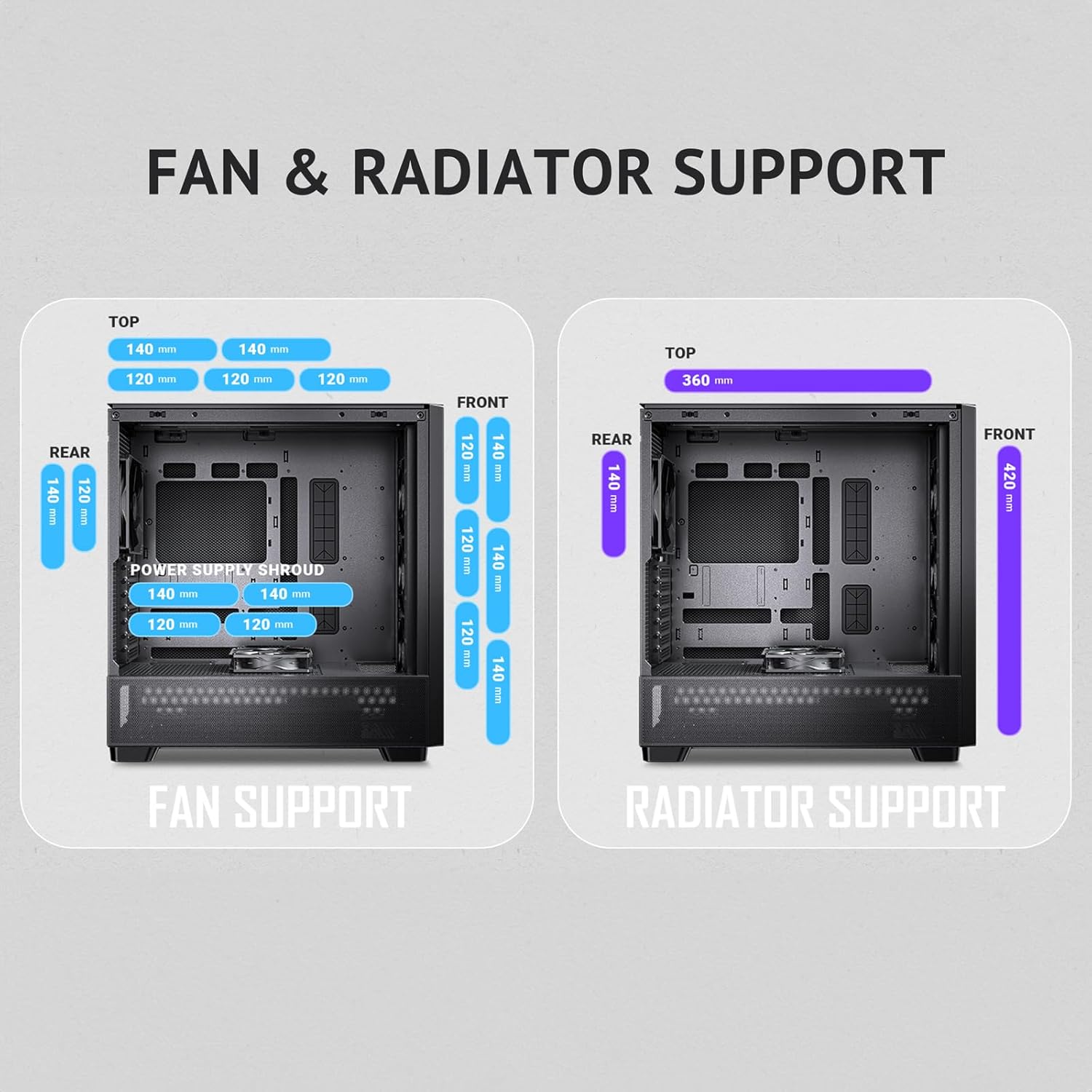
Detailed chart showing compatible fan and radiator sizes for various mounting locations within the case (top, front, rear, power supply shroud).
4.4. കേബിൾ മാനേജ്മെന്റ്

കഴിഞ്ഞുview of the cable management system, including pre-installed Velcro straps and cable ties for organized routing behind the motherboard tray.
5 സ്പെസിഫിക്കേഷനുകൾ
| ഫീച്ചർ | വിശദാംശങ്ങൾ |
|---|---|
| ബ്രാൻഡ് | Antec |
| പരമ്പര | FLUX SE |
| മോഡൽ നമ്പർ | FLUX SE |
| കേസ് തരം | മിഡ് ടവർ |
| മെറ്റീരിയൽ | അലോയ് സ്റ്റീൽ |
| നിറം | ഫ്ലക്സ് എസ്ഇ |
| ഇനത്തിൻ്റെ ഭാരം | 19.4 പൗണ്ട് |
| ഉൽപ്പന്ന അളവുകൾ (LxWxH) | 19.05 x 19.4 x 19.76 ഇഞ്ച് |
| മദർബോർഡ് അനുയോജ്യത | E-ATX (≤ 330 mm), ATX, Micro-ATX, ITX |
| സിപിയു കൂളർ മാക്സ് ഉയരം | 180 മി.മീ |
| പരമാവധി GPU ദൈർഘ്യം | 408 മി.മീ |
| Power Supply Max Length | 235mm (with HDD) |
| USB 3.0 പോർട്ടുകളുടെ എണ്ണം | 1 |
| തണുപ്പിക്കൽ രീതി | വായു |
6. പരിപാലനം
Regular maintenance ensures the longevity and optimal performance of your Antec Flux SE PC case. Keep the case clean by regularly dusting the exterior with a soft, dry cloth. Utilize the pull-out dust filters at the bottom and front to prevent dust accumulation inside the case. Clean these filters periodically by rinsing them with water and allowing them to dry completely before reinstallation. Ensure all fans are free from obstructions and clean any dust buildup on fan blades to maintain efficient airflow.
7. പ്രശ്നപരിഹാരം
7.1. പവർ ഇല്ല
- Ensure the power supply is correctly installed and all cables are securely connected to the motherboard and components.
- Verify the power switch on the case and the power supply unit are in the 'ON' position.
- Check the power outlet and power cable for any issues.
7.2. Excessive Fan Noise
- Inspect fans for dust buildup and clean them as necessary.
- Ensure fan cables are not obstructing fan blades.
- Verify fans are securely mounted and not vibrating against the case.
7.3. Overheating Components
- Check that all case fans are operating correctly and are oriented for optimal airflow (intake/exhaust).
- Clean all dust filters and internal components to ensure unrestricted airflow.
- Ensure proper thermal paste application on the CPU and secure mounting of the CPU cooler.
8. വാറൻ്റിയും പിന്തുണയും
The Antec Flux SE PC Case comes with a manufacturer's warranty. Please refer to the warranty card included with your product for specific terms and conditions. For technical support, troubleshooting assistance, or warranty claims, please visit the official Antec webസൈറ്റിൽ ബന്ധപ്പെടുക അല്ലെങ്കിൽ അവരുടെ ഉപഭോക്തൃ സേവനവുമായി ബന്ധപ്പെടുക. വാറന്റി സാധൂകരണത്തിനായി നിങ്ങളുടെ വാങ്ങിയതിന്റെ തെളിവ് സൂക്ഷിക്കുക.


