ആമുഖം
The STRONG Leap-UNA TV Streaming Stick is a compact and powerful device designed to transform your television into a smart TV, providing instant access to a vast array of streaming content. Powered by Android TV 11, it offers seamless 2K resolution streaming with Wi-Fi 5 connectivity. This manual provides detailed instructions for setting up, operating, and maintaining your Leap-UNA streaming stick to ensure an optimal entertainment experience.
സുരക്ഷാ വിവരങ്ങൾ
- ഉപകരണം ഉപയോഗിക്കുന്നതിന് മുമ്പ് എല്ലാ നിർദ്ദേശങ്ങളും വായിക്കുക.
- മഴ, ഈർപ്പം, അല്ലെങ്കിൽ തീവ്രമായ താപനില എന്നിവയിൽ ഉപകരണം തുറന്നുകാട്ടരുത്.
- അമിതമായി ചൂടാക്കുന്നത് തടയാൻ ഉപകരണത്തിന് ചുറ്റും ശരിയായ വായുസഞ്ചാരം ഉറപ്പാക്കുക.
- ഉപകരണത്തിനൊപ്പം നൽകിയിട്ടുള്ള പവർ അഡാപ്റ്റർ മാത്രം ഉപയോഗിക്കുക.
- ഉപകരണം സ്വയം ഡിസ്അസംബ്ലിംഗ് ചെയ്യാനോ നന്നാക്കാനോ ശ്രമിക്കരുത്. എല്ലാ സേവനങ്ങളും യോഗ്യതയുള്ള ഉദ്യോഗസ്ഥരെ ഏൽപ്പിക്കുക.
- നേരിട്ട് സൂര്യപ്രകാശത്തിൽ നിന്നും താപ സ്രോതസ്സുകളിൽ നിന്നും ഉപകരണം അകറ്റി നിർത്തുക.
പാക്കേജ് ഉള്ളടക്കം
എല്ലാ ഇനങ്ങളും നിലവിലുണ്ടോ എന്നും നല്ല നിലയിലാണെന്നും ദയവായി പരിശോധിക്കുക:
- STRONG Leap-UNA 2K Android TV Streaming Stick
- റിമോട്ട് കൺട്രോൾ
- Power Adapter (or USB cable for power)
- HDMI Extender (if included)
- ഉപയോക്തൃ മാനുവൽ (ഈ പ്രമാണം)
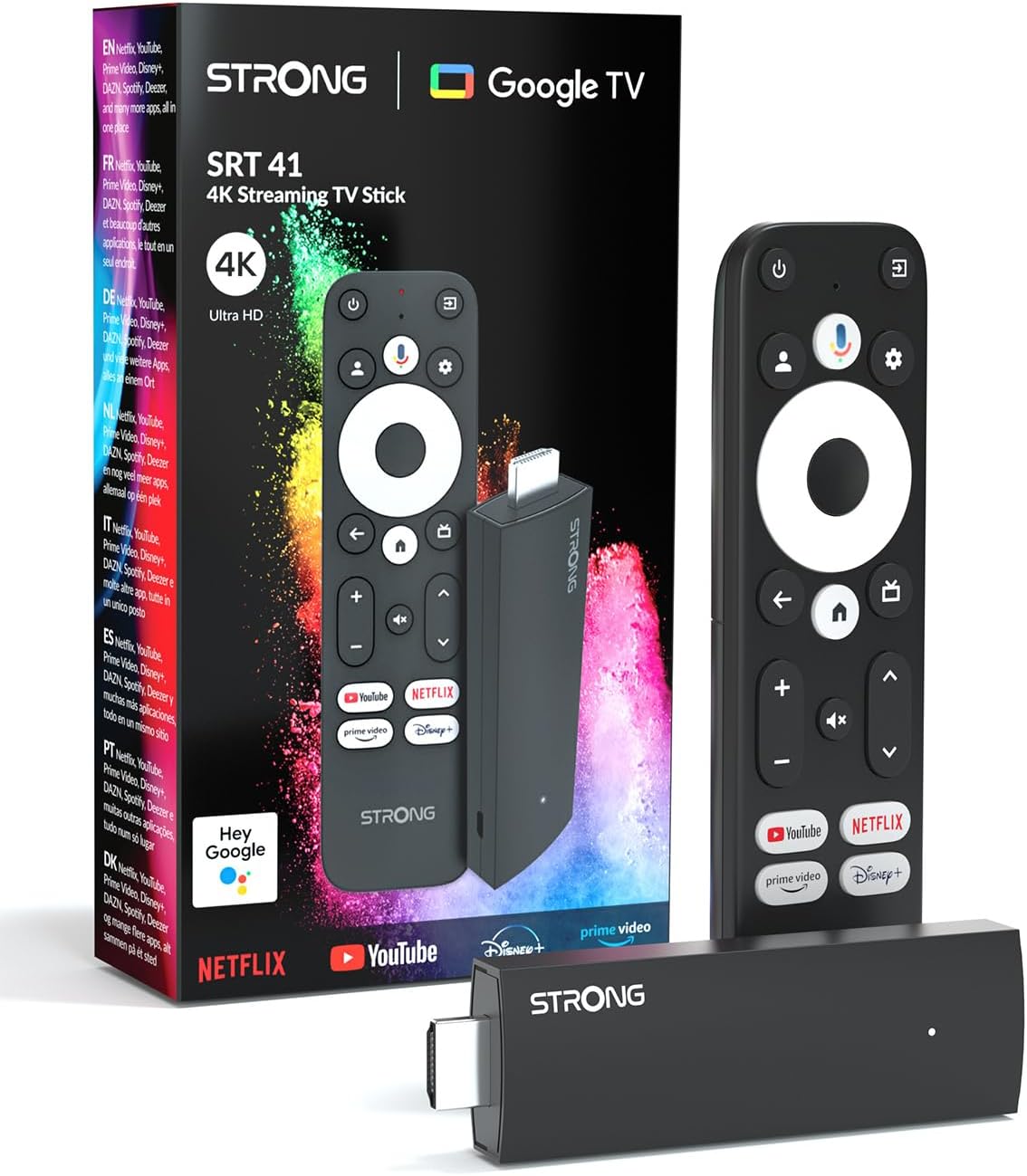
Image: The STRONG Leap-UNA streaming stick, its remote control, and the product packaging. This shows the main components included in the box.
ഉൽപ്പന്നം കഴിഞ്ഞുview
The Leap-UNA stick is designed for ease of use and portability. It connects directly to your TV's HDMI port.
ഉപകരണ ഘടകങ്ങൾ:
- Streaming Stick: Compact device with an HDMI connector for TV and a Micro USB port for power.
- റിമോട്ട് കൺട്രോൾ: Features dedicated buttons for power, navigation, volume, Google Assistant, and quick access to popular streaming services like Netflix and YouTube.

Image: A close-up of the STRONG Leap-UNA streaming stick, highlighting its compact design and connectivity options including HDMI and Micro USB ports.
സജ്ജമാക്കുക
Follow these steps to set up your STRONG Leap-UNA streaming stick:
- ടിവിയിലേക്ക് കണക്റ്റ് ചെയ്യുക: Plug the STRONG Leap-UNA streaming stick directly into an available HDMI port on your television. If space is limited, use an HDMI extender (if provided).
- പവർ ഓൺ: Connect the power adapter to the Micro USB port on the streaming stick and then plug the adapter into a power outlet. The device will power on automatically.
- HDMI ഇൻപുട്ട് തിരഞ്ഞെടുക്കുക: Use your TV's remote control to select the correct HDMI input source to which the Leap-UNA stick is connected.
- റിമോട്ട് കൺട്രോൾ ജോടിയാക്കുക: Follow the on-screen instructions to pair your remote control. This usually involves pressing and holding specific buttons on the remote close to the stick.
- വൈഫൈയിലേക്ക് കണക്റ്റുചെയ്യുക: On the screen, select your Wi-Fi network from the list and enter the password. Ensure you have a stable internet connection for optimal streaming.
- Google അക്കൗണ്ട് സജ്ജീകരണം: Sign in with your Google account. This is necessary to access the Google Play Store, Google Assistant, and other Google services. If you don't have one, you can create one.
- ആപ്പുകൾ ഇൻസ്റ്റാൾ ചെയ്യുക: After initial setup, you can download and install your favorite streaming applications like Netflix, Amazon Prime Video, YouTube, and Disney+ from the Google Play Store.

Image: Visual representation of the simple setup process: 1. Connect the stick to your TV. 2. Connect to your internet box (Wi-Fi). 3. Start streaming your content.
പ്രവർത്തന നിർദ്ദേശങ്ങൾ
റിമോട്ട് കൺട്രോൾ ഉപയോഗിക്കുന്നത്:
The included remote control allows you to navigate the Android TV interface and control your streaming experience.
- നാവിഗേഷൻ പാഡ്: Use the circular pad to move through menus and select items.
- ബാക്ക് ബട്ടൺ: മുമ്പത്തെ സ്ക്രീനിലേക്ക് മടങ്ങുന്നു.
- ഹോം ബട്ടണ്: ആൻഡ്രോയിഡ് ടിവി ഹോം സ്ക്രീനിലേക്ക് മടങ്ങുന്നു.
- ഗൂഗിൾ അസിസ്റ്റന്റ് ബട്ടൺ: Press to activate voice commands.
- വോളിയം ബട്ടണുകൾ: ടിവി വോളിയം ക്രമീകരിക്കുക.
- സമർപ്പിത ആപ്പ് ബട്ടണുകൾ: Quickly launch Netflix, YouTube, Prime Video, and Disney+ (if available).

Image: The remote control for the STRONG Leap-UNA, highlighting its dedicated app buttons and the wide range of applications available through Google Play.
Voice Control with Google Assistant:
The integrated Google Assistant allows you to control your device and search for content using your voice. Press the Google Assistant button on your remote and speak your command. Examples ഉൾപ്പെടുന്നു:
- "നെറ്റ്ഫ്ലിക്സ് തുറക്കുക"
- "ആക്ഷൻ സിനിമകൾ കണ്ടെത്തുക"
- "Play [Movie Title]"
- "കാലാവസ്ഥ എങ്ങനെയുണ്ട്?"

Image: The STRONG Leap-UNA remote control positioned in front of a TV screen, illustrating the use of Google Assistant for voice commands, such as "Avvia Netflix" (Start Netflix).
Chromecast ബിൽറ്റ്-ഇൻ:
With Chromecast built-in, you can cast content directly from your smartphone, tablet, or computer to your TV. Simply open a compatible app on your mobile device and tap the Cast icon ▶ to send the content to your TV.

Image: A TV screen displaying content being cast via Google Cast, with a smartphone in the foreground demonstrating the casting functionality.
മെയിൻ്റനൻസ്
To ensure the longevity and optimal performance of your STRONG Leap-UNA streaming stick, follow these maintenance guidelines:
- വൃത്തിയാക്കൽ: ഉപകരണം വൃത്തിയാക്കാൻ മൃദുവായതും ഉണങ്ങിയതുമായ തുണി ഉപയോഗിക്കുക. ലിക്വിഡ് ക്ലീനറുകളോ എയറോസോളുകളോ ഉപയോഗിക്കരുത്.
- വെൻ്റിലേഷൻ: Ensure the device is placed in a well-ventilated area and that its vents are not blocked.
- സോഫ്റ്റ്വെയർ അപ്ഡേറ്റുകൾ: The device may receive automatic software updates. Ensure it is connected to the internet to receive these updates, which improve performance and add new features.
- സംഭരണം: ദീർഘനേരം ഉപയോഗത്തിലില്ലാത്തപ്പോൾ, ഉപകരണം തണുത്തതും വരണ്ടതുമായ സ്ഥലത്ത് സൂക്ഷിക്കുക.
ട്രബിൾഷൂട്ടിംഗ്
If you encounter issues with your STRONG Leap-UNA streaming stick, refer to the following common problems and solutions:
| പ്രശ്നം | സാധ്യമായ കാരണം | പരിഹാരം |
|---|---|---|
| പവർ ഇല്ല/ഉപകരണം ഓണാകുന്നില്ല | Power cable not connected properly; Faulty power adapter; Power outlet issue. | Check all power connections. Try a different power outlet. Ensure the power adapter is working. |
| ടിവിയിൽ ചിത്രമില്ല. | Incorrect HDMI input selected; Loose HDMI connection; TV compatibility issue. | Ensure your TV is on the correct HDMI input. Reconnect the HDMI cable. Try a different HDMI port on your TV. |
| റിമോട്ട് കൺട്രോൾ പ്രതികരിക്കുന്നില്ല | Batteries are low or dead; Remote not paired; Obstruction between remote and stick. | Replace batteries. Re-pair the remote control (refer to Setup section). Ensure no obstructions. |
| ബഫറിംഗ് അല്ലെങ്കിൽ മോശം സ്ട്രീമിംഗ് നിലവാരം | Weak Wi-Fi signal; Internet speed issues; Network congestion. | Move the stick closer to your Wi-Fi router. Restart your router. Check your internet speed. Reduce other network activity. |
| ആപ്പുകൾ ക്രാഷാകുന്നു അല്ലെങ്കിൽ മരവിക്കുന്നു | App error; Insufficient memory; Software glitch. | Restart the app. Clear the app's cache (Settings > Apps > [App Name] > Clear cache). Restart the streaming stick. |
സ്പെസിഫിക്കേഷനുകൾ
| ഫീച്ചർ | വിശദാംശങ്ങൾ |
|---|---|
| ബ്രാൻഡ് | ശക്തമായ |
| മോഡലിൻ്റെ പേര് | Leap-UNA |
| ഓപ്പറേറ്റിംഗ് സിസ്റ്റം | ആൻഡ്രോയിഡ് ടിവി 11 |
| റെസലൂഷൻ | 2K |
| കണക്റ്റിവിറ്റി ടെക്നോളജി | Bluetooth, HDMI, IR, Wi-Fi (Wi-Fi 5) |
| പിന്തുണയ്ക്കുന്ന ഇന്റർനെറ്റ് സേവനങ്ങൾ | Netflix, Amazon Prime Video, Disney+, YouTube |
| റാം വലിപ്പം | 1 ജിബി |
| അളവുകൾ | 9L x 3W x 1.5H സെൻ്റീമീറ്റർ |
| അനുയോജ്യമായ ഉപകരണങ്ങൾ | TV, smartphone, tablet, personal computer, laptop |
| നിറം | കറുപ്പ് |
വാറൻ്റിയും പിന്തുണയും
STRONG products are designed for reliability and performance. For warranty information and technical support, please refer to the warranty card included with your product or visit the official STRONG website. You can also contact customer support through the details provided on the packaging or website for assistance with any issues not covered in this manual.
ഏറ്റവും പുതിയ വിവരങ്ങൾക്കും പിന്തുണയ്ക്കും, ദയവായി സന്ദർശിക്കുക: www.strong.tv


