ആമുഖം
The KIDYWOLF KIDYTALK is a rechargeable walkie-talkie designed for children aged 5 and above, offering a communication range of up to 6 kilometers. This device promotes outdoor play, adventure, and communication, encouraging cooperation and autonomy. It features a robust design, an integrated flashlight, and a rechargeable lithium battery for extended use.
ഉൽപ്പന്നം കഴിഞ്ഞുview
Familiarize yourself with the components of your KIDYWOLF KIDYTALK walkie-talkie.

ചിത്രം: Diagram illustrating the KIDYWOLF KIDYTALK walkie-talkie with its main components labeled. These include the Channel Button, Power/Volume Button, Status Indicator, PTT Button, Flashlight/Monitor Button, Headphone/Microphone Jack, and Microphone.
- ചാനൽ ബട്ടൺ: ആശയവിനിമയ ചാനലുകൾ മാറ്റാൻ ഉപയോഗിക്കുന്നു.
- Power/Volume Button: Turns the device on/off and adjusts the volume.
- സ്റ്റാറ്റസ് ഇൻഡിക്കേറ്റർ: Displays the current operational status.
- പിടിടി (പുഷ്-ടു-ടോക്ക്) ബട്ടൺ: നിങ്ങളുടെ ശബ്ദം പ്രക്ഷേപണം ചെയ്യാൻ അമർത്തിപ്പിടിക്കുക.
- Flashlight/Monitor Button: Activates the integrated flashlight or monitor function.
- ഹെഡ്ഫോൺ/മൈക്രോഫോൺ ജാക്ക്: ബാഹ്യ ഓഡിയോ ആക്സസറികൾ ബന്ധിപ്പിക്കുന്നതിന്.
- മൈക്രോഫോൺ: പ്രക്ഷേപണത്തിനായി നിങ്ങളുടെ ശബ്ദം പകർത്തുന്നു.
- LED ഫ്ലാഷ്ലൈറ്റ്: Integrated light source for visibility in low-light conditions.
- ബെൽറ്റ് ക്ലിപ്പ്: Allows attachment to clothing or a belt for easy carrying.
- ലാൻയാർഡ്: Provides an additional carrying option for security.
സജ്ജമാക്കുക
1 ബാറ്ററി ചാർജ് ചെയ്യുന്നു
The KIDYTALK walkie-talkie is equipped with a rechargeable lithium-ion battery. Before first use, fully charge the device.
- Connect the provided USB charger cable to the charging port on the walkie-talkie.
- Connect the other end of the USB cable to a compatible USB power source (e.g., computer, USB wall adapter).
- The status indicator will show the charging progress. Once fully charged, the indicator will change (refer to the device's specific light pattern for full charge).
- ഒരു പൂർണ്ണ ചാർജ് സാധാരണയായി ഏകദേശം [Charging time not specified in product data. Refer to product packaging or quick start guide for details.].
2. ബെൽറ്റ് ക്ലിപ്പും ലാനിയാർഡും ഘടിപ്പിക്കുന്നു
For convenient carrying, attach the belt clip or lanyard.
- ബെൽറ്റ് ക്ലിപ്പ്: Slide the belt clip into the designated slot on the back of the walkie-talkie until it clicks securely into place.
- ലാൻയാർഡ്: Thread the lanyard through the small loop located on the top or side of the walkie-talkie.
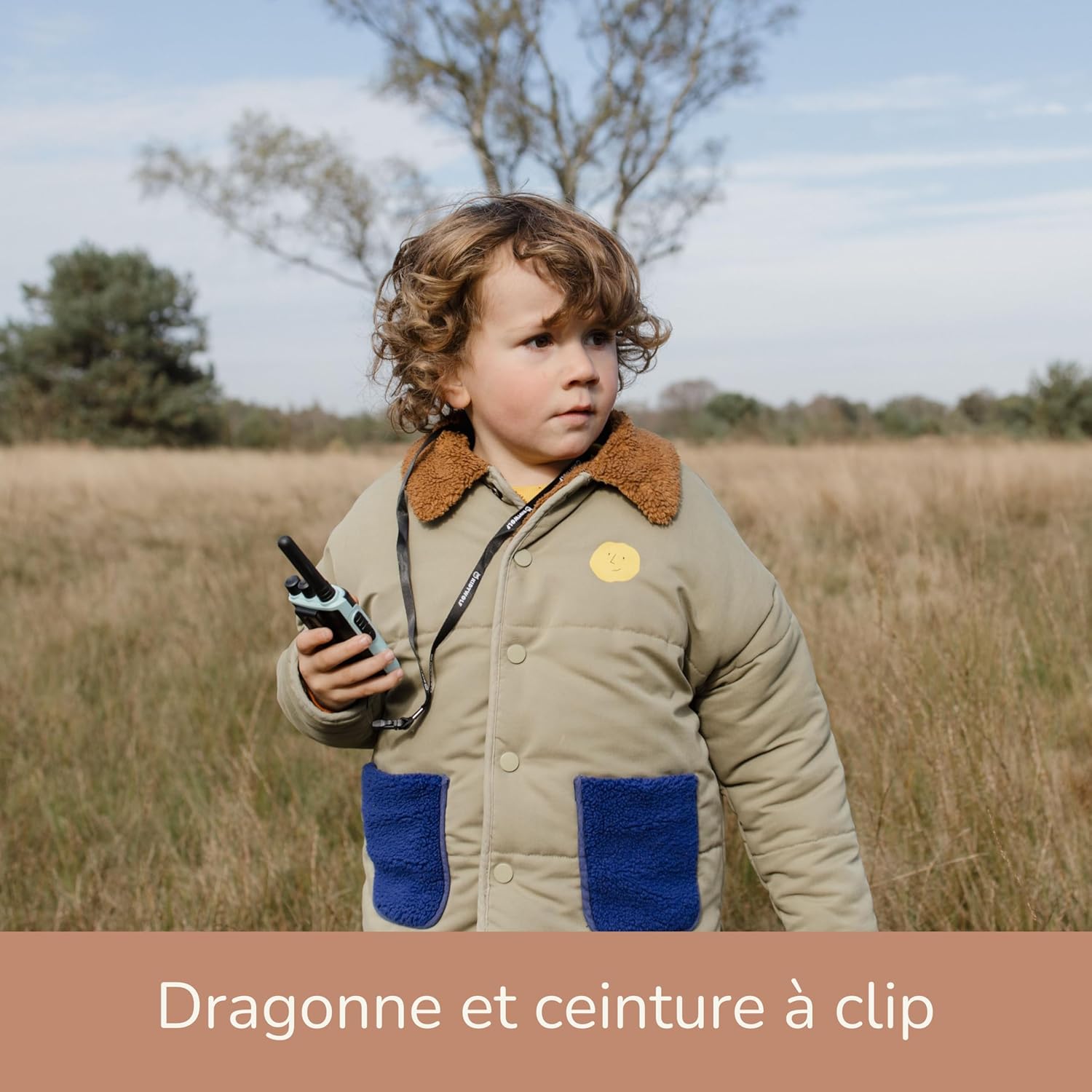
ചിത്രം: A young child wearing the KIDYWOLF KIDYTALK walkie-talkie around their neck using the included lanyard, demonstrating a convenient way to carry the device during outdoor activities.
പ്രവർത്തന നിർദ്ദേശങ്ങൾ
1. പവർ ഓൺ/ഓഫ്, വോളിയം ക്രമീകരണം
- To power on the walkie-talkie, rotate the പവർ/വോളിയം ബട്ടൺ clockwise until you hear a click and the screen illuminates.
- പവർ ഓഫ് ചെയ്യാൻ, തിരിക്കുക പവർ/വോളിയം ബട്ടൺ counter-clockwise until it clicks off.
- തിരിക്കുന്നതിലൂടെ വോളിയം ക്രമീകരിക്കുക പവർ/വോളിയം ബട്ടൺ clockwise to increase and counter-clockwise to decrease.
2 ഒരു ചാനൽ തിരഞ്ഞെടുക്കുന്നു
The KIDYTALK operates on PMR446 license-free channels. To communicate with another walkie-talkie, both devices must be set to the same channel.
- അമർത്തുക ചാനൽ ബട്ടൺ to cycle through the available channels.
- The selected channel number will be displayed on the screen.
- Ensure all walkie-talkies intended for communication are on the identical channel.
3. പ്രക്ഷേപണവും സ്വീകരണവും
- നിങ്ങളുടെ ശബ്ദം പ്രക്ഷേപണം ചെയ്യാൻ, അമർത്തിപ്പിടിക്കുക PTT (പുഷ്-ടു-ടോക്ക്) ബട്ടൺ. Speak clearly into the microphone, holding the walkie-talkie approximately 5-10 cm from your mouth.
- റിലീസ് ചെയ്യുക PTT ബട്ടൺ to stop transmitting and listen for a response.
- When another walkie-talkie on the same channel transmits, you will hear their voice through your speaker.
4. ഫ്ലാഷ്ലൈറ്റ് ഉപയോഗിക്കുന്നത്
- അമർത്തുക Flashlight/Monitor Button once to turn on the integrated LED flashlight.
- ഫ്ലാഷ്ലൈറ്റ് ഓഫ് ചെയ്യാൻ ബട്ടൺ വീണ്ടും അമർത്തുക.
5. മോണിറ്റർ പ്രവർത്തനം
The monitor function allows you to listen for weak signals on the current channel without squelch. This can be useful for checking if a channel is clear or for hearing distant transmissions.
- അമർത്തിപ്പിടിക്കുക Flashlight/Monitor Button to activate the monitor function.
- Release the button to deactivate the monitor function.

ചിത്രം: A young child smiling and holding a KIDYWOLF KIDYTALK walkie-talkie in an outdoor setting, demonstrating the product in use during an adventure.
മെയിൻ്റനൻസ്
1. വൃത്തിയാക്കൽ
- മൃദുവായ, ഡി-ടാക്കി ഉപയോഗിച്ച് വാക്കി-ടോക്കി തുടയ്ക്കുക.amp തുണി.
- കഠിനമായ രാസവസ്തുക്കളോ ഉരച്ചിലുകൾ ഉപയോഗിക്കരുത്.
- Ensure the device is dry before storing or using.
2. സംഭരണം
- നേരിട്ടുള്ള സൂര്യപ്രകാശവും ഉയർന്ന താപനിലയും ഏൽക്കാത്ത തണുത്തതും വരണ്ടതുമായ സ്ഥലത്ത് വാക്കി-ടോക്കി സൂക്ഷിക്കുക.
- ദീർഘനേരം സൂക്ഷിക്കുകയാണെങ്കിൽ, ബാറ്ററിയുടെ ആയുസ്സ് വർദ്ധിപ്പിക്കുന്നതിന് ബാറ്ററി ഭാഗികമായി (ഏകദേശം 50%) ചാർജ്ജ് ചെയ്തിട്ടുണ്ടെന്ന് ഉറപ്പാക്കുക.
3. ബാറ്ററി പരിചരണം
- ബാറ്ററി ഇടയ്ക്കിടെ പൂർണ്ണമായും കളയുന്നത് ഒഴിവാക്കുക.
- ഉപകരണം പതിവായി ഉപയോഗിക്കുന്നില്ലെങ്കിലും, ബാറ്ററി പതിവായി ചാർജ് ചെയ്യുക.
- Do not attempt to replace the internal lithium-ion battery yourself. Contact customer support if battery issues arise.
ട്രബിൾഷൂട്ടിംഗ്
| പ്രശ്നം | സാധ്യമായ കാരണം | പരിഹാരം |
|---|---|---|
| ശക്തിയില്ല | ബാറ്ററി തീർന്നു. | Charge the walkie-talkie using the USB cable. |
| Cannot communicate with another walkie-talkie | Different channels selected. Out of range. Low battery. | Ensure both walkie-talkies are on the same channel. Move closer to the other device. Recharge the battery. |
| മോശം ശബ്ദ നിലവാരം / സ്റ്റാറ്റിക് | Weak signal. Obstructions. Interference. | Move to an open area. Avoid large obstacles like buildings or hills. Check for other electronic devices causing interference. |
| ഫ്ലാഷ്ലൈറ്റ് പ്രവർത്തിക്കുന്നില്ല | Battery is low. Device is off. | Charge the battery. Ensure the walkie-talkie is powered on. |
സ്പെസിഫിക്കേഷനുകൾ
- മോഡൽ നമ്പർ: KIDYTALK-NC
- ബ്രാൻഡ്: കിഡ്വോൾഫ്
- ആശയവിനിമയ സാങ്കേതികവിദ്യ: PMR446 (License-free)
- പരമാവധി ശ്രേണി: Up to 6 Kilometers (3.7 miles)
- ചാനലുകളുടെ എണ്ണം: 6
- ബാറ്ററി തരം: 1 Lithium-ion (included, rechargeable)
- ചാർജിംഗ്: USB
- മെറ്റീരിയൽ: പ്ലാസ്റ്റിക്, അലുമിനിയം
- പ്രത്യേക സവിശേഷതകൾ: Integrated flashlight, CE certified, educational
- ജല പ്രതിരോധ നില: വാട്ടർപ്രൂഫ് അല്ല
- ഉൾപ്പെടുത്തിയ ഘടകങ്ങൾ: Walkie-talkie unit(s), USB charger cable, lanyard, belt clip.
- അനുയോജ്യമായ ഉപകരണങ്ങൾ: Other walkie-talkies or two-way radios using PMR446 technology.
- മാതൃരാജ്യം: ബെൽജിയം
വാറൻ്റിയും പിന്തുണയും
നിർമ്മാതാവിൻ്റെ വാറൻ്റി
The KIDYWOLF KIDYTALK walkie-talkie comes with a 2 വർഷത്തെ നിർമ്മാതാവിന്റെ വാറന്റി. സാധാരണ ഉപയോഗത്തിലുള്ള മെറ്റീരിയലുകളിലെയും ജോലികളിലെയും വൈകല്യങ്ങൾ ഈ വാറന്റി ഉൾക്കൊള്ളുന്നു.
For warranty claims or technical support, please contact KIDYWOLF customer service. Refer to the product packaging or the official KIDYWOLF webഏറ്റവും പുതിയ ബന്ധപ്പെടാനുള്ള വിവരങ്ങൾക്കായി സൈറ്റ്.
ഉപഭോക്തൃ പിന്തുണ
If you encounter any issues or have questions regarding your KIDYWOLF KIDYTALK, please reach out to our dedicated customer support team. We are committed to providing assistance and ensuring your satisfaction.
ബന്ധപ്പെടാനുള്ള വിവരങ്ങൾ (ഉദാ. website, email, phone) can typically be found on the product packaging or the official KIDYWOLF brand webസൈറ്റ്.


