1. ആമുഖം
The Wingtech Celero 5G smartphone is designed to provide reliable performance and connectivity. This manual offers comprehensive guidance on its features, setup, operation, and maintenance to ensure optimal use of your device.
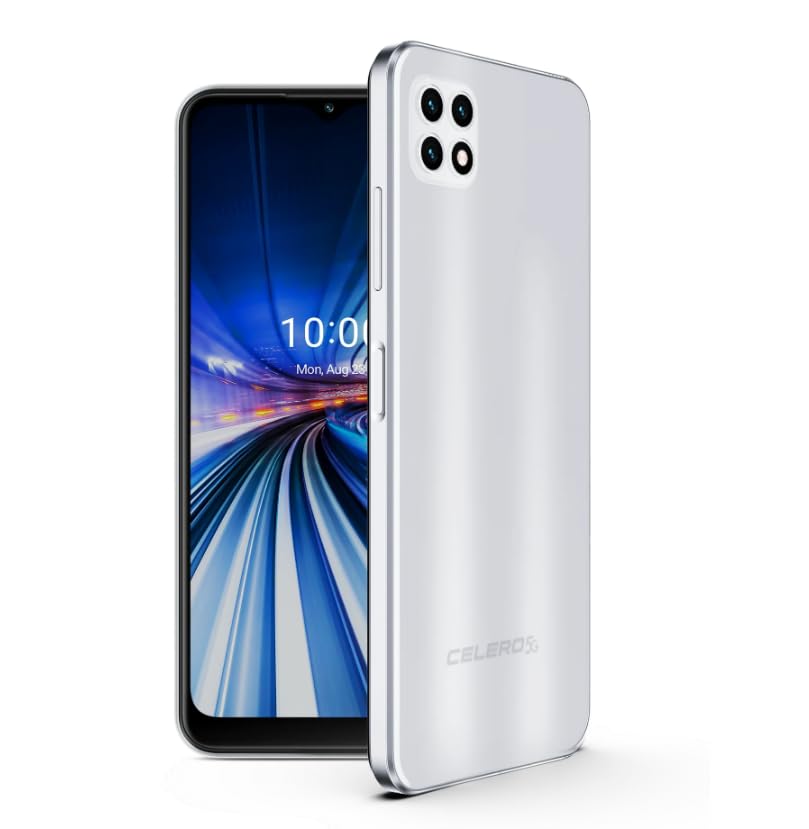
Figure 1: Wingtech Celero 5G Smartphone (Silver)
2. ബോക്സിൽ എന്താണുള്ളത്?
ഉൽപ്പന്ന പാക്കേജിംഗിൽ എല്ലാ ഇനങ്ങളും ഉണ്ടെന്ന് ഉറപ്പാക്കുക:
- Wingtech Celero 5G Smartphone
- USB കേബിൾ
- സിം ട്രേ എജക്ടർ
- ക്വിക്ക് സ്റ്റാർട്ട് ഗൈഡ് (പ്രത്യേകമായി ഉൾപ്പെടുത്തിയേക്കാം)
3. സജ്ജീകരണം
3.1. സിം കാർഡ് ഇടുന്നു
- നിങ്ങളുടെ ഉപകരണത്തിന്റെ വശത്ത് സിം കാർഡ് ട്രേ കണ്ടെത്തുക.
- ട്രേയുടെ അടുത്തുള്ള ചെറിയ ദ്വാരത്തിലേക്ക് സിം ട്രേ എജക്റ്റർ ഉപകരണം തിരുകുക, ട്രേ പുറത്തേക്ക് വരുന്നത് വരെ സൌമ്യമായി അമർത്തുക.
- സ്വർണ്ണ കോൺടാക്റ്റുകൾ താഴേക്ക് അഭിമുഖീകരിക്കുന്ന തരത്തിൽ നിങ്ങളുടെ നാനോ-സിം കാർഡ്(കൾ) അല്ലെങ്കിൽ മൈക്രോ എസ്ഡി കാർഡ് ട്രേയിൽ വയ്ക്കുക.
- ഉപകരണത്തിലേക്ക് ട്രേ ശ്രദ്ധാപൂർവ്വം വീണ്ടും ചേർക്കുക.
3.2. പ്രാരംഭ പവർ ഓണും സജ്ജീകരണവും
- ഉപകരണം വൈബ്രേറ്റ് ചെയ്ത് സ്ക്രീൻ ഓണാകുന്നതുവരെ പവർ ബട്ടൺ അമർത്തിപ്പിടിക്കുക.
- നിങ്ങളുടെ ഭാഷ തിരഞ്ഞെടുക്കുന്നതിനും, ഒരു Wi-Fi നെറ്റ്വർക്കിലേക്ക് കണക്റ്റുചെയ്യുന്നതിനും, നിങ്ങളുടെ Google അക്കൗണ്ട് സജ്ജീകരിക്കുന്നതിനും ഓൺ-സ്ക്രീൻ നിർദ്ദേശങ്ങൾ പാലിക്കുക.
- നിങ്ങളുടെ ഉപകരണ ക്രമീകരണങ്ങൾ വ്യക്തിഗതമാക്കാൻ സജ്ജീകരണ വിസാർഡ് പൂർത്തിയാക്കുക.
4. പ്രവർത്തിക്കുന്നു
4.1. അടിസ്ഥാന നാവിഗേഷൻ
- ഹോം സ്ക്രീൻ: വ്യത്യസ്ത ഹോം സ്ക്രീൻ പാനലുകൾ ആക്സസ് ചെയ്യാൻ ഇടത്തോട്ടോ വലത്തോട്ടോ സ്വൈപ്പ് ചെയ്യുക.
- ആപ്പ് ഡ്രോയർ: ഹോം സ്ക്രീനിൽ നിന്ന് മുകളിലേക്ക് സ്വൈപ്പ് ചെയ്യുക view ഇൻസ്റ്റാൾ ചെയ്ത എല്ലാ ആപ്ലിക്കേഷനുകളും.
- അറിയിപ്പ് പാനൽ: അറിയിപ്പുകളും ദ്രുത ക്രമീകരണങ്ങളും ആക്സസ് ചെയ്യാൻ സ്ക്രീനിന്റെ മുകളിൽ നിന്ന് താഴേക്ക് സ്വൈപ്പ് ചെയ്യുക.
4.2. കോളുകൾ ചെയ്യുക, സന്ദേശങ്ങൾ അയയ്ക്കുക
- ടാപ്പ് ചെയ്യുക ഫോൺ ഡയലർ തുറന്ന് കോളുകൾ വിളിക്കുന്നതിനുള്ള ഐക്കൺ.
- ടാപ്പ് ചെയ്യുക സന്ദേശങ്ങൾ icon to send and receive text messages.
4.3. ക്യാമറ ഉപയോഗം
- ടാപ്പ് ചെയ്യുക ക്യാമറ icon to launch the camera application.
- Select different modes (Photo, Video, Portrait, etc.) by swiping across the screen.
- ഫോട്ടോകൾ എടുക്കാൻ ഷട്ടർ ബട്ടൺ ടാപ്പ് ചെയ്യുക അല്ലെങ്കിൽ വീഡിയോ റെക്കോർഡിംഗ് ആരംഭിക്കുക/നിർത്തുക.
5 സ്പെസിഫിക്കേഷനുകൾ
| ഫീച്ചർ | വിശദാംശങ്ങൾ |
|---|---|
| മോഡലിൻ്റെ പേര് | സെലെറോ 5G |
| ഇനം മോഡൽ നമ്പർ | DSH98123 |
| ഓപ്പറേറ്റിംഗ് സിസ്റ്റം | ആൻഡ്രോയിഡ് 11.0 |
| സ്ക്രീൻ വലിപ്പം | 6.52 ഇഞ്ച് |
| റെസലൂഷൻ | 1920 x 1080 |
| മെമ്മറി സ്റ്റോറേജ് കപ്പാസിറ്റി | 4 ജിബി (റാം) |
| ആന്തരിക സംഭരണം | 64GB (as per product title, though description mentions 64GB built-in memory) |
| ബാറ്ററി ശേഷി | 4000 മില്ലിamp മണിക്കൂറുകൾ |
| കണക്റ്റിവിറ്റി ടെക്നോളജി | 5G |
| നിറം | വെള്ളി |
| നിർമ്മാതാവ് | Wingtech |
6. പരിപാലനം
- മൃദുവായതും ഉണങ്ങിയതുമായ തുണി ഉപയോഗിച്ച് നിങ്ങളുടെ ഉപകരണം വൃത്തിയായി സൂക്ഷിക്കുക.
- ഉപകരണം തീവ്രമായ താപനിലയിലോ, നേരിട്ടുള്ള സൂര്യപ്രകാശത്തിലോ, ദ്രാവകങ്ങളിലോ ഏൽക്കുന്നത് ഒഴിവാക്കുക.
- നഷ്ടപ്പെടാതിരിക്കാൻ നിങ്ങളുടെ ഡാറ്റ പതിവായി ബാക്കപ്പ് ചെയ്യുക.
- Install software updates as they become available to ensure optimal performance and security.
7. പ്രശ്നപരിഹാരം
7.1. ഉപകരണം ഓണാക്കുന്നില്ല
- ബാറ്ററി ചാർജ്ജ് ചെയ്തിട്ടുണ്ടെന്ന് ഉറപ്പാക്കുക. ഉപകരണം ചാർജറുമായി ബന്ധിപ്പിച്ച് പവർ ഓൺ ചെയ്യാൻ ശ്രമിക്കുന്നതിന് മുമ്പ് കുറച്ച് മിനിറ്റ് കാത്തിരിക്കുക.
- നിർബന്ധിതമായി റീബൂട്ട് ചെയ്യുന്നതിന് പവർ ബട്ടൺ കുറഞ്ഞത് 10-15 സെക്കൻഡ് അമർത്തിപ്പിടിക്കുക.
7.2. മോശം നെറ്റ്വർക്ക് കണക്റ്റിവിറ്റി
- നിങ്ങളുടെ സിം കാർഡ് ശരിയായി ചേർത്തിട്ടുണ്ടോ എന്ന് പരിശോധിക്കുക.
- Verify that mobile data is enabled in your device settings.
- Restart your device or toggle Airplane Mode on and off.
- Contact your wireless carrier to confirm service availability in your area.
7.3. ആപ്പുകൾ ക്രാഷാകുകയോ മരവിപ്പിക്കുകയോ ചെയ്യുന്നു
- Clear the cache and data for the problematic app via Settings > Apps.
- ആപ്പ് അൺഇൻസ്റ്റാൾ ചെയ്ത് വീണ്ടും ഇൻസ്റ്റാൾ ചെയ്യുക.
- നിങ്ങളുടെ ഉപകരണത്തിന്റെ സോഫ്റ്റ്വെയർ കാലികമാണെന്ന് ഉറപ്പാക്കുക.
8. വാറൻ്റിയും പിന്തുണയും
This product is offered as an Amazon Renewed device. Amazon Renewed products are inspected, tested, and refurbished as necessary to be fully functional. Your purchase is eligible for Amazon Renewed coverage in conjunction with Amazon's Return Policy and the A-to-z Guarantee.
For specific warranty details, return policies, or technical support, please refer to the documentation provided with your purchase or visit the Amazon Renewed support page.


