1. ആമുഖം
The Nerf Elite Digital Target is an interactive electronic target designed to enhance Nerf blaster play. It provides instant feedback on accuracy and features multiple game modes for varied play experiences. This manual provides detailed instructions for the setup, operation, and maintenance of your Nerf Elite Digital Target.
പ്രധാന സവിശേഷതകൾ:
- Interactive electronic target with lights and sounds.
- Suitable for both wall-hanging and tabletop placement.
- Designed for precision training and competitive play.
- Features multiple game modes and an LCD display for scoring.
2. സജ്ജീകരണം
2.1 പാക്കേജ് ഉള്ളടക്കം
- 1 x Nerf Elite Digital Target
കുറിപ്പ്: Nerf blasters and darts are not included and must be purchased separately.
2.2 ബാറ്ററി ഇൻസ്റ്റാളേഷൻ
The Nerf Elite Digital Target requires 3 x 1.5V AA ബാറ്ററികൾ പ്രവർത്തനത്തിനായി (ഉൾപ്പെടുത്തിയിട്ടില്ല).
- Locate the battery compartment on the back of the target.
- ഒരു ഫിലിപ്സ് ഹെഡ് സ്ക്രൂഡ്രൈവർ ഉപയോഗിച്ച്, ബാറ്ററി കമ്പാർട്ട്മെന്റ് കവർ അഴിക്കുക.
- Insert three (3) new 1.5V AA batteries, ensuring correct polarity (+/-) as indicated inside the compartment.
- ബാറ്ററി കമ്പാർട്ട്മെന്റ് കവർ മാറ്റി സ്ക്രൂ ഉപയോഗിച്ച് സുരക്ഷിതമാക്കുക.
2.3 പ്ലേസ്മെന്റ് ഓപ്ഷനുകൾ
The target can be used in two configurations:
- ടാബ്ലറ്റ് ഉപയോഗം: Extend the integrated stand on the back of the target to place it securely on a flat surface.
- മതിൽ മൗണ്ടിംഗ്: Use the designated mounting holes on the back of the target to hang it on a wall. Ensure appropriate hardware (not included) is used for secure installation.

Image: Nerf Elite Digital Target positioned on a desk, ready for tabletop play.
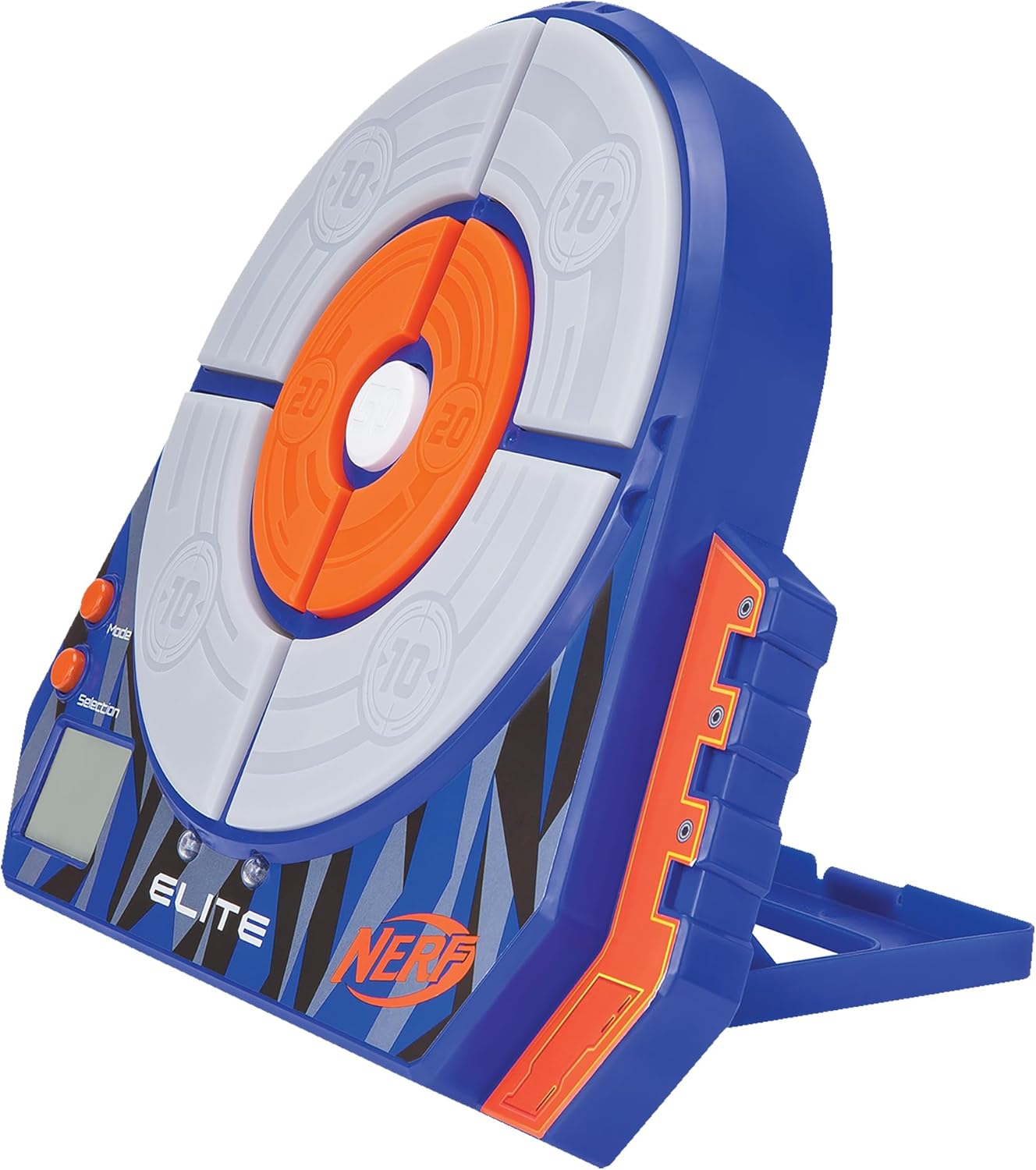
ചിത്രം: ആംഗിൾഡ് view of the Nerf Elite Digital Target, highlighting its integrated stand for stable placement.
3. പ്രവർത്തന നിർദ്ദേശങ്ങൾ
3.1 പവർ ഓൺ/ഓഫ്
To power on the target, press the മോഡ് ബട്ടൺ. പവർ ഓഫ് ചെയ്യാൻ, അമർത്തിപ്പിടിക്കുക മോഡ് button for a few seconds until the display turns off.
3.2 ഗെയിം മോഡുകൾ
The Nerf Elite Digital Target features multiple game modes to challenge your accuracy and speed. Use the മോഡ് button to cycle through the available game options and the തിരഞ്ഞെടുക്കൽ button to confirm your choice or adjust settings (e.g., number of players).
The target includes an LCD display that shows scores and game information. The target segments light up upon impact, providing visual feedback.

ചിത്രം: മുൻഭാഗം view of the Nerf Elite Digital Target, displaying its scoring zones and control buttons for mode and selection.
3.3 Scoring
Each segment of the target has a designated point value (e.g., 10, 20, 50 points). When a segment is hit, it will light up, and the score will be registered on the LCD display. The target can track scores for single or multiple players, depending on the selected game mode.

Image: Front of the product packaging, illustrating the target's features including the LCD display and various game modes.
4. പരിപാലനം
4.1 വൃത്തിയാക്കൽ
To clean the target, wipe it with a dry, soft cloth. Do not use abrasive cleaners or immerse the target in water, as this can damage the electronic components.
4.2 സംഭരണം
When not in use, store the target in a cool, dry place away from direct sunlight and extreme temperatures. If storing for an extended period, remove the batteries to prevent leakage and potential damage to the device.
5. പ്രശ്നപരിഹാരം
- Target not powering on: Ensure batteries are correctly installed with proper polarity and are not depleted. Replace with fresh batteries if necessary.
- Target not registering hits: Ensure darts are hitting the target segments directly. If the issue persists, check battery levels. Some users have noted the target may not be sensitive enough for very light impacts.
- പ്രദർശന പ്രശ്നങ്ങൾ: If the LCD display is not functioning correctly, try replacing the batteries.
- ശബ്ദ പ്രശ്നങ്ങൾ: The target's sound volume is fixed and cannot be adjusted. If there is no sound, check battery levels.
- Difficulty understanding game modes: Refer to the operating instructions section for a general overview. Experiment with the Mode and Selection buttons to familiarize yourself with the different game options.
6 സ്പെസിഫിക്കേഷനുകൾ
| മോഡൽ നമ്പർ | NER0156 |
| ബ്രാൻഡ് | നെർഫ് |
| അളവുകൾ (L x W x H) | 5.08 x 24.77 x 30.48 സെ.മീ (2 x 9.75 x 12 ഇഞ്ച്) |
| ഭാരം | 440 ഗ്രാം (0.97 പൗണ്ട്) |
| മെറ്റീരിയൽ | പ്ലാസ്റ്റിക് |
| പവർ ഉറവിടം | 3 x 1.5V AA ബാറ്ററികൾ (ഉൾപ്പെടുത്തിയിട്ടില്ല) |
| പ്രായപരിധി | 6 മുതൽ 99 വർഷം വരെ |
| ഘടകങ്ങൾ ഉൾപ്പെടുത്തിയിട്ടുണ്ട് | 1 ഡിജിറ്റൽ ലക്ഷ്യം |

Image: Diagram illustrating the approximate dimensions of the Nerf Elite Digital Target.
7 സുരക്ഷാ വിവരങ്ങൾ
- മുന്നറിയിപ്പ്: ചെറിയ ഭാഗങ്ങൾ കാരണം 36 മാസത്തിൽ താഴെയുള്ള കുട്ടികൾക്ക് അനുയോജ്യമല്ല.
- Always use official Nerf darts with Nerf blasters and targets.
- Do not aim blasters at eyes or face.
- Keep electronic devices away from water and moisture.
- ഉപയോഗിച്ച ബാറ്ററികൾ പ്രാദേശിക നിയന്ത്രണങ്ങൾ അനുസരിച്ച് ഉത്തരവാദിത്തത്തോടെ നീക്കം ചെയ്യുക.
8. വാറൻ്റിയും പിന്തുണയും
Specific warranty information for the Nerf NER0156 Elite Digital Target is not provided in this manual. For details regarding warranty coverage, please refer to the product packaging or contact Nerf customer support directly.
For further assistance or inquiries, please visit the official Nerf webസൈറ്റ് അല്ലെങ്കിൽ അവരുടെ ഉപഭോക്തൃ സേവന വിഭാഗവുമായി ബന്ധപ്പെടുക.


