1. ആമുഖം
The SingularXYZ E1 Lite GNSS RTK GPS Surveying Equipment is a high-precision solution designed for various applications including land survey, topographic mapping, and CORS correction. Featuring 1408 channels, robust signal tracking, and quick fixed solutions, this equipment ensures centimeter-level accuracy even in challenging environments. This manual provides essential information for the proper setup, operation, and maintenance of your E1 Lite GNSS RTK system.
2. ബോക്സിൽ എന്താണുള്ളത്?
Your SingularXYZ E1 Lite GNSS RTK package includes the following components:
- 1 x E1 Lite GNSS Receiver
- 1 x Transport Case
- 1 x USB-Type C Cable
- 1 x Super Charger
- 1 x ദ്രുത ആരംഭ ഗൈഡ്
- 1 x ദ്രുത ആരംഭ കാർഡ്
- 1 x SC200 Data Collector
- 1 x USB cable (for SC200)
- 1 x Super Charger (for SC200)
- 1 x ബ്രാക്കറ്റ്
- 1 x SingularPad Software
- 1 x Terminal antenna

Image: E1 Lite GNSS RTK components neatly organized within their transport case, including the receiver, data collector, cables, and accessories.
Video: This video demonstrates the unboxing process of the SingularXYZ E1 Lite GNSS RTK system, showcasing all included components and their packaging.
3. ഉൽപ്പന്നം കഴിഞ്ഞുview
3.1 പ്രധാന സവിശേഷതകൾ
- Full-Constellation Signal: Provides robust signal tracking and quick fixed solutions (within seconds) in challenging environments.
- അൾട്രാ-ലോംഗ് റേഞ്ച്: Built-in UHF radio offers up to 5km range; Bluetooth connection to local CORS stations extends to 50km range.
- Entry-Level IMU: Delivers solid performance for high-precision surveying with tilt measurement capabilities.
- ബഹുമുഖ കണക്റ്റിവിറ്റി: Features NFC, Bluetooth, WiFi, USB Type-C, and 8GB onboard storage for seamless data transfer.
- IP67 Rugged Protection: Waterproof, dustproof, and drop-resistant casing ensures reliable performance in harsh conditions.
- Web UI ആക്സസ്: Easily download static data, upgrade firmware, and configure settings via a WiFi-enabled web ഇൻ്റർഫേസ്.
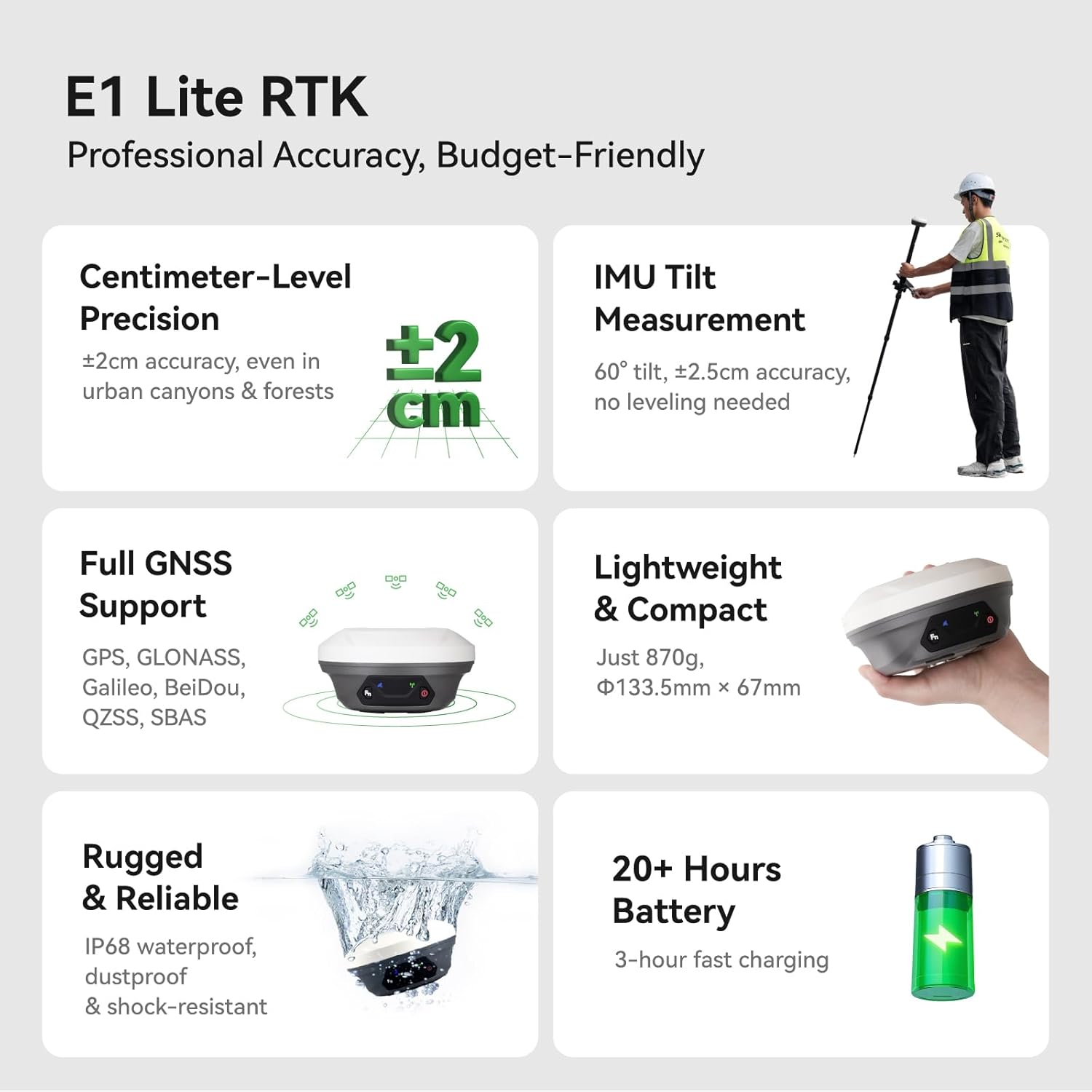
Image: A visual summary of the E1 Lite RTK's professional accuracy, centimeter-level precision, IMU tilt measurement, full GNSS support, lightweight design, ruggedness, and 20+ hours battery life.
3.2 Front Panel and Interfaces
The E1 Lite GNSS Receiver features an intuitive front panel and multiple interfaces for connectivity and operation:
- Satellite Tracking Indicator: Flashes to indicate the number of tracking satellites.
- Static & Network Indicator: Yellow light flashes when recording static data.
- ഫംഗ്ഷൻ ബട്ടൺ: Press twice in succession to start/stop static data recording.
- Correction Data Indicator: Flashes when TX/RX correction data is active.
- പവർ സൂചകം: Red light indicates the receiver is turned on, red light flashes when battery is low (<10%), green light flashes when charging, and stays on when fully charged.
- പവർ ബട്ടൺ: Long press to turn on/off the receiver.
- എൻഎഫ്സി കണക്ഷൻ: For quick pairing with compatible devices.
- TNC Connector: For UHF Antenna.
- ടൈപ്പ്-സി ഇന്റർഫേസ്: For charging and data download.
- 7-pin Lemo RS232 Serial Port: For additional connectivity.

Image: Detailed diagram illustrating the front panel indicators (Satellite Tracking, Static & Network, Correction Data, Power) and connectivity interfaces (NFC, TNC, USB Type-C, RS232) of the E1 Lite GNSS Receiver.
4. സജ്ജീകരണം
4.1 പ്രാരംഭ അസംബ്ലി
Assemble the E1 Lite GNSS Receiver with the SC200 Data Collector onto a range pole or tripod as required for your surveying task. Ensure all connections are secure.

Image: A professional surveyor utilizing the E1 Lite GNSS RTK equipment mounted on a range pole with the SC200 data collector attached, performing measurements in an outdoor environment.
4.2 ഉപകരണ കണക്ഷൻ
To connect your E1 Lite GNSS Receiver to the SC200 Data Collector:
- Turn on your GNSS device.
- On the SC200, go to Device >> Communication നിങ്ങളുടെ ഉപകരണം ബന്ധിപ്പിക്കുന്നതിന്.
- തിരഞ്ഞെടുക്കുക SingularXYZ >> RTK >> Bluetooth, then search for your device's Serial Number (SN) and connect.
Video: This tutorial demonstrates how to connect the SingularXYZ E1 Lite GNSS RTK receiver to the SC200 Data Collector via Bluetooth using the SingularPad software.
4.3 Project Creation
To create a new project in the SingularPad software:
- പോകുക Project >> Project Manager.
- ക്ലിക്ക് ചെയ്യുക പുതിയത് to create a new project.
- Enter your project name and configure unit settings by clicking കൂടുതൽ.
- Choose a predefined projected coordinate system or define your own by selecting Ellipsoid and Projection Parameters.
- If needed, add a geoid model via Vertical Adjustment Parameter.
Video: This tutorial guides users through creating a new project in SingularPad software, including setting up coordinate systems and project parameters.
4.4 ഡാറ്റ ഇറക്കുമതി
To import data into your project:
- പോകുക Project >> Import Data.
- Select the data type (points, lines, code library) and the corresponding import file ഫോർമാറ്റ്.
- You can create a new custom format if your file type is not listed.
- ക്ലിക്ക് ചെയ്യുക അടുത്തത് to select the import file പാത.
- ഉപയോഗിക്കുക പ്രീview option to verify the file format before importing.
Video: This tutorial demonstrates the process of importing data into the SingularPad software, covering file format selection and previewing imported data.
5. ഓപ്പറേഷൻ
5.1 Advanced IMU Tilt Measurement
The E1 Lite features an advanced IMU for tilt measurement, allowing for faster and smarter work with ±2.5cm accuracy at 60° tilt, eliminating the need for bubble leveling. This is ideal for uneven terrain, hidden locations, dangerous locations, and surveying under dense forests or near building corners.

Image: An illustration of a surveyor using the E1 Lite GNSS RTK with its IMU tilt measurement feature, demonstrating its effectiveness in surveying challenging spots like hidden locations, dangerous areas, under dense forests, and building corners.
5.2 Superior Performance in Challenging Environments
The E1 Lite GNSS RTK tracks over 30 satellites even under dense cover or urban structures, utilizing anti-obstruction technology to maintain accuracy. This provides reliable solutions with centimeter-level precision in seconds.

Image: The E1 Lite GNSS RTK set up in a challenging environment, showcasing its capability to track numerous satellites and provide accurate data despite obstructions, ensuring reliable surveying solutions.
5.3 Working with E1 Lite Rover + Base
For optimal performance, ensure the following conditions before configuration:
- You have two E1 Lite GNSS receivers; designate one as the base and the other as the rover.
- Connect them separately to your PDA device via Bluetooth.
- Place both E1 Lite base and rover in an open view ആകാശത്തിൻ്റെ.
- Connect the whip antenna to both E1 Lite base and rover.
അടിസ്ഥാനം സജ്ജമാക്കുന്നു:
- Connect E1 Lite base to your PDA, go to Device > Base.
- വേണ്ടി Base Startup Mode, you can input known point coordinates to setup, or select സിംഗിൾ പോയിന്റ് mode for automatic setup.
- സജ്ജമാക്കുക ഡാറ്റാലിങ്ക് as ആന്തരിക റേഡിയോ, and customize radio channels, frequency, and protocol according to your needs.
- Save settings and Start Base. The status bar will become Base.
Setting up the Rover:
- Disconnect E1 Lite base and connect to the rover in the software.
- പോകുക Device >> Rover, സെറ്റ് ഡാറ്റ ലിങ്ക് as ആന്തരിക റേഡിയോ.
- Match and set the same protocol and frequency as the base setting.
- ക്ലിക്ക് ചെയ്യുക ശേഖരണം to save settings and click അപേക്ഷിക്കുക.

Image: Step-by-step screenshots from the SingularPad software illustrating the configuration of both the E1 Lite Base and Rover units, including data link settings and startup modes.
5.4 Working with CORS/RTK Correction Service
Before configuring, please note:
- Purchase a CORS/RTK Correction Service account in your local area.
- Ensure your PDA device (phone/tablet/data collector) can access network and supports Bluetooth connection.
- Place your E1 Lite GNSS receiver in an open view ആകാശത്തിൻ്റെ.
ഘട്ടങ്ങൾ:
- Open SingularPad software.
- ക്ലിക്ക് ചെയ്യുക ആശയവിനിമയം and connect to your E1 Lite receiver's SN via Bluetooth.
- ക്ലിക്ക് ചെയ്യുക നേടുക ലഭിക്കാൻ Mount-Point list and select appropriate one. Click ആരംഭിക്കുക ഒപ്പം അപേക്ഷിക്കുക.
- ക്ലിക്ക് ചെയ്യുക റോവർ. സജ്ജമാക്കുക ഡാറ്റ ലിങ്ക് as ഫോൺ ഇൻ്റർനെറ്റ്, പിന്നെ പോകുക കണക്റ്റ് മോഡ് and fill in your CORS/RTK Correction Service account.
Tip: Find the appropriate mount point via the website of your local CORS/RTK Correction Service provider. Ensure the baseline is within 50km.

Image: Detailed screenshots from the SingularPad software demonstrating how to configure the E1 Lite GNSS RTK for use with a CORS/RTK Correction Service, including communication and mount point selection.
5.5 Viewing RTK Positioning Status
After completing your E1 Lite RTK setup, check the current RTK solution status in the top left corner of the SingularPad software:
- സ്ഥിരമായത്: E1 Lite is receiving RTK corrections stably and obtaining a Fixed RTK solution with centimeter-level accuracy.
- ഫ്ലോട്ട്: E1 Lite receives corrections from the base/CORS, but due to obstructions or magnetic field interference, the signal reception is not very stable and the accuracy is sub-meter level.
- സ്വയംഭരണാധികാരം: Single-point satellite positioning without receiving RTK correction data. The accuracy is around meter-level.
Tip: Before surveying, make sure E1 Lite has a clear sky view, free from obstacles like buildings, trees, cars, and more.

Image: A visual guide explaining the different RTK positioning statuses (Fixed, Float, Autonomous) and providing a tip for ensuring clear sky view for best accuracy.
5.6 Web UI ആക്സസ്
Access the E1 Lite's WiFi to conduct static data download, firmware upgrades, and configuration settings via its web പേജ്.

Image: A graphic depicting the E1 Lite GNSS Receiver connected via WiFi to a laptop, demonstrating how to access its Web UI for various management tasks.
6. പരിപാലനം
6.1 Rugged Protection
The E1 Lite GNSS RTK features an IP67-rated casing, ensuring it is waterproof, dustproof, and drop-resistant. This robust design allows for reliable performance in harsh environmental conditions. Regularly inspect the device for any physical damage and keep ports clean.

Image: The E1 Lite GNSS RTK receiver partially submerged in water, illustrating its IP67 rugged protection against water and dust.
6.2 ബാറ്ററി വിവരങ്ങൾ
The device is powered by 3 Lithium Ion batteries (included) and offers up to 20 hours of battery life. It supports 3-hour fast charging. Ensure to use the provided Super Charger for optimal charging and battery longevity.
7. പ്രശ്നപരിഹാരം
7.1 FCC Radio License Note
കുറിപ്പ്: U.S. users must apply for an FCC radio license for commercial use (e.g., surveying, construction) with the UHF function (450–470 MHz). The device is FCC certified, and supporting information can be provided if needed. Failure to obtain the necessary license may result in operational restrictions or penalties.
7.2 Optimizing Accuracy
If you experience issues with achieving centimeter-level accuracy (i.e., the status remains 'FLOAT' or 'AUTONOMOUS' for extended periods), ensure the following:
- The E1 Lite receiver has a clear, unobstructed view of the sky. Avoid areas with dense foliage, tall buildings, or other structures that may block satellite signals.
- All cables and antennas are securely connected.
- The base and rover units (if applicable) are configured correctly with matching protocols and frequencies.
- Your CORS/RTK Correction Service account is active and properly configured, and the baseline distance is within the recommended range (e.g., 50km).
8 സ്പെസിഫിക്കേഷനുകൾ
| ഫീച്ചർ | വിശദാംശങ്ങൾ |
|---|---|
| ഇനത്തിൻ്റെ ഭാരം | 7.82 പൗണ്ട് |
| ഉൽപ്പന്ന അളവുകൾ | 2.64 x 5.26 x 5.26 ഇഞ്ച് |
| ഇനം മോഡൽ നമ്പർ | E1 Lite GNSS RECEIVER |
| ബാറ്ററികൾ | 3 ലിഥിയം അയോൺ ബാറ്ററികൾ ആവശ്യമാണ് (ഉൾപ്പെടുത്തിയിരിക്കുന്നു) |
| ഡിസ്പ്ലേ വലിപ്പം | 1 Inches (for receiver indicators) |
| ബാറ്ററി ലൈഫ് | 20 മണിക്കൂർ |
| വോയ്സ് കമാൻഡ് | ബട്ടണുകൾ |
| ബ്രാൻഡ് | SingularXYZ |
| മോഡലിൻ്റെ പേര് | E1 Lite GNSS RECEIVER |
| പ്രത്യേക ഫീച്ചർ | Bluetooth, NFC, Waterproof |
| കണക്റ്റിവിറ്റി ടെക്നോളജി | ബ്ലൂടൂത്ത്, ഇതർനെറ്റ്, യുഎസ്ബി, വൈ-ഫൈ |
| മാപ്പ് തരം | ലോകമെമ്പാടും |
| മൗണ്ടിംഗ് തരം | പാനൽ മ .ണ്ട് |
| Operating System (SC200) | ആൻഡ്രോയിഡ് |
9. വാറണ്ടിയും പിന്തുണയും
The SingularXYZ E1 Lite GNSS RTK GPS Surveying Equipment comes with a 1 വർഷത്തെ വാറൻ്റി from the date of purchase. For technical assistance, troubleshooting, or warranty claims, please contact SingularXYZ customer support. SingularXYZ is committed to providing reliable products and solutions, backed by a dedicated support team.
For further information and support, please visit the official SingularXYZ webസൈറ്റിൽ ബന്ധപ്പെടുക അല്ലെങ്കിൽ നിങ്ങളുടെ ക്വിക്ക് സ്റ്റാർട്ട് ഗൈഡിൽ നൽകിയിരിക്കുന്ന കോൺടാക്റ്റ് വിശദാംശങ്ങൾ പരിശോധിക്കുക.


