1. ഉൽപ്പന്നം കഴിഞ്ഞുview
This manual provides instructions for the Fanttik F2 Master Mini Cordless Rotary Tool Kit and the Fanttik D2 PLUS Laser Level. These tools are designed for precision tasks and accurate leveling applications.

Image 1.1: The Fanttik F2 Master Mini Cordless Rotary Tool (left) and D2 PLUS Laser Level (right).
1.1 F2 Master Mini Cordless Rotary Tool
The F2 Master is a compact, cordless rotary tool featuring a brushless hollow cup motor for reduced noise and enhanced performance. It offers 5 adjustable speed settings for various precision tasks such as grinding, polishing, drilling, and engraving. The tool includes a Revostor Hub for organized accessory storage and a durable aluminum case with a pop-up mechanism for easy access.
1.2 D2 PLUS Laser Level
The D2 PLUS is a high-precision laser level utilizing advanced high-brightness green laser technology. It provides a projection range of up to 100 ft with an accuracy of 3/32 inches at 30 ft. It features independent or combined vertical and horizontal line projection, a wide-angle expansion for vertical lines, and a pulse mode for extended working range with an optional receiver.
2 സുരക്ഷാ വിവരങ്ങൾ
Always observe the following safety precautions to prevent injury and damage to the product.
- ഉപയോഗിക്കുന്നതിന് മുമ്പ് എല്ലാ നിർദ്ദേശങ്ങളും വായിക്കുക.
- Wear appropriate personal protective equipment, such as safety glasses, when operating the rotary tool.
- ജോലിസ്ഥലം വൃത്തിയുള്ളതും നല്ല വെളിച്ചമുള്ളതുമായി സൂക്ഷിക്കുക.
- തീപിടിക്കുന്ന ദ്രാവകങ്ങൾ, വാതകങ്ങൾ, പൊടി എന്നിവയുടെ സാന്നിധ്യം പോലെ സ്ഫോടനാത്മക അന്തരീക്ഷത്തിൽ പവർ ടൂളുകൾ പ്രവർത്തിപ്പിക്കരുത്.
- പവർ ടൂൾ പ്രവർത്തിപ്പിക്കുമ്പോൾ കുട്ടികളെയും കാഴ്ചക്കാരെയും അകറ്റി നിർത്തുക.
- ഉപകരണങ്ങൾ കുട്ടികൾക്ക് ലഭ്യമാകാതെ സൂക്ഷിക്കുക.
2.1 ലേസർ സുരക്ഷ
The D2 PLUS Laser Level is a Class II laser product. Observe the following precautions:
- ജാഗ്രത: ലേസർ ബീമിലേക്ക് നേരിട്ട് നോക്കരുത്.
- ലേസർ ബീം മനഃപൂർവ്വം ആളുകളുടെയോ മൃഗങ്ങളുടെയോ നേരെ നയിക്കരുത്.
- Avoid exposing the eyes to direct or reflected laser beams.
- ലേസർ ഉപകരണത്തിൽ മാറ്റം വരുത്തരുത്.
- ഈ മാനുവലിൽ വിവരിച്ചിരിക്കുന്നതുപോലെ മാത്രം ഉപയോഗിക്കുക.
3. പാക്കേജ് ഉള്ളടക്കം
താഴെ ലിസ്റ്റ് ചെയ്തിരിക്കുന്ന എല്ലാ ഇനങ്ങളും നിങ്ങളുടെ പാക്കേജിൽ ഉൾപ്പെടുത്തിയിട്ടുണ്ടെന്ന് ഉറപ്പാക്കുക:

Image 3.1: Contents of the D2 PLUS Laser Level package.
- D2 പ്ലസ് ലേസർ ലെവൽ
- യുഎസ്ബി-സി കേബിൾ
- കാന്തിക ബ്രാക്കറ്റ്
- Target Plate
- ഡ്രോസ്ട്രിംഗ് ബാഗ്
- ഉപയോക്തൃ മാനുവൽ
- F2 Master Mini Cordless Rotary Tool
- F2 Master Revostor Hub with 35 accessories (3/32" / 2.3mm)
- F2-M2 Magnetic Wrench
4. F2 Master Rotary Tool - Setup & Operation
4.1 ഘടകങ്ങൾ കഴിഞ്ഞുview
- Rotary Tool Body: Main unit with motor and battery.
- കോളെറ്റ്: Holds the accessory bits.
- Speed Indicator Lights: Display current speed setting.
- Power/Speed Button: ശക്തിയും വേഗതയും നിയന്ത്രിക്കുന്നു.
- റിവോസ്റ്റർ ഹബ്: Magnetic stand for organizing accessories.
- Aluminum Case: Protective case with pop-up mechanism.
4.2 Charging the Rotary Tool
The F2 Master is battery-powered. Ensure it is fully charged before first use.
- Connect the USB-C charging cable to the charging port on the rotary tool.
- കേബിളിന്റെ മറ്റേ അറ്റം അനുയോജ്യമായ ഒരു USB പവർ അഡാപ്റ്ററുമായി ബന്ധിപ്പിക്കുക (ഉൾപ്പെടുത്തിയിട്ടില്ല).
- The indicator lights will show charging status. Once fully charged, disconnect the cable.
4.3 ആക്സസറികൾ അറ്റാച്ചുചെയ്യുന്നു
The Revostor Hub provides organized storage and easy access to various accessories.

Image 4.1: The Revostor Hub for organized accessory storage.
- Ensure the rotary tool is turned off.
- Unscrew the collet nut.
- Insert the desired accessory bit (3/32" / 2.3mm shank) into the collet.
- Tighten the collet nut securely using the F2-M2 Magnetic Wrench to hold the bit in place. Do not overtighten.
4.4 പവർ ഓൺ/ഓഫ്, വേഗത ക്രമീകരണം
The F2 Master features a brushless motor for efficient and quiet operation.

Image 4.2: The F2 Master operates quietly at 32 dB when idle.
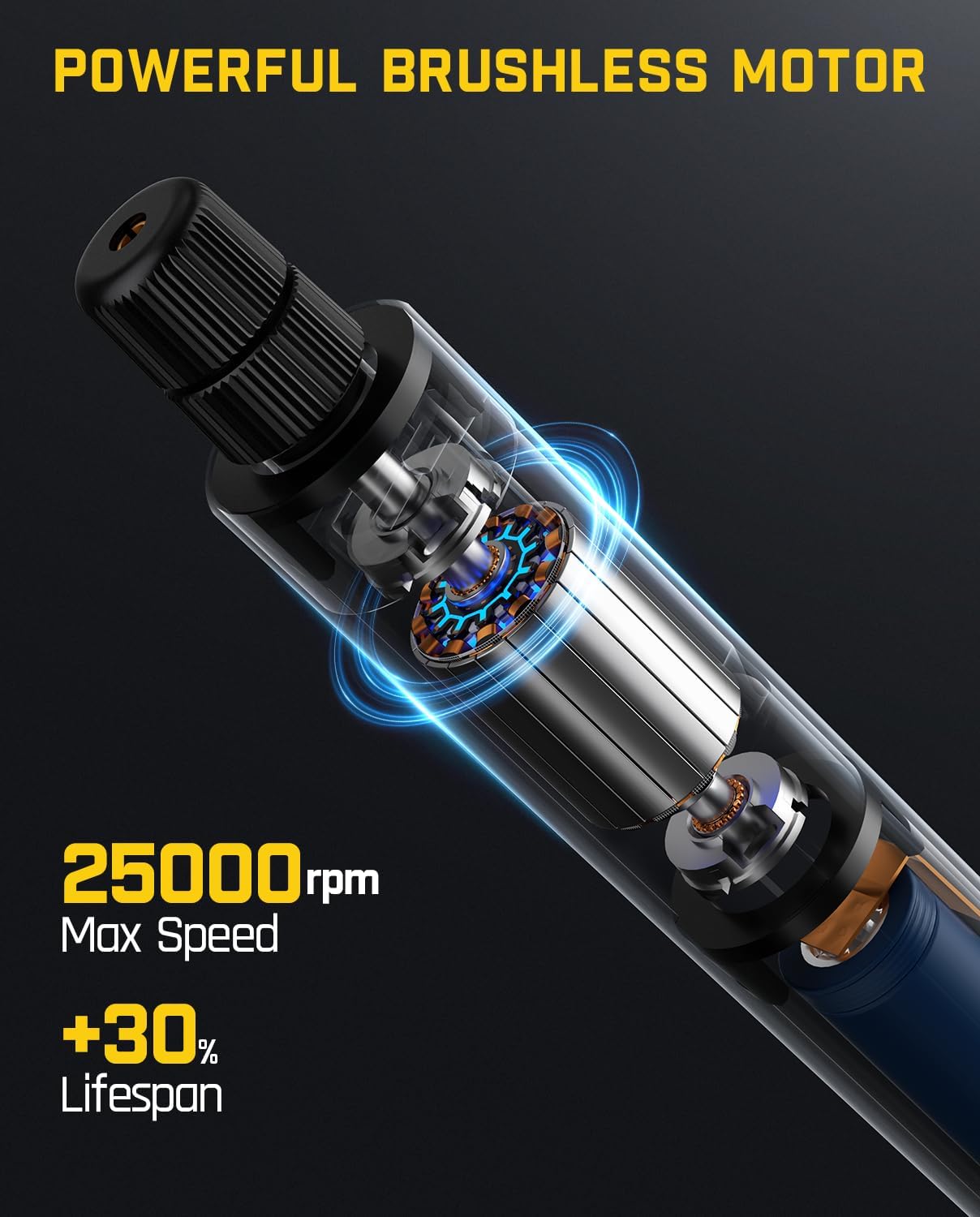
Image 4.3: The F2 Master's powerful brushless motor provides up to 25,000 RPM.
- പവർ ഓണാക്കാൻ: Press and hold the Power/Speed button until the indicator lights illuminate. The tool will start at the lowest speed setting.
- വേഗത ക്രമീകരിക്കാൻ: Briefly press the Power/Speed button to cycle through the 5 available speed settings. The indicator lights will show the selected speed.
- പവർ ഓഫ് ചെയ്യാൻ: Press and hold the Power/Speed button until the indicator lights turn off.
5. D2 PLUS Laser Level - Setup & Operation
5.1 ഘടകങ്ങൾ കഴിഞ്ഞുview
- Laser Emitters: Project horizontal and vertical green laser lines.
- നിയന്ത്രണ പാനൽ: Buttons for power, mode selection, and pulse mode.
- Pendulum Lock: Secures the pendulum for manual mode or transport.
- ബാറ്ററി സൂചകം: ശേഷിക്കുന്ന ബാറ്ററി ലൈഫ് പ്രദർശിപ്പിക്കുന്നു.
- USB-C ചാർജിംഗ് പോർട്ട്: ആന്തരിക ബാറ്ററി റീചാർജ് ചെയ്യുന്നതിന്.
5.2 Charging the Laser Level
The D2 PLUS has a 2600 mAh rechargeable battery, providing 7-14 hours of continuous use.

Image 5.1: The D2 PLUS Laser Level features a USB-C charging port.
- Connect the provided USB-C charging cable to the charging port on the side of the laser level.
- കേബിളിന്റെ മറ്റേ അറ്റം അനുയോജ്യമായ ഒരു USB പവർ അഡാപ്റ്ററുമായി ബന്ധിപ്പിക്കുക (ഉൾപ്പെടുത്തിയിട്ടില്ല).
- The battery indicator lights will show charging status. Disconnect once fully charged.
5.3 പവർ ഓൺ/ഓഫ്, മോഡ് തിരഞ്ഞെടുക്കൽ
The D2 PLUS uses an OSRAM green laser, which is four times brighter than traditional red lasers.

Image 5.2: The D2 PLUS utilizes a bright OSRAM green laser.

Image 5.3: The D2 PLUS offers three distinct line modes.

Image 5.4: Manual Mode (left) and Self-Leveling Mode (right) applications.
- സ്വയം-ലെവലിംഗ് മോഡ്: Unlock the pendulum by sliding the pendulum lock switch to the 'unlocked' position. Press the power button to turn on the laser. The laser will self-level within 4 degrees. If the tilt exceeds 4 degrees, the laser will flash rapidly to indicate it is out of level. Press the power button to cycle through horizontal line, vertical line, or both.
- മാനുവൽ മോഡ്: Lock the pendulum by sliding the pendulum lock switch to the 'locked' position. Press and hold the power button for 3 seconds to turn on the laser. The laser lines can now be projected at any angle without self-leveling. Press the power button to cycle through horizontal line, vertical line, or both.
- പൾസ് മോഡ്: In self-leveling mode, briefly press the pulse mode button (often indicated by a 'P' or wave icon) to activate pulse mode. This mode extends the working range up to 200 ft when used with a compatible laser receiver (not included), especially useful in bright environments.

Image 5.5: Pulse Mode extends the working range of the D2 PLUS Laser Level.
5.4 ലേസർ ലെവൽ മൌണ്ട് ചെയ്യുന്നു
The D2 PLUS can be mounted using its integrated magnetic bracket or a tripod.

Image 5.6: The D2 PLUS offers high precision, up to ±3/32 in at 30 ft.
- കാന്തിക ബ്രാക്കറ്റ്: Attach the magnetic bracket to metallic surfaces for stable positioning.
- ട്രൈപോഡ് മൗണ്ടിംഗ്: The laser level has a standard tripod thread (1/4"-20) on its base for mounting to a tripod (not included).
6. പരിപാലനം
Proper maintenance ensures the longevity and optimal performance of your tools.

Image 6.1: The D2 PLUS Laser Level is designed for durability against dust, water, and minor impacts.
- വൃത്തിയാക്കൽ: ഒരു സോഫ്റ്റ് ഉപയോഗിക്കുക, ഡിamp cloth to clean the tool surfaces. Do not use abrasive cleaners or solvents. For the laser level, gently wipe the laser windows with a clean, lint-free cloth.
- സംഭരണം: Store both tools in their original packaging or a protective case in a dry, cool place, away from direct sunlight and extreme temperatures. Ensure the pendulum lock on the laser level is engaged during storage and transport.
- ബാറ്ററി കെയർ: For optimal battery life, charge the tools regularly, even if not in frequent use. Avoid fully discharging the batteries for extended periods.
- പരിശോധന: Periodically inspect the tools for any signs of damage, loose parts, or wear. Do not operate damaged tools.
7. പ്രശ്നപരിഹാരം
പൊതുവായ പ്രശ്നങ്ങളും അവയുടെ പരിഹാരങ്ങളും അറിയാൻ താഴെയുള്ള പട്ടിക കാണുക.
| പ്രശ്നം | സാധ്യമായ കാരണം | പരിഹാരം |
|---|---|---|
| F2 Master does not turn on. | കുറഞ്ഞ ബാറ്ററി. | Charge the rotary tool using the USB-C cable. |
| F2 Master accessory bit is loose. | കോളറ്റ് നട്ട് വേണ്ടത്ര മുറുക്കിയിട്ടില്ല. | Ensure the collet nut is securely tightened with the magnetic wrench. |
| D2 PLUS laser lines are flashing rapidly. | Laser level is out of its self-leveling range (>4 degrees). | Place the laser level on a flatter surface or adjust its position until the flashing stops. |
| D2 PLUS laser lines are dim or not visible outdoors. | തിളക്കമുള്ള ആംബിയന്റ് ലൈറ്റ്. | Activate Pulse Mode and use a compatible laser receiver (not included). |
| D2 PLUS laser lines are not self-leveling. | Pendulum lock is engaged (Manual Mode). | Slide the pendulum lock switch to the 'unlocked' position for Self-Leveling Mode. |
If you encounter issues not covered here, please contact Fanttik customer support.
8 സ്പെസിഫിക്കേഷനുകൾ
8.1 Fanttik F2 Master Mini Cordless Rotary Tool
| ഫീച്ചർ | സ്പെസിഫിക്കേഷൻ |
|---|---|
| മോട്ടോർ തരം | Brushless Hollow Cup Motor |
| പരമാവധി റൊട്ടേഷണൽ സ്പീഡ് | 25,000 ആർപിഎം |
| സ്പീഡ് ക്രമീകരണങ്ങൾ | 5 ക്രമീകരിക്കാവുന്ന ക്രമീകരണങ്ങൾ |
| Noise Level (Idle) | 32 ഡി.ബി |
| ഭാരം | 0.22 പൗണ്ട് |
| Accessory Shank Size | 3/32" / 2.3mm |
| പവർ ഉറവിടം | ബാറ്ററി പവർ |
| പ്രത്യേക സവിശേഷതകൾ | Portable, Cordless, Revostor Hub, Aluminum Case |
8.2 Fanttik D2 PLUS Laser Level
| ഫീച്ചർ | സ്പെസിഫിക്കേഷൻ |
|---|---|
| ലേസർ തരം | Green Laser (OSRAM) |
| ലേസർ വർഗ്ഗീകരണം | Class II, <1 mW |
| പ്രൊജക്ഷൻ ശ്രേണി | 100 അടി വരെ |
| കൃത്യത | ±3/32 in at 30 ft |
| സ്വയം-ലെവൽ ശ്രേണി | ± 4 ഡിഗ്രി |
| Vertical Line Angle | 130° |
| ബാറ്ററി ശേഷി | 2600 mAh |
| തുടർച്ചയായ ഉപയോഗ സമയം | 7-14 മണിക്കൂർ |
| ചാർജിംഗ് പോർട്ട് | USB-C |
| ഈട് | Dust Resistance, Water Resistance, Resistant to fall from 1m |
9. വാറൻ്റിയും പിന്തുണയും
Fanttik products are manufactured to high-quality standards. For warranty information or technical support, please refer to the warranty card included in your package or visit the official Fanttik webസൈറ്റ്. പിന്തുണയുമായി ബന്ധപ്പെടുമ്പോൾ നിങ്ങളുടെ മോഡൽ നമ്പറും വാങ്ങൽ തീയതിയും ലഭ്യമാക്കുക.
For further assistance, you may contact Fanttik customer service through their official channels.


