1. ആമുഖം
Thank you for choosing the Kanlux ZEPO Cabinet Luminaire. This manual provides essential information for the safe and efficient installation, operation, and maintenance of your new lighting fixture. Please read this manual thoroughly before installation and keep it for future reference.
The Kanlux ZEPO luminaire is designed for installation under cabinets, such as kitchen worktops, providing elegant and functional accent lighting. Its compact design and various color options (black, white, silver/chrome) allow it to seamlessly integrate into various interior styles.

ചിത്രം 1: ഉദാample of Kanlux ZEPO luminaire installed in a kitchen setting, illuminating a countertop.
2 സുരക്ഷാ വിവരങ്ങൾ
പരിക്കുകളോ കേടുപാടുകളോ തടയാൻ ഇനിപ്പറയുന്ന സുരക്ഷാ മുൻകരുതലുകൾ എപ്പോഴും പാലിക്കുക:
- Ensure the power supply is disconnected before installation, maintenance, or bulb replacement.
- This luminaire is rated Class III, meaning it requires a safety extra-low voltage (SELV) power supply. Do not connect directly to mains voltage without an appropriate transformer.
- The luminaire has an IP20 rating, indicating protection against solid objects larger than 12.5mm. It is not protected against water. Install only in dry, indoor environments.
- Do not cover the luminaire with insulating material.
- Use only G4 bulbs with a maximum power of 10W.
- നിങ്ങൾക്ക് ഉറപ്പില്ലെങ്കിൽ, യോഗ്യതയുള്ള ഒരു ഇലക്ട്രീഷ്യൻ ഇൻസ്റ്റാളേഷൻ നടത്തണം.
- കുട്ടികൾക്ക് ലഭ്യമാകാതെ സൂക്ഷിക്കുക.
3. സജ്ജീകരണവും ഇൻസ്റ്റാളേഷനും
Follow these steps for proper installation of your Kanlux ZEPO luminaire:
- ഇൻസ്റ്റലേഷൻ ഏരിയ തയ്യാറാക്കുക: Choose a suitable location under a cabinet or shelf. Ensure there is enough space for the luminaire and access for wiring.
- മൗണ്ടിംഗ് പോയിൻ്റുകൾ അടയാളപ്പെടുത്തുക: Use the luminaire as a template to mark the screw holes on the underside of the cabinet. The luminaire has a triangular shape with sides of approximately 130mm.
- ഡ്രിൽ പൈലറ്റ് ദ്വാരങ്ങൾ: Carefully drill small pilot holes at the marked points.
- Secure the Luminaire: Attach the luminaire to the cabinet using appropriate screws (not included).
- വയറിംഗ് ബന്ധിപ്പിക്കുക: Connect the luminaire to a compatible Class III (SELV) power supply. Ensure all connections are secure and insulated. Refer to your power supply's instructions for specific wiring details.
- ബൾബ് ചേർക്കുക: Gently insert a G4 bulb (max 10W) into the luminaire's socket.
- ടെസ്റ്റ്: പവർ പുനഃസ്ഥാപിക്കുക, ലുമിനയർ പരിശോധിക്കുക.
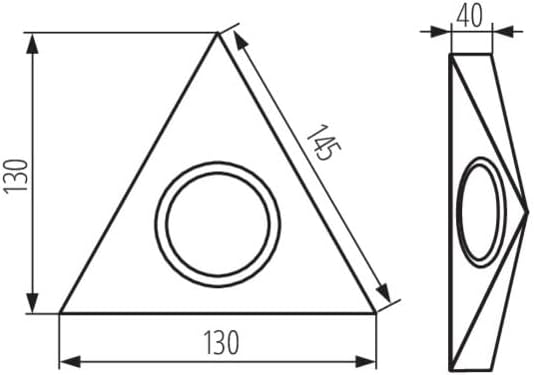
Figure 2: Technical diagram showing the dimensions of the Kanlux ZEPO luminaire (130mm x 130mm x 40mm depth).

ചിത്രം 3: ക്ലോസപ്പ് view of the Kanlux ZEPO luminaire, showing the G4 bulb socket and integrated power switch.
4. പ്രവർത്തന നിർദ്ദേശങ്ങൾ
The Kanlux ZEPO luminaire is designed for simple operation:
- പവർ ഓൺ/ഓഫ്: If your luminaire model includes an integrated switch (as shown in Figure 3), use it to turn the light on or off. Otherwise, control the luminaire via the external switch connected to your power supply.
- ബൾബ് മാറ്റിസ്ഥാപിക്കൽ: To replace the G4 bulb, first disconnect the power supply. Carefully remove the old bulb and insert the new G4 bulb into the socket. Ensure the bulb is securely seated before restoring power.
5. പരിപാലനം
To ensure the longevity and optimal performance of your luminaire:
- വൃത്തിയാക്കൽ: Disconnect power before cleaning. Wipe the luminaire with a soft, dry cloth. Do not use abrasive cleaners or solvents, as they may damage the finish.
- പരിശോധന: Periodically check the wiring and connections for any signs of wear or damage.
- ബൾബ് തരം: Always use the specified G4 bulb type with a maximum power of 10W. Using higher wattage bulbs can cause overheating and damage.
6. പ്രശ്നപരിഹാരം
If you encounter issues with your luminaire, try the following:
| പ്രശ്നം | സാധ്യമായ കാരണം | പരിഹാരം |
|---|---|---|
| ലൈറ്റ് ഓണാക്കില്ല. | No power supply, faulty bulb, loose connection, faulty switch. | Check power source. Replace bulb. Check all wiring connections. Test the switch. |
| ലൈറ്റ് മിന്നുന്നു. | അയഞ്ഞ ബൾബ്, അസ്ഥിരമായ വൈദ്യുതി വിതരണം, പൊരുത്തപ്പെടാത്ത ബൾബ്. | Ensure bulb is seated correctly. Check power supply stability. Use a compatible G4 bulb. |
| Luminaire gets too hot. | തെറ്റായ ബൾബ് വാട്ട്tagഇ (വളരെ ഉയർന്നത്). | Ensure you are using a G4 bulb with a maximum of 10W. |
If the problem persists after attempting these solutions, please contact Kanlux customer support or a qualified electrician.
7 സ്പെസിഫിക്കേഷനുകൾ
| ഫീച്ചർ | വിശദാംശങ്ങൾ |
|---|---|
| ബ്രാൻഡ് | കാൻലക്സ് |
| മോഡൽ നമ്പർ | 36632 |
| ശക്തി | 10 വാട്ട്സ് പരമാവധി |
| തൊപ്പി തരം | G4 |
| Protection Index (IP) | IP20 |
| ഇലക്ട്രിക്കൽ ക്ലാസ് | ക്ലാസ് III |
| മെറ്റീരിയൽ | അലോയ് സ്റ്റീൽ |
| ശൈലി | ആധുനികം |
| ഇനത്തിൻ്റെ ഭാരം | 140 ഗ്രാം |
| അളവുകൾ (ഏകദേശം) | 130mm (Length) x 130mm (Width) x 40mm (Depth) |
| ബാറ്ററികൾ ആവശ്യമാണ് | ഇല്ല |
8. വാറൻ്റിയും പിന്തുണയും
Kanlux products are manufactured to high quality standards. For information regarding warranty terms and conditions, please refer to the warranty card included with your product or visit the official Kanlux website. For technical support or inquiries, please contact Kanlux customer service through their official channels.
Kanlux Official Webസൈറ്റ്: www.kanlux.com


