1. ആമുഖം
Thank you for choosing the FNTCASE Protective Case for your Samsung Galaxy A26-5G. This manual provides essential information on the installation, usage, and maintenance of your new phone case to ensure optimal protection and functionality.
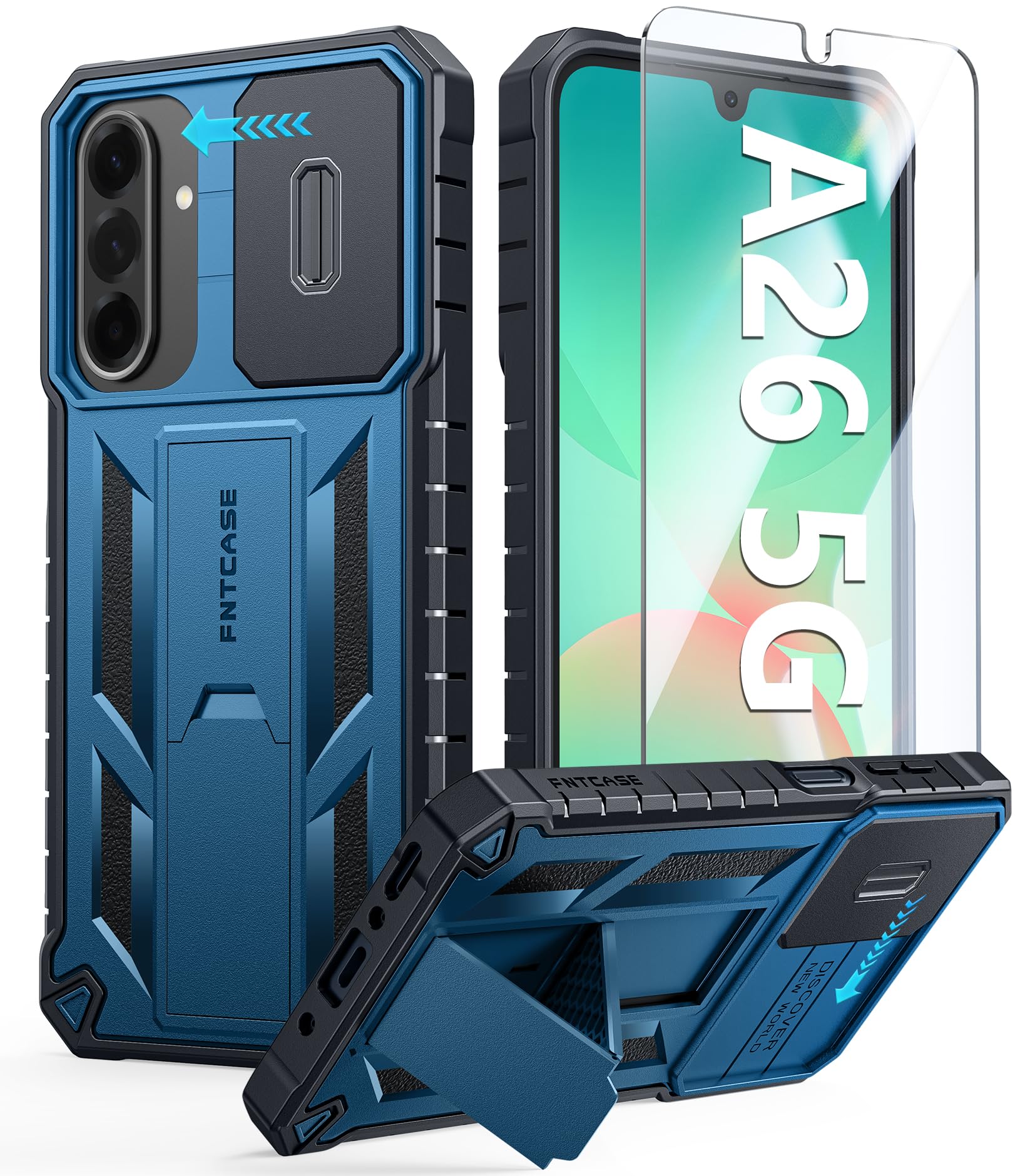
Figure 1: FNTCASE Samsung Galaxy A26-5G Protective Case
2. ഉപകരണ അനുയോജ്യത
This FNTCASE protective case is specifically designed for the Samsung Galaxy A26-5G phone, 6.7 inch, Release 2025. It ensures precise cutouts for all ports, buttons, and features, allowing full access without obstruction.
To verify your phone model, navigate to your phone's settings, scroll down to "About phone," and check the "Model name" displayed.

ചിത്രം 2: ഉപകരണ അനുയോജ്യത അവസാനിച്ചുview

Figure 3: How to Check Your Phone Model
3 പ്രധാന സവിശേഷതകൾ
- Upgraded Anti-Scratch Sliding Camera Protection: Features a delicate sliding cover to protect your Galaxy A26-5G phone camera from scratches, collisions, scuffs, and impacts. The unique design also helps prevent privacy disclosure.
- Military-Grade Drop Protection: Constructed with a matte hard PC back and flexible Thermoplastic Soft Touch TPU shock-absorbing bumpers. Raised thickened rubber in four-corners with grooved airbags provides protection against accidental drops, shock, and impacts.
- ബിൽറ്റ്-ഇൻ കിക്ക്സ്റ്റാൻഡ്: A hidden stand allows for stable vertical and horizontal viewing angles, convenient for media consumption or video calls.
- Excellent Grip & Armor Anti-skid Design: The processed TPU frame offers a delicate touch feeling and non-slip grip, preventing the phone from slipping. Textured edges and an impact-resistant hard PC shell back cover enhance overall handling.

Figure 4: Sliding Camera Cover

Figure 5: Military-Grade Drop Protection

Figure 6: Built-in Kickstand in Use
4. സജ്ജീകരണവും ഇൻസ്റ്റാളേഷനും
4.1 കേസ് ഇൻസ്റ്റാളേഷൻ
To install your Samsung Galaxy A26-5G into the FNTCASE protective case:
- Ensure your phone is clean and free of dust or debris.
- Align the phone with the case, starting with one side.
- Gently press the phone into the case, ensuring all corners and edges are securely seated. The case is designed for a snug fit to provide maximum protection.
Video 1: FNTCASE for Galaxy A26 Case Installation Guide. This video demonstrates the process of installing the phone into the protective case.
4.2 Screen Protector Installation (If Applicable)
If your product includes a screen protector, follow these steps for installation:
- Clean your phone screen thoroughly with the provided wet and dry wipes to remove any smudges or dust.
- Use the dust-absorber sticker to remove any remaining dust particles.
- Carefully align the screen protector with your phone screen, ensuring it is centered and straight.
- Gently lay the screen protector onto the screen. It will adhere automatically. Press out any air bubbles from the center outwards.
Video 2: FNTCASE for Galaxy A26 Case Tempered Glass. This video illustrates the steps for installing a tempered glass screen protector.
5. പ്രവർത്തന നിർദ്ദേശങ്ങൾ
5.1 Using the Sliding Camera Cover
To use the sliding camera cover:
- To expose the camera, gently slide the cover to the left until it clicks into place.
- To protect the camera, slide the cover back to the right until it fully covers the camera lenses and is securely buckled.
Video 3: FNTCASE for Galaxy A26 Case Details Show. This video demonstrates the functionality of the sliding camera cover.
5.2 ബിൽറ്റ്-ഇൻ കിക്ക്സ്റ്റാൻഡ് ഉപയോഗിക്കുന്നു
The integrated kickstand allows for hands-free viewing:
- To deploy the kickstand, use your fingernail to gently pull it out from the back of the case. Press slightly to secure it in the open position.
- Position your phone vertically or horizontally as desired.
- To close the kickstand, push it forward until it clicks securely back into the case.
Video 4: FNTCASE for Galaxy A26 Case Kickstand. This video demonstrates how to open and close the kickstand.
6. പരിപാലനവും പരിചരണവും
To maintain the condition and effectiveness of your FNTCASE protective case:
- ഒരു സോഫ്റ്റ്, ഡി ക്ലീനർ ഉപയോഗിച്ച് കേസ് പതിവായി വൃത്തിയാക്കുക.amp തുണി. കഠിനമായ രാസവസ്തുക്കളോ ഉരച്ചിലുകളോ ഉള്ള വസ്തുക്കൾ ഒഴിവാക്കുക.
- Ensure the sliding camera cover and kickstand mechanisms are free from dirt or debris to ensure smooth operation.
- Avoid prolonged exposure to extreme temperatures or direct sunlight, which may affect the material's durability.
7. പ്രശ്നപരിഹാരം
7.1 Kickstand is Stiff or Hard to Open
If the kickstand is stiff, especially during initial use, gently work it open and closed a few times. It should become smoother with use. Ensure no debris is obstructing the mechanism.
7.2 Camera Cover Not Sliding Smoothly
Check for any dust or small particles trapped in the sliding mechanism. Clean the area with a soft, dry cloth. Ensure the cover is properly aligned in its track.
8 സ്പെസിഫിക്കേഷനുകൾ
| ഫീച്ചർ | വിശദാംശങ്ങൾ |
|---|---|
| ബ്രാൻഡ് | FNTCASE |
| അനുയോജ്യമായ ഫോൺ മോഡൽ | Samsung Galaxy A26-5G |
| മെറ്റീരിയൽ | Thermoplastic Polyurethane (TPU), Hard Polycarbonate (PC) |
| പ്രത്യേക സവിശേഷതകൾ | Heavy Duty Protection, Kickstand, Military Grade Protection, Scratch Resistant, Slide Camera Cover |
| ഇനത്തിൻ്റെ ഭാരം | 2.89 ഔൺസ് |
| പാക്കേജ് അളവുകൾ | 8.11 x 4.45 x 0.63 ഇഞ്ച് |
9. വാറൻ്റിയും പിന്തുണയും
FNTCASE products are designed for durability and performance. For any questions, concerns, or warranty claims regarding your product, please refer to the seller's contact information on the purchase platform or visit the official FNTCASE webപിന്തുണയ്ക്കുള്ള സൈറ്റ്.


