1. ആമുഖം
The Thermal Master NV300 Max is an advanced automotive thermal night vision dashcam designed to enhance driving safety, particularly in low-visibility conditions. It features a long-range thermal sensor, AI-powered collision warning, and multiple display modes to provide a clearer view മുന്നോട്ടുള്ള പാതയുടെ.
പ്രധാന കഴിവുകളിൽ ഇവ ഉൾപ്പെടുന്നു:
- 328 Yards Long Distance Vision: Detects pedestrians and animals up to 300 meters away.
- AI Collision Warning: Utilizes deep learning algorithms to identify potential hazards and provide visual and audible alerts.
- 3-Vision Infrared Dashcam: Offers Visible Light, Infrared (Thermal), and Fusion display modes.
- സ്മാർട്ട് വോയ്സ് നിയന്ത്രണം: Allows hands-free operation for various settings.
- ദ്രുത ഇൻസ്റ്റാളേഷൻ: Designed for easy setup in various vehicle types.
2. പാക്കേജ് ഉള്ളടക്കം
Upon unboxing your NV300 Max, please verify that all components are present:
- NV300 Max Camera Module
- In-Car Display Host
- ബ്ലൂടൂത്ത് OBD മൊഡ്യൂൾ
- സിഗരറ്റ് ലൈറ്റർ പവർ കേബിൾ
- In-Car/Out-Car Connection Cable (x2)
- ഉപയോക്തൃ മാനുവൽ (ഈ പ്രമാണം)

Image: The NV300 Max camera module and its accompanying display host.
3. സജ്ജീകരണവും ഇൻസ്റ്റാളേഷനും
The NV300 Max is designed for quick and easy installation, typically taking around 5 minutes. It is compatible with a wide range of vehicles, including cars, pickups, RVs, trucks, and buses.
3.1 Mounting the Camera Module
The camera module is typically mounted on the dashboard or windshield, ensuring a clear, unobstructed view of the road ahead. Use the provided adhesive or mounting bracket to secure the module firmly.
3.2 Positioning the Display Host
The 6.4-inch floating display features magnetic 3D adjustment, allowing you to position it for optimal viewനിങ്ങളുടെ ഡ്രൈവിംഗിന് തടസ്സമാകാതെ പ്രവർത്തിക്കുന്നു view. Place it in a convenient location on your dashboard.
3.3 Connecting Power and OBD
Connect the camera module to the display host using the provided connection cable. Power the system using the cigarette lighter power cable. For advanced features and vehicle data, connect the Bluetooth OBD module to your vehicle's OBD-II port.
4. പ്രവർത്തന നിർദ്ദേശങ്ങൾ
4.1 പവർ ഓൺ/ഓഫ്
The device will typically power on automatically when your vehicle starts and power off when the ignition is turned off. A manual power button may also be present on the display host for direct control.
4.2 ഡിസ്പ്ലേ മോഡുകൾ
The NV300 Max offers three distinct display modes to adapt to various driving conditions:
- ദൃശ്യപ്രകാശ മോഡ്: സാധാരണ ക്യാമറ view, similar to a regular dashcam.
- Infrared (Thermal) Mode: Displays heat signatures, ideal for pitch-dark conditions, fog, or heavy rain.
- ഫ്യൂഷൻ മോഡ്: Combines visible light and thermal imaging for a comprehensive view, highlighting thermal objects within the visible scene.

Image: Visual comparison of Visible Light, Thermal, and Fusion Vision modes, demonstrating enhanced visibility in challenging conditions.
4.3 AI Collision Warning System
The built-in AI algorithm continuously analyzes the road ahead for potential hazards such as vehicles, pedestrians, and animals. When a potential collision is detected, the system provides visual alerts (green, yellow, red indicators) and audible warnings to prompt timely driver reaction.
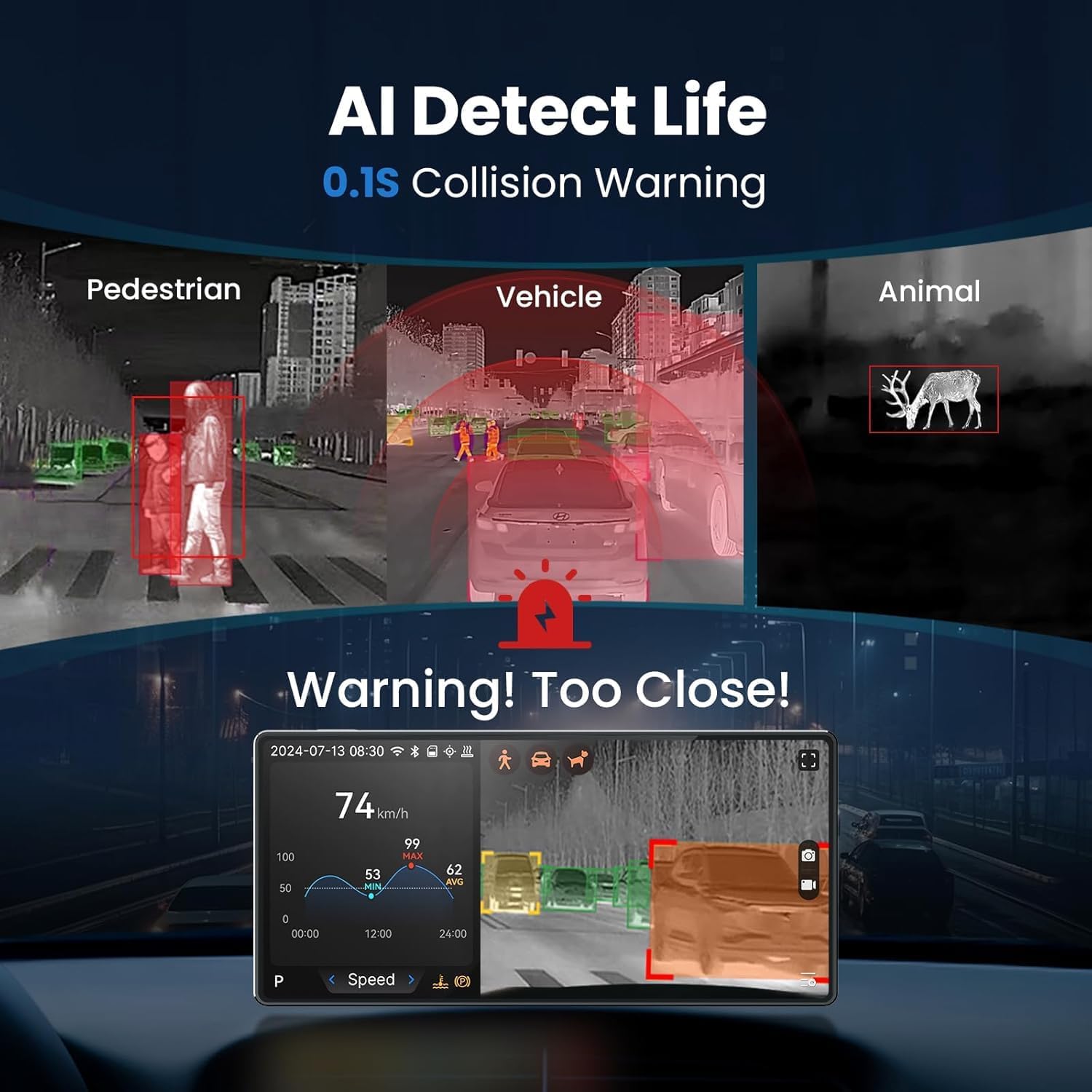
Image: The AI collision warning system actively identifying and highlighting pedestrians, vehicles, and animals on the road.
4.4 സ്മാർട്ട് വോയ്സ് കൺട്രോൾ
The NV300 Max supports voice commands for hands-free operation. You can adjust settings such as display modes, volume, and brightness by speaking commands directly to the device, allowing you to maintain focus on driving.
5. സവിശേഷതകൾ കഴിഞ്ഞുview
5.1 Long-Range Vision
The NV300 Max provides a clear view up to 328 yards (300 meters), significantly extending your perception range in challenging conditions like darkness, heavy rain, or fog. This allows for earlier detection of obstacles and potential hazards.

Image: The NV300 Max's long-range night vision capability, demonstrating detection of a deer on the road at a significant distance.
5.2 High-Resolution Thermal Sensor
Equipped with a high-sensitivity thermal sensor, the NV300 Max delivers clear thermal images even in complete darkness. The 512x384 Super IR Resolution ensures detailed thermal imaging for accurate object recognition.

Image: A side-by-side comparison illustrating the enhanced clarity and detail provided by the 512x384 Super IR Resolution.
5.3 Shutterless Zero Freezing Technology
The latest seamless infrared technology ensures a smooth, uninterrupted image feed, preventing any freezing or stuttering that could disrupt your view റോഡിൻ്റെ.
5.4 OBD Functionality
Beyond its vision capabilities, the NV300 Max also functions as an On-Board Diagnostics (OBD) tool, providing additional vehicle data and insights to help you drive more safely and confidently.

Image: Illustrates the device's 'Spaceship Design', its core Thermal Camera function, and its integrated OBD capabilities.
5.5 All-Weather Performance
The NV300 Max is designed to operate reliably in a wide range of environmental conditions, from extreme cold to high temperatures, ensuring 24/7 performance regardless of the weather.
6. പരിപാലനം
To ensure the longevity and optimal performance of your NV300 Max, follow these maintenance guidelines:
- വൃത്തിയാക്കൽ: Gently wipe the camera lens and display screen with a soft, lint-free cloth. Avoid abrasive cleaners or solvents that could damage the surfaces.
- കേബിൾ മാനേജുമെന്റ്: Ensure all cables are securely connected and not pinched or exposed to excessive wear.
- സോഫ്റ്റ്വെയർ അപ്ഡേറ്റുകൾ: നിർമ്മാതാവിന്റെ website for any available firmware or software updates to ensure your device has the latest features and performance enhancements.
- സംഭരണം: ഉപകരണം ദീർഘനേരം സൂക്ഷിക്കുകയാണെങ്കിൽ, നേരിട്ടുള്ള സൂര്യപ്രകാശത്തിൽ നിന്നും കടുത്ത താപനിലയിൽ നിന്നും അകന്ന് തണുത്തതും വരണ്ടതുമായ സ്ഥലത്ത് സൂക്ഷിക്കുക.
7. പ്രശ്നപരിഹാരം
This section addresses common issues you might encounter with your NV300 Max.
| പ്രശ്നം | സാധ്യമായ കാരണം | പരിഹാരം |
|---|---|---|
| ഉപകരണം പവർ ഓണാക്കുന്നില്ല. | വൈദ്യുതി ഇല്ല; കണക്ഷൻ നഷ്ടപ്പെട്ടു. | Check if the cigarette lighter power cable is securely plugged in and the vehicle's power outlet is functional. Ensure all cables are firmly connected. |
| ഡിസ്പ്ലേ ശൂന്യമാണ് അല്ലെങ്കിൽ നിശ്ചലമാണ്. | Software glitch; power interruption. | Restart the device by unplugging and re-plugging the power cable. If the issue persists, check for firmware updates. |
| AI warning not functioning. | Feature disabled; sensor obstruction. | Ensure the AI collision warning feature is enabled in the device settings. Check that the camera lens is clean and unobstructed. |
| Poor image clarity. | Dirty lens; incorrect mode. | Clean the camera lens. Ensure you are using the appropriate display mode (e.g., Thermal Mode for darkness). |
8 സ്പെസിഫിക്കേഷനുകൾ
| ഫീച്ചർ | വിശദാംശങ്ങൾ |
|---|---|
| മോഡൽ നമ്പർ | Black (NV300 Max) |
| ബ്രാൻഡ് | തെർമൽ മാസ്റ്റർ |
| സ്ക്രീൻ വലിപ്പം | 6.4 ഇഞ്ച് |
| ഡിസ്പ്ലേ ടെക്നോളജി | എൽസിഡി |
| ലെൻസ് തരം | Wide Angle (Fixed) |
| ഒപ്റ്റിക്കൽ സെൻസർ വലുപ്പം | 1/4 ഇഞ്ച് |
| ഇനത്തിൻ്റെ ഭാരം | 4.62 പൗണ്ട് |
| പാക്കേജ് അളവുകൾ | 11.26 x 8.7 x 4.25 ഇഞ്ച് |
| ബാറ്ററികൾ | 1 ലിഥിയം മെറ്റൽ ബാറ്ററി (ഉൾപ്പെടുത്തിയിരിക്കുന്നു) |
| കണക്റ്റിവിറ്റി | വയർലെസ് |
9. വാറൻ്റിയും പിന്തുണയും
For warranty information, technical support, or service inquiries, please refer to the warranty card included with your product or visit the official Thermal Master webവാറന്റി ക്ലെയിമുകൾക്കുള്ള വാങ്ങലിന്റെ തെളിവായി നിങ്ങളുടെ വാങ്ങൽ രസീത് സൂക്ഷിക്കുക.


