1. ആമുഖം
Thank you for choosing the INKBIRD IB-1049-BOJP WiFi Hub and Bluetooth Temperature Humidity Sensor Set. This manual provides essential information for the proper setup, operation, and maintenance of your device. Please read it carefully before use.
പ്രധാന സവിശേഷതകൾ:
- Bluetooth & WiFi Connectivity: Each sensor supports Bluetooth 5.0 for stable connections up to 80m. The hub enables remote temperature and humidity management via 2.4GHz WiFi, even when you are away. Up to 10 Bluetooth temperature and humidity sensors can be linked to one hub.
- IP65 വാട്ടർപ്രൂഫ് റേറ്റിംഗ്: Designed with IP65 waterproof and dustproof standards, suitable for both indoor and outdoor environments. Its compact, lightweight design and IP65 rating make it ideal for use in homes, baby rooms, refrigerators, reptile terrariums, greenhouses, and other confined spaces.
- ഹൈ-പ്രിസിഷൻ സെൻസർ: The Bluetooth temperature and humidity sensor ITH-11-B incorporates a high-precision Swiss sensor, measuring every 3 seconds. Temperature range: -40℃ to 60℃ (-40℉ to 140℉). Humidity range: 0%RH to 99%RH. Accuracy: ±0.2℃ / ±2%RH.
- Long-Term Data Storage: The app visualizes changes in temperature, humidity, VPD, and dew point through graphs. Export up to 2 years of historical data via email. The waterproof temperature and humidity sensor can store up to 300 days of offline data, which is uploaded to the 'INKBIRD' app after Bluetooth connection. Offline data storage duration varies by recording interval (set to 1/2/5/10 minutes).
- വിപുലീകരിച്ച ബാറ്ററി ലൈഫ്: Each ITH-11-B temperature and humidity sensor comes with two AAA batteries, providing approximately 9 months of continuous operation with a super-large capacity of 1200 mAh, eliminating the need for frequent battery changes.

ചിത്രം 1: ഓവർview of the INKBIRD Wireless Temperature and Humidity Monitor Set.
2. സജ്ജീകരണം
2.1 Sensor Battery Installation (ITH-11-B)
- Open the back cover of the ITH-11-B sensor.
- Remove the insulating strip from the battery compartment.
- Ensure the batteries are installed with the correct polarity.
- Thread the lanyard through the designated hole before replacing the cover for easier handling.
- Close the back cover. The ITH-11-B will switch on automatically.
Video 1: ITH-11-B Waterproof Temperature and Humidity Monitor Setup Guide. This video demonstrates how to install batteries and prepare the ITH-11-B sensor for use.
2.2 Connecting the Wi-Fi Hub (IBS-M2S-B)
- Plug the IBS-M2S-B Wi-Fi hub into a power outlet.
- Download and open the 'INKBIRD' app on your smartphone.
- Click the '+' icon in the top right corner of the app to search for devices.
- Select the IBS-M2S-B from the detected devices.
- Connect to your 2.4GHz Wi-Fi network and follow the on-screen instructions to establish the connection.
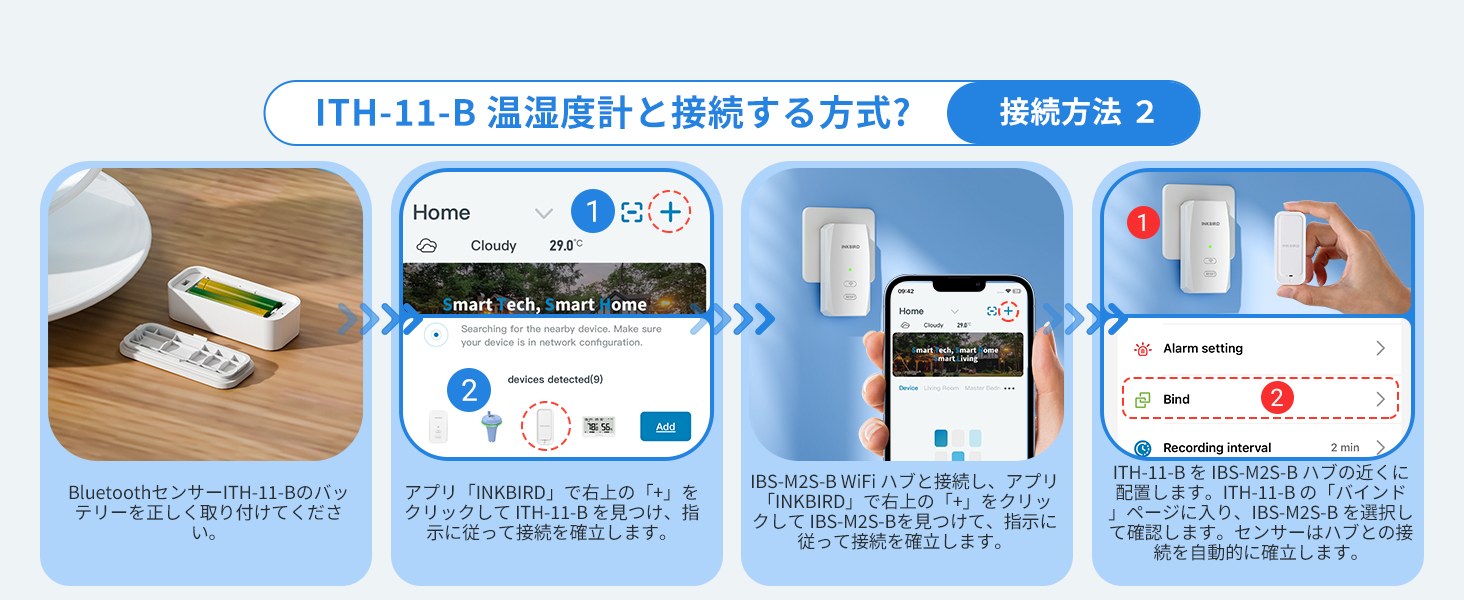
Figure 2: Visual guide for connecting the Wi-Fi Hub to the INKBIRD app.
2.3 Connecting ITH-11-B Bluetooth Sensors to the Hub
There are two methods to connect the ITH-11-B Bluetooth sensors to the Wi-Fi hub:
Method 1: Direct Connection via Hub
- Ensure the IBS-M2S-B Wi-Fi hub is connected to the app.
- Insert the battery into the ITH-11-B Bluetooth sensor and place it near the IBS-M2S-B Wi-Fi hub.
- In the IBS-M2S-B's 'Unbound Device' section within the app, find and add the ITH-11-B.
- Once added, the ITH-11-B data will be displayed.
Method 2: App-Initiated Connection
- Insert the battery into the ITH-11-B Bluetooth sensor.
- In the 'INKBIRD' app, click the '+' icon to find the ITH-11-B and follow the instructions to establish a connection.
- After the ITH-11-B is connected via Bluetooth, select the IBS-M2S-B hub in the app.
- Go to the 'Alarm setting' page, select 'Bind', and choose the IBS-M2S-B. The sensor and hub will automatically establish a connection.
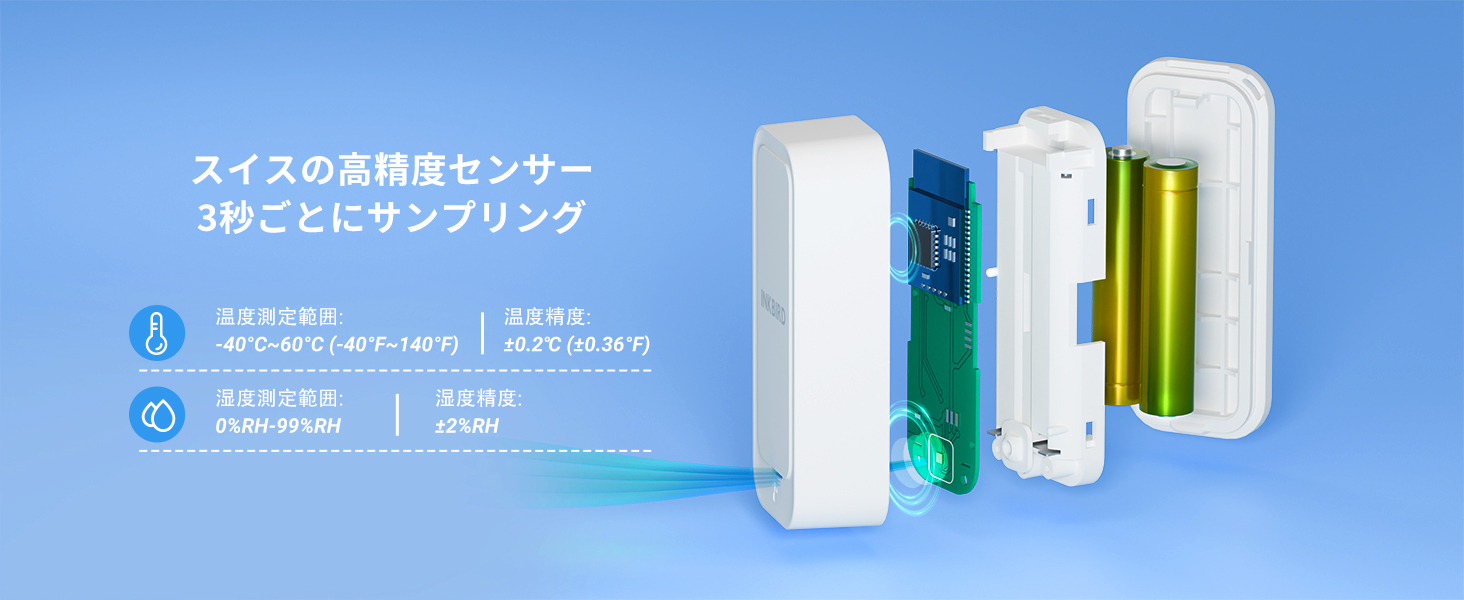
Figure 3: Connecting ITH-11-B sensors to the hub (Method 1).
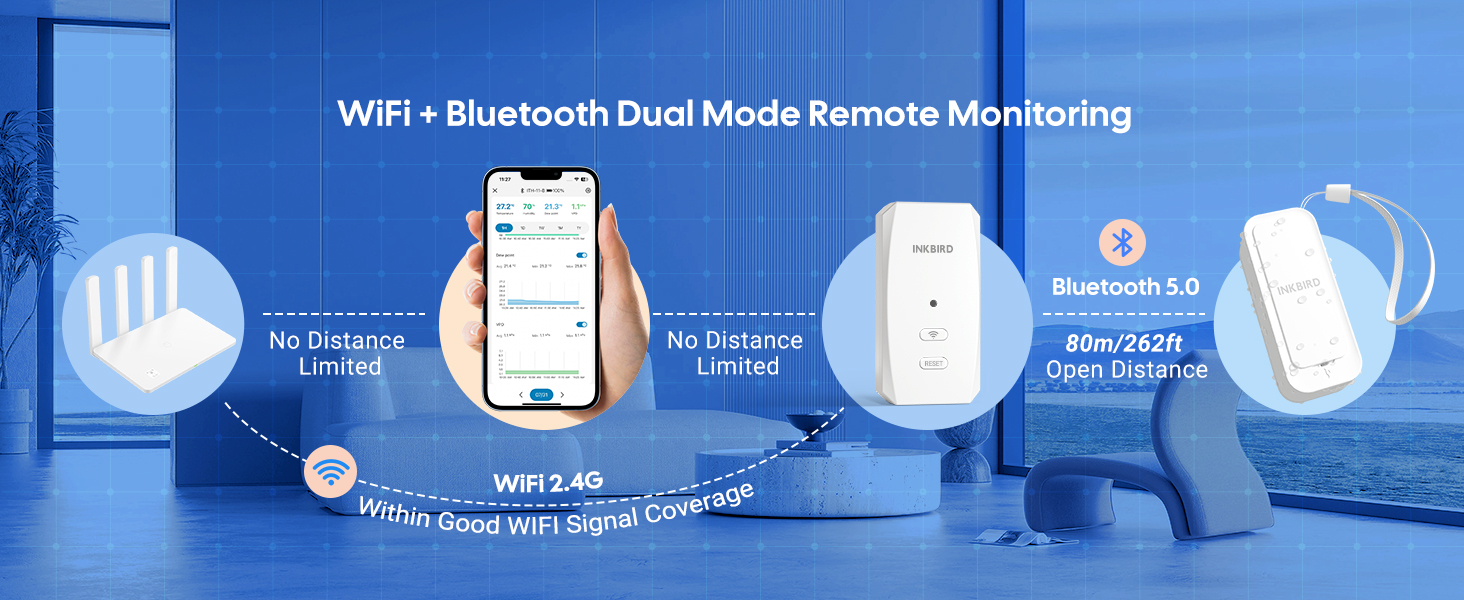
Figure 4: Connecting ITH-11-B sensors to the hub (Method 2).
Video 2: WI-FI Thermometer IBS-TH3 Setup. This video demonstrates the app connection process, which is similar for the INKBIRD Wi-Fi Hub.
3. പ്രവർത്തന നിർദ്ദേശങ്ങൾ
3.1 Remote Monitoring and Data Viewing
Once connected, you can remotely monitor temperature, humidity, VPD (Vapor Pressure Deficit), and dew point from anywhere via the INKBIRD app. The app displays real-time data and historical graphs for various timeframes (1 hour, 1 day, 1 week, 1 month, 1 year).

Figure 5: App interface for remote monitoring and data display.
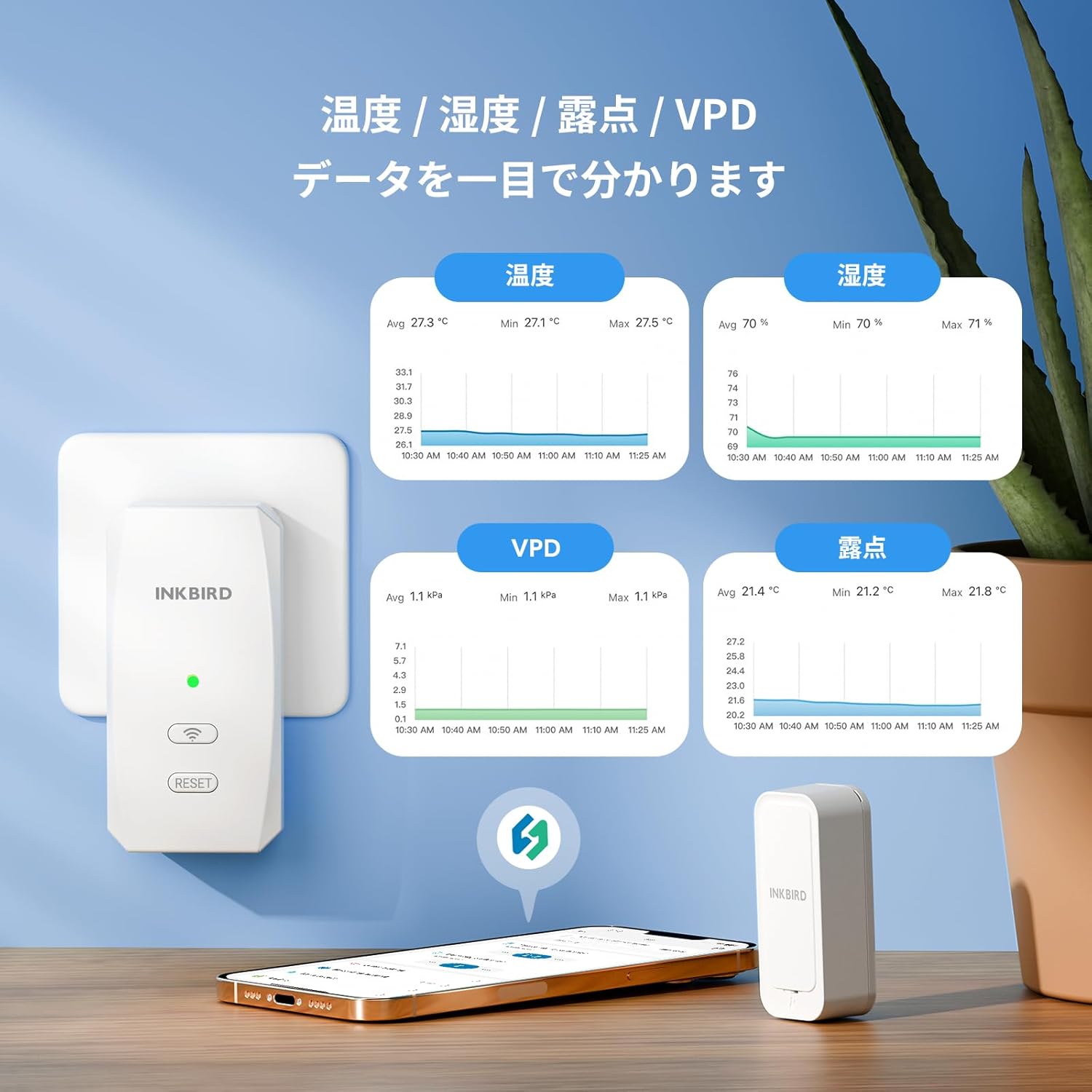
Figure 6: Detailed graphs for temperature, humidity, dew point, and VPD.
3.2 അലാറം അറിയിപ്പുകൾ
Set custom high/low temperature and humidity alarms within the app. You will receive instant push notifications on your smartphone if the readings exceed your set thresholds. The app also provides low battery alerts.

ചിത്രം 7: ഉദാample of alarm notifications received via the app.
3.3 ഡാറ്റ എക്സ്പോർട്ട്
The app allows you to export up to 2 years of historical data in a convenient format via email. You can also customize the data recording interval (1, 2, 5, or 10 minutes) to suit your monitoring needs.

Figure 8: Data export feature in the INKBIRD app.
3.4 അപേക്ഷകൾ
The IP65 waterproof and dustproof design, combined with its compact size, makes this sensor suitable for a wide range of applications:
- Home environments (living rooms, bedrooms)
- Baby rooms
- റഫ്രിജറേറ്ററുകളും ഫ്രീസറുകളും
- Reptile terrariums
- Greenhouses and plant cultivation areas
- വൈൻ നിലവറകൾ
- ഇൻകുബേറ്ററുകൾ
- Outdoor areas (courtyards, gardens)

Figure 9: Diverse applications of the INKBIRD sensor.
4. പരിപാലനം
4.1 ബാറ്ററി മാറ്റിസ്ഥാപിക്കൽ
The ITH-11-B sensor uses two AAA batteries. When the app indicates a low battery, replace both batteries to ensure continuous and accurate monitoring. Refer to section 2.1 for battery installation steps.
4.2 വൃത്തിയാക്കൽ
Wipe the device with a soft, dry cloth. Do not use abrasive cleaners or immerse the device in water, despite its IP65 rating, to prevent damage to internal components.
5. പ്രശ്നപരിഹാരം
5.1 Data Loss During Network/Power Outage
In case of a network disconnection or power outage, data may appear lost. The system is designed to mitigate this:
- Network Disconnection: The hub continues to collect data from the sensors and temporarily stores it for up to 3 hours. Once the internet connection is restored, the data is automatically uploaded to the cloud, ensuring no data is lost.
- പവർ ഓtage: The sensors continue to record data. After power is restored, reconnect via Bluetooth, and you can retrieve all historical data.
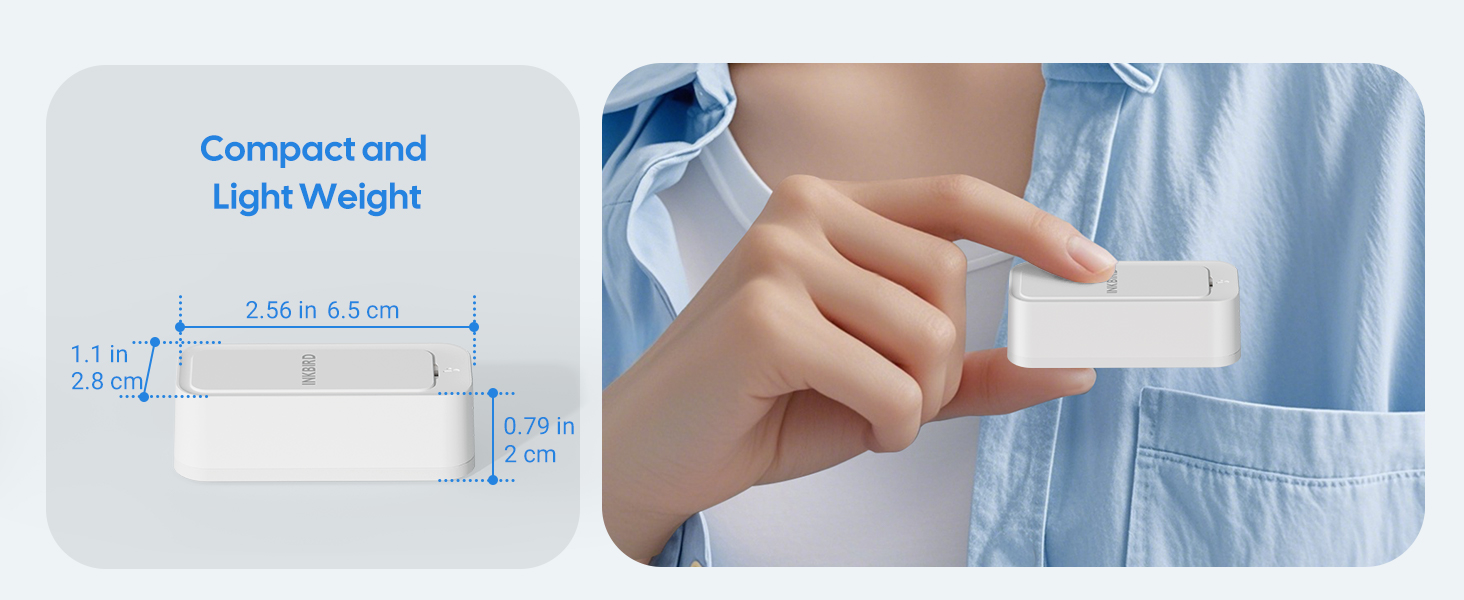
Figure 10: Data recovery in various outagഇ സാഹചര്യങ്ങൾ.
5.2 Turning Off Alarm Buzzer/Wi-Fi Light
If the Wi-Fi light is too bright in the dark, you can press the Wi-Fi button on the hub to turn it off. To silence an alarm buzzer immediately after receiving a notification, press any button on the gateway or click the alarm notification on your phone.
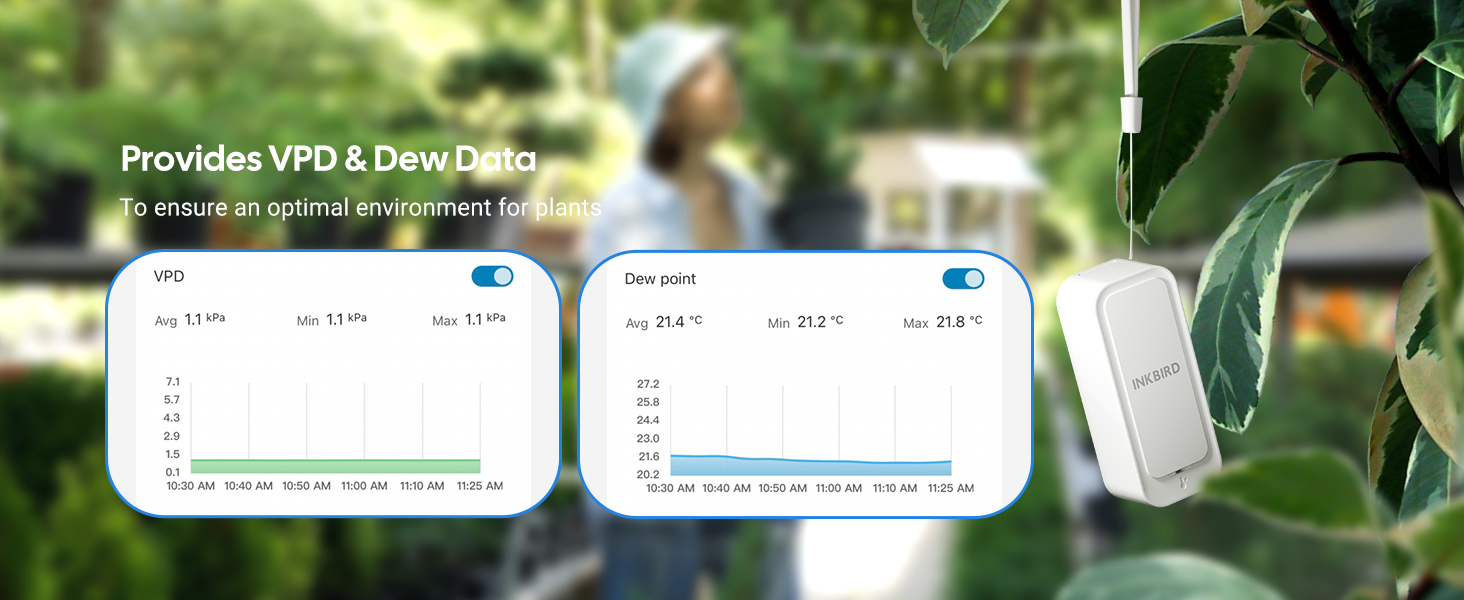
Figure 11: Managing Wi-Fi light and alarm sounds.
6 സ്പെസിഫിക്കേഷനുകൾ
| ഫീച്ചർ | വിശദാംശങ്ങൾ |
|---|---|
| നിർമ്മാതാവ് | മഷി പക്ഷി |
| ഭാഗം നമ്പർ | IB-1049-BOJP |
| ഇനത്തിൻ്റെ ഭാരം | 270 ഗ്രാം |
| പാക്കേജ് അളവുകൾ | 10.3 x 9.7 x 8.5 സെ.മീ |
| ബാറ്ററികൾ | 6 AAA ബാറ്ററികൾ (ഉൾപ്പെട്ടിരിക്കുന്നു) |
| അളക്കൽ കൃത്യത | ±0.2℃ / ±2%RH |
| ഉൾപ്പെടുത്തിയ ഘടകങ്ങൾ | 1 Wi-Fi Hub, 3 Bluetooth Temperature Humidity Sensors |
| ബാറ്ററി തരം | Alkaline (AAA) |
| Temperature Rating Upper Limit | 60℃ (140℉) |
7. വാറൻ്റി
Inkbird products typically come with a 1-year limited warranty from the date of purchase. This warranty covers defects in materials and workmanship under normal use. Please retain your proof of purchase for warranty claims. For specific warranty terms and conditions, refer to the documentation included with your product or visit the official Inkbird webസൈറ്റ്.
8. പിന്തുണ
For technical support, troubleshooting assistance, or any questions regarding your INKBIRD product, please contact Inkbird customer service. You can usually find contact information on the official Inkbird website or through the 'INKBIRD' app.
ഓൺലൈൻ ഉറവിടങ്ങൾ:
- സന്ദർശിക്കുക Inkbird Store on Amazon ഉൽപ്പന്ന വിവരങ്ങൾക്കും അപ്ഡേറ്റുകൾക്കും.
- Check the 'INKBIRD' app for FAQs and in-app support options.


