1. ആമുഖം
This manual provides detailed instructions for the proper use and care of your WIKICO WX02-6K 6K Digital Camera. Please read this manual thoroughly before operating the camera to ensure optimal performance and longevity. This camera is designed for both photography and video recording, featuring 6K video resolution, 64MP photos, a 180° flip screen, and various advanced functions.
2. പാക്കേജ് ഉള്ളടക്കം
താഴെ ലിസ്റ്റ് ചെയ്തിരിക്കുന്ന എല്ലാ ഇനങ്ങളും നിങ്ങളുടെ പാക്കേജിൽ ഉൾപ്പെടുത്തിയിട്ടുണ്ടെന്ന് ഉറപ്പാക്കുക. ഏതെങ്കിലും ഇനങ്ങൾ നഷ്ടപ്പെട്ടിട്ടുണ്ടെങ്കിലോ കേടായിട്ടുണ്ടെങ്കിലോ, ദയവായി ഉപഭോക്തൃ പിന്തുണയുമായി ബന്ധപ്പെടുക.
- WIKICO WX02-6K 6K Digital Camera (x1)
- 1500mAh Rechargeable Batteries (x2)
- Dual Battery Charger (x1)
- റിസ്റ്റ് സ്ട്രാപ്പ് (x1)
- 32GB TF Card (x1)
- Wide-Angle Lens (x1)
- Macro Lens (x1)
- USB കേബിൾ (x1)
- പവർ അഡാപ്റ്റർ (x1)
- ഇൻസ്ട്രക്ഷൻ മാനുവൽ (x1)
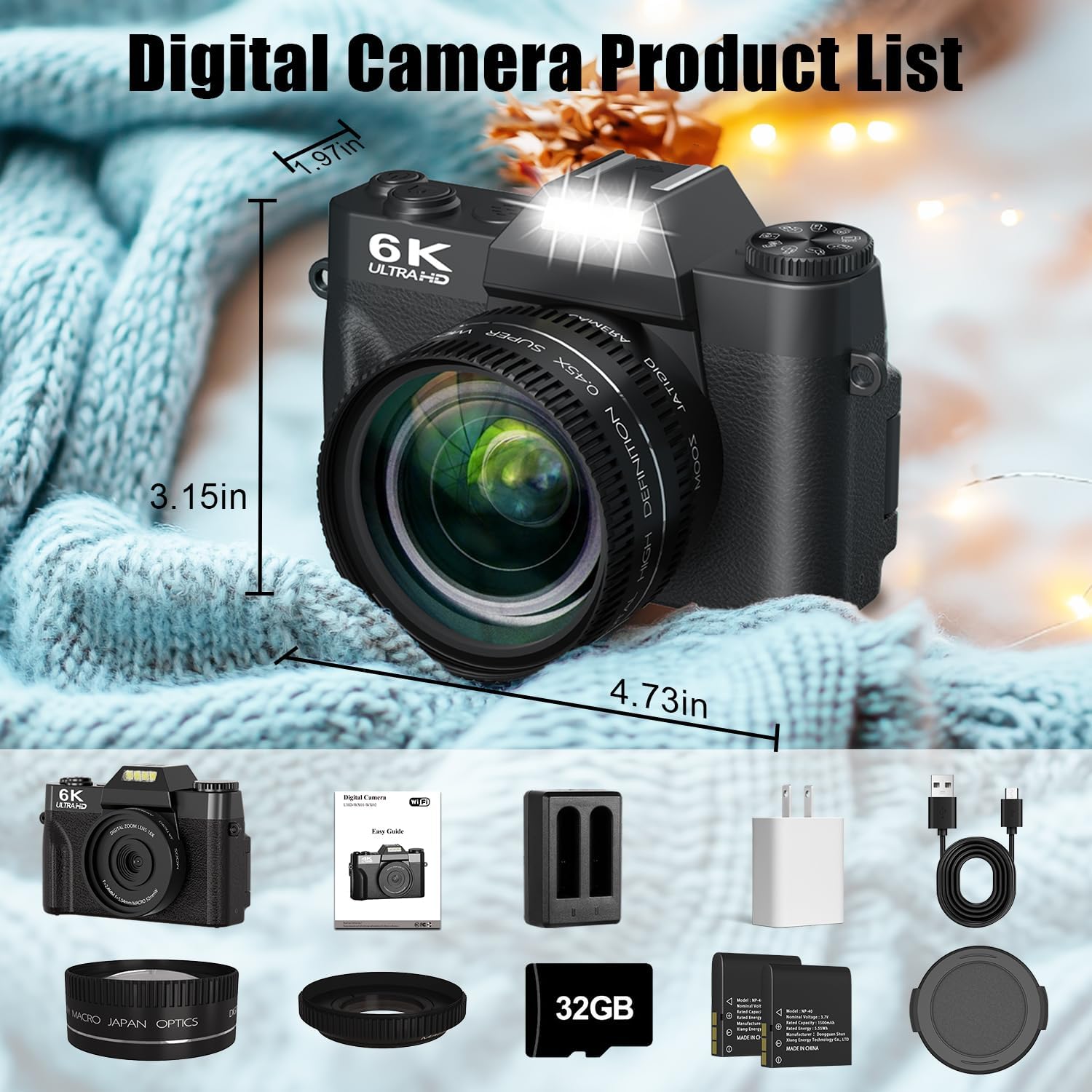
Image: The WIKICO WX02-6K Digital Camera shown with all its included accessories, including the camera body, wide-angle lens, macro lens, two batteries, dual charger, USB cable, power adapter, wrist strap, and 32GB TF card.
3. ക്യാമറ ഓവർview
ക്യാമറയുടെ ഘടകങ്ങളും നിയന്ത്രണങ്ങളും പരിചയപ്പെടുക.

Image: A detailed diagram illustrating the various buttons, dials, and ports on the WIKICO WX02-6K camera, including the mode dial, hot shoe, power button, photo button, battery compartment, digital zoom controls, navigation buttons, menu button, playback button, tripod hole, memory card slot, external MIC interface, Type-C USB interface, and HDMI output interface.
3.1 ഫ്രണ്ട് View
- ലെൻസ്: ചിത്രങ്ങൾ പകർത്തുന്നതിനുള്ള പ്രധാന ഒപ്റ്റിക്കൽ ഘടകം.
- ബിൽറ്റ്-ഇൻ ഫ്ലാഷ്/ഫിൽ ലൈറ്റ്: കുറഞ്ഞ വെളിച്ചത്തിൽ പ്രകാശം നൽകുന്നു.
3.2 ടോപ്പ് View
- മോഡ് ഡയൽ: Selects shooting modes (Photo, Video, Time-lapse, etc.).
- ഹോട്ട് ഷൂ: For attaching external accessories like microphones or flashes.
- പവർ ബട്ടൺ: ക്യാമറ ഓൺ/ഓഫ് ചെയ്യുന്നു.
- ഷട്ടർ ബട്ടൺ: Press halfway to focus, fully to capture a photo or start/stop video.
3.3 പിൻഭാഗം View
- 3-inch 180° Flip Screen: തത്സമയം പ്രദർശിപ്പിക്കുന്നു view, menus, and playback. Can be flipped for self-recording.
- നാവിഗേഷൻ ബട്ടണുകൾ (മുകളിലേക്ക്, താഴേക്ക്, ഇടത്, വലത്, ശരി): For menu navigation and quick settings.
- Digital Zoom In/Out Buttons: Adjusts digital zoom level.
- മെനു ബട്ടൺ: ക്യാമറ ക്രമീകരണങ്ങൾ ആക്സസ് ചെയ്യുന്നു.
- പ്ലേബാക്ക് ബട്ടൺ: Reviews captured photos and videos.
3.4 വശം Views
- ബാറ്ററി കമ്പാർട്ട്മെൻ്റ്: റീചാർജ് ചെയ്യാവുന്ന ബാറ്ററിയാണ് ഇവിടെ സ്ഥാപിച്ചിരിക്കുന്നത്.
- മെമ്മറി കാർഡ് സ്ലോട്ട്: For inserting the TF (MicroSD) card.
- ട്രൈപോഡ് ഹോൾ: For mounting the camera on a tripod.
- ബാഹ്യ MIC ഇൻ്റർഫേസ്: ഒരു ബാഹ്യ മൈക്രോഫോൺ ബന്ധിപ്പിക്കുന്നതിന്.
- Type-C USB Interface: For charging, data transfer, and webക്യാം ഫംഗ്ഷൻ.
- HDMI Output Interface: ഒരു ബാഹ്യ ഡിസ്പ്ലേയിലേക്ക് ബന്ധിപ്പിക്കുന്നതിന്.
4. സജ്ജീകരണം
4.1 ബാറ്ററി ചാർജ് ചെയ്യുകയും ഇൻസ്റ്റാൾ ചെയ്യുകയും ചെയ്യുന്നു
- Insert the provided 1500mAh batteries into the dual battery charger.
- Connect the charger to a power source using the USB cable and power adapter. The indicator light will show charging status.
- Once fully charged, open the battery compartment on the camera and insert a charged battery, ensuring correct orientation. Close the compartment securely.

Image: The WIKICO WX02-6K camera with an external dual battery charger connected to a power bank, illustrating the multiple fast charging options available for the camera's batteries.
4.2 TF കാർഡ് ചേർക്കൽ
- ക്യാമറയുടെ വശത്ത് മെമ്മറി കാർഡ് സ്ലോട്ട് കണ്ടെത്തുക.
- Insert the provided 32GB TF card (MicroSD card) into the slot with the gold contacts facing the correct direction (refer to the diagram near the slot). Push until it clicks into place.
- To remove, gently push the card in again until it clicks and ejects.
കുറിപ്പ്: The camera supports TF cards up to 128GB. Ensure the card is formatted in the camera before first use for optimal performance.
4.3 Attaching the Lenses
The camera comes with a detachable wide-angle lens and a macro lens.
- To attach the wide-angle lens, align it with the camera's main lens and gently twist clockwise until it is secure.
- The macro lens is typically integrated with the wide-angle lens. To use only the macro lens, unscrew the wide-angle portion from the macro lens.
- To remove any lens, twist counter-clockwise.

Image: The WIKICO WX02-6K Digital Camera with its detachable wide-angle and macro lenses, demonstrating how they can be attached to the camera's main lens.
5. പ്രവർത്തന നിർദ്ദേശങ്ങൾ
5.1 പവർ ഓൺ/ഓഫ്
അമർത്തിപ്പിടിക്കുക പവർ ബട്ടൺ ക്യാമറ ഓൺ അല്ലെങ്കിൽ ഓഫ് ചെയ്യാൻ അതിന്റെ മുകളിൽ.
5.2 ഒരു മോഡ് തിരഞ്ഞെടുക്കൽ
തിരിക്കുക മോഡ് ഡയൽ നിങ്ങൾക്ക് ആവശ്യമുള്ള ഷൂട്ടിംഗ് മോഡ് തിരഞ്ഞെടുക്കാൻ ക്യാമറയുടെ മുകളിൽ:
- ഫോട്ടോ മോഡ്: For capturing still images.
- വീഡിയോ മോഡ്: For recording video footage.
- സമയദൈർഘ്യം: ടൈം-ലാപ്സ് വീഡിയോകൾ സൃഷ്ടിക്കുന്നതിന്.
- സ്ലോ മോഷൻ: For recording slow-motion video.
- തുടർച്ചയായ ഷൂട്ടിംഗ്: For capturing a rapid sequence of photos.
- സ്വയം-ടൈമർ: For delayed photo capture (3s, 5s, 10s).
- ലൂപ്പ് റെക്കോർഡിംഗ്: For continuous video recording that overwrites old footage.

Image: A graphic illustrating the WIKICO WX02-6K camera's mode dial with various functions such as video mode, slow motion, time-lapse, loop recording, photo mode, automatic shooting, timer shooting, and continuous shooting.
5.3 ഫോട്ടോകളും വീഡിയോകളും പകർത്തൽ
- ഫോക്കസിംഗ്: In Photo or Video mode, press the ഷട്ടർ ബട്ടൺ halfway down. The camera will autofocus, and the focus indicator will confirm.
- ഒരു ഫോട്ടോ എടുക്കൽ: ഫോട്ടോ മോഡിൽ, അമർത്തുക ഷട്ടർ ബട്ടൺ fully down to capture an image.
- വീഡിയോ റെക്കോർഡിംഗ്: വീഡിയോ മോഡിൽ, അമർത്തുക ഷട്ടർ ബട്ടൺ fully down to start recording. Press it again to stop.

Image: A visual demonstration of the WIKICO WX02-6K camera's 64MP autofocus feature, showing a clear, focused image on the left and a blurred, unfocused image on the right, highlighting the camera's ability to achieve sharp focus.
5.4 ഡിജിറ്റൽ സൂം
ഉപയോഗിക്കുക Digital Zoom In/Out Buttons on the rear of the camera to adjust the 16X digital zoom. This allows you to magnify distant subjects.

Image: A comparison showing the effect of the WIKICO WX02-6K camera's 16x digital zoom, with images at 4x, 8x, and 16x magnification of a red panda, demonstrating the ability to capture distant details.
5.5 Using the Flip Screen
The 3-inch screen can be flipped 180° forward, making it ideal for vlogging and selfies. Adjust the screen to your preferred angle for easy viewing.
5.6 Built-in Filters and Beauty Mode
Enhance your photos and videos with the camera's built-in filters and beauty mode. Access these options through the camera's menu system.
- ഫിൽട്ടറുകൾ: Choose from various artistic filters to add flair to your content.
- ബ്യൂട്ടി മോഡ്: Automatically enhances facial features for refined portraits.

Image: A side-by-side comparison demonstrating the effect of the WIKICO WX02-6K camera's Smart Beauty Mode, showing a 'pre-facialisation' image on the left and an 'after beautifying' image on the right, highlighting skin texture and facial proportion enhancements.
5.7 Webക്യാം ഫംഗ്ഷൻ
Connect the camera to your computer via the USB Type-C cable and select 'Webcam Mode' from the camera's menu (if prompted). This allows you to use the camera for live streaming, video calls, or online meetings.

Image: The WIKICO WX02-6K camera mounted on a tripod, connected to a laptop and displaying a live video feed, illustrating its use as a webcam for YouTube, self-vlogging, or live streaming.
5.8 വൈഫൈ പ്രവർത്തനം
The camera features built-in Wi-Fi for easy transfer of photos and videos to your smartphone or tablet. Refer to the camera's on-screen instructions or a dedicated app (if available) for connecting and transferring files.

Image: The WIKICO WX02-6K camera connected to a laptop via USB cable and also showing a Wi-Fi signal icon, demonstrating its dual connectivity options for transferring photos and videos.
6. പരിപാലനം
6.1 ക്യാമറ വൃത്തിയാക്കൽ
- ക്യാമറ ബോഡി: ക്യാമറ ബോഡി തുടയ്ക്കാൻ മൃദുവായതും ഉണങ്ങിയതുമായ തുണി ഉപയോഗിക്കുക. കഠിനമായ അഴുക്കിന്, ചെറുതായി dampവെള്ളം കൊണ്ട് തുണി.
- ലെൻസ്: Use a lens brush or a soft, lint-free microfiber cloth specifically designed for camera lenses. Avoid touching the lens surface with your fingers.
- സ്ക്രീൻ: മൃദുവായതും ഉണങ്ങിയതുമായ ഒരു മൈക്രോഫൈബർ തുണി ഉപയോഗിച്ച് സ്ക്രീൻ സൌമ്യമായി തുടയ്ക്കുക.
ജാഗ്രത: Do not use organic solvents or strong chemicals to clean the camera.
6.2 സംഭരണം
- When not in use for extended periods, remove the battery from the camera.
- Store the camera in a cool, dry, and well-ventilated place, away from direct sunlight, high temperatures, and humidity.
- Protect the camera from dust and dirt by storing it in a camera bag or case.
7. പ്രശ്നപരിഹാരം
നിങ്ങളുടെ ക്യാമറയിൽ പ്രശ്നങ്ങൾ നേരിടുകയാണെങ്കിൽ, ഇനിപ്പറയുന്ന പൊതുവായ പ്രശ്നങ്ങളും പരിഹാരങ്ങളും പരിശോധിക്കുക:
| പ്രശ്നം | സാധ്യമായ കാരണം | പരിഹാരം |
|---|---|---|
| ക്യാമറ പവർ ഓൺ ചെയ്യുന്നില്ല. | ബാറ്ററി തീർന്നു അല്ലെങ്കിൽ തെറ്റായി ചേർത്തിരിക്കുന്നു. | ബാറ്ററി പൂർണ്ണമായും ചാർജ് ചെയ്ത് ശരിയായി ചേർത്തിട്ടുണ്ടെന്ന് ഉറപ്പാക്കുക. |
| ഫോട്ടോകൾ എടുക്കാനോ വീഡിയോകൾ റെക്കോർഡ് ചെയ്യാനോ കഴിയില്ല. | TF കാർഡ് നിറഞ്ഞിരിക്കുന്നു, ചേർത്തിട്ടില്ല, അല്ലെങ്കിൽ കേടായിരിക്കുന്നു. | Insert a TF card, ensure it has free space, or format the card (this will erase all data). |
| ചിത്രങ്ങൾ അവ്യക്തമാണ്. | Lens is dirty, camera shake, or focus issue. | Clean the lens. Hold the camera steady or use a tripod. Ensure autofocus locks before capturing. |
| വൈഫൈ കണക്ഷൻ പരാജയപ്പെടുന്നു. | തെറ്റായ പാസ്വേഡ്, പരിധിക്ക് പുറത്താണ്, അല്ലെങ്കിൽ ആപ്പ് പ്രശ്നം. | Ensure correct Wi-Fi password. Move closer to the connected device. Restart camera and device. |
| ക്യാമറ മരവിക്കുന്നു അല്ലെങ്കിൽ പ്രതികരിക്കുന്നില്ല. | സോഫ്റ്റ്വെയർ തകരാർ അല്ലെങ്കിൽ ബാറ്ററി പ്രശ്നം. | Remove and reinsert the battery to reset the camera. If issue persists, ensure battery is charged. |
If the problem persists after trying these solutions, please contact WIKICO customer support.
8 സ്പെസിഫിക്കേഷനുകൾ
Detailed technical specifications for the WIKICO WX02-6K Digital Camera.
| ഫീച്ചർ | സ്പെസിഫിക്കേഷൻ |
|---|---|
| മോഡലിൻ്റെ പേര് | WX02-6K |
| ഫലപ്രദമായ സ്റ്റിൽ റെസല്യൂഷൻ | 64 എം.പി |
| വീഡിയോ റെസല്യൂഷൻ | 5760x3240 (6K) |
| ഫോട്ടോ സെൻസർ ടെക്നോളജി | CMOS |
| ഇമേജ് സ്റ്റെബിലൈസേഷൻ | ഡിജിറ്റൽ |
| ഒപ്റ്റിക്കൽ സൂം | 1x |
| ഡിജിറ്റൽ സൂം | 16x |
| സ്ക്രീൻ വലിപ്പം | 3 Inches (180° Flip Screen) |
| പിന്തുണച്ചു File ഫോർമാറ്റ് | JPEG, MP4 |
| കണക്റ്റിവിറ്റി ടെക്നോളജി | Wi-Fi, USB Type-C, HDMI |
| ഓട്ടോഫോക്കസ് | Yes (Contrast Detection, 49 points) |
| ബാറ്ററി തരം | Lithium Ion (1500mAh, x2 included) |
| സ്റ്റോറേജ് മീഡിയ | TF Card (32GB included, supports up to 128GB) |
| ലെൻസ് തരം | Fixed lens with detachable Wide Angle and Macro lenses |
| പ്രത്യേക സവിശേഷതകൾ | Webcam function, Built-in Fill Light, Filters, Beauty Mode, Loop Recording, Pause Function |
| ഇനത്തിൻ്റെ ഭാരം | 611 ഗ്രാം |
| അളവുകൾ | ഏകദേശം 4.73 x 3.15 x 1.97 ഇഞ്ച് |
9. വാറൻ്റിയും പിന്തുണയും
WIKICO products are designed for reliability and performance. For any questions, technical assistance, or warranty claims, please contact WIKICO customer support through the retailer where the product was purchased or visit the official WIKICO webബന്ധപ്പെടാനുള്ള വിവരങ്ങൾക്കുള്ള സൈറ്റ്.
വാറന്റി ആവശ്യങ്ങൾക്കായി നിങ്ങളുടെ വാങ്ങിയതിന്റെ തെളിവ് സൂക്ഷിക്കുക.


