1. ആമുഖം
This manual provides detailed instructions for the operation and maintenance of your Monster Open Touch Pro 100 Wireless Earbuds. Please read this manual thoroughly before use to ensure proper functionality and to maximize your listening experience.
2. പാക്കേജ് ഉള്ളടക്കം
നിങ്ങളുടെ പാക്കേജിൽ എല്ലാ ഇനങ്ങളും ഉണ്ടെന്ന് ഉറപ്പാക്കുക:
- Monster Open Touch Pro 100 Wireless Earbuds (Left and Right)
- ടച്ച് സ്ക്രീനോടുകൂടിയ ചാർജിംഗ് കേസ്
- യുഎസ്ബി ചാർജിംഗ് കേബിൾ (ടൈപ്പ്-സി)
- ഉപയോക്തൃ മാനുവൽ (ഈ പ്രമാണം)
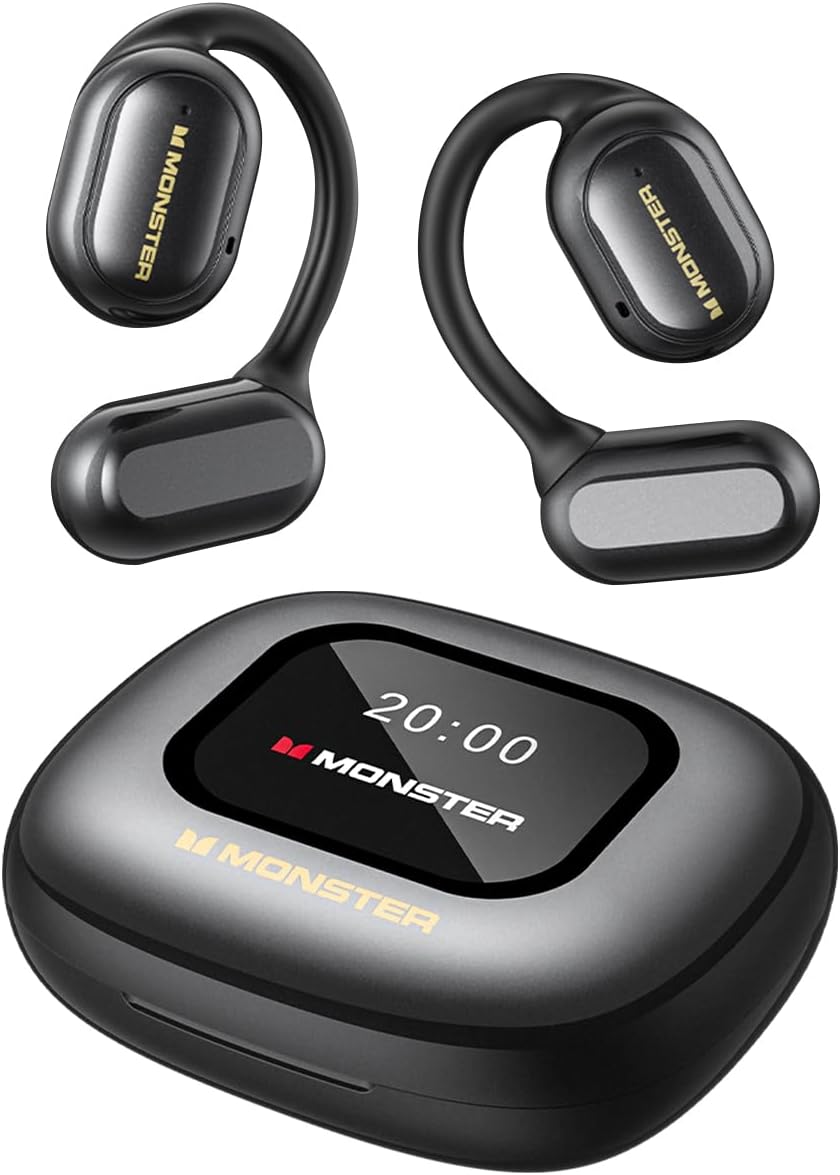
Image: The Monster Open Touch Pro 100 wireless earbuds and their charging case, illustrating the complete product package.
3. ഉൽപ്പന്നം കഴിഞ്ഞുview
3.1 Earbud Components
- തുറന്ന ചെവി ഡിസൈൻ: ചുറ്റുപാടുകളെക്കുറിച്ചുള്ള അവബോധം അനുവദിക്കുന്നു.
- ഇയർ ഹുക്കുകൾ: Ergonomic curved design for secure and comfortable wear.
- 16.2 എംഎം ഡൈനാമിക് ഡ്രൈവറുകൾ: For clear sound quality.
- മൈക്രോഫോണുകൾ: For Environmental Noise Cancellation (ENC) during calls.
- ചാർജിംഗ് കോൺടാക്റ്റുകൾ: കേസിനുള്ളിൽ ചാർജ് ചെയ്യുന്നതിന്.

Image: A man wearing the Monster Open Touch Pro 100 earbud, demonstrating its open-ear design and comfortable fit.
3.2 Charging Case Features
- LED Full-Color Smart Touch Screen: For control over music, settings, and more.
- ടിഎഫ് കാർഡ് സ്ലോട്ട്: Supports independent MP3 playback (TF card not included).
- USB-C ചാർജിംഗ് പോർട്ട്: കേസ് റീചാർജ് ചെയ്യുന്നതിന്.

Image: The Monster Open Touch Pro 100 charging case displaying its LED full-color smart touch screen, showing various control options.
4. സജ്ജീകരണം
4.1 പ്രാരംഭ ചാർജിംഗ്
Before first use, fully charge the earbuds and the charging case. Place the earbuds into the charging case and connect the USB-C cable to the charging port on the case, then connect the other end to a USB power source (e.g., computer, wall adapter).
The LED screen on the charging case will indicate the charging status. A full charge typically takes approximately 1.5-2 hours for the case and earbuds.
4.2 പവർ ഓൺ/ഓഫ്
- പവർ ഓൺ: ചാർജിംഗ് കേസ് തുറക്കുക. ഇയർബഡുകൾ സ്വയമേവ ഓണാകുകയും ജോടിയാക്കൽ മോഡിലേക്ക് പ്രവേശിക്കുകയും ചെയ്യും.
- പവർ ഓഫ്: ഇയർബഡുകൾ ചാർജിംഗ് കെയ്സിലേക്ക് തിരികെ വയ്ക്കുകയും ലിഡ് അടയ്ക്കുകയും ചെയ്യുക. അവ സ്വയമേവ വിച്ഛേദിക്കപ്പെടുകയും പവർ ഓഫാകുകയും ചെയ്യും.
4.3 ബ്ലൂടൂത്ത് ജോടിയാക്കൽ
- Ensure the earbuds are charged and powered on (open the charging case).
- നിങ്ങളുടെ ഉപകരണത്തിൽ (സ്മാർട്ട്ഫോൺ, ടാബ്ലെറ്റ്, ലാപ്ടോപ്പ്), ബ്ലൂടൂത്ത് പ്രവർത്തനക്ഷമമാക്കുക.
- ഇതിനായി തിരയുക available Bluetooth devices and select "Monster Open Touch Pro 100".
- കണക്റ്റ് ചെയ്തുകഴിഞ്ഞാൽ, ഇയർബഡുകൾ ജോടിയാക്കൽ വിജയകരമായി പൂർത്തിയായി എന്ന് സൂചിപ്പിക്കും, ഉപകരണം അവ കണക്റ്റ് ചെയ്തതായി കാണിക്കും.
The earbuds will automatically attempt to reconnect to the last paired device when removed from the case.
5. പ്രവർത്തന നിർദ്ദേശങ്ങൾ
5.1 ഇയർബഡ് ടച്ച് നിയന്ത്രണങ്ങൾ
The earbuds feature touch-sensitive areas for controlling playback and calls:
- പ്ലേ/താൽക്കാലികമായി നിർത്തുക: Single click on either L/R earbud.
- അടുത്ത ഗാനം: Double click on the Right earbud.
- മുൻ ഗാനം: Triple click on the Left earbud.
- മറുപടി കോൾ: Double click on either L/R earbud.
- ഹാംഗ് അപ്പ് കോൾ: Hold for 3 seconds on either L/R earbud.
- വോയ്സ് അസിസ്റ്റന്റിനെ സജീവമാക്കുക: Hold for 2 seconds on either L/R earbud.

Image: A visual guide to the touch controls on the Monster Open Touch Pro 100 earbuds, detailing actions for play/pause, track skipping, call management, and voice assistant activation.
5.2 Charging Case Touch Screen Functions
The full-color touch screen on the charging case provides advanced controls:
- സംഗീത പ്ലേബാക്ക് നിയന്ത്രണം: Play, pause, skip tracks, adjust volume directly from the screen.
- EQ മോഡുകൾ: Select from multiple equalizer presets (e.g., Rock and Roll, Pop, Normal, Jazz, Classic) to customize your audio experience.
- ഭാഷാ സ്വിച്ച്: Change the system language of the case interface.
- ക്യാമറ ഷട്ടർ: Use the case as a remote shutter button for your smartphone camera.
- എന്റെ ഇയർഫോൺ കണ്ടെത്തുക: Locate misplaced earbuds by activating an audible signal.
- ക്രമീകരണങ്ങൾ: Access additional device settings.

Image: The Monster Open Touch Pro 100 charging case screen displaying the language selection interface, allowing users to switch between languages.

Image: The Monster Open Touch Pro 100 charging case screen displaying various equalizer modes such as Rock and Roll, Pop, Normal, Jazz, and Classic.
5.3 Independent MP3 Mode (TF Card)
The charging case features a TF card slot, allowing the earbuds to function as an independent MP3 player without requiring a connected phone or network.
- Insert a TF card (not included) with your music files into the designated slot on the charging case.
- On the touch screen, navigate to the "SD Music" option.
- Select and play your desired music directly from the TF card.
Note: Hot-swapping of the TF card is not supported. Ensure the device is powered off or in a safe state before inserting or removing the TF card.

Image: The Monster Open Touch Pro 100 charging case with a TF card being inserted, highlighting its independent MP3 playback capability.
6. പരിപാലനം
6.1 വൃത്തിയാക്കൽ
- ഇയർബഡുകളും ചാർജിംഗ് കെയ്സും മൃദുവായതും ഉണങ്ങിയതും ലിന്റ് രഹിതവുമായ തുണി ഉപയോഗിച്ച് തുടയ്ക്കുക.
- അബ്രാസീവ് ക്ലീനറുകൾ, ആൽക്കഹോൾ, കെമിക്കൽ ലായകങ്ങൾ എന്നിവ ഉപയോഗിക്കരുത്.
- Keep charging contacts clean and dry to ensure proper charging.
6.2 ജല പ്രതിരോധം
The earbuds are rated IPX5 waterproof, meaning they are protected against low-pressure water jets from any direction. This makes them suitable for workouts and light rain.
Important: The charging case is NOT waterproof. Avoid exposing the charging case to water or moisture.

Image: A woman exercising while wearing the Monster Open Touch Pro 100 earbuds, illustrating their IPX5 waterproof performance against sweat and light moisture.
6.3 സംഭരണം
ഉപയോഗത്തിലില്ലാത്തപ്പോൾ, ഇയർബഡുകൾ സംരക്ഷിക്കുന്നതിനും ചാർജ് ചെയ്തിരിക്കുന്നതായി ഉറപ്പാക്കുന്നതിനും അവ ചാർജിംഗ് കേസിൽ സൂക്ഷിക്കുക. കടുത്ത താപനിലയിൽ നിന്ന് മാറി തണുത്തതും വരണ്ടതുമായ സ്ഥലത്ത് സൂക്ഷിക്കുക.
7. പ്രശ്നപരിഹാരം
| പ്രശ്നം | സാധ്യമായ കാരണം | പരിഹാരം |
|---|---|---|
| ഇയർബഡുകൾ ജോടിയാക്കുന്നില്ല | Earbuds not in pairing mode; Bluetooth off on device; out of range. | Ensure case is open and earbuds are powered on. Turn Bluetooth off and on on your device. Move closer to your device. |
| ഇയർബഡുകളിൽ നിന്ന് ശബ്ദമില്ല | ശബ്ദം വളരെ കുറവാണ്; ഇയർബഡുകൾ കണക്റ്റ് ചെയ്തിട്ടില്ല; മീഡിയ താൽക്കാലികമായി നിർത്തി. | Increase volume on device and earbuds. Reconnect earbuds. Check media playback status. |
| ചാർജിംഗ് കേസ് ചാർജുചെയ്യുന്നില്ല | Cable not connected properly; faulty cable/adapter; dirty charging port. | Ensure USB-C cable is securely connected. Try a different cable or power adapter. Clean the charging port gently. |
| ഇയർബഡുകൾ ചാർജ് ചെയ്യുന്നില്ല, എന്തെങ്കിലും കാരണത്താൽ | Earbuds not seated correctly; dirty charging contacts. | Adjust earbuds in case to ensure proper contact. Clean earbud and case charging contacts. |
| ടച്ച് സ്ക്രീൻ പ്രതികരിക്കുന്നില്ല | താൽക്കാലിക സോഫ്റ്റ്വെയർ തകരാർ; ബാറ്ററി കുറവാണ്. | Restart the charging case (if possible, by closing and reopening). Ensure the case is sufficiently charged. |
8 സ്പെസിഫിക്കേഷനുകൾ
| ഫീച്ചർ | വിശദാംശങ്ങൾ |
|---|---|
| മോഡലിൻ്റെ പേര് | Monster Open Touch Pro 100 |
| കണക്റ്റിവിറ്റി ടെക്നോളജി | വയർലെസ് (ബ്ലൂടൂത്ത്) |
| ബ്ലൂടൂത്ത് പതിപ്പ് | 5.4 |
| ചെവി പ്ലേസ്മെൻ്റ് | തുറന്ന ചെവി |
| ഓഡിയോ ഡ്രൈവർ തരം | ഡൈനാമിക് ഡ്രൈവർ (16.2mm) |
| ശബ്ദ നിയന്ത്രണ സവിശേഷതകൾ | പരിസ്ഥിതി ശബ്ദം റദ്ദാക്കൽ (ENC) |
| നിയന്ത്രണ രീതി | സ്പർശിക്കുക |
| പ്രത്യേക സവിശേഷതകൾ | LED Full-Color Smart Screen, TF Card Support, IPX5 Waterproof (earbuds only) |
| ബാറ്ററി ലൈഫ് (ഇയർബഡുകൾ) | 8 മണിക്കൂർ വരെ (ഒറ്റ ചാർജ്) |
| ആകെ പ്ലേബാക്ക് സമയം | 30 മണിക്കൂർ വരെ (ചാർജിംഗ് കേസ് ഉപയോഗിച്ച്) |
| മെറ്റീരിയൽ | Silicone (ear hooks) |
| ഇനത്തിൻ്റെ ഭാരം | 7.4 ഔൺസ് |
| അനുയോജ്യമായ ഉപകരണങ്ങൾ | സ്മാർട്ട്ഫോണുകൾ, ലാപ്ടോപ്പുകൾ, ടാബ്ലെറ്റുകൾ, സ്മാർട്ട് സ്പീക്കറുകൾ |
9. വാറൻ്റിയും പിന്തുണയും
For warranty information and customer support, please refer to the documentation included with your purchase or visit the official Monster webസൈറ്റ്. വാറന്റി ക്ലെയിമുകൾക്കായി നിങ്ങളുടെ വാങ്ങലിന്റെ തെളിവ് സൂക്ഷിക്കുക.
നിർമ്മാതാവ്: രാക്ഷസൻ


