1. ഉൽപ്പന്നം കഴിഞ്ഞുview
The DESLOC C100 is a keyless entry smart deadbolt lock designed for enhanced home security and convenience. It features a keypad for PIN entry, a LockVue display for visual operation, and mechanical key access. The lock is built with durable materials and includes various security and convenience features.
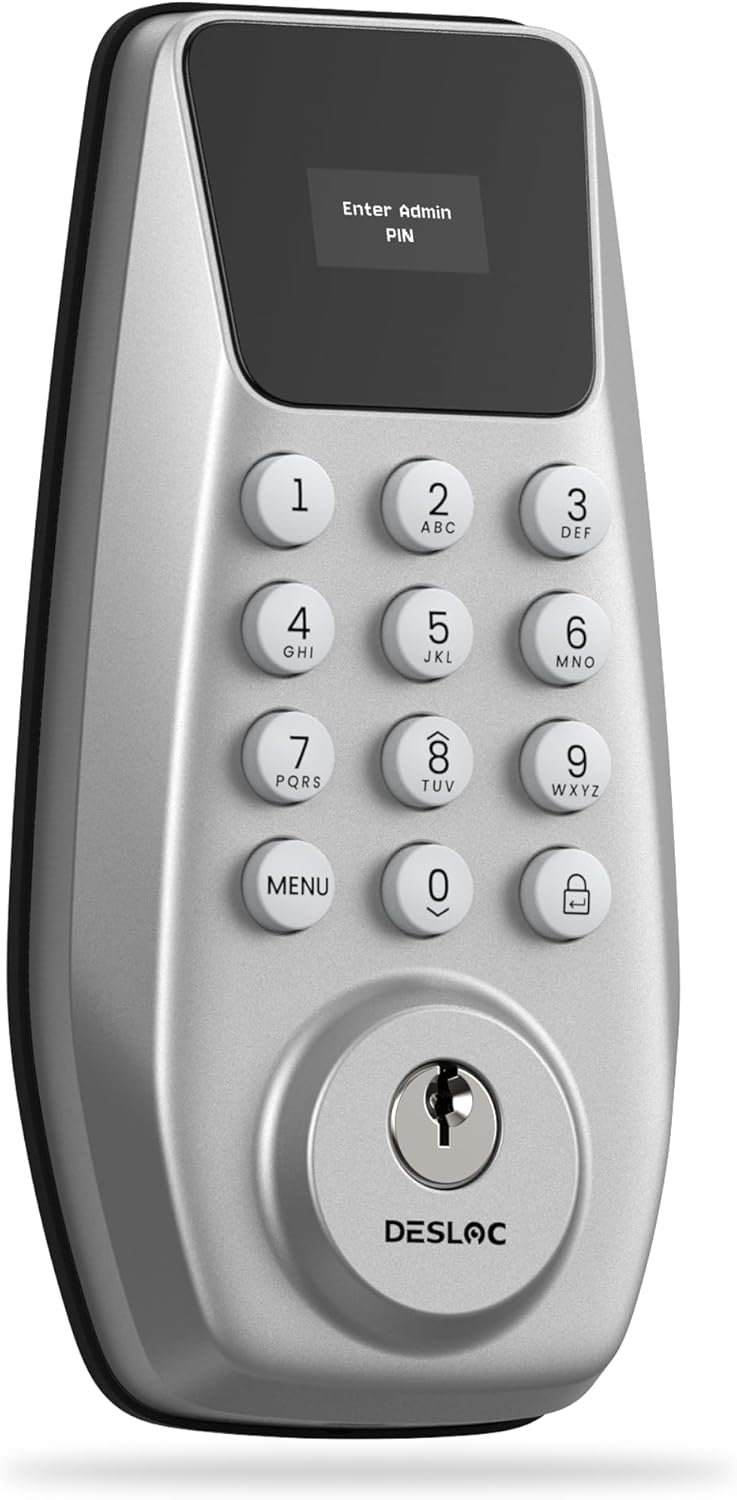
Figure 1: DESLOC C100 Keyless Entry Smart Deadbolt Lock (Silver)
2. സജ്ജീകരണവും ഇൻസ്റ്റാളേഷനും
Installing the DESLOC C100 deadbolt lock is designed to be a straightforward process, typically requiring only a screwdriver. The lock features automatic door swing detection to simplify setup.
2.1 ടൂളുകൾ ആവശ്യമാണ്
- ഫിലിപ്സ് ഹെഡ് സ്ക്രൂഡ്രൈവർ
2.2 ഇൻസ്റ്റലേഷൻ ഘട്ടങ്ങൾ
- Remove your existing deadbolt lock from the door.
- Insert the new deadbolt latch into the door edge and secure it with screws. Ensure the correct orientation as indicated in the instructions.
- Connect the cable from the exterior keypad unit to the interior unit.
- Align and attach the exterior keypad unit and the interior unit to the door, ensuring the spindle passes through the deadbolt mechanism.
- Secure the units with the provided mounting screws.
- Install 4 AA batteries into the interior unit.

Figure 2: Quick DIY Installation steps including auto-sensing detection, adhesive installation, accessory labeling, and extended cable connection.
For a visual guide on the installation process, please refer to the official video:
Video 1: How to Install DESLOC C100. This video demonstrates the step-by-step installation of the DESLOC C100 lock.
2.3 വാതിൽ അനുയോജ്യത
The DESLOC C100 is designed to fit a variety of door configurations. Please check the following dimensions for compatibility:
- Door Thickness: 1-3/8" to 2" (35 to 50mm)
- Hole Diameter: 2-1/8" (54mm)
- Backset: 2-3/8" or 2-3/4" (60 or 70mm)

Figure 3: Door compatibility diagram showing various measurements and compatible door types (both right and left doors).
3. പ്രവർത്തന നിർദ്ദേശങ്ങൾ
The DESLOC C100 offers multiple ways to operate, including PIN codes, mechanical keys, and smart app control.
3.1 Visualized Operation
The LockVue Display provides an intuitive on-device interface for managing users and configuring settings.

Figure 4: LockVue Display showing menu options for Add Admin, Add User, Del User, and Lock Settings.
3.2 PIN Code Management
The lock supports up to 100 permanent PIN codes and temporary one-time PINs for guests.

Figure 5: Flexible Passcode Access, illustrating the ability to add up to 100 codes for various users like family, renters, or guests.
3.2.1 Changing Initial PIN
It is recommended to change the initial administrator PIN (default is 123456) immediately after installation for security. The new PIN should be 6-8 digits.
Video 2: Change Initial PIN DESLOC C100. This video guides you through changing the default PIN.
3.2.2 Adding Admin and User PINs
You can add new administrator and regular user PINs through the lock's menu.
Video 3: Add Admin and User PIN DESLOC C100. This video demonstrates how to add new admin and user PINs.
3.2.3 Adding and Deleting Temporary PINs
Generate temporary PINs for visitors that expire after first use. You can also delete these temporary PINs.
Video 4: Add and Delete Temp PIN DESLOC C100. This video shows how to create and remove temporary access codes.
3.2.4 User Information and Deletion
Manage user information and delete existing users as needed.
Video 5: User Information and Delete User DESLOC C100. This video explains how to view and delete user data.
3.3 Auto-Lock and Passage Mode
Configure the lock to automatically secure itself after a set time (5-120 seconds) or enable Passage Mode to keep the door unlocked for easy access.

Figure 6: Auto-Lock feature ensures the door locks automatically after a set period (5-120 seconds).
Video 6: Open Direction, Passage Mode and Auto Lock. This video demonstrates how to set door opening direction, enable Passage Mode, and configure Auto Lock.
3.4 Anti-Peeping PIN Protection
Enhance security by entering random digits before or after your correct PIN. The total length of the entered digits must not exceed 16.

Figure 7: Anti-Peeping feature allows adding random digits before or after your correct password to prevent others from guessing your code.
3.5 Sound Setup
Adjust the sound settings of your lock, including turning sounds on or off.
Video 7: Sound Setup DESLOC C100. This video demonstrates how to configure the sound settings of the lock.
4. പരിപാലനം
4.1 ബാറ്ററി ലൈഫും മാറ്റിസ്ഥാപിക്കലും
The DESLOC C100 is powered by 4 AA batteries, offering up to 12 months of battery life. The lock provides proactive low-battery warnings. When replacing batteries, ensure correct polarity.

Figure 8: The lock offers up to 12 months of battery life with 4 AA batteries (not included).
4.2 അടിയന്തര വൈദ്യുതി
In case the batteries run out, an emergency Type-C port allows you to use a power bank to temporarily restore power and unlock the door.

Figure 9: Emergency Type-C port for temporary power when batteries are depleted.
5. പ്രശ്നപരിഹാരം
5.1 ഫാക്ടറി റീസെറ്റ്
If you encounter persistent issues or need to clear all user data, you can perform a factory reset. This will restore the lock to its default settings.
Video 8: Factory Reset DESLOC C100. This video demonstrates the steps to perform a factory reset on your lock.
6 സ്പെസിഫിക്കേഷനുകൾ
| ഫീച്ചർ | വിശദാംശങ്ങൾ |
|---|---|
| ബ്രാൻഡ് | ഡെസ്ലോക്ക് |
| മോഡലിൻ്റെ പേര് | C100 Smart Lock with LockVue |
| ലോക്ക് തരം | കീപാഡ് ഡെഡ്ബോൾട്ട് ഡോർ ലോക്ക് |
| മെറ്റീരിയൽ | അലുമിനിയം |
| പ്രത്യേക ഫീച്ചർ | 0.96” LockVue Display, 12-Month Battery Life, Automatic Detection, BHMA Grade 3 Certified, IP54 Waterproof |
| ഇനത്തിൻ്റെ അളവുകൾ L x W x H | 8.11 x 5.91 x 3.98 ഇഞ്ച് |
| ഇനത്തിൻ്റെ ഭാരം | 2.11 പൗണ്ട് |
| ബാറ്ററികൾ ആവശ്യമാണ് | അതെ (4 AA ബാറ്ററികൾ) |
| നിയന്ത്രണ രീതി | സ്പർശിക്കുക |
| ഉൾപ്പെടുത്തിയ ഘടകങ്ങൾ | Exterior Lock, Interior lock, Mounting Plate, Strike Plate, Deadbolt, Mechanical Key, Screws |
6.1 ഈടുതലും സുരക്ഷയും

Figure 10: BHMA Grade 3 certification ensures professional-level security, including 240h Salt Spray Test, 100,000 Cycle Tests, and 3000N Impact Test.

Figure 11: IP54 weather resistance ensures reliable performance in extreme conditions, with tests for waterproof, dustproof, high heat, low temperature, and salt spray.
7. വാറൻ്റിയും പിന്തുണയും
7.1 ഉൽപ്പന്ന വാറന്റി
DESLOC backs your purchase with a 1-year warranty from the date of purchase.
7.2 ഉപഭോക്തൃ പിന്തുണ
For any assistance, please reach out to DESLOC customer support:
- ഉപഭോക്തൃ ഹോട്ട്ലൈൻ: Available Monday-Friday, 9am-5pm EST
- ഇമെയിൽ പിന്തുണ: 24/7 ലഭ്യമാണ്

Figure 12: Dedicated customer service team available for 24/7 assistance.


