1. ആമുഖം
Welcome to the user manual for your Perlegear Mobile TV Floor Stand. This stand is designed to provide a versatile and stable solution for displaying your television, offering mobility, adjustable viewing angles, and a clean aesthetic. Please read these instructions carefully before assembly and use to ensure safe and optimal performance.

Image: The Perlegear Mobile TV Floor Stand with a television mounted, highlighting its modern design and integrated hidden wheels.
2 പ്രധാന സവിശേഷതകൾ
- Clean Aesthetic with Hidden Wheels: This TV stand features discreetly integrated wheels, allowing for easy movement without compromising stability or the stand's sleek appearance. The hidden design prevents tripping hazards and maintains a streamlined look.
- ക്രമീകരിക്കാവുന്ന Viewഇൻ ആംഗിൾ: Enjoy optimal viewing from various positions with a tilt range of +5° to -10° and a swivel range of ±35°. This flexibility allows you to customize your viewing experience without repositioning the entire stand.
- Solid Base for Secure Installation: The robust 17.72" x 23.62" wooden base provides exceptional stability, securely supporting televisions up to 40 kg (88 lbs). It accommodates screens from 30 to 70 inches, ensuring your TV is safely held.
- ക്രമീകരിക്കാവുന്ന ഉയരം ക്രമീകരണങ്ങൾ: The portable TV stand offers three ergonomic height settings. Adjust the TV to your preferred viewing height, whether seated or standing, to reduce strain and enhance comfort.
- തടസ്സരഹിതമായ ഇൻസ്റ്റാളേഷൻ: This stand offers a convenient alternative to wall mounting, requiring no drilling. The package includes a detailed instruction manual and labeled hardware for quick and straightforward assembly.

Image: Visual representation of the stand's key features, including hidden wheels, no-drill installation, cable management, and tilt functionality.
3 അനുയോജ്യത
Before assembly, please ensure your television meets the following compatibility requirements:
- ടിവി വലുപ്പം: Suitable for most 30 to 70-inch flat-panel or curved televisions.
- ഭാരം ശേഷി: Supports televisions weighing up to 40 kg (88 lbs).
- VESA മൗണ്ടിംഗ് പാറ്റേണുകൾ: Compatible with VESA patterns ranging from 100x100mm to 400x400mm. Common compatible patterns include:
- 100x100 മി.മീ
- 200x100 മി.മീ
- 200x200 മി.മീ
- 200x300 മി.മീ
- 300x200 മി.മീ
- 300x300 മി.മീ
- 400x300 മി.മീ
- 400x400 മി.മീ
To determine your TV's VESA pattern, measure the horizontal and vertical distance (in millimeters) between the mounting holes on the back of your television.

Image: An illustration demonstrating how to measure VESA mounting holes on the back of a television.

ചിത്രം: ഉദാamples of different VESA compatible patterns supported by the stand.
4. ഉൽപ്പന്ന സവിശേഷതകൾ
| സ്പെസിഫിക്കേഷൻ | വിശദാംശങ്ങൾ |
|---|---|
| ബ്രാൻഡ് | പെർലെഗിയർ |
| മോഡൽ നമ്പർ | B0DYTYT2KP |
| അനുയോജ്യമായ ടിവി വലുപ്പങ്ങൾ | 30 - 70 ഇഞ്ച് |
| പരമാവധി ലോഡ് കപ്പാസിറ്റി | 40 കി.ഗ്രാം (88 പൗണ്ട്) |
| VESA അനുയോജ്യത | 100x100mm മുതൽ 400x400mm വരെ |
| ടിൽറ്റ് ആംഗിൾ | +5° / -10° |
| സ്വിവൽ ആംഗിൾ | ±35° |
| ഉയരം ക്രമീകരിക്കൽ | 3 settings (Min: 1186mm, Max: 1346mm) |
| മെറ്റീരിയൽ | അലോയ് സ്റ്റീൽ |
| അടിസ്ഥാന അളവുകൾ | 450 മിമി x 600 മിമി |
| ഉൽപ്പന്ന ഭാരം | 12.3 കി.ഗ്രാം |
| അനുയോജ്യമായ ഉപകരണങ്ങൾ | Television, LCD TV, LED TV, Plasma TV |

Image: Detailed product dimensions and specifications for the TV stand.
5. സജ്ജീകരണവും ഇൻസ്റ്റാളേഷനും
The Perlegear Mobile TV Floor Stand is designed for straightforward assembly without the need for drilling. Please follow the included instruction manual for detailed, step-by-step guidance. Ensure all parts are present and undamaged before beginning assembly.
പൊതു ഇൻസ്റ്റാളേഷൻ ഘട്ടങ്ങൾ:
- അൺപാക്ക് ചെയ്ത് പരിശോധിക്കുക: Carefully unpack all components and compare them against the parts list in your instruction manual.
- അടിസ്ഥാനം കൂട്ടിച്ചേർക്കുക: Attach the main support column to the wooden base using the provided hardware.
- ടിവി ബ്രാക്കറ്റുകൾ ഘടിപ്പിക്കുക: Secure the TV mounting brackets to the back of your television, ensuring they align with your TV's VESA pattern.
- ടിവി സ്ഥാപിക്കുക: Carefully lift your television and hook the TV brackets onto the main support column. Secure the TV in place with the safety screws.
- കേബിൾ മാനേജുമെന്റ്: Utilize the integrated cable management system to route and conceal TV cables for a tidy appearance.
Safety Note: Always ensure the stand is on a level surface. For larger or heavier televisions, it is recommended to have two people for safe lifting and mounting.
6. പ്രവർത്തന നിർദ്ദേശങ്ങൾ
സ്റ്റാൻഡ് നീക്കൽ:
The hidden wheels allow for easy repositioning of your TV. Gently push the stand from the base or the side of the TV to move it to your desired location. Ensure the path is clear of obstacles to prevent damage or tipping.

Image: A person effortlessly gliding the TV stand, highlighting its mobility with hidden wheels.
ക്രമീകരിക്കുന്നു Viewകോണുകൾ:
- ടിൽറ്റ് അഡ്ജസ്റ്റ്മെന്റ്: To adjust the vertical tilt (+5°/-10°), loosen the tilt knobs on the TV brackets, set the desired angle, and then securely tighten the knobs.
- സ്വിവൽ അഡ്ജസ്റ്റ്മെന്റ്: The TV can be swiveled ±35° horizontally. Gently rotate the TV screen to the left or right to achieve your preferred viewing ആംഗിൾ.
- ഉയരം ക്രമീകരിക്കൽ: The stand offers three height settings. To adjust the height, remove the TV from the stand (if necessary, depending on the design), adjust the mounting arms to the desired height, and re-mount the TV. Refer to your specific manual for detailed height adjustment steps.

Image: Demonstrating the tilt and swivel capabilities for an adjustable viewഅനുഭവം.

Image: The TV swiveling to accommodate different viewing positions in a room.
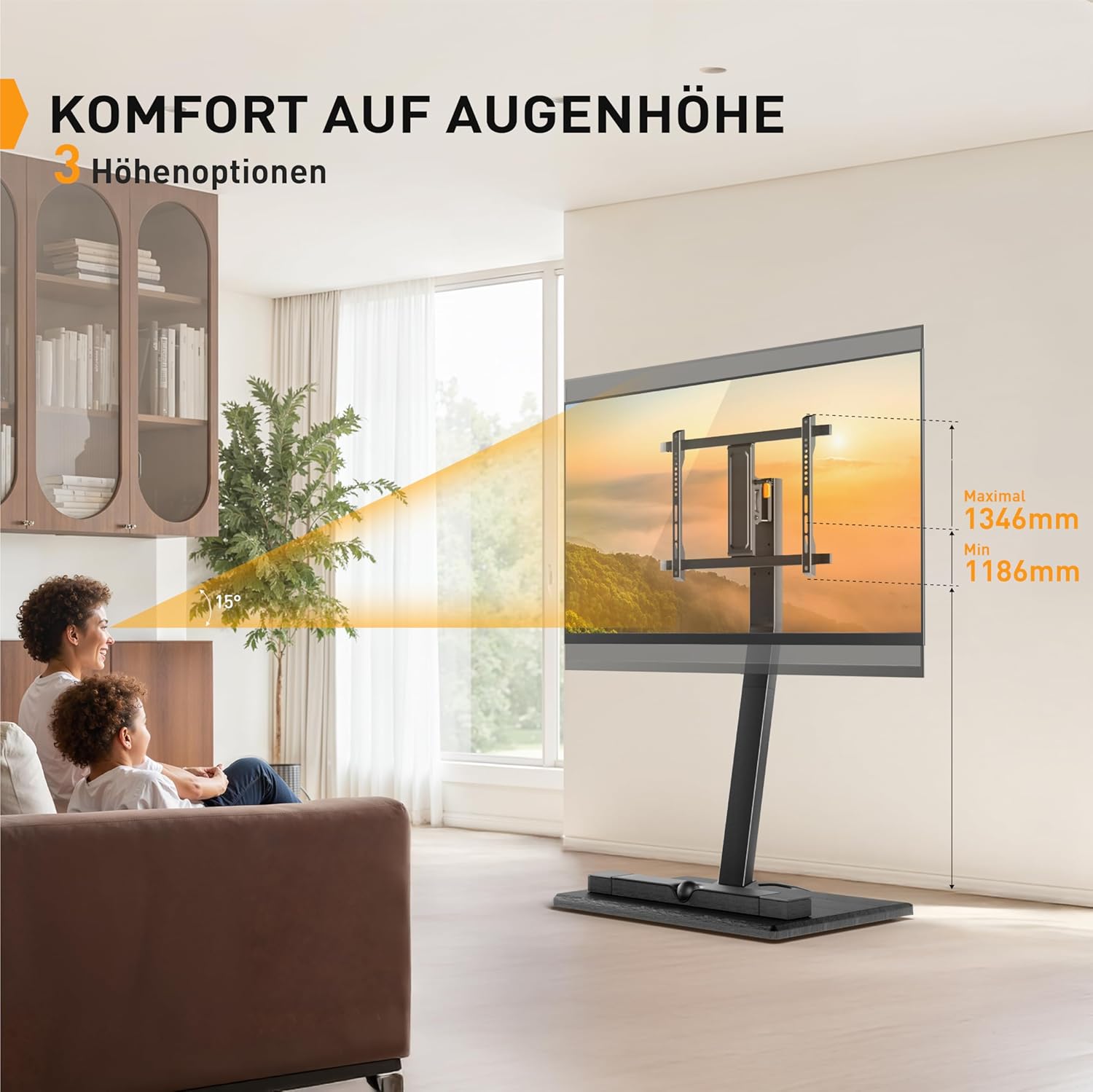
Image: The TV stand adjusted to an ergonomic height for comfortable viewing.
7. പരിപാലനം
To ensure the longevity and safe operation of your Perlegear TV stand, follow these maintenance guidelines:
- വൃത്തിയാക്കൽ: മൃദുവായതും ഉണങ്ങിയതുമായ തുണി ഉപയോഗിച്ച് സ്റ്റാൻഡ് തുടയ്ക്കുക. കഠിനമായ അടയാളങ്ങൾക്ക്, അല്പം ഡി.amp തുണി ഉപയോഗിക്കാം, തുടർന്ന് ഉടനടി ഉണക്കുക. ഉരച്ചിലുകൾ ഉണ്ടാക്കുന്ന ക്ലീനറുകളോ ലായകങ്ങളോ ഒഴിവാക്കുക.
- കണക്ഷനുകൾ പരിശോധിക്കുക: Periodically check all screws and bolts to ensure they remain tight and secure. Loose connections can affect stability.
- കേടുപാടുകൾക്കായി പരിശോധിക്കുക: Regularly inspect the stand for any signs of wear, damage, or deformation. If any issues are found, discontinue use and contact customer support.
8. പ്രശ്നപരിഹാരം
നിങ്ങളുടെ ടിവി സ്റ്റാൻഡിൽ എന്തെങ്കിലും പ്രശ്നങ്ങൾ നേരിടുകയാണെങ്കിൽ, ഇനിപ്പറയുന്ന പൊതുവായ പരിഹാരങ്ങൾ പരിശോധിക്കുക:
- Stand is not stable: Ensure all screws are tightened securely. Verify that the TV weight and size are within the stand's specifications. Make sure the stand is on a flat, level surface.
- ടിവി നിലവാരമില്ലാത്തതാണ്: Check that the TV mounting brackets are installed evenly on the back of the TV. Some stands offer a small leveling adjustment; refer to your manual for details.
- Difficulty moving the stand: Ensure the hidden wheels are not obstructed by debris. If the stand feels stiff, check for any loose components that might be causing friction.
- വിട്ടുപോയ ഭാഗങ്ങൾ: If any parts are missing upon unboxing, please contact Perlegear customer support immediately for assistance.
For issues not covered here, please contact Perlegear customer support.
9. വാറൻ്റിയും പിന്തുണയും
Perlegear is committed to providing high-quality products. This product includes a guarantee for EU spare parts availability for 5 years from the date of purchase.
For technical assistance, warranty claims, or to inquire about spare parts, please visit the official Perlegear website or contact their customer support through the retailer where you purchased the product. Please have your model number (B0DYTYT2KP) and proof of purchase ready when contacting support.
കൂടുതൽ വിവരങ്ങളും ബന്ധപ്പെടാനുള്ള വിശദാംശങ്ങളും നിങ്ങൾക്ക് ഇവിടെ കണ്ടെത്താനാകും Perlegear Brand Store.


