1. ആമുഖം
Thank you for choosing the OLIGHT Ostation X Battery Charger and Ostrip Smart LED Strip Lights. This manual provides essential information for the safe and efficient use of your new products. Please read this manual thoroughly before operation and retain it for future reference.
2. സുരക്ഷാ നിർദ്ദേശങ്ങൾ
- Always use the product in a dry environment. Do not expose to water or moisture.
- കുട്ടികൾക്കും വളർത്തുമൃഗങ്ങൾക്കും ലഭ്യമാകാതെ സൂക്ഷിക്കുക.
- Use only the specified power adapter for the Ostation X charger.
- Do not attempt to disassemble or modify the devices. This will void the warranty and may cause damage or injury.
- Ensure proper ventilation around the Ostation X during charging.
- For Ostrip, ensure the installation surface is clean and dry before adhering.
- Avoid looking directly at the Ostrip's illuminated LEDs for extended periods.
3. പാക്കേജ് ഉള്ളടക്കം
നിങ്ങളുടെ പാക്കേജിൽ എല്ലാ ഇനങ്ങളും ഉണ്ടെന്ന് ഉറപ്പാക്കുക:
- OLIGHT Ostation X Battery Charger
- 32 x OLIGHT AA NiMH Rechargeable Batteries
- OLIGHT Ostrip Smart LED Strip Lights
- Power Adapter (for Ostation X)
- ഉപയോക്തൃ മാനുവൽ (ഈ പ്രമാണം)

Image 3.1: Contents of the OLIGHT Ostation X and Ostrip bundle.
4. ഉൽപ്പന്നം കഴിഞ്ഞുview
4.1 OLIGHT Ostation X Battery Charger
The Ostation X is an innovative 3-in-1 device designed for AA NiMH batteries, functioning as a smart charger, battery tester, and organizer. It features intelligent battery detection, automatically identifying good or bad batteries and offering both standard (3.8-hour) and fast (2.5-hour) charging modes. Its unique design eliminates the need to check battery polarity.

Image 4.1.1: OLIGHT Ostation X dimensions and its integrated functions as a battery charger, tester, and organizer.

Image 4.1.2: Compatibility with various AA NiMH batteries, including Olight B Pro AA batteries with 2100mAh capacity and 1.2V voltage.

Image 4.1.3: The unique waterfall charging design allows batteries to be dropped in, charged, and then easily retrieved.
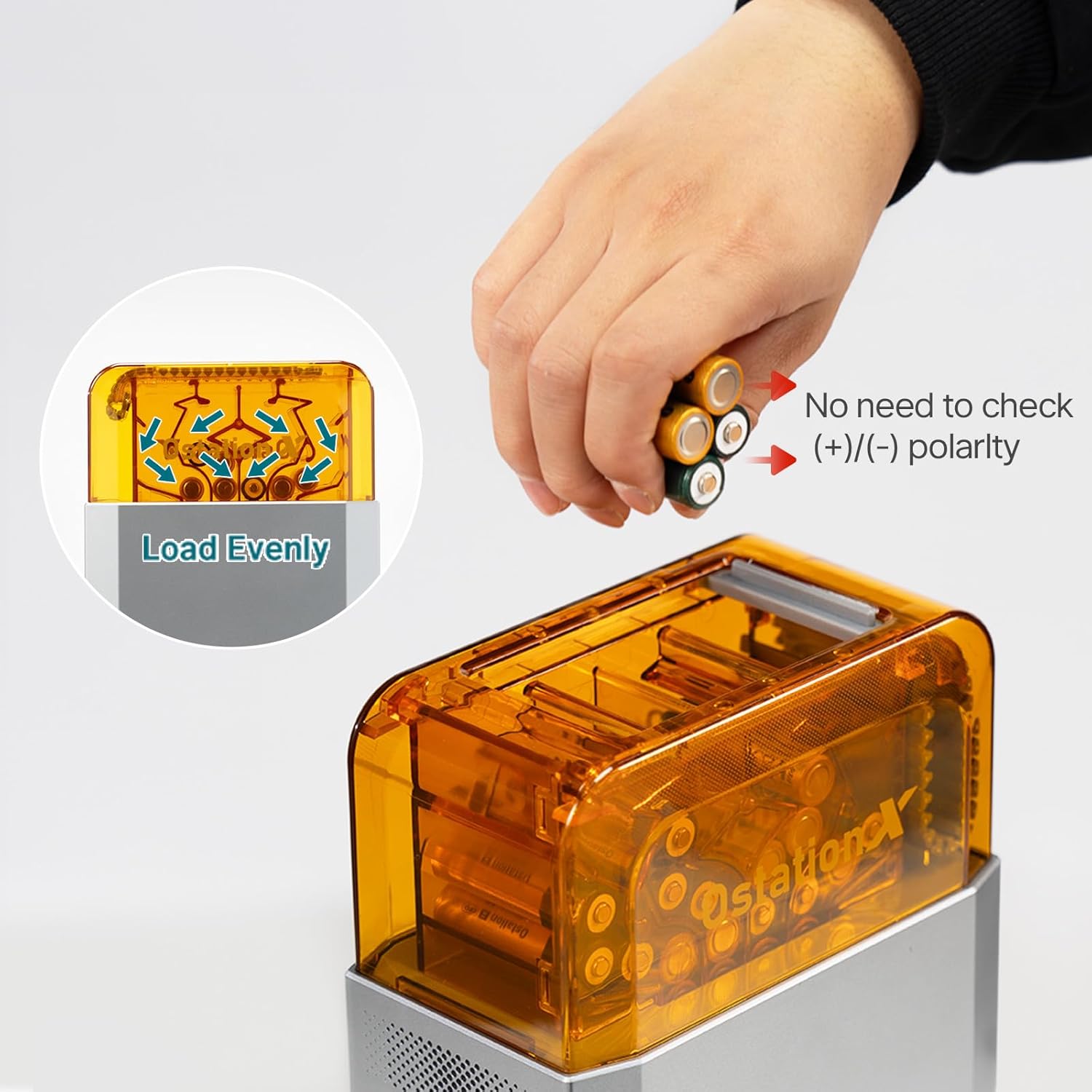
Image 4.1.4: The charger automatically detects battery polarity, eliminating the need for manual orientation.
4.2 OLIGHT Ostrip Smart LED Strip Lights
The Ostrip Smart LED Strip Lights offer versatile lighting solutions with smart app control. You can customize brightness, color, and lighting modes from your smartphone, choosing from thousands of colors, 66 preset scenes, or creating your own DIY lighting effects. The Ostrip also features a music sync mode to enhance your ambiance.
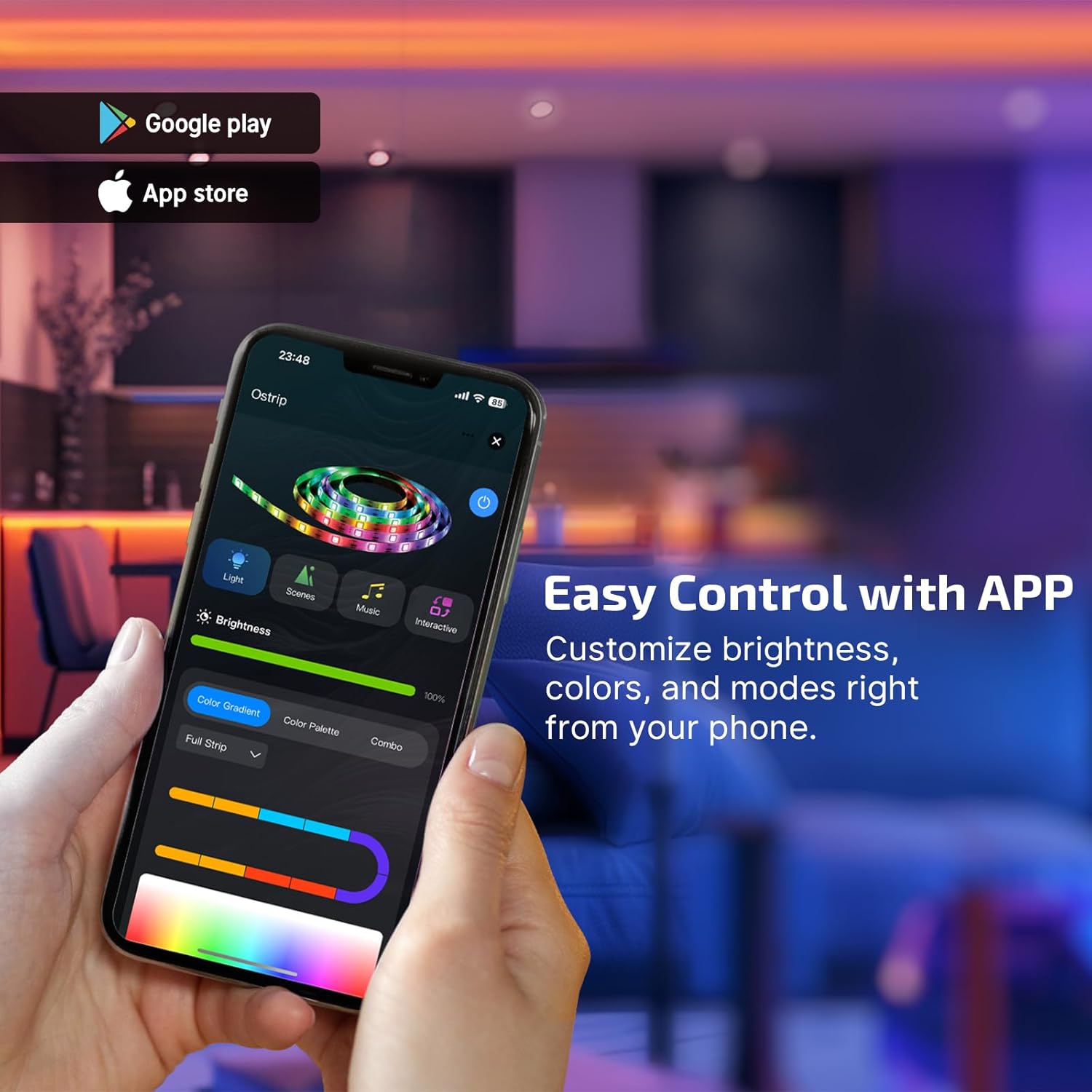
Image 4.2.1: The Ostrip can be easily controlled via a dedicated smartphone application, allowing customization of brightness, color, and modes.

Image 4.2.2: In DIY mode, users can personalize their lighting experience by selecting various colors, effects, and speeds.

Image 4.2.3: The Ostrip can synchronize its lighting effects with music, creating a dynamic light show.
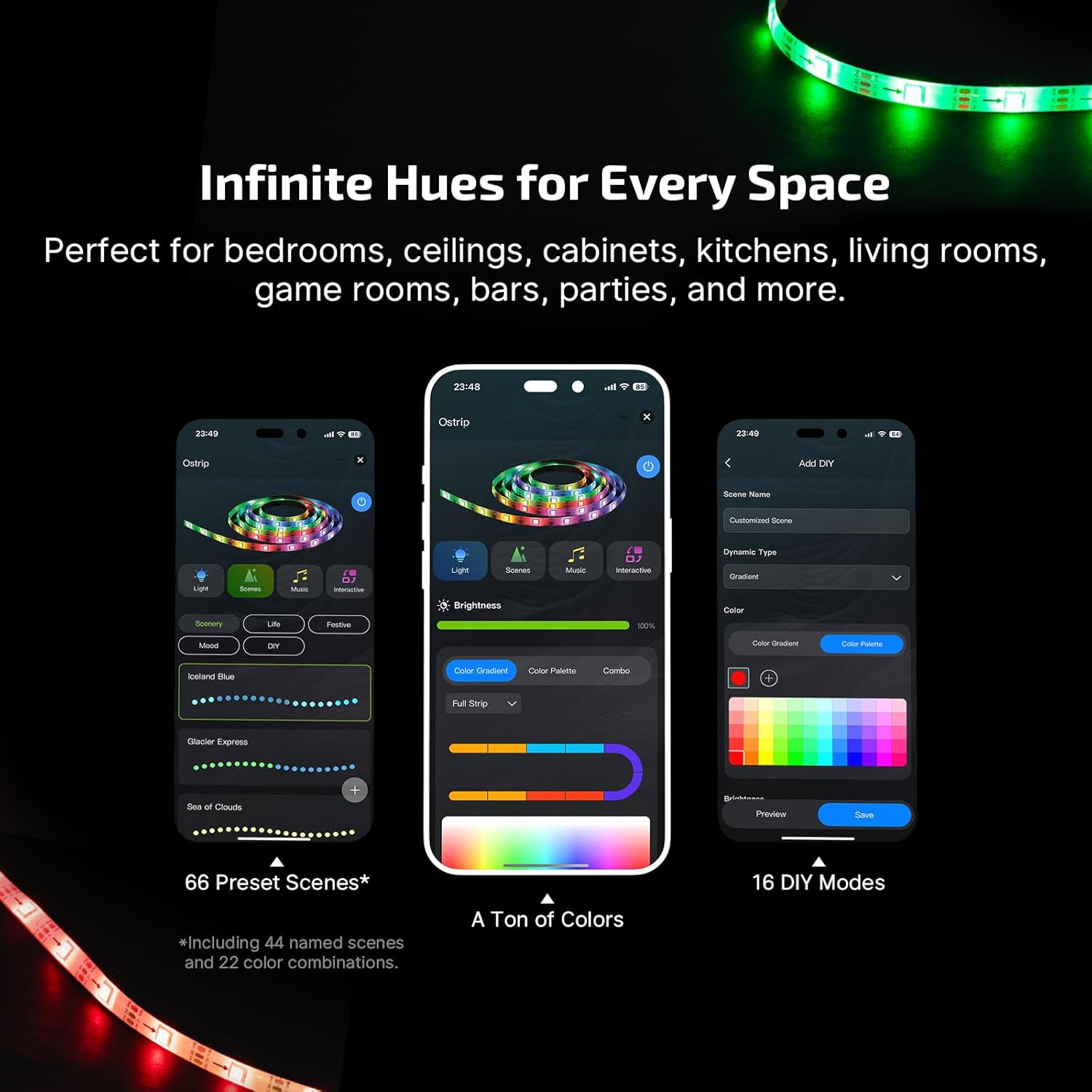
Image 4.2.4: The Ostrip offers a wide range of colors and 66 preset scenes, suitable for various spaces and moods.
5. സജ്ജീകരണം
5.1 OLIGHT Ostation X Setup
- അൺപാക്ക്: Carefully remove the Ostation X from its packaging.
- പവർ കണക്ഷൻ: Connect the provided power adapter to the Ostation X and plug it into a standard wall outlet.
- App Download (Optional but Recommended): For the best user experience and to update the product's software, download the official OLIGHT app from the Google Play Store or Apple App Store. Connect the Ostation X to the app as per the in-app instructions.
5.2 OLIGHT Ostrip Setup
- ഉപരിതല തയ്യാറാക്കൽ: Choose a clean, dry, and smooth surface for installation. Ensure the surface is free of dust, oil, or moisture.
- അഡീഷൻ: Peel off the adhesive backing from the Ostrip and carefully press the strip onto the desired surface. Apply firm pressure along the entire length to ensure good adhesion.
- പവർ കണക്ഷൻ: Connect the Ostrip to its power supply and plug it into a wall outlet.
- ആപ്പ് ജോടിയാക്കൽ: Download the official OLIGHT app (if you haven't already). Open the app and follow the on-screen instructions to pair your Ostrip Smart LED Strip Lights.
6. പ്രവർത്തന നിർദ്ദേശങ്ങൾ
6.1 Using the OLIGHT Ostation X
- ബാറ്ററികൾ ചേർക്കുന്നു: Simply drop AA NiMH batteries into the charging slots. The Ostation X will automatically detect the battery type and polarity.
- ചാർജിംഗ് മോഡുകൾ: The charger will automatically initiate charging. A standard charge takes approximately 3.8 hours, while a fast charge takes about 2.5 hours. The device intelligently manages the charging process.
- ബാറ്ററി പരിശോധന: The Ostation X can intelligently detect the condition of the batteries (good or bad). Refer to the device's indicators or the app for battery status.
- Battery Organization: The Ostation X provides storage for up to 32 batteries, keeping them organized and ready for use.
6.2 Using the OLIGHT Ostrip
- ആപ്പ് നിയന്ത്രണം: Open the OLIGHT app on your smartphone. From the app, you can control the Ostrip's brightness, color, and various lighting modes.
- Preset Scenes: Choose from 66 preset scenes, including 44 named scenes and 22 color combinations, to instantly set the mood.
- DIY മോഡ്: Customize your own lighting effects by selecting specific colors, speeds, and patterns.
- സംഗീത സമന്വയം: Activate the music sync feature in the app to make the Ostrip lights dance and pulse in rhythm with your favorite tunes.
7. പരിപാലനം
- വൃത്തിയാക്കൽ: Use a soft, dry cloth to clean the exterior of both the Ostation X and Ostrip. Do not use abrasive cleaners or solvents.
- സംഭരണം: When not in use for extended periods, store the devices in a cool, dry place away from direct sunlight.
- ബാറ്ററി കെയർ: For optimal performance and longevity of the NiMH batteries, avoid fully discharging them regularly. Recharge them when they are low.
8. പ്രശ്നപരിഹാരം
| പ്രശ്നം | സാധ്യമായ കാരണം | പരിഹാരം |
|---|---|---|
| Ostation X not charging batteries. | No power, faulty battery, incorrect battery type. | Ensure power adapter is properly connected. Check if batteries are AA NiMH. Try a different battery. |
| Ostrip not lighting up. | No power, loose connection, app issue. | Check power connection. Ensure app is paired and controls are active. |
| App cannot connect to Ostation X/Ostrip. | Bluetooth/Wi-Fi issue, outdated software. | Ensure Bluetooth/Wi-Fi is enabled on your device. Restart app and product. Download the app to update the product's software. |
| Ostrip colors/modes not changing. | App control issue, interference. | Ensure you are within the 25-meter control range. Restart the app. |
9 സ്പെസിഫിക്കേഷനുകൾ
9.1 OLIGHT Ostation X Battery Charger
- അളവുകൾ: 7.36 x 3.84 x 11.02 ഇഞ്ച് (187 x 97.5 x 280 മിമി)
- ഭാരം: 3.31 പൗണ്ട് (1.5 കി.ഗ്രാം)
- Putട്ട്പുട്ട് വോളിയംtage: 1.2 വോൾട്ട്
- സ്റ്റാൻഡേർഡ് ചാർജിംഗ് സമയം: 3.8 മണിക്കൂർ
- വേഗത്തിലുള്ള ചാർജിംഗ് സമയം: 2.5 മണിക്കൂർ
- അനുയോജ്യത: All brands of AA NiMH batteries (e.g., Olight B Pro AA)
- Battery Capacity (Olight B Pro AA): 2100mAh
- ബാറ്ററി വോളിയംtage (Olight B Pro AA): 1.2V
- Charge Retention (Olight B Pro AA): >75% after 12 Months
- Cycle Life (Olight B Pro AA): 300+ തവണ
- സർട്ടിഫിക്കേഷനുകൾ: UL, FCC
9.2 OLIGHT Ostrip Smart LED Strip Lights
- നിയന്ത്രണ രീതി: സ്മാർട്ട് ആപ്പ് നിയന്ത്രണം
- നിയന്ത്രണ പരിധി: 25 മീറ്റർ വരെ
- വർണ്ണ ഓപ്ഷനുകൾ: Thousands of colors
- Preset Scenes: 66 (44 named scenes, 22 color combinations)
- ഇഷ്ടാനുസൃതമാക്കൽ: DIY modes, color customization by paragraph
- പ്രത്യേക സവിശേഷതകൾ: സംഗീത സമന്വയ മോഡ്
10. വാറൻ്റിയും പിന്തുണയും
OLIGHT products are manufactured with high-quality materials and craftsmanship. For warranty information, product registration, or technical support, please visit the official OLIGHT webസൈറ്റിൽ ബന്ധപ്പെടുക അല്ലെങ്കിൽ അവരുടെ ഉപഭോക്തൃ സേവനവുമായി ബന്ധപ്പെടുക. കൂടുതൽ വിവരങ്ങളും പിന്തുണാ ഉറവിടങ്ങളും നിങ്ങൾക്ക് ഇവിടെ കണ്ടെത്താനാകും ആമസോണിലെ OLIGHT സ്റ്റോർ.


