1. ആമുഖം
This manual provides detailed instructions for the installation, configuration, and operation of your CP PLUS EZ-P23 2MP Smart Wi-Fi CCTV Camera. Please read this manual thoroughly before using the product to ensure proper functionality and safety. Keep this manual for future reference.
The CP PLUS EZ-P23 is a Full HD 2MP Smart Wi-Fi CCTV Camera designed for home security. It features 360° Pan & Tilt capabilities, advanced night vision, two-way audio communication, and AI-based human detection with motion tracking. It supports local storage via an SD card up to 256GB.
2. ഉൽപ്പന്നം കഴിഞ്ഞുview
2.1 പ്രധാന സവിശേഷതകൾ
- 2MP Full HD Resolution: Delivers sharp and clear images for detailed surveillance.
- 360° Pan & Tilt Coverage: Allows comprehensive monitoring of large areas, eliminating blind spots.
- 2-വേ ഓഡിയോ: ബിൽറ്റ്-ഇൻ മൈക്രോഫോണും സ്പീക്കറും തത്സമയ ആശയവിനിമയം സാധ്യമാക്കുന്നു.
- Intelligent Surveillance: AI-based human detection and motion tracking provide real-time alerts.
- വിപുലമായ രാത്രി കാഴ്ച: Infrared LEDs ensure clear footagപൂർണ്ണമായ ഇരുട്ടിൽ 15 മീറ്റർ വരെ.
- വികസിപ്പിക്കാവുന്ന സംഭരണം: Supports micro SD cards up to 256GB for video recordings.
2.2 ക്യാമറ ഘടകങ്ങൾ
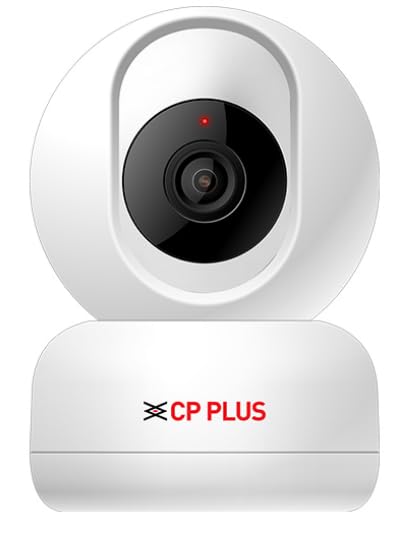
ചിത്രം 1: മുൻഭാഗം view of the CP PLUS EZ-P23 Smart Wi-Fi CCTV Camera. The image shows the white camera unit with a black lens module and the CP PLUS logo on the base. A small red indicator light is visible above the lens.
- ക്യാമറ ലെൻസ്: വീഡിയോ foo ക്യാപ്ചർ ചെയ്യുന്നുtage.
- ഇൻഫ്രാറെഡ് LED-കൾ: രാത്രി കാഴ്ചയ്ക്ക് വെളിച്ചം നൽകുക.
- മൈക്രോഫോൺ: ടു-വേ ആശയവിനിമയത്തിനായി ഓഡിയോ പകർത്തുന്നു.
- സ്പീക്കർ: ടു-വേ ആശയവിനിമയത്തിനായി ഓഡിയോ ഔട്ട്പുട്ട് ചെയ്യുന്നു.
- സ്റ്റാറ്റസ് ഇൻഡിക്കേറ്റർ ലൈറ്റ്: Displays the camera's current operational status (e.g., power on, Wi-Fi connection).
- മൈക്രോ എസ്ഡി കാർഡ് സ്ലോട്ട്: ലോക്കൽ വീഡിയോ സംഭരണത്തിനായി (256GB വരെ പിന്തുണയ്ക്കുന്നു).
- പവർ പോർട്ട്: പവർ അഡാപ്റ്ററുമായി ബന്ധിപ്പിക്കുന്നു.
- റീസെറ്റ് ബട്ടൺ: ക്യാമറ ഫാക്ടറി ക്രമീകരണങ്ങളിലേക്ക് പുനഃസജ്ജമാക്കാൻ ഉപയോഗിക്കുന്നു.
3. സജ്ജീകരണ ഗൈഡ്
3.1 അൺബോക്സിംഗും പ്രാരംഭ പരിശോധനയും
- പാക്കേജിംഗിൽ നിന്ന് എല്ലാ ഘടകങ്ങളും ശ്രദ്ധാപൂർവ്വം നീക്കം ചെയ്യുക.
- Verify that all items are present: camera unit, power adapter, mounting accessories (if included), and this user manual.
- Inspect the camera for any signs of damage. If damaged, contact customer support.
3.2 ക്യാമറയിൽ പവർ ചെയ്യൽ
- ക്യാമറയുടെ പവർ പോർട്ടിലേക്ക് പവർ അഡാപ്റ്റർ ബന്ധിപ്പിക്കുക.
- പവർ അഡാപ്റ്റർ ഒരു സാധാരണ ഇലക്ട്രിക്കൽ ഔട്ട്ലെറ്റിലേക്ക് പ്ലഗ് ചെയ്യുക.
- The camera's status indicator light will illuminate, typically blinking, indicating it is powering on and ready for setup.
3.3 ആപ്പ് ഡൗൺലോഡും അക്കൗണ്ട് സൃഷ്ടിക്കലും
- Download the official CP PLUS mobile application from your smartphone's app store (Google Play Store for Android or Apple App Store for iOS).
- Open the app and create a new user account. Follow the on-screen instructions to complete registration.
3.4 Wi-Fi-ലേക്ക് ബന്ധിപ്പിക്കുന്നു
- Ensure your smartphone is connected to a 2.4GHz Wi-Fi network. The camera supports 2.4GHz Wi-Fi only.
- In the CP PLUS app, tap "Add Device" or the "+" icon.
- Select your camera model (EZ-P23) from the list of devices.
- Follow the in-app prompts to connect the camera to your Wi-Fi network. This usually involves scanning a QR code generated by the app with the camera's lens or entering Wi-Fi credentials manually.
- Once connected, the camera's status indicator light will typically turn solid blue or green, indicating a successful connection.
3.5 മൈക്രോ എസ്ഡി കാർഡ് ഇൻസ്റ്റാളേഷൻ (ഓപ്ഷണൽ)
- Locate the micro SD card slot on the camera (refer to the product diagram if needed).
- Gently insert a formatted micro SD card (up to 256GB) into the slot until it clicks into place.
- In the app, navigate to the camera settings and format the SD card if prompted. This ensures compatibility and optimal performance.
3.6 ക്യാമറ മൗണ്ടിംഗ്
The CP PLUS EZ-P23 can be mounted on a wall or ceiling. Choose a location that provides the desired viewing angle and is within range of your Wi-Fi signal and a power outlet.
- വാൾ മൗണ്ട്: Use the provided mounting bracket and screws to secure the camera to a wall. Ensure the camera is positioned securely.
- സീലിംഗ് മൗണ്ട്: Attach the mounting bracket to the ceiling using screws. Then, secure the camera to the bracket. Ensure the camera is oriented correctly for ceiling installation (check app settings for image rotation if necessary).
4. പ്രവർത്തന നിർദ്ദേശങ്ങൾ
4.1 തത്സമയം View
Open the CP PLUS app and select your camera from the device list to access the live video feed. You can view തത്സമയ footagനിങ്ങളുടെ ക്യാമറയിൽ നിന്ന് എപ്പോൾ വേണമെങ്കിലും എവിടെയും.
4.2 പാൻ & ടിൽറ്റ് നിയന്ത്രണം
തത്സമയം view screen, use the directional controls within the app to remotely pan (horizontal movement) and tilt (vertical movement) the camera lens to adjust the viewing angle and cover a 360° area.
4.3 ടു-വേ ഓഡിയോ
ടു-വേ ഓഡിയോ സവിശേഷത ഉപയോഗിക്കുന്നതിന്, ലൈവ് ഷോയിലെ മൈക്രോഫോൺ ഐക്കണിൽ ടാപ്പ് ചെയ്യുക view interface. Hold the button to speak, and release it to listen. This allows for real-time communication with individuals near the camera.
4.4 മോഷൻ ഡിറ്റക്ഷനും അലേർട്ടുകളും
- ആപ്പിലെ ക്യാമറ ക്രമീകരണങ്ങളിലേക്ക് നാവിഗേറ്റ് ചെയ്യുക.
- Enable "Motion Detection" and "Human Detection" (if available).
- ആവശ്യാനുസരണം സെൻസിറ്റിവിറ്റി ലെവലുകൾ ക്രമീകരിക്കുക.
- Configure alert notifications to receive instant alerts on your smartphone when motion or human presence is detected.
4.5 നൈറ്റ് വിഷൻ
The camera automatically switches to night vision mode in low-light conditions, utilizing its infrared LEDs to provide clear black-and-white footage up to 15 meters. This feature ensures continuous surveillance even in complete darkness.
4.6 വീഡിയോ റെക്കോർഡിംഗും പ്ലേബാക്കും
If an SD card is installed, the camera will record footage based on your settings (e.g., continuous recording, motion-triggered recording). To view രേഖപ്പെടുത്തി footage:
- In the app, select your camera and go to the "Playback" or "History" section.
- Choose the date and time to review രേഖപ്പെടുത്തിയ ഇവന്റുകൾ.
5. പരിപാലനം
5.1 ക്യാമറ വൃത്തിയാക്കൽ
To maintain optimal image quality, periodically clean the camera lens with a soft, dry, lint-free cloth. Do not use harsh chemicals or abrasive cleaners.
5.2 ഫേംവെയർ അപ്ഡേറ്റുകൾ
Regularly check for firmware updates through the CP PLUS app. Keeping your camera's firmware updated ensures access to the latest features, security enhancements, and bug fixes. Follow the in-app instructions for updating firmware.
5.3 SD കാർഡ് മാനേജ്മെന്റ്
If using an SD card for storage, it is recommended to periodically format the card through the app to maintain performance and prevent data corruption. Back up any important footagഫോർമാറ്റ് ചെയ്യുന്നതിന് മുമ്പ്.
6. പ്രശ്നപരിഹാരം
| പ്രശ്നം | സാധ്യമായ കാരണം | പരിഹാരം |
|---|---|---|
| ക്യാമറ ഓണാക്കുന്നില്ല. | പവർ അഡാപ്റ്റർ ബന്ധിപ്പിച്ചിട്ടില്ല അല്ലെങ്കിൽ തകരാറുണ്ട്; പവർ ഔട്ട്ലെറ്റ് പ്രവർത്തിക്കുന്നില്ല. | Check power connections. Try a different power outlet. Ensure the power adapter is functioning correctly. |
| വൈഫൈയിലേക്ക് കണക്റ്റ് ചെയ്യാനാവുന്നില്ല. | തെറ്റായ വൈഫൈ പാസ്വേഡ്; ക്യാമറ റൂട്ടറിൽ നിന്ന് വളരെ അകലെയാണ്; 5GHz വൈഫൈ നെറ്റ്വർക്ക് ഉപയോഗിച്ചു. | Verify Wi-Fi password. Move camera closer to the router. Ensure you are connecting to a 2.4GHz Wi-Fi network. Reset the camera and try again. |
| മോശം ഇമേജ് നിലവാരം. | ലെൻസ് വൃത്തികേടാണ്; വെളിച്ചക്കുറവ്; നെറ്റ്വർക്ക് ബാൻഡ്വിഡ്ത്ത് പ്രശ്നങ്ങൾ. | Clean the camera lens. Ensure adequate lighting or check night vision settings. Verify stable Wi-Fi connection and sufficient bandwidth. |
| ചലന മുന്നറിയിപ്പുകൾ ലഭിച്ചില്ല. | Motion detection disabled; app notifications turned off; incorrect sensitivity settings. | Enable motion detection and human detection in the app. Check app notification settings on your phone. Adjust motion sensitivity. |
| SD കാർഡ് റെക്കോർഡ് ചെയ്യുന്നില്ല. | SD card not inserted correctly; card not formatted; card full or faulty. | Reinsert the SD card. Format the SD card via the app. Replace the SD card if it's faulty. Check recording settings in the app. |
7 സ്പെസിഫിക്കേഷനുകൾ
| ഫീച്ചർ | വിശദാംശങ്ങൾ |
|---|---|
| മോഡൽ നമ്പർ | CP PLUS EZ-P23 |
| വീഡിയോ ക്യാപ്ചർ റെസല്യൂഷൻ | 2MP Full HD |
| പാൻ & ടിൽറ്റ് | 360° Pan, Vertical Tilt |
| രാത്രി കാഴ്ച ദൂരം | 15 മീറ്റർ വരെ (ഇൻഫ്രാറെഡ്) |
| ഓഡിയോ | 2-വേ ഓഡിയോ (ബിൽറ്റ്-ഇൻ മൈക്കും സ്പീക്കറും) |
| സംഭരണം | മൈക്രോ SD കാർഡ് (256GB വരെ) |
| കണക്റ്റിവിറ്റി | വൈഫൈ (2.4GHz മാത്രം) |
| മനുഷ്യ കണ്ടെത്തൽ | AI-based |
| മോഷൻ ട്രാക്കിംഗ് | അതെ |
| ഫോം ഫാക്ടർ | മതിൽ മൗണ്ട് |
| മൗണ്ടിംഗ് തരം | സീലിംഗ് മൗണ്ട് |
| ഇനത്തിന്റെ അളവുകൾ (LxWxH) | 18 x 8 x 8 സെൻ്റീമീറ്റർ |
| ഇനത്തിൻ്റെ ഭാരം | 200 ഗ്രാം |
| നിറം | വെള്ള |
| ഇൻഡോർ/ഔട്ട്ഡോർ ഉപയോഗം | ഇൻഡോർ |
8. വാറൻ്റിയും പിന്തുണയും
വാറന്റി വിവരങ്ങൾക്ക്, ദയവായി നിങ്ങളുടെ ഉൽപ്പന്നത്തിനൊപ്പം ഉൾപ്പെടുത്തിയിരിക്കുന്ന വാറന്റി കാർഡ് പരിശോധിക്കുകയോ ഔദ്യോഗിക CP PLUS സന്ദർശിക്കുകയോ ചെയ്യുക. website. For technical support, troubleshooting assistance, or any product-related inquiries, please contact CP PLUS customer service through their official channels.
CP PLUS Official Webസൈറ്റ്: www.cpplusworld.com
കുറിപ്പ്: ഉൽപ്പന്ന സവിശേഷതകളും സവിശേഷതകളും മുൻകൂർ അറിയിപ്പ് കൂടാതെ മാറ്റത്തിന് വിധേയമാണ്.


