1. ആമുഖം
Thank you for choosing the LEICKE Construction Site Radio. This robust and versatile radio is designed to provide high-quality audio in demanding environments, featuring DAB+, FM, Bluetooth, and AUX connectivity. This manual provides essential information for safe operation, setup, and maintenance of your device. Please read it thoroughly before use and keep it for future reference.
2. സുരക്ഷാ നിർദ്ദേശങ്ങൾ
- തീവ്രമായ താപനില, നേരിട്ടുള്ള സൂര്യപ്രകാശം, ഉയർന്ന ഈർപ്പം എന്നിവയ്ക്ക് റേഡിയോ വിധേയമാക്കരുത്.
- Ensure the charging port cover is securely closed when not in use to maintain IP54 protection.
- റേഡിയോ ഡിസ്അസംബ്ലിംഗ് ചെയ്യാനോ പരിഷ്ക്കരിക്കാനോ ശ്രമിക്കരുത്. എല്ലാ സേവനങ്ങളും യോഗ്യതയുള്ള ഉദ്യോഗസ്ഥർക്ക് റഫർ ചെയ്യുക.
- ശക്തമായ കാന്തികക്ഷേത്രങ്ങളിൽ നിന്ന് റേഡിയോ അകറ്റി നിർത്തുക.
- Use only the provided charger or a compatible charger with the correct voltagഇ, നിലവിലെ സ്പെസിഫിക്കേഷനുകൾ.
- കേൾവിക്ക് കേടുപാടുകൾ സംഭവിക്കാതിരിക്കാൻ, ദീർഘനേരം അമിതമായി ഉയർന്ന ശബ്ദത്തിൽ കേൾക്കുന്നത് ഒഴിവാക്കുക.
3. പാക്കേജ് ഉള്ളടക്കം
പാക്കേജിൽ ഇനിപ്പറയുന്ന ഇനങ്ങൾ ഉണ്ടോ എന്ന് പരിശോധിക്കുക:
- LEICKE Construction Site Radio (Model EP18263)
- യുഎസ്ബി-സി കേബിൾ
- AUX കേബിൾ
- പവർ അഡാപ്റ്റർ/ചാർജർ
- ഉപയോക്തൃ മാനുവൽ (ഈ പ്രമാണം)

Image: LEICKE Construction Site Radio with its charger, user manual, and product packaging.
4. ഉൽപ്പന്നം കഴിഞ്ഞുview
The LEICKE Construction Site Radio is built for durability and performance. It features a robust housing with IP54 protection against dust and splashing water, making it ideal for challenging work environments. Enjoy powerful stereo sound from its two 15W speakers and clear information display on the 2.4-inch LCD screen.

ചിത്രം: മുന്നിൽ-ഇടത് view of the LEICKE Construction Site Radio, highlighting its rugged design and control panel.
പ്രധാന സവിശേഷതകൾ:
- Multifunctional Reception: DAB+ (174 - 240 MHz) and FM (87.5 - 108 MHz) for a wide range of stations.
- ബ്ലൂടൂത്ത് V5.3: Seamless wireless connection to other devices.
- AUX ഇൻപുട്ട്: 3.5mm jack for wired audio connections.
- ശക്തമായ ശബ്ദം: Two 15W speakers deliver strong stereo audio.
- ദീർഘകാല ബാറ്ററി: Integrated 4000 mAh rechargeable battery provides up to 15 hours of operation at 50% volume.
- യുഎസ്ബി ചാർജിംഗ് പോർട്ട്: 5V/1A USB port for charging smartphones.
- മോടിയുള്ള ഡിസൈൻ: Robust housing with handle and IP54 protection against dust and splashing water.
- LCD ഡിസ്പ്ലേ: 2.4-inch color LCD for clear display of settings and information.

Image: The radio demonstrating its IP54 dust and splash water protection.
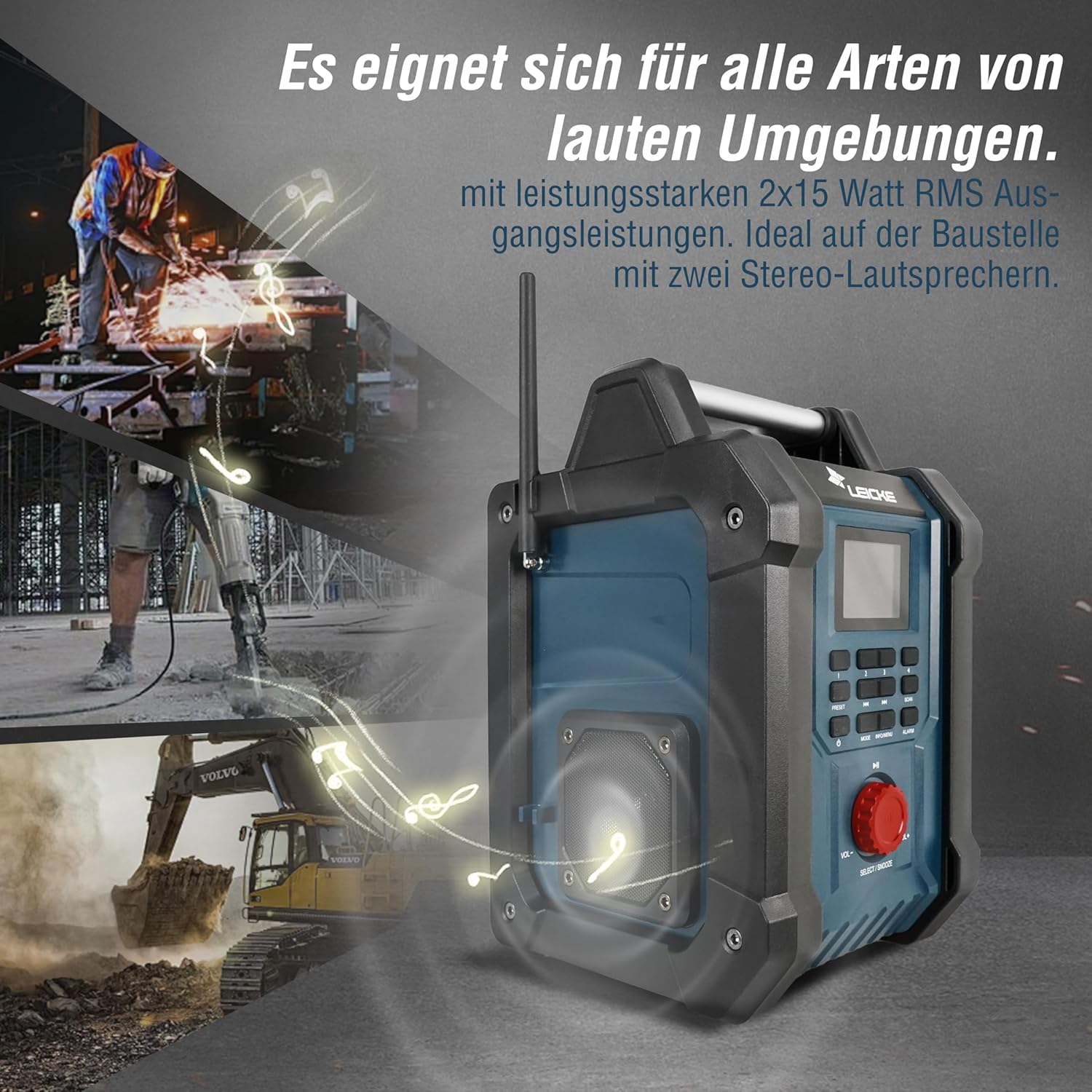
Image: The radio providing powerful sound in a loud construction environment.

Image: Detail of the radio's connectivity options and internal phone charging compartment.
5. സജ്ജീകരണം
5.1 പ്രാരംഭ ചാർജിംഗ്
Before first use, fully charge the radio's internal battery. Connect the provided power adapter to the DC 9V/2A input port on the radio and plug it into a power outlet. The charging indicator on the display will show the charging status. A full charge takes approximately 3 hours.

Image: Visual representation of the 4000mAh battery capacity.
5.2 ആന്റിന സജ്ജീകരണം
Extend the telescopic antenna fully for optimal DAB+ and FM radio reception. Adjust its position to improve signal strength if needed.

Image: Detail of the radio's extendable antenna for signal reception.
6. പ്രവർത്തന നിർദ്ദേശങ്ങൾ
6.1 പവർ ഓൺ/ഓഫ്
അമർത്തുക പവർ button (usually labeled with a power symbol) to turn the radio on or off.
6.2 മോഡ് തിരഞ്ഞെടുക്കൽ
അമർത്തുക മോഡ് button to cycle through available modes: DAB+, FM, Bluetooth, and AUX.
6.3 റേഡിയോ ഓപ്പറേഷൻ (DAB+/FM)
- യാന്ത്രിക സ്കാൻ: In DAB+ or FM mode, press the സ്കാൻ ചെയ്യുക button to automatically search for and store available stations. The radio can store up to 30 stations.
- സ്വമേധയാലുള്ള ട്യൂണിംഗ്: ഉപയോഗിക്കുക PREV/അടുത്തത് buttons (◀◀ / ►►) to manually tune to frequencies.
- പ്രീസെറ്റ് സ്റ്റേഷനുകൾ: Use the numbered preset buttons (1-4) or the പ്രീസെറ്റ് button to recall saved stations. To save a station, tune to the desired station, then press and hold a preset button until the display confirms it's saved.
6.4 ബ്ലൂടൂത്ത് പ്രവർത്തനം
In Bluetooth mode, the radio will enter pairing mode automatically. On your smartphone or other Bluetooth device, search for "LEICKE EP18263" (or similar name) and connect. Once paired, you can stream audio wirelessly to the radio.

Image: User connecting a smartphone to the radio via Bluetooth.
6.5 AUX ഇൻപുട്ട്
Connect an external audio device (e.g., MP3 player) to the 3.5mm AUX IN port using the provided AUX cable. Switch the radio to AUX mode to play audio from the connected device.
6.6 വോളിയം നിയന്ത്രണം
Rotate the large red VOL-/VOL+ വോളിയം ലെവൽ ക്രമീകരിക്കാൻ knob.
6.7 അലാറം പ്രവർത്തനം
The radio features a dual alarm function. Press the അലാറം button to set alarm times and choose between a buzzer or radio as the alarm sound. Refer to the on-screen menu for detailed alarm settings.
6.8 യുഎസ്ബി ചാർജിംഗ് പോർട്ട്
Open the side compartment to access the USB charging port (5V/1A). You can use this port to charge your smartphone or other small USB-powered devices while the radio is on or charging.

Image: The radio's practical design with a handle and a hidden USB charging port.

Image: A smartphone charging within the radio's dedicated compartment.
7. പരിപാലനം
7.1 വൃത്തിയാക്കൽ
ഒരു സോഫ്റ്റ് ഉപയോഗിച്ച് റേഡിയോ തുടയ്ക്കുക, ഡിamp cloth. Do not use abrasive cleaners, solvents, or strong chemicals, as these may damage the surface. Ensure all port covers are closed before cleaning.
7.2 സംഭരണം
When not in use for extended periods, store the radio in a cool, dry place, away from direct sunlight and extreme temperatures. It is recommended to charge the battery every 3-6 months to maintain its lifespan.
8. പ്രശ്നപരിഹാരം
| പ്രശ്നം | സാധ്യമായ കാരണം | പരിഹാരം |
|---|---|---|
| റേഡിയോ ഓൺ ആകുന്നില്ല. | ബാറ്ററി തീർന്നു. | Connect the radio to the power adapter and charge it. |
| മോശം റേഡിയോ റിസപ്ഷൻ (DAB+/FM). | ആന്റിന വികസിതമല്ല അല്ലെങ്കിൽ മോശം സിഗ്നൽ ഏരിയ. | Fully extend the antenna and try repositioning the radio. Perform an automatic scan. |
| ബ്ലൂടൂത്ത് ഉപകരണം ബന്ധിപ്പിക്കാൻ കഴിയുന്നില്ല. | റേഡിയോ ബ്ലൂടൂത്ത് മോഡിലല്ല അല്ലെങ്കിൽ ഉപകരണം വളരെ അകലെയാണ്. | Ensure radio is in Bluetooth mode. Move device closer to the radio. Unpair and re-pair the device. |
| സ്പീക്കറുകളിൽ നിന്ന് ശബ്ദമില്ല. | Volume too low or muted. Incorrect mode selected. | Increase volume. Check if radio is muted. Ensure correct mode (DAB+, FM, Bluetooth, AUX) is selected. |
| Smartphone not charging via USB. | Radio off or cable faulty. | Ensure the radio is powered on. Try a different USB cable. |
9 സ്പെസിഫിക്കേഷനുകൾ
| ഫീച്ചർ | സ്പെസിഫിക്കേഷൻ |
|---|---|
| ബ്രാൻഡ് | ലൈക്ക് |
| മോഡൽ നമ്പർ | EP18263 |
| കണക്റ്റിവിറ്റി ടെക്നോളജി | Bluetooth V5.3, AUX (3.5mm) |
| ട്യൂണർ ടെക്നോളജി | DAB+, FM |
| DAB+ ഫ്രീക്വൻസി ശ്രേണി | 174 - 240 മെഗാഹെട്സ് |
| എഫ്എം ഫ്രീക്വൻസി റേഞ്ച് | 87.5 - 108 മെഗാഹെട്സ് |
| സ്പീക്കർ ഔട്ട്പുട്ട് | 2 x 15W ആർഎംഎസ് |
| ബാറ്ററി ശേഷി | 4000 mAh |
| ബാറ്ററി ലൈഫ് (ഏകദേശം) | 15 മണിക്കൂർ വരെ (50% വോളിയത്തിൽ) |
| ചാർജിംഗ് സമയം (ഏകദേശം) | 3 മണിക്കൂർ |
| USB ചാർജിംഗ് ഔട്ട്പുട്ട് | 5V/1A |
| ഡിസ്പ്ലേ തരം | 2.4" കളർ എൽസിഡി |
| സംരക്ഷണ ക്ലാസ് | IP54 (Dust and Splash Water Protected) |
| ഉൽപ്പന്ന അളവുകൾ (L x W x H) | 22 x 18.5 x 31 സെ.മീ |
| പവർ ഉറവിടം | Battery and Wired |
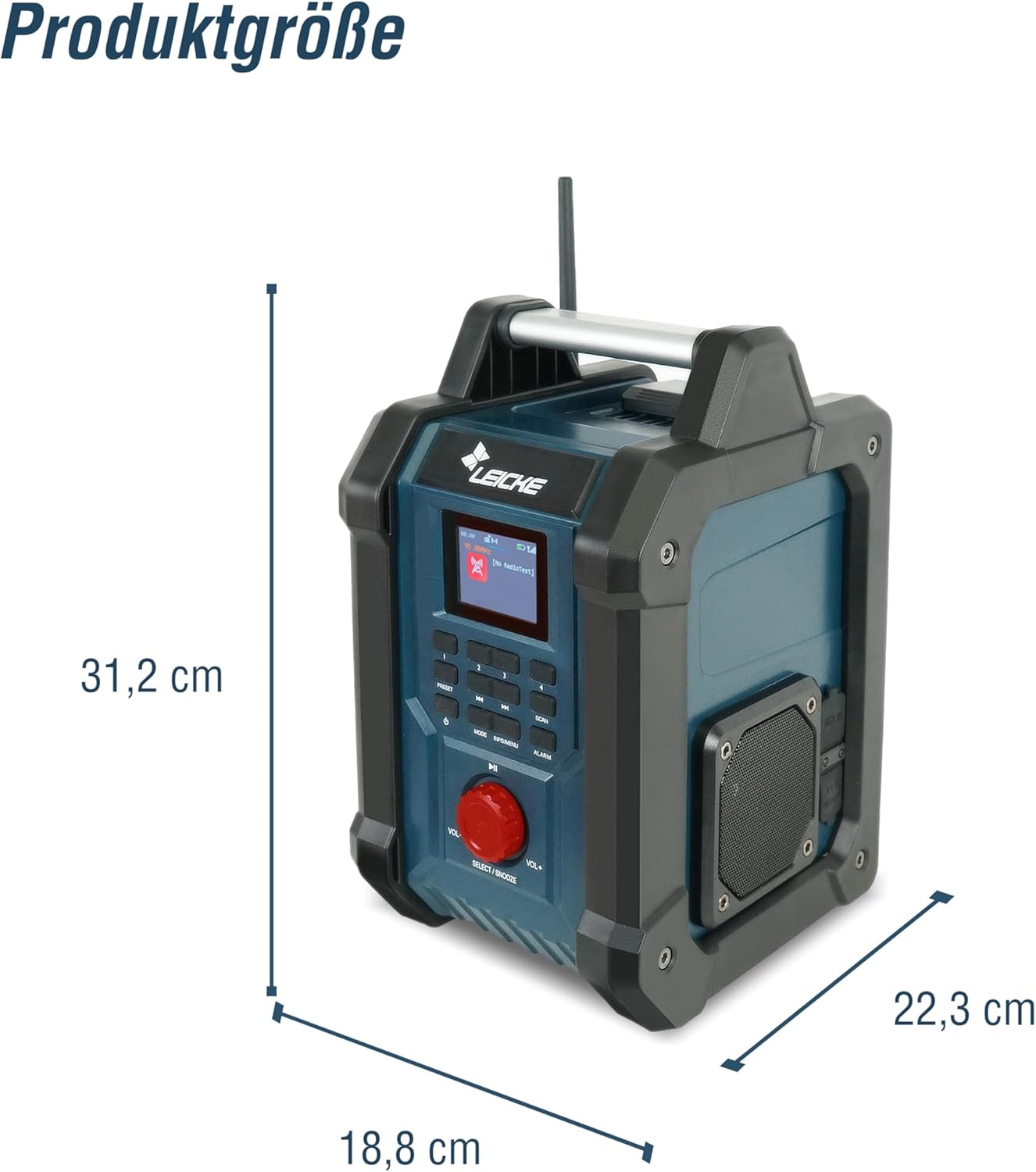
ചിത്രം: ഉൽപ്പന്ന അളവുകളുടെ ഡയഗ്രം.
10. വാറൻ്റിയും പിന്തുണയും
LEICKE products are designed for reliability and performance. For warranty information and technical support, please refer to the warranty card included with your purchase or visit the official LEICKE website. If you encounter any issues not covered in this manual, please contact LEICKE customer service for assistance.
ഈ മാനുവലിൽ ഉൾച്ചേർക്കുന്നതിന് വിൽപ്പനക്കാരന്റെ ഔദ്യോഗിക ഉൽപ്പന്ന വീഡിയോകളൊന്നും കണ്ടെത്തിയില്ല.


