ആമുഖം
This manual provides detailed instructions for the installation, operation, and maintenance of your HBEZON Medicine Cabinet with LED Lights and Mirror. This product features a 48 x 32 inch design, suitable for both surface and recessed mounting, and includes a defogger, memory function, 3-color lighting modes, integrated outlet and USB ports, dimming capability, and adjustable storage shelves. Please read this manual thoroughly before installation and use to ensure proper function and safety.
സുരക്ഷാ വിവരങ്ങൾ
മുന്നറിയിപ്പ്: Electrical installation should be performed by a qualified electrician. Ensure power is disconnected at the circuit breaker before any installation or maintenance.
- Do not expose the cabinet to excessive moisture or direct water spray.
- ഗ്ലാസ് ഘടകങ്ങൾ പൊട്ടിപ്പോകാതിരിക്കാൻ ശ്രദ്ധയോടെ കൈകാര്യം ചെയ്യുക.
- Ensure the mounting surface is structurally sound and can support the weight of the cabinet.
- ഇൻസ്റ്റാളേഷൻ ഏരിയയിൽ നിന്ന് കുട്ടികളെ അകറ്റി നിർത്തുക.
- Do not attempt to repair or modify the electrical components yourself. Contact qualified personnel.
ഉൽപ്പന്നം കഴിഞ്ഞുview
The HBEZON Medicine Cabinet is designed to enhance your bathroom with both functionality and modern aesthetics. Key features include:
- LED ലൈറ്റിംഗ്: Integrated LED strips with 3 color modes (warm, natural, cold white) and dimmable brightness.
- ഡീഫോഗർ: Built-in anti-fog function for clear reflections.
- മെമ്മറി പ്രവർത്തനം: Remembers your last light setting.
- Power Outlets & USB Ports: Convenient charging for devices inside the cabinet.
- ക്രമീകരിക്കാവുന്ന ഷെൽഫുകൾ: Tempered glass shelves for flexible storage.
- Soft-Close Hinges: DTC rustproof hinges for quiet and smooth door operation.
- മൗണ്ടിംഗ് ഓപ്ഷനുകൾ: Can be surface-mounted or recessed into the wall.

ചിത്രം: മുൻഭാഗം view of the HBEZON Medicine Cabinet, highlighting its illuminated mirror and modern appearance.
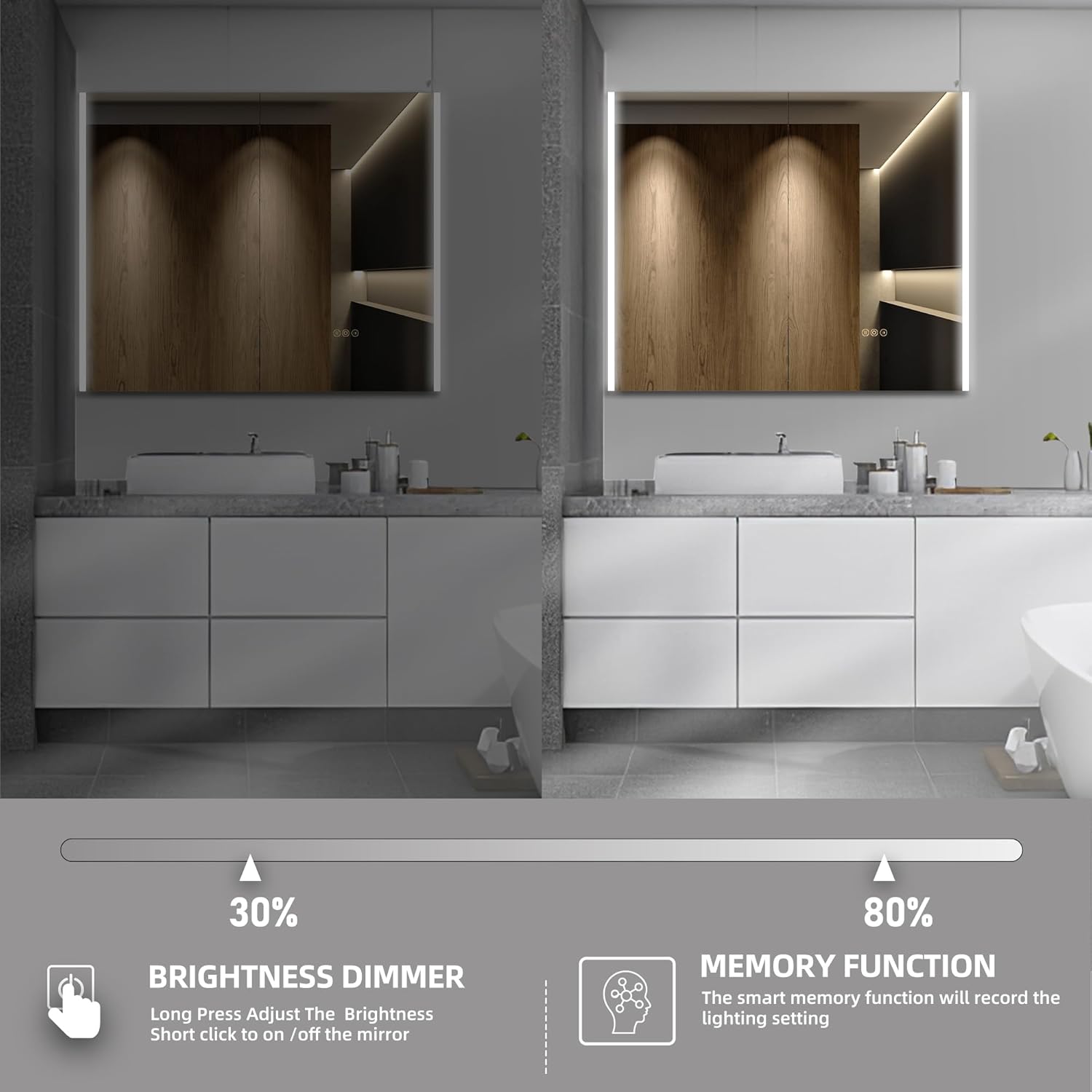
Image: Visual representation of the cabinet's main features, including lighting controls, anti-fog, and power options.
സജ്ജീകരണവും ഇൻസ്റ്റാളേഷനും
The HBEZON Medicine Cabinet offers both surface and recessed mounting options. Ensure you have the necessary tools and assistance before beginning installation.
Dimensions and Cutout (for Recessed Mounting)
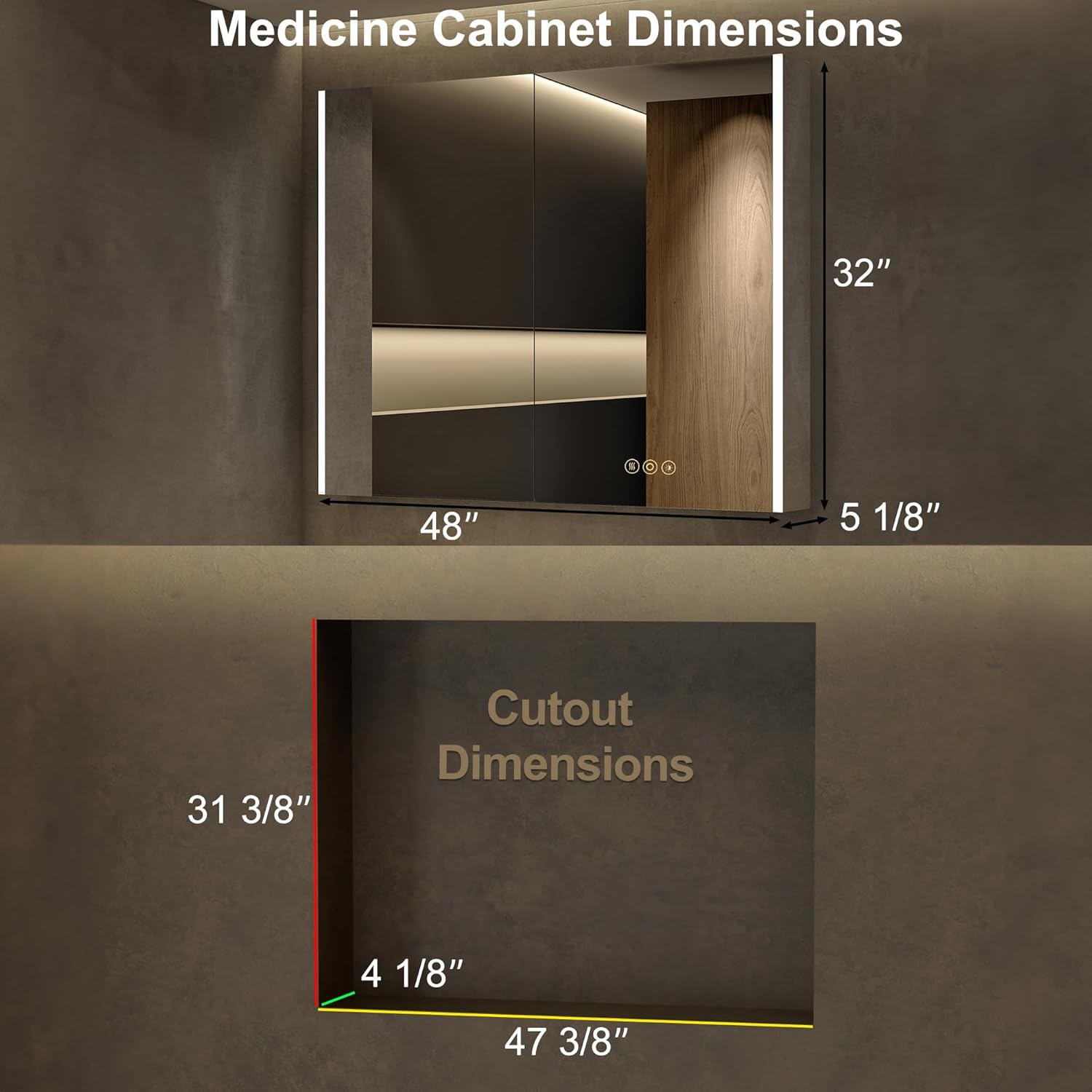
Image: Detailed dimensions for the cabinet and the required wall cutout for recessed installation.
മൗണ്ടിംഗ് ഓപ്ഷനുകൾ

Image: Visual comparison of recessed mounting versus surface (wall) mounting.
പൊതു ഇൻസ്റ്റാളേഷൻ ഘട്ടങ്ങൾ:
- തയ്യാറാക്കൽ: Turn off power at the main circuit breaker. Identify the desired mounting location and ensure it is free of pipes or electrical wires.
- അടയാളപ്പെടുത്തൽ: Mark the mounting points on the wall according to the cabinet's dimensions and mounting hardware.
- മൗണ്ടിംഗ് ഹാർഡ്വെയർ: Install the provided mounting hardware securely into the wall. For recessed mounting, create the appropriate cutout in the wall.
- വയറിംഗ്: Connect the cabinet's electrical wiring to your home's electrical system. This step should be performed by a qualified electrician. Ensure all connections are secure and insulated.
- Mounting the Cabinet: Carefully lift and secure the cabinet onto the installed mounting hardware. Ensure it is level and firmly attached.
- ഷെൽഫുകൾ ക്രമീകരിക്കുക: Place the adjustable glass shelves inside the cabinet at your desired heights.
- പവർ ഓൺ: ഇൻസ്റ്റാളേഷൻ പൂർത്തിയായി എല്ലാ കണക്ഷനുകളും സുരക്ഷിതമായിക്കഴിഞ്ഞാൽ, സർക്യൂട്ട് ബ്രേക്കറിൽ പവർ പുനഃസ്ഥാപിക്കുക.
പ്രവർത്തന നിർദ്ദേശങ്ങൾ
LED ലൈറ്റിംഗ് നിയന്ത്രണം

Image: Demonstrates how to change the LED light color temperature using the touch control.
- പവർ ഓൺ/ഓഫ്: ലൈറ്റുകൾ ഓണാക്കാനോ ഓഫാക്കാനോ കണ്ണാടിയിലെ പവർ ഐക്കണിൽ ഹ്രസ്വമായി അമർത്തുക.
- വർണ്ണ താപനില ക്രമീകരണം: Short press the light icon to cycle through the three color modes: Warm (3000K), Natural (4000K), and Cold White (6000K).
- തെളിച്ചം മങ്ങിയത്: Long press the light icon to adjust the brightness from 0% to 100%. Release when the desired brightness is reached.
- മെമ്മറി പ്രവർത്തനം: The cabinet will remember your last light setting (color mode and brightness) when turned off and on again.
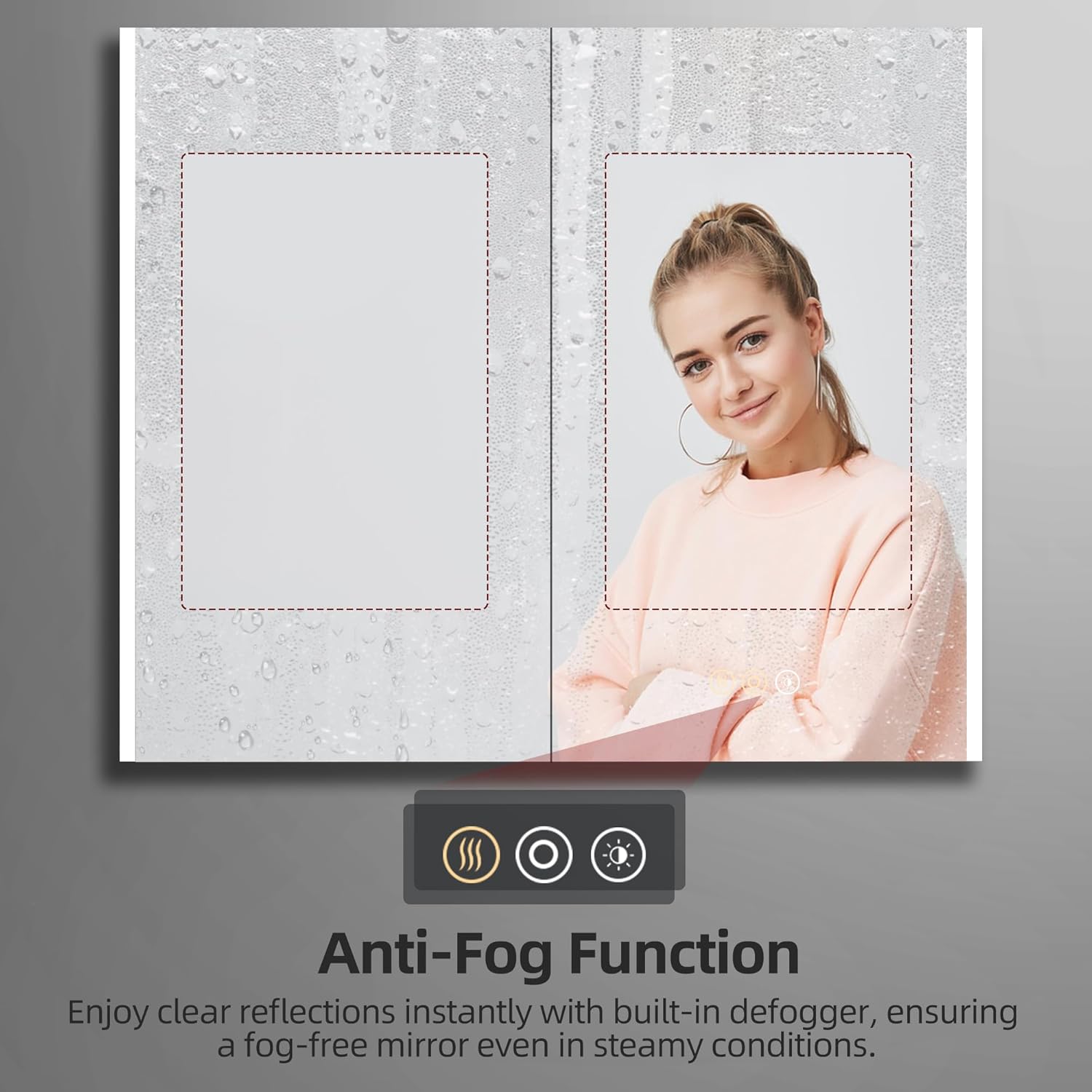
Image: Illustrates the dimming capability and the memory function of the LED lighting.
ആന്റി-ഫോഗ് ഫംഗ്ഷൻ

Image: Shows the effectiveness of the anti-fog function, keeping the mirror clear in steamy conditions.
- ഡീഫോഗർ സജീവമാക്കുക: Short press the defogger icon (looks like steam) on the mirror to activate the anti-fog function.
- Deactivate Defogger: Press the defogger icon again to turn it off. It is recommended to turn off the defogger when not needed for energy efficiency.
Using Electrical Outlets and USB Ports

ചിത്രം: ക്ലോസ്-അപ്പ് view of the integrated electrical outlet and USB ports within the cabinet.
- The internal electrical outlets and USB ports are active when the cabinet is connected to power.
- Use these ports to conveniently charge small electronic devices like electric toothbrushes, shavers, or smartphones.
- Do not overload the outlets. Refer to the specifications for maximum power output.
മെയിൻ്റനൻസ്
- കണ്ണാടി വൃത്തിയാക്കൽ: Use a soft, lint-free cloth and a non-abrasive glass cleaner. Spray the cleaner onto the cloth, not directly onto the mirror, to avoid liquid seeping into electrical components.
- Cleaning the Cabinet Interior: Wipe down interior surfaces and shelves with a damp തുണിയും മൃദുവായ ഡിറ്റർജൻ്റും. നന്നായി ഉണക്കുക.
- ഹിഞ്ച് കെയർ: The DTC soft-close hinges are designed for durability. Avoid applying excessive force when opening or closing the doors. No special lubrication is typically required.
- ഇലക്ട്രിക്കൽ ഘടകങ്ങൾ: Ensure the cabinet is disconnected from power before cleaning near electrical outlets or wiring. Do not use wet cloths directly on electrical components.
ട്രബിൾഷൂട്ടിംഗ്
| പ്രശ്നം | സാധ്യമായ കാരണം | പരിഹാരം |
|---|---|---|
| LED വിളക്കുകൾ ഓണാക്കുന്നില്ല. | വൈദ്യുതി ഇല്ല; വയറിംഗ് അയഞ്ഞിരിക്കുന്നു; ടച്ച് സെൻസർ തകരാറിലായി. | Check circuit breaker. Ensure all electrical connections are secure. Contact customer support if issue persists. |
| മൂടൽമഞ്ഞ് വിരുദ്ധ പ്രവർത്തനം പ്രവർത്തിക്കുന്നില്ല. | Defogger not activated; power issue. | Ensure the defogger icon is pressed. Check power supply. |
| Outlets/USB ports not working. | No power supply; internal wiring issue. | Verify main power to the cabinet. Avoid overloading. |
| Doors do not close smoothly. | Hinges misaligned or damaged. | Check hinge alignment. If damaged, contact customer support for replacement parts. |
സ്പെസിഫിക്കേഷനുകൾ
| ഫീച്ചർ | വിശദാംശങ്ങൾ |
|---|---|
| ബ്രാൻഡ് | HBEZON |
| മോഡലിൻ്റെ പേര് | AURA (Model 4832) |
| ഉൽപ്പന്ന അളവുകൾ | 5"D x 48"W x 32"H |
| നിറം | വെള്ളി |
| മൗണ്ടിംഗ് തരം | Wall Mount or Recessed Mount |
| പ്രത്യേക സവിശേഷതകൾ | Smart Touch Control, Lighting Memory Function, Dimmable, 3 Color Lighting Modes, Defogger, Space-saving, Soft-close Hinges, Electrical Outlet & USB Port, Adjustable Shelves |
| ഷെൽഫുകളുടെ എണ്ണം | 3 (ക്രമീകരിക്കാവുന്ന ടെമ്പർഡ് ഗ്ലാസ്) |
| ഫ്രെയിം മെറ്റീരിയൽ | അലുമിനിയം |
| ഭാര പരിധി | 60 പൗണ്ട് |
| ഇനത്തിൻ്റെ ഭാരം | 51 പൗണ്ട് |
| ഉൾപ്പെടുത്തിയ ഘടകങ്ങൾ | Medicine cabinet with mirror, Mounting Hardware, Shelves |
വാറൻ്റിയും പിന്തുണയും
For warranty information or technical support, please refer to the documentation included with your purchase or contact HBEZON customer service. You can also visit the official HBEZON store on Amazon for more details and contact options.
HBEZON Store: https://www.amazon.com/stores/HBEZON/page/8EF5340D-4FAE-42F2-92D1-7037F531B1CC
ഉപയോക്തൃ മാനുവൽ (PDF): https://manuals.plus/m/4cf1acaebfca3c9bdf07a18cfd87af63f19a9e62aa17364159a58723dd512d7d


