1. ആമുഖം
ഗോവീലൈഫ് ബ്ലൂടൂത്ത് ഫ്രീസർ തെർമോമീറ്ററിനും (മോഡൽ H5108) ഗോവീലൈഫ് വയർലെസ് മീറ്റ് തെർമോമീറ്ററിനും (മോഡൽ H5192) വിശദമായ നിർദ്ദേശങ്ങൾ ഈ മാനുവലിൽ നൽകിയിരിക്കുന്നു. ഉപകരണങ്ങൾ ശരിയായി പ്രവർത്തിക്കുന്നുവെന്ന് ഉറപ്പാക്കുന്നതിനും അവയുടെ ആയുസ്സ് പരമാവധിയാക്കുന്നതിനും ഉപയോഗിക്കുന്നതിന് മുമ്പ് ദയവായി ഈ മാനുവൽ നന്നായി വായിക്കുക.
ബണ്ടിൽ ഉൾപ്പെടുന്നു:
- 2 x ഗോവീലൈഫ് ബ്ലൂടൂത്ത് ഫ്രീസർ തെർമോമീറ്ററുകൾ (H5108)
- 1 x ഗോവീലൈഫ് വയർലെസ് മീറ്റ് തെർമോമീറ്റർ (H5192) 2 പ്രോബുകൾക്കൊപ്പം
- 1 x USB-C ചാർജിംഗ് കേബിൾ (H5192-ന്)

ചിത്രം 1: ഗോവീലൈഫ് ബ്ലൂടൂത്ത് ഫ്രീസർ തെർമോമീറ്റർ H5108 (2 യൂണിറ്റുകൾ), വയർലെസ് മീറ്റ് തെർമോമീറ്റർ H5192 ബണ്ടിൽ. ചിത്രത്തിൽ ഡിജിറ്റൽ ഡിസ്പ്ലേകളുള്ള രണ്ട് വെളുത്ത ചതുര ഫ്രീസർ തെർമോമീറ്ററുകളും രണ്ട് പ്രോബുകളുള്ള ഒരു കറുത്ത ചതുരാകൃതിയിലുള്ള മീറ്റ് തെർമോമീറ്റർ ബേസും കാണിക്കുന്നു.
2 സുരക്ഷാ വിവരങ്ങൾ
- ഉപകരണങ്ങളെ അവയുടെ പ്രവർത്തന പരിധിക്ക് പുറത്തുള്ള തീവ്രമായ താപനിലയിലേക്ക് തുറന്നുകാട്ടരുത്.
- വാട്ടർപ്രൂഫ് എന്ന് വ്യക്തമാക്കിയിട്ടില്ലെങ്കിൽ ഉപകരണങ്ങൾ വെള്ളത്തിൽ നിന്ന് അകറ്റി നിർത്തുക (H5192 പ്രോബുകൾ വാട്ടർപ്രൂഫ് ആണ്).
- ഉപകരണങ്ങൾ സ്വയം വേർപെടുത്താനോ നന്നാക്കാനോ ശ്രമിക്കരുത്. സഹായത്തിനായി ഉപഭോക്തൃ പിന്തുണയുമായി ബന്ധപ്പെടുക.
- കുട്ടികൾക്ക് ലഭ്യമാകാതെ സൂക്ഷിക്കുക.
3. സജ്ജീകരണം
3.1 ഗോവീലൈഫ് ബ്ലൂടൂത്ത് ഫ്രീസർ തെർമോമീറ്റർ (H5108)
- ബാറ്ററി ഇൻസ്റ്റാളേഷൻ: തെർമോമീറ്ററിന്റെ പിൻഭാഗത്തുള്ള ബാറ്ററി കമ്പാർട്ട്മെന്റ് തുറന്ന് ആവശ്യമായ ബാറ്ററികൾ (ഉൾപ്പെടുത്തിയിട്ടില്ല) ചേർക്കുക.
- പ്ലേസ്മെൻ്റ്: നിങ്ങളുടെ ഫ്രീസറിലോ റഫ്രിജറേറ്ററിലോ തെർമോമീറ്റർ വയ്ക്കുക. എളുപ്പത്തിൽ വായിക്കാൻ ഡിസ്പ്ലേ ദൃശ്യമാണെന്ന് ഉറപ്പാക്കുക.
- ആപ്പ് കണക്ഷൻ:
- ആപ്പ് സ്റ്റോറിൽ നിന്നോ ഗൂഗിൾ പ്ലേയിൽ നിന്നോ ഗോവീ ഹോം ആപ്പ് ഡൗൺലോഡ് ചെയ്യുക.
- നിങ്ങളുടെ സ്മാർട്ട്ഫോണിൽ ബ്ലൂടൂത്ത് പ്രവർത്തനക്ഷമമാക്കുക.
- ഗോവീ ഹോം ആപ്പ് തുറന്ന് '+' ഐക്കണിൽ ടാപ്പ് ചെയ്ത് H5108 എന്ന് തിരയുക.
- ഉപകരണം ജോടിയാക്കാൻ ആപ്പിലെ നിർദ്ദേശങ്ങൾ പാലിക്കുക.

ചിത്രം 2: റഫ്രിജറേറ്ററിനുള്ളിൽ സ്ഥാപിച്ചിരിക്കുന്ന GoveeLife ബ്ലൂടൂത്ത് ഫ്രീസർ തെർമോമീറ്റർ H5108, താപനില പ്രദർശിപ്പിക്കുന്നു. താപനില ഡാറ്റ പ്രദർശിപ്പിക്കുന്ന Govee ഹോം ആപ്പുള്ള ഒരു സ്മാർട്ട്ഫോൺ സ്ക്രീനും ചിത്രത്തിൽ കാണിക്കുന്നു.
3.2 ഗോവീലൈഫ് വയർലെസ് മീറ്റ് തെർമോമീറ്റർ (H5192)
- പ്രോബുകൾ ചാർജ് ചെയ്യുന്നു: ചാർജിംഗ് ബേസിലേക്ക് പ്രോബുകൾ ഇടുക. USB-C കേബിൾ ബേസിലേക്കും ചാർജ് ചെയ്യുന്നതിനായി ഒരു പവർ സ്രോതസ്സിലേക്കും ബന്ധിപ്പിക്കുക. 25 മിനിറ്റ് ചാർജ് ചെയ്താൽ 48 മണിക്കൂർ വരെ പ്രവർത്തിക്കാൻ കഴിയും.
- ആപ്പ് കണക്ഷൻ:
- നിങ്ങളുടെ സ്മാർട്ട്ഫോണിൽ ഗോവീ ഹോം ആപ്പ് ഇൻസ്റ്റാൾ ചെയ്തിട്ടുണ്ടെന്നും ബ്ലൂടൂത്ത്/വൈ-ഫൈ പ്രവർത്തനക്ഷമമാക്കിയിട്ടുണ്ടെന്നും ഉറപ്പാക്കുക.
- ഗോവീ ഹോം ആപ്പ് തുറന്ന് '+' ഐക്കണിൽ ടാപ്പ് ചെയ്ത് H5192 എന്ന് തിരയുക.
- ബ്ലൂടൂത്ത് വഴി ഉപകരണം ജോടിയാക്കുന്നതിനും വിപുലീകൃത ശ്രേണിക്കായി വൈഫൈയിലേക്ക് കണക്റ്റുചെയ്യുന്നതിനും ആപ്പിലെ നിർദ്ദേശങ്ങൾ പാലിക്കുക.
- പ്രോബ് ഇൻസേർഷൻ: ഭക്ഷണത്തിന്റെ ഏറ്റവും കട്ടിയുള്ള ഭാഗത്തേക്ക് മാംസ പേടകങ്ങൾ തിരുകുക, അസ്ഥിയോ നാരുകളോ ഒഴിവാക്കുക.

ചിത്രം 3: USB-C കേബിൾ വഴി ബന്ധിപ്പിച്ചിരിക്കുന്ന പ്രോബുകൾ ചേർത്ത GoveeLife വയർലെസ് മീറ്റ് തെർമോമീറ്റർ H5192 ചാർജിംഗ് ബേസ്. ചിത്രം 3000mAh ബാറ്ററിയും 25 മിനിറ്റ് ചാർജിന് ശേഷമുള്ള 48 മണിക്കൂർ പ്രവർത്തനവും എടുത്തുകാണിക്കുന്നു.

ചിത്രം 4: ഗോവീലൈഫ് വയർലെസ് മീറ്റ് തെർമോമീറ്റർ H5192 പ്രോബ് ഒരു മാംസ കഷണത്തിൽ തിരുകിയിരിക്കുന്നു, ഇത് ആന്തരിക, ആംബിയന്റ് താപനില നിരീക്ഷണം കാണിക്കുന്നു. ചിത്രം 32°F മുതൽ 212°F വരെയുള്ള ആന്തരിക സെൻസർ ശ്രേണിയും 32°F മുതൽ 572°F വരെയുള്ള ആംബിയന്റ് സെൻസർ ശ്രേണിയും സൂചിപ്പിക്കുന്നു.
4. പ്രവർത്തന നിർദ്ദേശങ്ങൾ
4.1 ഗോവീലൈഫ് ബ്ലൂടൂത്ത് ഫ്രീസർ തെർമോമീറ്റർ (H5108)
- താപനില പ്രദർശനം: LCD സ്ക്രീൻ നിലവിലെ താപനില പ്രദർശിപ്പിക്കുന്നു. പുതുക്കൽ ആവൃത്തി ഏകദേശം 2 സെക്കൻഡ് ആണ്, കൃത്യത ±0.9°F ആണ്.
- ആപ്പ് മോണിറ്ററിംഗ്: താപനില വിദൂരമായി നിരീക്ഷിക്കുന്നതിനും താപനിലയിലെ ഏറ്റക്കുറച്ചിലുകൾക്കുള്ള അലേർട്ടുകൾ സജ്ജീകരിക്കുന്നതിനും ഗോവി ഹോം ആപ്പ് ഉപയോഗിക്കുക, കൂടാതെ view 2 വർഷം വരെയുള്ള ചരിത്രപരമായ ഡാറ്റ.
- അലേർട്ടുകൾ: താപനില നിങ്ങളുടെ സെറ്റ് പരിധിക്ക് മുകളിലോ താഴെയോ പോയാൽ അറിയിപ്പുകൾ ലഭിക്കുന്നതിന് ആപ്പിനുള്ളിൽ താപനില ശ്രേണി അലേർട്ടുകൾ കോൺഫിഗർ ചെയ്യുക.

ചിത്രം 5: താപനിലയും ബാറ്ററി സൂചകങ്ങളും കാണിക്കുന്ന GoveeLife ബ്ലൂടൂത്ത് ഫ്രീസർ തെർമോമീറ്റർ H5108 ഡിജിറ്റൽ ഡിസ്പ്ലേയുടെ ക്ലോസ്-അപ്പ്. ചിത്രം ±0.9°F കൃത്യതയും 2-സെക്കൻഡ് പുതുക്കൽ ആവൃത്തിയും എടുത്തുകാണിക്കുന്നു.

ചിത്രം 6: ഗോവീലൈഫ് ഫ്രീസർ തെർമോമീറ്ററിനായുള്ള ഗോവീ ഹോം ആപ്പ് ഇന്റർഫേസ് പ്രദർശിപ്പിക്കുന്ന സ്മാർട്ട്ഫോൺ സ്ക്രീൻ, താപനില ചരിത്രവും ഡാറ്റ എക്സ്പോർട്ട് ഓപ്ഷനുകളും കാണിക്കുന്നു. ആപ്പിന് 2 വർഷം വരെ ഡാറ്റ റെക്കോർഡ് ചെയ്യാൻ കഴിയും.
4.2 ഗോവീലൈഫ് വയർലെസ് മീറ്റ് തെർമോമീറ്റർ (H5192)
- LCD ഡിസ്പ്ലേ: ബേസ് യൂണിറ്റിൽ ആന്തരിക, ആംബിയന്റ് താപനിലകൾ, അലേർട്ട് താപനില, പ്രോബ് നമ്പർ, പ്രോബ് ബാറ്ററി, ബേസ് ബാറ്ററി, നിലവിലെ താപനില എന്നിവ കാണിക്കുന്ന 10-ഫംഗ്ഷൻ എൽസിഡി ഡിസ്പ്ലേ ഉണ്ട്.
- സ്മാർട്ട് ഗൈഡഡ് പാചകം: വിവിധ മാംസങ്ങൾ (ബീഫ്, ആട്ടിൻകുട്ടി, ചിക്കൻ, പന്നിയിറച്ചി, ടർക്കി മുതലായവ)ക്കായുള്ള 28 USDA-പ്രീസെറ്റ് താപനില ശുപാർശകളിൽ നിന്ന് തിരഞ്ഞെടുക്കാൻ Govee Home ആപ്പ് ഉപയോഗിക്കുക. ആപ്പ് തത്സമയ അലേർട്ടുകൾ നൽകുന്നു.
- താപനില നിരീക്ഷണം: ±1.8°F കൃത്യതയോടെ ആന്തരിക, ആംബിയന്റ് താപനിലകൾ നിരീക്ഷിക്കുകയും ഓരോ 3 സെക്കൻഡിലും അപ്ഡേറ്റ് ചെയ്യുകയും ചെയ്യുന്നു.
- കണക്റ്റിവിറ്റി: ഗോവി ഹോം ആപ്പ് വഴി സ്ഥിരവും വിപുലീകൃതവുമായ ശ്രേണി നിരീക്ഷണത്തിനായി തെർമോമീറ്റർ ബ്ലൂടൂത്ത് (തുറന്ന സ്ഥലത്ത് 328 അടി വരെ), വൈ-ഫൈ എന്നിവയെ പിന്തുണയ്ക്കുന്നു.
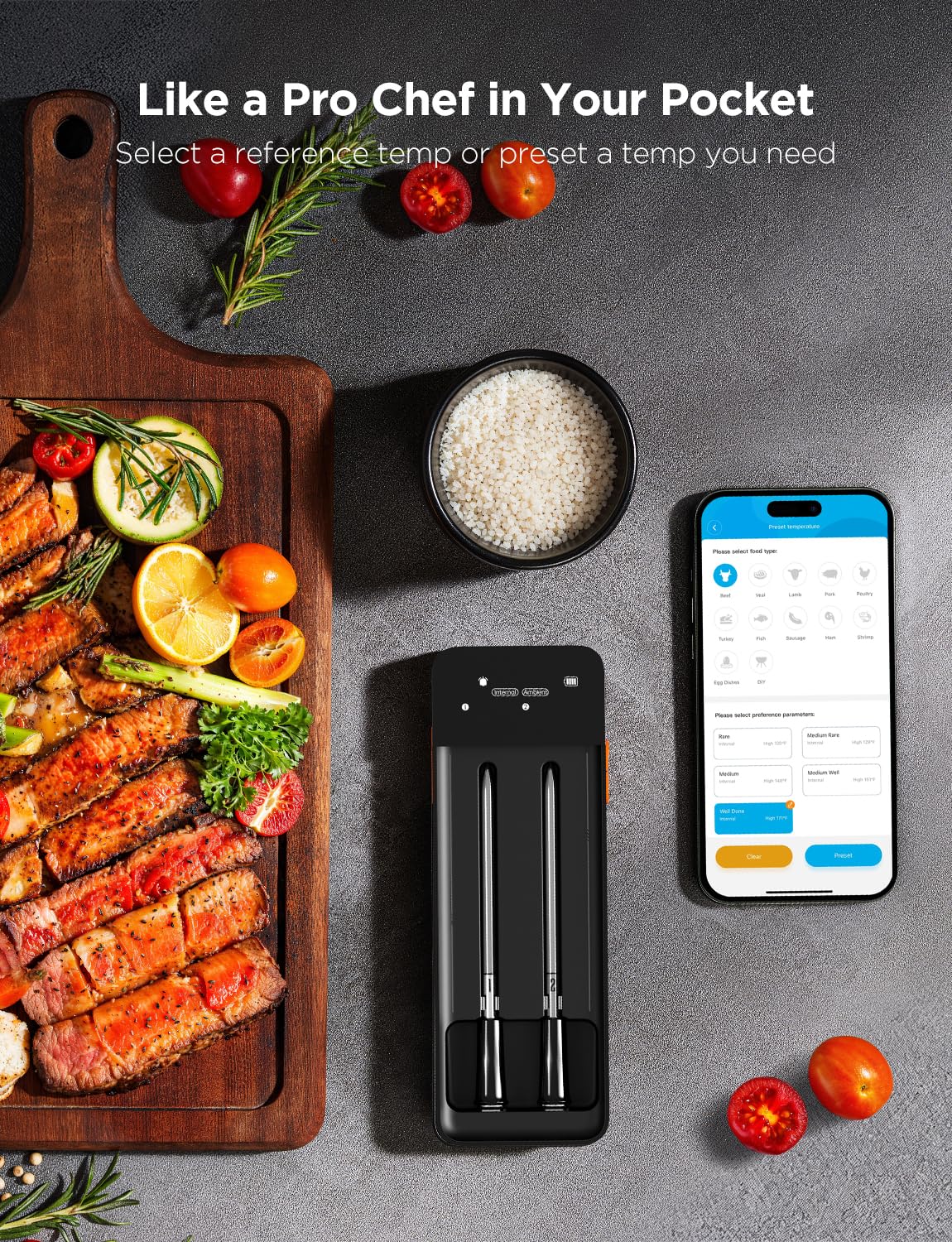
ചിത്രം 7: ഭക്ഷണ തരം, ഇഷ്ടപ്പെട്ട പാചകരീതി (ഉദാ: അപൂർവ്വം, ഇടത്തരം അപൂർവ്വം) എന്നിവ തിരഞ്ഞെടുക്കുന്നതിനുള്ള ഓപ്ഷനുകൾ കാണിക്കുന്ന, ഗോവീ ലൈഫ് വയർലെസ് മീറ്റ് തെർമോമീറ്ററിനായുള്ള ഗോവീ ഹോം ആപ്പ് ഇന്റർഫേസ് പ്രദർശിപ്പിക്കുന്ന സ്മാർട്ട്ഫോൺ സ്ക്രീൻ.

ചിത്രം 8: വൈ-ഫൈ സിഗ്നൽ, അലാറം മ്യൂട്ട്, ബ്ലൂടൂത്ത്, പ്രീസെറ്റ് താപനില, പ്രോബ് ബേസ് ബാറ്ററി, ഇന്റേണൽ/ആംബിയന്റ് താപനില, പ്രോബ് നമ്പർ, പ്രോബ് ബാറ്ററി, നിലവിലെ താപനില, താപനില യൂണിറ്റ് തുടങ്ങിയ വിവിധ സൂചകങ്ങൾ വിശദീകരിക്കുന്ന ഗോവീലൈഫ് വയർലെസ് മീറ്റ് തെർമോമീറ്റർ H5192 LCD ഡിസ്പ്ലേയുടെ ക്ലോസ്-അപ്പ്.

ചിത്രം 9: GoveeLife വയർലെസ് മീറ്റ് തെർമോമീറ്റർ H5192-നുള്ള കണക്റ്റിവിറ്റി ഓപ്ഷനുകൾ ചിത്രീകരിക്കുന്ന ഡയഗ്രം, 328 അടി വരെയുള്ള ബ്ലൂടൂത്ത് ശ്രേണിയും Govee ഹോം ആപ്പ് വഴി പരിധിയില്ലാത്ത Wi-Fi ശ്രേണിയും കാണിക്കുന്നു.
5. പരിപാലനം
- വൃത്തിയാക്കൽ:
- H5108 ഫ്രീസർ തെർമോമീറ്റർ: മൃദുവുപയോഗിച്ച് തുടയ്ക്കുക, ഡിamp തുണി. വെള്ളത്തിൽ മുക്കരുത്.
- H5192 മീറ്റ് തെർമോമീറ്റർ പ്രോബ്സ്: പ്രോബുകൾ വാട്ടർപ്രൂഫ് ആണ്. ഓരോ ഉപയോഗത്തിനു ശേഷവും സോപ്പും വെള്ളവും ഉപയോഗിച്ച് വൃത്തിയാക്കുക. സൂക്ഷിക്കുന്നതിനുമുമ്പ് അവ ഉണങ്ങിയെന്ന് ഉറപ്പാക്കുക.
- H5192 മീറ്റ് തെർമോമീറ്റർ ബേസ്: മൃദുവുപയോഗിച്ച് തുടയ്ക്കുക, ഡിamp തുണി. വെള്ളത്തിൽ മുക്കരുത്.
- ബാറ്ററി മാറ്റിസ്ഥാപിക്കൽ (H5108): ഡിസ്പ്ലേയിൽ ബാറ്ററി കുറവാണെന്ന് കാണിക്കുമ്പോൾ ബാറ്ററികൾ മാറ്റി സ്ഥാപിക്കുക.
- ചാർജിംഗ് (H5192): ആവശ്യാനുസരണം പ്രോബുകളും ബേസ് യൂണിറ്റും റീചാർജ് ചെയ്യുക.
- സംഭരണം: ഉപയോഗത്തിലില്ലാത്തപ്പോൾ ഉപകരണങ്ങൾ തണുത്തതും വരണ്ടതുമായ സ്ഥലത്ത് സൂക്ഷിക്കുക.
6. പ്രശ്നപരിഹാരം
| പ്രശ്നം | സാധ്യമായ കാരണം | പരിഹാരം |
|---|---|---|
| ഉപകരണം ആപ്പിലേക്ക് കണക്റ്റ് ചെയ്യുന്നില്ല | ബ്ലൂടൂത്ത്/വൈ-ഫൈ ഓഫാണ്; ഉപകരണം പരിധിക്ക് പുറത്താണ്; ബാറ്ററി കുറവാണ്; ആപ്പിൽ പ്രശ്നം. | ബ്ലൂടൂത്ത്/വൈ-ഫൈ ഓണാണെന്ന് ഉറപ്പാക്കുക. ഉപകരണം ഫോണിനോടോ റൂട്ടറിനോടോ കൂടുതൽ അടുപ്പിക്കുക. ബാറ്ററികൾ ചാർജ് ചെയ്യുക/മാറ്റിസ്ഥാപിക്കുക. ആപ്പ്/ഉപകരണം പുനരാരംഭിക്കുക. |
| കൃത്യമല്ലാത്ത താപനില റീഡിംഗുകൾ | പ്രോബിന്റെ തെറ്റായ സ്ഥാനം (H5192); സെൻസർ തടസ്സം; ഉപകരണത്തിന്റെ തകരാറ്. | H5192 പ്രോബുകൾ ശരിയായി ചേർത്തിട്ടുണ്ടെന്ന് ഉറപ്പാക്കുക, അസ്ഥി ഒഴിവാക്കുക. സെൻസറുകൾ വൃത്തിയാക്കുക. പ്രശ്നം നിലനിൽക്കുകയാണെങ്കിൽ പിന്തുണയുമായി ബന്ധപ്പെടുക. |
| H5192 പ്രോബുകൾ ചാർജ് ചെയ്യുന്നില്ല | അയഞ്ഞ കണക്ഷൻ; കേബിൾ/ചാർജർ തകരാറ്; വൃത്തികെട്ട കോൺടാക്റ്റുകൾ. | പ്രോബുകൾ ശരിയായി സ്ഥാപിച്ചിട്ടുണ്ടെന്ന് ഉറപ്പാക്കുക. മറ്റൊരു USB-C കേബിൾ/ചാർജർ പരീക്ഷിക്കുക. പ്രോബുകളിലും ബേസിലും ചാർജിംഗ് കോൺടാക്റ്റുകൾ വൃത്തിയാക്കുക. |
7 സ്പെസിഫിക്കേഷനുകൾ
7.1 ഗോവീലൈഫ് ബ്ലൂടൂത്ത് ഫ്രീസർ തെർമോമീറ്റർ (H5108)
- മോഡൽ: H5108
- കണക്റ്റിവിറ്റി: ബ്ലൂടൂത്ത്
- താപനില കൃത്യത: ±0.9°F
- ആവൃത്തി പുതുക്കുക: 2 സെക്കൻഡ്
- പ്രവർത്തന താപനില: -40°F മുതൽ 158°F വരെ
- ഡാറ്റ സംഭരണം: ഗോവീ ഹോം ആപ്പ് വഴി 2 വർഷം വരെ
7.2 ഗോവീലൈഫ് വയർലെസ് മീറ്റ് തെർമോമീറ്റർ (H5192)
- മോഡൽ: H5192
- കണക്റ്റിവിറ്റി: വൈ-ഫൈ, ബ്ലൂടൂത്ത്
- ആന്തരിക സെൻസർ ശ്രേണി: 32°F മുതൽ 212°F വരെ (0°C മുതൽ 100°C വരെ)
- ആംബിയന്റ് സെൻസർ ശ്രേണി: 32°F മുതൽ 572°F വരെ (0°C മുതൽ 300°C വരെ)
- താപനില കൃത്യത: ±1.8°F
- അപ്ഡേറ്റ് ഫ്രീക്വൻസി: ഓരോ 3 സെക്കൻഡിലും
- ബാറ്ററി ലൈഫ് പരിശോധിക്കുക: 48 മണിക്കൂർ (25 മിനിറ്റ് ചാർജ് ചെയ്തതിന് ശേഷം)
- അടിസ്ഥാന ബാറ്ററി ശേഷി: 3000mAh
- പ്രത്യേക സവിശേഷതകൾ: ഉയർന്ന കൃത്യത, സ്മാർട്ട് ഗൈഡഡ് പാചകം, മാഗ്നറ്റിക് ബേസ്, എൽസിഡി സ്ക്രീൻ
- ബാഹ്യ മെറ്റീരിയൽ: പ്ലാസ്റ്റിക് / സിലിക്കൺ
8. വാറൻ്റിയും പിന്തുണയും
വാറന്റി വിവരങ്ങൾക്കും സാങ്കേതിക പിന്തുണയ്ക്കും, ദയവായി ഔദ്യോഗിക GoveeLife സന്ദർശിക്കുക. webസൈറ്റിൽ ബന്ധപ്പെടുകയോ അവരുടെ ഉപഭോക്തൃ സേവനവുമായി നേരിട്ട് ബന്ധപ്പെടുകയോ ചെയ്യുക. വിശദാംശങ്ങൾ സാധാരണയായി ഉൽപ്പന്ന പാക്കേജിംഗിലോ ഗോവി ഹോം ആപ്പിലോ കാണാം.
ഗോവീലൈഫ് സ്റ്റോർ: ആമസോണിലെ ഗോവീലൈഫ് സ്റ്റോർ സന്ദർശിക്കുക


