1. ആമുഖം
Thank you for choosing the FL ESPORTS GEO 65 HE Gaming Keyboard. This 60% mechanical keyboard features Hall Effect magnetic switches, rapid trigger functionality, and adjustable actuation for a highly customizable gaming experience. This manual provides detailed instructions for setup, operation, maintenance, and troubleshooting to ensure optimal performance.
2. പാക്കേജ് ഉള്ളടക്കം
നിങ്ങളുടെ പാക്കേജിൽ എല്ലാ ഇനങ്ങളും ഉണ്ടെന്ന് ദയവായി പരിശോധിക്കുക:
- FL ESPORTS GEO 65 HE Gaming Keyboard
- USB-C മുതൽ USB-A കേബിൾ വരെ
- കീക്യാപ് പുള്ളർ
- സ്വിച്ച് പുള്ളർ
- ഉപയോക്തൃ മാനുവൽ

Image: Contents of the FL ESPORTS GEO 65 HE keyboard package, showing the keyboard, USB-C cable, keycap puller, and switch puller.
3. സജ്ജീകരണം
- കീബോർഡ് ബന്ധിപ്പിക്കുക: Plug the USB-C end of the provided cable into the keyboard and the USB-A end into an available USB port on your computer. The keyboard will automatically be recognized by your operating system.
- സോഫ്റ്റ്വെയർ ഇൻസ്റ്റാൾ ചെയ്യുക (ഓപ്ഷണൽ പക്ഷേ ശുപാർശ ചെയ്യുന്നത്): For full customization of RGB lighting, key remapping, macros, and performance settings (including rapid trigger and actuation point adjustment), download and install the official FL ESPORTS software from the manufacturer's webസൈറ്റ്.

ചിത്രം: കഴിഞ്ഞുview of the FL ESPORTS keyboard's features, including the software interface for customization and performance settings.
4. പ്രവർത്തന നിർദ്ദേശങ്ങൾ
4.1 അടിസ്ഥാന കീ പ്രവർത്തനങ്ങൾ
The GEO 65 HE features a compact 60% layout. Many standard functions are accessed via the Fn key in combination with other keys. Refer to the keyboard's keycaps for secondary functions (e.g., arrow keys, function row).
4.2 Hall Effect Switches and Rapid Trigger
This keyboard utilizes Hall Effect magnetic switches, allowing for precise control over actuation and rapid trigger functionality. Rapid Trigger enables keys to reset instantly upon release, allowing for faster repeated inputs.
- ക്രമീകരിക്കാവുന്ന പ്രവർത്തനം: The actuation point (the distance a key needs to travel to register an input) can be customized via the software. This allows you to set a shallow actuation for quick responses or a deeper one for more deliberate presses.
- റാപ്പിഡ് ട്രിഗർ: This feature can be enabled and configured through the software, allowing you to set the reset sensitivity for individual keys.
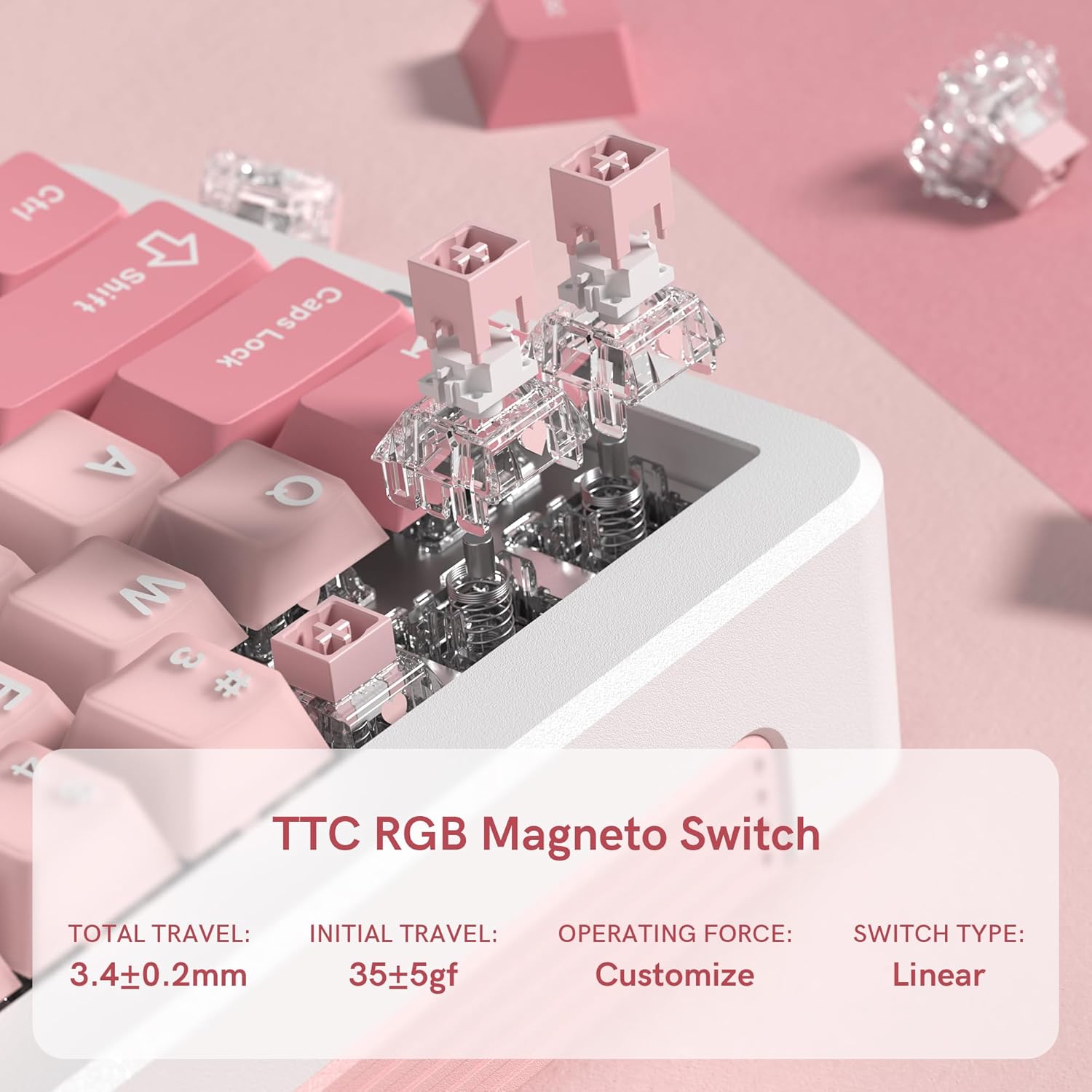
ചിത്രം: ഒരു ക്ലോസ്-അപ്പ് view of the TTC RGB Magneto Switches, highlighting their design and key specifications such as total travel and operating force.
4.3 RGB ലൈറ്റിംഗ് കസ്റ്റമൈസേഷൻ
The keyboard features per-key RGB lighting. Lighting effects, colors, and brightness can be adjusted using the FL ESPORTS software. Some basic lighting modes may be accessible via Fn key combinations.
4.4 സോഫ്റ്റ്വെയർ കോൺഫിഗറേഷൻ
The dedicated software provides comprehensive control over your keyboard:
- കീ റീമാപ്പിംഗ്: Assign custom functions to any key.
- മാക്രോ മാനേജ്മെന്റ്: Create and assign complex macros for gaming or productivity.
- പ്രകടന ക്രമീകരണങ്ങൾ: Fine-tune actuation points, rapid trigger sensitivity, and polling rate.
- ലൈറ്റിംഗ് ക്രമീകരണങ്ങൾ: Customize RGB effects, colors, and brightness.
- ഫേംവെയർ അപ്ഡേറ്റുകൾ: Keep your keyboard updated with the latest features and improvements.

Image: Multiple screenshots illustrating the FL ESPORTS software interface, showing options for key configuration, lighting settings, performance adjustments, and macro management.
5. പരിപാലനം
5.1 വൃത്തിയാക്കൽ
നിങ്ങളുടെ കീബോർഡിന്റെ രൂപഭാവവും പ്രവർത്തനക്ഷമതയും നിലനിർത്താൻ:
- കീബോർഡ് പ്രതലം തുടയ്ക്കാൻ മൃദുവായതും ഉണങ്ങിയതുമായ തുണി ഉപയോഗിക്കുക.
- കൂടുതൽ ആഴത്തിലുള്ള വൃത്തിയാക്കലിനായി, നൽകിയിരിക്കുന്ന കീക്യാപ്പ് പുള്ളർ ഉപയോഗിച്ച് കീക്യാപ്പുകൾ നീക്കം ചെയ്ത് അടിഭാഗം കംപ്രസ് ചെയ്ത വായു അല്ലെങ്കിൽ ഒരു ചെറിയ ബ്രഷ് ഉപയോഗിച്ച് വൃത്തിയാക്കുക.
- കഠിനമായ രാസവസ്തുക്കളോ ഉരച്ചിലുകളോ ഉപയോഗിക്കുന്നത് ഒഴിവാക്കുക.
5.2 കീക്യാപ്പ്, സ്വിച്ച് നീക്കം ചെയ്യൽ
The keyboard supports hot-swappable switches. Use the provided tools for safe removal:
- കീക്യാപ്പ് നീക്കംചെയ്യൽ: Gently attach the keycap puller to the keycap and pull straight up.
- സ്വിച്ച് നീക്കംചെയ്യൽ: After removing the keycap, use the switch puller to grasp the top and bottom clips of the switch and pull straight up. Ensure the switch is properly aligned when reinserting.
6. പ്രശ്നപരിഹാരം
- കീബോർഡ് പ്രതികരിക്കുന്നില്ല:
- USB-C കേബിൾ കീബോർഡിലേക്കും കമ്പ്യൂട്ടറിലേക്കും സുരക്ഷിതമായി ബന്ധിപ്പിച്ചിട്ടുണ്ടെന്ന് ഉറപ്പാക്കുക.
- മറ്റൊരു USB പോർട്ടിലേക്ക് കണക്റ്റുചെയ്യാൻ ശ്രമിക്കുക.
- നിങ്ങളുടെ കമ്പ്യൂട്ടർ പുനരാരംഭിക്കുക.
- RGB ലൈറ്റിംഗ് പ്രവർത്തിക്കുന്നില്ല/തെറ്റാണ്:
- Check the lighting settings in the FL ESPORTS software.
- കീബോർഡ് ഫേംവെയർ കാലികമാണെന്ന് ഉറപ്പാക്കുക.
- കീകൾ രജിസ്റ്റർ ചെയ്യുന്നില്ല അല്ലെങ്കിൽ ഇരട്ട-ടൈപ്പിംഗ് ഇല്ല:
- ബാധിച്ച സ്വിച്ചിന് ചുറ്റും അവശിഷ്ടങ്ങൾ നീക്കം ചെയ്യാൻ വൃത്തിയാക്കുക.
- If the issue persists, consider replacing the switch using the provided switch puller.
- Verify actuation settings in the software.
- കീബോർഡ് കണ്ടെത്താത്ത സോഫ്റ്റ്വെയർ:
- സോഫ്റ്റ്വെയർ ഏറ്റവും പുതിയ പതിപ്പാണെന്ന് ഉറപ്പാക്കുക.
- സോഫ്റ്റ്വെയർ വീണ്ടും ഇൻസ്റ്റാൾ ചെയ്യാൻ ശ്രമിക്കുക.
- തടസ്സപ്പെടുത്തുന്ന ഏതെങ്കിലും ആന്റിവൈറസ് അല്ലെങ്കിൽ ഫയർവാൾ സോഫ്റ്റ്വെയർ താൽക്കാലികമായി പ്രവർത്തനരഹിതമാക്കുക.
7 സ്പെസിഫിക്കേഷനുകൾ
| ഫീച്ചർ | സ്പെസിഫിക്കേഷൻ |
|---|---|
| മോഡൽ | GEO 65 HE |
| ബ്രാൻഡ് | എഫ്എൽ എസ്പോർട്സ് |
| കീബോർഡ് ലേഔട്ട് | 60% (QWERTY) |
| സ്വിച്ച് തരം | Hall Effect Magnetic Switches (TTC RGB Magneto Switch) |
| ആക്ച്വേഷൻ | ക്രമീകരിക്കാവുന്ന |
| പ്രത്യേക സവിശേഷതകൾ | Rapid Trigger, Aluminum Alloy Case, RGB Backlighting, PBT Keycaps |
| കണക്റ്റിവിറ്റി | യുഎസ്ബി-സി (വയേർഡ്) |
| അനുയോജ്യമായ ഉപകരണങ്ങൾ | പിസി (വിൻഡോസ്/മാക്) |
| പോളിംഗ് നിരക്ക് | 8KHz |
| സ്കാൻ നിരക്ക് | 256K |
| കുറഞ്ഞ ലേറ്റൻസി | 0.125മി.എസ് |
| Rapid Trigger (RT) | 0.005 മി.മീ |
| സീറോ ഡെഡ് സോൺ | 0 |
| ഇനത്തിൻ്റെ ഭാരം | 1.2 പൗണ്ട് |
| പാക്കേജ് അളവുകൾ | 10 x 2.7 x 2 ഇഞ്ച് |
| Keyboard Dimensions (Approx.) | 323.3mm (L) x 118.3mm (W) x 34mm (H) |
Image: Top and side views of the FL ESPORTS GEO 65 HE keyboard with approximate dimensions indicated in millimeters.
8. വാറൻ്റിയും പിന്തുണയും
For warranty information and technical support, please refer to the official FL ESPORTS website or contact their customer service directly. Standard return policies typically allow for returns within 30 days of purchase. Extended protection plans may be available from your retailer.


