1. ആമുഖം
The TP-Link Deco X20-OUTDOOR is an AX1800 Dual-Band Wi-Fi 6 outdoor mesh extender unit designed to expand your existing Deco mesh Wi-Fi network to outdoor areas. It provides reliable Wi-Fi coverage up to 2,200 sq. ft. and supports over 150 devices, ensuring seamless connectivity for various outdoor activities. The unit features an IP65 weatherproof design, making it suitable for harsh outdoor conditions.
ബോക്സിൽ എന്താണുള്ളത്
- 1 × Deco X20-Outdoor unit
- 1 × AC Power Cord
- 1 × RJ45 Ethernet cable
- Wall/Pole Mounting Kit (Pole Mounting Strap, Plastic Wall Anchors, Self-tapping Screws)
- ഇൻസ്റ്റലേഷൻ ഗൈഡ്

Image 1.1: TP-Link Deco X20-OUTDOOR unit.
2. സജ്ജീകരണവും ഇൻസ്റ്റാളേഷനും
Follow these steps to set up your Deco X20-OUTDOOR unit and integrate it into your existing Deco mesh network.
2.1 ഉപകരണം പവർ ചെയ്യുന്നു
The Deco X20-OUTDOOR supports two power options:
- പവർ ഓവർ ഇഥർനെറ്റ് (PoE+): Connect an Ethernet cable from a PoE+ enabled switch or injector to one of the Gigabit Ethernet ports on the Deco unit. This provides both power and data connectivity.
- എസി പവർ സപ്ലൈ: Use the included AC power cord to connect the Deco unit to a standard electrical outlet.

ചിത്രം 2.1: താഴെ view of the Deco X20-OUTDOOR unit, highlighting the 2x PoE Gigabit Ports and AC Power Supply input.
2.2 മൗണ്ടിംഗ് ഓപ്ഷനുകൾ
The Deco X20-OUTDOOR offers flexible mounting options for various environments:
- പോൾ മൗണ്ട്: Use the provided pole mounting strap to secure the unit to a pole.
- വാൾ മൗണ്ട്: Use the plastic wall anchors and self-tapping screws to attach the unit to a wall.
- ടേബിൾടോപ്പ്: Place the unit on a flat surface for indoor or sheltered outdoor use.

Image 2.2: Multi-placement options for the Deco X20-OUTDOOR, including pole, wall, and tabletop setups.
2.3 Initial Configuration with the Deco App
The Deco app guides you through the setup process. Ensure your main Deco unit is already set up and functioning.
- ബന്ധിപ്പിക്കുക: Power on the Deco X20-OUTDOOR unit and connect it to your modem or an existing Deco unit via Ethernet if using a wired backhaul.
- ഡൗൺലോഡ്: App Store (iOS) അല്ലെങ്കിൽ Google Play Store (Android) ൽ നിന്ന് TP-Link Deco ആപ്പ് ഡൗൺലോഡ് ചെയ്യുക.
- കോൺഫിഗർ ചെയ്യുക: Open the Deco app, log in or create a TP-Link ID, and follow the in-app instructions to add your new Deco X20-OUTDOOR unit to your mesh network. The app will detect the new unit and guide you through its integration.

Image 2.3: Visual guide for the Deco app setup process, showing connection, app download, and configuration steps.
3. പ്രവർത്തന നിർദ്ദേശങ്ങൾ
Understand the key features and functionalities of your Deco X20-OUTDOOR unit.
3.1 Wi-Fi 6 AX1800 Performance
The Deco X20-OUTDOOR utilizes Wi-Fi 6 technology to deliver high-speed dual-band connectivity:
- 5 GHz ബാൻഡ്: Up to 1201 Mbps for demanding tasks like streaming and gaming.
- 2.4 GHz ബാൻഡ്: Up to 574 Mbps for general browsing and smart home devices.
This ensures efficient data transfer and reduced latency across your network.
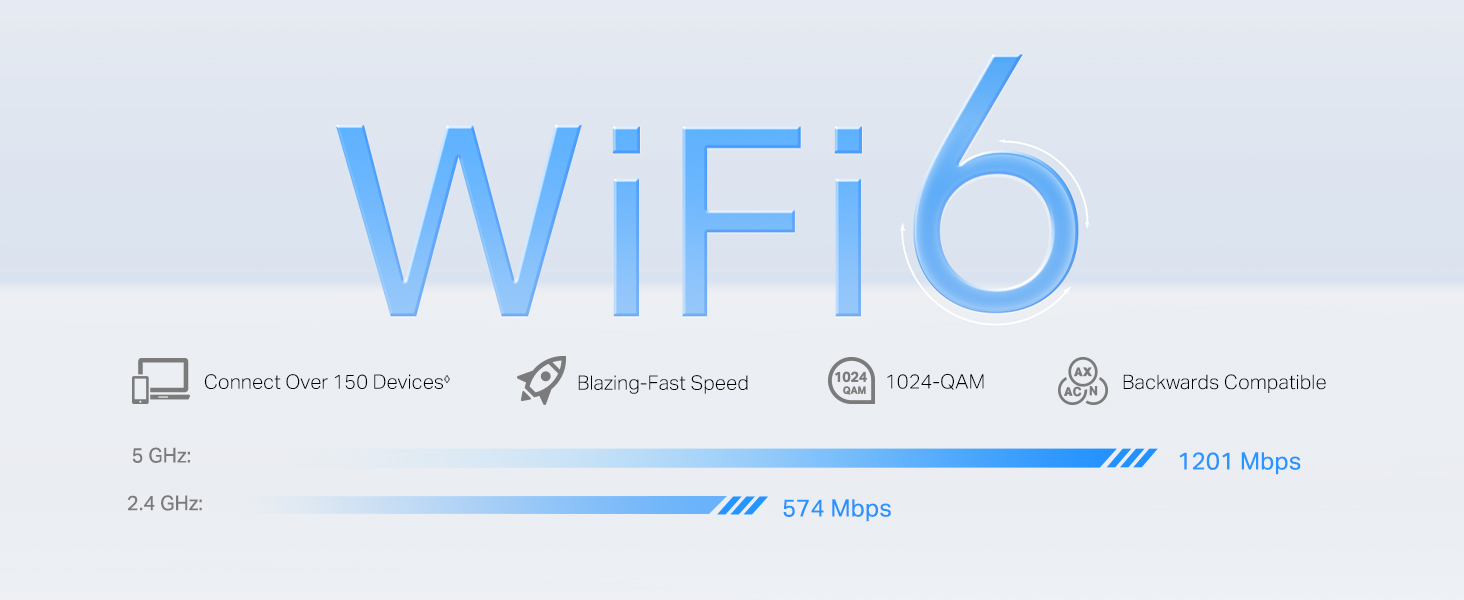
Image 3.1: Wi-Fi 6 speed capabilities, showing maximum theoretical speeds for 5 GHz and 2.4 GHz bands.
3.2 Seamless Roaming and AI-Driven Mesh
The Deco mesh system creates a unified network with a single Wi-Fi name. As you move between indoor and outdoor spaces, your devices automatically connect to the Deco unit providing the strongest signal, ensuring uninterrupted streaming and browsing. The AI-Driven Mesh technology continuously learns and adapts to your network environment for optimal performance.

Image 3.2: Seamless roaming functionality, depicting continuous Wi-Fi coverage indoors and outdoors.
3.3 ഹോംഷീൽഡ് സുരക്ഷ
ടിപി-ലിങ്ക് ഹോംഷീൽഡ് സമഗ്രമായ നെറ്റ്വർക്ക് പരിരക്ഷണവും മാനേജ്മെന്റ് സവിശേഷതകളും നൽകുന്നു:
- നെറ്റ്വർക്ക് പരിരക്ഷ: Guards against cyber threats with features like DoS protection and SPI firewall.
- Robust Parental Controls: Manage internet access, filter content, and set time limits for family members.
- സേവനത്തിൻ്റെ ഗുണനിലവാരം (QoS): Prioritize devices or activities to ensure optimal performance for critical applications.
- സമഗ്രമായ റിപ്പോർട്ടുകൾ: Monitor network usage and security events.
നെറ്റ്വർക്ക് സംരക്ഷണം

രക്ഷാകർതൃ നിയന്ത്രണങ്ങൾ
സേവനത്തിൻ്റെ ഗുണനിലവാരം (QoS)

സമഗ്രമായ റിപ്പോർട്ടുകൾ
4. പരിപാലനം
Proper maintenance ensures the longevity and optimal performance of your Deco X20-OUTDOOR unit.
4.1 IP65 Weatherproof Design
The Deco X20-OUTDOOR features an IP65 rating, indicating its resistance to dust ingress and protection against water jets from any direction. This design allows the unit to operate reliably in various outdoor weather conditions, including rain and dust.

Image 4.1: IP65 Weatherproof Enclosure for Outdoor Environments, demonstrating resistance to dust and water.
4.2 ശുചീകരണവും പരിചരണവും
- Wipe the unit with a soft, dry cloth. Do not use liquid cleaners or aerosol sprays.
- Ensure all ports are free from debris, especially if the unit is exposed to dusty environments.
- Avoid placing the unit near heat sources or in direct sunlight for prolonged periods, despite its outdoor rating.
4.3 ഫേംവെയർ അപ്ഡേറ്റുകൾ
Regularly check for and install firmware updates via the Deco app. Firmware updates provide performance improvements, new features, and security enhancements.
5. പ്രശ്നപരിഹാരം
If you encounter issues with your Deco X20-OUTDOOR unit, consider the following troubleshooting steps:
- ഇൻ്റർനെറ്റ് കണക്ഷൻ ഇല്ല: Verify that your main Deco unit has an active internet connection. Check all Ethernet cable connections. Restart your modem, main Deco unit, and the outdoor unit.
- ദുർബലമായ വൈ-ഫൈ സിഗ്നൽ: Ensure the outdoor unit is placed within the effective range of your existing Deco network. Adjust its position to minimize obstructions.
- ഉപകരണം കണക്റ്റുചെയ്യുന്നില്ല: Confirm that the Wi-Fi password is correct. Try restarting the device you are trying to connect. Check the Deco app for any blocked devices.
- ഡെക്കോ ആപ്പ് പ്രശ്നങ്ങൾ: Ensure your Deco app is updated to the latest version. Try force-closing and reopening the app.
- LED ഇൻഡിക്കേറ്റർ നില: Refer to the Deco app or the product's online support page for explanations of different LED indicator colors and patterns, which can help diagnose issues.
For further assistance, consult the TP-Link support webസൈറ്റ് അല്ലെങ്കിൽ ഉപഭോക്തൃ സേവനവുമായി ബന്ധപ്പെടുക.
6 സ്പെസിഫിക്കേഷനുകൾ
| ഉൽപ്പന്ന അളവുകൾ | 4.8 x 4.3 x 8.5 ഇഞ്ച് |
| ഇനത്തിൻ്റെ ഭാരം | 1.98 പൗണ്ട് |
| മോഡലിൻ്റെ പേര് | AX1800 ഔട്ട്ഡോർ/ഇൻഡോർ മെഷ് Wi-Fi 6 യൂണിറ്റ് |
| പ്രത്യേക സവിശേഷതകൾ | Access Point Mode, Alexa Compatible, Guest Mode, Parental Control, QoS |
| ഫ്രീക്വൻസി ബാൻഡ് ക്ലാസ് | ഡ്യുവൽ-ബാൻഡ് |
| വയർലെസ് കമ്മ്യൂണിക്കേഷൻ സ്റ്റാൻഡേർഡ് | 802.11ac, 802.11ax, 802.11b, 802.11g, 802.11n |
| അനുയോജ്യമായ ഉപകരണങ്ങൾ | പേഴ്സണൽ കമ്പ്യൂട്ടർ, സെക്യൂരിറ്റി ക്യാമറ, സ്മാർട്ട് ടെലിവിഷൻ, സ്മാർട്ട്ഫോൺ, ടാബ്ലെറ്റ് |
| കണക്റ്റിവിറ്റി ടെക്നോളജി | ഇഥർനെറ്റ്, വൈ-ഫൈ |
| നിറം | വെള്ള |
| നിർമ്മാതാവ് | ടിപി-ലിങ്ക് |
| പ്രവർത്തന താപനില | -22°F മുതൽ 104°F വരെ (-30°C മുതൽ 40°C വരെ) |
| പ്രവർത്തന ഹ്യുമിഡിറ്റി | 10% മുതൽ 90% വരെ RH, നോൺ-കണ്ടൻസിങ് |
7. വാറൻ്റിയും പിന്തുണയും
TP-Link products come with a limited warranty. For detailed warranty information, product support, and technical assistance, please visit the official TP-Link webസൈറ്റ് അല്ലെങ്കിൽ നിങ്ങളുടെ വാങ്ങലിൽ ഉൾപ്പെടുത്തിയിരിക്കുന്ന ഡോക്യുമെന്റേഷൻ പരിശോധിക്കുക.
നിങ്ങൾക്ക് കൂടുതൽ ഉറവിടങ്ങളും പതിവുചോദ്യങ്ങളും ഇവിടെ കണ്ടെത്താനാകും TP-Link Amazon Store.
8 പ്രധാനപ്പെട്ട സുരക്ഷാ വിവരങ്ങൾ
Please read and follow all safety instructions provided in the installation guide. The following legal disclaimer applies:
The ◈ Maximum wireless signal rates are the physical rates derived from IEEE Standard 802.11 specifications. Actual wireless data throughput and wireless coverage, and quantity of connected devices are not guaranteed and will vary as a result of network conditions, client limitations, and environmental factors, including building materials, obstacles, volume and density of traffic, and client location. Clients need to support 802.11k/v/r and may require additional set up. Performance may vary depending on the client device. ☃Protection against lightning and electro-static discharge may be achieved through proper product setup, grounding and cable shielding. Refer to the instruction manual and consult an IT professional to assist with setting up this product. *HomeShield includes the Free Basic Plan. Fees apply for the Pro Plan. Visit tp-link.com/homeshield for more information. Some features are under development and will be supported with subsequent software updates. ▲WiFi generations represent the wireless standard IEEE 802.11 a/b/g/n/ac/ax/be. Users may require an extra modem device that is compatible with their internet service provider to gain internet access. Actual network speed may be limited by the rate of the product's Ethernet WAN or LAN port, the rate supported by the network cable, Internet service provider factors and other environmental conditions. This Deco may not support all the mandatory features as ratified in IEEE 802.11ax specification. Further software upgrades for feature availability may be required.


