1. ആമുഖം
വാങ്ങിയതിന് നന്ദി.asing the CROSSIO 23'' Outdoor Ceiling Fan with Lights. This manual provides essential information for the safe installation, operation, and maintenance of your new fan. Please read these instructions thoroughly before installation and retain them for future reference.
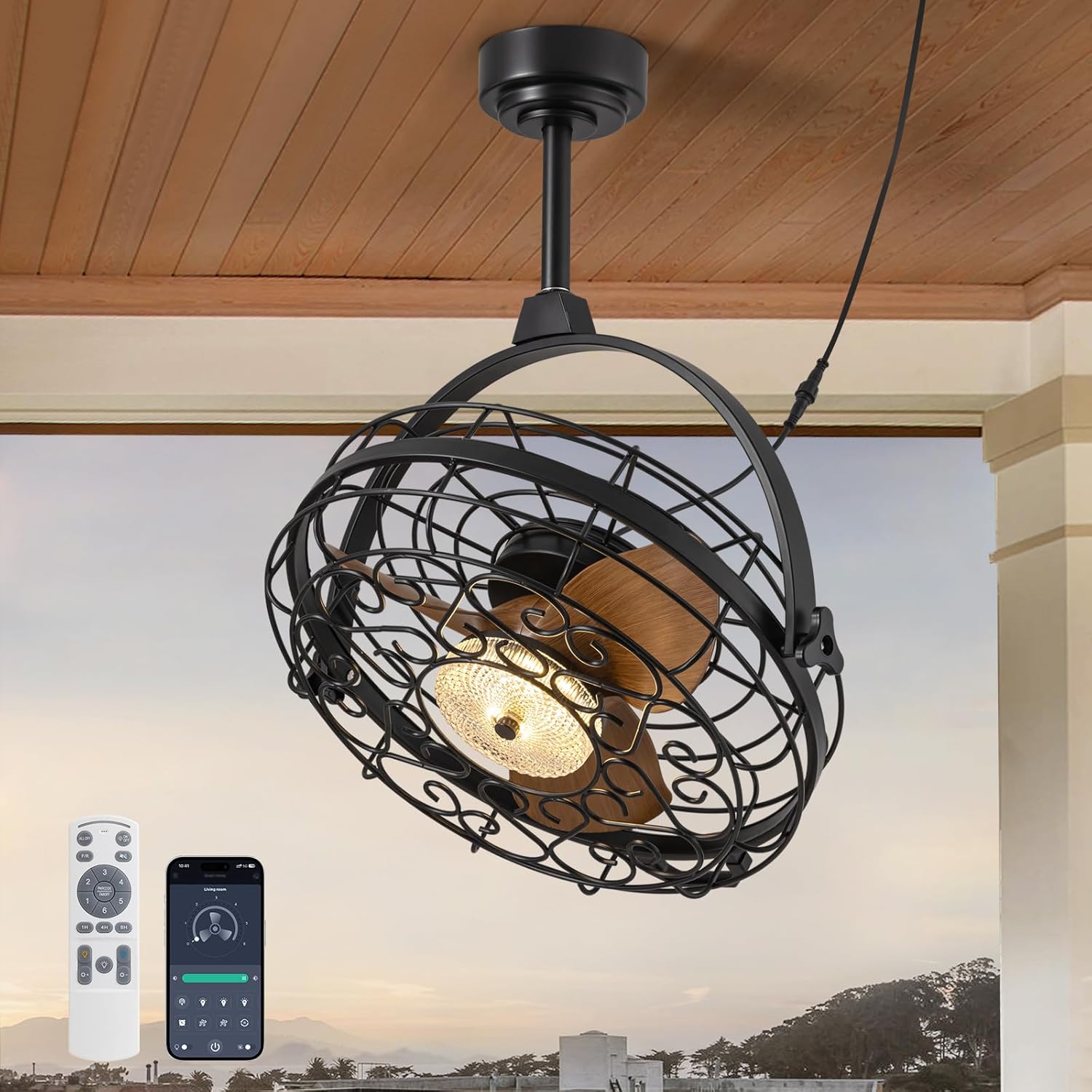
Image 1.1: The CROSSIO 23-inch outdoor ceiling fan, showcasinജി അതിന്റെ ഡിസൈൻ, റിമോട്ട് കൺട്രോൾ, സ്മാർട്ട്ഫോൺ ആപ്പ് ഇന്റർഫേസ്.
പ്രധാന സവിശേഷതകൾ:
- Outdoor & Indoor Ready: Wet-rated design suitable for patios, gazebos, covered porches, living rooms, and bedrooms. Features a sealed motor and rust-proof materials for safe operation in wet conditions.
- Dimmable Fan Light: Integrated LED light with three adjustable color temperatures (Warm 3000K, Natural 4500K, Cool 6000K) and seamless dimming from 10% to 100%.
- Multiple Ceiling Compatibility: Designed for various mounting options including hanging with hooks, fixing to solid wood ceilings, or mounting to an outlet box. Includes two down rod lengths for flexible installation heights.
- Dual 360° Rotation & Reversible Motor: Manual 360° vertical and horizontal adjustment to direct airflow. Reversible motor function provides downdraft cooling in summer and updraft warm air circulation in winter.
- 6-Speed & Timer Function: Six customizable fan speeds and a convenient timer function (1, 4, or 8 hours) for automatic shut-off.
- നിയന്ത്രണ രീതികൾ: Operable via included remote control and a dedicated smartphone application.
2 സുരക്ഷാ വിവരങ്ങൾ
Please observe the following safety precautions to reduce the risk of fire, electric shock, or personal injury.
- ഇൻസ്റ്റാൾ ചെയ്യുന്നതിനും ഉപയോഗിക്കുന്നതിനും മുമ്പ് എല്ലാ നിർദ്ദേശങ്ങളും ശ്രദ്ധാപൂർവ്വം വായിക്കുക.
- Ensure the power supply is disconnected at the circuit breaker before installation or servicing.
- All electrical connections must be in accordance with local codes, ordinances, and the National Electric Code (NEC). If you are unfamiliar with electrical wiring, consult a qualified electrician.
- The fan must be mounted to a structure capable of supporting a minimum of 35 lbs (15.9 kg).
- കേടായ കോർഡ് അല്ലെങ്കിൽ പ്ലഗ് ഉപയോഗിച്ച് ഫാൻ പ്രവർത്തിപ്പിക്കരുത്.
- ഫാൻ പ്രവർത്തിക്കുമ്പോൾ വിരലുകളോ വസ്തുക്കളോ ഫാൻ ബ്ലേഡുകളിൽ വയ്ക്കുന്നത് ഒഴിവാക്കുക.
- This fan is wet-rated for outdoor use in covered areas. Do not expose to direct heavy rain or submerge in water.
- തറയിൽ നിന്ന് ബ്ലേഡുകൾ കുറഞ്ഞത് 7 അടി (2.13 മീറ്റർ) ഉയരത്തിൽ ഫാൻ സ്ഥാപിച്ചിട്ടുണ്ടെന്ന് ഉറപ്പാക്കുക.
- നിർമ്മാതാവ് വ്യക്തമാക്കിയ മാറ്റിസ്ഥാപിക്കാനുള്ള ഭാഗങ്ങൾ മാത്രം ഉപയോഗിക്കുക.
3. പാക്കേജ് ഉള്ളടക്കം
ഇൻസ്റ്റാളേഷൻ ആരംഭിക്കുന്നതിന് മുമ്പ് എല്ലാ ഘടകങ്ങളും നിലവിലുണ്ടെന്നും കേടുപാടുകൾ സംഭവിച്ചിട്ടില്ലെന്നും ഉറപ്പാക്കുക. ഏതെങ്കിലും ഭാഗങ്ങൾ നഷ്ടപ്പെട്ടാലോ കേടുപാടുകൾ സംഭവിച്ചാലോ, ഉപഭോക്തൃ പിന്തുണയുമായി ബന്ധപ്പെടുക.
- സീലിംഗ് ഫാൻ യൂണിറ്റ് (ഇന്റഗ്രേറ്റഡ് ലൈറ്റ് ഉള്ളത്)
- റിമോട്ട് കൺട്രോൾ
- Mounting Hardware Kit (screws, anchors, brackets)
- Down Rods (2 lengths)
- നിർദ്ദേശ മാനുവൽ (ഈ പ്രമാണം)
4 സ്പെസിഫിക്കേഷനുകൾ
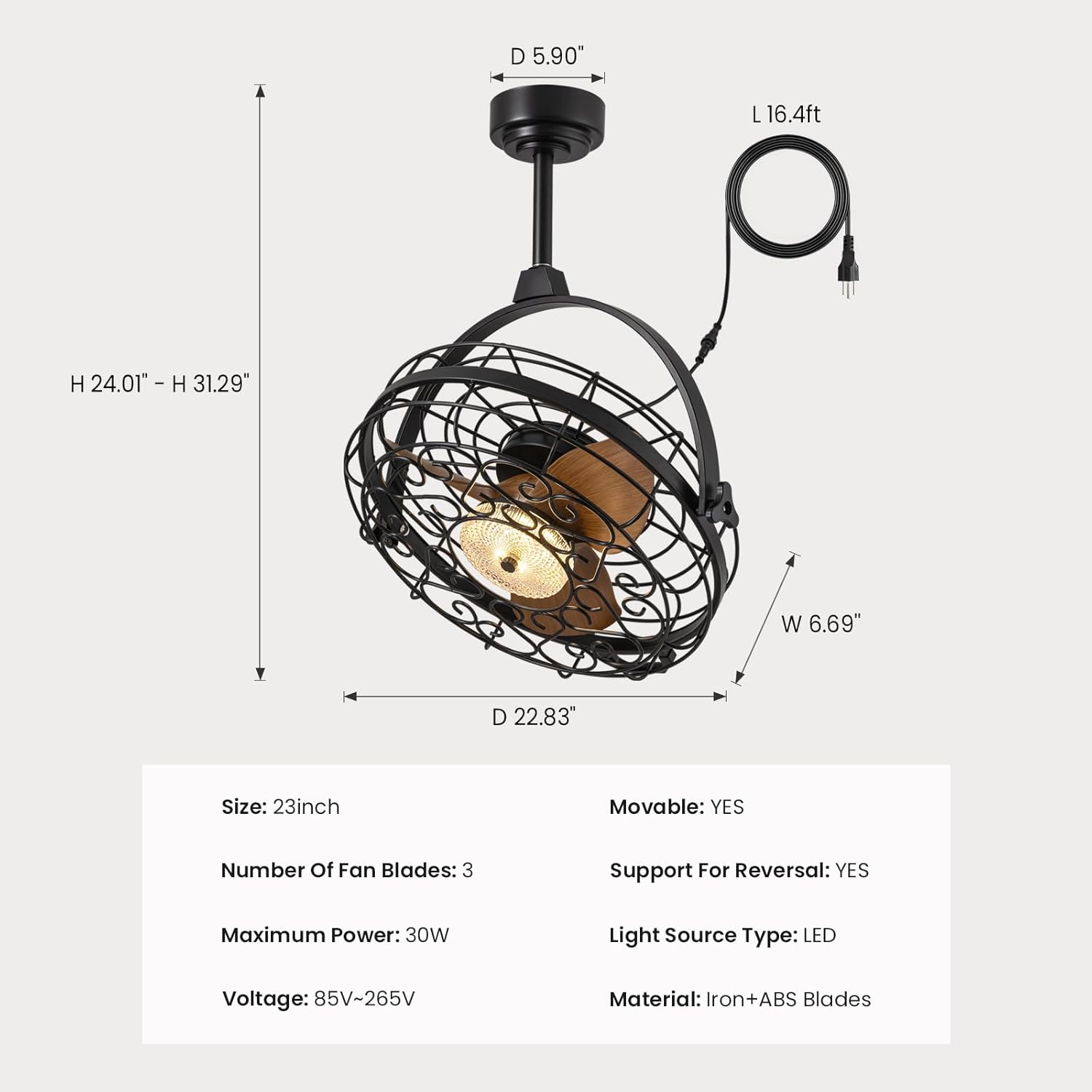
Image 4.1: Detailed dimensions of the fan unit, including height, width, and depth.
| ഫീച്ചർ | സ്പെസിഫിക്കേഷൻ |
|---|---|
| മോഡലിൻ്റെ പേര് | FS8912-01 |
| ബ്രാൻഡ് | ക്രോസിയോ |
| വലിപ്പം | 23 ഇഞ്ച് |
| ഉൽപ്പന്ന അളവുകൾ | 5"D x 20"W x 20"H |
| ഇനത്തിൻ്റെ ഭാരം | 22.5 പൗണ്ട് |
| Number of Fan Blades | 3 |
| പരമാവധി പവർ | 30W |
| വാല്യംtage | 85V-265V |
| പവർ ഉറവിടം | AC |
| പ്രകാശ സ്രോതസ്സ് തരം | എൽഇഡി |
| മെറ്റീരിയൽ | Iron + ABS Blades |
| നിയന്ത്രണ രീതി | ആപ്പ്, റിമോട്ട് |
| ഇൻഡോർ/ഔട്ട്ഡോർ ഉപയോഗം | ഇൻഡോർ, ഔട്ട്ഡോർ (വെറ്റ് റേറ്റഡ്) |
| പ്രത്യേക സവിശേഷതകൾ | Adjustable Color Temperature, Dimmable, Timer, Waterproof, 360° Rotation, Reversible Motor |
| യു.പി.സി | 733241251473 |
5. ഇൻസ്റ്റലേഷൻ നിർദ്ദേശങ്ങൾ
Before installation, ensure the power is turned off at the circuit breaker. Follow these steps for your chosen mounting method.

Image 5.1: Three available installation options: mounting to an outlet box, fixing to solid wood, or hanging with a ceiling hook.
General Steps for All Installations:
- മൗണ്ടിംഗ് ലൊക്കേഷൻ തയ്യാറാക്കുക: Ensure the ceiling structure can support the fan's weight (minimum 35 lbs).
- ഡൗൺ വടി കൂട്ടിച്ചേർക്കുക: Attach the desired length of down rod to the fan motor housing.
- പവർ കോർഡ് ബന്ധിപ്പിക്കുക: The fan comes with a 16ft flexible cord and a 3-prong plug. Ensure the power outlet is within reach and properly grounded.

Image 5.2: The 16ft flexible power cord with a 3-prong plug for easy connection.
Option 1: Outlet Box Mounting
- Secure the mounting bracket to a UL-listed outlet box (not included) that is rated for fan support.
- Attach the fan's down rod assembly to the mounting bracket.
- Make electrical connections (live, neutral, ground) from the fan to the outlet box wiring.
Option 2: Solid Wood Ceiling Mounting
- Drill pilot holes into the solid wood ceiling beam.
- Secure the mounting bracket directly to the wood using appropriate screws (provided in hardware kit).
- Attach the fan's down rod assembly to the mounting bracket.
Option 3: Ceiling Hook Hanging
- Install a sturdy ceiling hook (provided in hardware kit) into a secure ceiling joist or beam.
- Hang the fan unit from the ceiling hook using the integrated hanging mechanism.

Image 5.3: The fan is designed for easy hanging and removal, particularly with the ceiling hook option.
6. പ്രവർത്തന നിർദ്ദേശങ്ങൾ
The CROSSIO ceiling fan can be controlled using the included remote control or a smartphone application.

Image 6.1: The remote control and smartphone application provide comprehensive control over fan and light functions.
വിദൂര നിയന്ത്രണ പ്രവർത്തനങ്ങൾ:
- ലൈറ്റ് സ്വിച്ച്: ലൈറ്റ് ഓൺ/ഓഫ് ചെയ്യുന്നു.
- കാറ്റിന്റെ വേഗത ക്രമീകരണം (1-6): Increases or decreases fan speed.
- Timer Button (1H/4H/8H): Sets the fan to automatically turn off after 1, 4, or 8 hours.
- വർണ്ണ താപനില ക്രമീകരണം: Cycles through Warm (3000K), Natural (4500K), and Cool (6000K) light.
- തെളിച്ച ക്രമീകരണം (+/-): Dims or brightens the light from 10% to 100%.
- F/R (Forward/Reverse) Button: Changes the direction of fan blade rotation.
സ്മാർട്ട്ഫോൺ ആപ്പ് നിയന്ത്രണം:
Download the CROSSIO app from your device's app store. Follow the in-app instructions to pair your fan. The app provides all the functions available on the remote control, plus additional smart features.
ഫാൻ സ്പീഡ് ക്രമീകരണങ്ങൾ:
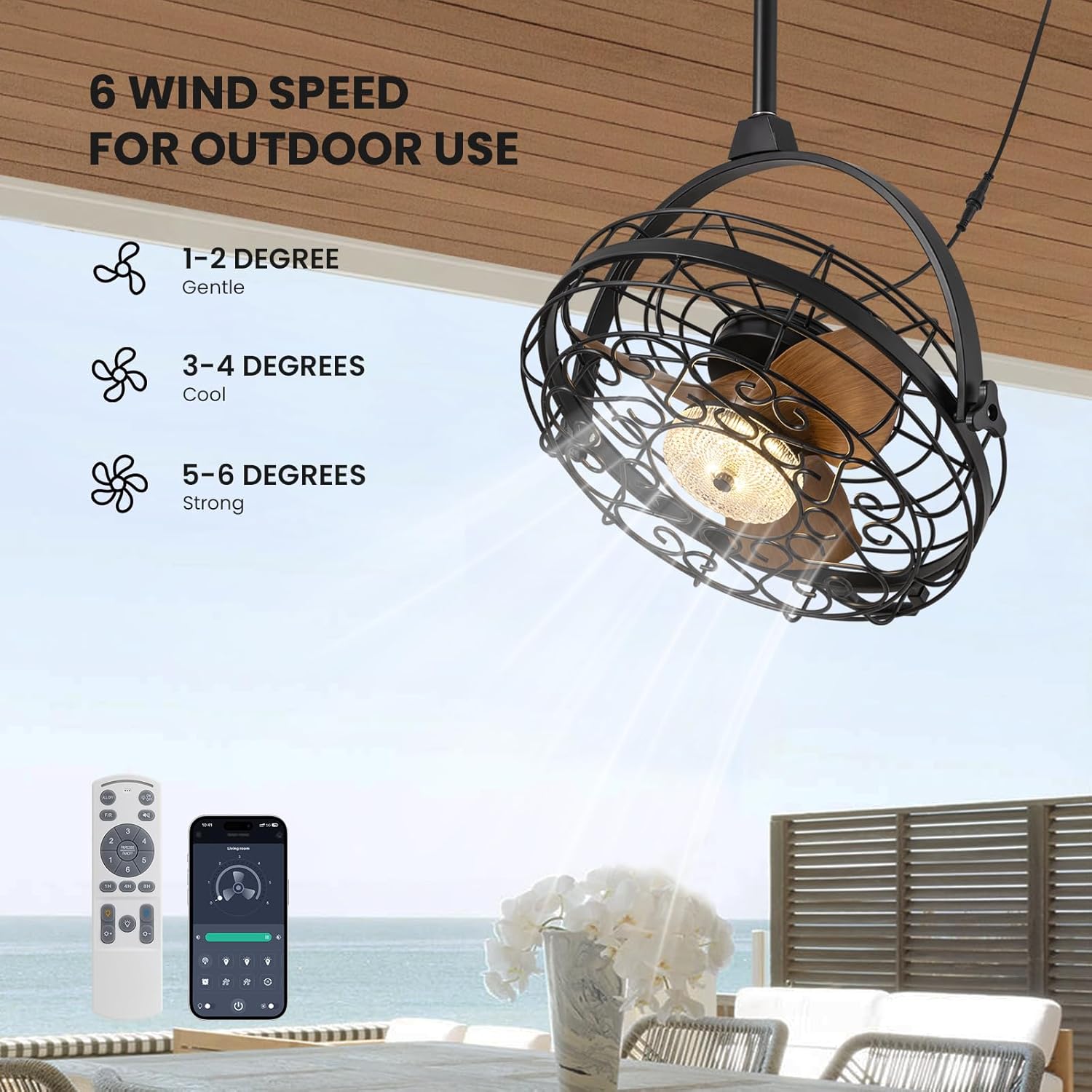
Image 6.2: The fan offers 6 distinct wind speed settings, from gentle to strong.
- വേഗത 1-2: Gentle airflow, ideal for quiet environments or light breeze.
- വേഗത 3-4: Cool airflow, suitable for moderate temperatures.
- വേഗത 5-6: Strong airflow, effective for warmer conditions or larger areas.
Dimmable Light Operation:

Image 6.3: The integrated LED light can be adjusted to three color temperatures and dimmed from 10% to 100% brightness.
Use the color temperature button to cycle through 3000K (Warm), 4500K (Natural), and 6000K (Cool) settings. Use the brightness adjustment buttons to set the light intensity from 10% to 100%.
360° റൊട്ടേഷൻ സവിശേഷത:

Image 6.4: The fan head can be manually adjusted 360 degrees both horizontally and vertically to direct airflow precisely.
The fan head can be manually rotated 360 degrees horizontally and vertically. This allows you to direct the airflow to specific areas as needed, providing flexible cooling.
റിവേഴ്സിബിൾ മോട്ടോർ പ്രവർത്തനം:
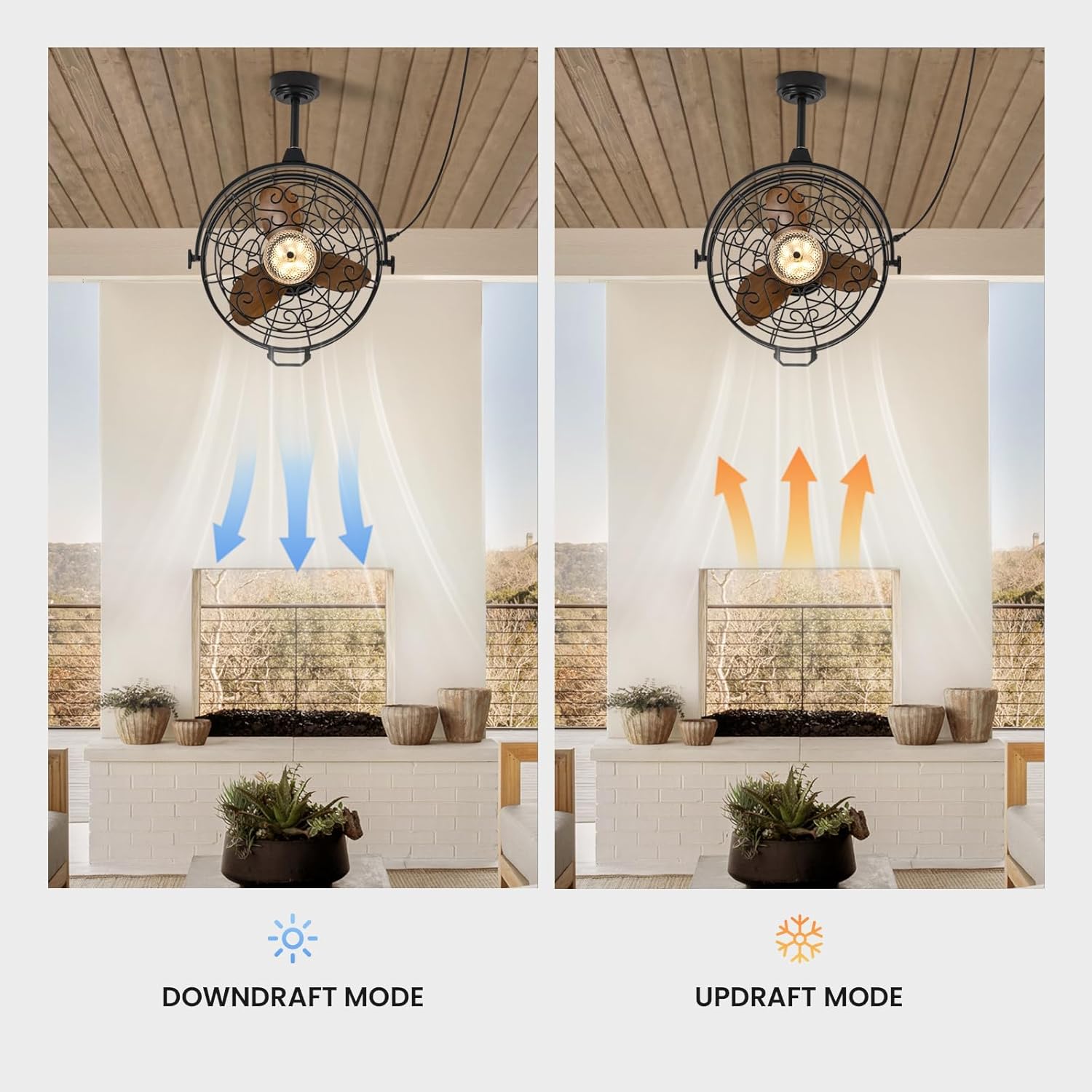
Image 6.5: The fan operates in downdraft mode for cooling in summer and updraft mode for circulating warm air in winter.
Use the F/R button on the remote or the corresponding setting in the app to switch the fan's rotation direction:
- ഡൗൺട്രാഫ്റ്റ് മോഡ് (വേനൽക്കാലം): ബ്ലേഡുകൾ എതിർ ഘടികാരദിശയിൽ കറങ്ങുന്നു, വായുവിനെ താഴേക്ക് തള്ളിക്കൊണ്ട് ഒരു തണുപ്പിക്കൽ പ്രഭാവം സൃഷ്ടിക്കുന്നു.
- അപ്ഡ്രാഫ്റ്റ് മോഡ് (ശീതകാലം): ബ്ലേഡുകൾ ഘടികാരദിശയിൽ കറങ്ങുന്നു, സീലിംഗിന് സമീപം കുടുങ്ങിക്കിടക്കുന്ന ഊഷ്മള വായു മുകളിലേക്ക് വലിച്ചെടുക്കുന്നു.
7. പരിപാലനം
Regular maintenance ensures optimal performance and extends the lifespan of your fan.
- വൃത്തിയാക്കൽ: Wipe the fan housing and blades with a soft, damp cloth. Do not use abrasive cleaners or solvents. Ensure the fan is completely dry before operating.
- പൊടിയിടൽ: Periodically dust the fan blades and light fixture to prevent buildup that can affect performance and light output.
- പരിശോധനകൾ: Regularly check all connections and mounting hardware for tightness. Ensure the power cord is free from damage.
- പ്രകാശ സ്രോതസ്സ്: The LED light source is integrated and generally not user-replaceable. If the light fails, contact customer support.
Caution: Always disconnect power before cleaning or performing any maintenance.
8. പ്രശ്നപരിഹാരം
If you encounter issues with your fan, refer to the following common problems and solutions.
| പ്രശ്നം | സാധ്യമായ കാരണം | പരിഹാരം |
|---|---|---|
| ഫാൻ ഓണാക്കുന്നില്ല | വൈദ്യുതി വിതരണം ഇല്ല Remote control battery low/dead Fan not properly plugged in | സർക്യൂട്ട് ബ്രേക്കറും വാൾ സ്വിച്ചും പരിശോധിക്കുക റിമോട്ട് കൺട്രോൾ ബാറ്ററികൾ മാറ്റിസ്ഥാപിക്കുക പ്രവർത്തിക്കുന്ന ഒരു ഔട്ട്ലെറ്റിൽ പ്ലഗ് പൂർണ്ണമായും ചേർത്തിട്ടുണ്ടെന്ന് ഉറപ്പാക്കുക. |
| ലൈറ്റ് ഓണാക്കുന്നില്ല | Light switch off LED പരാജയം | Press the light switch button on the remote/app സഹായത്തിന് ഉപഭോക്തൃ പിന്തുണയുമായി ബന്ധപ്പെടുക |
| ഫാൻ അമിതമായ ശബ്ദം ഉണ്ടാക്കുന്നു | അയഞ്ഞ മൗണ്ടിംഗ് സ്ക്രൂകൾ ഫാൻ ബ്ലേഡുകളിൽ തടസ്സം | Ensure all mounting screws are tightened Check for any objects interfering with the blades (with power off) |
| റിമോട്ട് കൺട്രോൾ പ്രവർത്തിക്കുന്നില്ല | Batteries low/dead Obstruction between remote and fan Fan not paired | ബാറ്ററികൾ മാറ്റിസ്ഥാപിക്കുക വ്യക്തമായ കാഴ്ച ഉറപ്പാക്കുക Refer to pairing instructions in the app or contact support |
| ദുർബലമായ വായുപ്രവാഹം | ഫാൻ വേഗത വളരെ കുറവാണ് Incorrect fan direction (winter mode in summer) | ഫാൻ വേഗത ക്രമീകരണം വർദ്ധിപ്പിക്കുക Switch to downdraft mode (counter-clockwise rotation) |
ഈ പരിഹാരങ്ങൾ പരീക്ഷിച്ചതിനുശേഷവും പ്രശ്നം നിലനിൽക്കുകയാണെങ്കിൽ, ദയവായി ഉപഭോക്തൃ പിന്തുണയുമായി ബന്ധപ്പെടുക.
9. വാറൻ്റിയും പിന്തുണയും
വാറൻ്റി വിവരങ്ങൾ:
This CROSSIO product is covered by a manufacturer's warranty against defects in materials and workmanship. The specific terms and duration of the warranty may vary. Please retain your proof of purchase for warranty claims.
ഉപഭോക്തൃ പിന്തുണ:
For any questions, technical assistance, or warranty claims, please contact CROSSIO customer support. You can typically find contact information on the product packaging, the official CROSSIO webസൈറ്റ്, അല്ലെങ്കിൽ നിങ്ങളുടെ വാങ്ങൽ പ്ലാറ്റ്ഫോം വഴി.
When contacting support, please have your product model number (FS8912-01) and proof of purchase readily available.


