ആമുഖം
വാങ്ങിയതിന് നന്ദി.asing the VTech VM5267 Digital Video Baby Monitor. This manual provides comprehensive instructions for setting up, operating, and maintaining your new baby monitor. Please read this manual thoroughly before use to ensure proper operation and safety.
പാക്കേജ് ഉള്ളടക്കം
- പാരന്റ് യൂണിറ്റ് (5-ഇഞ്ച് LCD സ്ക്രീനോടുകൂടി)
- ബേബി യൂണിറ്റ് (ക്യാമറ)
- Two power adapters
- ഉപയോക്തൃ മാനുവൽ
- ദ്രുത ആരംഭ ഗൈഡ്

Image: The VTech VM5267 Digital Video Baby Monitor package contents, including the parent unit with a 5-inch display and the baby unit (camera).
സജ്ജമാക്കുക
1. Powering On the Baby Unit
- Connect the small plug of the power adapter to the DC jack on the back of the baby unit.
- Connect the large plug of the power adapter to a wall outlet.
- ബേബി യൂണിറ്റ് യാന്ത്രികമായി പവർ ഓൺ ആകും.
2. Powering On the Parent Unit
- Connect the small plug of the power adapter to the DC jack on the side of the parent unit.
- Connect the large plug of the power adapter to a wall outlet.
- അമർത്തിപ്പിടിക്കുക പവർ സ്ക്രീൻ ഓണാകുന്നതുവരെ പാരന്റ് യൂണിറ്റിലെ ബട്ടൺ അമർത്തുക.
Note: For optimal performance, ensure both units are placed within range and away from other electronic devices that may cause interference.
മോണിറ്റർ പ്രവർത്തിക്കുന്നു
Viewനിങ്ങളുടെ കുഞ്ഞിനെ പരിപാലിക്കുന്നു
Once both units are powered on and linked, the parent unit will display the video feed from the baby unit. The 5-inch high-resolution color LCD screen provides a clear view.
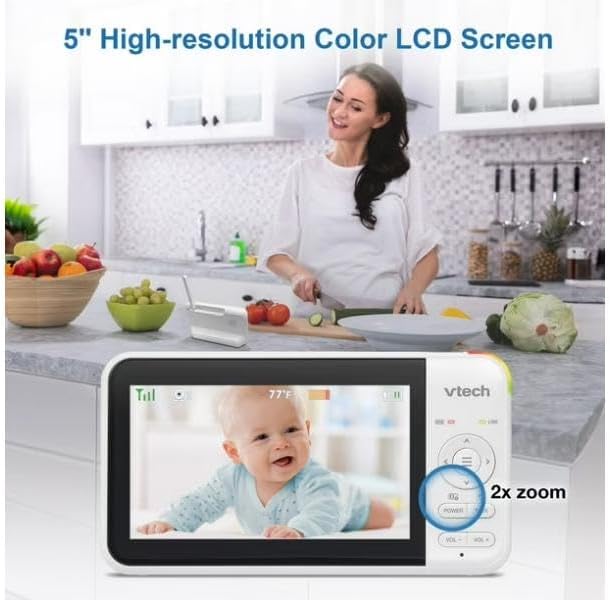
Image: The parent unit's 5-inch high-resolution color LCD screen showing a clear image of a baby, with an indication of 2x zoom capability.
പാൻ ആൻഡ് ടിൽറ്റ് ഫംഗ്ഷൻ
Use the navigation buttons on the parent unit to remotely pan (move horizontally) and tilt (move vertically) the camera lens of the baby unit. This allows you to adjust the viewing angle without physically moving the camera.
Two-Way Talk-Back Intercom
അമർത്തിപ്പിടിക്കുക സംസാരിക്കുക ബേബി യൂണിറ്റിന്റെ സ്പീക്കറിലൂടെ നിങ്ങളുടെ കുഞ്ഞിനോട് സംസാരിക്കാൻ പാരന്റ് യൂണിറ്റിലെ ബട്ടൺ അമർത്തുക. നിങ്ങളുടെ കുഞ്ഞ് പറയുന്നത് കേൾക്കാൻ ബട്ടൺ വിടുക.

Image: A visual representation of the two-way talk-back intercom, demonstrating communication between the parent unit and the baby unit.
Night Light and Soothing Sounds
The baby unit features a multi-color night light and can play soothing sounds and lullabies. Use the dedicated buttons on the parent unit to control these features.
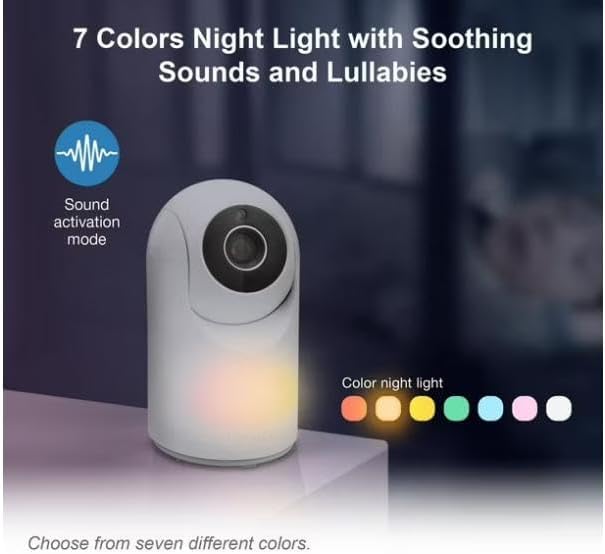
Image: The baby unit showcasing its 7-color night light feature, along with an icon indicating sound activation mode.
ഓട്ടോമാറ്റിക് ഇൻഫ്രാറെഡ് നൈറ്റ് വിഷൻ
The baby unit is equipped with infrared LEDs that automatically activate in low-light conditions, providing a clear black-and-white video image of your baby, even in complete darkness.

Image: A side-by-side comparison illustrating the superior clarity of VTech's enhanced night vision compared to standard night vision.
Sound Activation Screen
The parent unit screen can be set to automatically turn on when sound is detected from the baby unit, conserving battery life. The night light on the baby unit can also be configured to turn on with sound detection.

Image: The parent unit displaying a baby, with visual cues indicating the sound activation feature that turns the screen on when noise is detected.
മെയിൻ്റനൻസ്
Cleaning the Units
- Wipe the surfaces of the parent unit and baby unit with a soft, damp തുണി.
- ക്ലീനിംഗ് സ്പ്രേകളോ ലിക്വിഡ് ക്ലീനറുകളോ ഉപയോഗിക്കരുത്.
- Ensure units are dry before reconnecting to power.
Battery Care (Parent Unit)
- The parent unit uses a rechargeable battery.
- ആദ്യ ഉപയോഗത്തിന് മുമ്പ് കുറഞ്ഞത് 12 മണിക്കൂറെങ്കിലും ബാറ്ററി ചാർജ് ചെയ്യുക.
- To prolong battery life, fully discharge the battery periodically before recharging.
- If storing the unit for an extended period, remove the battery.
ട്രബിൾഷൂട്ടിംഗ്
| പ്രശ്നം | സാധ്യമായ പരിഹാരം |
|---|---|
| No link / Out of range |
|
| ചിത്രമില്ല / കറുത്ത സ്ക്രീൻ |
|
| സ്റ്റാറ്റിക് അല്ലെങ്കിൽ ഇടപെടൽ |
|
സ്പെസിഫിക്കേഷനുകൾ
- മോഡൽ: VM5267
- ഡിസ്പ്ലേ: 5-inch (12.7 cm) Color LCD
- ക്യാമറ സവിശേഷതകൾ: Pan, Tilt, Digital Zoom, Automatic Infrared Night Vision, Multi-color Night Light
- ഓഡിയോ സവിശേഷതകൾ: Two-Way Talk-Back Intercom, Soothing Sounds & Lullabies, Sound Activation
- ശക്തി: AC power adapters for both units; Rechargeable battery for Parent Unit
- പ്രവർത്തന ആവൃത്തി: 2.4 GHz FHSS
- പ്രവർത്തന ശ്രേണി: Up to 300 meters (open field)
- അളവുകൾ (മാതൃ യൂണിറ്റ്): Approximately 7.62 x 7.62 x 5.08 cm (as per parcel dimensions, actual unit dimensions may vary slightly)
- ഭാരം: ഏകദേശം 750 ഗ്രാം (ആകെ പാക്കേജ് ഭാരം)
വാറൻ്റിയും പിന്തുണയും
For warranty information and technical support, please refer to the warranty card included in your product packaging or visit the official VTech website. Please have your product model number (VM5267) and purchase date ready when contacting support.
വിടെക് ഔദ്യോഗിക Webസൈറ്റ്: www.vtechphone.com


