1. ആമുഖം
This manual provides essential information for the safe and efficient operation of your Machenike Machcreator N17A laptop. Please read this manual thoroughly before using the device and retain it for future reference.
2. പാക്കേജ് ഉള്ളടക്കം
പാക്കേജിൽ എല്ലാ ഇനങ്ങളും ഉണ്ടെന്ന് ഉറപ്പാക്കുക:
- Machenike Machcreator N17A Laptop
- പവർ അഡാപ്റ്റർ
- ഉപയോക്തൃ മാനുവൽ (ഈ പ്രമാണം)
3. ഉൽപ്പന്നം കഴിഞ്ഞുview
The Machenike Machcreator N17A is a 17.3-inch laptop designed for daily computing tasks. It features an Intel N100 Processor, 8GB DDR5 RAM, and a 256GB PCIe SSD for responsive performance. The 17.3" Full HD 120Hz display provides clear visuals, and the laptop runs on Windows 11 Home.
3.1. Laptop Components

ചിത്രം 3.1: മുൻഭാഗം view of the Machenike Machcreator N17A laptop.
This image shows the overall design of the Machenike Machcreator N17A laptop, highlighting its large 17.3-inch display and sleek chassis.

Figure 3.2: The 17.3-inch Full HD 120Hz display.
എ വിശദമായി view of the laptop's 17.3-inch Full HD display, emphasizing its narrow bezels and 120Hz refresh rate for smooth visuals.

Figure 3.3: Backlit keyboard and touchpad.
This image highlights the backlit keyboard and the spacious touchpad, designed for comfortable typing and navigation.
3.2. പോർട്ടുകളും കണക്ടറുകളും
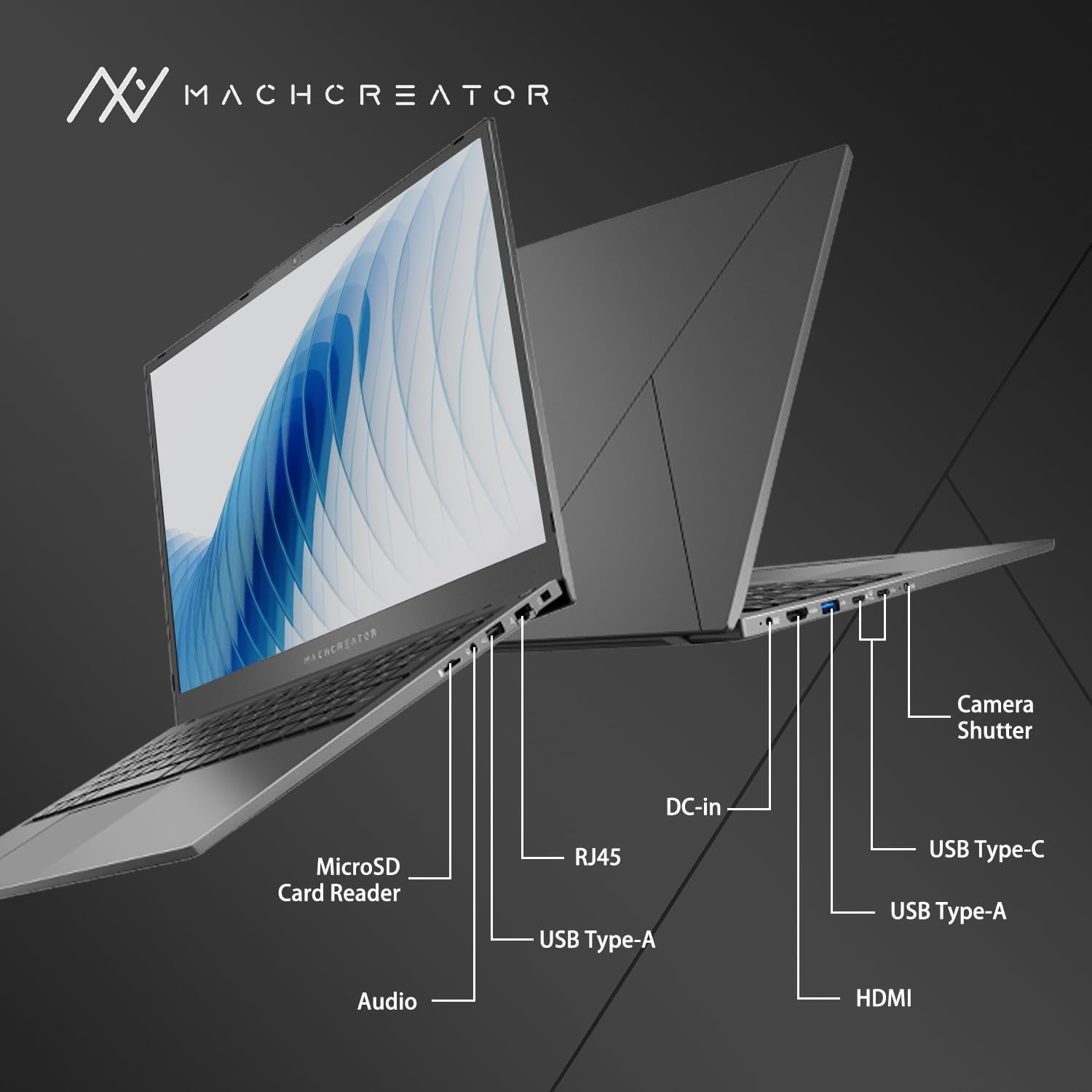
ചിത്രം 3.4: വശം view പോർട്ട് ലേബലുകൾക്കൊപ്പം.
An illustration detailing the various input/output ports available on the laptop, including USB, HDMI, and the SD card reader.
- മൈക്രോഎസ്ഡി കാർഡ് റീഡർ: For reading and writing data to MicroSD cards.
- ഡിസി-ഇൻ: Connect the power adapter for charging and power supply.
- തണ്ടർബോൾട്ട് 4 (x2): അതിവേഗ ഡാറ്റ കൈമാറ്റം, വീഡിയോ ഔട്ട്പുട്ട്, പവർ ഡെലിവറി.
- യുഎസ്ബി 2.0 ടൈപ്പ്-എ (x2): USB ഉപകരണങ്ങൾ ബന്ധിപ്പിക്കുക.
- എച്ച്ഡിഎംഐ: ബാഹ്യ ഡിസ്പ്ലേകളിലേക്കോ പ്രൊജക്ടറുകളിലേക്കോ കണക്റ്റുചെയ്യുക.
- RJ45: വയർഡ് നെറ്റ്വർക്ക് കണക്ഷനുള്ള ഇഥർനെറ്റ് പോർട്ട്.
- ഓഡിയോ ജാക്ക്: ഹെഡ്ഫോണുകളോ ബാഹ്യ സ്പീക്കറുകളോ ബന്ധിപ്പിക്കുക.
4. സജ്ജീകരണം
4.1. പ്രാരംഭ പവർ ഓൺ
- ലാപ്ടോപ്പും എല്ലാ ആക്സസറികളും പെട്ടിയിൽ നിന്ന് അൺപാക്ക് ചെയ്യുക.
- Connect the power adapter to the DC-in port on the laptop and then to a power outlet.
- ലാപ്ടോപ്പ് ലിഡ് തുറക്കുക.
- ലാപ്ടോപ്പ് ഓണാക്കാൻ കീബോർഡിലെ പവർ ബട്ടൺ അമർത്തുക.
- Follow the on-screen instructions to complete the Windows 11 Home setup process. This includes selecting your region, language, and setting up your user account.
4.2. Wi-Fi-ലേക്ക് ബന്ധിപ്പിക്കുന്നു
- During the Windows setup, you will be prompted to connect to a Wi-Fi network. Select your desired network from the list.
- Enter the Wi-Fi password if prompted and click "Connect".
- If you skip this step, you can connect later via Windows Settings: Go to ആരംഭിക്കുക > ക്രമീകരണങ്ങൾ > നെറ്റ്വർക്കും ഇൻ്റർനെറ്റും > വൈഫൈ.
5. പ്രവർത്തന നിർദ്ദേശങ്ങൾ
5.1. കീബോർഡും ടച്ച്പാഡും ഉപയോഗിക്കൽ
The laptop features a full-size keyboard with a numeric keypad and a large touchpad. The keyboard is backlit, which can be activated or adjusted using the function keys (e.g., Fn + F5).
ചിത്രം 5.1: കീബോർഡിന്റെയും ടച്ച്പാഡിന്റെയും ലേഔട്ട്.
This image illustrates the keyboard and touchpad, showing the key layout and the size of the touchpad for user interaction.
5.2. ബാഹ്യ ഉപകരണങ്ങൾ ബന്ധിപ്പിക്കുന്നു
ബാഹ്യ ഉപകരണങ്ങൾ ബന്ധിപ്പിക്കുന്നതിന് ലഭ്യമായ പോർട്ടുകൾ ഉപയോഗിക്കുക:
- USB ഉപകരണങ്ങൾ: Plug USB drives, mice, or keyboards into the USB Type-A or Thunderbolt 4 (USB-C) ports.
- ബാഹ്യ പ്രദർശനം: Connect an external monitor or TV using the HDMI port or one of the Thunderbolt 4 ports (with an appropriate adapter, if needed).
- SD കാർഡുകൾ: Insert a MicroSD card into the MicroSD Card Reader slot to access its contents.
- വയർഡ് നെറ്റ്വർക്ക്: സ്ഥിരമായ വയർഡ് ഇന്റർനെറ്റ് കണക്ഷനായി ഒരു ഇതർനെറ്റ് കേബിൾ RJ45 പോർട്ടിലേക്ക് ബന്ധിപ്പിക്കുക.
5.3. Adjusting the Display Angle
The laptop screen can be adjusted up to a 170-degree angle, providing flexibility for various viewing positions, presentations, or collaborative work.
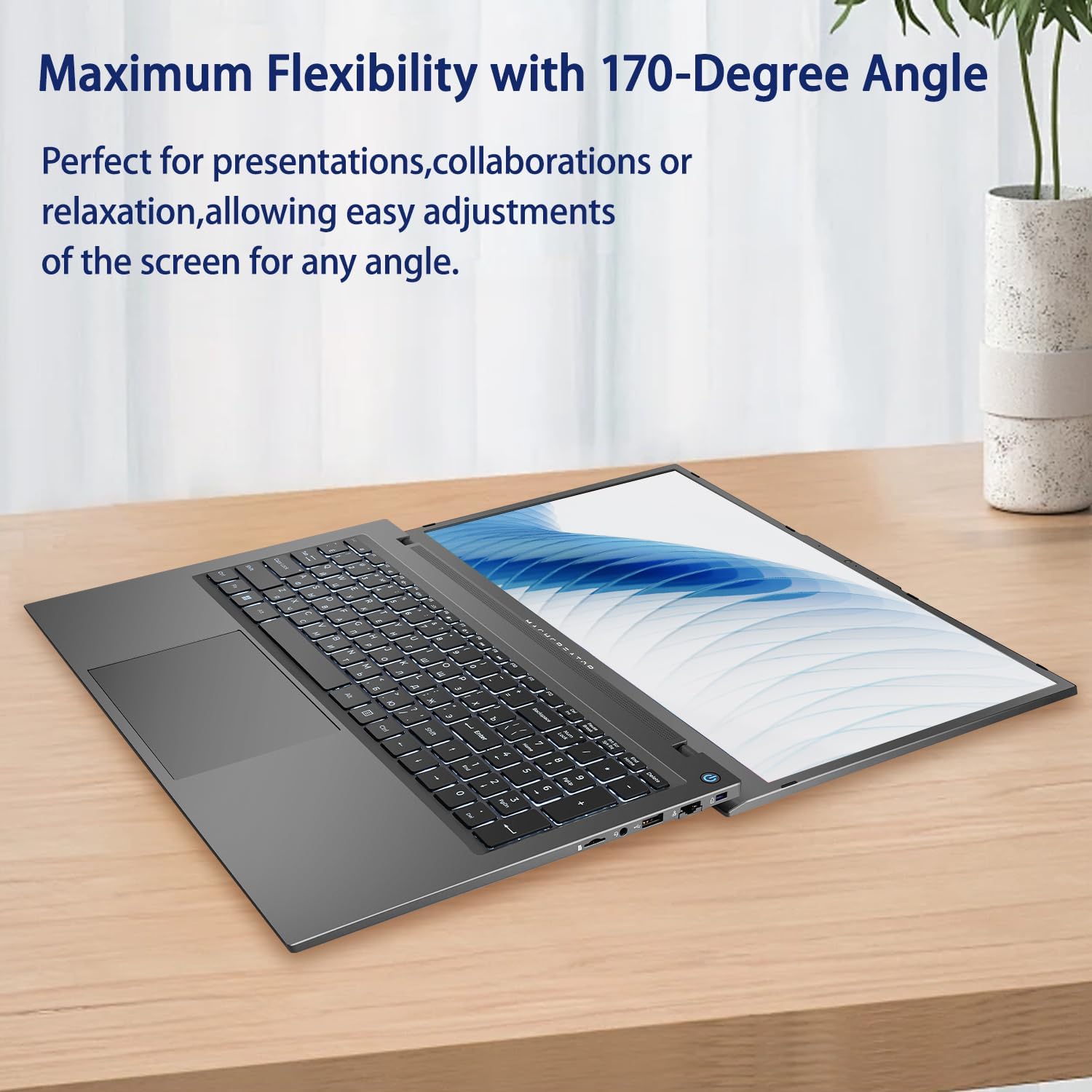
Figure 5.2: Laptop display at 170-degree angle.
This image demonstrates the laptop's ability to open its screen to a wide 170-degree angle, useful for various viewസാഹചര്യങ്ങൾ.
5.4. Charging the Laptop
Connect the provided power adapter to the DC-in port. The laptop also supports fast charging via its USB-C (Thunderbolt 4) ports with a compatible USB-C Power Delivery charger.
6. പരിപാലനം
6.1. വൃത്തിയാക്കൽ
- സ്ക്രീൻ വൃത്തിയാക്കാൻ മൃദുവായ, ലിന്റ് രഹിത തുണി ഉപയോഗിക്കുക. കഠിനമായ പാടുകൾക്ക്, നേരിയ തോതിൽ dampതുണിയിൽ വെള്ളം അല്ലെങ്കിൽ സ്ക്രീൻ ക്ലീനിംഗ് ലായനി ഉപയോഗിച്ച് നനയ്ക്കുക.
- മൃദുവായതും ഉണങ്ങിയതുമായ തുണി ഉപയോഗിച്ച് കീബോർഡും ഷാസിയും തുടയ്ക്കുക. കഠിനമായ രാസവസ്തുക്കളോ ഉരച്ചിലുകളോ ഉള്ള വസ്തുക്കൾ ഉപയോഗിക്കുന്നത് ഒഴിവാക്കുക.
- വൃത്തിയാക്കുന്നതിനുമുമ്പ് ലാപ്ടോപ്പ് പവർ ഓഫ് ചെയ്തിട്ടുണ്ടെന്നും പ്ലഗ് ഊരിവെച്ചിട്ടുണ്ടെന്നും ഉറപ്പാക്കുക.
6.2. ബാറ്ററി പരിചരണം
- ബാറ്ററി ഇടയ്ക്കിടെ പൂർണ്ണമായും ഡിസ്ചാർജ് ചെയ്യുന്നത് ഒഴിവാക്കുക.
- ലാപ്ടോപ്പ് അമിതമായ താപനിലയിൽ തുറന്നുകാട്ടരുത്.
- ലാപ്ടോപ്പ് ദീർഘനേരം സൂക്ഷിക്കുകയാണെങ്കിൽ, അത് ഓഫ് ചെയ്യുന്നതിനുമുമ്പ് ബാറ്ററി ഏകദേശം 50-70% വരെ ചാർജ് ചെയ്യുക.
6.3. സോഫ്റ്റ്വെയർ അപ്ഡേറ്റുകൾ
മികച്ച പ്രകടനവും സുരക്ഷയും ഉറപ്പാക്കാൻ നിങ്ങളുടെ വിൻഡോസ് ഓപ്പറേറ്റിംഗ് സിസ്റ്റവും ഡ്രൈവറുകളും പതിവായി അപ്ഡേറ്റ് ചെയ്യുക. പോകുക ആരംഭിക്കുക > ക്രമീകരണങ്ങൾ > വിൻഡോസ് അപ്ഡേറ്റ് അപ്ഡേറ്റുകൾ പരിശോധിക്കാൻ.
7. പ്രശ്നപരിഹാരം
| പ്രശ്നം | സാധ്യമായ പരിഹാരം |
|---|---|
| ലാപ്ടോപ്പ് പവർ ഓൺ ആകുന്നില്ല. |
|
| വൈഫൈ കണക്ഷനൊന്നുമില്ല. |
|
| സ്ക്രീൻ ശൂന്യമാണ് അല്ലെങ്കിൽ മിന്നിമറയുന്നു. |
|
| കീബോർഡ് ബാക്ക്ലൈറ്റ് പ്രവർത്തിക്കുന്നില്ല. |
|
8 സ്പെസിഫിക്കേഷനുകൾ
| ഫീച്ചർ | വിശദാംശങ്ങൾ |
|---|---|
| മോഡലിൻ്റെ പേര് | Machenike Machcreator N17A |
| പ്രോസസ്സർ | Intel N100 (4 Cores, up to 3.4 GHz) |
| റാം | 8 ജിബി DDR5 (4800 മെഗാഹെർട്സ്) |
| സംഭരണം | 256 ജിബി പിസിഐഇ എസ്എസ്ഡി |
| ഗ്രാഫിക്സ് | ഇന്റൽ യുഎച്ച്ഡി ഗ്രാഫിക്സ് (ഇന്റഗ്രേറ്റഡ്) |
| പ്രദർശിപ്പിക്കുക | 17.3" FHD (1920x1080) IPS, 120Hz |
| ഓപ്പറേറ്റിംഗ് സിസ്റ്റം | വിൻഡോസ് 11 ഹോം |
| തുറമുഖങ്ങൾ | 2x Thunderbolt 4, 2x USB 2.0 Type-A, 1x HDMI, 1x RJ45, 1x MicroSD Card Reader, 1x Audio Jack, 1x DC-in |
| വയർലെസ് കണക്റ്റിവിറ്റി | Wi-Fi (802.11n) |
| പ്രത്യേക സവിശേഷതകൾ | Backlit Keyboard, Numeric Keypad |
| അളവുകൾ (LxWxH) | 15.6 x 10.32 x 1.02 ഇഞ്ച് |
| ഭാരം | 5.78 പൗണ്ട് |
| നിറം | ചാരനിറം |
9. വാറൻ്റിയും പിന്തുണയും
For warranty information and technical support, please refer to the documentation provided with your purchase or visit the official Machenike webസൈറ്റ്. വാറന്റി ക്ലെയിമുകൾക്കായി നിങ്ങളുടെ വാങ്ങലിന്റെ തെളിവ് സൂക്ഷിക്കുക.
ഓൺലൈൻ ഉറവിടങ്ങൾ:
- മചെനികെ ഉദ്യോഗസ്ഥൻ Webസൈറ്റ്: www.machenike.com (കുറിപ്പ്: ഇതൊരു പ്ലെയ്സ്ഹോൾഡറാണ് URL, please refer to your product's specific warranty card for the correct support contact.)
10. ഉൽപ്പന്ന പ്രദർശന വീഡിയോ
Video 10.1: Machcreator N17A Laptop Overview.
ഈ വീഡിയോ ഒരു ദൃശ്യാവിഷ്കാരം നൽകുന്നുview of the Machenike Machcreator N17A laptop, showcasing its design, key features, and various ports. It demonstrates the unboxing experience, the backlit keyboard, and the available connectivity options.


