1. ആമുഖം
Thank you for choosing the FIREBAT MN56 Mini PC Gaming Computer. This compact yet powerful desktop is designed for a wide range of applications, including gaming, business, education, and multimedia. Equipped with an AMD Ryzen 8745HS processor and Radeon 780M graphics, it delivers high performance in a small form factor. This manual provides essential information for setting up, operating, maintaining, and troubleshooting your new Mini PC.
2. പാക്കേജ് ഉള്ളടക്കം
പാക്കേജിൽ എല്ലാ ഇനങ്ങളും ഉണ്ടെന്ന് ദയവായി പരിശോധിക്കുക:
- 1 x FIREBAT MN56 AMD Ryzen 8745HS Mini PC
- 1 x Vertical Bracket
- 1 x US Power Supply (19V/6.32A 120W DC Adapter)
- 1 x HDMI കേബിൾ
- 1 x ഉപയോക്തൃ മാനുവൽ (ഈ പ്രമാണം)
3. സജ്ജീകരണ ഗൈഡ്
3.1 പെരിഫറലുകൾ ബന്ധിപ്പിക്കുന്നു
Before powering on your Mini PC, connect all necessary peripherals such as a monitor, keyboard, and mouse.
- മോണിറ്റർ കണക്ഷൻ: Use the provided HDMI cable or a DisplayPort (DP) cable to connect your monitor to the corresponding port on the Mini PC. The device supports 4K@120Hz and 8K@60Hz resolutions.
- കീബോർഡും മൗസും: Connect your USB keyboard and mouse to the available USB 2.0 or USB 3.2 Type-A ports. Wireless peripherals can be connected via Bluetooth 5.2 or their respective USB dongles.
- നെറ്റ്വർക്ക് കണക്ഷൻ: For wired internet access, connect an Ethernet cable to one of the two 2.5Gbps RJ45 ports. For wireless connectivity, the Mini PC supports WiFi 6.
- ഓഡിയോ ഉപകരണങ്ങൾ: 3.5mm ഓഡിയോ ജാക്കിലേക്ക് ഹെഡ്ഫോണുകളോ സ്പീക്കറുകളോ ബന്ധിപ്പിക്കുക.

ചിത്രം 3.1: ഓവർview of the Mini PC's interfaces, including USB-C 4.0, USB 3.2, USB 2.0, DP 1.4, HDMI 2.1, 2.5Gbps LAN, and 3.5mm audio jack.
3.2 പവർ ചെയ്യുന്നു
Connect the US Power Supply to the DC-in port on the Mini PC, then plug the adapter into a power outlet. Press the power button located on the front of the device to turn it on. The RGB lighting will illuminate upon startup.
3.3 Initial Operating System Setup
The Mini PC comes with a default operating system pre-installed. Upon the first boot, you may be guided through an initial setup process, which typically includes language selection, network configuration, and user account creation. Follow the on-screen instructions to complete the setup.
4. നിങ്ങളുടെ മിനി പിസി പ്രവർത്തിപ്പിക്കൽ
4.1 പൊതു പ്രവർത്തനം
The FIREBAT MN56 Mini PC is designed for ultra-fast startup, typically booting in less than 14 seconds. Its powerful AMD Ryzen 8745HS processor and Radeon 780M graphics ensure smooth operation for demanding tasks, including gaming, video editing, and multitasking.

Figure 4.1: The Mini PC offers rapid boot times and smooth performance for various applications.
4.2 RGB ലൈറ്റിംഗ് നിയന്ത്രണം
The Mini PC features RGB gradient breathing light to enhance its aesthetic. You can cycle through three modes: full-color flashing, monochrome on, or off. Refer to the RGB control button on the front panel to adjust the lighting to your preference.
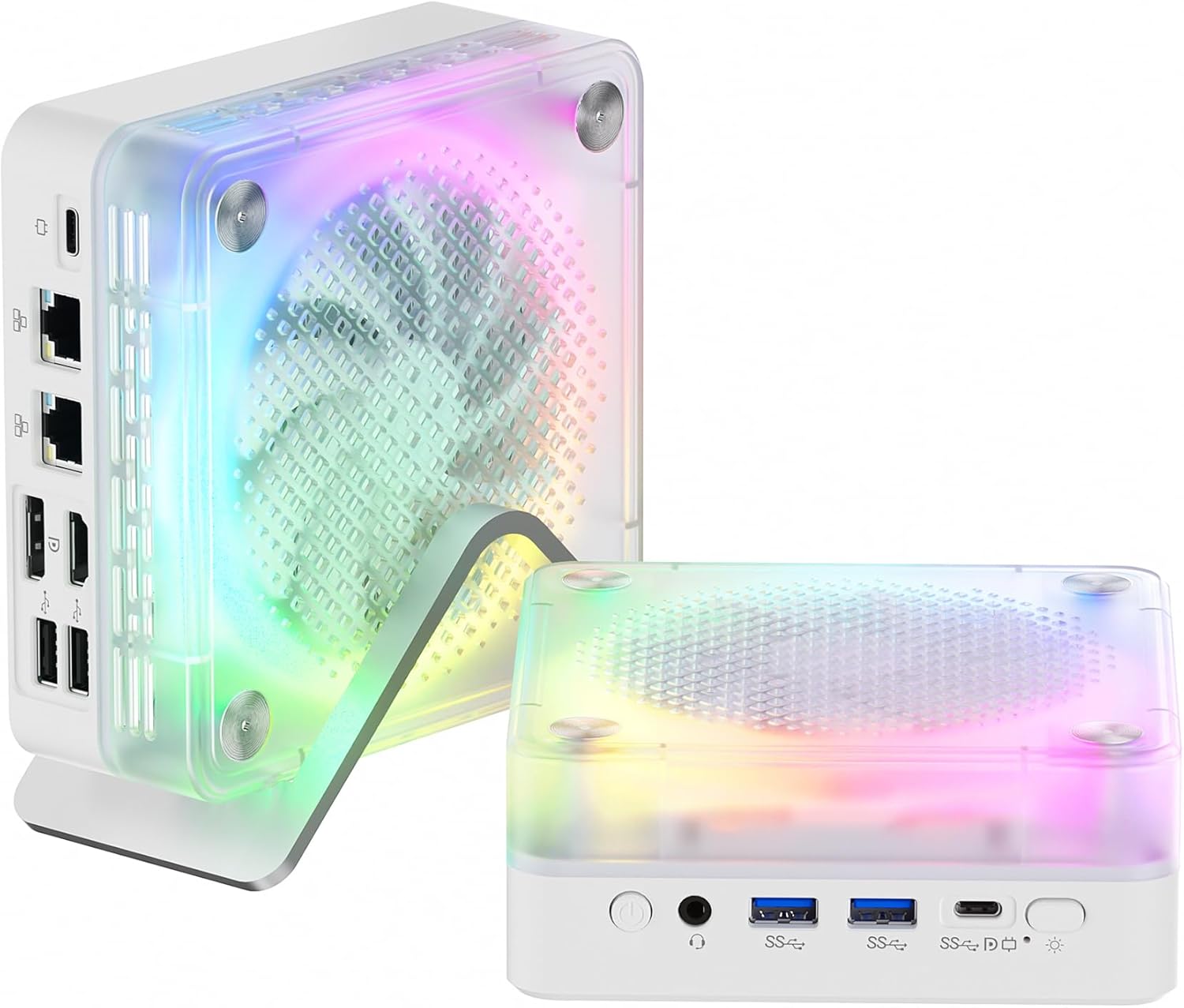
Figure 4.2: The Mini PC features customizable RGB lighting for personalized aesthetics.
5. പരിപാലനവും നവീകരണങ്ങളും
5.1 താപ വിസർജ്ജനം
The FIREBAT MN56 is equipped with an efficient heat dissipation system, including a system fan for whole machine cooling and a dedicated CPU fan, along with high-efficiency thermal grease. This design ensures the PC remains cool even under high load, preventing performance throttling.

Figure 5.1: The dual-fan cooling system ensures optimal thermal performance.
To maintain optimal cooling, ensure the ventilation openings are not obstructed. Regularly clean dust from the exterior of the device using a soft, dry cloth. Avoid placing the Mini PC in enclosed spaces without adequate airflow.
5.2 RAM, SSD അപ്ഗ്രേഡുകൾ
The Mini PC comes with 32GB DDR5 5600MHz RAM (2x16GB) and a 1TB PCIe 4.0 M.2 2280 SSD. The memory can be expanded up to 96GB (2x48GB), offering significant upgrade potential for demanding applications. The M.2 SSD slot also allows for storage expansion or replacement.
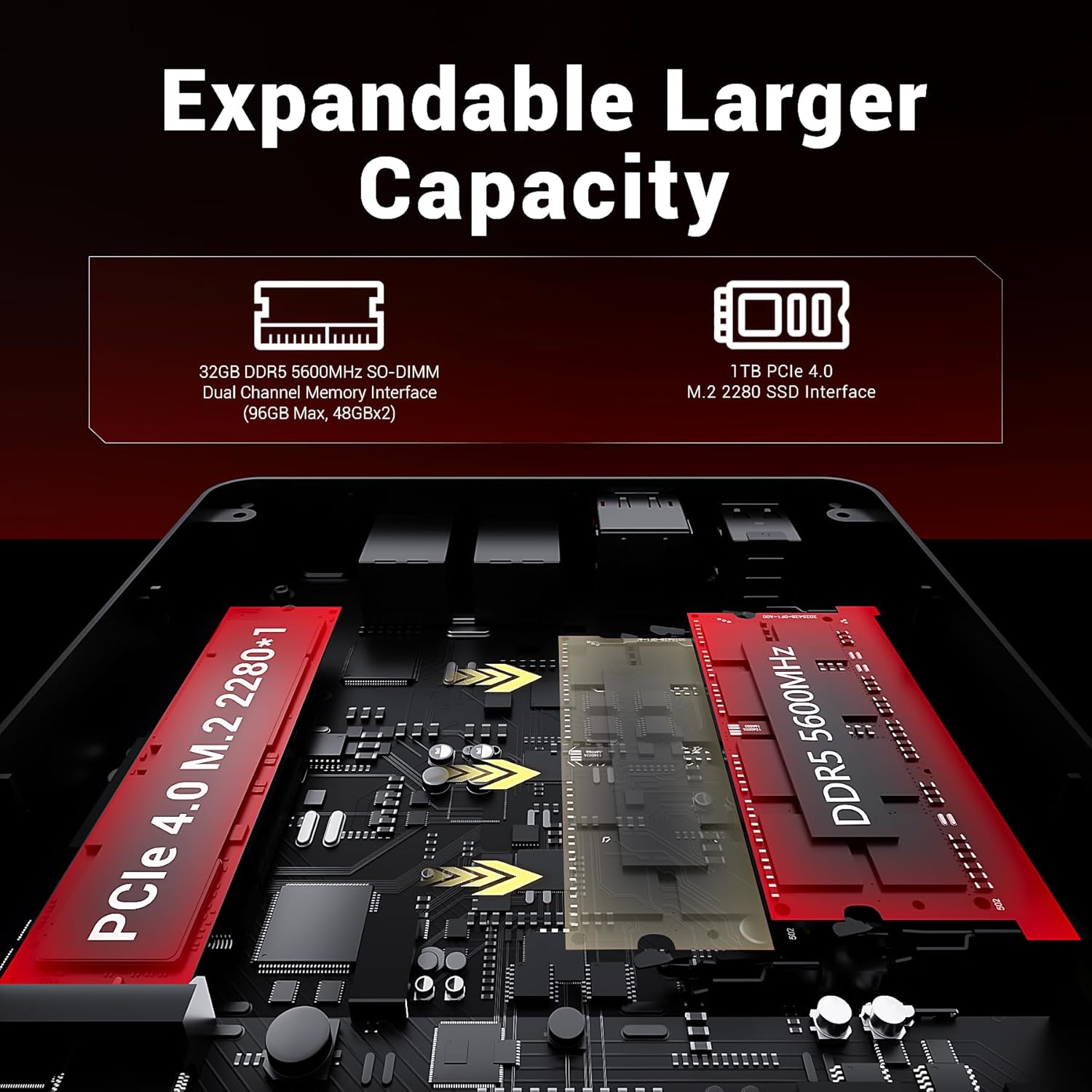
Figure 5.2: Internal layout showing expandable RAM and SSD slots.
For detailed instructions on upgrading components, please refer to the official FIREBAT support website or consult a qualified technician to avoid voiding any warranty.
6. പ്രശ്നപരിഹാരം
This section addresses common issues you might encounter with your Mini PC. If the problem persists, please contact customer support.
| പ്രശ്നം | സാധ്യമായ കാരണം | പരിഹാരം |
|---|---|---|
| No power/PC does not turn on | Power adapter not connected properly; Power outlet issue; Faulty power button. | Ensure power adapter is securely connected to both the PC and the wall outlet. Test the outlet with another device. Try a different power adapter if available. |
| മോണിറ്ററിൽ ഡിസ്പ്ലേ ഇല്ല | മോണിറ്റർ ബന്ധിപ്പിച്ചിട്ടില്ല; മോണിറ്ററിൽ തെറ്റായ ഇൻപുട്ട് ഉറവിടം; തകരാറുള്ള കേബിൾ. | Check HDMI/DP cable connection. Ensure monitor is set to the correct input source (HDMI/DP). Try a different cable or monitor. |
| മന്ദഗതിയിലുള്ള പ്രകടനം | Too many applications running; Overheating; Insufficient RAM/SSD space. | Close unnecessary applications. Ensure proper ventilation and clean dust. Consider upgrading RAM or SSD if frequently encountering issues. |
| ഇൻ്റർനെറ്റ് കണക്ഷനില്ല | Ethernet cable disconnected; Wi-Fi disabled; Router issue. | Check Ethernet cable. Ensure Wi-Fi is enabled and connected to the correct network. Restart your router/modem. |
7 സ്പെസിഫിക്കേഷനുകൾ
Detailed technical specifications for the FIREBAT MN56 Mini PC:
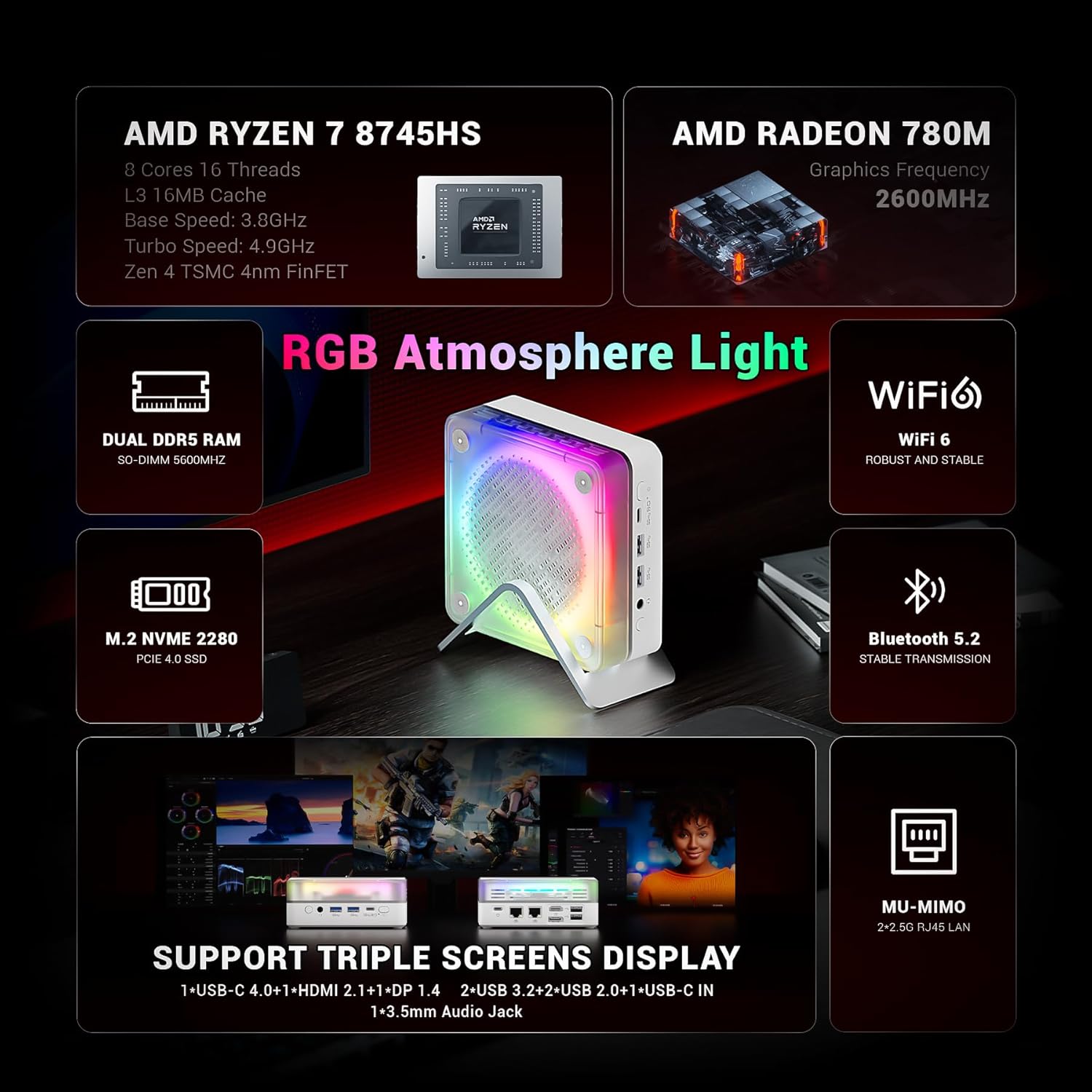
Figure 7.1: Key features and specifications at a glance.
| ഘടകം | സ്പെസിഫിക്കേഷൻ |
|---|---|
| പ്രോസസ്സർ | AMD Ryzen 7 8745HS (8 Cores/16 Threads, Zen 4 Architecture, 3.8-4.9GHz, 16MB L3 Cache) |
| ഗ്രാഫിക്സ് | എഎംഡി റേഡിയൻ 780എം (ഇന്റഗ്രേറ്റഡ്) |
| റാം | 32GB DDR5 5600MHz (2x16GB SO-DIMM, expandable up to 96GB) |
| സംഭരണം | 1TB PCIe 4.0 M.2 2280 SSD |
| ഓപ്പറേറ്റിംഗ് സിസ്റ്റം | Default (Windows 11 compatible) |
| വയർലെസ് കണക്റ്റിവിറ്റി | വൈഫൈ 6, ബ്ലൂടൂത്ത് 5.2 |
| തുറമുഖങ്ങൾ (മുൻവശം) | 1x 3.5mm Audio Jack (HP&MIC), 2x USB 3.2 Type-A, 1x USB-C 4.0 (PD/DP/DATA, Up to 40Gbps), 1x RGB Control Button |
| പോർട്ടുകൾ (പിൻഭാഗം) | 2x USB 2.0 Type-A, 1x DP 1.4, 1x HDMI 2.1, 2x 2.5Gbps RJ45 Ethernet, 1x USB-C IN (Power) |
| വീഡിയോ ഔട്ട്പുട്ട് | Supports 4K@120Hz, 8K@60Hz (via DP 1.4 and HDMI 2.1) |
| അളവുകൾ (LxWxH) | 5 x 5 x 2 ഇഞ്ച് (ഏകദേശം 13 x 13 x 5.4 സെ.മീ) |
| ഭാരം | 1.2 പൗണ്ട് (ഏകദേശം 0.53 കിലോഗ്രാം) |
| പവർ അഡാപ്റ്റർ | 19V/6.32A 120W DC |

Figure 7.2: AMD Ryzen 7 8745HS Processor Details.
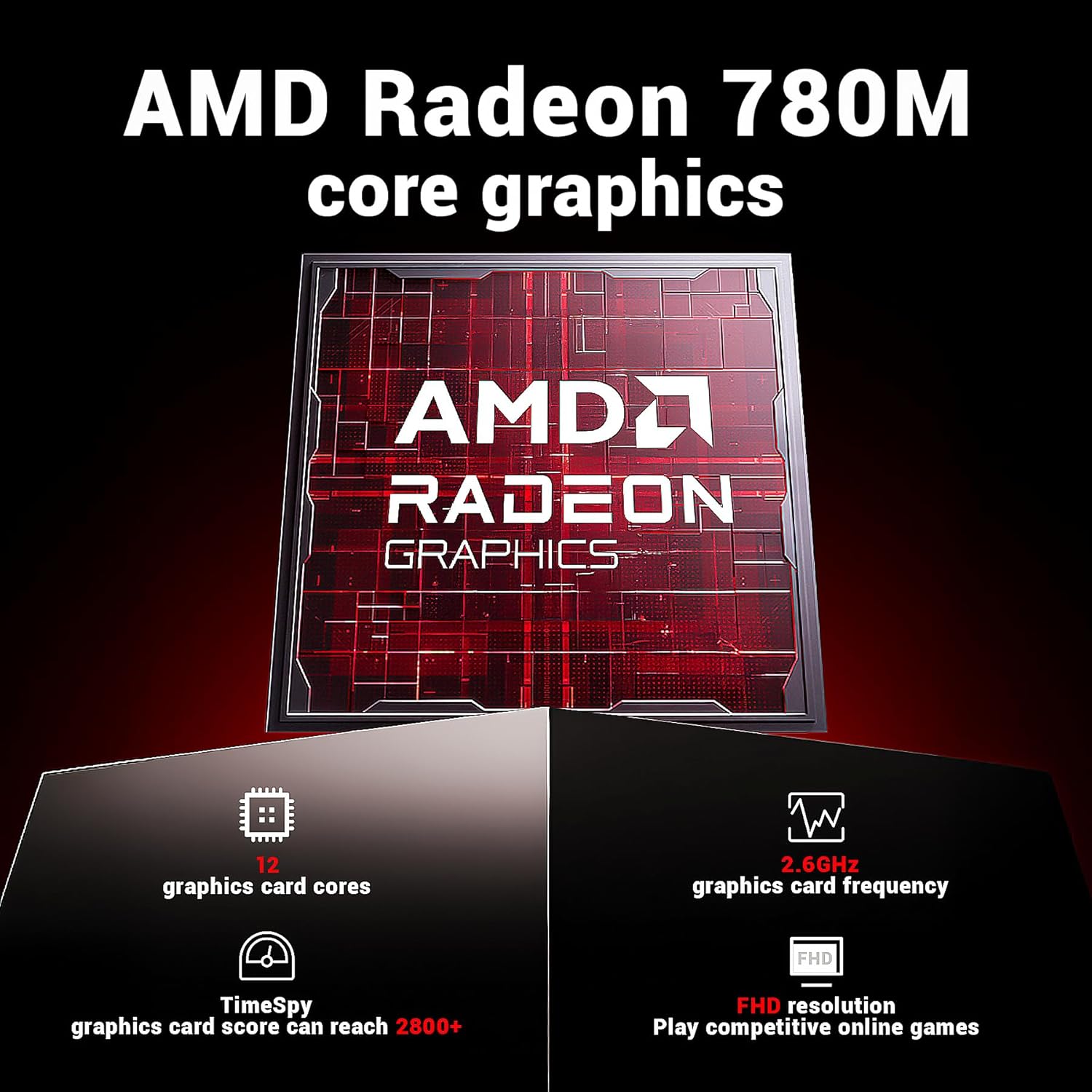
Figure 7.3: AMD Radeon 780M Graphics Details.
8. വാറൻ്റിയും പിന്തുണയും
FIREBAT is committed to providing high-quality products and customer satisfaction. For any technical assistance, warranty inquiries, or support needs, please contact us through the following channels:
- ഇമെയിൽ പിന്തുണ: support@firebatpc.com
- ഉദ്യോഗസ്ഥൻ Webസൈറ്റ്: www.firebatpc.com
Please have your product model (MN56) and purchase details ready when contacting support to ensure faster service.


