1. ആമുഖം
The Donner ESSENTIAL L1 is a monophonic analog synthesizer designed for musicians and sound designers. It features a vintage-inspired analog sound engine, a 64-step sequencer, and the innovative S2C Magnetic Modular System for versatile configurations. This manual will guide you through understanding and utilizing its full capabilities.
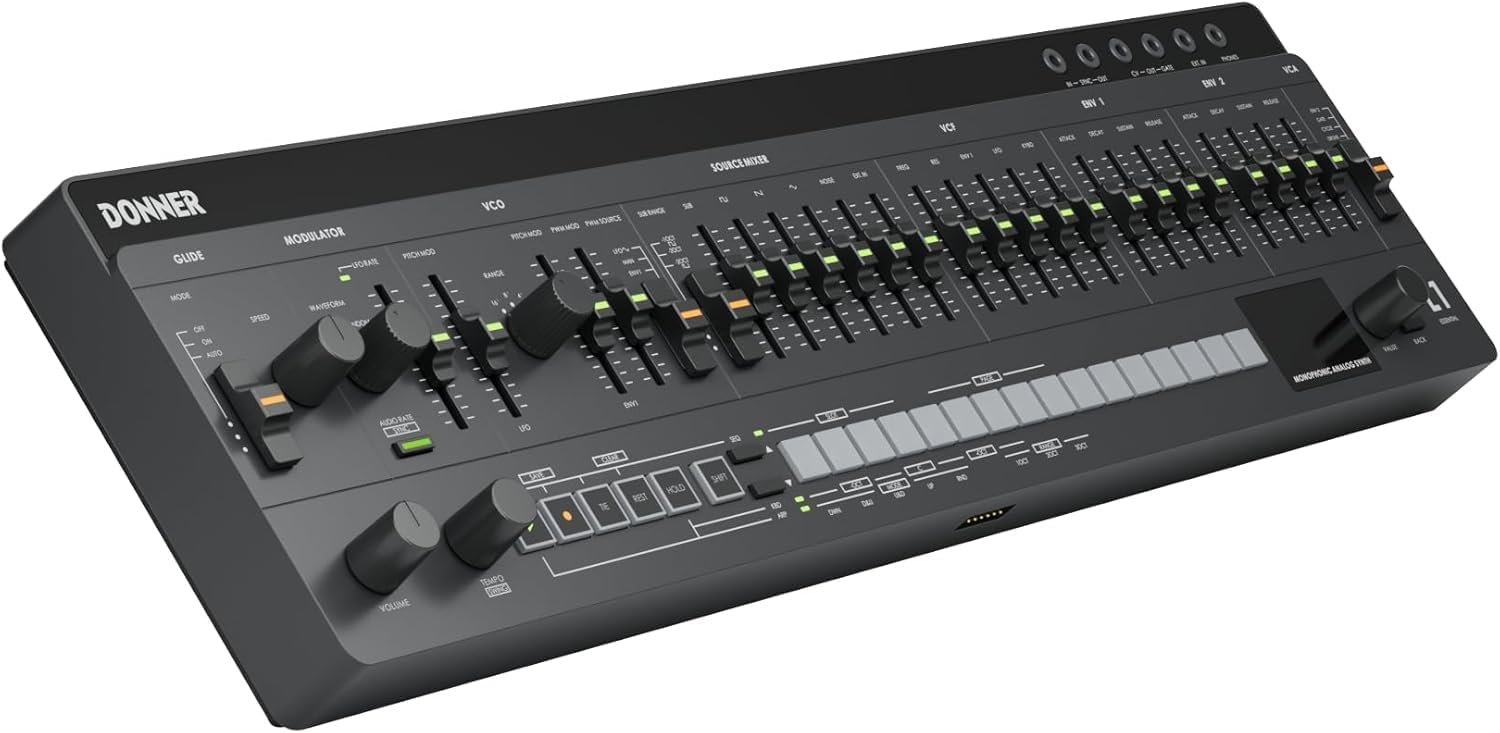
ചിത്രം 1: മുൻഭാഗം view of the Donner ESSENTIAL L1 Synthesizer, showcasing its control panel and compact design.
2 പ്രധാന സവിശേഷതകൾ
2.1 വിൻtage-Inspired Analog Sound
The ESSENTIAL L1 is powered by classic 3340 VCO and 3109 VCF chips, enabling it to recreate iconic monophonic tones suitable for bass lines and lead melodies. The true analog signal path ensures rich and authentic sound generation.

Figure 2: Diagram illustrating the analog signal path with 3340 VCO, 3109 VCF, and 662 VCA components.
2.2 S2C Magnetic Modular System
The Snap2Connect (S2C) system allows seamless switching between desktop and keyboard modes. This magnetic connection facilitates easy setup and transition between various performance environments, offering modular freedom without extra cables.

Figure 3: The ESSENTIAL L1 module shown magnetically connected to a KB-32M keyboard, highlighting the S2C system.
2.3 Powerful Modulation Section
Equipped with two ADSR envelope generators and a syncable LFO, the ESSENTIAL L1 provides rich modulation sources for expanded tonal possibilities. The DRONE mode for the VCA is useful for ambient sound design or processing external audio.

ചിത്രം 4: വിശദമായി view of the modulation controls, including ADSR envelopes and LFO.
2.4 Integrated Creative Engine
The synthesizer features a 64-step sequencer with SONG mode, allowing for 128 pattern memories and up to 32 songs. A 5-mode customizable arpeggiator further enhances creative performance, including a Trigger Edit feature for unique patterns.

Figure 5: The sequencer and arpeggiator section with controls for pattern memory and song mode.
2.5 Pro Studio Connectivity
The ESSENTIAL L1 offers extensive connectivity options, including CV/GATE/SYNC I/O for modular gear, EXT. IN for audio processing, and MIDI over USB-C/TRS. This ensures seamless integration into various studio and live setups.

ചിത്രം 6: ഓവർview of the connectivity ports, including EXT. IN, MIDI I/O, SYNC I/O, and CV/GATE Output.
3. സജ്ജീകരണം
3.1 പവർ ചെയ്യുന്നു
Connect the provided USB-C cable to the ESSENTIAL L1 and a compatible power source (e.g., USB power adapter, computer USB port, or power bank). Ensure the power switch is in the 'ON' position. The OLED display will illuminate, indicating the device is ready.
3.2 ഓഡിയോ കണക്ഷനുകൾ
For audio output, connect headphones to the PHONES jack or use the MAIN OUT to connect to an amplifier, mixer, or audio interface. The EXT. IN allows external audio signals to be processed through the synthesizer's VCF.
3.3 MIDI and CV/GATE Connections
Utilize the MIDI I/O (TRS, Type-A) for connecting to other MIDI devices. The USB-C port also supports MIDI over USB. For modular synthesis integration, connect compatible gear to the CV/GATE/SYNC I/O ports.
4. പ്രവർത്തന നിർദ്ദേശങ്ങൾ
4.1 അടിസ്ഥാന ശബ്ദ ഉത്പാദനം
Adjust the VCO, VCF, and VCA parameters using the dedicated sliders and knobs to shape your sound. Experiment with the MODULATOR section to introduce movement and complexity to your patches.
4.2 Using the Sequencer
To create a sequence, enter notes using the integrated keyboard or an external MIDI controller. Use the sequencer controls to record, edit, and playback patterns. The SONG mode allows chaining multiple patterns for longer compositions.
4.3 Arpeggiator Functions
Activate the arpeggiator and select one of the 5 available modes (up, down, up & down, random, order). Adjust the rate and range to create dynamic arpeggiated melodies. The Trigger Edit function offers advanced pattern manipulation.
4.4 Real-time Control and Performance
The intuitive user interface with dedicated controls and an OLED display provides immediate feedback on every action. Utilize the GLIDE and MODULATION sections for expressive real-time performance.
Video 1: Demonstrates three synth sketches created with the Donner L1, showcasing its sound capabilities.
വീഡിയോ 2: ഒരു ഓവർview of the Donner ESSENTIAL L1 Synthesizer, highlighting its features and design.
Video 3: Explores the endless sound design possibilities when combining the Donner L1 with the KB32 keyboard.
5. പരിപാലനം
To ensure the longevity and optimal performance of your Donner ESSENTIAL L1, follow these maintenance guidelines:
- മൃദുവായതും ഉണങ്ങിയതുമായ തുണി ഉപയോഗിച്ച് തുടച്ച് ഉപകരണം വൃത്തിയായി സൂക്ഷിക്കുക. ഉരച്ചിലുകൾ ഉള്ള ക്ലീനറുകളോ ലായകങ്ങളോ ഉപയോഗിക്കുന്നത് ഒഴിവാക്കുക.
- Protect the synthesizer from dust, moisture, and extreme temperatures.
- Avoid placing heavy objects on the unit or subjecting it to strong impacts.
- അമിതമായി ചൂടാക്കുന്നത് തടയാൻ ശരിയായ വായുസഞ്ചാരം ഉറപ്പാക്കുക.
6. പ്രശ്നപരിഹാരം
If you encounter any issues with your ESSENTIAL L1, refer to the following common troubleshooting steps:
- ശക്തിയില്ല: Check the USB-C cable connection and ensure the power source is functional. Verify the power switch is in the 'ON' position.
- ശബ്ദമില്ല: Confirm that the volume knob is turned up. Check all audio cable connections. Ensure an active patch is selected and the VCA level is not at minimum.
- MIDI പ്രതികരിക്കുന്നില്ല: Verify MIDI cable connections (TRS or USB-C). Check MIDI settings on both the ESSENTIAL L1 and your external device.
- Sequencer/Arpeggiator Issues: Ensure the sequencer/arpeggiator is enabled and tempo is set correctly. Check for any conflicting settings or modes.
For further assistance, please contact Donner customer support.
7 സ്പെസിഫിക്കേഷനുകൾ
| ഫീച്ചർ | സ്പെസിഫിക്കേഷൻ |
|---|---|
| ഇനത്തിൻ്റെ ഭാരം | 2.79 പൗണ്ട് |
| പാക്കേജ് അളവുകൾ | 21.5 x 6.25 x 3.25 ഇഞ്ച് |
| ഇനം മോഡൽ നമ്പർ | ESSENTIAL L1 |
| ബോഡി മെറ്റീരിയൽ | ലോഹം |
| കണക്റ്റർ തരം | യുഎസ്ബി ടൈപ്പ് സി |
| മെറ്റീരിയൽ തരം | മരം, ലോഹം, പ്ലാസ്റ്റിക് |
| മോഡലിൻ്റെ പേര് | L1 Synthesizer |
| നിർമ്മാതാവ് | ഡോണർ |
8. വാറൻ്റിയും പിന്തുണയും
Donner provides a limited warranty for the ESSENTIAL L1 Synthesizer against defects in materials and workmanship under normal use. For specific warranty terms, registration, and technical support, please visit the official Donner webസൈറ്റ് അല്ലെങ്കിൽ അവരുടെ ഉപഭോക്തൃ സേവന വിഭാഗവുമായി ബന്ധപ്പെടുക.
Contact information can typically be found on the product packaging or the Donner Music webസൈറ്റ്: ആമസോണിലെ ഡോണർ സ്റ്റോർ സന്ദർശിക്കുക


