1. ആമുഖം
Thank you for choosing the PROVISION ISR 4MP IP PoE Camera. This manual provides essential information for the proper installation, operation, and maintenance of your security camera. Please read this manual thoroughly before using the product to ensure optimal performance and safety. This camera is designed for both indoor and outdoor surveillance, offering high-definition video, advanced night vision, and robust weather protection.
2 സുരക്ഷാ വിവരങ്ങൾ
- Ensure the power supply meets the camera's specifications (PoE or 12V DC).
- ക്യാമറ അതിന്റെ പ്രവർത്തന പരിധിക്ക് പുറത്തുള്ള (-30°C മുതൽ 60°C വരെ) ഉയർന്ന താപനിലയിലേക്ക് തുറന്നുവിടരുത്.
- Avoid direct exposure to strong light sources, which may affect image quality.
- ക്യാമറ വേർപെടുത്താനോ പരിഷ്കരിക്കാനോ ശ്രമിക്കരുത്. എല്ലാ സേവനങ്ങളും യോഗ്യതയുള്ള ഉദ്യോഗസ്ഥരെ ഏൽപ്പിക്കുക.
- മൃദുവായതും ഉണങ്ങിയതുമായ തുണി ഉപയോഗിച്ച് ക്യാമറ ലെൻസ് വൃത്തിയാക്കുക. കഠിനമായ രാസവസ്തുക്കൾ ഒഴിവാക്കുക.
3. പാക്കേജ് ഉള്ളടക്കം
പാക്കേജിൽ എല്ലാ ഇനങ്ങളും ഉണ്ടെന്ന് ഉറപ്പാക്കുക:
- പ്രൊവിഷൻ ISR 4MP IP PoE ക്യാമറ ബോഡി
- ഇൻസ്ട്രക്ഷൻ മാനുവൽ
4. സജ്ജീകരണം
4.1. ഇൻസ്റ്റലേഷൻ
The PROVISION ISR 4MP IP PoE Camera is designed for ceiling mount installation. Ensure the mounting surface is strong enough to support the camera's weight.
- ഒപ്റ്റിമൽ നിരീക്ഷണ കവറേജിന് അനുയോജ്യമായ ഒരു സ്ഥലം തിരഞ്ഞെടുക്കുക.
- Use the provided mounting template (if applicable) to mark drill holes on the ceiling.
- ആവശ്യമെങ്കിൽ പൈലറ്റ് ദ്വാരങ്ങൾ തുരന്ന് വാൾ ആങ്കറുകൾ ഇടുക.
- സ്ക്രൂകൾ ഉപയോഗിച്ച് മൗണ്ടിംഗ് ഉപരിതലത്തിലേക്ക് ക്യാമറ ബേസ് സുരക്ഷിതമാക്കുക.
- ക്യാമറകൾ ക്രമീകരിക്കുക viewആവശ്യാനുസരണം ആംഗിൾ.

Image: Simple Installation. This image shows a person installing the camera on a ceiling, demonstrating the ease of physical setup.
4.2. കണക്റ്റിവിറ്റി
This camera supports Power over Ethernet (PoE) for simplified installation, allowing both power and data transmission over a single Ethernet cable. Alternatively, it can be powered via a 12V DC power adapter (not included).
- PoE കണക്ഷൻ: Connect an Ethernet cable from a PoE-enabled NVR or PoE switch to the camera's Ethernet port.
- സ്റ്റാൻഡേർഡ് കണക്ഷൻ: Connect an Ethernet cable to the camera's Ethernet port and a 12V DC power adapter to the camera's power input.

Image: Easy Integration with PoE. This diagram illustrates how the camera integrates with an NVR system using PoE, highlighting its plug-and-play capability.
4.3. പ്രാരംഭ കോൺഫിഗറേഷൻ
After physical installation and connection, configure the camera via its web interface or an NVR system.
- ആക്സസ് ചെയ്യുന്നു Web ഇൻ്റർഫേസ്: Use a network scanner tool to find the camera's IP address. Enter the IP address into a web browser to access the camera's login page.
- എൻവിആർ സംയോജനം: Refer to your NVR's manual for instructions on adding IP cameras. The camera supports ONVIF for broad compatibility.
5. പ്രവർത്തിക്കുന്നു
5.1 പ്രധാന സവിശേഷതകൾ
- 4MP High Resolution: Provides clear and detailed video at 2560x1440 resolution.
- IR 40m Night Vision: Ensures clear imaging up to 40 meters in complete darkness.
- ബിൽറ്റ്-ഇൻ മൈക്രോഫോൺ: സമഗ്രമായ നിരീക്ഷണത്തിനായി വീഡിയോയ്ക്കൊപ്പം ഓഡിയോയും പകർത്തുന്നു.
- AI മോഷൻ ഡിറ്റക്ഷൻ: Utilizes advanced algorithms to accurately detect human movement and reduce false alarms.
- H.265+ കംപ്രഷൻ: Efficiently compresses video to save storage space without compromising quality.
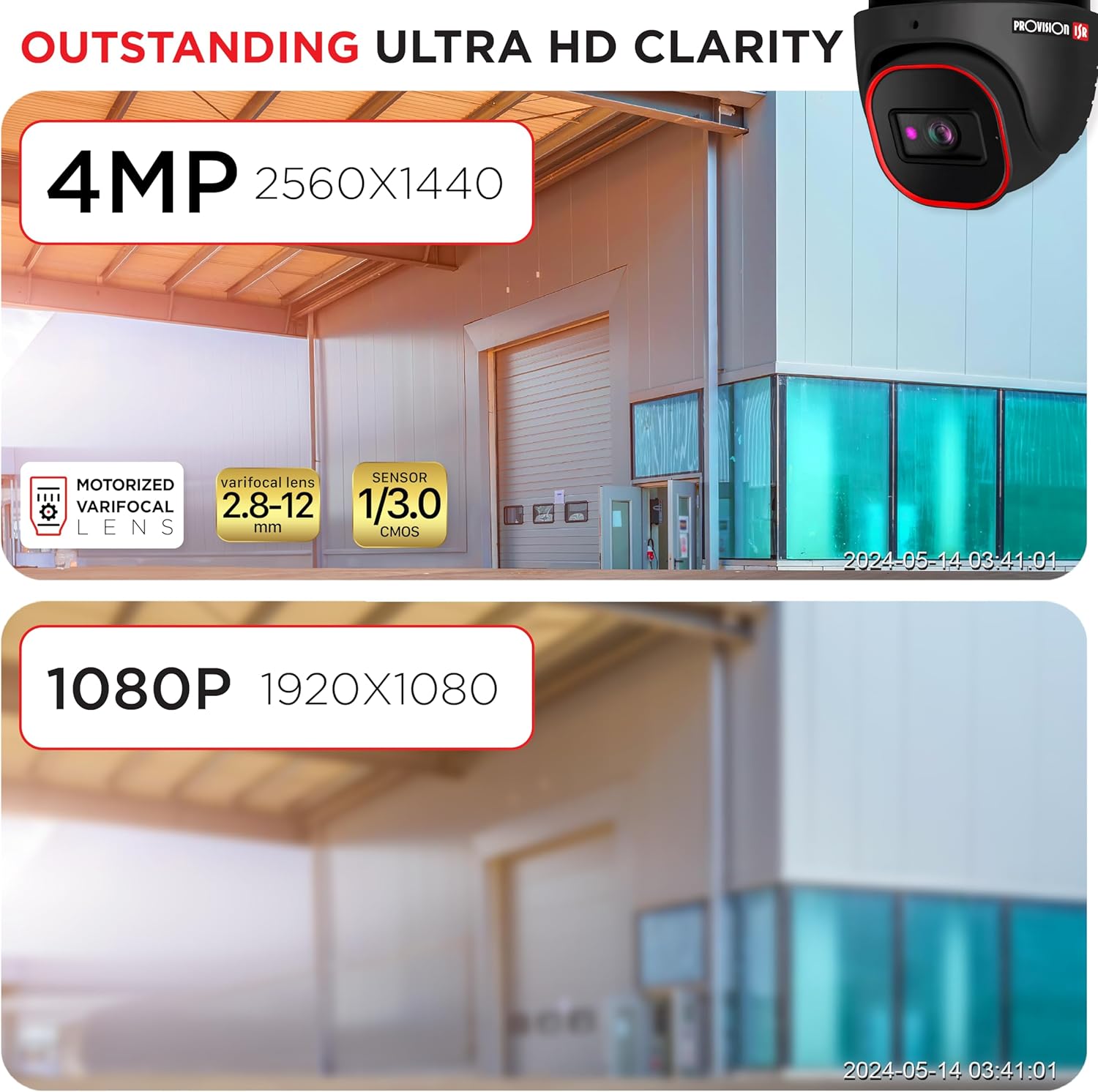
Image: Outstanding Ultra HD Clarity. This image visually compares the superior clarity of 4MP resolution (2560x1440) against 1080P (1920x1080).

Image: Built-in Microphone & Audio. This image highlights the camera's integrated microphone and audio input feature, enabling sound recording.
5.2. റിമോട്ട് ആക്സസ്
ലൈവ് ഫൂ ആക്സസ് ചെയ്യുകtage and recordings remotely via mobile devices or PCs.
- മൊബൈൽ ആപ്ലിക്കേഷൻ: Download the official PROVISION ISR mobile app from your device's app store. Follow the in-app instructions to add and view നിങ്ങളുടെ ക്യാമറ.
- PC Access: Use the IP camera web interface or dedicated VMS (Video Management Software) for comprehensive monitoring and management.

Image: Remote Access with AI-Powered Detection. This image shows a smartphone displaying multiple live camera feeds, demonstrating remote monitoring capabilities and AI detection.
5.3. റെക്കോർഡിംഗ് മോഡുകൾ
The camera supports various recording modes to suit your surveillance needs:
- മാനുവൽ റെക്കോർഡിംഗ്: Start and stop recording manually through the web ഇന്റർഫേസ് അല്ലെങ്കിൽ എൻവിആർ.
- ഷെഡ്യൂൾഡ് റെക്കോർഡിംഗ്: Set specific times or days for continuous recording.
- Line-Crossing Recording: Trigger recording when an object crosses a predefined virtual line.
- മോഷൻ ഡിറ്റക്ഷൻ റെക്കോർഡിംഗ്: Record only when motion is detected, saving storage space.
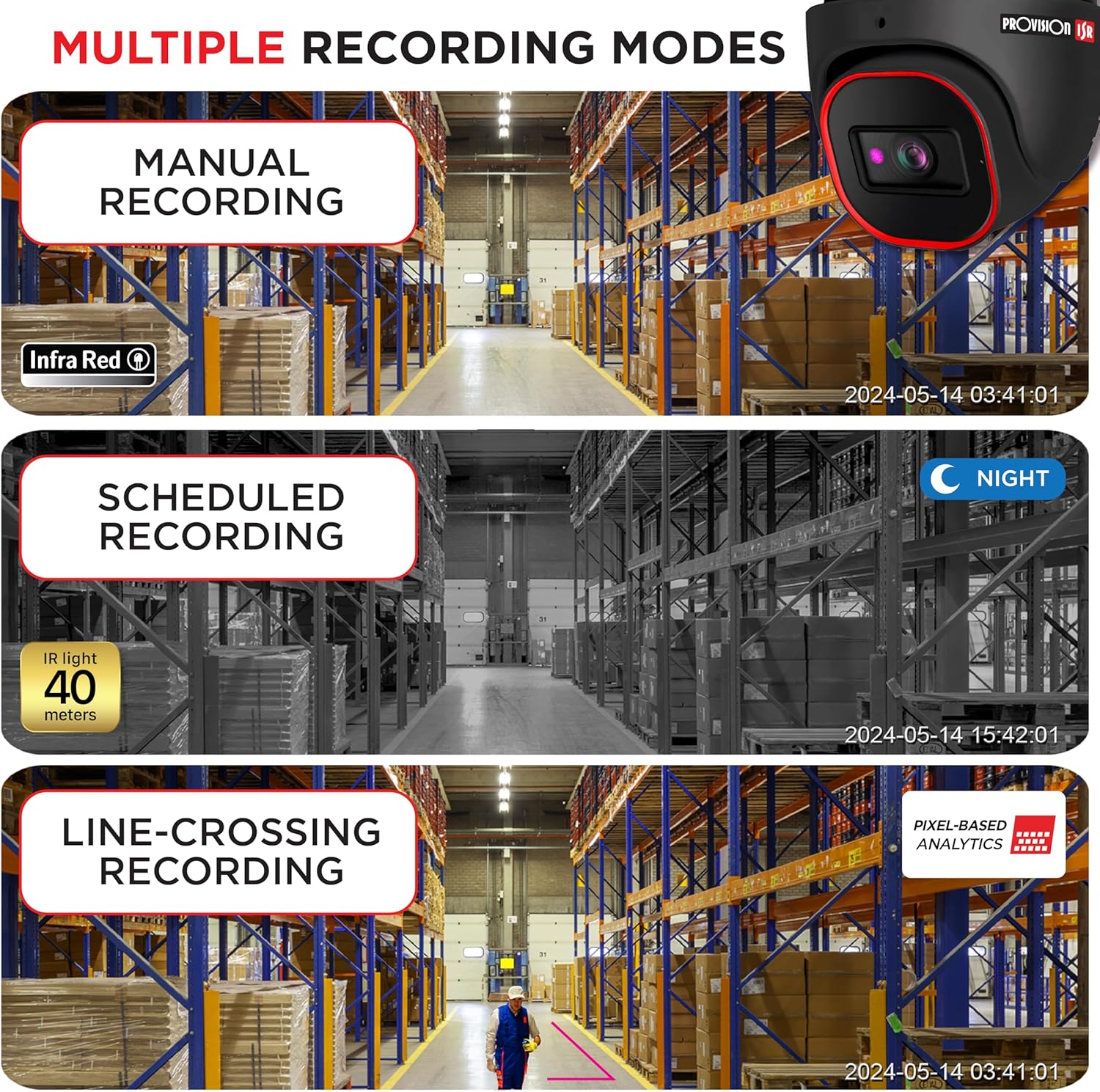
Image: Multiple Recording Modes. This image illustrates different recording options: manual, scheduled (night vision), and line-crossing triggered recording.

Image: Pixel Based Analytics. This diagram demonstrates the camera's ability to detect line crossing and sterile area intrusions using pixel-based analytics, providing real-time alerts.
6. പരിപാലനം
പതിവ് അറ്റകുറ്റപ്പണികൾ നിങ്ങളുടെ ക്യാമറയുടെ ദീർഘായുസ്സും മികച്ച പ്രകടനവും ഉറപ്പാക്കുന്നു.
- വൃത്തിയാക്കൽ: ക്യാമറ ലെൻസും ഹൗസിംഗും ഇടയ്ക്കിടെ സോഫ്റ്റ്, ഡി-ക്യാമറ ഉപയോഗിച്ച് വൃത്തിയാക്കുക.amp തുണി. ഉരച്ചിലുകൾ ഉള്ള ക്ലീനറുകൾ ഉപയോഗിക്കരുത്.
- ഫേംവെയർ അപ്ഡേറ്റുകൾ: പ്രൊവിഷൻ ISR പരിശോധിക്കുക website for the latest firmware updates. Keeping your firmware updated ensures access to new features and security enhancements.
- പരിസ്ഥിതി സംരക്ഷണം: The camera has an IP67 waterproof rating, protecting it from dust and water ingress. Ensure all cable connections are properly sealed to maintain this rating.

Image: Durable Design & Waterproof. This image highlights the camera's IP67 rating, indicating its durability and resistance to water and dust, along with its operational temperature range.
7. പ്രശ്നപരിഹാരം
നിങ്ങളുടെ ക്യാമറയിൽ പ്രശ്നങ്ങൾ നേരിടുകയാണെങ്കിൽ, ഇനിപ്പറയുന്ന പൊതുവായ പ്രശ്നങ്ങളും പരിഹാരങ്ങളും പരിശോധിക്കുക:
| പ്രശ്നം | സാധ്യമായ കാരണം | പരിഹാരം |
|---|---|---|
| ഇമേജ്/വീഡിയോ ഔട്ട്പുട്ട് ഇല്ല. | No power; Network cable issue; Incorrect IP address | Check power connection; Verify Ethernet cable integrity; Ensure correct IP configuration |
| മോശം ചിത്ര നിലവാരം | Dirty lens; Insufficient lighting; Incorrect resolution settings | Clean the lens; Ensure adequate lighting or enable IR; Adjust resolution settings in web ഇൻ്റർഫേസ് |
| ക്യാമറ വിദൂരമായി ആക്സസ് ചെയ്യാൻ കഴിയില്ല | Network configuration; Firewall settings; Incorrect port forwarding | Verify network settings (router, port forwarding); Check firewall rules; Ensure stable internet connection |
| മോഷൻ ഡിറ്റക്ഷൻ പ്രവർത്തിക്കുന്നില്ല | Sensitivity too low; Detection area not configured; Firmware outdated | Adjust motion detection sensitivity; Configure detection zones; Update camera firmware |
8 സ്പെസിഫിക്കേഷനുകൾ
Detailed technical specifications for the PROVISION ISR 4MP IP PoE Camera:
| ഫീച്ചർ | സ്പെസിഫിക്കേഷൻ |
|---|---|
| മോഡലിൻ്റെ പേര് | സുരക്ഷാ ക്യാമറ |
| ഇൻഡോർ/ഔട്ട്ഡോർ ഉപയോഗം | ഔട്ട്ഡോർ, ഇൻഡോർ |
| വീഡിയോ ക്യാപ്ചർ റെസല്യൂഷൻ | 4എംപി (2560x1440) |
| നൈറ്റ് വിഷൻ റേഞ്ച് | 40 മീറ്റർ |
| കണക്റ്റിവിറ്റി ടെക്നോളജി | വയർഡ് (ഇഥർനെറ്റ്) |
| പവർ ഉറവിടം | Corded Electric (PoE supported) |
| IP റേറ്റിംഗ് | IP67 വാട്ടർപ്രൂഫ് |
| ഫോം ഫാക്ടർ | താഴികക്കുടം |
| മൗണ്ടിംഗ് തരം | സീലിംഗ് മൗണ്ട് |
| Viewing ആംഗിൾ | 94 ഡിഗ്രി |
| അളവുകൾ (L x W x H) | 6.25 x 5.5 x 5.5 ഇഞ്ച് |
| നിറം | കറുപ്പ് |
| അനുയോജ്യമായ ഉപകരണങ്ങൾ | Desktop, NVR, Smartphone |
| കൺട്രോളർ തരം | NVR, Android |
| യു.പി.സി | 619317412736 |
| ഇനം മോഡൽ നമ്പർ | DI-340IPS-MVF-G |
9. വാറൻ്റിയും പിന്തുണയും
For warranty information and technical support, please contact PROVISION ISR directly or refer to their official webസൈറ്റ്. വിപുലീകൃത കവറേജിനായി സംരക്ഷണ പദ്ധതികൾ ലഭ്യമായേക്കാം.
Manufacturer: Provision ISR