1. ആമുഖം
This user manual provides detailed instructions for the operation and maintenance of your COMICA EJoy D10 D USB/XLR Dynamic Microphone. Designed for high-quality audio capture, this microphone features versatile connectivity, advanced noise reduction, and customizable lighting effects, making it ideal for gaming, streaming, podcasting, and recording across various platforms.

Figure 1: COMICA EJoy D10 D Dynamic Microphone
2. ഉൽപ്പന്നം കഴിഞ്ഞുview
2.1. പാക്കേജ് ഉള്ളടക്കം
പാക്കേജിൽ എല്ലാ ഇനങ്ങളും ഉണ്ടെന്ന് ഉറപ്പാക്കുക:
- മൈക്രോഫോൺ x 1
- 2 in 1 Audio Cable x 1
- Desktop Mic Stand x 1
- ഉപയോക്തൃ മാനുവൽ x 1
- വാറൻ്റി കാർഡ് x 1
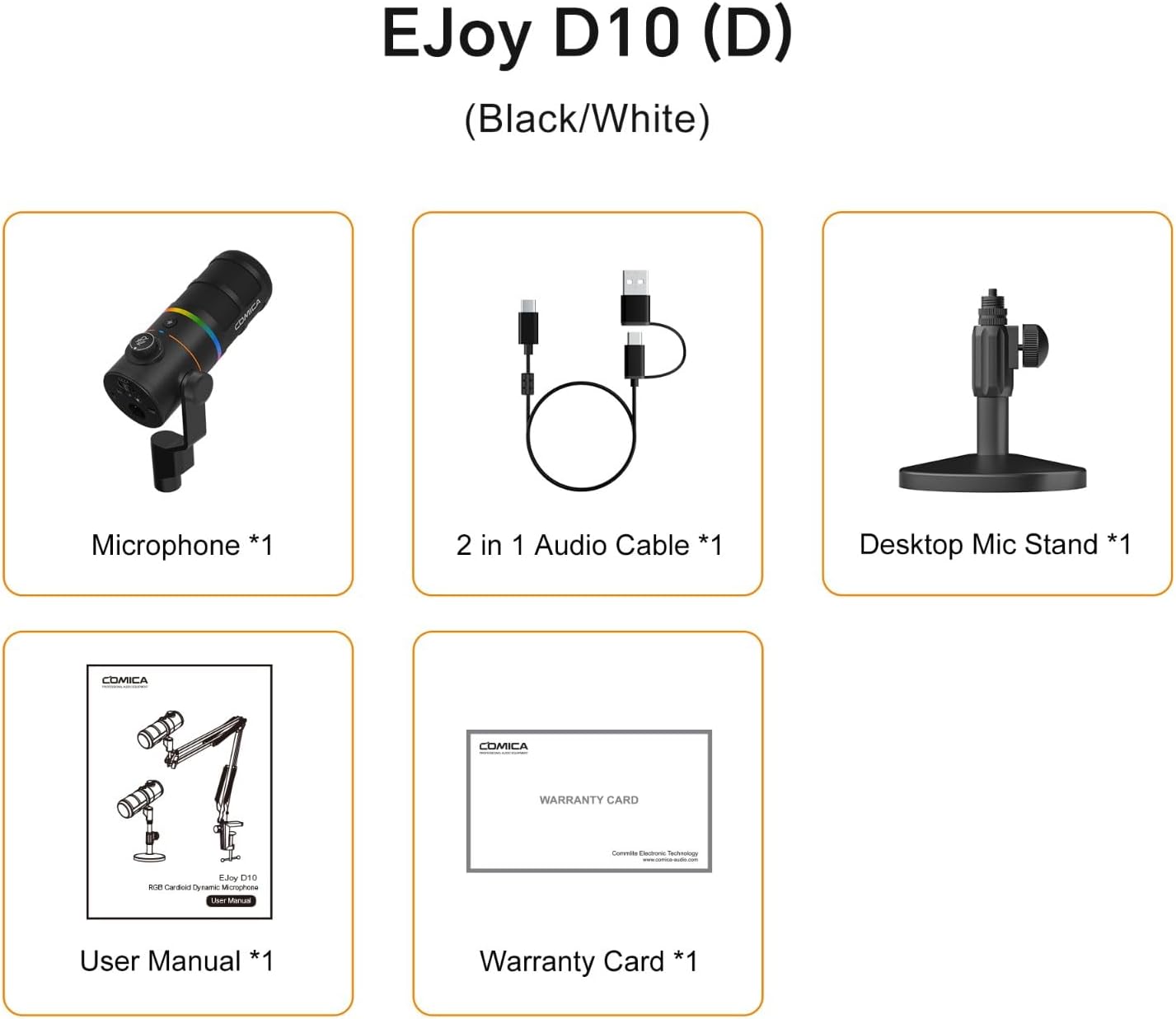
ചിത്രം 2: പാക്കേജ് ഉള്ളടക്കം
2.2 പ്രധാന സവിശേഷതകൾ
- കാർഡിയോയിഡ് പോളാർ പാറ്റേൺ: Focuses on capturing sound sources directly in front of the microphone, effectively reducing ambient noise.
- Anti-noise Large Diaphragm Dynamic Mic: Designed to pick up a wide range of frequencies, delivering rich and delicate sound with clarity even in complex environments.
- XLR/USB-C Digital/Analog Outputs: Offers broad compatibility with smartphones, computers, and audio interfaces.
- 48kHz/24bit Recording: Provides lossless sound quality suitable for high-demand post-production.
- One-key CalMix Denoise: Utilizes Comica's audio processing algorithm to precisely identify human voice and filter out redundant noises.
- 4-level Gain Control: Allows adjustment of microphone input sensitivity.
- തത്സമയ നിരീക്ഷണം: Integrated 3.5mm headphone jack for direct audio monitoring.
- Dynamic Radiant RGB Light: Features 6 optional lighting effects to enhance live stream atmosphere.
- 3 EQ മോഡുകൾ: Customizable equalization settings (Deep, Nature, Bright) to adapt to different recording styles.
2.3. Microphone Components
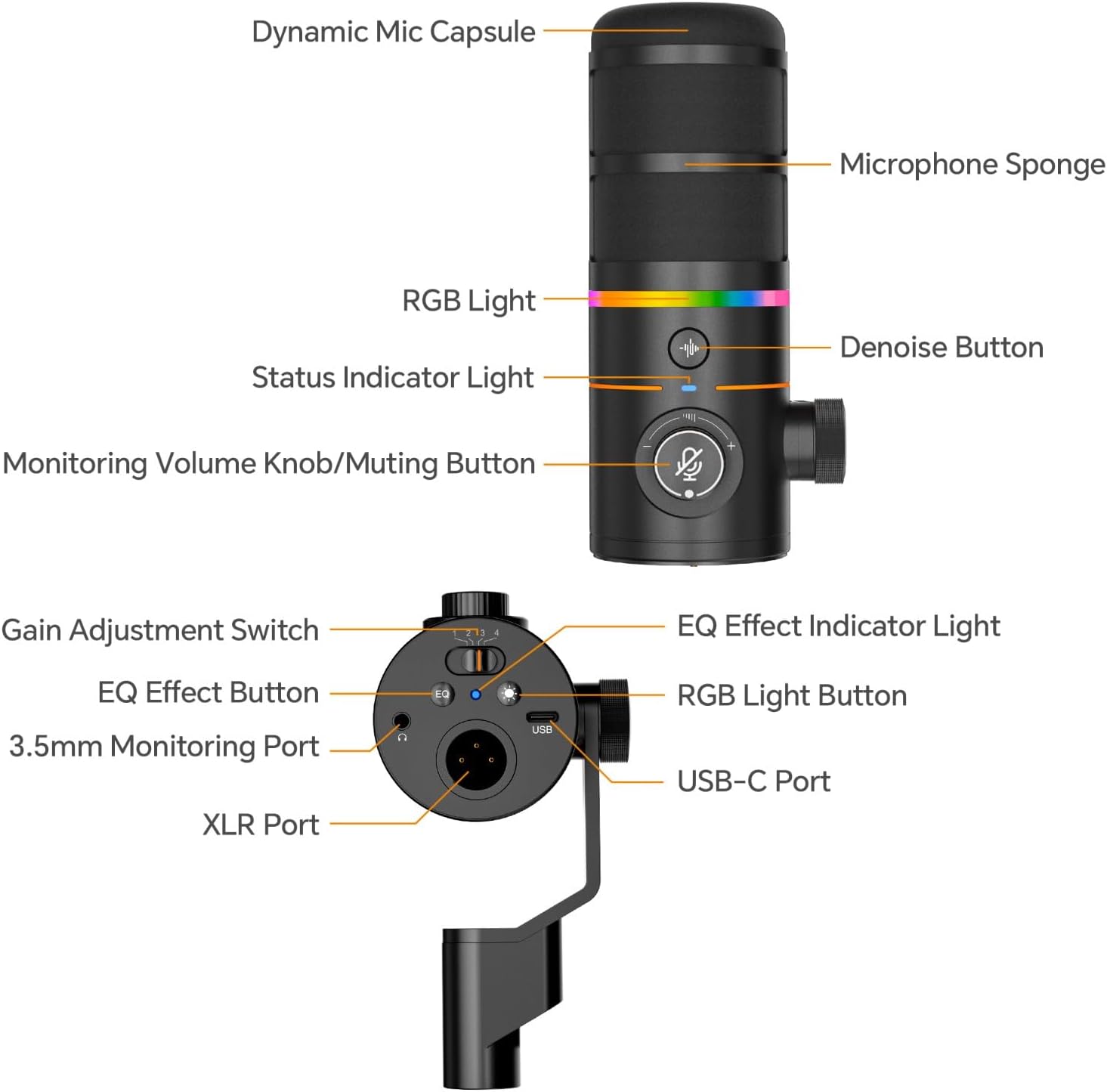
Figure 3: Microphone Component Diagram
3. സജ്ജീകരണം
The COMICA EJoy D10 D microphone offers flexible connectivity options for various devices.
3.1. Connecting to a Computer (USB-C)
- Connect the USB-C end of the provided 2-in-1 audio cable to the USB-C port on the microphone.
- Connect the USB-A or USB-C end of the cable to an available USB port on your computer (PC or Mac).
- The microphone should be automatically recognized by your operating system.
- Select "COMICA EJoy D10 D" as your input device in your computer's sound settings or recording software.
3.2. Connecting to an Audio Interface/Mixer (XLR)
- Connect a standard XLR cable (not included) to the XLR port on the microphone.
- Connect the other end of the XLR cable to an XLR input on your audio interface or mixer.
- Ensure your audio interface or mixer is properly configured and powered.
- Adjust gain levels on your audio interface/mixer as needed.

ചിത്രം 4: കണക്റ്റിവിറ്റി ഓപ്ഷനുകൾ
4. പ്രവർത്തന നിർദ്ദേശങ്ങൾ
4.1. ക്രമീകരണം നേടുക
The microphone features a 4-level gain adjustment switch. Move the switch to the left or right to select the desired gain level (1-4) to optimize your audio input.

Figure 5: Adjusting Gain Control
4.2. തത്സമയ നിരീക്ഷണം
Plug your 3.5mm headphones into the 3.5mm monitoring port on the microphone to listen to your audio input in real-time without latency.
4.3. Monitoring Volume Adjustment and Muting
Rotate the Monitoring Volume Knob to increase or decrease the monitoring volume. In case of emergency or to temporarily silence the microphone, use the one-click muting function by pressing the knob.
Figure 6: Monitoring Volume and Mute Control
4.4. CalMix Denoise Function
Press the Denoise Button to activate or deactivate the CalMix Denoise function. This feature uses an advanced audio processing algorithm to reduce background noise and enhance vocal clarity.
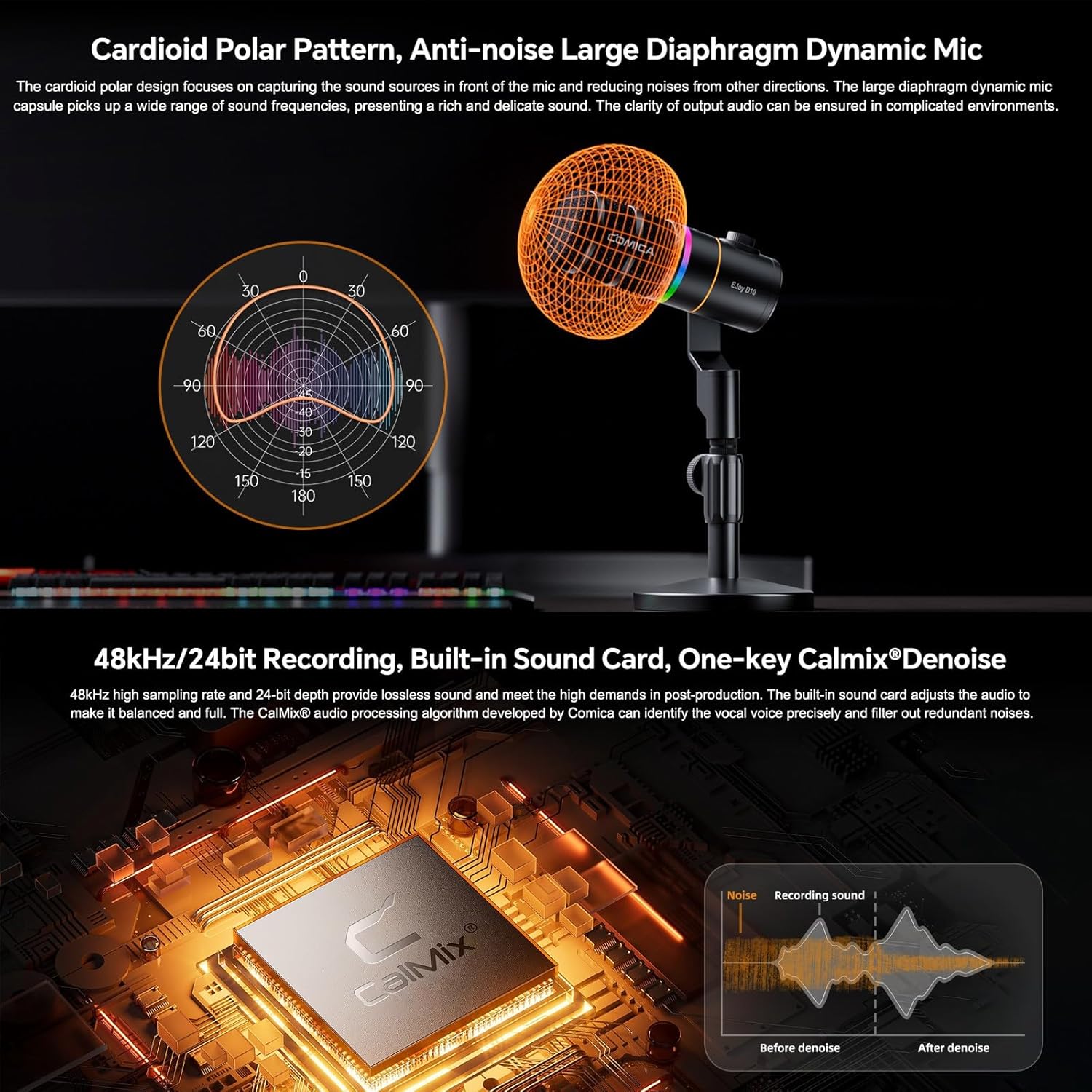
Figure 7: CalMix Denoise Feature
4.5. RGB ലൈറ്റിംഗ് ഇഫക്റ്റുകൾ
Short press the RGB Light Button to cycle through 6 optional dynamic radiant RGB light effects: Audio Dynamic, Comica Orange, Sea Wave, Colorful Breathing Light, RGB Slow Wave, and Rotating Rainbow. These effects can enhance your streaming or gaming setup.

ചിത്രം 8: RGB ലൈറ്റിംഗ് ഇഫക്റ്റുകൾ
4.6. ഇക്യു മോഡുകൾ
Long press the EQ Effect Button to turn the EQ effect on or off. Short press to switch between three EQ effects: Deep, Nature, or Bright. These modes allow for customized audio adjustment to suit different recording styles.

Figure 9: EQ Modes for Customized Adjustment
5. പരിപാലനം
- മൃദുവായതും ഉണങ്ങിയതുമായ തുണി ഉപയോഗിച്ച് തുടച്ച് മൈക്രോഫോൺ വൃത്തിയായി സൂക്ഷിക്കുക.
- മൈക്രോഫോണിനെ തീവ്രമായ താപനില, ഈർപ്പം അല്ലെങ്കിൽ നേരിട്ടുള്ള സൂര്യപ്രകാശം എന്നിവയിൽ ഏൽപ്പിക്കുന്നത് ഒഴിവാക്കുക.
- ഉപയോഗിക്കാത്തപ്പോൾ വരണ്ടതും പൊടി രഹിതവുമായ അന്തരീക്ഷത്തിൽ മൈക്രോഫോൺ സംഭരിക്കുക.
- Do not use harsh chemicals or abrasive cleaners on the microphone.
6. പ്രശ്നപരിഹാരം
| പ്രശ്നം | സാധ്യമായ കാരണം | പരിഹാരം |
|---|---|---|
| ശബ്ദ ഔട്ട്പുട്ട് ഇല്ല | Incorrect input selection; Loose cable connection; Low gain setting | Ensure "COMICA EJoy D10 D" is selected as input; Check all cable connections; Increase microphone gain. |
| Audio is distorted or too loud | Gain setting too high; Proximity to sound source | Decrease microphone gain; Move microphone further from sound source. |
| Background noise present | Denoise function off; Environmental noise | Activate CalMix Denoise; Reduce ambient noise in recording environment. |
| RGB ലൈറ്റുകൾ പ്രവർത്തിക്കുന്നില്ല | RGB light function off | Press the RGB Light Button to activate or cycle effects. |
7 സ്പെസിഫിക്കേഷനുകൾ
| ഫീച്ചർ | വിശദാംശങ്ങൾ |
|---|---|
| ബ്രാൻഡ് | കോമിക്ക |
| മോഡൽ | Comica D10 D |
| കണക്റ്റിവിറ്റി ടെക്നോളജി | USB, XLR |
| കണക്റ്റർ തരം | XLR, USB-C |
| അനുയോജ്യമായ ഉപകരണങ്ങൾ | Personal Computer, Gaming Console |
| പോളാർ പാറ്റേൺ | ഏകദിശയിലുള്ള (കാർഡിയോയിഡ്) |
| പവർ ഉറവിടം | കോർഡഡ് ഇലക്ട്രിക് |
| സിഗ്നൽ-ടു-നോയിസ് അനുപാതം | 72 ഡി.ബി |
| ഫ്രീക്വൻസി പ്രതികരണം | 55 Hz (Lower limit, typical for dynamic mics) |
| ഉൽപ്പന്ന അളവുകൾ | 10.63 x 9.06 x 3.54 ഇഞ്ച് |
| ഇനത്തിൻ്റെ ഭാരം | 2.42 പൗണ്ട് (1.1 കിലോഗ്രാം) |
| നിറം | കറുപ്പ് |
8. സുരക്ഷാ മുന്നറിയിപ്പുകൾ
- Do not place the product near fire or flammable gases.
- Do not use in rain or humid environments.
- ഉൽപ്പന്നം കുട്ടികൾക്ക് ലഭ്യമാകാതെ സൂക്ഷിക്കുക.
- Do not disassemble at will. If repair is required, the product must be sent to an authorized repair center.

Figure 10: Safety Warnings
9. വാറൻ്റിയും പിന്തുണയും
This product comes with a warranty as detailed in the included Warranty Card. For technical support, service, or warranty claims, please contact COMICA customer service through their official channels or the retailer from whom you purchased the product. Protection plans may also be available for extended coverage.
Manufacturer: Comica


