1. ആമുഖം
This manual provides detailed instructions for the installation, operation, and maintenance of your CAMECHO 4+64GB Car Stereo. This unit is designed for specific Honda Acura MDX models from 2007-2013 (Low-End Version, without Canbus). Please read this manual thoroughly before installation and use to ensure proper functionality and safety.

Image: CAMECHO Car Stereo main interface in a vehicle dashboard.
2. വാഹന അനുയോജ്യത
This CAMECHO car stereo is compatible with Honda Acura MDX models manufactured between 2007 and 2013. It is specifically designed for the Low-End Version without Canbus. Please verify your vehicle's console type before installation.

Image: Visual guide for compatible Honda Acura MDX console types (A and B with AUX) and incompatible types (C, D with HDD, E).
അനുയോജ്യമായ മോഡലുകൾ: 2007-2013 Honda Acura MDX (Low-End Version, Without Canbus).
പ്രധാനപ്പെട്ടത്: Consoles with HDD (Hard Disk Drive) are not supported. Ensure your vehicle's console matches types A or B shown in the image for proper installation.
3. ബോക്സിൽ എന്താണുള്ളത്?
താഴെയുള്ള പട്ടികയിൽ നിങ്ങളുടെ പാക്കേജിന്റെ ഉള്ളടക്കങ്ങൾ പരിശോധിക്കുക:
- 1 x Android Head Unit
- 1 x AHD ബാക്കപ്പ് ക്യാമറ
- 1 x ബാഹ്യ മൈക്രോഫോൺ
- 1 x ചെറിയ മൈക്രോഫോൺ
- 1 x ജിപിഎസ് ആന്റിന
- 1 x പവർ കേബിൾ
- 1 x Voice-frequency Adapter
- 1 x RCA കേബിൾ
- 1 x USB കേബിൾ
- 1 x പിൻ ക്യാമറ ഇൻപുട്ട് കേബിൾ
- 1 x ആക്സസറികൾ
- 1 x ഇൻസ്റ്റാളേഷൻ ഉപകരണം
- 1 x ഇൻസ്ട്രക്ഷൻ മാനുവൽ
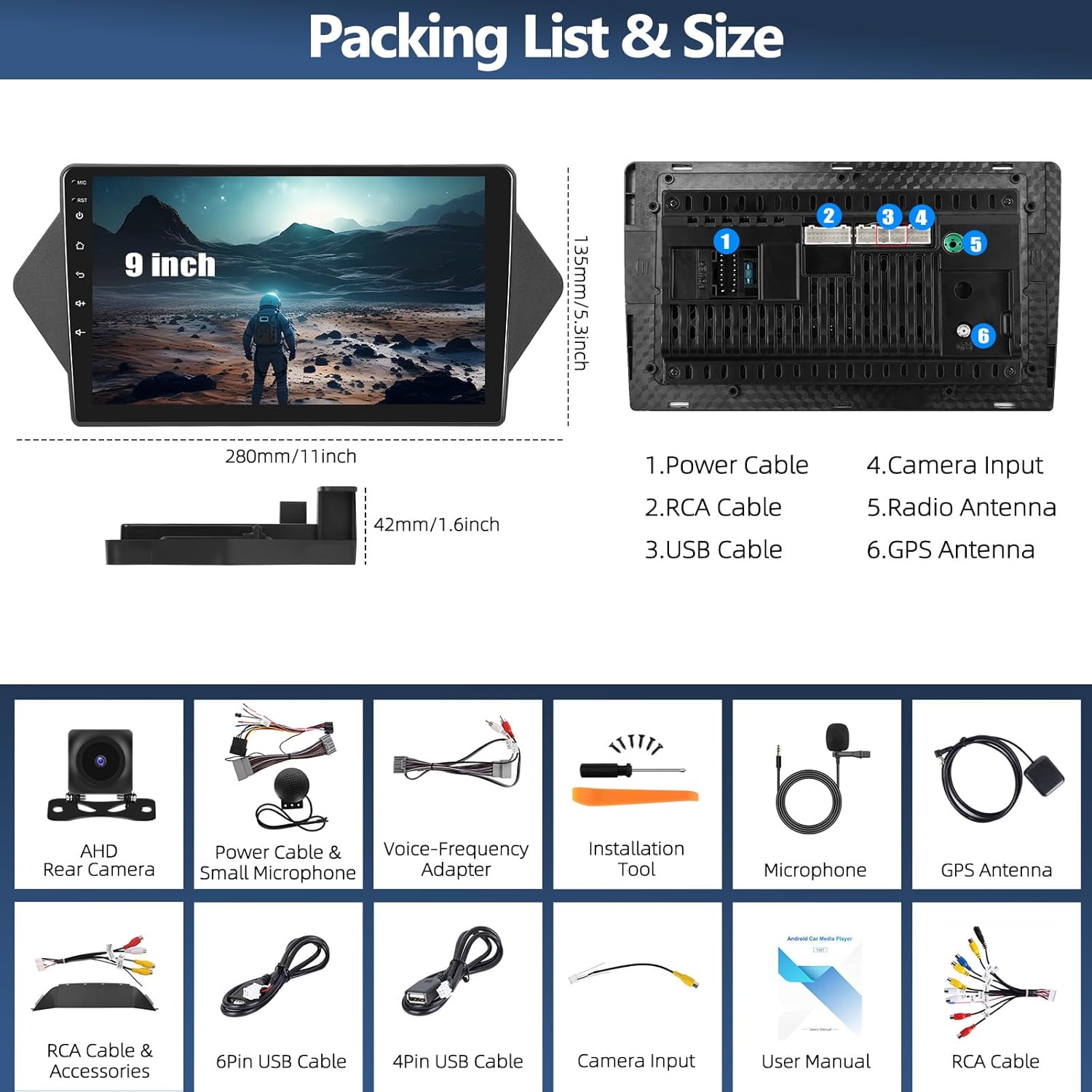
Image: Packing list and size diagram, illustrating the head unit dimensions and all included components.
4. സജ്ജീകരണവും ഇൻസ്റ്റാളേഷനും
4.1 പൊതുവായ ഇൻസ്റ്റലേഷൻ
Professional installation is recommended. Ensure the vehicle's power is disconnected before beginning installation. Refer to your vehicle's service manual for specific dashboard removal procedures.
4.2 റിവേഴ്സിംഗ് ക്യാമറ ഇൻസ്റ്റാളേഷൻ
The reversing input must be connected even if the reversing camera is not used, to ensure proper functionality of the head unit.
- Connect the red wire (positive) of the camera to the positive pole of the car's reversing light.
- Connect the black wire (negative) of the camera to the negative pole of the car's reversing light.
- The reversing trigger is controlled by the stereo; therefore, the third wire (trigger wire) does not require a separate connection.
കുറിപ്പ്: The white plug from the camera input cable must be connected to the main device for Bluetooth and Wi-Fi signals to function correctly.

Image: Reversing Camera Installation wiring diagram.
4.3 Steering Wheel Control Setup
After connecting the power cable, you need to configure the steering wheel controls. Navigate to the "SWC" application on the head unit. Follow the on-screen instructions to learn and assign the steering wheel buttons. If the learning process fails, repeat the steps.

Image: Steering Wheel Control (SWC) application interface.
5. പ്രവർത്തന നിർദ്ദേശങ്ങൾ
5.1 വയർലെസ് ആപ്പിൾ കാർപ്ലേയും ആൻഡ്രോയിഡ് ഓട്ടോയും
The head unit supports both wireless Apple CarPlay and Android Auto, allowing seamless integration with your smartphone for navigation, calls, messages, and music.

Image: Wireless Apple CarPlay and Android Auto interfaces.
5.1.1 വയർലെസ് ആപ്പിൾ കാർപ്ലേ കണക്ഷൻ
- Enable Bluetooth on your iPhone and pair it with the car radio.
- Open the "Zlink" application on the car stereo.
- If connection fails, connect your iPhone to the car radio's hotspot, then click the "Zlink" app again.
Maintain both Bluetooth and hotspot connections for stable CarPlay operation.

Image: Wireless Apple CarPlay in use.
5.1.2 വയർലെസ് ആൻഡ്രോയിഡ് ഓട്ടോ കണക്ഷൻ
- Ensure you have the "Android Auto" app installed on your cell phone.
- Enable Bluetooth on your Android phone and pair it with the car radio.
- Open the "Zlink" application on the car stereo.

Image: Wireless Android Auto in use.
5.2 ജിപിഎസ് നാവിഗേഷൻ & വൈഫൈ കണക്ഷൻ
The unit features a built-in GPS module for both online and offline navigation. Connect to a Wi-Fi hotspot to access online maps, download third-party apps, and browse the internet.
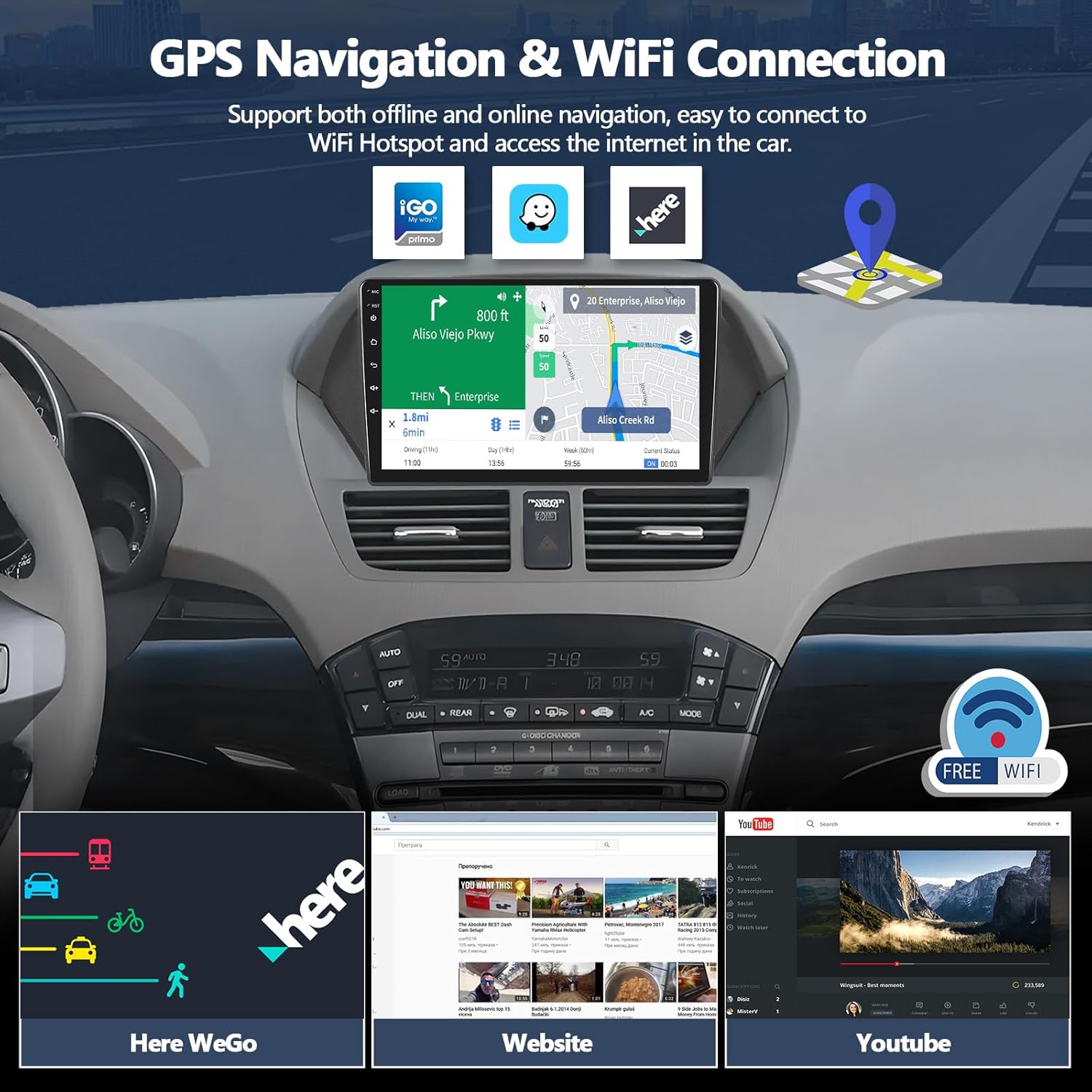
Image: GPS Navigation and WiFi connectivity features.
5.2.1 ജിപിഎസ് നാവിഗേഷൻ
Run real-time navigation or offline map navigation on the head unit at any time. Various navigation applications are available for download from the Google Play Store.

Image: GPS Navigation interface.
5.2.2 വൈഫൈ കണക്ഷൻ
Connect to Wi-Fi or a mobile hotspot to download applications, stream videos, access offline maps, and more.

Image: WiFi Connection capabilities and app exampലെസ്.
5.3 Bluetooth 5.0 & FM RDS Radio
Enjoy hands-free calls and wireless audio streaming via Bluetooth 5.0. The built-in FM/RDS radio offers 18-station presets for live broadcasting.

Image: Bluetooth and FM RDS Radio interfaces.
5.3.1 ബ്ലൂടൂത്ത് 5.0
Connect your phone for hands-free calls and wireless audio streaming from services like Spotify or Pandora.

Image: Bluetooth 5.0 features.
5.3.2 FM RDS Radio
Listen to real-time radio broadcasts with RDS information.

Image: FM RDS Radio features.
5.4 16-Band Equalizer (EQ)
Customize your audio experience with the built-in 16-band equalizer. Adjust sound fields for strong bass, soft midrange, and bright treble to achieve your preferred audio quality.

Image: 16-Band Equalizer interface.
5.4.1 32-ബാൻഡ് സമനില
The system also features a 32-band equalizer for more precise audio tuning, ideal for various musical styles.

Image: 32-Band Equalizer interface.
5.5 Optional Home Page APP Display
Customize your home page by selecting and rearranging the application icons you want to display. This allows for a personalized and efficient user experience.

Image: Optional Home Page APP customization.
5.6 സ്പ്ലിറ്റ് സ്ക്രീൻ പ്രവർത്തനം
The split-screen feature allows you to run two applications simultaneously, such as navigation and music playback, enhancing multitasking capabilities.

Image: Split Screen functionality.
5.7 മിറർ ലിങ്ക് ഫംഗ്ഷൻ
Synchronize your iOS or Android phone screen to the head unit. Android supports two-way operation, while iOS supports one-way operation (display only).

Image: iOS/Android Mirror Link feature.
6. പരിപാലനം
നിങ്ങളുടെ കാർ സ്റ്റീരിയോയുടെ ദീർഘായുസ്സും ഒപ്റ്റിമൽ പ്രകടനവും ഉറപ്പാക്കാൻ, ഈ പരിപാലന മാർഗ്ഗനിർദ്ദേശങ്ങൾ പാലിക്കുക:
- സ്ക്രീൻ ക്ലീനിംഗ്: ടച്ച് സ്ക്രീൻ മൃദുവായി തുടയ്ക്കാൻ മൃദുവായ, ലിന്റ് രഹിത തുണി ഉപയോഗിക്കുക. കഠിനമായ പാടുകൾക്ക്, ചെറുതായി dampതുണിയിൽ വെള്ളം അല്ലെങ്കിൽ സ്ക്രീൻ-സേഫ് ക്ലീനർ ഉപയോഗിക്കുക. കഠിനമായ രാസവസ്തുക്കളോ ഉരച്ചിലുകളോ ഉള്ള വസ്തുക്കൾ ഒഴിവാക്കുക.
- പൊതുവായ ശുചീകരണം: യൂണിറ്റ് പൊടിയിൽ നിന്നും അവശിഷ്ടങ്ങളിൽ നിന്നും മുക്തമായി സൂക്ഷിക്കുക. വെന്റുകളും ബട്ടൺ ഏരിയകളും വൃത്തിയാക്കാൻ മൃദുവായ ബ്രഷ് അല്ലെങ്കിൽ കംപ്രസ് ചെയ്ത വായു ഉപയോഗിക്കുക.
- സോഫ്റ്റ്വെയർ അപ്ഡേറ്റുകൾ: Periodically check for available software updates to ensure you have the latest features and bug fixes. Refer to the manufacturer's webസൈറ്റ് അല്ലെങ്കിൽ യൂണിറ്റിന്റെ അപ്ഡേറ്റ് നടപടിക്രമങ്ങൾക്കുള്ള ക്രമീകരണങ്ങൾ.
- തീവ്രമായ താപനില ഒഴിവാക്കുക: Do not expose the unit to extreme heat or cold for extended periods, as this can affect its electronic components.
7. പ്രശ്നപരിഹാരം
7.1 ഓഡിയോ ഔട്ട്പുട്ട് ഇല്ല
If you experience no audio from the car stereo, check the following connections:
- Ensure the AUX IN R/L on the Voice-Frequency Adapter is correctly connected to the Audio Out R/L on the RCA cable (red to red, white to white).
- Verify that the small speaker (included in the package) is connected to the power cable.

Image: Solutions for no audio output.
7.2 Steering Wheel Controls Not Responding
If your steering wheel controls are not functioning, ensure they have been properly configured. Refer to section 4.3 "Steering Wheel Control Setup" for detailed instructions. Re-learn the buttons if necessary.
7.3 ജിപിഎസ് സിഗ്നൽ പ്രശ്നങ്ങൾ
Ensure the GPS antenna is properly installed and has a clear line of sight to the sky. Obstructions or poor placement can affect signal reception.
7.4 Wi-Fi/Bluetooth Connectivity Problems
Check that the white plug from the camera input cable is securely connected to the main device, as this connection is crucial for Wi-Fi and Bluetooth signals.
8 സ്പെസിഫിക്കേഷനുകൾ
| ഫീച്ചർ | വിശദാംശങ്ങൾ |
|---|---|
| മോഡൽ നമ്പർ | A8039A3662H1MI2 |
| ഓപ്പറേറ്റിംഗ് സിസ്റ്റം | ആൻഡ്രോയിഡ് 15 |
| റാം | 4 ജിബി |
| ROM | 64 ജിബി |
| സ്ക്രീൻ വലിപ്പം | 9 ഇഞ്ച് |
| കണക്റ്റിവിറ്റി ടെക്നോളജി | Bluetooth 5.0, Wi-Fi, GPS |
| പ്രത്യേക സവിശേഷതകൾ | Wireless Apple CarPlay, Android Auto, 16-Band EQ, FM RDS Radio, HD Backup Camera Support, Split Screen, Mirror Link |
| അനുയോജ്യമായ ഉപകരണങ്ങൾ | Honda Acura MDX 2007-2013 (Low-End Version, Without Canbus) |
| ഉൽപ്പന്ന അളവുകൾ | 1.6 x 11 x 5.3 ഇഞ്ച് |
| ഇനത്തിൻ്റെ ഭാരം | 2.86 പൗണ്ട് |
| ഓഡിയോ put ട്ട്പുട്ട് മോഡ് | സ്റ്റീരിയോ |
| സറൗണ്ട് സൗണ്ട് ചാനൽ കോൺഫിഗറേഷൻ | 5.1 |
| വീഡിയോ എൻകോഡിംഗ് | എച്ച്.264, എച്ച്.265/എച്ച്ഇവിസി |
9. വാറൻ്റി വിവരങ്ങൾ
For specific warranty details regarding your CAMECHO car stereo, please refer to the warranty card included in your product packaging or contact the seller directly. Protection plans may be available for purchase separately to extend coverage.
10. ഉപഭോക്തൃ പിന്തുണ
If you require further assistance, have questions about installation, or encounter any issues not covered in this manual, please contact CAMECHO customer support.
ഇമെയിൽ: CAMECHOVIP@126.com

Image: CAMECHO Customer Support contact information.


