1. ഉൽപ്പന്നം കഴിഞ്ഞുview
The ECHTPower Ergonomic Wireless Mouse is designed for comfort and versatility, featuring a vertical design that promotes a natural hand posture to reduce wrist strain. It offers triple-mode connectivity, allowing seamless switching between up to three devices using dual Bluetooth channels and a 2.4GHz USB receiver.

Image: The ECHTPower Ergonomic Wireless Mouse in black, shown with its accompanying USB receiver. The mouse features a vertical design with blue LED accents.

Image: A diagram illustrating the ergonomic benefits of the vertical mouse. It shows how a traditional mouse can cause wrist bending, while the ergonomic vertical mouse promotes a natural, comfortable wrist posture.
2. പാക്കേജ് ഉള്ളടക്കം
പാക്കേജ് തുറക്കുമ്പോൾ, എല്ലാ ഇനങ്ങളും ഉണ്ടെന്ന് ഉറപ്പാക്കാൻ അതിന്റെ ഉള്ളടക്കം പരിശോധിക്കുക:
- 1 x ECHTPower Ergonomic Wireless Mouse
- 1 x 2.4GHz USB Receiver (stored in the mouse's bottom compartment)
- 1 x യുഎസ്ബി-സി ചാർജിംഗ് കേബിൾ
- 1 x ഉപയോക്തൃ മാനുവൽ
3. ഉൽപ്പന്ന ലേഔട്ട്
Familiarize yourself with the buttons and features of your ECHTPower mouse:
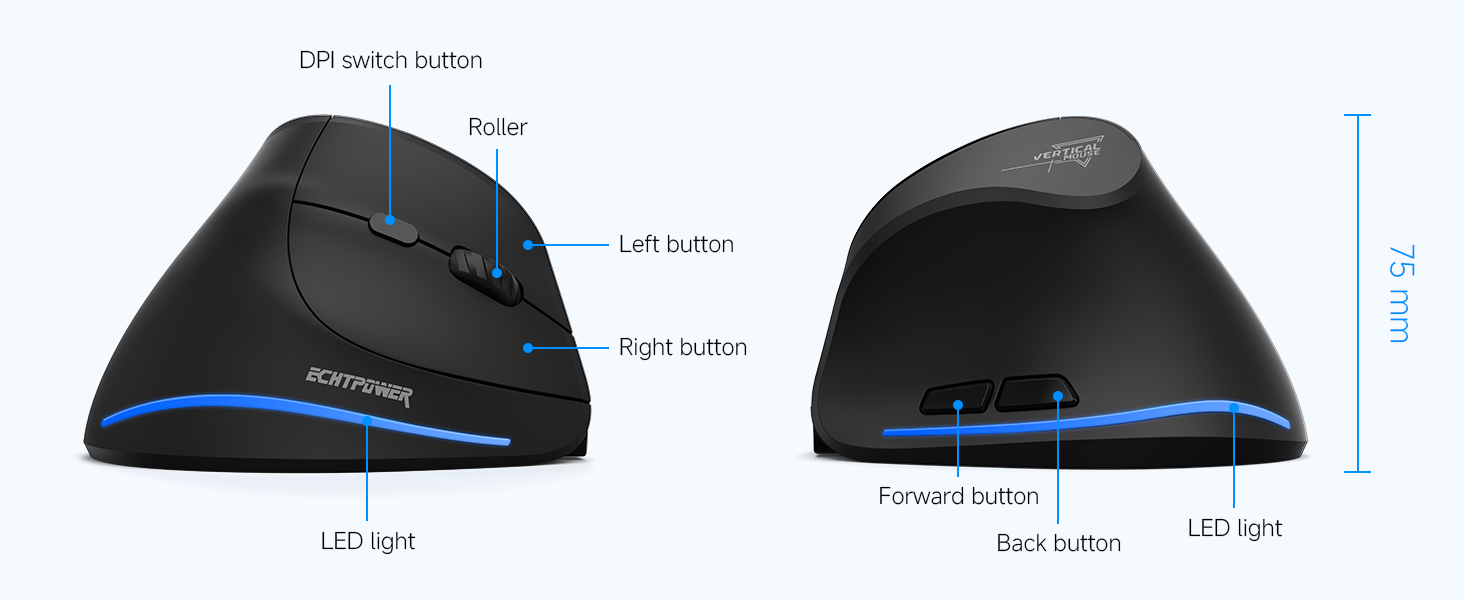
Image: A detailed diagram showing the top and side views of the mouse, labeling the DPI switch button, roller, left button, right button, forward button, back button, LED light, and Type-C port. Dimensions are also indicated.
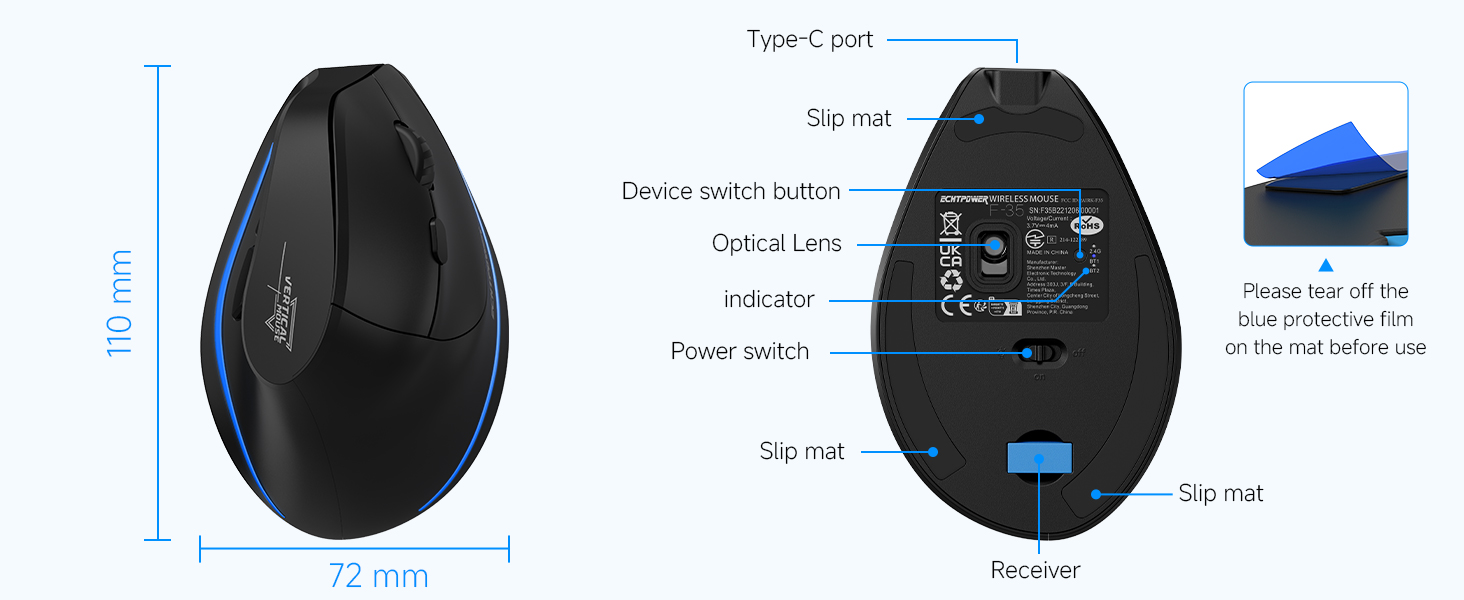
Image: A diagram of the bottom of the mouse, indicating the Type-C port, slip mats, device switch button, optical lens, indicator light, power switch, and the location of the USB receiver compartment. A note reminds users to remove the blue protective film from the slip mats before use.
- ഡിപിഐ സ്വിച്ച് ബട്ടൺ: Located on top, behind the scroll wheel, for adjusting cursor sensitivity.
- Roller (Scroll Wheel): ലംബ സ്ക്രോളിംഗിനായി.
- ഇടത്/വലത് ബട്ടണുകൾ: Standard mouse click functions, designed for silent operation.
- ഫോർവേഡ്/ബാക്ക് ബട്ടണുകൾ: Located on the thumb side for quick navigation (note: may be disabled on macOS).
- LED ലൈറ്റ്: Indicates connection status and charging.
- ടൈപ്പ്-സി പോർട്ട്: For charging the mouse.
- Device Switch Button: On the bottom, to cycle between 2.4GHz and Bluetooth channels (BT1, BT2).
- വൈദ്യുതി സ്വിച്ച്: On the bottom, to turn the mouse On/Off.
- USB Receiver Compartment: On the bottom, for storing the 2.4GHz USB receiver.
4. സജ്ജീകരണം
4.1 പ്രാരംഭ ചാർജിംഗ്
Before first use, it is recommended to fully charge the mouse. Connect the provided USB-C charging cable to the mouse's Type-C port and the other end to a USB power source (e.g., computer USB port, USB wall adapter). The LED light will indicate charging status.

Image: The ECHTPower mouse with its Type-C charging port connected to a charging cable, illustrating the charging process. The image also highlights the 700mAh battery capacity and 2-hour charging time.
4.2 2.4GHz വയർലെസ് കണക്ഷൻ
- Locate the 2.4GHz USB receiver from the compartment at the bottom of the mouse.
- നിങ്ങളുടെ കമ്പ്യൂട്ടറിൽ ലഭ്യമായ USB പോർട്ടിലേക്ക് USB റിസീവർ പ്ലഗ് ചെയ്യുക.
- താഴെയുള്ള പവർ സ്വിച്ച് ഉപയോഗിച്ച് മൗസ് ഓണാക്കുക.
- Press the device switch button on the bottom of the mouse until the indicator light shows the 2.4GHz mode (usually indicated by a specific color or pattern). The mouse should automatically connect.
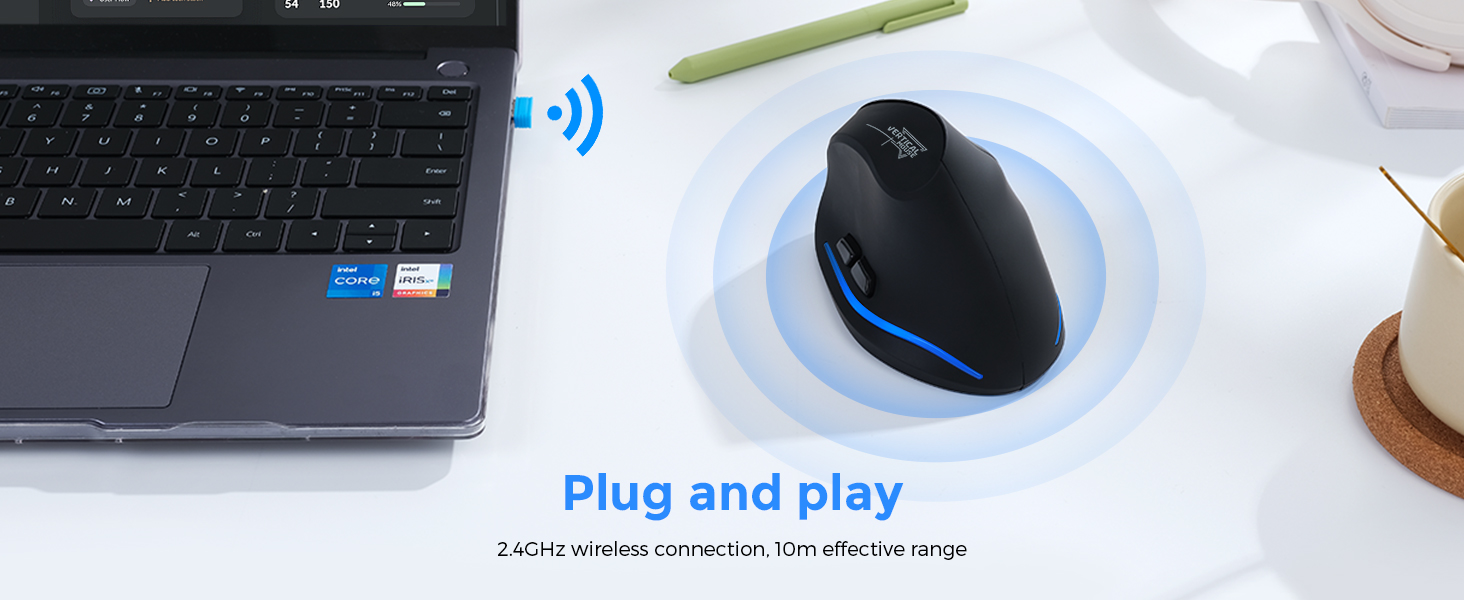
Image: A visual representation of the 2.4GHz wireless connection, showing the USB receiver plugged into a laptop and the mouse wirelessly connected, emphasizing its plug-and-play functionality and 10m effective range.
4.3 ബ്ലൂടൂത്ത് കണക്ഷൻ (BT1 / BT2)
- താഴെയുള്ള പവർ സ്വിച്ച് ഉപയോഗിച്ച് മൗസ് ഓണാക്കുക.
- Press the device switch button on the bottom of the mouse to select either Bluetooth channel 1 (BT1) or Bluetooth channel 2 (BT2). The indicator light will show the selected Bluetooth mode.
- For first-time pairing, press and hold the device switch button for 3-5 seconds until the indicator light flashes rapidly, indicating pairing mode.
- On your device (PC, laptop, Mac, tablet), go to Bluetooth settings and search for new devices.
- Select "ECHTPower Mouse" (or similar name) from the list of available devices to pair.
- കണക്റ്റ് ചെയ്തുകഴിഞ്ഞാൽ, ഇൻഡിക്കേറ്റർ ലൈറ്റ് മിന്നുന്നത് നിർത്തുകയും സോളിഡ് ആയി തുടരുകയും ചെയ്യും.
- Repeat steps 2-5 to connect to a second Bluetooth device using the other Bluetooth channel (BT2).

Image: An illustration demonstrating the mouse's ability to connect to three devices simultaneously (laptop, desktop, tablet) via 2.4G and dual Bluetooth modes, with easy switching between them.
5. പ്രവർത്തന നിർദ്ദേശങ്ങൾ
5.1 ബന്ധിപ്പിച്ച ഉപകരണങ്ങൾക്കിടയിൽ മാറൽ
To switch between the 2.4GHz connection and the two Bluetooth connections (BT1, BT2), simply press the device switch button on the bottom of the mouse. Each press will cycle through the available modes.
5.2 ഡിപിഐ അഡ്ജസ്റ്റ്മെന്റ്
The mouse features adjustable DPI (Dots Per Inch) settings to control cursor sensitivity. Press the DPI switch button located on the top of the mouse, behind the scroll wheel, to cycle through the available DPI levels (1000, 1600, 2400 DPI). Select the sensitivity that best suits your needs.

Image: A graphic illustrating the adjustable DPI settings of the mouse, showing the three levels: 1000 DPI, 1600 DPI, and 2400 DPI. The mouse is positioned on a mouse pad, indicating its use.
5.3 സൈലന്റ് ക്ലിക്ക് ഫീച്ചർ
The left and right mouse buttons are designed to produce significantly less noise (up to 90% reduction) compared to traditional mice. This silent click feature helps maintain a quiet working environment. Note that the forward and back buttons are not muted.
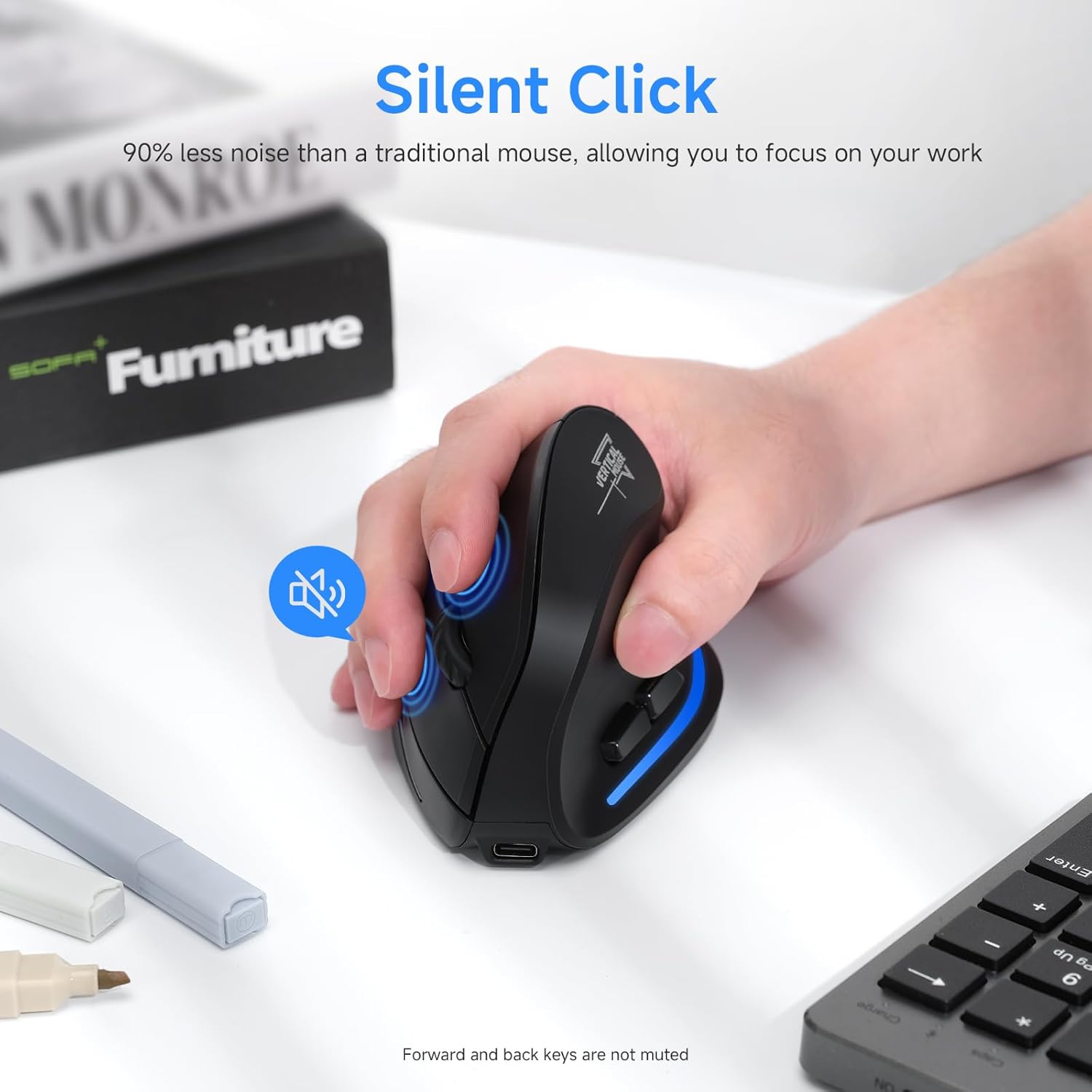
Image: A hand operating the ECHTPower mouse, with an icon indicating the silent click feature, highlighting that the left and right buttons produce 90% less noise than traditional mice.
6. ബാറ്ററി മാനേജ്മെന്റ്
The ECHTPower mouse is equipped with a 700mAh rechargeable battery for extended use.
- ബാറ്ററി ലൈഫ്: Up to 150 hours of non-RGB use on a full charge.
- ചാർജിംഗ് സമയം: പൂർണ്ണമായി ചാർജ് ചെയ്യാൻ ഏകദേശം 2-3 മണിക്കൂർ.
- കുറഞ്ഞ ബാറ്ററി സൂചകം: The LED light will blink to indicate a low battery.
- ഓട്ടോ-സ്ലീപ്പ് ഫംഗ്ഷൻ: The mouse will automatically enter sleep mode after 15 minutes of inactivity to conserve power.
- ഉണരുക: Simply move the mouse to instantly wake it up from sleep mode.
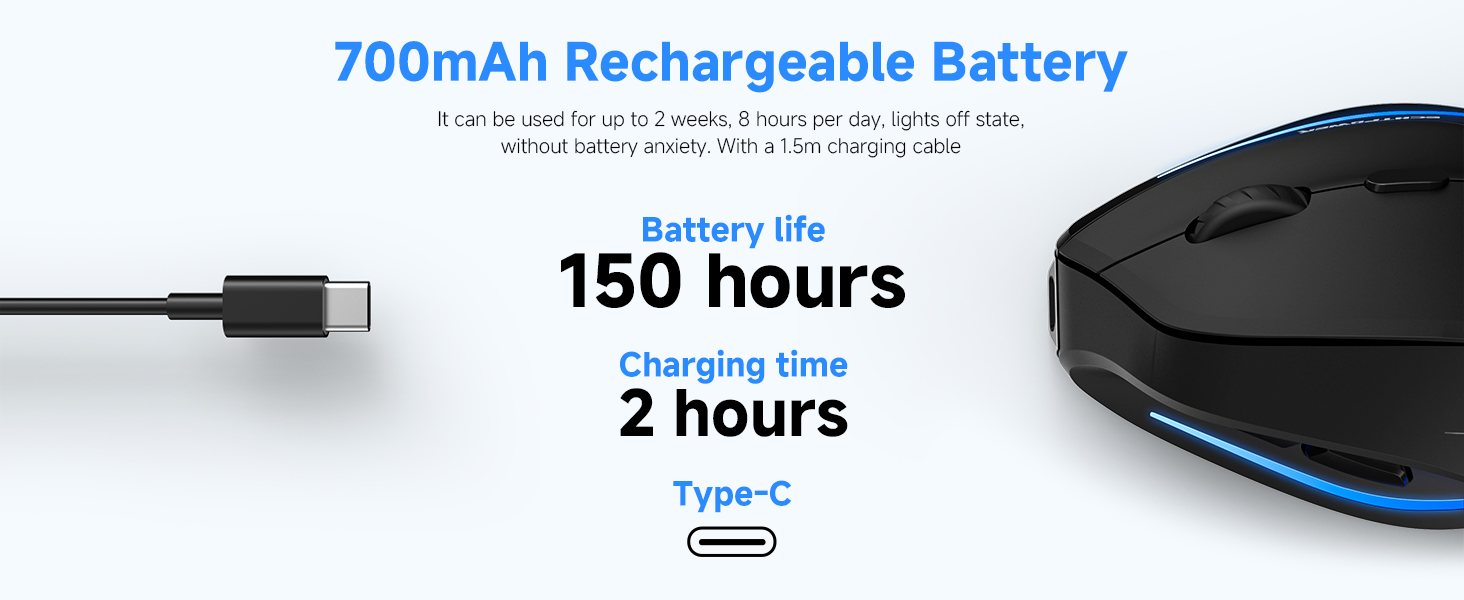
Image: A graphic highlighting the 700mAh rechargeable battery, indicating a battery life of 150 hours and a charging time of 2 hours via Type-C.
7 അനുയോജ്യത
The ECHTPower Ergonomic Wireless Mouse is compatible with a wide range of operating systems:
- Windows XP / Vista / 7/8 / 10 / 11
- ലിനക്സ്
- macOS X (Note: Forward/back buttons may be disabled on macOS)
It is ideal for use with PCs, laptops, MacBooks, and other compatible devices.
8. പരിപാലനം
നിങ്ങളുടെ മൗസിന്റെ ദീർഘായുസ്സും ഒപ്റ്റിമൽ പ്രകടനവും ഉറപ്പാക്കാൻ, ഈ പരിപാലന മാർഗ്ഗനിർദ്ദേശങ്ങൾ പാലിക്കുക:
- വൃത്തിയാക്കൽ: മൗസിന്റെ പ്രതലം തുടയ്ക്കാൻ മൃദുവായതും ഉണങ്ങിയതുമായ ഒരു തുണി ഉപയോഗിക്കുക. കഠിനമായ അഴുക്കിന്, അല്പം ഡി.amp തുണി ഉപയോഗിക്കാം, പക്ഷേ ഉപകരണത്തിനുള്ളിൽ ഈർപ്പം കയറുന്നില്ലെന്ന് ഉറപ്പാക്കുക.
- ദ്രാവകങ്ങൾ ഒഴിവാക്കുക: Do not expose the mouse to water or other liquids.
- സംഭരണം: ദീർഘനേരം ഉപയോഗിക്കാത്തപ്പോൾ തണുത്തതും വരണ്ടതുമായ സ്ഥലത്ത് മൗസ് സൂക്ഷിക്കുക.
- USB റിസീവർ: When transporting the mouse, store the USB receiver in its dedicated compartment at the bottom to prevent loss.
- സംരക്ഷണ ഫിലിം: Remember to remove the blue protective film from the slip mats on the bottom of the mouse before initial use for smooth gliding.
9. പ്രശ്നപരിഹാരം
If you encounter issues with your ECHTPower mouse, please refer to the following common solutions:
| പ്രശ്നം | സാധ്യമായ പരിഹാരം |
|---|---|
| മൗസ് പ്രതികരിക്കുന്നില്ല (2.4GHz) |
|
| Mouse not connecting (Bluetooth) |
|
| കഴ്സർ ചലനം ക്രമരഹിതമോ മന്ദഗതിയിലുള്ളതോ ആണ്. |
|
| Forward/Back buttons not working on macOS | This is a known compatibility limitation. The forward/back buttons may be disabled on macOS. This is not a defect of the mouse. |
| LED light not working or mouse not charging |
|
10 സ്പെസിഫിക്കേഷനുകൾ
| ഫീച്ചർ | വിശദാംശങ്ങൾ |
|---|---|
| മോഡൽ നമ്പർ | F35B |
| കണക്റ്റിവിറ്റി | Bluetooth 5.0 (BT1, BT2), 2.4GHz Wireless |
| ഡിപിഐ ലെവലുകൾ | 1000 / 1600 / 2400 ഡിപിഐ |
| ബാറ്ററി ശേഷി | 700mAh റീചാർജ് ചെയ്യാവുന്നത് |
| ചാർജിംഗ് പോർട്ട് | യുഎസ്ബി ടൈപ്പ്-സി |
| ചാർജിംഗ് സമയം | ഏകദേശം 2-3 മണിക്കൂർ |
| Battery Life (non-RGB) | 150 മണിക്കൂർ വരെ |
| നിശബ്ദ ക്ലിക്ക് | 90% noise reduction on left/right buttons |
| അളവുകൾ (L x W x H) | 4.41 x 3.5 x 2.95 ഇഞ്ച് (ഏകദേശം 112 x 89 x 75 മിമി) |
| ഇനത്തിൻ്റെ ഭാരം | 6.7 ഔൺസ് (ഏകദേശം 190 ഗ്രാം) |
| മൂവ്മെന്റ് ഡിറ്റക്ഷൻ ടെക്നോളജി | ഒപ്റ്റിക്കൽ |

Image: A guide for measuring hand size (A and B) to determine the recommended mouse size. The table suggests M-L size for this mouse, with dimensions 4.33x2.83x2.95 inches.
11. വാറൻ്റിയും പിന്തുണയും
ECHTPower provides a 24 മാസ വാറൻ്റി for this product (registration may be required). For any questions, technical assistance, or warranty claims, please contact ECHTPower customer service. They offer 24/7 professional customer service for hassle-free troubleshooting.
For support, please refer to the contact information provided on the product packaging or the official ECHTPower webസൈറ്റ്.


